
Claude Code in Your Own Web App · Part 1 of 16 in the series
Part 1: Claude Code in a Terminal Nobody Watches
Meet Sitesmith, the web app this series builds around the real Claude Code, and try its foundation by hand: Claude Code running in a tmux session in the background, keys typed into it, and its screen read back.
Claude Code in Your Own Web AppPart 1 of 16
On this page
Quest objectives
- Know what Sitesmith will do, and why it drives the real Claude Code instead of an API
- Run programs in sessions on a tmux server of your own
- Type into a session with send-keys and read its screen with capture-pane
- Start Claude Code in a session, answer its trust dialog and ask it something from outside
- See what makes reading a screen fragile, and why later parts listen to hooks instead
Claude Code is at its best in a terminal. It reads your project, edits files, runs commands, asks when it is unsure, and keeps a conversation going as long as you need it. But a terminal is something you have to sit in front of. This series builds a web app around it: Claude Code works, and you follow along in a page, answer its questions with a click, and in the end do that from your phone.
The app is called Sitesmith. You describe a website in a few sentences, Claude Code builds it in a folder of its own, and the page shows the result in a preview while the files appear. Everything Claude Code asks along the way comes up in the page: its questions, its requests for permission, the plan it wants you to approve, and the question whether it may trust a new folder.
What you will build
This is Sitesmith in part 8, while Claude Code prepares the site of a surf school:
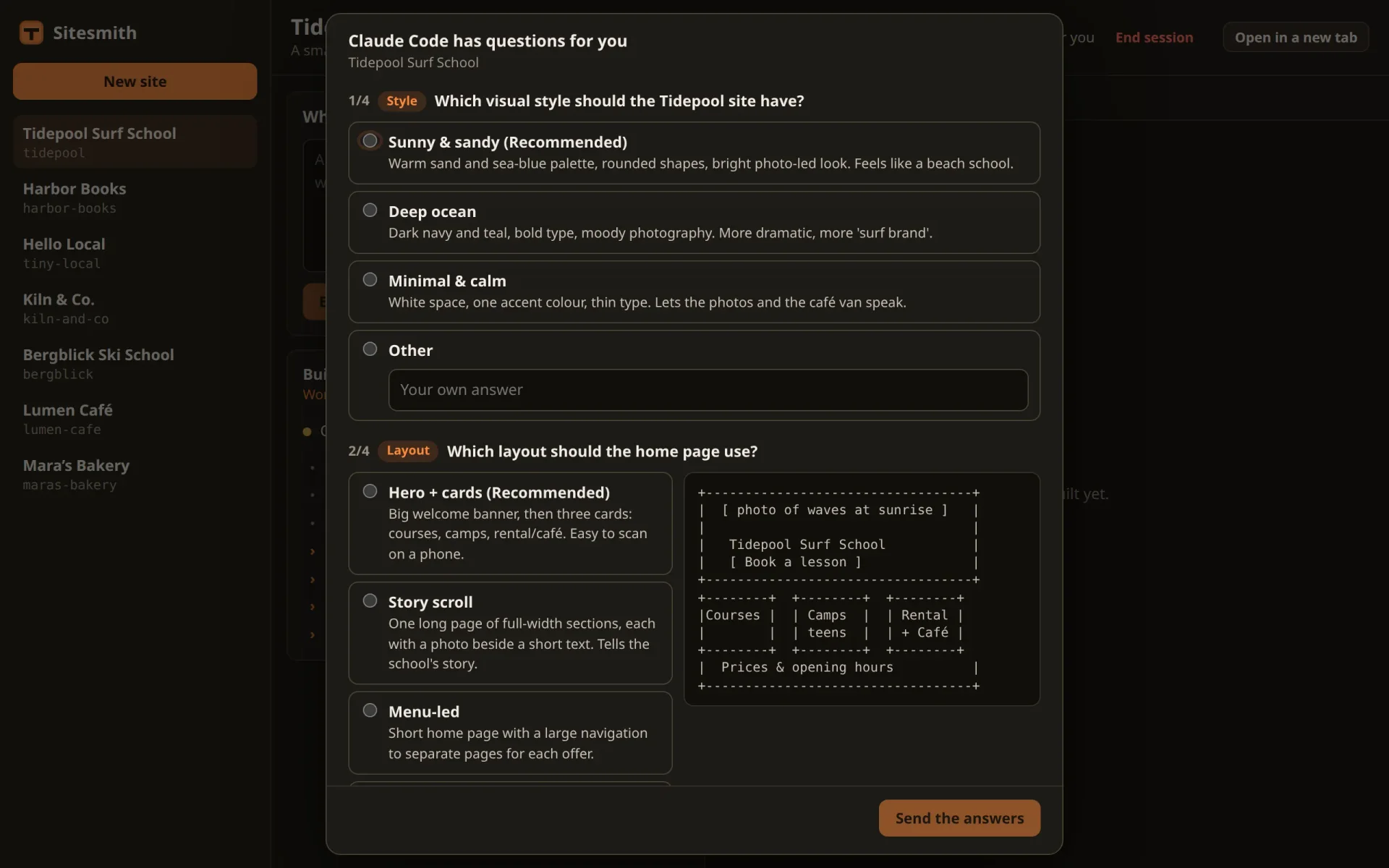
On the left are the sites, each of them a folder that Claude Code builds. On the right is the open site, and over it a dialog with Claude Code's questions. Nothing of it is staged: Claude Code called its own tool for asking questions, Sitesmith caught the call and held it until you answer in the page. The options, the descriptions and the little sketch of the layout are Claude Code's.
Why the real Claude Code
There are two ways to put Claude into a web app. One is the API: you send messages and get answers, and everything around them, the tools that read and write files, the loop that runs them, the rules for what is allowed, you build yourself or take from an SDK. The other is the one this series takes: run Claude Code itself, the program you use in your terminal, and let the app drive it.
Everything Claude Code can do comes along. Its tools, your settings, your skills and MCP servers, the
CLAUDE.mdfiles it reads, the way it plans and asks. When Claude Code gets better, so does Sitesmith, without a line changed.It runs on your plan. Claude Code is logged in with your Claude account, and the sessions Sitesmith starts use that login. There is no API key, and nothing is billed per token.
One session, two ways in. Each site gets one Claude Code session, which lives in tmux. The page types into it and reads from it, and you can open the very same session in your own terminal at any time and carry on by hand.
The price is that a program made for people has to be driven by a program. Sitesmith types into Claude Code's terminal, reads its screen, and listens to Claude Code's hooks: commands that Claude Code runs at fixed moments, such as before it uses a tool or when it has finished a turn, handing each of them what is going on as JSON. How far you get that way is what this series is about.
If you followed the series Create an AI Assistant With Local Models, you have seen a lighter version of the idea in its last part: one question typed into Claude Code in tmux, and the answer back through a hook. Sitesmith takes it a lot further.
The road ahead
Part 2 sets up the project: a server that keeps the sites in folders, a page, and a preview on a port of its own.
Part 3 gives every site a Claude Code session in tmux, and part 4 brings its terminal into the page.
Part 5 types a request into Claude Code and gets the first site built. Parts 6 and 7 listen to the hooks: what Claude Code does, and what it says when a turn ends.
Parts 8 to 11 bring everything Claude Code asks into the page: its questions, its permission prompts, the trust dialog, and the plan it wants approved. Where the page can't answer, it hands over to the terminal.
Part 12 runs several sites at once, part 13 tells you when one waits for you, and part 14 hands Claude Code files and images.
Part 15 swaps the brain for a local model through Ollama, and part 16 opens Sitesmith to your phone on the home network.
What you need
Node.js 24 or newer. It runs TypeScript files directly, so the server needs no build step.
tmux 3.2 or newer:
sudo apt install tmuxon Debian and Ubuntu,brew install tmuxon macOS.Claude Code, installed and logged in with your Claude account: run
claudeonce in a terminal and follow the login.
The series was built and tested on Linux. macOS should behave the same, but was not tested; on Windows, use WSL, which was not tested either. Check what you have:
$ node --version$ tmux -V$ claude --version# tested with Node 26.13, tmux 3.6 and Claude Code 2.1.328
Every request Sitesmith sends counts against your plan just like one you type yourself. While you build and try things, a smaller model goes a long way: the runs for this series used Haiku. Part 3 shows how to start Sitesmith's sessions with it.
tmux by hand
Before Sitesmith drives Claude Code through tmux, drive it yourself. The commands below are the ones the server will send later.
tmux is a terminal multiplexer: a server process that keeps terminals, called sessions, running, whether anyone looks at them or not. Programs talk to that server with the tmux command: start a session, send it keys, read what is on its screen. Make an empty folder tmux-try, open a terminal in it, and start a session with a shell:
$ tmux -L demo new-session -d -s hello -x 80 -y 12$ tmux -L demo send-keys -t hello 'echo Hello from tmux' Enter$ tmux -L demo capture-pane -p -t helloecho Hello from tmuxyou@laptop:~/tmux-try$ echo Hello from tmuxHello from tmuxyou@laptop:~/tmux-try$
-L demopicks a tmux server of its own, with its own socket calleddemo. If you use tmux yourself, your sessions live on the default server and never see these. Sitesmith will use-L sitesmith.new-session -d -s hello -x 80 -y 12starts a session calledhello, detached (-d: no terminal shows it), 80 columns wide and 12 lines high. Without a command it runs your shell. If no tmux server runs on that socket yet, this starts one.send-keys -t hello 'echo Hello from tmux' Entertypes into it. Each argument is sent as a key if tmux knows a key by that name (Enter,Down,Escape), and as its letters otherwise.capture-pane -p -t helloprints what the session's screen shows right now.
Look at the first line of that screen: echo Hello from tmux, above the prompt. The keys arrived before the shell had drawn its prompt. The terminal echoed them at once, and the shell read them a moment later. Nothing broke this time, but it is a first taste of what driving a program by keys means: you don't know when it is ready for them. Do the same again with a second between starting the session and typing, and the screen is clean:
# kill-session, new-session again, wait a second, then send-keys and:$ tmux -L demo capture-pane -p -t helloyou@laptop:~/tmux-try$ echo Hello from tmuxHello from tmuxyou@laptop:~/tmux-try$$ tmux -L demo list-sessionshello: 1 windows (created Thu Nov 19 14:36:20 2026)$ tmux -L demo kill-session -t hello
list-sessions (or short, ls) lists what runs on this server, and kill-session ends a session with whatever runs in it.
Claude Code in a session
Instead of a shell, a session can run any program. Start one with Claude Code:
$ tmux -L demo new-session -d -s claude -x 100 -y 30 claude$ tmux -L demo capture-pane -p -t claude──────────────────────────────────────────────────────────────────────────────────────────────────── Accessing workspace: /home/you/tmux-try Quick safety check: Is this a project you created or one you trust? (Like your own code, a well-known open source project, or work from your team). If not, take a moment to review what's in this folder first. Claude Code'll be able to read, edit, and execute files here. Security guide ❯ No, exit Yes, I trust this folder Enter to confirm · Esc to cancel
Claude Code has never worked in this folder, so before anything else it asks whether you trust it. The ❯ marks the choice that Enter would take, and that is No, exit. An Enter that arrives too early, meant for something else, ends Claude Code right here. So move down first, then confirm:
$ tmux -L demo send-keys -t claude Down Enter$ tmux -L demo capture-pane -p -t claude ▐▛███▛█ Claude Code v2.1.328▝▜██████▀ Haiku 5.5 · Claude Ultra ▝▝ ▝▝ ~/tmux-try ◐ medium · /effort────────────────────────────────────────────────────────────────────────────────────────────────────❯ Try "create a util logging.py that…"──────────────────────────────────────────────────────────────────────────────────────────────────── ⏵⏵ auto mode on (shift+tab to cycle) · ← for agents# … two more status lines of the author's own statusLine setting, left out here
Now Claude Code shows its welcome: the version, the model and plan (the runs for this series used Haiku; your line names yours), and the folder. Below that is the input box, the line with ❯ between two rules. The text in it is not yours: it is a dim hint that Claude Code shows in an empty box. In a plain capture it looks just like typed text; part 5 tells the two apart by their colors. Under the box, the status line names the permission mode. Here it is auto mode, the author's default; yours may say something else. Sitesmith starts its sessions in a mode of its own in part 3, and part 11 reads this line to switch.
Now ask it something. Send the text with -l, and Enter as a key of its own:
$ tmux -L demo send-keys -t claude -l 'What is the capital of Austria? One word.'$ tmux -L demo send-keys -t claude Enter$ tmux -L demo capture-pane -p -t claude ▐▛███▛█ Claude Code v2.1.328▝▜██████▀ Haiku 5.5 · Claude Ultra ▝▝ ▝▝ ~/tmux-try❯ What is the capital of Austria? One word.● Vienna✻ Crunched for 1s · done 14:36────────────────────────────────────────────────────────────────────────────────────────────────────❯──────────────────────────────────────────────────────────────────────────────────────────────────── ⏵⏵ auto mode on (shift+tab to cycle)# while it worked, the screen also showed this hint once, under the answer:# tmux focus-events off · add 'set -g focus-events on' to ~/.tmux.conf and reattach for focus tra…$ tmux -L demo list-panes -a -F "#{session_name} #{pane_current_command} #{window_activity}"claude claude 1795095417
-l makes tmux take the text literally. Without it, a word that happens to be the name of a key, such as Enter or Space, would be sent as that key. Enter then goes on its own, as a real key press. A second later the answer stands on the screen behind the ●, the ✻ line says how long it took, and the input box is empty again.
Two more things in that session. While Claude Code worked, it showed a hint once: tmux does not pass on focus events. Claude Code can follow whether its terminal has the focus, and tmux tells the programs in its sessions only with focus-events on. Sitesmith's configuration sets it in part 3. And list-panes with a format prints two values that part 3 builds on: pane_current_command, the program in front, which says claude now and the shell's name once Claude Code exits, and window_activity, the second in which the screen last changed. The first tells whether Claude Code still runs, the second whether it is working.
You can also step into the session yourself:
$ tmux -L demo attach -t claude# you are in the session now: type, scroll, watch# Ctrl+b, then d, detaches; the session keeps running$ tmux -L demo kill-server
attach shows the session in your terminal, live, and you can type to Claude Code as in any terminal. To leave without stopping it, press tmux's prefix key, Ctrl+b, and then d for detach. Sitesmith's configuration switches the prefix off, so that every key reaches Claude Code; part 3 shows how to leave then. kill-server ends the demo server with all its sessions.
What goes wrong with screens
You have just done by hand all that Sitesmith needs: start Claude Code, answer a dialog, type a question, read the answer. A program can send the same commands. But at every step you looked at the screen and knew what it meant, and a program has to work that out:
Timing. Keys can arrive before a program is ready for them, as the echo showed. And while Claude Code works, its screen keeps changing: when is an answer finished, and when is it only pausing?
A dialog in the way. The trust dialog came before the input box. Later, permission prompts and questions turn up in the middle of a turn. Text meant for the input box lands in whatever is on the screen.
Keys that answer something else. An Enter that should send a message confirms the highlighted choice of a dialog instead. In the trust dialog that choice was "No, exit".
A changed look. Claude Code's screen is made for people, and it changes between versions: a new symbol, a reworded line, a different layout. A program that read it fine yesterday reads nothing today.
So Sitesmith reads as little from the screen as it can. What Claude Code does, a tool it is about to use, a question, a permission it needs, the end of a turn with its last message, comes from its hooks, as JSON, from part 6 on. The screen is left for what no hook reports: whether the input box is empty and ready (part 5), the trust dialog (part 10), and the mode in the status line (part 11). Even there the rule is: what Sitesmith does not recognize, it leaves alone. It waits, or it hands over to you in the terminal.
Next
You have run Claude Code where nobody watches, typed into it and read its screen, and you have seen why that alone is not enough. In the next part the project begins: a small server, a page with the sites, and a preview that shows them from a port of its own. Claude Code moves in with part 3.
Comments
The comments are GitHub Discussions: sign in with GitHub to write one.
The comments come from GitHub, through giscus. Loading them sends your IP address to giscus.app and GitHub.