
Claude Code in Your Own Web App · Part 2 of 16 in the series
Part 2: A Server and a Page
Set up the Sitesmith project: a small Node server that runs TypeScript directly, keeps every site in a folder and pushes changes to the page, a preview server on a port of its own, and a plain TypeScript page built with Vite.
Claude Code in Your Own Web AppPart 2 of 16
On this page

Quest objectives
- Set up a TypeScript project that Node runs without a build step
- Keep each site in a folder of its own, with a CLAUDE.md that tells Claude Code what it is
- Push changes to every open page with server-sent events and a folder watch
- Keep other web pages, and the sites themselves, away from the API
- Show the sites from a second server on a port of their own
- Build the page from a few small TypeScript classes, without a framework
Claude Code will need a place to work and something to show its work in. This part builds both, before Claude Code joins: a server that keeps a folder for every site, a page that lists the sites and shows the open one, and a preview that serves each site's files as they are.
It is the longest part of the series, because the whole project is set up here. Most of it is ordinary web plumbing. Two pieces matter for everything that follows, though: who may talk to the server, and where the sites are shown. Claude Code will write code into these folders, and that code runs in your browser.
The project
Create a folder sitesmith, and in it the file package.json:
{
  "name": "sitesmith",
  "private": true,
  "version": "1.0.0",
  "description": "Describe a website, Claude Code builds it, the page shows it and asks you what Claude Code asks",
  "type": "module",
  "engines": {
    "node": ">=24"
  },
  "scripts": {
    "server": "node server/main.ts",
    "dev": "vite",
    "build": "vite build",
    "start": "vite build && node server/main.ts",
    "typecheck": "tsc --noEmit"
  },
  "devDependencies": {
    "@types/node": "^24.10.1",
    "typescript": "^7.0.2",
    "vite": "^8.3.5"
  }
}
The server has no dependencies yet: Node's own http, fs and path are enough. TypeScript only checks the types, Vite builds the page, and @types/node describes Node's modules to both. The scripts:
serverstarts the server.node server/main.tsruns the TypeScript file as it is: Node 24 strips the types and runs what remains.devstarts Vite's dev server for the page, which reloads it on every change.buildbuilds the page intodist/.startdoes that and then starts the server, which serves the built page itself.typecheckruns the compiler over everything, without writing a file.
Next to it, tsconfig.json:
{
  "compilerOptions": {
    "target": "ES2023",
    "lib": ["ES2023", "DOM", "DOM.Iterable"],
    "module": "NodeNext",
    "moduleResolution": "NodeNext",
    "allowImportingTsExtensions": true,
    "erasableSyntaxOnly": true,
    "verbatimModuleSyntax": true,
    "noEmit": true,
    "strict": true,
    "noUnusedLocals": true,
    "skipLibCheck": true,
    "types": ["node", "vite/client"]
  },
  "include": ["server", "shared", "src", "vite.config.ts"]
}
Node can run TypeScript because it removes the types and runs what is left. That only works for syntax that is nothing but types. A few TypeScript features generate code of their own: enums, namespaces, and parameter properties such as constructor(public status: number). Node refuses them. erasableSyntaxOnly makes the compiler refuse them too, so you hear about it in your editor and not when the server starts. You will see the effect in this project's classes: they declare their fields and assign them in the constructor.
allowImportingTsExtensions: imports name the real file,./http.ts, because that is the file Node looks for.verbatimModuleSyntax: an import that only brings in types has to sayimport type. Node drops such imports completely. A plain import of something that exists only as a type would stay in the code and fail when the module loads.noEmit: the compiler only checks; it never writes JavaScript.types: Node's types for the server, and Vite's for the page, which lets the page import its stylesheet.
One configuration covers the server, the page and the types they share. Now vite.config.ts:
import { defineConfig } from 'vite';

// `npm run dev` serves the page with hot reload on 5401 and forwards /api to the server
// (`npm run server`, 5400). `npm start` builds the page into dist/, which the server serves itself.
export default defineConfig({
  server: {
    port: 5401,
    strictPort: true,
    proxy: { '/api': { target: 'http://127.0.0.1:5400', ws: true } },
  },
  build: { outDir: 'dist', emptyOutDir: true },
});
While you work on the page, two servers run: Vite on port 5401 serves the page and reloads it when you change something, and your server on 5400 answers the API. The proxy forwards every request to /api from 5401 to 5400. So the page always asks its own address, whether it comes from Vite or from your server. ws: true forwards WebSocket connections as well; the terminal of part 4 needs one. strictPort makes Vite stop if 5401 is taken, instead of moving to another port: the server lets in pages from 5400 and 5401 only, as you will see.
The page itself starts in index.html:
<!doctype html>
<html lang="en">
  <head>
    <meta charset="utf-8" />
    <meta name="viewport" content="width=device-width, initial-scale=1" />
    <meta name="color-scheme" content="dark" />
    <title>Sitesmith</title>
    <link rel="icon" href="data:image/svg+xml,%3Csvg xmlns='http://www.w3.org/2000/svg' viewBox='0 0 16 16'%3E%3Crect width='16' height='16' rx='3' fill='%23ff8a3d'/%3E%3Cpath d='M3 6h10v2H9v4H7V8H3z' fill='%23181410'/%3E%3C/svg%3E" />
  </head>
  <body>
    <div id="app"></div>
    <script type="module" src="/src/main.ts"></script>
  </body>
</html>
An empty #app and the script; Vite follows the script to everything else. The icon is a small SVG written into the link, so there is no file to serve for it. color-scheme tells the browser that the page is dark, so it draws scrollbars and form controls to match. Last, .gitignore:
node_modules/
dist/
.data/
sites/
sites/ will hold what Claude Code builds, and .data/ what the server keeps for itself from part 6 on. Neither belongs in the app's repository. Install the packages:
$ npm installadded 19 packages in 517ms
What the server and the page share
Both sides import the same types from shared/types.ts:
/** What the server and the page both know about. */

/** A site: one folder in sites/, which Claude Code builds. */
export interface Site {
  /** the folder's name: also the site's address in the page and in the preview */
  name: string;
  title: string;
  description: string;
  created: number;
  /** whether it has an index.html yet */
  built: boolean;
}

export interface NewSite {
  name: string;
  title: string;
  description: string;
}

export interface Config {
  /** the preview server's port: the sites are shown from there, never from the page's own address */
  previewPort: number;
}

/** What the server tells every open page, over server-sent events. */
export type ServerEvent =
  | { type: 'sites'; sites: Site[] }
  | { type: 'files'; site: string };
A Site is a folder. Its name is the folder's name, and at the same time the site's address in the page and in the preview. built says whether there is an index.html yet. Config is what the page needs to know when it starts, so far only the preview's port. ServerEvent lists everything the server pushes to the page; later parts add to it.
HTTP helpers
server/http.ts holds the small things every route needs. The first half:
import fs from 'node:fs';
import path from 'node:path';
import type http from 'node:http';

/** An error with the HTTP status it should answer with. */
export class HttpError extends Error {
  status: number;
  constructor(status: number, message: string) {
    super(message);
    this.status = status;
  }
}

export function send(res: http.ServerResponse, status: number, body: unknown) {
  res.writeHead(status, { 'content-type': 'application/json; charset=utf-8', 'cache-control': 'no-store' });
  res.end(JSON.stringify(body));
}

/** The request's JSON body (at most 1 MB). */
export async function readJson<T>(req: http.IncomingMessage): Promise<Partial<T>> {
  const chunks: Buffer[] = [];
  let size = 0;
  for await (const chunk of req as AsyncIterable<Buffer>) {
    size += chunk.length;
    if (size > 1024 ** 2) throw new HttpError(413, 'request too large');
    chunks.push(chunk);
  }
  // bytes first, text at the end: a character can be split between two chunks
  const raw = Buffer.concat(chunks).toString('utf8');
  if (!raw) return {};
  try { return JSON.parse(raw) as Partial<T>; } catch { throw new HttpError(400, 'not JSON'); }
}
HttpError carries a status, so a route can simply throw new HttpError(404, …), and the server turns it into an answer in one place. Note how status is declared as a field and assigned in the constructor: that is the rule of erasable syntax from above. send answers with JSON and no-store, so the browser never shows an old list. readJson collects a request's body as bytes and counts them: past 1 MB it gives up with a 413. Only at the end does it turn the bytes into text. In UTF-8 a character can take several bytes, and a body arrives in chunks, so a character can be split between two of them; decoded chunk by chunk, it would come out broken. Anything that is not JSON gets a 400. readJson returns a Partial, because what arrives was written by someone else: the routes check every field before they use it.
The second half serves files:
const TYPES: Record<string, string> = {
  '.html': 'text/html; charset=utf-8',
  '.css': 'text/css; charset=utf-8',
  '.js': 'text/javascript; charset=utf-8',
  '.json': 'application/json; charset=utf-8',
  '.svg': 'image/svg+xml',
  '.png': 'image/png',
  '.jpg': 'image/jpeg',
  '.jpeg': 'image/jpeg',
  '.webp': 'image/webp',
  '.gif': 'image/gif',
  '.ico': 'image/x-icon',
  '.woff2': 'font/woff2',
  '.txt': 'text/plain; charset=utf-8',
};

export function sendFile(res: http.ServerResponse, file: string, headers: Record<string, string> = {}) {
  res.writeHead(200, { 'content-type': TYPES[path.extname(file).toLowerCase()] ?? 'application/octet-stream', ...headers });
  fs.createReadStream(file).pipe(res);
}

/**
 * The file a URL path points to inside `root`, or null. Decoding and normalizing first, then
 * checking the result is still inside, keeps `/../` and `%2e%2e` out of the rest of the disk.
 */
export function fileIn(root: string, urlPath: string) {
  let rel: string;
  try { rel = decodeURIComponent(urlPath); } catch { return null; }
  let file = path.resolve(root, `.${path.posix.normalize(`/${rel}`)}`);
  if (file !== root && !file.startsWith(root + path.sep)) return null;
  try {
    if (fs.statSync(file).isDirectory()) file = path.join(file, 'index.html');
    return fs.statSync(file).isFile() ? file : null;
  } catch { return null; }
}
sendFile picks the content type by the file's extension and streams the file. fileIn is the one function between a URL and your disk, so it is worth reading closely. A URL path is text from the browser, and it can contain .., plainly or encoded as %2e%2e. So fileIn decodes first. Then it normalizes the path as if it began at /, which can't be climbed above: /../../etc/passwd becomes /etc/passwd. It puts the result under root and checks once more that it really lies inside. A folder means the index.html in it, and anything that is not a file gives null, which the caller answers with a 404.
The sites
Every site is a folder in sites/. Start server/sites.ts with the rules for them:
import fs from 'node:fs';
import path from 'node:path';
import type { NewSite, Site } from '../shared/types.ts';
import { HttpError } from './http.ts';

/** Site names are folder names, addresses and (later) tmux session names: keep them plain. */
export const NAME = /^[a-z0-9][a-z0-9-]{0,39}$/;
/** Sitesmith's own files in a site's folder. */
export const OWN = '.sitesmith';
const META = `${OWN}/site.json`;

/** What Claude Code reads first in every site's folder: what the folder is and how it is built. */
const guide = (s: NewSite) => `# ${s.title}

This folder is a website that Claude Code builds for Sitesmith, a web app that shows it in a preview.

${s.description}

- The site is static: \`index.html\` at the top of this folder, other pages next to it, styles in
  \`style.css\`, scripts in \`script.js\`, pictures and other files in \`assets/\`.
- No build step, no packages and no files from other servers: everything the site needs is in this
  folder, so the preview shows it as it is.
- \`${OWN}/\` belongs to Sitesmith. Requests arrive there; leave the rest of it alone.
`;
NAME allows a lowercase letter or digit, then up to 39 more of them or dashes. A site's name becomes a folder name, a part of URLs, and from part 3 on the name of a tmux session, where . and : have meanings of their own. The narrow pattern keeps all three simple, and the server checks every name it gets against it. OWN is Sitesmith's own folder inside a site: it holds site.json now, and the requests from part 5 on.
guide writes the site's CLAUDE.md. Claude Code reads a CLAUDE.md by itself whenever it starts in a folder, so this is where Sitesmith tells it what the folder is: the title, the description you gave, and three house rules. The site is static and complete in itself, because the preview serves the folder's files as they are: no build step runs, and nothing comes from other servers. And .sitesmith/ is Sitesmith's. The file belongs to the site from then on, so you can change it like any other.
The rest of the file is the class that manages the folders:
export class Sites {
  readonly root: string;

  constructor(root: string) {
    this.root = root;
    fs.mkdirSync(root, { recursive: true });
  }

  dir(name: string) {
    return path.join(this.root, name);
  }

  read(name: string): Site | null {
    if (!NAME.test(name)) return null;
    try {
      const meta = JSON.parse(fs.readFileSync(path.join(this.dir(name), META), 'utf8')) as Omit<Site, 'name' | 'built'>;
      return { ...meta, name, built: fs.existsSync(path.join(this.dir(name), 'index.html')) };
    } catch { return null; }
  }

  /** The site, or a 404 for the page. */
  get(name: string): Site {
    const site = this.read(name);
    if (!site) throw new HttpError(404, `There is no site called ${name}.`);
    return site;
  }

  /** Newest first. */
  list(): Site[] {
    return fs.readdirSync(this.root)
      .map((name) => this.read(name))
      .filter((s): s is Site => s !== null)
      .sort((a, b) => b.created - a.created);
  }

  create(req: Partial<NewSite>): Site {
    const name = String(req.name ?? '').trim();
    const title = String(req.title ?? '').trim();
    const description = String(req.description ?? '').trim();
    if (!NAME.test(name)) throw new HttpError(400, 'The name needs lowercase letters, digits and dashes (up to 40).');
    if (!title) throw new HttpError(400, 'Give the site a title.');
    const dir = this.dir(name);
    if (fs.existsSync(dir)) throw new HttpError(409, `There is already a site called ${name}.`);
    fs.mkdirSync(path.join(dir, OWN), { recursive: true });
    fs.writeFileSync(path.join(dir, 'CLAUDE.md'), guide({ name, title, description }));
    fs.writeFileSync(path.join(dir, META), `${JSON.stringify({ title, description, created: Date.now() }, null, 2)}\n`);
    return this.get(name);
  }
}readreturnsnullfor anything that is not a valid name or has no readablesite.json. A folder you make by hand insites/does not count as a site.builtis worked out on every read, from whetherindex.htmlexists. It can't go stale: Claude Code writes the file, not the server, and the server does not need to be told.listreturns all sites, newest first.createchecks the fields, refuses a name that exists with a 409, makes the folder with.sitesmith/in it, and writesCLAUDE.mdandsite.json.
The server
server/main.ts is the heart of the server: its options, the live updates, the check of who may ask, the routes and the preview. It grows in almost every part, so here it comes in pieces, from top to bottom. The start:
/**
 * Sitesmith's server: the API, live updates over server-sent events, the built page (dist/), and a
 * second server on a port of its own that shows the sites. It listens on this machine only.
 *
 *   node server/main.ts [--port 5400] [--sites ./sites]
 */
import fs from 'node:fs';
import http from 'node:http';
import path from 'node:path';
import { fileURLToPath } from 'node:url';
import type { Config, NewSite, ServerEvent } from '../shared/types.ts';
import { HttpError, fileIn, readJson, send, sendFile } from './http.ts';
import { NAME, OWN, Sites } from './sites.ts';

const APP = path.dirname(path.dirname(fileURLToPath(import.meta.url)));

function option(name: string, fallback: string) {
  const i = process.argv.indexOf(name);
  return i > 0 && process.argv[i + 1] ? process.argv[i + 1] : fallback;
}
const PORT = Number(option('--port', '5400'));
const PREVIEW_PORT = PORT + 2;
/** Vite's dev server (`npm run dev`), which forwards /api here */
const DEV_PORT = 5401;
const DIST = path.join(APP, 'dist');

const sites = new Sites(path.resolve(option('--sites', path.join(APP, 'sites'))));
const config: Config = { previewPort: PREVIEW_PORT };
APP is the project folder, found from the file's own URL, so it does not matter where you start the server from. option reads --port and --sites from the command line; for two options a library is not worth it. The page's port is 5400 and the preview's is two above it, 5402. The one in between, 5401, is Vite's. The sites go to sites/ in the project unless you name another folder.
Next come the live updates:
/* ------------------------------------------------------------------ */
/* live updates                                                         */
/* ------------------------------------------------------------------ */

const clients = new Set<http.ServerResponse>();

function broadcast(ev: ServerEvent) {
  const data = `data: ${JSON.stringify(ev)}\n\n`;
  for (const c of clients) c.write(data);
}

/**
 * Claude Code will write the sites' files from its own process, so the folder itself says what
 * changed. A build writes many files at once: one event per site after a quiet moment.
 */
const quiet = new Map<string, NodeJS.Timeout>();
fs.watch(sites.root, { recursive: true }, (_type, file) => {
  const [name, sub] = String(file ?? '').split(path.sep);
  if (!NAME.test(name) || sub === OWN) return;
  clearTimeout(quiet.get(name));
  quiet.set(name, setTimeout(() => {
    quiet.delete(name);
    broadcast({ type: 'files', site: name });
    broadcast({ type: 'sites', sites: sites.list() });
  }, 200));
});
The page has to learn about changes it did not make itself: a site created in another tab, and above all the files Claude Code writes. Claude Code writes them from its own process; the server never sees those writes. Two things take care of it.
Server-sent events. Every open page keeps one long GET request open, and the server writes lines of the form data: <json> into the answer. It is simple, it only goes from the server to the page, which is all that is needed here, and the browser's EventSource reconnects by itself when the connection drops. broadcast writes one event to every open page.
A watch on the folder. fs.watch with recursive reports every change below sites/, whoever made it. The first part of the changed path is the site's name. Changes in .sitesmith/ are Sitesmith's own and are skipped. A build writes many files in a short time, so every site gets a timer that starts over with each change. Only after 200 milliseconds of quiet does the server send one files event, which makes the open page reload its preview, and a fresh list, because the site's built may have changed.
Then the part that guards the server:
/* ------------------------------------------------------------------ */
/* who may ask                                                          */
/* ------------------------------------------------------------------ */

/** Where the page comes from: this server, or Vite's dev server. */
const ORIGINS = new Set([PORT, DEV_PORT].flatMap((p) => [`http://localhost:${p}`, `http://127.0.0.1:${p}`]));
const HOSTS = new Set([...ORIGINS].map((o) => new URL(o).host));

/**
 * Only this machine, and only our own page. The Host check stops DNS rebinding (a foreign web site
 * whose name suddenly points to 127.0.0.1); the Origin check stops the pages of other sites, and
 * the previewed sites, from sending us anything but a GET, which changes nothing.
 */
function allowed(req: http.IncomingMessage) {
  if (!HOSTS.has(req.headers.host ?? '')) return false;
  const origin = req.headers.origin;
  return req.method === 'GET' || req.method === 'HEAD' || origin === undefined || ORIGINS.has(origin);
}
The server listens on 127.0.0.1 only, so no other computer reaches it. But every web page you open runs in a browser on this computer, and a web page can send requests to localhost. These two checks keep those requests out:
Host. Your browser names the address it asked for in the
Hostheader:localhost:5400, or 5401 through Vite. A trick called DNS rebinding works like this: a foreign site loads its page, then lets its own name point to 127.0.0.1. Its page's requests now reach your server and count as the page's own, but they still sayHost: attacker.example:5400. They are refused.Origin. With every request that can change something, a
POSTfor example, the browser sends anOriginheader naming the page that sent it. Only Sitesmith's page, from 5400 or 5401, gets through. GET and HEAD pass: here they change nothing, and the browser does not let a foreign page read the answer. A request without anyOrigindoes not come from a web page at all: it iscurl, or from part 6 on one of Claude Code's hooks.
The routes:
/* ------------------------------------------------------------------ */
/* the API                                                              */
/* ------------------------------------------------------------------ */

type Route = [method: string, path: RegExp, handler: (req: http.IncomingMessage, res: http.ServerResponse, m: RegExpMatchArray) => unknown];

const routes: Route[] = [
  ['GET', /^\/api\/config$/, (_req, res) => send(res, 200, config)],
  ['GET', /^\/api\/sites$/, (_req, res) => send(res, 200, sites.list())],
  ['POST', /^\/api\/sites$/, async (req, res) => {
    const site = sites.create(await readJson<NewSite>(req));
    broadcast({ type: 'sites', sites: sites.list() });
    send(res, 201, site);
  }],
  ['GET', /^\/api\/sites\/([^/]+)$/, (_req, res, m) => send(res, 200, sites.get(m[1]))],

  // live updates: one long response per open page, an event per `data:` line
  ['GET', /^\/api\/events$/, (req, res) => {
    res.writeHead(200, { 'content-type': 'text/event-stream', 'cache-control': 'no-store' });
    res.write(`data: ${JSON.stringify({ type: 'sites', sites: sites.list() } satisfies ServerEvent)}\n\n`);
    clients.add(res);
    // a comment now and then, so no proxy on the way closes a quiet connection
    const ping = setInterval(() => res.write(': ping\n\n'), 20000);
    req.on('close', () => { clearInterval(ping); clients.delete(res); });
  }],
];
A route is a method, a pattern and a handler, and the handler gets the match, so m[1] is the site's name. Four routes return the config, list the sites, create one, and return one. Creating broadcasts the new list, so every open page shows the new site, the one that created it included.
/api/events is the stream. Its answer never ends: it starts with the type text/event-stream and the current list, so that a page that has just connected, or reconnected after a restart of the server, starts from the truth. Then the answer joins clients. A comment line (: ping) every 20 seconds keeps anything on the way, a proxy for example, from closing a quiet connection. When the page goes away, close takes it out again.
The server that uses all of this:
const server = http.createServer(async (req, res) => {
  const url = new URL(req.url ?? '/', 'http://localhost');
  try {
    if (!allowed(req)) throw new HttpError(403, 'forbidden');
    if (url.pathname.startsWith('/api/')) {
      const route = routes.find(([method, re]) => method === req.method && re.test(url.pathname));
      if (!route) throw new HttpError(404, 'not found');
      await route[2](req, res, url.pathname.match(route[1])!);
      return;
    }
    // the page: its built files, and index.html for every other address
    if (!fs.existsSync(path.join(DIST, 'index.html'))) {
      throw new HttpError(503, `The page is not built: run npm run build, or use the dev server on port ${DEV_PORT}.`);
    }
    sendFile(res, fileIn(DIST, url.pathname) ?? path.join(DIST, 'index.html'), { 'cache-control': 'no-cache' });
  } catch (err) {
    const status = err instanceof HttpError ? err.status : 500;
    if (status === 500) console.error(err);
    if (!res.headersSent) send(res, status, { error: err instanceof Error ? err.message : String(err) });
    else res.end();
  }
});
Every request passes allowed first. Paths under /api/ go to the first route that matches method and path, or get a 404. Everything else is the page: the file from dist/ if there is one, or index.html. If the page has not been built, a 503 says what to do. Errors turn into answers in one place: an HttpError becomes its status and message as JSON, which the page shows as it is; anything else becomes a 500 and also goes to the console. If the answer had already started, as the event stream does, it is just ended.
The preview
The last piece of the file serves the sites:
/* ------------------------------------------------------------------ */
/* the preview                                                          */
/* ------------------------------------------------------------------ */

const PREVIEW_HOSTS = new Set([`localhost:${PREVIEW_PORT}`, `127.0.0.1:${PREVIEW_PORT}`]);
const MISSING = '<!doctype html><meta charset="utf-8"><title>Not here</title><body style="font:15px system-ui;color:#888;padding:2rem">Nothing here (yet).</body>';

/** Whether a path names a hidden file or folder: decoded first, %2e is a dot and %2f a slash too. */
function hiddenPath(urlPath: string) {
  try { return decodeURIComponent(urlPath).split('/').some((part) => part.startsWith('.')); } catch { return true; }
}

/**
 * The sites, at /<name>/ on a port of their own. A site is code Claude Code wrote: served from the
 * page's own address, its scripts could call the API just like the page does. From another port
 * it is another origin, and allowed() turns it away. Hidden files (.sitesmith/ with the requests)
 * are not shown.
 */
const preview = http.createServer((req, res) => {
  const url = new URL(req.url ?? '/', 'http://localhost');
  const [, name = '', ...rest] = url.pathname.split('/');
  const site = PREVIEW_HOSTS.has(req.headers.host ?? '') ? sites.read(name) : null;
  // /<name> without the slash: the site's relative links need it
  if (site && !rest.length) { res.writeHead(302, { location: `/${name}/` }); res.end(); return; }
  const file = site && !hiddenPath(rest.join('/')) ? fileIn(sites.dir(name), rest.join('/')) : null;
  if (!file) { res.writeHead(404, { 'content-type': 'text/html; charset=utf-8' }); res.end(MISSING); return; }
  sendFile(res, file, { 'cache-control': 'no-store' });
});
The sites are Claude Code's work: HTML, CSS, and JavaScript that runs in your browser when you look at them. Served from the page's own address, say at localhost:5400/sites/…, a site's script would stand exactly where Sitesmith's page stands. It could send requests to the API, create sites, and from part 5 on type requests into Claude Code. The Origin check would let all of it through, because the origin would be the page's.
So the sites get a server of their own, on port 5402. To a browser, another port is another origin: a site's script can't read the page or the API's answers, and allowed turns away anything it sends. The rest of the preview server:
It checks the
Hostheader as well, against the same rebinding trick.A URL is
/<name>/<path>, and the name has to be a site./harbor-bookswithout the slash is redirected to/harbor-books/: a page at the first address whose link saysstyle.csswould load/style.css; with the slash, it loads/harbor-books/style.css.A path with a part that starts with a dot is refused, to keep
.sitesmith/and other hidden files out of the preview.hiddenPathdecodes the whole path before it looks, because%2eis a dot and%2fa slash too:/harbor-books/%2esitesmith/or/harbor-books/x%2f.sitesmith%2fsite.jsonwould slip past a check of the raw path. A path that can't be decoded counts as hidden.fileIndoes the rest, andno-storemakes sure the browser always loads the file as it is now: Claude Code may have changed it a second ago.
The end of the file starts both servers:
server.listen(PORT, '127.0.0.1', () => console.log(`Sitesmith: http://localhost:${PORT}/`));
preview.listen(PREVIEW_PORT, '127.0.0.1');

function shutdown() {
  for (const c of clients) c.end();
  server.close();
  preview.close();
  setTimeout(() => process.exit(0), 300).unref();
}
process.on('SIGINT', shutdown);
process.on('SIGTERM', shutdown);
Both listen on 127.0.0.1, so no other computer on your network reaches them; part 16 opens that up on purpose, with a token. shutdown runs on Ctrl+C: it ends the event streams first, since server.close() would wait for them forever, and exits after 300 milliseconds at the latest.
The page
The page is plain TypeScript, without a framework: a handful of classes, each of which owns a piece of the page, and one helper that builds elements. Start with the helper, src/dom.ts:
type Child = Node | string | null | undefined | false;
type Props = Record<string, unknown>;

/**
 * Creates an element: h('button', { class: 'primary', onclick: go }, 'Build it').
 * `on…` functions become listeners, known properties are set as properties, the rest as
 * attributes; null, undefined and false leave a prop or a child out.
 */
export function h<K extends keyof HTMLElementTagNameMap>(tag: K, props: Props = {}, ...children: Child[]): HTMLElementTagNameMap[K] {
  const el = document.createElement(tag);
  for (const [key, value] of Object.entries(props)) {
    if (value === undefined || value === null || value === false) continue;
    if (key === 'class') el.className = String(value);
    else if (key.startsWith('on') && typeof value === 'function') el.addEventListener(key.slice(2), value as EventListener);
    else if (key in el && !key.includes('-')) (el as unknown as Record<string, unknown>)[key] = value;
    else el.setAttribute(key, value === true ? '' : String(value));
  }
  el.append(...children.filter((c): c is Node | string => c !== null && c !== undefined && c !== false));
  return el;
}
h(tag, props, ...children) creates an element. class becomes the class name, and a function under a name that starts with on becomes an event listener: onclick listens for click. A name the element knows as a property, such as value, hidden or maxLength, is set as that property, so hidden: true hides the element. Everything else, aria-label for example, becomes an attribute. null, undefined and false leave a prop or a child out, so cond ? x : null works inline. Strings become text, never HTML: a site's title can't smuggle markup into the page.
src/api.ts talks to the server:
import type { ServerEvent } from '../shared/types.ts';

/** A call to the server's API; its error message, if it sends one, becomes the Error's. */
export async function api<T>(method: string, url: string, body?: unknown): Promise<T> {
  const res = await fetch(url, {
    method,
    headers: body === undefined ? {} : { 'content-type': 'application/json' },
    body: body === undefined ? undefined : JSON.stringify(body),
  });
  const data = await res.json().catch(() => ({}));
  if (!res.ok) throw new Error((data as { error?: string }).error ?? `${method} ${url}: HTTP ${res.status}`);
  return data as T;
}

/** Server-sent events. EventSource reconnects by itself after a lost connection. */
export function events(onEvent: (ev: ServerEvent) => void, onLost: () => void, onBack: () => void) {
  const source = new EventSource('/api/events');
  source.onmessage = (m) => onEvent(JSON.parse(m.data) as ServerEvent);
  source.onerror = onLost;
  source.onopen = onBack;
  return source;
}
api sends JSON and returns JSON. When the server refuses, its message becomes the error's, so the page can show "There is already a site called harbor-books." just as the server wrote it. events opens the stream; onLost runs when the connection drops, onBack when it is back. The reconnecting itself is the browser's job.
src/main.ts puts the page together:
import './style.css';
import { api, events } from './api.ts';
import { h } from './dom.ts';
import { newSiteForm } from './newSite.ts';
import { Sidebar } from './sidebar.ts';
import { SitePage } from './sitePage.ts';
import type { Config, ServerEvent, Site } from '../shared/types.ts';

/**
 * The page: the sites on the left, the open one on the right. Addresses: #new, #site/<name>.
 * Everything that changes comes from the server's events, whoever changed it.
 */
async function start() {
  const config = await api<Config>('GET', '/api/config');
  const sidebar = new Sidebar();
  const main = h('main', { class: 'main' });
  const offline = h('p', { class: 'offline', hidden: true }, 'The server is not answering. Waiting for it…');
  document.querySelector('#app')!.append(sidebar.el, main, offline);

  let sites: Site[] = [];
  let page: SitePage | null = null;

  function route() {
    const hash = decodeURIComponent(location.hash.slice(1));
    const name = hash.startsWith('site/') ? hash.slice(5) : '';
    if (page && page.name === name) return;
    page?.dispose();
    page = null;
    if (hash === 'new') main.replaceChildren(newSiteForm((site) => { location.hash = `site/${site.name}`; }));
    else if (name) {
      page = new SitePage(name, config);
      page.update(sites);
      main.replaceChildren(page.el);
    } else {
      main.replaceChildren(h('div', { class: 'welcome' },
        h('h1', {}, 'Describe a site, Claude Code builds it.'),
        h('p', {}, 'Pick a site on the left, or start a new one.'),
        h('a', { class: 'button primary', href: '#new' }, 'New site')));
    }
    sidebar.render(sites, name);
  }

  function onEvent(ev: ServerEvent) {
    if (ev.type === 'sites') {
      sites = ev.sites;
      sidebar.render(sites, page?.name ?? '');
      page?.update(sites);
    } else if (ev.type === 'files' && ev.site === page?.name) page.filesChanged();
  }

  events(onEvent, () => { offline.hidden = false; }, () => { offline.hidden = true; });
  window.addEventListener('hashchange', route);
  route();
}

void start();
The page's addresses are hashes: #new is the form for a new site, #site/<name> a site, anything else the welcome. Changing the hash loads nothing from the server, and a reload or a bookmark comes back to the same place. route builds what the address asks for, but leaves an open site page alone if the address still names it.
onEvent is the only way data comes in after the start. A new list replaces the old one everywhere, and a files event reaches the page of that site. The page never updates itself after its own actions: when it creates a site, the new list comes back through the same event every other open page gets. With one way in, two tabs can't disagree. The offline notice shows while the stream is gone.
The list on the left is src/sidebar.ts:
import { h } from './dom.ts';
import type { Site } from '../shared/types.ts';

/** The list of sites on the left, and the way to a new one. */
export class Sidebar {
  readonly el: HTMLElement;
  private list = h('nav', { class: 'site-list', 'aria-label': 'Sites' });

  constructor() {
    this.el = h('aside', { class: 'sidebar' },
      h('a', { class: 'brand', href: '#' }, h('span', { class: 'brand-mark', 'aria-hidden': 'true' }), 'Sitesmith'),
      h('a', { class: 'button primary', href: '#new' }, 'New site'),
      this.list);
  }

  render(sites: Site[], current: string) {
    this.list.replaceChildren(...sites.map((s) => h('a', {
      class: 'site-link',
      href: `#site/${s.name}`,
      'aria-current': s.name === current ? 'page' : null,
    }, h('span', { class: 'site-title' }, s.title), h('span', { class: 'site-name' }, s.name))));
    if (!sites.length) this.list.append(h('p', { class: 'hint' }, 'No sites yet.'));
  }
}
The name of the app, the button for a new site, and a link for every site with its title and name. aria-current marks the open one, for the stylesheet and for screen readers. render runs with every new list.
The form for a new site, src/newSite.ts:
import { api } from './api.ts';
import { h } from './dom.ts';
import type { NewSite, Site } from '../shared/types.ts';

/** "Mara's Bakery & Café" -> "maras-bakery-cafe" */
const slug = (title: string) => title.toLowerCase().normalize('NFKD').replace(/[\u0300-\u036f'’]/g, '')
  .replace(/[^a-z0-9]+/g, '-').replace(/^-+|-+$/g, '').slice(0, 40).replace(/-+$/, '');

function field(label: string, input: HTMLElement, hint?: string) {
  return h('label', { class: 'field' }, h('span', { class: 'field-label' }, label), input, hint ? h('span', { class: 'hint' }, hint) : null);
}

/** The form for a new site: a title, its folder name (filled in from the title) and what it is about. */
export function newSiteForm(onCreated: (site: Site) => void) {
  const title = h('input', { required: true, maxLength: 80, autocomplete: 'off', placeholder: 'Mara’s Bakery' });
  const name = h('input', { required: true, maxLength: 40, pattern: '[a-z0-9][a-z0-9\\-]*', autocomplete: 'off', placeholder: 'maras-bakery' });
  const description = h('textarea', { rows: 6, placeholder: 'A small bakery in Graz: opening hours, the breads of the week, how to order a cake…' });
  const msg = h('p', { class: 'hint bad', 'aria-live': 'polite' });
  let ownName = false;
  title.oninput = () => { if (!ownName) name.value = slug(title.value); };
  name.oninput = () => { ownName = true; };

  const form = h('form', { class: 'panel new-site' },
    h('h1', {}, 'A new site'),
    field('Title', title),
    field('Name', name, 'Its folder and its address: lowercase letters, digits and dashes.'),
    field('What is it about?', description, 'Claude Code reads this before it builds anything.'),
    h('div', { class: 'actions' }, h('button', { type: 'submit', class: 'primary' }, 'Create the site')),
    msg);
  form.onsubmit = async (e) => {
    e.preventDefault();
    msg.textContent = '';
    const body: NewSite = { name: name.value, title: title.value, description: description.value };
    try { onCreated(await api<Site>('POST', '/api/sites', body)); } catch (err) { msg.textContent = (err as Error).message; }
  };
  requestAnimationFrame(() => title.focus());
  return form;
}
Three fields. The name fills itself in from the title, through slug: lowercase; NFKD splits an é into an e and an accent, and the first replace drops the accents (the characters from U+0300 to U+036F) along with apostrophes, straight and curly, so "Mara’s Bakery" becomes maras-bakery and not mara-s-bakery; everything else that is not a letter or a digit becomes a dash, and the result is cut to 40 characters. Once you type into the name field yourself, it stops following the title. pattern lets the browser point out a bad name before anything is sent. The server checks again anyway, and its message lands under the form. When the site is created, the address changes to it.
Last, the page of one site, src/sitePage.ts:
import { h } from './dom.ts';
import type { Config, Site } from '../shared/types.ts';

/** One site: what it is about, and the site itself in a frame. */
export class SitePage {
  readonly el: HTMLElement;
  readonly name: string;
  private config: Config;
  private site: Site | null = null;
  private heading = h('h1', { class: 'site-heading' });
  private about = h('p', { class: 'site-about' });
  private frame = h('iframe', { class: 'preview-frame', title: 'The site', sandbox: 'allow-scripts allow-same-origin allow-forms allow-popups' });
  private empty = h('div', { class: 'preview-empty' }, h('p', {}, 'Nothing built yet.'));

  constructor(name: string, config: Config) {
    this.name = name;
    this.config = config;
    this.el = h('section', { class: 'site-page' },
      h('header', { class: 'site-head' },
        h('div', { class: 'site-head-text' }, this.heading, this.about),
        h('a', { class: 'button small', href: this.previewUrl, target: '_blank', rel: 'noopener' }, 'Open in a new tab')),
      h('div', { class: 'preview' }, this.frame, this.empty));
  }

  /**
   * The site on the preview server: the same host name as the page (so it also works when the
   * page is opened from another machine later), but its own port.
   */
  get previewUrl() {
    return `${location.protocol}//${location.hostname}:${this.config.previewPort}/${this.name}/`;
  }

  /** The list of sites changed (or arrived). */
  update(sites: Site[]) {
    const site = sites.find((s) => s.name === this.name) ?? null;
    const wasBuilt = this.site?.built;
    this.site = site;
    this.heading.textContent = site?.title ?? this.name;
    this.about.textContent = site ? site.description : 'There is no site of this name.';
    this.frame.hidden = !site?.built;
    this.empty.hidden = Boolean(site?.built);
    if (site?.built && !wasBuilt) this.frame.src = this.previewUrl;
  }

  /** Files of this site changed on disk: show the new state. */
  filesChanged() {
    // setting src again navigates the frame again, even to the same address
    if (this.site?.built) this.frame.src = this.previewUrl;
  }

  dispose() {}
}
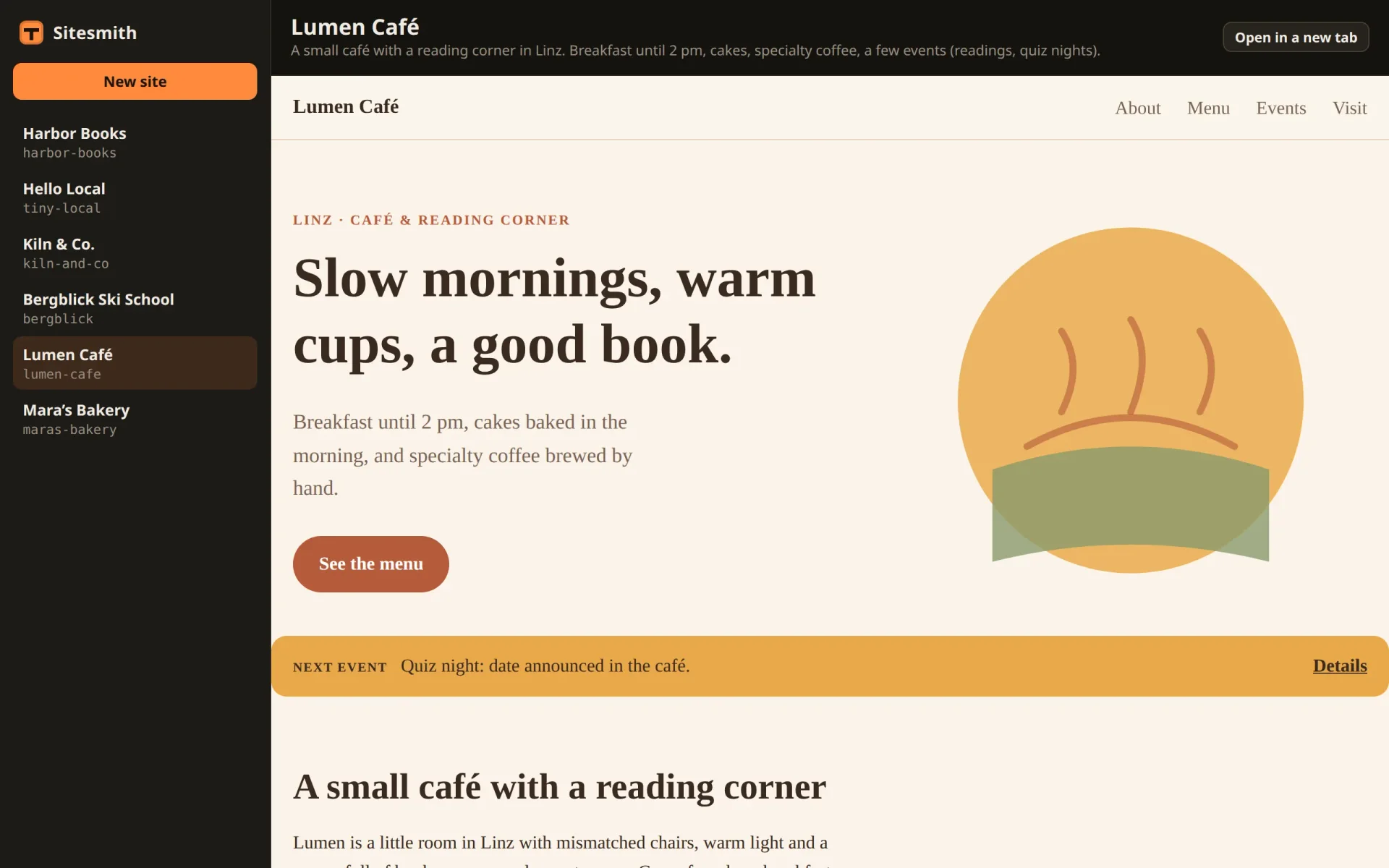
A header with the title, the description and a link that opens the site in a new tab, and below it the preview: a frame on the preview server, or "Nothing built yet". previewUrl uses the page's own host name with the preview's port, so it keeps working when the page is opened from another computer in part 16. update runs with every list. It shows the frame once the site is built and loads it the moment it becomes built. filesChanged sets src again, which reloads the frame even at the same address. dispose is empty for now; later parts close the terminal's connection there.
The frame is sandboxed, with four permissions: scripts, its own origin, forms and pop-ups. A sandboxed frame without allow-same-origin gets an anonymous origin, without storage or cookies, and a site that uses them breaks. Here it is safe to allow, because the frame's origin is the preview's, not the page's. On the page's own origin, scripts and same-origin together would let the frame lift its own sandbox. What the sandbox still prevents: the site can't navigate Sitesmith's tab away, and it can't open dialogs such as alert.
Build and run
With all files in place and style.css from the download in src/, check the types and build the page:
$ npx tsc --noEmit$ npm run build> sitesmith@1.0.0 build> vite buildvite v8.3.8 building client environment for production...transforming...✓ 10 modules transformed.rendering chunks...computing gzip size...dist/index.html 0.67 kB │ gzip: 0.43 kBdist/assets/index-BeBPfUyA.css 11.57 kB │ gzip: 3.35 kBdist/assets/index-DxC1l3U9.js 5.30 kB │ gzip: 2.45 kB✓ built in 129ms
The compiler says nothing when all is well, and Vite builds the page into about 5 kB of JavaScript and 12 kB of CSS. There are two ways to run Sitesmith:
# working on the page: the server in one terminal …$ npm run server# … and Vite in a second one, then open http://localhost:5401$ npm run dev# or build the page once and let the server serve it at http://localhost:5400$ npm start
When you work on the page, run the server and Vite side by side and open http://localhost:5401: the page reloads with every change, and the server you restart by hand after a change to its code (Ctrl+C, then start it again). When you only use the app, npm start builds the page once and serves everything at http://localhost:5400. Open it and click New site:
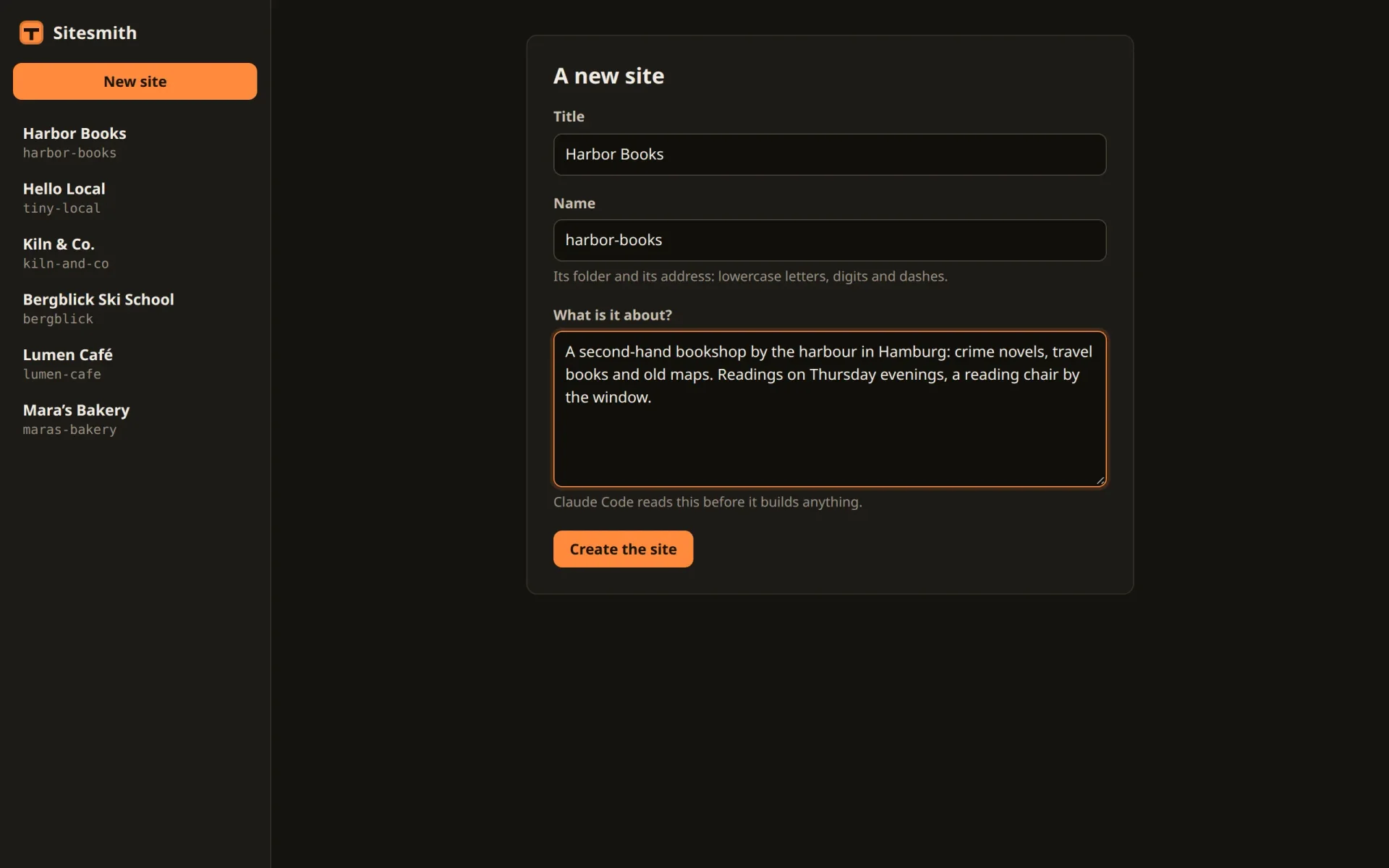
Create the site. Its folder appears in sites/, with CLAUDE.md and .sitesmith/site.json, and the page shows "Nothing built yet". Claude Code builds nothing until part 5, but the preview does not care who writes the files. Write an index.html by hand:
$ echo '<h1>Harbor Books</h1><p>Written by hand, for now.</p>' > sites/harbor-books/index.htmlA moment later the frame shows it: the folder watch noticed the new file, the server sent a files event and a new list, and the page loaded the preview. Once a site has real content, it looks like this:
What you have now
A server that keeps every site in a folder with its own CLAUDE.md, tells every open page what changed, lets in only its own page, and shows the sites from an origin of their own. And a page, built from a few small classes, that lists the sites and shows them as their files change.
What is missing is the one who builds. In the next part, Claude Code moves in: one tmux session per site, started and ended from the site's header.
Comments
The comments are GitHub Discussions: sign in with GitHub to write one.
The comments come from GitHub, through giscus. Loading them sends your IP address to giscus.app and GitHub.