
Claude Code in Your Own Web App · Part 7 of 16 in the series
Part 7: The End of a Turn
Show what Claude Code says when it is done, rendered from Markdown without letting the model's text bring its own HTML, reply to it from the page, and tell exactly when a turn is over, also when it ends without a Stop hook.
Claude Code in Your Own Web AppPart 7 of 16
On this page
Quest objectives
- Take the summary of a turn from the Stop hook
- Render Claude Code's Markdown safely: escape first, then add tags
- Reply to Claude Code from the page, as one typed line
- Let the hooks decide whether Claude Code is busy
- End a turn that never sends a Stop hook
Since part 6 the page knows what Claude Code does while it works: each tool from a hook, and what it says between them from its transcript. The Stop hook tells it, to the second, when a turn is over. Then the panel says "Done after 0:39", and that is all.
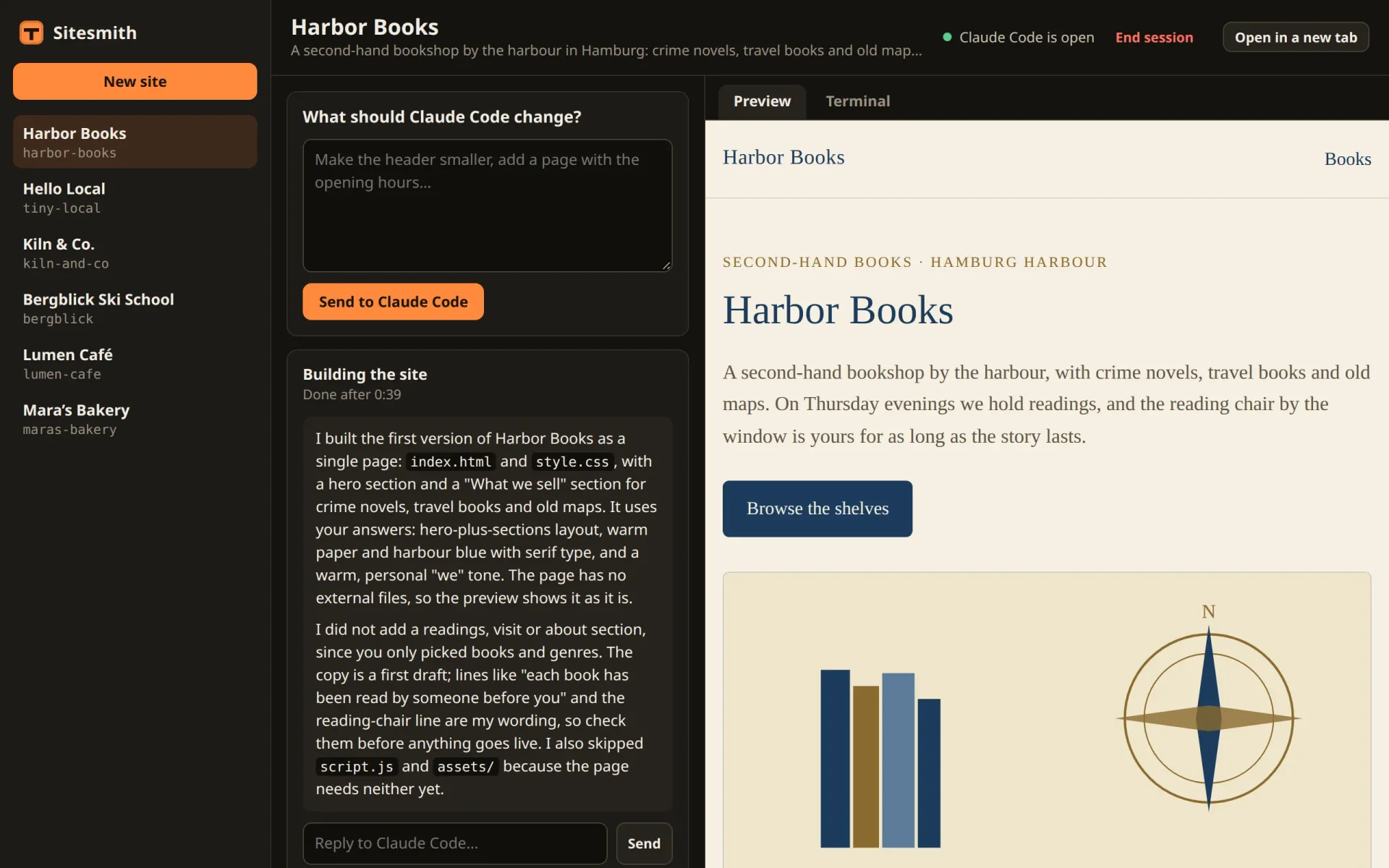
Yet what Claude Code says at that moment is the most useful part of the whole turn. The request asks it for two or three sentences about what it built or changed, and it usually adds what it left out and what you should check. So far, those sentences are only in the terminal. This part brings them into the page, rendered from Markdown without opening a door for the model's text, and puts a box under them to reply. On the way, the page learns to tell more exactly when Claude Code is busy, including the turns that end without a Stop hook.
The last message comes with the Stop hook
The Stop hook's input has a field you have not used yet: last_assistant_message, the text of the message with which Claude Code ended its turn. That is the summary. A run keeps it, in shared/types.ts (replace Run):
/** A request from the page, from the moment it is asked until Claude Code's turn is over. */
export interface Run {
  id: string;
  title: string;
  /**
   * queued: waits until Claude Code is free; starting: typed in (or the session is starting);
   * working: Claude Code works on it; then done, stopped or failed
   */
  status: 'queued' | 'starting' | 'working' | 'done' | 'stopped' | 'failed';
  queued: number;
  started?: number;
  ended?: number;
  error?: string;
  /** what Claude Code said at the end of its turn */
  summary?: string;
}
In server/agent.ts, pub(), which turns a job into what the pages see, copies it along:
const pub = (j: Job): Run => ({ id: j.id, title: j.title, status: j.status, queued: j.queued, started: j.started, ended: j.ended, error: j.error, summary: j.summary });And the Stop case of hookEvent() takes it (replace the case):
case 'Stop': {
  // the end of its turn, with its last message: exact, where the screen could only guess
  s.hookBusy = false;
  const said = String(ev.last_assistant_message ?? '').trim();
  if (said) this.note(name, { kind: 'say', text: short(oneLine(said), 300) });
  if (live(run)) {
    run!.summary = said || undefined;
    this.end(name, 'done');
  }
  break;
}
The whole text goes into the run. The feed gets it too, folded into one line and cut at 300 characters, like everything else Claude Code says there.
Why not read it from the transcript, like the rest of what Claude Code says? You saw in part 6 that the transcript is written a moment after the hooks fire. When the Stop hook arrives, the last message may not be in the file yet, and the next chance to read it would be the next hook, which could be an hour away. The Stop hook brings the text along, so there is nothing to wait for.
Said once, noted once
The same words now arrive twice: from the Stop hook, and later from the transcript. A reply you type (further down) does the same: it is noted when the page types it, and again when the UserPromptSubmit hook reports it. Replace note():
/**
 * A line of activity, in its place in time. What Claude Code says and what you type arrive twice
 * (from a hook and from the transcript): a second copy within two minutes is left out.
 */
private note(name: string, a: Omit<Activity, 't'>, t = Date.now()) {
  const s = this.site(name);
  const window = a.kind === 'say' || a.kind === 'prompt' ? 120000 : 2000;
  if (s.activity.slice(-6).some((b) => b.kind === a.kind && b.text === a.text && Math.abs(b.t - t) < window)) return;
  // the transcript is written a moment after the hooks fire: its lines go back to where they belong
  let i = s.activity.length;
  while (i > 0 && s.activity[i - 1].t > t) i--;
  s.activity.splice(i, 0, { t, ...a });
  if (s.activity.length > ACTIVITY) s.activity.splice(0, s.activity.length - ACTIVITY);
}
A copy is recognised by its kind and its text, among the last six lines, and only when the two are close in time. The line from the transcript carries the transcript's own timestamp, however late it is read, so both copies carry nearly the same time; two minutes leave plenty of room. For tools and the other lines, the window is two seconds, because the same tool twice in a row is real: Claude Code may well edit index.html twice.
Markdown, and nothing else
Claude Code writes Markdown: bold, code in backticks, lists, now and then a table or a heading. Shown as plain text, that is a panel full of asterisks. A Markdown library would do, but the page needs only a small part of Markdown, and that part must be safe. Create src/markdown.ts:
/**
* Claude Code's messages as HTML: a small part of Markdown (paragraphs, headings, lists, code,
* emphasis, tables, links). Everything is escaped first, so the text can never bring its own
* markup, and links must be http(s).
*/
const esc = (s: string) => s.replace(/&/g, '&').replace(/</g, '<').replace(/>/g, '>').replace(/"/g, '"');
function inline(s: string) {
const codes: string[] = [];
let out = esc(s).replace(/`([^`]+)`/g, (_, c: string) => `\u0000${codes.push(c) - 1}\u0000`);
out = out
.replace(/\*\*([^*]+)\*\*/g, '<strong>$1</strong>')
.replace(/(^|[^*\w])\*([^*\s][^*]*)\*(?!\w)/g, '$1<em>$2</em>')
.replace(/\[([^\]]+)\]\((https?:\/\/[^\s)]+)\)/g, '<a href="$2" target="_blank" rel="noopener noreferrer">$1</a>');
return out.replace(/\u0000(\d+)\u0000/g, (_, i: string) => `<code>${codes[Number(i)]}</code>`);
}
export function markdown(text: string) {
const lines = text.replace(/\r\n/g, '\n').split('\n');
const html: string[] = [];
let i = 0;
while (i < lines.length) {
const line = lines[i];
if (/^```/.test(line)) {
const body: string[] = [];
for (i++; i < lines.length && !/^```/.test(lines[i]); i++) body.push(lines[i]);
i++;
html.push(`<pre><code>${esc(body.join('\n'))}</code></pre>`);
continue;
}
const h = line.match(/^(#{1,4})\s+(.*)$/);
if (h) { html.push(`<h${Math.min(6, h[1].length + 3)}>${inline(h[2])}</h${Math.min(6, h[1].length + 3)}>`); i++; continue; }
if (/^\s*\|.*\|\s*$/.test(line) && /^\s*\|?\s*:?-{2,}/.test(lines[i + 1] ?? '')) {
const cells = (l: string) => l.trim().replace(/^\||\|$/g, '').split('|').map((c) => c.trim());
const head = cells(line);
const rows: string[][] = [];
for (i += 2; i < lines.length && /^\s*\|.*\|\s*$/.test(lines[i]); i++) rows.push(cells(lines[i]));
html.push(`<table><thead><tr>${head.map((c) => `<th>${inline(c)}</th>`).join('')}</tr></thead><tbody>${rows.map((r) => `<tr>${r.map((c) => `<td>${inline(c)}</td>`).join('')}</tr>`).join('')}</tbody></table>`);
continue;
}
const list = line.match(/^\s*([-*]|\d+[.)])\s+/);
if (list) {
const ordered = /\d/.test(list[1]);
const items: string[] = [];
for (; i < lines.length; i++) {
const m = lines[i].match(/^\s*([-*]|\d+[.)])\s+(.*)$/);
if (m) items.push(m[2]);
else if (lines[i].trim() && /^\s{2,}/.test(lines[i]) && items.length) items[items.length - 1] += ` ${lines[i].trim()}`;
else break;
}
html.push(`<${ordered ? 'ol' : 'ul'}>${items.map((it) => `<li>${inline(it)}</li>`).join('')}</${ordered ? 'ol' : 'ul'}>`);
continue;
}
if (!line.trim()) { i++; continue; }
const para: string[] = [];
for (; i < lines.length && lines[i].trim() && !/^(```|#{1,4}\s|\s*([-*]|\d+[.)])\s)/.test(lines[i]); i++) para.push(lines[i]);
html.push(`<p>${para.map(inline).join('<br>')}</p>`);
}
return html.join('');
}Escape first. The first thing inline() does, and the only thing done to a code block, is esc(): every &, <, > and " becomes an entity. Only then do the patterns add their tags. So the only tags in the result are the ones markdown() writes itself, and whatever HTML is in the text arrives as text.
Code is kept aside. Code spans are swapped for numbered placeholders before bold, emphasis and links are looked for, and put back at the end. An asterisk inside a code span stays an asterisk.
Links only to the web. A link becomes an <a> only when its address starts with http:// or https://; a javascript: address stays text. Links open in a new tab, with noopener noreferrer, so the page behind them gets no handle on Sitesmith.
Blocks, line by line. markdown() walks through the lines and recognises fenced code, headings, tables (a row of cells followed by a row of dashes), lists and paragraphs. Headings move down three levels: a # in Claude Code's message becomes an <h4>, so it stays smaller than the page's own headings. A list item may go on over several lines when they are indented.
The panel
Replace src/agentPanel.ts with:
import { api } from './api.ts';
import { h } from './dom.ts';
import { markdown } from './markdown.ts';
import type { AgentState, ReplyBody, Run } from '../shared/types.ts';

export const isLive = (r: Run | null | undefined) => Boolean(r && ['queued', 'starting', 'working'].includes(r.status));

/** 75 -> "1:15" */
const clock = (ms: number) => {
  const s = Math.max(0, Math.round(ms / 1000));
  return `${Math.floor(s / 60)}:${String(s % 60).padStart(2, '0')}`;
};

function statusText(r: Run, now: number) {
  switch (r.status) {
    case 'queued': return 'Waiting until Claude Code is free';
    case 'starting': return 'Starting';
    case 'working': return `Working for ${clock(now - (r.started ?? now))}`;
    case 'done': return `Done after ${clock((r.ended ?? now) - (r.started ?? now))}`;
    case 'stopped': return 'Stopped';
    case 'failed': return r.error ? `Failed: ${r.error}` : 'Failed';
  }
}

/**
 * The current (or last) run: what it is, how long Claude Code has worked on it, what it does
 * (its tools and what it says between them, from the hooks), and Stop. At the end, what it said
 * last, and a box to reply to it.
 */
export class AgentPanel {
  readonly el: HTMLElement;
  private url: string;
  private title = h('h2', { class: 'agent-title' });
  private status = h('p', { class: 'agent-status' });
  private stopBtn = h('button', { type: 'button', class: 'small ghost' }, 'Stop');
  private feed = h('ol', { class: 'feed', 'aria-label': 'What Claude Code does', 'aria-live': 'polite' });
  private summary = h('div', { class: 'summary md', hidden: true });
  private replyText = h('input', { type: 'text', autocomplete: 'off', placeholder: 'Reply to Claude Code…', 'aria-label': 'Reply to Claude Code' });
  private reply = h('form', { class: 'reply', hidden: true }, this.replyText, h('button', { type: 'submit', class: 'small' }, 'Send'));
  private site: string;
  private msg = h('p', { class: 'hint bad', 'aria-live': 'polite' });
  private timer = 0;

  constructor(site: string) {
    this.site = site;
    this.url = `/api/sites/${site}/stop`;
    this.stopBtn.onclick = () => void this.stop();
    this.reply.onsubmit = (e) => { e.preventDefault(); void this.send(); };
    this.el = h('section', { class: 'panel agent', 'aria-label': 'Claude Code', hidden: true },
      h('header', { class: 'agent-head' }, h('div', {}, this.title, this.status), this.stopBtn),
      this.feed, this.summary, this.reply, this.msg);
  }

  update(state: AgentState | undefined) {
    const run = state?.run ?? null;
    clearInterval(this.timer);
    this.el.hidden = !run;
    if (!run) return;
    this.el.dataset.status = run.status;
    this.title.textContent = run.title;
    this.status.textContent = statusText(run, Date.now());
    if (run.status === 'working') this.timer = window.setInterval(() => { this.status.textContent = statusText(run, Date.now()); }, 1000);
    this.stopBtn.hidden = !isLive(run) || run.status === 'queued';
    // what it did for this run, the last few lines; at the end, what it said last instead
    const live = isLive(run);
    const mine = state!.activity.filter((a) => a.t >= run.queued - 1000).slice(-9);
    this.feed.replaceChildren(...mine.map((a) => h('li', { class: a.kind }, a.text)));
    this.feed.hidden = !mine.length || (!live && Boolean(run.summary));
    this.summary.hidden = live || !run.summary;
    if (!live && run.summary) this.summary.innerHTML = markdown(run.summary);
    this.reply.hidden = live;
  }

  private async send() {
    const body: ReplyBody = { text: this.replyText.value };
    this.msg.textContent = '';
    try {
      await api('POST', `/api/sites/${this.site}/reply`, body);
      this.replyText.value = '';
    } catch (err) { this.msg.textContent = (err as Error).message; }
  }

  private async stop() {
    if (!confirm('Stop Claude Code? It ends its turn where it is; what it changed so far stays.')) return;
    try { await api('POST', this.url); } catch (err) { this.msg.textContent = (err as Error).message; }
  }

  dispose() { clearInterval(this.timer); }
}
While a run is live, the panel shows the feed as before. When the run is over and has a summary, the summary takes the feed's place, rendered by markdown(); its class md is what style.css uses to space the rendered Markdown. Below it, whenever no run is live, is the form to reply. send() needs nothing from the answer of the server: the new state arrives through the server's events, as for everything else.
Replying
A reply is a message typed into Claude Code, as you would type it in the terminal. Add reply() to the Agent class in server/agent.ts, after stop():
/**
 * Your reply to what Claude Code said at the end of its turn, typed in like a message in the
 * terminal. It continues the last run: the page follows it there.
 */
async reply(t: Target, text: string) {
  const s = this.site(t.name);
  if (!this.terminals.get(t.name)?.claude) throw new Error('Claude Code is not running for this site.');
  if (this.busy(t.name) || this.active(t.name)) throw new Error('Claude Code is working. Wait until its turn is over.');
  if (!(await this.terminals.atEmptyPrompt(t))) throw new Error('Claude Code is not at an empty prompt: look in the terminal.');
  // one line: a line break would send it early, a long text would arrive as a paste
  const line = oneLine(text);
  if (!line) throw new Error('Write a reply first.');
  if (line.length > 500) throw new Error('Keep the reply under 500 characters, or send it as a new request.');
  await this.terminals.type(t, line);
  this.note(t.name, { kind: 'prompt', text: `You: ${short(line)}` });
  const run = s.run;
  if (run) {
    run.status = 'starting';
    run.started = run.sentAt = Date.now();
    run.ended = run.summary = run.error = undefined;
  }
  this.changed(t.name);
}
It refuses in five cases, each with a message the panel shows: Claude Code is not running, it is working, it is not at an empty prompt, the reply is empty, or it is too long. The empty prompt is the check from part 5: keys sent at anything else would answer that, and an Enter can approve a permission prompt. A reply is one line, with all its whitespace folded into single spaces, because a line break in the terminal would send it early. Up to 500 characters it is typed straight in; anything longer is a request, and requests travel in a file.
A reply continues the run it answers instead of starting a new one. The run goes back to starting and loses its end, its summary and its error. Its clock starts again, too: started and sentAt become now, so the panel counts the time of the new turn, and check() gives it the same few seconds to get going as a new run. The hooks take it from there: UserPromptSubmit makes it working, and Stop brings the new summary.
The body of the request, in shared/types.ts after RequestBody:
/** A reply to what Claude Code said at the end of its turn. */
export interface ReplyBody {
  text: string;
}
And the route, in server/main.ts after the one for stop. Add ReplyBody to the import from ../shared/types.ts:
['POST', /^\/api\/sites\/([^/]+)\/reply$/, async (req, res, m) => {
  const t = target(m[1]);
  const { text } = await readJson<ReplyBody>(req);
  try { await agent.reply(t, String(text ?? '')); } catch (err) { throw new HttpError(409, (err as Error).message); }
  send(res, 200, agent.state(t.name));
}],
A refusal from agent.reply() becomes a 409 with its message, which api() in the page turns into the error the panel shows.
Busy, by the hooks
Try a reply right after the end of a turn, and with the code so far it is turned down. This is what happened in the test, on Lumen Café:
# a reply sent right after the end of a turn, while the screen still counted as busy:{"error":"Claude Code is working. Wait until its turn is over."}# with the hooks deciding "busy", the reply went through:{"site":"lumen-cafe","run":{"id":"8c6a8713-…","title":"Changing the site",…# the run's status and the start of its summary, at the next check a few seconds later:check 1: done | The "See the menu" button now darkens to `#7a3822` on hover, down from …
The Stop hook had said the turn was over, but busy() also asked the screen: busy was true when the hooks said so or when the screen moved. And the screen keeps moving for a few seconds after the end of a turn, while Claude Code draws its last lines. A session counts as busy as long as its screen changed in three of the last five seconds (part 3). So now the hooks decide alone, for the sessions that have them. In server/agent.ts, replace site() and busy():
private site(name: string) {
  let s = this.sites.get(name);
  if (!s) {
    s = { run: null, queue: [], delivering: false, hooked: false, hookBusy: false, quietSince: 0, transcript: null, transcriptPos: 0, activity: [], sent: '' };
    this.sites.set(name, s);
  }
  return s;
}

/**
 * Working: with the hooks, between a prompt and the end of its turn (exact, the moment it
 * happens); without them, while the screen moves (a few seconds late).
 */
private busy(name: string) {
  const term = this.terminals.get(name);
  const s = this.site(name);
  return Boolean(term?.claude && (s.hooked ? s.hookBusy : term.busy));
}
For sessions without the hooks, for example one that was started before the server wrote its settings, the screen still decides. The hooks know the moment a turn starts and the moment it ends; the screen only notices a few seconds late.
site() starts a new field, quietSince, at 0. Add it to the SiteAgent interface, after hookBusy:
/** since when the hooks say busy while the screen sits still at the prompt (0: not so) */
quietSince: number;
Turns that end without a word
The hooks have one blind spot: a turn that is interrupted ends without a Stop hook. The Stop button in the page presses Escape, so stop() now ends the hooks' busy itself. Replace it:
/** Interrupts Claude Code: Escape in its session, as you would press it. */
async stop(t: Target) {
  const s = this.site(t.name);
  s.queue = [];
  await this.terminals.keys(t, 'Escape').catch(() => undefined);
  // an interrupted turn ends without a Stop hook
  s.hookBusy = false;
  this.end(t.name, 'stopped');
  this.changed(t.name);
}
But Escape can also be pressed in the terminal, by you, and a turn can end on an error. Then no hook says anything, and the page would say "working" until the next prompt. Here is such a turn from the test, and how the page saw it with the code below:
# Escape typed in the terminal itself, not the page's Stop: no Stop hook comes13:39:13 Escape sent# the run's status as the page saw it, checked every few seconds:check 1: workingcheck 2: workingcheck 3: stopped | Stopped13:39:31 at most 18 s after the Escape (a few seconds until the screen counts as still, then 12 s of quiet)# Claude Code's screen:❯ Do what .sitesmith/request.md says. Listed 1 directory ⎿ Interrupted · What should Claude do instead?────────────────────────────────────────────────────────────❯
The screen helps out again, as a second opinion: when the hooks say busy, but the screen has stood still at an empty prompt for twelve seconds, the turn is over. Replace check():
private async check(name: string, s: SiteAgent) {
  if (s.queue.length) await this.deliver(name);
  const run = s.run;
  const term = this.terminals.get(name);
  if (!term?.claude) s.hookBusy = false;
  // a turn that ends without a Stop hook (Escape in the terminal, an error): the hooks still say
  // busy, but the screen has sat still at an empty prompt for a while
  if (s.hookBusy && term && !term.busy && await this.terminals.atEmptyPrompt({ name })) {
    if (!s.quietSince) s.quietSince = Date.now();
    if (Date.now() - s.quietSince > 12000) {
      s.hookBusy = false;
      if (live(run)) this.end(name, 'stopped', 'The turn ended without a word: interrupted, or an error.');
    }
  } else s.quietSince = 0;
  if (!run || !live(run)) return;
  const since = Date.now() - run.sentAt;
  if (!term) { if (since > 5000) this.end(name, 'failed', 'The session ended.'); return; }
  if (!term.claude) { if (since > 8000) this.end(name, 'failed', 'Claude Code exited.'); return; }
  // with the hooks, the Stop hook ends the run; without them, only the screen can tell
  if (s.hooked) return;
  if (term.busy) { run.status = 'working'; return; }
  // quiet again, at an empty prompt: the turn is over. A turn too short to count as busy ends
  // the same way, once it has had time to start.
  if ((run.status === 'working' || since > 15000) && await this.terminals.atEmptyPrompt(run.target)) this.end(name, 'done');
}
Why wait twelve seconds? While Claude Code works, its input box stays on screen, empty, so an empty prompt alone proves nothing. What proves it is a screen that has not moved for a while, and a still moment within a working turn must never count. A run that ends this way is stopped, not done, with a note that says as much as anyone can tell: "The turn ended without a word: interrupted, or an error."
Try it
Start the server and the page as before (npm start, or npm run server and npm run dev), open a site that is built, and send a small change. When the run is done, its panel shows what Claude Code said. Reply to it: the run starts again, and its new summary takes the place of the old one. Then stop a run in the middle, once with the Stop button and once with Escape in the Terminal tab. The first ends at once; the second after the quiet seconds.
The page now hears the end of a turn in Claude Code's own words, and you can answer them. What it cannot answer yet is a question Claude Code asks in the middle of its work: such a dialog still waits in the terminal while the page says "working". The next part changes that, and it is the heart of the series: Claude Code's questions in the page.
Comments
The comments are GitHub Discussions: sign in with GitHub to write one.
The comments come from GitHub, through giscus. Loading them sends your IP address to giscus.app and GitHub.