
Claude Code in Your Own Web App · Part 14 of 16 in the series
Part 14: Files and Pictures for Claude Code
Hand Claude Code a logo, photos or a PDF along with a request: chosen with a button or dropped anywhere on the page, streamed into the site's assets/ folder under a clean name and a size limit, and named in the request so Claude Code looks at them first.
Claude Code in Your Own Web AppPart 14 of 16
On this page

Quest objectives
- Upload a file with a plain PUT and stream it straight to disk
- Clean file names, refuse other types, and count the size while the bytes arrive
- Leave nothing behind when an upload breaks off
- Name the files in the request, so Claude Code reads them before it starts
- Add files with a button or by dropping them anywhere on the site's page
Words go a long way, but some things are quicker shown than described: the bakery's logo, a photo of the shop window, last year's price list as a PDF, a sketch on a napkin. Claude Code can look at all of them. Its Read tool shows it pictures and PDFs, not just text, so a request like "take the colors from the logo" works, as long as the logo is somewhere Claude Code can read it.
So this part is about getting a file from your browser into the site's folder, and telling Claude Code that it is there. The folder is the right place for two reasons. Claude Code reads files inside the folder it works in without asking, while reading elsewhere can bring up a permission prompt first. And the file is meant for the site: the CLAUDE.md from part 2 already says that pictures and other files belong in assets/, so a logo put there is ready to be used as it is.
An upload as a plain PUT
The page and the server need two new things to talk about. In shared/types.ts, a request gets a list of files, and an upload gets an answer:
/** A request typed into the page. */
export interface RequestBody {
  text: string;
  /** plan first: Claude Code shows its plan for approval before it changes anything */
  plan?: boolean;
  /** files you added for this request, as paths in the site's folder (assets/…) */
  files?: string[];
}

/** The answer to an upload: where the file went in the site's folder. */
export interface Uploaded {
  file: string;
}
In server/main.ts, add Uploaded to the type import at the top, and replace the requests route with these two routes:
// requests: Claude Code works on the site
['POST', /^\/api\/sites\/([^/]+)\/requests$/, async (req, res, m) => {
  if (!terminals.available) throw new HttpError(409, 'Sessions need tmux.');
  const site = sites.get(m[1]);
  const { text, plan, files } = await readJson<RequestBody>(req);
  // only files that are really in the site's assets/ folder
  const added = (Array.isArray(files) ? files : []).map(String)
    .filter((f) => /^assets\/[a-z0-9_-][a-z0-9._-]*$/.test(f) && fs.existsSync(path.join(sites.dir(site.name), f)));
  try {
    send(res, 201, agent.run(target(site.name), runTitle(site), requestText(site, String(text ?? ''), plan === true, added), plan === true));
  } catch (err) { throw new HttpError(409, (err as Error).message); }
}],
// files for Claude Code: the body is the file itself
['PUT', /^\/api\/sites\/([^/]+)\/files\/([^/]+)$/, async (req, res, m) => {
  const site = sites.get(m[1]);
  const file = await sites.receive(site.name, decodeURIComponent(m[2]), req);
  send(res, 201, { file } satisfies Uploaded);
}],
The upload is a PUT to /api/sites/<site>/files/<name>, and its body is the file, byte for byte. No form, no multipart encoding with boundaries to parse: the request is a stream of bytes, and it can go to disk as it arrives. The name travels in the address, encoded by the page, and the server decodes it. One file per request; the page sends several one after the other.
The request now takes the list of files the page sends along. The server does not trust that list. It keeps only paths of the form assets/<plain name> (lowercase letters, digits, dots, dashes and underscores, and no dot at the start, so a hidden file is never named) that exist in the site's folder, and drops the rest without a word. The list ends up in the text Claude Code reads as its instructions, so only names the server itself handed out may get in there.
Both routes sit behind the checks every route has had since part 2: the Host header must be ours, and a browser may send anything but a GET only from our own page. A previewed site cannot upload files, which you will see in a moment.
Receiving a file
The work happens in server/sites.ts. At the top, it needs a few more imports, the list of what may come in, the limit, and a function for clean names:
import fs from 'node:fs';
import type http from 'node:http';
import path from 'node:path';
import { Transform } from 'node:stream';
import { pipeline } from 'node:stream/promises';
import type { NewSite, Site } from '../shared/types.ts';
import { HttpError } from './http.ts';

/** Site names are folder names, addresses and (later) tmux session names: keep them plain. */
export const NAME = /^[a-z0-9][a-z0-9-]{0,39}$/;
/** Sitesmith's own files in a site's folder. */
export const OWN = '.sitesmith';
const META = `${OWN}/site.json`;
/** What can be added for Claude Code: pictures, PDFs and plain text, which its Read tool can show it. */
const UPLOADS = /\.(png|jpe?g|webp|gif|svg|pdf|txt|md|csv)$/i;
const MAX_UPLOAD = 20 * 1024 ** 2;

/** "Logo Final (2).PNG" -> "logo-final-2.png"; a name without Latin letters becomes "file.png" */
function fileName(name: string) {
  const ext = path.extname(name).toLowerCase().replace(/[^a-z0-9.]/g, '');
  const base = path.basename(name, path.extname(name)).toLowerCase().normalize('NFKD').replace(/[\u0300-\u036f]/g, '')
    .replace(/[^a-z0-9_-]+/g, '-').replace(/^-+|-+$/g, '');
  return `${base || 'file'}${ext}`;
}
fileName turns whatever the browser calls the file into a name that is safe in a folder, a URL and a shell command. It takes the name apart: the extension is kept, in lowercase, and only the part before it is cleaned. path.basename drops any folder in front, ../../ included, so a name can never lead out of assets/. normalize('NFKD') splits a letter with an accent into the letter and the accent, and the next step removes the accents, so "Über" becomes "uber" rather than a dash. Everything else that is not a plain letter, digit, dash or underscore becomes a dash, dots included, and dashes at either end go. So "Logo Final (2).PNG" becomes logo-final-2.png, and the cleaned part never starts with a dot: no upload can become a hidden file such as .htaccess. A name with no Latin letters or digits at all, a photo named in Greek or Japanese, say, has nothing left, and becomes file with its extension, such as file.png.
UPLOADS lists what Claude Code can make sense of: pictures (SVG is text to Claude Code and a picture to the browser), PDFs, and plain text. The method that receives a file goes into the class Sites, after list():
/**
 * A file for Claude Code, streamed into the site's assets/ folder. A name that is taken gets a
 * number; a broken or too large upload leaves nothing behind.
 */
async receive(name: string, original: string, req: http.IncomingMessage) {
  const clean = fileName(original);
  if (!UPLOADS.test(clean)) throw new HttpError(415, 'Pictures, PDFs and text files only (png, jpg, webp, gif, svg, pdf, txt, md, csv).');
  if (Number(req.headers['content-length'] ?? 0) > MAX_UPLOAD) throw new HttpError(413, 'Files up to 20 MB.');
  const dir = path.join(this.dir(name), 'assets');
  fs.mkdirSync(dir, { recursive: true });
  const ext = path.extname(clean);
  let file = clean;
  for (let i = 2; fs.existsSync(path.join(dir, file)); i++) file = `${path.basename(clean, ext)}-${i}${ext}`;
  const tmp = path.join(dir, `.${file}.upload`);
  let size = 0;
  // the Content-Length can lie: count what really arrives
  const limit = new Transform({
    transform(chunk: Buffer, _enc, done) {
      size += chunk.length;
      done(size > MAX_UPLOAD ? new HttpError(413, 'Files up to 20 MB.') : null, chunk);
    },
  });
  try {
    await pipeline(req, limit, fs.createWriteStream(tmp));
    fs.renameSync(tmp, path.join(dir, file));
  } catch (err) {
    fs.rmSync(tmp, { force: true });
    throw err;
  }
  return `assets/${file}`;
}
It reads like a checklist.
The type, by the extension of the clean name. Anything else is refused with 415 before a byte of the body is read.
The size, as announced. A browser sends the length of the body in the
Content-Lengthheader, and a file that announces more than 20 MB is refused at once.The size, as it arrives. A header is only a claim. A client can announce less than it sends, or send the body in chunks without announcing anything. So a
Transformstream sits between the request and the file and counts every chunk that passes. As soon as the count passes the limit, it fails with 413;pipelinethen stops all three streams.A free name. If
logo.pngis taken, the file becomeslogo-2.png, thenlogo-3.png. Nothing Claude Code or you put there is overwritten.Nothing half-written. The bytes go into a temporary file,
.logo.png.upload, and only a complete upload is renamed to its real name. A rename within one folder is a single step for the file system, so there is never a half file under the real name for the preview or Claude Code to stumble on. If anything fails, the temporary file is deleted and the error goes on to the route, which answers with its status. The temporary name starts with a dot, so the preview server, which shows no hidden files, never serves it, and no clean name can ever be the same.
Twenty megabytes is plenty for a logo and the photos of a small website. A photo straight from a camera can be bigger, and is better made smaller before it goes on a web page anyway.
Here are the guards at work, with curl against the running server:
$ curl -X PUT --data-binary @evil.sh localhost:5400/api/sites/maras-bakery/files/evil.sh{"error":"Pictures, PDFs and text files only (png, jpg, webp, gif, svg, pdf, txt, md, csv)."}$ curl -X PUT --data-binary @logo.svg "localhost:5400/api/sites/maras-bakery/files/..%2F..%2FÜber%20Uns.SVG"{"file":"assets/uber-uns.svg"}# big.png has 21 MB$ curl -X PUT --data-binary @big.png localhost:5400/api/sites/maras-bakery/files/big.png{"error":"Files up to 20 MB."}$ curl -X PUT --data-binary @logo.svg -H 'origin: http://localhost:5402' localhost:5400/api/sites/maras-bakery/files/x.svg{"error":"forbidden"}
A shell script is refused for its type. The second upload tries to climb out of the folder with an encoded ../../ in its name and lands in assets/uber-uns.svg: no folders, no capitals, no umlaut, no space. A file of 21 MB is turned away by its Content-Length. And the last request pretends to come from a previewed site on port 5402: forbidden, from the Origin check of part 2, before the route is even looked at.
Telling Claude Code
A file in assets/ is not enough: Claude Code has to know it is meant for this request. In server/requests.ts, requestText gets the list and puts it right below your words:
/**
 * What Claude Code gets for a request: the user's words, framed by what Sitesmith needs. It goes
 * into .sitesmith/request.md; the folder's CLAUDE.md says what the site is and how it is built.
 */
export function requestText(site: Site, text: string, plan = false, files: string[] = []) {
  const task = site.built
    ? 'Change the site in this folder as follows:'
    : 'Build the first version of the site in this folder (CLAUDE.md says what it is about). The user adds:';
  return `# A request from Sitesmith

${task}

${text.trim() || '(nothing: use your own judgement)'}
${files.length ? `
The user added these files for this request. Look at each of them before you start (the Read
tool shows you pictures and PDFs), and use them where they fit:

${files.map((f) => `- ${f}`).join('\n')}
` : ''}
If something important is open (the style, the sections, the tone of the texts), ask before you
build, with AskUserQuestion: two to four options per question, the one you recommend first. For a
question about the layout, give each option a small sketch of the page in plain text as its
preview. Don't ask about details you can decide well yourself.

${plan ? `You are in plan mode: first make a plan (what you will build or change, file by file, in a
few short points) and present it with ExitPlanMode. Sitesmith shows it to the user for approval.

` : ''}When you are done, say in two or three sentences what you built or changed.
`;
}
"Look at each of them before you start" is the important part. Claude Code would find a logo in assets/ on its own sooner or later, but you want it to look before it decides on colors and a layout, not after. The hint about the Read tool tells it how.
In the feed, that shows up as its own line: describeTool from part 6 already says Looking at instead of Reading when Claude Code reads a picture. In the real run for this part, a file called "Mara Logo.png" went to Mara's Bakery with a request, and the feed read like this:
Asked from the page: Changing the site
Claude Code started
Read the request file and list project contents
Read project notes, site config, index page and assets
Looking at mara-logo.png
Sample dominant colours from the logo (a permission, allowed in the page)
Asking you something (layout and tone)
Writing index.html
Writing style.css
Check that referenced local files exist (a permission)
I built the Mara's Bakery one-pager in
index.html… the palette (cream, green, caramel, crust brown) is sampled from the logo …
Claude Code looked at the logo, then went a step further than looking: it ran a small command to measure the colors in the picture, which needed a permission, and built the palette from the result. The run was done after 37 seconds.
Files in the page
The page needs a place to pick files and show the ones that are waiting for the next request. Create src/attachments.ts:
import { h } from './dom.ts';
import type { Uploaded } from '../shared/types.ts';

const IMAGE = /\.(png|jpe?g|webp|gif|svg)$/i;

/**
 * Files for the next request: chosen with "Add files" or dropped anywhere on the site's page.
 * Each one goes straight into the site's assets/ folder; the request names them, so Claude Code
 * looks at them before it starts.
 */
export class Attachments {
  readonly el: HTMLElement;
  /** paths in the site's folder (assets/…), in the order they were added */
  files: string[] = [];
  private site: string;
  private previewBase: string;
  private list = h('div', { class: 'files' });
  private input = h('input', { type: 'file', multiple: true, hidden: true, accept: 'image/*,.pdf,.txt,.md,.csv' });
  private msg = h('p', { class: 'hint bad', 'aria-live': 'polite' });

  /** `previewBase`: the site on the preview server, where the thumbnails come from */
  constructor(site: string, previewBase: string) {
    this.site = site;
    this.previewBase = previewBase;
    this.input.onchange = () => { void this.add([...(this.input.files ?? [])]); this.input.value = ''; };
    this.el = h('div', { class: 'attachments' },
      this.list,
      h('div', { class: 'actions' },
        h('button', { type: 'button', class: 'small', onclick: () => this.input.click() }, 'Add files'),
        h('span', { class: 'hint' }, 'or drop them on the page')),
      this.input, this.msg);
  }

  /** Uploads files one after the other; each one shows up as soon as it is there. */
  async add(files: File[]) {
    this.msg.textContent = '';
    for (const file of files) {
      try {
        const res = await fetch(`/api/sites/${this.site}/files/${encodeURIComponent(file.name)}`, { method: 'PUT', body: file });
        const data = await res.json() as Uploaded & { error?: string };
        if (!res.ok) throw new Error(data.error ?? `HTTP ${res.status}`);
        this.files.push(data.file);
        this.render();
      } catch (err) { this.msg.textContent = `${file.name}: ${(err as Error).message}`; }
    }
  }

  /** The request went out with them. */
  clear() {
    this.files = [];
    this.render();
  }

  private render() {
    this.list.replaceChildren(...this.files.map((f) => h('span', { class: 'file-chip' },
      IMAGE.test(f) ? h('img', { src: `${this.previewBase}${f}`, alt: '' }) : null,
      h('span', { class: 'file-name' }, f.slice('assets/'.length)),
      h('button', { type: 'button', 'aria-label': `Leave ${f} out`, onclick: () => { this.files = this.files.filter((x) => x !== f); this.render(); } }, '×'))));
  }
}

/** Files dragged over the element: a hint covers the page, a drop hands them over. */
Choosing. A file input does the choosing, but its looks cannot be styled much, so it stays hidden and the Add files button clicks it. Its accept list makes the browser's file dialog offer pictures, PDFs and text files first. That is a convenience for you, not a check: the server decides.
Uploading. add sends the files one at a time, and each one appears as a chip the moment it is there. If one is refused, its name and the server's reason show below, and the next one still goes.
The chips. A picture gets a thumbnail, and the thumbnail comes from the preview server, where the file now is anyway. The page's own address never serves the sites' files, for the reason from part 2: a site is code Claude Code wrote, and it does not belong on the page's origin. The × leaves a file out of the request. The file stays in assets/; it is part of the site now.
Below the class, in the same file, comes the drop target:
  const hint = h('div', { class: 'drop-hint', hidden: true }, 'Drop the files for Claude Code');
  let depth = 0;
  const hasFiles = (e: DragEvent) => Boolean(e.dataTransfer?.types.includes('Files'));
  el.addEventListener('dragenter', (e) => { if (hasFiles(e)) { depth++; hint.hidden = false; } });
  el.addEventListener('dragleave', () => { if (--depth <= 0) { depth = 0; hint.hidden = true; } });
  el.addEventListener('dragover', (e) => { if (hasFiles(e)) e.preventDefault(); });
  el.addEventListener('drop', (e) => {
    if (!hasFiles(e)) return;
    e.preventDefault();
    depth = 0;
    hint.hidden = true;
    onFiles([...(e.dataTransfer?.files ?? [])]);
  });
  el.append(hint);
}
Dragging a file over the page should cover it with a hint, and the hint should go away when the file leaves again. That sounds like two events, but dragenter and dragleave fire for every element the pointer crosses: moving from the text box to the button below it is a leave and an enter. With a simple flag, the hint would flicker. So depth counts enters minus leaves, and the hint goes when it is back at zero.
hasFiles makes sure only files count, not a piece of text dragged from another window. preventDefault on dragover is what tells the browser that a drop is welcome here; without it, the browser would open the file itself and leave Sitesmith. The hint is fixed over the whole page with pointer-events: none in style.css, so it never gets in the way of the events it reacts to.
The chips go into the request box. Here is src/requestBox.ts in full:
import { api } from './api.ts';
import type { Attachments } from './attachments.ts';
import { h } from './dom.ts';
import type { RequestBody, Site } from '../shared/types.ts';

/** Where you tell Claude Code what to build or change. */
export class RequestBox {
  readonly el: HTMLFormElement;
  private url: string;
  private label = h('h2', {}, 'What should Claude Code build?');
  private text = h('textarea', { rows: 5, 'aria-label': 'Your request' });
  private go = h('button', { type: 'submit', class: 'primary' }, 'Build the site');
  private plan = h('input', { type: 'checkbox' });
  private msg = h('p', { class: 'hint bad', 'aria-live': 'polite' });
  private busy = false;
  private attachments: Attachments;

  constructor(site: string, attachments: Attachments) {
    this.url = `/api/sites/${site}/requests`;
    this.attachments = attachments;
    this.el = h('form', { class: 'panel request' },
      this.label, this.text, attachments.el,
      h('div', { class: 'actions' },
        h('label', { class: 'check', title: 'Claude Code shows you its plan before it changes anything' }, this.plan, 'Plan first'),
        this.go),
      this.msg);
    this.el.onsubmit = (e) => { e.preventDefault(); void this.send(); };
    this.text.onkeydown = (e) => { if (e.key === 'Enter' && (e.ctrlKey || e.metaKey)) { e.preventDefault(); void this.send(); } };
  }

  /** A built site gets changes; a new one its first version. Nothing goes out while a run is on. */
  update(site: Site | null, busy: boolean) {
    this.busy = busy;
    const built = Boolean(site?.built);
    this.label.textContent = built ? 'What should Claude Code change?' : 'What should Claude Code build?';
    this.text.placeholder = built
      ? 'Make the header smaller, add a page with the opening hours…'
      : 'A warm, simple one-pager: the breads of the week, opening hours, where to find us…';
    this.go.textContent = built ? 'Send to Claude Code' : 'Build the site';
    this.go.disabled = busy || !site;
  }

  private async send() {
    if (this.busy) return;
    this.msg.textContent = '';
    const body: RequestBody = { text: this.text.value, plan: this.plan.checked, files: this.attachments.files };
    try {
      await api('POST', this.url, body);
      this.text.value = '';
      this.attachments.clear();
    } catch (err) { this.msg.textContent = (err as Error).message; }
  }
}
The box gets the attachments from outside, shows them below the text, sends their paths along with the request, and empties the list once the request went out. If the request fails, the chips stay, so nothing has to be added again.
Finally, in src/sitePage.ts, import Attachments and dropTarget from ./attachments.ts, and replace the constructor:
constructor(name: string, config: Config) {
  this.name = name;
  this.config = config;
  this.session = new SessionControls(name, config.terminals);
  this.terminal = new TerminalView(name, config.pty);
  const attachments = new Attachments(name, this.previewUrl);
  this.request = new RequestBox(name, attachments);
  this.agent = new AgentPanel(name);
  this.tabs = {
    preview: h('button', { type: 'button', class: 'tab', role: 'tab', onclick: () => this.show('preview') }, 'Preview'),
    terminal: h('button', { type: 'button', class: 'tab', role: 'tab', onclick: () => this.show('terminal') }, 'Terminal'),
  };
  this.el = h('section', { class: 'site-page' },
    h('header', { class: 'site-head' },
      h('div', { class: 'site-head-text' }, this.heading, this.about),
      this.session.el,
      h('a', { class: 'button small', href: this.previewUrl, target: '_blank', rel: 'noopener' }, 'Open in a new tab')),
    h('div', { class: 'site-body' },
      h('div', { class: 'work' }, this.request.el, this.agent.el),
      h('div', { class: 'view' },
        h('div', { class: 'tabs', role: 'tablist' }, this.tabs.preview, this.tabs.terminal),
        this.preview, this.terminal.el)));
  this.show('preview');
  dropTarget(this.el, (files) => void attachments.add(files));
}
The attachments get the site's preview address for their thumbnails, and the whole site page becomes the drop target, so you can drop a file wherever your mouse happens to be.
Try it
Open a site, drop a picture on the page, and write what Claude Code should do with it:
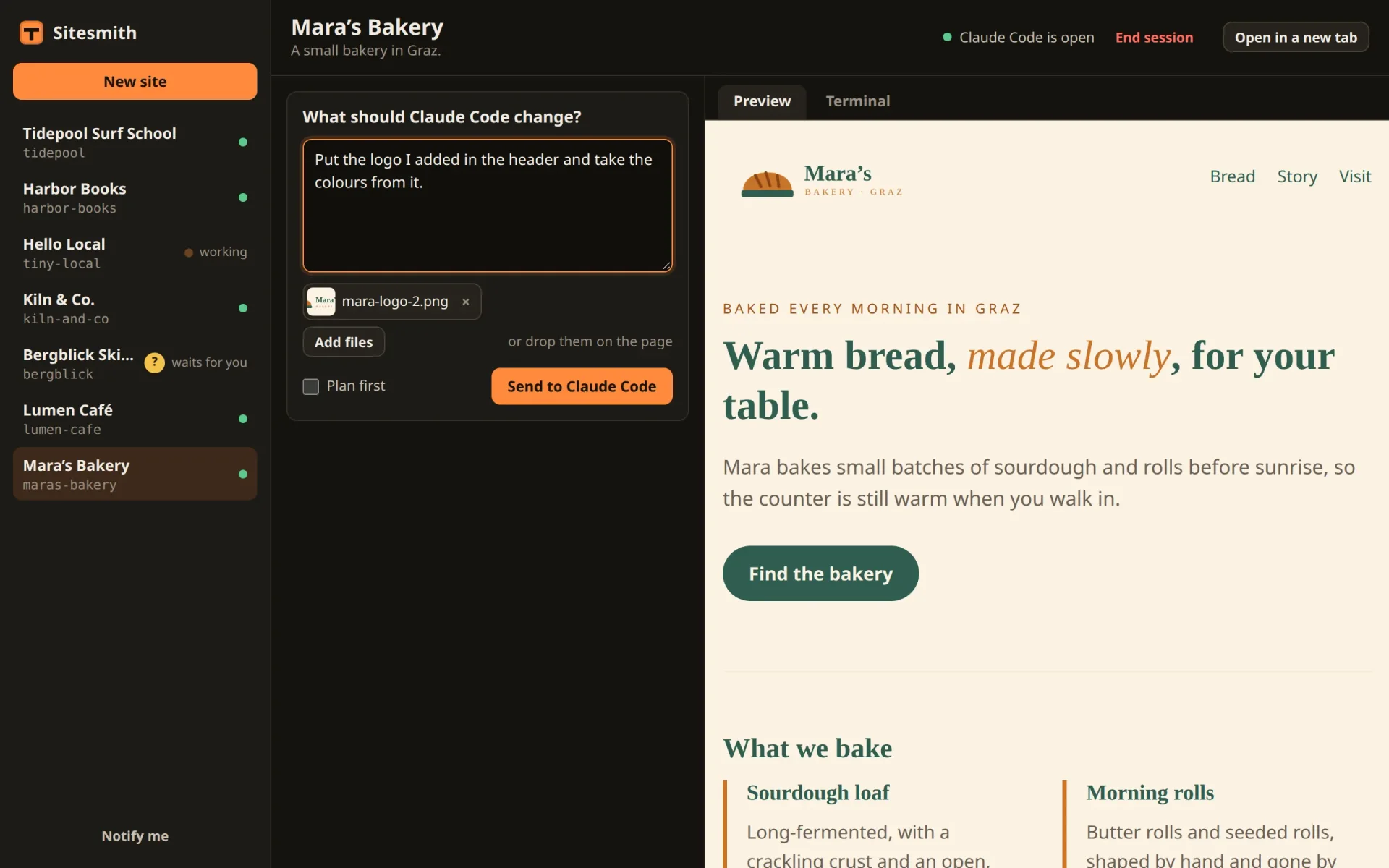
What you have now
Claude Code no longer depends on your words alone. A logo, a photo or a PDF goes into the site's folder under a clean name, nothing half-written or oversized stays behind, and the request tells Claude Code to look at it first. In the page it is a button or a drop, wherever you are on the site's page.
Up to now, every site has been built by Claude on your subscription. The next part gives a site another brain: a local model, through Ollama, with everything else of Sitesmith left as it is.
Comments
The comments are GitHub Discussions: sign in with GitHub to write one.
The comments come from GitHub, through giscus. Loading them sends your IP address to giscus.app and GitHub.