
Claude Code in Your Own Web App · Part 9 of 16 in the series
Part 9: Permission Prompts in the Page
Hold Claude Code's permission prompts with a PermissionRequest hook and answer them in the page: allow once, allow from now on, or deny. And know why the terminal shows its own dialog at the same time.
Claude Code in Your Own Web AppPart 9 of 16
On this page

Quest objectives
- Know which commands ask for permission in acceptEdits mode
- Hold permission prompts with a PermissionRequest hook
- Answer with allow, allow from now on (updatedPermissions) or deny (message)
- Understand why Claude Code's own dialog shows in the terminal at the same time
- Leave the permission check of a question to the terminal
Since part 3 the sessions run in acceptEdits mode: Claude Code changes the files in the site's folder without asking. Commands are another matter. Some run without a question, others make Claude Code stop and ask for permission. In the first build of part 5, such a prompt waited in the terminal for two minutes while the page said "working".
This part brings permission prompts into the page with a second held hook, PermissionRequest. Most of the machinery is the one from part 8: the hook asks the server and waits, the page shows a dialog, and the answer goes back as the hook's output. What is new is the answer itself (allow, allow from now on, or deny), and one difference you need to know about: while this hook waits, the terminal shows Claude Code's own dialog at the same time.
Which commands ask
In acceptEdits mode, file edits go ahead, and so do commands that only read. In the test, wc -l *.html and date && uname -s ran without a question. Commands that reach the network ask: curl -sI https://example.com | head -1 did. So do commands with certain shell operators: in part 5, (node --check script.js && echo "JS ok") ; ls -la . assets asked, with "This command uses shell operators that require approval for safety".
Claude Code decides this, not Sitesmith, and its rules can change from version to version; the permissions in your own Claude Code settings take part as well. Sitesmith does not need to know the rules. It needs to hear the moment Claude Code is about to ask.
Why another hook
PreToolUse, which holds the questions, runs before every tool, before Claude Code has decided whether the tool needs permission. To use it for permissions, Sitesmith would have to know Claude Code's rules after all: which command only reads, which operator is suspicious, what you allowed in your settings. PermissionRequest runs exactly when Claude Code is about to ask, with the tool and its input, and with the rules Claude Code would offer for "don't ask again". That last part is new in the event. In server/agent.ts, replace HookEvent:
/** What a hook sends: Claude Code's hook input (the fields Sitesmith reads). */
export interface HookEvent {
  hook_event_name: string;
  transcript_path?: string;
  source?: string;
  prompt?: string;
  tool_name?: string;
  tool_input?: Record<string, unknown>;
  tool_use_id?: string;
  last_assistant_message?: string;
  /** PermissionRequest: the rules Claude Code would add for "don't ask again" */
  permission_suggestions?: unknown[];
}
In the constructor, the settings get the new hook, with the same day of patience as PreToolUse. Replace the settings object:
const settings = {
  hooks: {
    SessionStart: [{ hooks: hook() }],
    UserPromptSubmit: [{ hooks: hook() }],
    // a question may wait for hours: Claude Code cancels a hook after `timeout` seconds
    PreToolUse: [{ matcher: '*', hooks: hook(86400) }],
    PermissionRequest: [{ matcher: '*', hooks: hook(86400) }],
    Stop: [{ hooks: hook() }],
  },
};
The same hook.ts handles it. In server/hook.ts, replace main():
async function main() {
  const raw = await stdin();
  if (!site || !data) return;
  const base = serverUrl();
  if (!base) return;
  const event = JSON.parse(raw) as HookInput;
  const question = event.hook_event_name === 'PreToolUse' && event.tool_name === 'AskUserQuestion';
  const permission = event.hook_event_name === 'PermissionRequest';
  // every event is reported (a permission prompt's tool already was, by its PreToolUse)
  if (!permission) await call(`${base}/api/hooks/event`, 'POST', { site, event }, 2000).catch(() => undefined);
  if (question || permission) {
    const output = await wait(base, event);
    if (output) process.stdout.write(JSON.stringify(output));
  }
}
A permission prompt is not reported as an event: its tool already was, by its PreToolUse a moment earlier, and the feed would show it twice. Otherwise it goes the way of a question: wait() asks the server, polls until there is an answer, and main() writes the output.
A permission as an ask
The page has to show what Claude Code wants to do. In shared/types.ts, Ask gets a second kind, and AnswerBody a decision. Replace both:
/** What Claude Code waits for the page to answer. */
export type Ask =
  | { id: string; kind: 'questions'; questions: Question[]; since: number }
  | {
    id: string;
    kind: 'permission';
    tool: string;
    /** one line about what it wants to do */
    summary: string;
    /** the command, the file or the address */
    detail?: string;
    /** whether Claude Code offers a rule for "from now on" */
    remember: boolean;
    since: number;
  };

/** The page's answer: per question text, the chosen labels (joined with ", ") or your own words. */
export interface AnswerBody {
  id: string;
  answers?: Record<string, string>;
  /** for a permission prompt */
  decision?: 'allow' | 'always' | 'deny';
}
In server/agent.ts, hookAsk() makes one kind or the other. Replace it:
/**
 * A hook holds Claude Code for the page: a question or a permission prompt. With no page open,
 * nobody could answer: Claude Code asks in the terminal instead.
 */
hookAsk(name: string, ev: HookEvent): { id: string } | { release: true } {
  if (this.pages() === 0) return { release: true };
  // a question that went to the terminal shows there as Claude Code's own dialog, which asks
  // for permission too: that one is answered in the terminal
  if (ev.hook_event_name === 'PermissionRequest' && ev.tool_name === 'AskUserQuestion') return { release: true };
  const s = this.site(name);
  s.hooked = true;
  // a newer question replaces an older one that is still open
  if (s.ask) this.settle(s.ask, { status: 'release' });
  const id = crypto.randomUUID();
  let ask: Ask;
  if (ev.hook_event_name === 'PermissionRequest') {
    const input = ev.tool_input ?? {};
    const detail = [input.command, input.file_path, input.url].find((v) => typeof v === 'string') as string | undefined;
    const summary = describeTool(String(ev.tool_name), input);
    ask = { id, kind: 'permission', tool: String(ev.tool_name), summary, detail, remember: Boolean(ev.permission_suggestions?.length), since: Date.now() };
    this.note(name, { kind: 'note', text: `Asks for permission: ${summary}` });
  } else {
    ask = { id, kind: 'questions', questions: (ev.tool_input?.questions ?? []) as Question[], since: Date.now() };
  }
  const p: Pending = { ask, site: name, event: ev, result: null, waiters: [] };
  this.pending.set(ask.id, p);
  s.ask = p;
  this.changed(name);
  return { id: ask.id };
}
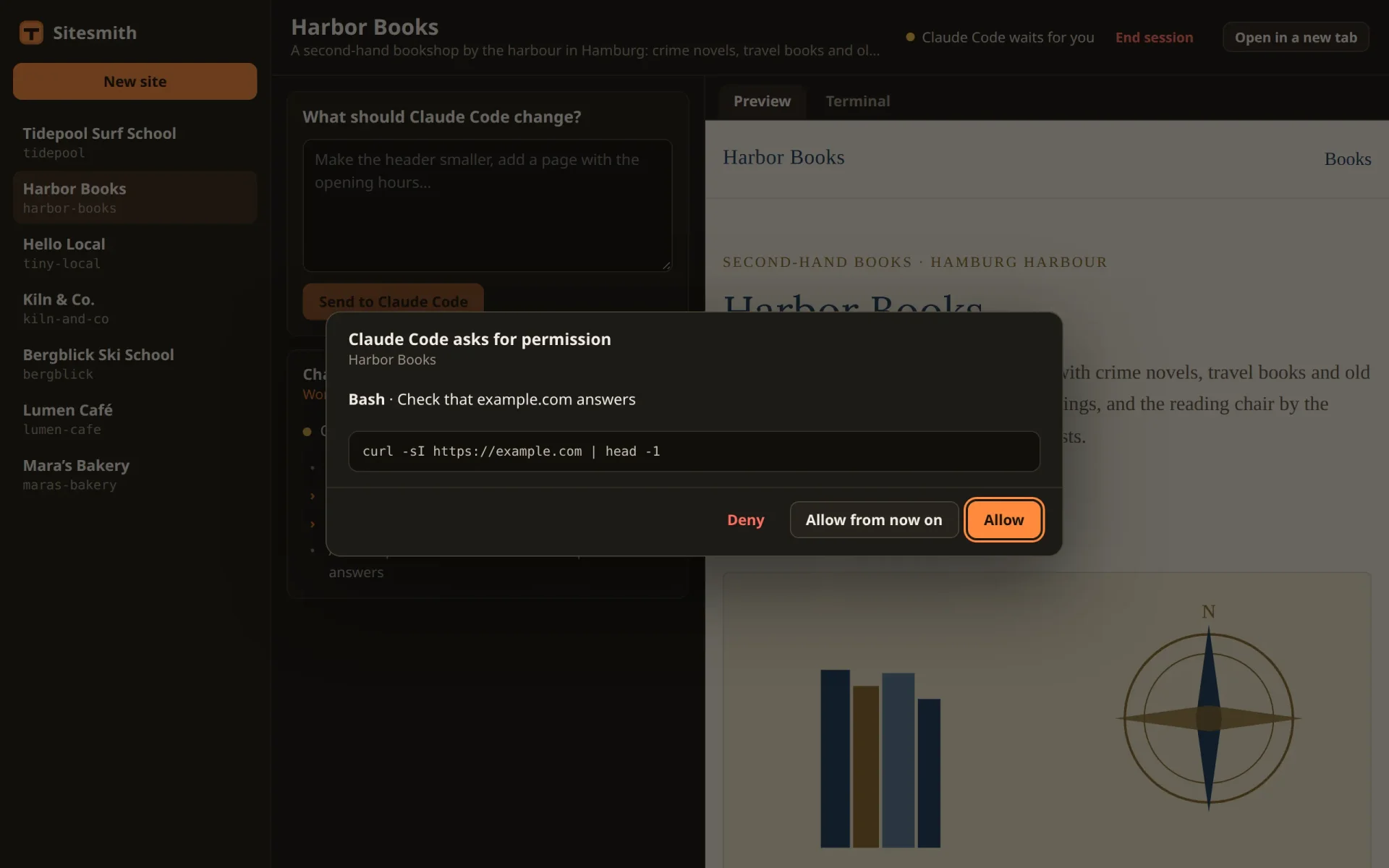
For a permission, summary is the line from describeTool(); for Bash that is Claude Code's own description of the command, such as "Check that example.com answers". detail is the command, the file or the address, whichever the input has. remember says whether Claude Code offered rules for "don't ask again", and the feed gets a line: "Asks for permission: …".
The second line of hookAsk() deserves a closer look. When a question ends up in the terminal (its hook gave up, or, from the next part on, you hand it there yourself), Claude Code shows its own question dialog, and that dialog goes through the permission check as well: PermissionRequest fires, with AskUserQuestion as its tool. Shown in the page, that would be a permission prompt for "Asking you something" with Allow and Deny, and allowing it would not answer a single question. So hookAsk() releases it at once, and the questions are answered where they are now: in the terminal.
Allow, from now on, or deny
answer() gets the permission case in front of the questions. Replace it:
/**
 * The page's answer, as the hook's output for Claude Code.
 *
 * Questions: "allow" the tool, with its input extended by `answers` (per question text, the
 * chosen labels or your own words). Claude Code takes that as your answer and never shows its
 * own dialog.
 *
 * Permissions: a decision, "allow" or "deny" (with a message for Claude Code). "Allow from now on"
 * allows and adds the rules Claude Code suggested, as its own "don't ask again" would.
 */
answer(name: string, req: Partial<AnswerBody>) {
  const p = this.site(name).ask;
  if (!p || p.ask.id !== req.id) throw new Error('That question is no longer open.');
  const ask = p.ask;
  if (ask.kind === 'permission') {
    const decision = req.decision ?? 'deny';
    this.note(name, { kind: 'prompt', text: `${decision === 'deny' ? 'You denied' : 'You allowed'}: ${ask.summary}` });
    const out = decision === 'deny'
      ? { behavior: 'deny', message: 'The user denied this in Sitesmith.' }
      : { behavior: 'allow', ...(decision === 'always' && p.event.permission_suggestions?.length ? { updatedPermissions: p.event.permission_suggestions } : {}) };
    this.settle(p, { status: 'answered', output: { hookSpecificOutput: { hookEventName: 'PermissionRequest', decision: out } } });
    return;
  }
  const answers: Record<string, string> = {};
  for (const q of ask.questions) {
    const a = String(req.answers?.[q.question] ?? '').trim();
    if (!a) throw new Error(`Answer “${q.question}” first.`);
    answers[q.question] = a;
  }
  this.note(name, { kind: 'prompt', text: `You answered: ${short(Object.values(answers).join(' · '))}` });
  this.settle(p, {
    status: 'answered',
    output: {
      hookSpecificOutput: {
        hookEventName: 'PreToolUse',
        permissionDecision: 'allow',
        permissionDecisionReason: 'Answered in Sitesmith',
        updatedInput: { ...p.event.tool_input, answers },
      },
    },
  });
}
A PermissionRequest hook does not answer with the permissionDecision of part 8. The two events have outputs of their own, and mixing them up is an easy mistake. This is what the hook writes for Allow:
{
  "hookSpecificOutput": {
    "hookEventName": "PermissionRequest",
    "decision": {
      "behavior": "allow"
    }
  }
}
And the three answers, plus the case of none:
Allow:
behavior: "allow". Claude Code runs the command, this once.Allow from now on: the same, plus
updatedPermissions, the rules from the event'spermission_suggestions, passed back untouched. They are what the terminal's dialog offers as its second option, for example "Yes, and don't ask again for: curl -sI https://example.com". Sitesmith does not look inside them: Claude Code wrote them, and Claude Code reads them. The page offers the button only when there are suggestions.Deny:
behavior: "deny", with amessagethat Claude Code reads as the reason. Its turn goes on without the command; what it does next is up to it.No decision: an answer without one denies. A missing field should never allow a command.
The dialog
In src/askDialog.ts, show() picks what to draw. Replace it:
/** Shows a site's ask; nothing happens when it is already on screen, so choices made stay. */
show(site: string, title: string, ask: Ask) {
  if (this.el.open && this.ask?.id === ask.id) return;
  this.ask = ask;
  this.site = site;
  this.dismissed = null;
  this.msg.textContent = '';
  this.sub.textContent = title;
  if (ask.kind === 'questions') this.renderQuestions(ask.questions);
  else this.renderPermission(ask);
  if (!this.el.open) this.el.showModal();
}
and add renderPermission() after send():
private renderPermission(ask: Extract<Ask, { kind: 'permission' }>) {
  this.heading.textContent = 'Claude Code asks for permission';
  this.body.replaceChildren(
    h('p', {}, h('strong', {}, ask.tool), ask.summary !== ask.tool ? ` · ${ask.summary}` : ''),
    ask.detail ? h('pre', { class: 'ask-detail' }, ask.detail) : '');
  const allow = h('button', { type: 'button', class: 'primary', onclick: () => void this.send({ decision: 'allow' }) }, 'Allow');
  this.foot.replaceChildren(
    h('button', { type: 'button', class: 'ghost danger', onclick: () => void this.send({ decision: 'deny' }) }, 'Deny'),
    ask.remember ? h('button', { type: 'button', onclick: () => void this.send({ decision: 'always' }) }, 'Allow from now on') : '',
    allow);
  requestAnimationFrame(() => allow.focus());
}
The heading says what kind of ask this is, the tool comes in bold with its summary, and the command (or file, or address) below it in full, so you see exactly what you allow. Allow has the focus, as "Yes" is preselected in the terminal. Escape puts the dialog aside, as with a question, and the panel's Answer brings it back.
Two dialogs at once
A question is held before its dialog exists: PreToolUse runs before the tool does, so while the page holds a question, the terminal has nothing to show. A permission prompt is different. Claude Code runs the PermissionRequest hook and shows its own dialog in the terminal, at the same time. While the page held the curl prompt from above, the terminal looked like this:
# the site's terminal while the page held the prompt for: curl -sI https://example.com | head -1 curl -sI https://example.com | head -1 This command requires approval Do you want to proceed? ❯ 1. Yes 2. Yes, and don’t ask again for: curl -sI https://example.com 3. Yes, and switch to auto mode · auto mode handles these prompts for you 4. No Esc to cancel · Tab to amend# after an Allow in the page, the terminal showed:⎿ Allowed by PermissionRequest hook
Both dialogs are real, and whichever is answered first wins. Allow in the page, and Claude Code takes the hook's decision, closes its own dialog and notes that the hook allowed it. Answer in the terminal, and Claude Code goes on with that answer; the hook's comes too late to change anything.
There is no way to keep the terminal's dialog away, and it is better that way: it is the safety net. If the page or the server goes away while a prompt waits, the terminal still has it. Sitesmith does not type into it by accident either: the dialog is not an empty input box, so atEmptyPrompt() from part 5 says no, and nothing is typed while it is on screen.
The case where the terminal wins has a loose end in this part's code. The server does not hear that the terminal answered, so the page keeps its dialog (and the header keeps saying that Claude Code waits) until the next question or prompt replaces it, or until you stop the run. Answering it then changes nothing in Claude Code, which has long gone on. Part 10 teaches the server to notice that Claude Code has moved on and to close the dialog by itself.
Try it
Restart the server and ask a site for something that needs the network, for example to use a web font and download it into the site's folder. Switch to the Terminal tab before you send the request: behind the page's dialog you will see Claude Code's own dialog come up, and go when you answer in the page.
In the test, Bergblick Ski School was asked to use the Fraunces font and fetch it with curl. Two prompts came up in the page, "Bash · Fetch Fraunces @font-face CSS from Google Fonts" and "Bash · Download Fraunces Latin woff2 into assets/fonts". Both were allowed there, and the run was done after 0:20.
Claude Code's questions and its permission prompts now come to the page, and the terminal is where they go when the page cannot take them. So far that happens quietly: the page does not know when something waits in the terminal, and one dialog is not reported by any hook at all, the trust dialog of a new folder. The next part is about those cases: when the page can't answer.
Comments
The comments are GitHub Discussions: sign in with GitHub to write one.
The comments come from GitHub, through giscus. Loading them sends your IP address to giscus.app and GitHub.