
Claude Code in Your Own Web App · Part 16 of 16 in the series
Part 16: Sitesmith on Your Phone
Open Sitesmith from your phone on your home network: the server listens on the LAN, prints a login link with a QR code, and keeps everyone else out with a token, a cookie and the Host and Origin checks. Then a look back at the whole series.
Claude Code in Your Own Web AppPart 16 of 16
On this page
Quest objectives
- Let the server listen on your network, and know what that opens up
- Log a phone in with a token in the link's #fragment and a cookie derived from it
- Know which check stops what: DNS rebinding, foreign pages, previewed sites, guessing
- Keep the hooks on this machine, and the preview and the terminal behind the login
- Know what plain HTTP on the LAN cannot do: notifications, the clipboard, privacy on the wire
- Use the page on a phone-sized screen
Claude Code builds, you make tea, and while the question about the footer waits on the laptop's screen, your phone is in your pocket. Since part 13 the laptop can chime, but it cannot bring the question to you. This last part brings Sitesmith to your phone, on your own network.
Technically that is one option: let the server listen on the network instead of on 127.0.0.1 alone. All the work lies in what follows from it. Every check so far rested on one fact: whoever connects sits at this machine. From now on that is no longer true, and Sitesmith is not a harmless page. It types into Claude Code, and it shows a terminal in which, once Claude Code exits, a shell waits (part 3). Whoever can use the page can run any command as you. So most of this part is about who gets in, and about which check keeps out what.
Listening on the network
The server gets two new options and prints a QR code. Install the package that draws it, and its types:
$ npm install qrcode$ npm install --save-dev @types/qrcode
At the top of server/main.ts, the comment names the new options, and two imports come in: the QR code, and server/access.ts, which you write below.
/**
 * Sitesmith's server: the API, live updates over server-sent events, the built page (dist/), and a
 * second server on a port of its own that shows the sites. It listens on this machine only, unless
 * --host opens it to your network.
 *
 *   node server/main.ts [--port 5400] [--sites ./sites] [--data ./.data] [--ollama URL] [--local-context 65536]
 *                       [--host 0.0.0.0] [--name my-pc.local]
 *
 * With --host, the server listens on your network too: your phone opens it with the login link it
 * prints. --name adds a host name the page may be opened by (every one you use, like my-pc.local).
 */
import fs from 'node:fs';
import http from 'node:http';
import path from 'node:path';
import { fileURLToPath } from 'node:url';
import QRCode from 'qrcode';
import { WebSocketServer } from 'ws';
import type { AnswerBody, Brain, Config, LocalModels, NewSite, ReplyBody, RequestBody, ServerEvent, Uploaded } from '../shared/types.ts';
import { Access, LOGIN_PAGE, lanAddresses } from './access.ts';
import { Agent, type HookEvent } from './agent.ts';
import { HttpError, fileIn, readJson, send, sendFile } from './http.ts';
import { requestText, runTitle } from './requests.ts';
import { NAME, OWN, Sites } from './sites.ts';
import { Terminals, type Target } from './terminals.ts';
Below option(), add options() for an option that may be given more than once, and the two constants for where the server listens:
function option(name: string, fallback: string) {
  const i = process.argv.indexOf(name);
  return i > 0 && process.argv[i + 1] ? process.argv[i + 1] : fallback;
}
/** every value of an option given more than once */
const options = (name: string) => process.argv.flatMap((a, i) => (a === name && process.argv[i + 1] ? [process.argv[i + 1]] : []));
const PORT = Number(option('--port', '5400'));
const PREVIEW_PORT = PORT + 2;
/** Vite's dev server (`npm run dev`), which forwards /api here */
const DEV_PORT = 5401;
const DIST = path.join(APP, 'dist');
/** where to listen: this machine only (127.0.0.1), or 0.0.0.0 for the network too */
const HOST = option('--host', '127.0.0.1');
const ON_NETWORK = HOST === '0.0.0.0';
// one address of the network alone would shut out the hooks, which always come over 127.0.0.1
if (!ON_NETWORK && HOST !== '127.0.0.1') throw new Error('--host takes 127.0.0.1 (this machine) or 0.0.0.0 (the network too)');
--host 0.0.0.0 makes the server listen on every IPv4 address of the machine, loopback included, so localhost keeps working. Without the option it listens on 127.0.0.1 as before, and nothing in this part can be reached from outside. Any other value stops the server at the start. Listening on one network address alone, say 192.168.0.202, would leave out 127.0.0.1, and the hooks always call the server there (part 6): every session would lose its way back to the page. --name adds a host name the page may be opened by, such as my-pc.local, if your network knows the machine by one; it can be given several times.
Then replace the whole section "who may ask", with ORIGINS, HOSTS, allowed() and allowedSocket(), by this:
/* ------------------------------------------------------------------ */
/* who may ask                                                          */
/* ------------------------------------------------------------------ */

/**
 * The names the page may be opened by: localhost, and on the network this machine's addresses
 * and the names you gave. Host and Origin must be one of them (no DNS rebinding, no foreign pages,
 * no previewed sites); anyone but your own browser here must have logged in (server/access.ts).
 */
const NAMES = ['localhost', '127.0.0.1', ...(ON_NETWORK ? lanAddresses() : []), ...options('--name')];
const access = new Access(DATA, { port: PORT, previewPort: PREVIEW_PORT, devPort: DEV_PORT, names: NAMES });
The names are what the Host check from part 2 compares against: localhost and 127.0.0.1 always, the machine's network addresses when it listens on the network, and the names you gave. The checks themselves move into a class of their own.
A token, kept on disk
Create server/access.ts. It starts with three helpers:
import crypto from 'node:crypto';
import fs from 'node:fs';
import type http from 'node:http';
import os from 'node:os';
import path from 'node:path';

const COOKIE = 'sitesmith';
const LOOPBACK = new Set(['127.0.0.1', '::1', '::ffff:127.0.0.1']);

/** This machine's addresses in its networks (IPv4, not loopback): where a phone finds it. */
export function lanAddresses() {
  return Object.entries(os.networkInterfaces())
    // the bridges of Docker and virtual machines lead nowhere a phone could be
    .filter(([name]) => !/^(docker|br-|veth|virbr)/.test(name))
    .flatMap(([, list]) => list ?? [])
    .filter((a) => a.family === 'IPv4' && !a.internal)
    .map((a) => a.address);
}

/** The request's cookies. Whatever a client sends, nothing here may throw: a bad value is no value. */
function cookies(req: http.IncomingMessage) {
  const out: Record<string, string> = {};
  for (const part of String(req.headers.cookie ?? '').split(';')) {
    const at = part.indexOf('=');
    if (at < 0) continue;
    try { out[part.slice(0, at).trim()] = decodeURIComponent(part.slice(at + 1).trim()); } catch { /* not ours */ }
  }
  return out;
}

/** Equal, compared in constant time: how long it takes says nothing about the secret. */
function same(a: string, b: string) {
  const [x, y] = [Buffer.from(a), Buffer.from(b)];
  return x.length === y.length && crypto.timingSafeEqual(x, y);
}
lanAddresses collects the machine's IPv4 addresses that are not loopback. It skips the virtual network cards of Docker and of virtual machines (docker0, br-…, veth…, virbr…): they lead to containers and virtual machines, not to your phone. A machine can still have more than one real address, one for the cable and one for the Wi-Fi, like the one the test ran on.
cookies reads the Cookie header into an object. Whatever a client sends, it must not throw: decodeURIComponent throws on a broken escape such as %zz, so a value it cannot decode is simply left out. That care matters because the preview server runs these checks outside any try, where an exception would end the whole server, and anyone on the network can send a header.
same compares two secrets in constant time. An ordinary comparison stops at the first character that differs, so it answers a little sooner the more wrong a guess is, and with enough measurements that time tells an attacker how many characters were right. timingSafeEqual always compares every byte. It needs two inputs of the same length in bytes and throws otherwise, hence the check in front, on the two Buffers rather than on the strings: a character such as é counts once in a string but takes two bytes. The token's length is no secret.
Then the class, with the token and the names:
/**
 * Who may use Sitesmith. Your own browser on this machine may, as before. Anything else must have
 * logged in with the token: once, with the link the server prints, which sets a cookie. Host and
 * Origin are checked for every request, now against the LAN addresses too.
 */
export class Access {
  /** the secret in the login link; delete .data/token and restart to log every phone out */
  readonly token: string;
  /** the cookie's value: derived from the token, so the link itself is never stored in a browser */
  private session: string;
  private hosts = new Set<string>();
  private origins = new Set<string>();
  private previewHosts = new Set<string>();
  /** failed logins per address, for the last minute */
  private failures = new Map<string, number[]>();

  /** `names`: every host name the page may be opened by (localhost, LAN addresses, names you add) */
  constructor(data: string, opts: { port: number; previewPort: number; devPort: number; names: string[] }) {
    const file = path.join(data, 'token');
    try { this.token = fs.readFileSync(file, 'utf8').trim(); } catch { this.token = ''; }
    if (!this.token) {
      this.token = crypto.randomBytes(24).toString('base64url');
      fs.mkdirSync(data, { recursive: true });
      fs.writeFileSync(file, `${this.token}\n`, { mode: 0o600 });
    }
    this.session = crypto.createHmac('sha256', this.token).update('sitesmith session').digest('base64url');
    for (const name of opts.names) {
      for (const port of [opts.port, opts.devPort]) {
        this.hosts.add(`${name}:${port}`);
        this.origins.add(`http://${name}:${port}`);
      }
      this.previewHosts.add(`${name}:${opts.previewPort}`);
    }
  }
The token is 24 random bytes from the operating system's random source, 192 bits, written as 32 characters of base64url, which fit into a link without escaping. Nobody guesses that. It goes into .data/token with mode 600, so only your user can read the file, and it stays there across restarts, so a phone stays logged in when you restart the server. Delete the file and restart, and there is a new token, and every phone is logged out.
The cookie's value is not the token but an HMAC of it: a hash that only someone who knows the token can compute. So the server keeps no list of sessions; it computes the one valid value at the start and compares against it. And the token itself never ends up in a browser's cookie store. Do not take this for more than it is, though: the cookie is as good as a login, for 30 days. Whoever has it is in, just like whoever has the link.
The names become three sets: the hosts the page and the API may be asked for, on the server's port and on the dev server's; the origins of our own page; and the hosts of the preview server.
Who may do what
Next come the checks, one method each:
/** Your own browser on this machine: a loopback address, and the page asked for by localhost. */
local(req: http.IncomingMessage) {
  const host = String(req.headers.host ?? '').replace(/:\d+$/, '');
  return LOOPBACK.has(req.socket.remoteAddress ?? '') && (host === 'localhost' || host === '127.0.0.1');
}

loggedIn(req: http.IncomingMessage) {
  const value = cookies(req)[COOKIE];
  return Boolean(value) && same(value, this.session);
}

/** The API and the page: a known host, you (here or logged in), and our own page's origin. */
allowed(req: http.IncomingMessage) {
  if (!this.hosts.has(req.headers.host ?? '')) return false;
  if (!this.local(req) && !this.loggedIn(req)) return false;
  const origin = req.headers.origin;
  return req.method === 'GET' || req.method === 'HEAD' || origin === undefined || this.origins.has(origin);
}

/** A terminal socket: the same, and the origin must be there and ours. */
allowedSocket(req: http.IncomingMessage) {
  return this.hosts.has(req.headers.host ?? '') && (this.local(req) || this.loggedIn(req)) && this.origins.has(req.headers.origin ?? '');
}

/** The preview server: a known host, and you. */
allowedPreview(req: http.IncomingMessage) {
  if (!this.previewHosts.has(req.headers.host ?? '')) return false;
  return LOOPBACK.has(req.socket.remoteAddress ?? '') || this.loggedIn(req);
}

/** The hooks run on this machine, and only there: never from the network, logged in or not. */
fromThisMachine(req: http.IncomingMessage) {
  return LOOPBACK.has(req.socket.remoteAddress ?? '');
}

/** No other page's script: a POST from a browser carries the origin of its page. */
ownOrigin(req: http.IncomingMessage) {
  const origin = req.headers.origin;
  return req.method === 'GET' || origin === undefined || this.origins.has(origin);
}

/** Whether the login page may be shown (a known host is enough: it has nothing to hide). */
knownHost(req: http.IncomingMessage) {
  return this.hosts.has(req.headers.host ?? '');
}localis your own browser on this machine, and it takes two things: the connection comes from a loopback address, and the page was asked for aslocalhostor127.0.0.1. The address is not a header a client could write; it is where the TCP connection comes from. Open the page on this machine by its network address,http://192.168.0.202:5400, and you count as the network and have to log in. The test below used exactly that to play the phone.allowedguards the API and the page. The Host first, as in part 2: a foreign website whose name suddenly points to your machine (DNS rebinding) still sends its own name in the Host header, and is turned away. Then you: here, or logged in. Then the Origin, for everything but GET and HEAD: a page from elsewhere, or a previewed site, can at most send a GET, which changes nothing, and the browser does not let it read the answer.allowedSocketguards the terminal's WebSocket. The same rules, but the Origin must be there and must be ours: browsers have long let any page open a WebSocket to any address without asking (newer ones begin to ask before a public page reaches your network, but the server must not count on that), as part 4 explained, and this socket types into a shell.allowedPreviewguards the preview server: a known host, and you, on this machine or logged in. Without it, anyone on the network could look at your sites.fromThisMachineis for the hooks, further down.knownHostis enough for the login page, which has nothing to hide.
Logging in
The last method of the class:
  /**
   * A login with the token. Five wrong tries a minute per address, then a pause: the token is long
   * enough that guessing is hopeless, but there is no reason to let anyone try.
   */
  login(req: http.IncomingMessage, token: string): { ok: true; cookie: string } | { ok: false; status: number } {
    const who = req.socket.remoteAddress ?? '';
    const now = Date.now();
    const recent = (this.failures.get(who) ?? []).filter((t) => t > now - 60000);
    if (recent.length >= 5) return { ok: false, status: 429 };
    if (!same(token, this.token)) {
      this.failures.set(who, [...recent, now]);
      return { ok: false, status: 401 };
    }
    this.failures.delete(who);
    // HttpOnly: no script reads it; SameSite=Strict: no other site's page sends it along
    const cookie = `${COOKIE}=${this.session}; HttpOnly; SameSite=Strict; Path=/; Max-Age=${60 * 60 * 24 * 30}`;
    return { ok: true, cookie };
  }
}
Five wrong tries per address and minute; a sixth within that minute gets 429 and is not even checked, the right token included. With 192 bits, guessing is hopeless anyway, but there is no reason to let anyone try in a loop. A right token clears the address's record.
Each of the cookie's attributes does one thing:
HttpOnly: no script in the page can read it. A script that gets into the page through some bug can still send requests while it runs, but it cannot carry the cookie away.SameSite=Strict: the browser leaves it off every request that a page of another site starts. A foreign page that submits a form to your Sitesmith, or points a link at it, arrives without the cookie, so as not logged in.Path=/for the whole server,Max-Age30 days.No
Secure: that would tell the browser to send it over HTTPS only, and this is HTTP.
At the end of the file comes the login page, as one string:
/** The login page: it takes the token from the link's #fragment (never sent over the network by itself). */
export const LOGIN_PAGE = `<!doctype html>
<html lang="en"><head><meta charset="utf-8"><meta name="viewport" content="width=device-width, initial-scale=1">
<meta name="color-scheme" content="dark"><title>Sitesmith: log in</title>
<style>
body { margin: 0; min-height: 100vh; display: grid; place-items: center; background: #15130f; color: #f1ece4; font: 15px/1.5 system-ui, sans-serif; }
form { box-sizing: border-box; display: grid; gap: 12px; width: min(380px, calc(100vw - 32px)); padding: 24px; border: 1px solid #352f27; border-radius: 12px; background: #1d1a16; }
input { padding: 10px; border: 1px solid #4a4237; border-radius: 8px; background: #110f0c; color: inherit; font: 14px ui-monospace, monospace; }
button { padding: 10px; border: 0; border-radius: 8px; background: #ff8a3d; color: #1b120a; font-weight: 700; font-size: 15px; }
p { margin: 0; color: #9a9083; } .bad { color: #ff6f61; }
</style></head><body>
<form><h1 style="margin:0;font-size:20px">Sitesmith</h1>
<p>Open the link the server printed, or paste its token.</p>
<input name="token" autocomplete="off" aria-label="Token" placeholder="Token">
<button>Log in</button><p class="bad" aria-live="polite"></p></form>
<script>
const form = document.querySelector('form');
async function login(token) {
  const res = await fetch('/api/login', { method: 'POST', headers: { 'content-type': 'application/json' }, body: JSON.stringify({ token }) });
  if (res.ok) location.replace('/');
  else form.querySelector('.bad').textContent = res.status === 429 ? 'Too many tries: wait a minute.' : 'That token is not right.';
}
form.onsubmit = (e) => { e.preventDefault(); login(form.token.value.trim()); };
// the link's token, also when the link is opened on this page (only the #fragment changes then)
function fromLink() { if (location.hash.length > 1) { const t = location.hash.slice(1); history.replaceState(null, '', '/login'); login(t); } }
window.addEventListener('hashchange', fromLink);
fromLink();
</script></body></html>
`;
It brings its style and script along, because the browser that sees it is not logged in yet and would get none of the built page's files. Its main trick is where the token comes from: the link puts it after a #. Browsers never send this fragment to the server; it stays in the browser. So the token is not in the request line, not in a log, and not in the Referer header of a later request. The script reads it, removes it from the address bar with history.replaceState, and posts it to /api/login. If that worked, it goes on to the page.
The listener for hashchange came from testing: opening the link while the login page is already open changes only the fragment, and the page does not load again. You can also paste the token into the field.
The fragment keeps the token out of logs and addresses, not off the network. Over plain HTTP, the login request carries it readable for anyone who can see the traffic, and every later request carries the cookie the same way. More on that below.
The front door
Back in server/main.ts, add the login route to the list of routes (in the download it sits just above the hooks' routes):
['POST', /^\/api\/login$/, async (req, res) => {
  const { token } = await readJson<{ token: string }>(req);
  const result = access.login(req, String(token ?? ''));
  if (!result.ok) throw new HttpError(result.status, result.status === 429 ? 'too many tries' : 'wrong token');
  res.setHeader('set-cookie', result.cookie);
  send(res, 200, {});
}],
And replace the server's request handler:
const server = http.createServer(async (req, res) => {
  const url = new URL(req.url ?? '/', 'http://localhost');
  try {
    // the login page and the login itself need no login, only a known host
    if (url.pathname === '/login' || url.pathname === '/api/login') {
      if (!access.knownHost(req) || !access.ownOrigin(req)) throw new HttpError(403, 'forbidden');
      if (url.pathname === '/login') { res.writeHead(200, { 'content-type': 'text/html; charset=utf-8', 'cache-control': 'no-store' }); res.end(LOGIN_PAGE); return; }
    } else if (!access.allowed(req)) {
      // a phone that is not logged in yet: to the login page
      if (req.method === 'GET' && !url.pathname.startsWith('/api/') && access.knownHost(req)) { res.writeHead(302, { location: '/login' }); res.end(); return; }
      throw new HttpError(403, 'forbidden');
    }
    // the hooks run on this machine: never from the network, logged in or not
    if (url.pathname.startsWith('/api/hooks/') && !access.fromThisMachine(req)) throw new HttpError(403, 'forbidden');
    if (url.pathname.startsWith('/api/')) {
      const route = routes.find(([method, re]) => method === req.method && re.test(url.pathname));
      if (!route) throw new HttpError(404, 'not found');
      await route[2](req, res, url.pathname.match(route[1])!);
      return;
    }
    // the page: its built files, and index.html for every other address
    if (!fs.existsSync(path.join(DIST, 'index.html'))) {
      throw new HttpError(503, `The page is not built: run npm run build, or use the dev server on port ${DEV_PORT}.`);
    }
    sendFile(res, fileIn(DIST, url.pathname) ?? path.join(DIST, 'index.html'), { 'cache-control': 'no-cache' });
  } catch (err) {
    const status = err instanceof HttpError ? err.status : 500;
    if (status === 500) console.error(err);
    if (!res.headersSent) send(res, status, { error: err instanceof Error ? err.message : String(err) });
    else res.end();
  }
});
The login page and the login itself need no login, only a known host, which still keeps out DNS rebinding, and for the login our own origin (access.ownOrigin), so a script on another page in the phone's browser cannot use up your five tries. What guards the token itself is its length and those five tries a minute. Everything else goes through access.allowed. A browser that is not logged in and asks for a page, not the API, is sent to /login, which is how a phone lands on the login page when you type the bare address. The API answers 403.
Then the hooks. Their routes take Claude Code's events and hand the page's answers to the waiting hooks, and only one program ever calls them: server/hook.ts, which runs in the sessions on this machine. Nothing on your phone has any business there, so nothing from the network gets in, whatever cookie it brings.
The upgrade handler for the terminal changes in one place: it asks access.allowedSocket.
// /api/sites/<name>/session/socket?cols=..&rows=..: the session on a page's screen
server.on('upgrade', (req, socket, head) => {
  const url = new URL(req.url ?? '/', 'http://localhost');
  const m = url.pathname.match(/^\/api\/sites\/([^/]+)\/session\/socket$/);
  let t: Target | null = null;
  try { if (m && access.allowedSocket(req)) t = target(m[1]); } catch { /* no such site */ }
  if (!t) { socket.destroy(); return; }
  const size = (key: string, fallback: number) => Math.min(500, Math.max(10, Number(url.searchParams.get(key)) || fallback));
  sockets.handleUpgrade(req, socket, head, (ws) => terminals.attach(ws, t, size('cols', 120), size('rows', 36)));
});
The preview server asks access.allowedPreview:
/**
 * The sites, at /<name>/ on a port of their own. A site is code Claude Code wrote: served from the
 * page's own address, its scripts could call the API just like the page does. From another port
 * it is another origin, and access.allowed() turns it away. Hidden files (.sitesmith/ with the requests)
 * are not shown.
 */
const preview = http.createServer((req, res) => {
  const url = new URL(req.url ?? '/', 'http://localhost');
  const [, name = '', ...rest] = url.pathname.split('/');
  const site = access.allowedPreview(req) ? sites.read(name) : null;
  // /<name> without the slash: the site's relative links need it
  if (site && !rest.length) { res.writeHead(302, { location: `/${name}/` }); res.end(); return; }
  const file = site && !hiddenPath(rest.join('/')) ? fileIn(sites.dir(name), rest.join('/')) : null;
  if (!file) { res.writeHead(404, { 'content-type': 'text/html; charset=utf-8' }); res.end(MISSING); return; }
  sendFile(res, file, { 'cache-control': 'no-store' });
});
That works because cookies ignore ports. A cookie set by 192.168.0.202:5400 is sent to 192.168.0.202:5402 as well, so the preview frame on the phone carries it and the preview server can check it. It cuts both ways. The previewed sites are code Claude Code wrote, and their requests to the API carry the cookie too: for SameSite they are the same site, as only the port differs. That is why the Origin check stays: a POST from the preview's origin is refused, cookie or not.
Last, the server listens where it was told, and prints the links:
const SERVER_FILE = path.join(DATA, 'server.json');
server.listen(PORT, HOST, async () => {
  // the hooks of the sessions find the server through this file
  fs.writeFileSync(SERVER_FILE, `${JSON.stringify({ port: PORT, pid: process.pid })}\n`);
  console.log(`Sitesmith: http://localhost:${PORT}/`);
  if (!ON_NETWORK) return;
  // the login links, the first one as a QR code for the phone's camera
  const links = NAMES.filter((n) => n !== 'localhost' && n !== '127.0.0.1').map((n) => `http://${n}:${PORT}/login#${access.token}`);
  console.log('\nOn your phone (same network), open:');
  for (const link of links) console.log(`  ${link}`);
  if (links[0]) console.log(await QRCode.toString(links[0], { type: 'terminal', small: true }));
});
preview.listen(PREVIEW_PORT, HOST);
One link per network address and per --name, and the first one again as a QR code for your phone's camera. The first is not necessarily one your phone can reach: on a machine in two networks, take the link whose address is in your phone's network. The preview server listens on the same host as the server.
On a phone-sized screen
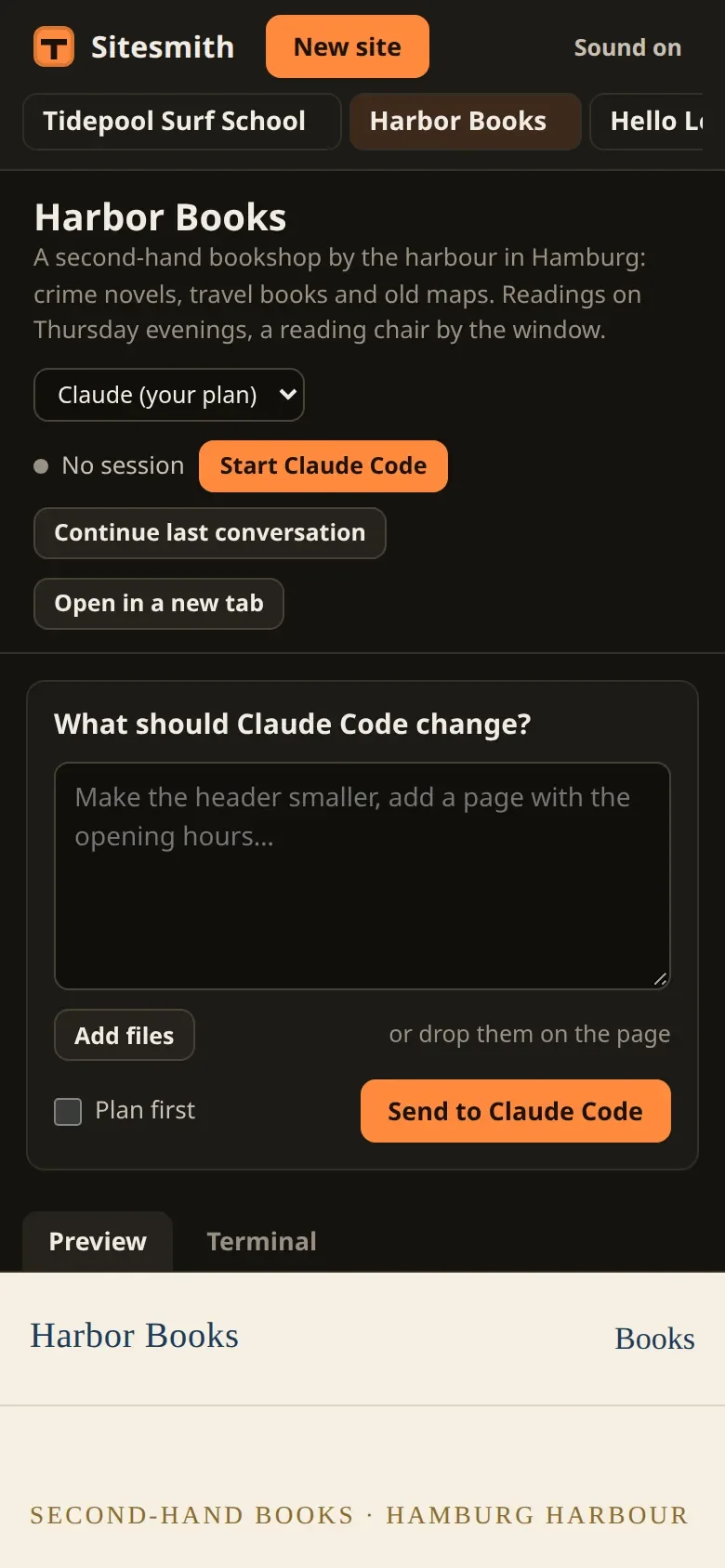
Most of the phone layout has been in style.css since part 2, in a block for screens up to 900 pixels wide: the sidebar becomes a bar at the top, the sites a row that scrolls sideways, and the request box and the feed come before the preview, which gets most of the screen's height. One thing needs code. With the sites in a row, the open one can be scrolled out of sight. In src/sidebar.ts, the class gets a field below list that remembers which site it last showed:
export class Sidebar {
  readonly el: HTMLElement;
  private list = h('nav', { class: 'site-list', 'aria-label': 'Sites' });
  /** the site last scrolled into view */
  private shown = '';
and render two lines at its end:
render(sites: Site[], current: string, agents: Map<string, AgentState>, terminals: TerminalState[]) {
  this.list.replaceChildren(...sites.map((s) => {
    const status = siteStatus(agents.get(s.name), terminals.find((t) => t.site === s.name));
    return h('a', {
      class: 'site-link',
      href: `#site/${s.name}`,
      'aria-current': s.name === current ? 'page' : null,
    },
    h('span', { class: 'site-title' }, s.title),
    h('span', { class: 'site-name' }, s.name),
    status ? h('span', { class: 'site-state' },
      status.dot === 'ask' ? h('span', { class: 'badge' }, '?') : h('span', { class: `dot ${status.dot}`, 'aria-hidden': 'true' }),
      status.text ? h('span', { class: 'site-state-text' }, status.text) : null) : null);
  }));
  if (!sites.length) this.list.append(h('p', { class: 'hint' }, 'No sites yet.'));
  // on a phone the list scrolls sideways: the open site in view, when another one opens
  if (current !== this.shown) this.list.querySelector('[aria-current]')?.scrollIntoView({ block: 'nearest', inline: 'nearest' });
  this.shown = current;
}
The list scrolls only when another site has opened. render runs on every event from the server, many times a minute while Claude Code works, and scrolling back each time would undo what your thumb just did. With 'nearest', scrollIntoView scrolls only as far as needed, and not at all when the link is already in view.
Try it
The phone reaches the server, not Vite's dev server, which listens on this machine only. So build the page first with npm run build, then start the server on the network (npm start -- --host 0.0.0.0 does both in one go):
$ npm run server -- --host 0.0.0.0Sitesmith: http://localhost:5400/On your phone (same network), open: http://192.168.0.202:5400/login#TOKEN http://192.168.1.137:5400/login#TOKEN# TOKEN stands for the 32 characters of the token. A QR code of the first link follows,# drawn with block characters.
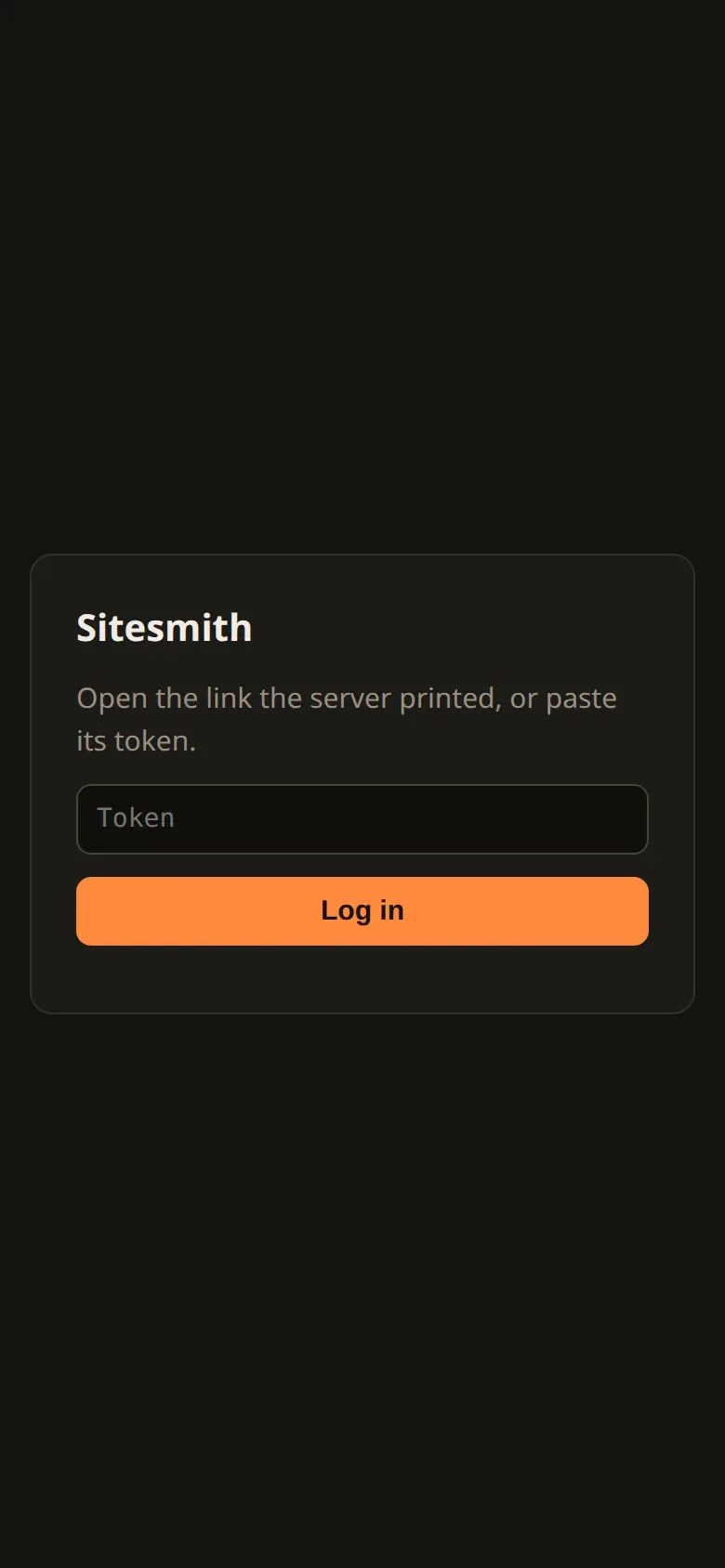
Scan the QR code with your phone, or type one of the links. The login page takes the token from the link and passes you on to Sitesmith. Open the bare address instead, and you get the login page without a token:
Logged in, it is the page you know, arranged for the narrow screen:
If the phone cannot connect at all, the usual reason is a firewall on the computer: it has to let in ports 5400 and 5402.
For this series the checks ran from the test machine's own network addresses, which count as "not this machine" just as a phone does. That server listened on port 5410, its preview on 5412:
# From this machine's own LAN addresses, so they count as "not this machine".# This test server listened on port 5410, its preview on 5412.1 page without login: 302 → http://192.168.0.202:5410/login2 API without login: 4033 wrong token, tries 1–5: 401 401 401 401 4013 wrong token, try 6: 429 (that address is locked out for a minute)4 right token (other address): 200, cookie set: sitesmith=…; HttpOnly; SameSite=Strict; Path=/; Max-Age=25920005 API with the cookie: 2005 POST, own origin: 400 (got through; the empty body was refused)5 POST, origin evil.example: 4036 hooks route from the LAN, with the cookie: 4037 preview without cookie: 404 (preview server on 5412)7 preview with cookie: 2009 localhost, no login: 2009 hooks from localhost: 200x foreign Host header: 403# The terminal's socket, from the LAN:no cookie: refused: socket hang upcookie, foreign origin: refused: socket hang upcookie, own origin (no session): closed 4404
Line by line: a page without login is sent to the login page, and the API refuses. Five wrong tokens get 401, the sixth 429, and since that address was now locked out for a minute, the right token came from the second address: 200, and the cookie with the attributes from above. With the cookie, the API answers. A POST from our own origin got through to its route, which refused the empty body; the same POST with a foreign Origin did not get that far. The hooks' routes turn the network away, cookie or not. The preview shows nothing without the cookie and the site with it. On localhost everything works without a login, as before, and a foreign Host header is refused. The terminal's socket was closed without the cookie and with a foreign origin. With the cookie and our own origin it passed every check, and the server closed it only because the site had no session (4404).
Then a phone-sized browser (390 × 844 pixels, with touch) on the network address: without a login it ended up on /login, after the link on the page, with the switch saying Sound on, and the preview frame loaded. It, too, was locked out for a minute at first, by the wrong tries of the checks before it: the limit does what it should.
What plain HTTP cannot do
http://192.168.0.202:5400 is not a secure context: the browser cannot know whether something between it and the server reads or changes the traffic, and it is right not to assume so. Three things follow.
No notifications. The switch from part 13 offers only the sound there.
No clipboard. Copying from the terminal (part 4) uses the browser's clipboard API, which only secure pages get. On the phone, nothing is copied.
Nothing private on the wire. The token at login, the cookie on every request, everything you type into the terminal and everything Claude Code shows travel unencrypted. On your home network many accept that for a tool like this; on a network you share with strangers, don't.
HTTPS would fix all three. It is the first idea in the list at the end.
What you have built
Sixteen parts ago, Claude Code was a program in a terminal. Look at what stands around it now:
tmux sessions, one per site, that outlive the server and that you can attach to from your own terminal at any time;
a server that types requests in, and reads the screen only where nothing else says what is going on: the prompt, the trust dialog, the mode;
hooks that report every step, and hold Claude Code's questions, permission prompts and plans until the page has answered;
a page with the terminal itself, a feed of what Claude Code does, its summary, and dialogs with previews for its questions;
a way out for everything the page cannot answer: the terminal tab, handing a question back, hooks that wait for a restarting server;
several sites at once, a chime when one needs you, files and pictures for Claude Code;
a local model as the brain for any site that should stay on your machine;
and a login, so that all of it fits into your pocket.
And no API key anywhere: everything runs on Claude Code as you use it every day, with your settings and your skills, on your subscription or on a model of your own.
Where to go from here
HTTPS on your network. With a certificate in front, notifications and the clipboard work on the phone, and the traffic is encrypted. A reverse proxy such as Caddy can do it, or a VPN that hands out certificates for its devices. One thing has to change first: Sitesmith trusts the loopback address, and a proxy on the same machine makes every request come from there. The hooks' check, the preview's and the tries per address all go by that address, so
access.tswould have to know about the proxy. This was not tried for the series.A history per site. Make each site's folder a git repository and let Claude Code commit after every request. The page could list the commits and take a site back to any of them.
Publishing. A site is a folder of static files. A button that copies it to a web host, or that asks Claude Code to deploy it, is a small step.
Claude Code checks its own work. Give the sessions a way to look at the result in a browser, and add to the request that it should look at the page on a narrow screen before it says it is done.
Other kinds of folders. Nothing in the tmux sessions, the hooks or the dialogs is about websites; only the
CLAUDE.mdguide, the request text and the preview are. Swap those, and the same machinery drives Claude Code for a documentation folder, a small app, anything you would like to describe from your sofa.
What is worth keeping is the shape of it. The program stays the real one, with everything it can do, and your code sits around it: it types, it listens to the hooks, it reads the screen only where nothing else tells it what is going on, and every wait has a way out. And because that program can do anything on your machine, every way into it checks who is asking, every time.
Comments
The comments are GitHub Discussions: sign in with GitHub to write one.
The comments come from GitHub, through giscus. Loading them sends your IP address to giscus.app and GitHub.