
Claude Code in Your Own Web App · Part 12 of 16 in the series
Part 12: Several Sites at Once
Let several sites work side by side: the server has kept everything per site from the start, so this part is about the page. The sidebar shows what each site's Claude Code is doing, and the tab's title counts the sites that wait for you.
Claude Code in Your Own Web AppPart 12 of 16
On this page

Quest objectives
- See why the server needs no change to run several sites at once
- Show in the sidebar what each site's Claude Code is doing
- Count the sites that wait for you in the tab title
- Keep the dialog to the site you look at, and know why
Claude Code works on one request at a time per site, but nothing stops you from giving three sites something to do and watching one of them. Each keeps working in its own session, and sooner or later one that you are not looking at has a question. Until now you wouldn't know: the dialog only ever comes up for the open site, and the sidebar is a plain list of names.
This part is short, because the server has been ready for it all along. What it adds is in the page: the sidebar shows what each site's Claude Code is doing, and the tab's title counts the sites that wait for you.
Built for several from the start
Look at what the server keeps, and nearly all of it is per site. These are the Agent's fields in server/agent.ts, unchanged:
private terminals: Terminals;
private emit: (ev: ServerEvent) => void;
private sites = new Map<string, SiteAgent>();
private pending = new Map<string, Pending>();
/** how many pages are open */
private pages: () => number;
/** since when no page has been open (0: one is) */
private noPagesSince = 0;
sites holds a SiteAgent for every site: its run and its queue, what it did, what it waits for, whether it is stuck. pending holds the open asks of all sites by their id, so a hook's long poll finds its question whichever site it belongs to. Terminals keeps its state per session, and every site has a tmux session of its own, named after it (part 3). The session's environment tells its hooks which site they report for:
/** The session's environment: which site its hooks report for, and where they find the server. */
private env(t: Target) {
  return this.hooks ? ['-e', `SITESMITH_SITE=${t.name}`, '-e', `SITESMITH_DATA=${this.hooks.data}`] : [];
}
The hook sends that name with every event and every question, so a question from Kiln & Co. lands in the SiteAgent of Kiln & Co. and nowhere else. And the clock goes through all sites every second:
/** Once a second: queued runs go out, and the state of the current one is checked. */
private async tick() {
  if (this.pages()) this.noPagesSince = 0;
  else if (!this.noPagesSince) this.noPagesSince = Date.now();
  for (const [name, s] of this.sites) {
    try { await this.check(name, s); } catch { /* a hiccup of tmux: next second */ }
    this.changed(name);
  }
}
One run at a time per site (part 5), but as many sites side by side as you like. Only the screens of sites with something going on are read (part 10), so idle sites cost next to nothing. What is shared is only what can't be per site: the open pages, and since when there has been none.
From your own terminal, you can see all sessions at once:
$ tmux -L sitesmith ls$ tmux -L sitesmith list-panes -a -F '#{session_name} #{pane_current_command}'
The first command lists one session per site that has one, the second what runs in each: claude, or a shell when Claude Code has exited.
The sidebar
The page knows every site's state already: the server sends it to every open page, and main.ts keeps it in agents. The sidebar just never looked at it. Here is src/sidebar.ts now:
import { h } from './dom.ts';
import type { AgentState, Site, TerminalState } from '../shared/types.ts';

/** What a site's Claude Code is up to, in a word or two for the list. */
export function siteStatus(agent: AgentState | undefined, term: TerminalState | undefined) {
  if (!term?.claude) return null;
  if (agent?.ask || agent?.needsTerminal) return { dot: 'ask', text: 'waits for you' };
  const busy = agent?.hooked ? agent.busy : term.busy;
  if (busy) return { dot: 'busy', text: 'working' };
  return { dot: 'on', text: '' };
}

/**
 * The list of sites on the left, and the way to a new one. Every site shows what its Claude Code
 * does, so a question waiting in one site is seen while you look at another.
 */
export class Sidebar {
  readonly el: HTMLElement;
  private list = h('nav', { class: 'site-list', 'aria-label': 'Sites' });

  constructor() {
    this.el = h('aside', { class: 'sidebar' },
      h('a', { class: 'brand', href: '#' }, h('span', { class: 'brand-mark', 'aria-hidden': 'true' }), 'Sitesmith'),
      h('a', { class: 'button primary', href: '#new' }, 'New site'),
      this.list);
  }

  render(sites: Site[], current: string, agents: Map<string, AgentState>, terminals: TerminalState[]) {
    this.list.replaceChildren(...sites.map((s) => {
      const status = siteStatus(agents.get(s.name), terminals.find((t) => t.site === s.name));
      return h('a', {
        class: 'site-link',
        href: `#site/${s.name}`,
        'aria-current': s.name === current ? 'page' : null,
      },
      h('span', { class: 'site-title' }, s.title),
      h('span', { class: 'site-name' }, s.name),
      status ? h('span', { class: 'site-state' },
        status.dot === 'ask' ? h('span', { class: 'badge' }, '?') : h('span', { class: `dot ${status.dot}`, 'aria-hidden': 'true' }),
        status.text ? h('span', { class: 'site-state-text' }, status.text) : null) : null);
    }));
    if (!sites.length) this.list.append(h('p', { class: 'hint' }, 'No sites yet.'));
  }
}
siteStatus() turns a site's state into a word or two: nothing when Claude Code doesn't run, a question mark and "waits for you" when it waits (for the page or in the terminal), "working" when it works, and a quiet dot when it is open and idle. Whether it works comes from the hooks if the session has them and from the screen if not, the same rule as in busy() on the server (part 7) and in the header (part 8).
The tab's title
In src/main.ts, one function brings the sidebar and the title up to date. Add it under the dialog:
/** The list on the left, and the tab's title: "(2) Sitesmith" while two sites wait for you. */
function overview() {
  sidebar.render(sites, page?.name ?? '', agents, terminals);
  const waiting = sites.filter((s) => agents.get(s.name)?.ask || agents.get(s.name)?.needsTerminal).length;
  const open = page ? sites.find((s) => s.name === page!.name)?.title : null;
  document.title = `${waiting ? `(${waiting}) ` : ''}${open ? `${open} · ` : ''}Sitesmith`;
}
The title counts the sites that wait for you, with an ask or with needsTerminal, and names the open site: "(2) Lumen Café · Sitesmith". It shows in the browser's tab strip even while you are in another tab. For the times you aren't looking at the browser at all, part 13 adds notifications.
route() calls it where it used to render the sidebar:
function route() {
  const hash = decodeURIComponent(location.hash.slice(1));
  const name = hash.startsWith('site/') ? hash.slice(5) : '';
  if (page && page.name === name) return;
  page?.dispose();
  page = null;
  if (hash === 'new') main.replaceChildren(newSiteForm((site) => { location.hash = `site/${site.name}`; }));
  else if (name) {
    page = new SitePage(name, config);
    page.update(sites);
    page.terminals(terminals);
    const state = agents.get(name);
    if (state) page.agentChanged(state);
    page.onAnswer = () => { dialog.dismissed = null; syncAsk(); };
    main.replaceChildren(page.el);
  } else {
    main.replaceChildren(h('div', { class: 'welcome' },
      h('h1', {}, 'Describe a site, Claude Code builds it.'),
      h('p', {}, 'Pick a site on the left, or start a new one.'),
      h('a', { class: 'button primary', href: '#new' }, 'New site')));
  }
  overview();
  syncAsk();
}
and so does onEvent(), for every kind of event, since the sidebar now depends on all three: the sites, the sessions and what Claude Code does:
function onEvent(ev: ServerEvent) {
  if (ev.type === 'sites') {
    sites = ev.sites;
    page?.update(sites);
    overview();
  } else if (ev.type === 'terminals') {
    terminals = ev.terminals;
    page?.terminals(terminals);
    overview();
  } else if (ev.type === 'agent') {
    agents.set(ev.state.site, ev.state);
    if (ev.state.site === page?.name) page.agentChanged(ev.state);
    overview();
    syncAsk();
  } else if (ev.type === 'files' && ev.site === page?.name) page.filesChanged();
}
One dialog, for the site you look at
syncAsk() stays as part 8 wrote it:
/** What the open site's Claude Code waits for, as a dialog (unless you put it aside). */
function syncAsk() {
  const ask = page ? agents.get(page.name)?.ask : null;
  if (!page || !ask) { dialog.close(); return; }
  if (dialog.dismissed === ask.id) return;
  dialog.show(page.name, sites.find((s) => s.name === page!.name)?.title ?? page.name, ask);
}
It shows the open site's ask and nothing else, and that is on purpose. A dialog for Bergblick over the page of Lumen Café would ask you to decide without the context: the site, its preview, what Claude Code did so far. The hooks hold Claude Code for as long as it takes, so a site that waits loses nothing but time. A click on it in the sidebar opens it, and its dialog comes up with it.
Try it
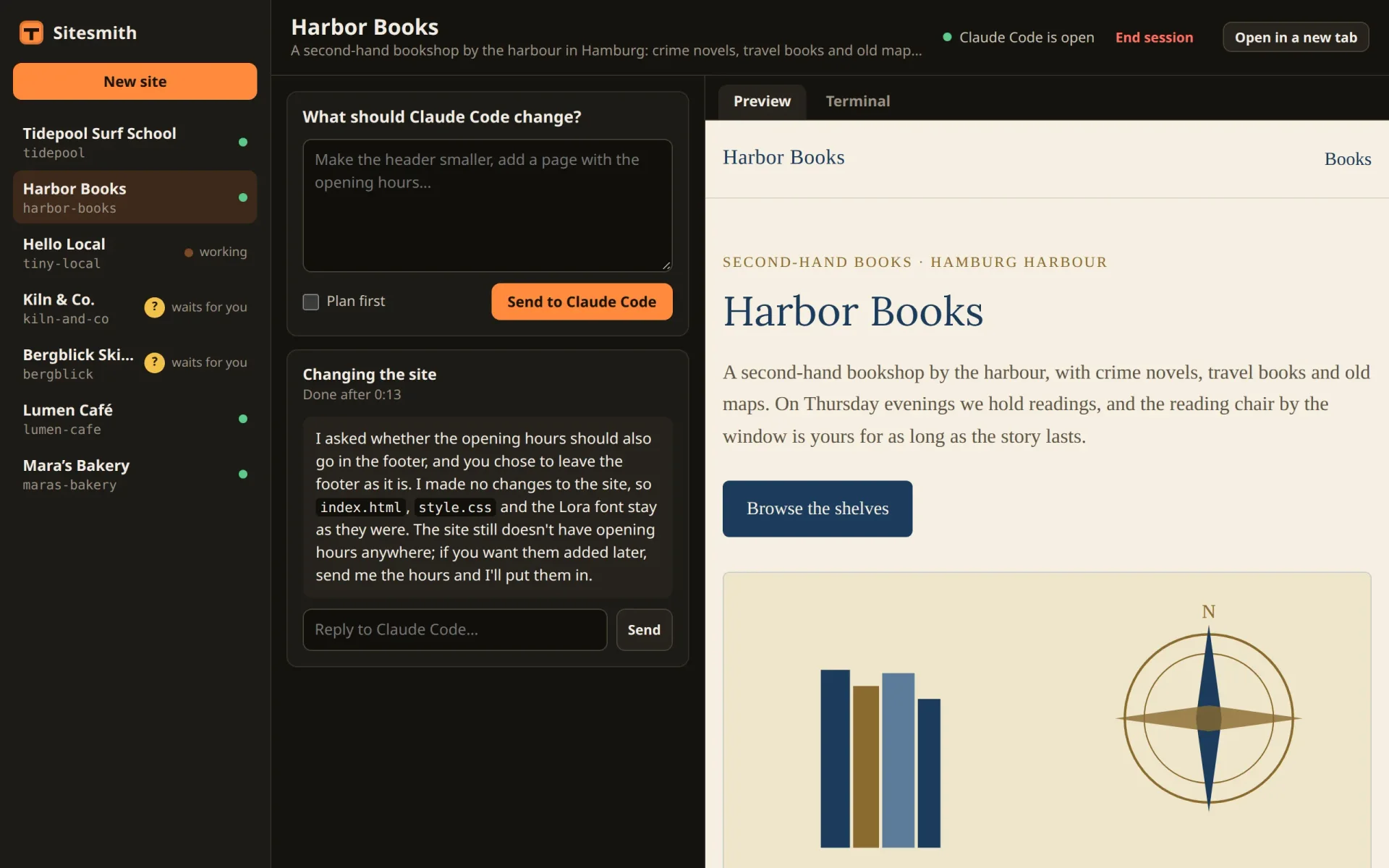
Give two sites a request that leaves something to ask ("ask me first whether…" works well), and open a third while they work. In the test, Kiln & Co. and Bergblick Ski School asked while the page showed Lumen Café:
The tab's title read "(2) Lumen Café · Sitesmith", and the sidebar showed both with "? waits for you".
A click on Bergblick Ski School opened it with its question already up, "Claude Code has a question for you". Once it was answered, the title read "(1) Bergblick Ski School · Sitesmith".
Then Kiln & Co.: its question came up the same way, and after the answer the title was "Kiln & Co. · Sitesmith", with nobody left waiting.
What you have now
Several sites at work at the same time, and a page that shows at a glance which of them works, which waits, and how many need you. The server needed no change for it: keeping everything per site from the start has paid off.
The title helps while the browser is in front of you. In the next part, Sitesmith learns to tap you on the shoulder when it isn't: a notification and a chime when Claude Code waits for you or is done.
Comments
The comments are GitHub Discussions: sign in with GitHub to write one.
The comments come from GitHub, through giscus. Loading them sends your IP address to giscus.app and GitHub.