
Claude Code in Your Own Web App · Part 5 of 16 in the series
Part 5: Typing a Request
Let the page send requests: the text goes into a file in the site's folder, and Sitesmith types one short line into Claude Code, but only once the screen shows an empty input box.
Claude Code in Your Own Web AppPart 5 of 16
On this page

Quest objectives
- Hand Claude Code a request of any length through a file and one short line
- Read Claude Code's screen, colors included, to tell an empty input box from everything else
- Type into a session without answering a dialog by accident
- Keep runs per site: a queue, one delivery at a time, a status the page can show
- Tell from the screen alone when a turn is over, and see where that falls short
- Build a first site from the page
The page shows each site's session and lets you type into it. Now Sitesmith does the typing: a box next to the preview takes what you want, Build the site sends it, and a panel under the box shows how Claude Code is getting on.
Typing into a terminal program from outside is simple, part 1 showed it: send-keys, then Enter. The hard part is the moment. Claude Code isn't always waiting for a message, and keys that arrive while it shows something else are taken as an answer to that. Most of this part is about one question: is it safe to type now?
The request travels in a file
A request from the page can be long and have several lines. Typed into Claude Code, every line break would be an Enter that sends what came before it on its own, and a long text that arrives all at once looks like a paste to Claude Code. Neither is what you want, and both depend on how the Claude Code of the day handles its input.
So Sitesmith doesn't type the request. It writes it to .sitesmith/request.md in the site's folder and types the same short line every time: Do what .sitesmith/request.md says.
Claude Code reads the file with its Read tool, like any other file. Your words never pass through the keyboard, so nothing in them can be taken for a key or a command: a request that starts with / or ! is just text in a file. The folder .sitesmith/ has been Sitesmith's since part 2, and the preview server doesn't show hidden folders.
The text around your words comes from a new file, server/requests.ts:
import type { Site } from '../shared/types.ts';

/** The page's name for a run of this site. */
export const runTitle = (site: Site) => (site.built ? 'Changing the site' : 'Building the site');

/**
 * What Claude Code gets for a request: the user's words, framed by what Sitesmith needs. It goes
 * into .sitesmith/request.md; the folder's CLAUDE.md says what the site is and how it is built.
 */
export function requestText(site: Site, text: string) {
  const task = site.built
    ? 'Change the site in this folder as follows:'
    : 'Build the first version of the site in this folder (CLAUDE.md says what it is about). The user adds:';
  return `# A request from Sitesmith

${task}

${text.trim() || '(nothing: use your own judgement)'}

When you are done, say in two or three sentences what you built or changed.
`;
}
A new site gets "build the first version", with a pointer to CLAUDE.md, where part 2 put the site's title and description. A site that has an index.html gets "change the site". An empty box is fine too: then Claude Code uses its own judgment. The last line asks for a short report at the end, which part 7 will show in the page.
When is it safe to type?
Claude Code shows many things besides its input box, and several of them take keys. Two you will meet in this part, the trust dialog of a new folder and a permission prompt:
# The trust dialog of a folder Claude Code has never seen: Enter picks "No, exit" Accessing workspace: ~/sitesmith/sites/maras-bakery Quick safety check: Is this a project you created or one you trust? (Like your own code, a well-known open source project, or work from your team). If not, take a moment to review what's in this folder first. Claude Code'll be able to read, edit, and execute files here. Security guide ❯ No, exit Yes, I trust this folder Enter to confirm · Esc to cancel# A permission prompt: Enter says "Yes" Bash command Syntax-check the script and list files (node --check script.js && echo "JS ok") ; ls -la . assets 2>/dev/null This command uses shell operators that require approval for safety Do you want to proceed? ❯ 1. Yes 2. Yes, and switch to auto mode · auto mode handles these prompts for you 3. No Esc to cancel · Tab to amend
Both have a ❯ in front of the selected option, and both take Enter as "this one". Sitesmith's line typed into the trust dialog would end with Enter on No, exit, and Claude Code would quit. Typed into the permission prompt, the Enter would say Yes to a command nobody has read. Keys sent while Claude Code is working are no better: they end up in its input box in the middle of its work.
That leaves one safe moment: Claude Code waits at an empty input box. Here is what that looks like at the end of a turn, and what the screen holds when you look at its colors as well:
# The bottom of the screen at the end of a turn: the input box, between two rules✻ Brewed for 27s · done 13:33────────────────────────────────────────────────────────────❯────────────────────────────────────────────────────────────# An empty box as capture-pane -e shows it, made visible with cat -v: the hint is dim (^[[2m)^[[39m❯ ^[[2mTry "write a test for <filepath>"^[[0m# Claude Code may offer your last prompt in an empty box, dim as well: the box counts as empty^[[39m❯ ^[[2mDo what .sitesmith/request.md says.^[[0m
Three things stand out. The input box is a line that starts with ❯, with a rule of ─ right above it and right below it; the dialogs have a ❯ as well, but never between two rules. An empty box is often not empty on the screen: Claude Code shows a hint (Try "…") or offers your last prompt again. And that text is dim: it starts with ESC[2m, the escape sequence for faint text (SGR 2), while text you type is drawn normally. Without the colors, a hint and a typed text look alike. With them, they don't.
That is enough for a check. In server/terminals.ts, add two helpers below the constants at the top:
/** Claude Code's input box sits between two rules of ─ */
const RULE = /^─{10,}$/;
/** a screen line without its colours */
const plain = (line: string) => line.replace(/\x1b\[[0-9;:]*m/g, '').trim();
And after end(), two small methods and the check itself:
/** The screen as text, without colours. */
screen(t: { name: string }) {
  return this.tmux('capture-pane', '-p', '-t', pane(t.name));
}

/** Keys by tmux's names: Escape, Enter, Down, BTab (Shift+Tab)… */
async keys(t: { name: string }, ...keys: string[]) {
  await this.tmux('send-keys', '-t', pane(t.name), ...keys);
}/**
* Whether Claude Code waits at an empty input box, the only safe moment to type: keys sent at
* anything else would answer it (Enter approves a permission prompt). The box is the last ❯ line
* between two rules; its dialogs have a ❯ too, but not between rules. A hint in an empty box is
* dim (SGR 2), typed text is not. Anything else on screen counts as "not ready", so a changed
* look of Claude Code makes Sitesmith wait rather than guess.
*/
async atEmptyPrompt(t: { name: string }) {
const lines = (await this.tmux('capture-pane', '-p', '-e', '-t', pane(t.name))).split('\n');
const box = lines.findLast((line, i) => plain(line).startsWith('❯')
&& RULE.test(plain(lines[i - 1] ?? '')) && RULE.test(plain(lines[i + 1] ?? '')));
if (box === undefined) return false;
const rest = box.slice(box.indexOf('❯') + 1).replace(/^[\s\u00a0]+/, '');
return !plain(rest) || rest.startsWith('\x1b[2m');
}screen() returns the screen as plain text; part 10 reads dialogs with it. keys() sends keys by tmux's names, Escape for the Stop button below, for example. atEmptyPrompt() works in four steps:
Take the screen with its colors.
capture-pane -pprints what the pane shows right now, one line per row, and-ekeeps the escape sequences for colors and styles in it. The history above the screen is not part of it, so the lowest box on the screen is the current one.Find the box.
findLastlooks for the lowest line that, without its colors, starts with❯and has a rule of at least ten─right above and right below. Your earlier messages in the conversation also start with❯, but no rules surround them, and none surround the options of a dialog either.No box, no typing. If no line fits, the answer is
false. A dialog, a screen in the middle of a redraw, a Claude Code that has exited: all of them end here.Look at what follows the
❯. The spaces after it go, including non-breaking ones. If nothing is left but color codes, the box is empty. If what is left starts with the dim sequence\x1b[2m, it is a hint or a suggestion, and the box is empty too. Anything else is text somebody typed, perhaps you in the Terminal tab, and Sitesmith won't type over it.
Note what the check doesn't do: it doesn't try to recognize dialogs. It recognizes one thing, the empty box, and treats everything else as "not now". If a new version of Claude Code draws its box differently, Sitesmith types nothing and waits. A request that waits is annoying. Keys that answer the wrong question can do harm.
When the box is empty, type() sends the line. Add it after atEmptyPrompt():
/**
 * Types one short line into Claude Code's input box and sends it. Only call it at an empty
 * prompt. A long or multi-line text would arrive as a paste, so requests travel in a file.
 */
async type(t: { name: string }, line: string) {
  // out of scroll mode first, where the first key only returns to the live screen
  await this.tmux('copy-mode', '-q', '-t', pane(t.name)).catch(() => undefined);
  await this.tmux('send-keys', '-t', pane(t.name), '-l', line);
  // a moment for the input box to take the text, or Enter can arrive first
  await new Promise((r) => setTimeout(r, 300));
  await this.tmux('send-keys', '-t', pane(t.name), 'Enter');
}
copy-mode -qcomes first. If someone scrolled the session back in the page, tmux is in copy mode, where a key only returns to the live screen (part 4), and the first letter of the line would be lost.-qleaves copy mode. Should the command fail, thecatchkeeps that from stopping the request.send-keys -lsends the text literally. Without-l, tmux would read an argument that is the name of a key, likeEnter, as that key.A pause of 300 milliseconds comes before Enter. The input box needs a moment to take the text in, and an Enter that arrives too soon can overtake it: the line then sits in the box, unsent.
Runs
A request from the page becomes a run: it waits until Claude Code is free, goes in, is worked on, and ends. The page needs to know where each run stands. In shared/types.ts, add three types after TerminalState, and extend ServerEvent by the agent's state:
/** A request from the page, from the moment it is asked until Claude Code's turn is over. */
export interface Run {
  id: string;
  title: string;
  /**
   * queued: waits until Claude Code is free; starting: typed in (or the session is starting);
   * working: Claude Code works on it; then done, stopped or failed
   */
  status: 'queued' | 'starting' | 'working' | 'done' | 'stopped' | 'failed';
  queued: number;
  started?: number;
  ended?: number;
  error?: string;
}

/** What Claude Code does for a site, as far as the page needs to know. */
export interface AgentState {
  site: string;
  /** the current run, or the last one */
  run: Run | null;
}

/** A request typed into the page. */
export interface RequestBody {
  text: string;
}

/** What the server tells every open page, over server-sent events. */
export type ServerEvent =
  | { type: 'sites'; sites: Site[] }
  | { type: 'files'; site: string }
  | { type: 'terminals'; terminals: TerminalState[] }
  | { type: 'agent'; state: AgentState };
Now the heart of this part, server/agent.ts. It is long, so here it comes in pieces, top to bottom. First, the constants and what the server keeps per site:
import crypto from 'node:crypto';
import fs from 'node:fs';
import path from 'node:path';
import type { AgentState, Run, ServerEvent } from '../shared/types.ts';
import { OWN } from './sites.ts';
import type { Target, Terminals } from './terminals.ts';

/** Where a request's text goes, in the site's folder. */
export const REQUEST = `${OWN}/request.md`;
/** The one short line typed into Claude Code for every request. */
const COMMAND = `Do what ${REQUEST} says.`;

/** A run, with what only the server needs. */
interface Job extends Run {
  target: Target;
  /** when its line was typed in (or its session started) */
  sentAt: number;
}

interface SiteAgent {
  /** the current run, or the last one */
  run: Job | null;
  /** runs waiting until Claude Code is free */
  queue: Job[];
  /** a run is being started or typed in right now */
  delivering: boolean;
  /** the state last sent to the pages */
  sent: string;
}

const pub = (j: Job): Run => ({ id: j.id, title: j.title, status: j.status, queued: j.queued, started: j.started, ended: j.ended, error: j.error });
const live = (r: Run | null) => Boolean(r && (r.status === 'starting' || r.status === 'working'));
COMMAND is the line from above. A Job is a run plus what only the server needs: the site's folder, and when its line went in. A SiteAgent holds a site's current run, its queue, and a flag for a lock you will meet in a moment. sent remembers the state last sent to the pages, so that an unchanged state isn't sent again. pub() strips a job down to what the page sees, and live() says whether a run has gone in and isn't over yet.
/**
 * Claude Code at work for the page. A request becomes a run: its text goes into a file in the
 * site's folder, and as soon as Claude Code is free, one short line is typed into the site's
 * session. What happens then, this part can only read from the screen.
 */
export class Agent {
  private terminals: Terminals;
  private emit: (ev: ServerEvent) => void;
  private sites = new Map<string, SiteAgent>();

  constructor(terminals: Terminals, emit: (ev: ServerEvent) => void) {
    this.terminals = terminals;
    this.emit = emit;
    // once a second, and never twice at the same time: a check that waits for tmux takes a moment
    const loop = async () => { await this.tick().catch(() => undefined); setTimeout(loop, 1000).unref(); };
    void loop();
  }

  private site(name: string) {
    let s = this.sites.get(name);
    if (!s) {
      s = { run: null, queue: [], delivering: false, sent: '' };
      this.sites.set(name, s);
    }
    return s;
  }

  state(name: string): AgentState {
    const s = this.site(name);
    // a queued run is the one that matters: there is one only when the last one is over
    const run = s.queue[0] ?? s.run;
    return { site: name, run: run ? pub(run) : null };
  }

  list() {
    return [...this.sites.keys()].map((name) => this.state(name));
  }

  /** Sends the site's state to the pages, if it changed. */
  private changed(name: string) {
    const state = this.state(name);
    const json = JSON.stringify(state);
    const s = this.site(name);
    if (json === s.sent) return;
    s.sent = json;
    this.emit({ type: 'agent', state });
  }

  /** The run that is on its way or underway, if any. */
  active(name: string) {
    const s = this.sites.get(name);
    if (!s) return null;
    return s.queue[0] ?? (live(s.run) ? s.run : null);
  }
The constructor starts a clock that runs tick() once a second. It isn't a setInterval: a tick waits for tmux and can take longer than a second, so the next one is scheduled only when the last has finished, and two never run at once. unref() keeps the clock from holding the process open when the server shuts down.
state() is what the page gets. If a run is queued, that is the one to show, because a new run is only accepted when the last one is over. changed() sends the state to all pages over the server-sent events of part 2, but only when it differs from the last one. active() finds a run that is queued or underway.
/** Asks Claude Code for something. One run at a time per site. */
run(t: Target, title: string, request: string): Run {
  const on = this.active(t.name);
  if (on) throw new Error(`Claude Code is still on “${on.title}”. Wait until it is done, or stop it.`);
  fs.mkdirSync(path.join(t.dir, OWN), { recursive: true });
  fs.writeFileSync(path.join(t.dir, REQUEST), `${request.trim()}\n`);
  const job: Job = { id: crypto.randomUUID(), title, status: 'queued', queued: Date.now(), target: t, sentAt: 0 };
  this.site(t.name).queue.push(job);
  void this.deliver(t.name);
  this.changed(t.name);
  return pub(job);
}
run() is what the route calls. One run per site at a time: while one is on, a second request is turned down with a message the page shows. Otherwise the request goes into the file, the job into the queue, and the server tries to deliver it right away.
/**
 * Sends the next queued run, when Claude Code can take it. No session: one starts, with the
 * line as its first message (continuing the folder's last conversation, if it has one). Claude
 * Code exited: it starts again in place of the shell. Claude Code waits at an empty prompt: the
 * line is typed in. Anything else: try again next second.
 */
private async deliver(name: string) {
  const s = this.site(name);
  // one at a time: run() and the clock both call this, and starting or typing takes a moment
  if (s.delivering) return;
  s.delivering = true;
  try { await this.deliverNext(name, s); } finally { s.delivering = false; }
}

private async deliverNext(name: string, s: SiteAgent) {
  const job = s.queue[0];
  if (!job) return;
  await this.terminals.poll();
  const term = this.terminals.get(name);
  const resume = this.terminals.hasConversation(job.target.dir);
  try {
    if (!term) await this.terminals.start(job.target, { prompt: COMMAND, resume });
    else if (!term.claude) await this.terminals.respawn(job.target, { prompt: COMMAND, resume });
    else {
      if (term.busy || !(await this.terminals.atEmptyPrompt(job.target))) return;
      // it may have been taken while we looked
      if (s.queue[0] !== job) return;
      await this.terminals.type(job.target, COMMAND);
    }
  } catch (err) {
    s.queue.shift();
    s.run = job;
    this.end(name, 'failed', (err as Error).message);
    return;
  }
  s.queue.shift();
  s.run = job;
  job.status = 'starting';
  job.started = job.sentAt = Date.now();
  this.changed(name);
}
Delivering is the step that touches the keyboard, and the comment above it lists its cases:
No session: one starts, with the line as Claude Code's first message (
claude "Do what …"), and with--continuewhen the folder has a conversation from before. Nothing is typed, so nothing has to wait for the box. In a new folder, the trust dialog comes first, and the first message waits behind it.Claude Code has exited and a shell sits in the session: it starts again the same way, in place of the shell.
Claude Code waits at an empty box: the line is typed in.
Anything else (working, a dialog, text in the box): nothing happens, and the clock tries again a second later.
The lock is there because two callers deliver: run() right away, and the clock every second. Starting a session or typing takes a moment, and without the lock a tick could come in the middle of it, find the job still at the head of the queue and type the line a second time. With the lock, a second call while one is underway just returns. For the same reason, deliverNext() checks once more, after its look at the screen, that the job is still at the head of the queue: a click on Stop may have emptied it in between.
If tmux fails, the run ends as failed, with tmux's message. Otherwise it leaves the queue as starting, with the time its line went in.
private end(name: string, status: 'done' | 'stopped' | 'failed', error?: string) {
  const run = this.site(name).run;
  if (!run || run.ended) return;
  run.status = status;
  run.ended = Date.now();
  if (error) run.error = error;
  this.changed(name);
}

/** Interrupts Claude Code: Escape in its session, as you would press it. */
async stop(t: Target) {
  const s = this.site(t.name);
  s.queue = [];
  await this.terminals.keys(t, 'Escape').catch(() => undefined);
  this.end(t.name, 'stopped');
  this.changed(t.name);
}
end() closes the current run, once. stop() is the page's Stop button: it empties the queue and presses Escape in the session, which is how you interrupt Claude Code at the keyboard too. What Claude Code changed up to that point stays.
  /** Once a second: queued runs go out, and the screen says how the current one is doing. */
  private async tick() {
    for (const [name, s] of this.sites) {
      try { await this.check(name, s); } catch { /* a hiccup of tmux: next second */ }
      this.changed(name);
    }
  }

  private async check(name: string, s: SiteAgent) {
    if (s.queue.length) await this.deliver(name);
    const run = s.run;
    if (!run || !live(run)) return;
    const term = this.terminals.get(name);
    const since = Date.now() - run.sentAt;
    if (!term) { if (since > 5000) this.end(name, 'failed', 'The session ended.'); return; }
    if (!term.claude) { if (since > 8000) this.end(name, 'failed', 'Claude Code exited.'); return; }
    if (term.busy) { run.status = 'working'; return; }
    // quiet again, at an empty prompt: the turn is over. A turn too short to count as busy ends
    // the same way, once it has had time to start.
    if ((run.status === 'working' || since > 15000) && await this.terminals.atEmptyPrompt(run.target)) this.end(name, 'done');
  }
}
check() runs every second for every site. Queued runs go out first. Then it judges the current run, and in this part it has only the screen to go on, through what part 3 already measures: whether Claude Code still runs in the session, and whether its screen keeps changing (busy, from the spinner).
The session is gone: the run failed. Not before five seconds, though, because a single look at tmux that fails looks just like no session at all.
A shell instead of Claude Code: it exited, and the run failed. The grace is longer here, because Claude Code starts inside a login shell, and for the first moments the shell is what tmux sees.
The screen moves: the run is
working.The screen is still and shows an empty box: the turn is over, and the run is
done. That takes either aworkingphase before it, or 15 seconds since the line went in. A turn so short that the screen never counted as busy ends that way, and a run that has only just gone in isn't taken for done before Claude Code has begun.
Here the screen reaches its limits. It knows "moving" and "still at an empty box", and a dialog is neither: while Claude Code waits for an answer in the terminal, the run keeps saying working, and nothing in the page tells you why. You will see it in the first build below. The screen also doesn't say what Claude Code is doing, only that it does something. The next part adds a better source.
Routes
In server/main.ts, import the agent and the request texts:
import fs from 'node:fs';
import http from 'node:http';
import path from 'node:path';
import { fileURLToPath } from 'node:url';
import { WebSocketServer } from 'ws';
import type { Config, NewSite, RequestBody, ServerEvent } from '../shared/types.ts';
import { Agent } from './agent.ts';
import { HttpError, fileIn, readJson, send, sendFile } from './http.ts';
import { requestText, runTitle } from './requests.ts';
import { NAME, OWN, Sites } from './sites.ts';
import { Terminals, type Target } from './terminals.ts';
Create the agent right after the terminals are set up:
const terminals = new Terminals(APP, broadcast);
await terminals.init();
config.terminals = terminals.available;
config.pty = terminals.canAttach;
const agent = new Agent(terminals, broadcast);
Then add two routes after the session routes. The route of the event stream below them, shown whole, gets one more line: it sends the agents' states right after the sessions, so a page that opens in the middle of a run sees it at once:
// requests: Claude Code works on the site
['POST', /^\/api\/sites\/([^/]+)\/requests$/, async (req, res, m) => {
  if (!terminals.available) throw new HttpError(409, 'Sessions need tmux.');
  const site = sites.get(m[1]);
  const { text } = await readJson<RequestBody>(req);
  try {
    send(res, 201, agent.run(target(site.name), runTitle(site), requestText(site, String(text ?? ''))));
  } catch (err) { throw new HttpError(409, (err as Error).message); }
}],
['POST', /^\/api\/sites\/([^/]+)\/stop$/, async (_req, res, m) => {
  await agent.stop(target(m[1]));
  send(res, 200, agent.state(m[1]));
}],

// live updates: one long response per open page, an event per `data:` line
['GET', /^\/api\/events$/, (req, res) => {
  res.writeHead(200, { 'content-type': 'text/event-stream', 'cache-control': 'no-store' });
  res.write(`data: ${JSON.stringify({ type: 'sites', sites: sites.list() } satisfies ServerEvent)}\n\n`);
  res.write(`data: ${JSON.stringify({ type: 'terminals', terminals: terminals.list() } satisfies ServerEvent)}\n\n`);
  for (const state of agent.list()) res.write(`data: ${JSON.stringify({ type: 'agent', state } satisfies ServerEvent)}\n\n`);
  clients.add(res);
  // a comment now and then, so no proxy on the way closes a quiet connection
  const ping = setInterval(() => res.write(': ping\n\n'), 20000);
  req.on('close', () => { clearInterval(ping); clients.delete(res); });
}],
A request needs tmux and a site that exists. When run() turns it down because a run is on, the page gets a 409 with the message. Stop answers with the new state.
The page
The box where you write the request, src/requestBox.ts:
import { api } from './api.ts';
import { h } from './dom.ts';
import type { RequestBody, Site } from '../shared/types.ts';

/** Where you tell Claude Code what to build or change. */
export class RequestBox {
  readonly el: HTMLFormElement;
  private url: string;
  private label = h('h2', {}, 'What should Claude Code build?');
  private text = h('textarea', { rows: 5, 'aria-label': 'Your request' });
  private go = h('button', { type: 'submit', class: 'primary' }, 'Build the site');
  private msg = h('p', { class: 'hint bad', 'aria-live': 'polite' });
  private busy = false;

  constructor(site: string) {
    this.url = `/api/sites/${site}/requests`;
    this.el = h('form', { class: 'panel request' },
      this.label, this.text,
      h('div', { class: 'actions' }, h('span', { class: 'hint' }, 'Ctrl+Enter sends'), this.go),
      this.msg);
    this.el.onsubmit = (e) => { e.preventDefault(); void this.send(); };
    this.text.onkeydown = (e) => { if (e.key === 'Enter' && (e.ctrlKey || e.metaKey)) { e.preventDefault(); void this.send(); } };
  }

  /** A built site gets changes; a new one its first version. Nothing goes out while a run is on. */
  update(site: Site | null, busy: boolean) {
    this.busy = busy;
    const built = Boolean(site?.built);
    this.label.textContent = built ? 'What should Claude Code change?' : 'What should Claude Code build?';
    this.text.placeholder = built
      ? 'Make the header smaller, add a page with the opening hours…'
      : 'A warm, simple one-pager: the breads of the week, opening hours, where to find us…';
    this.go.textContent = built ? 'Send to Claude Code' : 'Build the site';
    this.go.disabled = busy || !site;
  }

  private async send() {
    if (this.busy) return;
    this.msg.textContent = '';
    const body: RequestBody = { text: this.text.value };
    try {
      await api('POST', this.url, body);
      this.text.value = '';
    } catch (err) { this.msg.textContent = (err as Error).message; }
  }
}
Its title and button follow the site: Build the site while it has no index.html, Send to Claude Code after that. While a run is on, the button is off. Ctrl+Enter (Cmd+Enter on a Mac) sends as well. An accepted request empties the box; a refused one leaves your text and shows the server's message under it.
Under the box, src/agentPanel.ts shows the run:
import { api } from './api.ts';
import { h } from './dom.ts';
import type { AgentState, Run } from '../shared/types.ts';

export const isLive = (r: Run | null | undefined) => Boolean(r && ['queued', 'starting', 'working'].includes(r.status));

/** 75 -> "1:15" */
const clock = (ms: number) => {
  const s = Math.max(0, Math.round(ms / 1000));
  return `${Math.floor(s / 60)}:${String(s % 60).padStart(2, '0')}`;
};

function statusText(r: Run, now: number) {
  switch (r.status) {
    case 'queued': return 'Waiting until Claude Code is free';
    case 'starting': return 'Starting';
    case 'working': return `Working for ${clock(now - (r.started ?? now))}`;
    case 'done': return `Done after ${clock((r.ended ?? now) - (r.started ?? now))}`;
    case 'stopped': return 'Stopped';
    case 'failed': return r.error ? `Failed: ${r.error}` : 'Failed';
  }
}

/** The current (or last) run: what it is, how long Claude Code has worked on it, and Stop. */
export class AgentPanel {
  readonly el: HTMLElement;
  private url: string;
  private title = h('h2', { class: 'agent-title' });
  private status = h('p', { class: 'agent-status' });
  private stopBtn = h('button', { type: 'button', class: 'small ghost' }, 'Stop');
  private msg = h('p', { class: 'hint bad', 'aria-live': 'polite' });
  private timer = 0;

  constructor(site: string) {
    this.url = `/api/sites/${site}/stop`;
    this.stopBtn.onclick = () => void this.stop();
    this.el = h('section', { class: 'panel agent', 'aria-label': 'Claude Code', hidden: true },
      h('header', { class: 'agent-head' }, h('div', {}, this.title, this.status), this.stopBtn),
      this.msg);
  }

  update(state: AgentState | undefined) {
    const run = state?.run ?? null;
    clearInterval(this.timer);
    this.el.hidden = !run;
    if (!run) return;
    this.el.dataset.status = run.status;
    this.title.textContent = run.title;
    this.status.textContent = statusText(run, Date.now());
    if (run.status === 'working') this.timer = window.setInterval(() => { this.status.textContent = statusText(run, Date.now()); }, 1000);
    this.stopBtn.hidden = !isLive(run) || run.status === 'queued';
  }

  private async stop() {
    if (!confirm('Stop Claude Code? It ends its turn where it is; what it changed so far stays.')) return;
    try { await api('POST', this.url); } catch (err) { this.msg.textContent = (err as Error).message; }
  }

  dispose() { clearInterval(this.timer); }
}
The panel shows the run's title and a status line that counts up while Claude Code works. Stop asks before it does anything, and it is there only while a run is underway.
In src/sitePage.ts, the box and the panel take the left side of the page, next to the tabs. Replace the top of the file, down to the end of the constructor:
import { AgentPanel, isLive } from './agentPanel.ts';
import { h } from './dom.ts';
import { RequestBox } from './requestBox.ts';
import { SessionControls } from './session.ts';
import { TerminalView } from './terminalView.ts';
import type { AgentState, Config, Site, TerminalState } from '../shared/types.ts';

type Tab = 'preview' | 'terminal';

/**
 * One site: what it is about; on the left what you ask Claude Code and what it does; on the right
 * the site itself or its terminal.
 */
export class SitePage {
  readonly el: HTMLElement;
  readonly name: string;
  private config: Config;
  private site: Site | null = null;
  private heading = h('h1', { class: 'site-heading' });
  private about = h('p', { class: 'site-about' });
  private frame = h('iframe', { class: 'preview-frame', title: 'The site', sandbox: 'allow-scripts allow-same-origin allow-forms allow-popups' });
  private empty = h('div', { class: 'preview-empty' }, h('p', {}, 'Nothing built yet.'));
  private preview = h('div', { class: 'preview' }, this.frame, this.empty);
  private session: SessionControls;
  private terminal: TerminalView;
  private request: RequestBox;
  private agent: AgentPanel;
  private agentState: AgentState | undefined;
  private tabs: Record<Tab, HTMLButtonElement>;

  constructor(name: string, config: Config) {
    this.name = name;
    this.config = config;
    this.session = new SessionControls(name, config.terminals);
    this.terminal = new TerminalView(name, config.pty);
    this.request = new RequestBox(name);
    this.agent = new AgentPanel(name);
    this.tabs = {
      preview: h('button', { type: 'button', class: 'tab', role: 'tab', onclick: () => this.show('preview') }, 'Preview'),
      terminal: h('button', { type: 'button', class: 'tab', role: 'tab', onclick: () => this.show('terminal') }, 'Terminal'),
    };
    this.el = h('section', { class: 'site-page' },
      h('header', { class: 'site-head' },
        h('div', { class: 'site-head-text' }, this.heading, this.about),
        this.session.el,
        h('a', { class: 'button small', href: this.previewUrl, target: '_blank', rel: 'noopener' }, 'Open in a new tab')),
      h('div', { class: 'site-body' },
        h('div', { class: 'work' }, this.request.el, this.agent.el),
        h('div', { class: 'view' },
          h('div', { class: 'tabs', role: 'tablist' }, this.tabs.preview, this.tabs.terminal),
          this.preview, this.terminal.el)));
    this.show('preview');
  }
Replace update(), which now tells the box whether a run is on, and add agentChanged() after it:
/** The list of sites changed (or arrived). */
update(sites: Site[]) {
  const site = sites.find((s) => s.name === this.name) ?? null;
  const wasBuilt = this.site?.built;
  this.site = site;
  this.heading.textContent = site?.title ?? this.name;
  this.about.textContent = site ? site.description : 'There is no site of this name.';
  this.frame.hidden = !site?.built;
  this.empty.hidden = Boolean(site?.built);
  if (site?.built && !wasBuilt) this.frame.src = this.previewUrl;
  this.request.update(site, isLive(this.agentState?.run));
}

/** What Claude Code does for this site changed. */
agentChanged(state: AgentState) {
  this.agentState = state;
  this.agent.update(state);
  this.request.update(this.site, isLive(state.run));
}
dispose() stops the panel's clock as well:
/** The page shows another site. */
dispose() {
  this.terminal.dispose();
  this.agent.dispose();
}
Last, src/main.ts keeps the agents' states it hears about and passes them to the open site:
import './style.css';
import { api, events } from './api.ts';
import { h } from './dom.ts';
import { newSiteForm } from './newSite.ts';
import { Sidebar } from './sidebar.ts';
import { SitePage } from './sitePage.ts';
import type { AgentState, Config, ServerEvent, Site, TerminalState } from '../shared/types.ts';

/**
 * The page: the sites on the left, the open one on the right. Addresses: #new, #site/<name>.
 * Everything that changes comes from the server's events, whoever changed it.
 */
async function start() {
  const config = await api<Config>('GET', '/api/config');
  const sidebar = new Sidebar();
  const main = h('main', { class: 'main' });
  const offline = h('p', { class: 'offline', hidden: true }, 'The server is not answering. Waiting for it…');
  document.querySelector('#app')!.append(sidebar.el, main, offline);

  let sites: Site[] = [];
  let terminals: TerminalState[] = [];
  const agents = new Map<string, AgentState>();
  let page: SitePage | null = null;

  function route() {
    const hash = decodeURIComponent(location.hash.slice(1));
    const name = hash.startsWith('site/') ? hash.slice(5) : '';
    if (page && page.name === name) return;
    page?.dispose();
    page = null;
    if (hash === 'new') main.replaceChildren(newSiteForm((site) => { location.hash = `site/${site.name}`; }));
    else if (name) {
      page = new SitePage(name, config);
      page.update(sites);
      page.terminals(terminals);
      const state = agents.get(name);
      if (state) page.agentChanged(state);
      main.replaceChildren(page.el);
    } else {
      main.replaceChildren(h('div', { class: 'welcome' },
        h('h1', {}, 'Describe a site, Claude Code builds it.'),
        h('p', {}, 'Pick a site on the left, or start a new one.'),
        h('a', { class: 'button primary', href: '#new' }, 'New site')));
    }
    sidebar.render(sites, name);
  }

  function onEvent(ev: ServerEvent) {
    if (ev.type === 'sites') {
      sites = ev.sites;
      sidebar.render(sites, page?.name ?? '');
      page?.update(sites);
    } else if (ev.type === 'terminals') {
      terminals = ev.terminals;
      page?.terminals(terminals);
    } else if (ev.type === 'agent') {
      agents.set(ev.state.site, ev.state);
      if (ev.state.site === page?.name) page.agentChanged(ev.state);
    } else if (ev.type === 'files' && ev.site === page?.name) page.filesChanged();
  }

  events(onEvent, () => { offline.hidden = false; }, () => { offline.hidden = true; });
  window.addEventListener('hashchange', route);
  route();
}

void start();
The page keeps the states of all sites, not only the open one, because a state comes only when it changes. When you switch to a site in the middle of its run, its state is already at hand.
The first build
Run npm start, create a site, write what you want into the box, or leave it empty, and click Build the site. Here is the first build of the Lumen Café, started with curl, which sends the same JSON as the page, and what happened next:
$ curl -s -X POST -d '{"text":"Keep it to one page, warm colours."}' localhost:5400/api/sites/lumen-cafe/requests{"id":"53972648-…","title":"Building the site","status":"queued","queued":1795091449284}# The folder was new: Claude Code showed the trust dialog first, answered by hand in the Terminal tab.# Then the status said "working" for two minutes, while Claude Code waited at this prompt: ● Running 1 shell command… ⎿ $ (node --check script.js && echo "JS ok") ; ls -la . assets 2>/dev/null Bash command Syntax-check the script and list files (node --check script.js && echo "JS ok") ; ls -la . assets 2>/dev/null This command uses shell operators that require approval for safety Do you want to proceed? ❯ 1. Yes 2. Yes, and switch to auto mode · auto mode handles these prompts for you 3. No Esc to cancel · Tab to amend# After Enter (Yes) in the Terminal tab, the run was done 5 seconds later. In the folder now:# CLAUDE.md index.html script.js style.css. The end of Claude Code's last message on the screen: index.html, style.css and a small script.js for the mobile menu, with sections for the hero, about, menu, events and visit info. The page uses no outside files, and the script passes a syntax check, but I have not opened it in a browser. I left out the street address, opening hours beyond breakfast until 2 pm, and prices because the brief didn't give them. The visit section and the menu card text are placeholders to replace with real details.✻ Brewed for 27s · done 13:33# … and under it, the empty input box
The answer says queued: the run waits for its delivery, which follows a moment later. A new site usually has no session yet, so one starts, with the line as its first message. Then came two stops the page knew nothing about. The folder was new, so Claude Code first asked whether to trust it, and that had to be answered in the Terminal tab. Later it wanted to run a command with shell operators, which acceptEdits doesn't let through without asking, and waited for a yes. For two minutes the page said Working, because that is all the screen could tell. After Enter in the Terminal tab, Claude Code finished, its screen went quiet at an empty box, and the run was done.
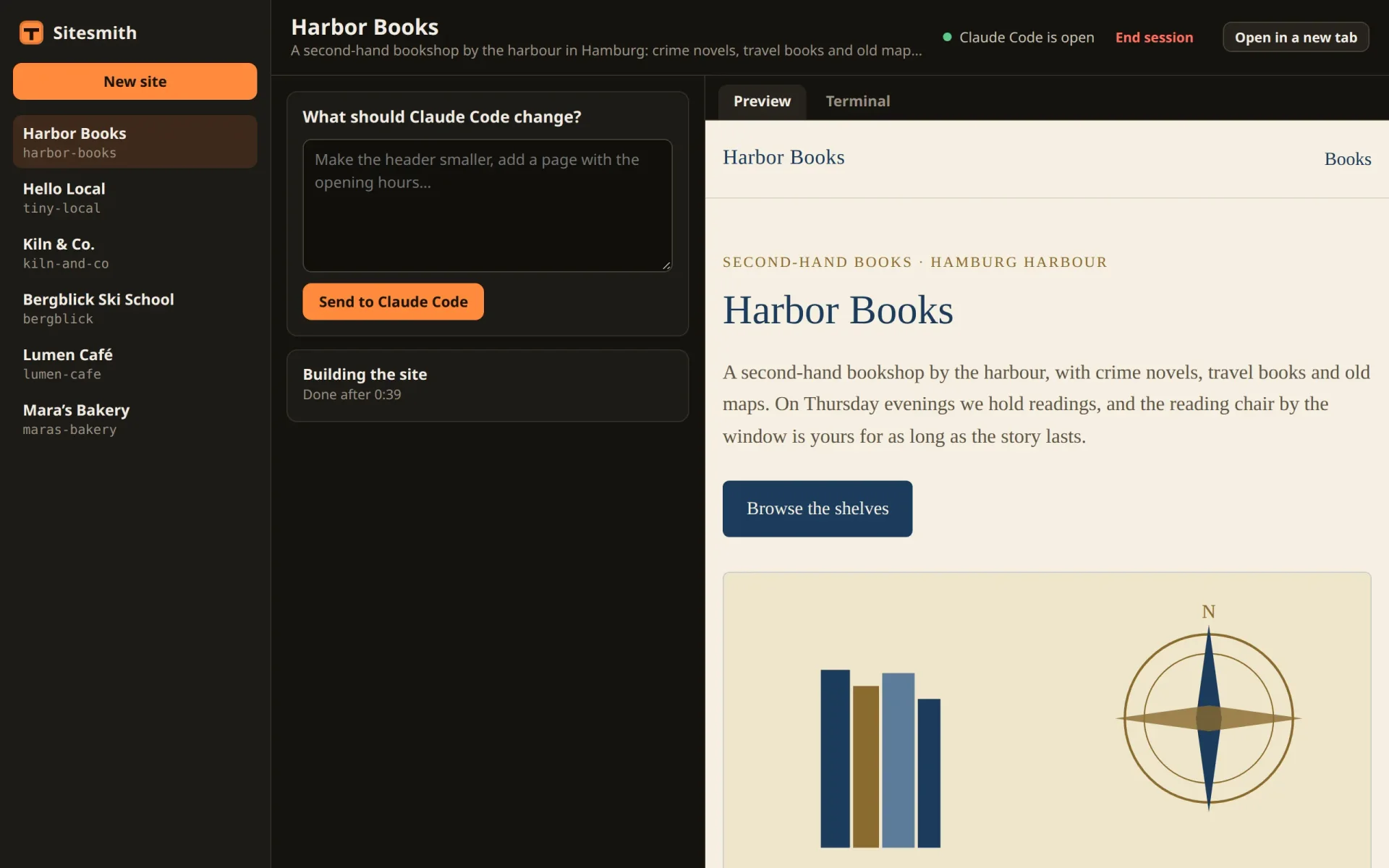
Sitesmith now types for you, and only when Claude Code is ready for it. What it learns about the work, though, it learns from a picture of the screen: moving or still, box or no box. That is enough to deliver a request and to tell when Claude Code is done, and it says nothing about what Claude Code does. In the next part, Claude Code starts telling the server itself, through its hooks.
Comments
The comments are GitHub Discussions: sign in with GitHub to write one.
The comments come from GitHub, through giscus. Loading them sends your IP address to giscus.app and GitHub.