
Claude Code in Your Own Web App · Part 8 of 16 in the series
Part 8: Claude Code's Questions in the Page
The core of Sitesmith: a PreToolUse hook holds Claude Code when it asks a question, the server hands the question to the page, and your answer goes back as the hook's output, so Claude Code goes on as if you had answered in the terminal.
Claude Code in Your Own Web AppPart 8 of 16
On this page
Quest objectives
- Invite Claude Code to ask before it builds, with sketches as previews
- Follow the whole round trip: hook, server, page, answer, hook output
- Hold a hook with a long poll, and give it a day of patience
- Answer AskUserQuestion with permissionDecision and updatedInput
- Show the questions in a dialog with options, "Other" and previews
- Fall back to the terminal whenever the page cannot answer
Claude Code asks. Before it builds a site, it may want to know which style you like, which pages the site should have, how its texts should sound. It has a tool for that, AskUserQuestion, and in the terminal it shows the questions as a dialog: options to pick with the arrow keys, and a line for your own answer.
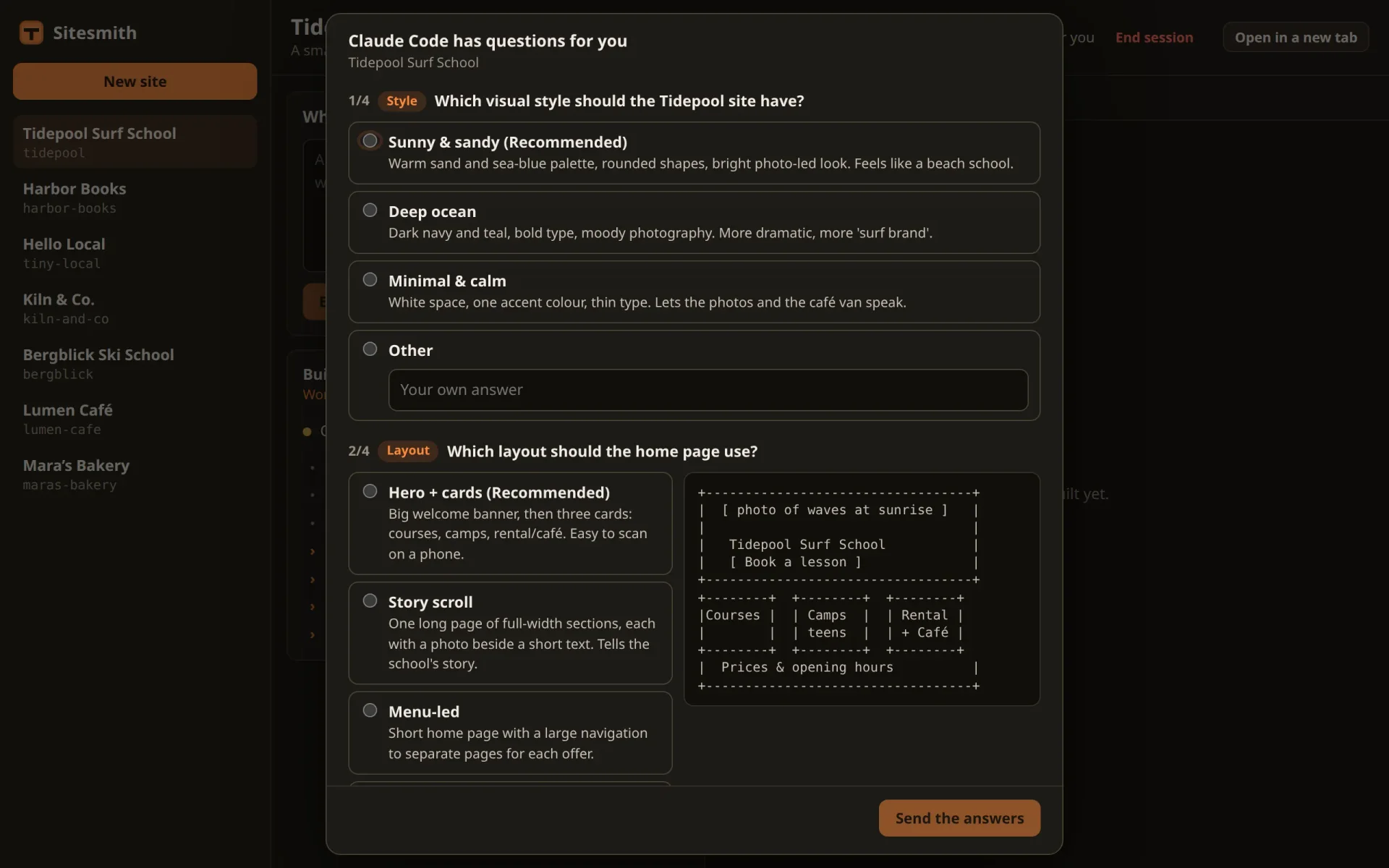
So far that dialog waits in the terminal while the page says "working". This part brings Claude Code's questions into the page: as a dialog with the same options, the previews Claude Code drew for them, and a field for your own words. Your answer goes back to Claude Code as if you had given it in the terminal, and Claude Code's own dialog never opens.
What makes it possible is one property of hooks: Claude Code waits for them. A PreToolUse hook runs before a tool does, and as long as the hook runs, the tool waits. So the hook can hold Claude Code, hand the question to the page, wait for your answer as long as it takes, and then give that answer to Claude Code as its output. This part is all about that round trip, and it is the core of Sitesmith: the next parts send permission prompts and plans the same way.
Inviting questions
Claude Code asks when it thinks something is open, and so far the request has told it to build. Invite questions in server/requests.ts:
import type { Site } from '../shared/types.ts';

/** The page's name for a run of this site. */
export const runTitle = (site: Site) => (site.built ? 'Changing the site' : 'Building the site');

/**
 * What Claude Code gets for a request: the user's words, framed by what Sitesmith needs. It goes
 * into .sitesmith/request.md; the folder's CLAUDE.md says what the site is and how it is built.
 */
export function requestText(site: Site, text: string) {
  const task = site.built
    ? 'Change the site in this folder as follows:'
    : 'Build the first version of the site in this folder (CLAUDE.md says what it is about). The user adds:';
  return `# A request from Sitesmith

${task}

${text.trim() || '(nothing: use your own judgement)'}

If something important is open (the style, the sections, the tone of the texts), ask before you
build, with AskUserQuestion: two to four options per question, the one you recommend first. For a
question about the layout, give each option a small sketch of the page in plain text as its
preview. Don't ask about details you can decide well yourself.

When you are done, say in two or three sentences what you built or changed.
`;
}
The new paragraph says when to ask (something important is open), how (AskUserQuestion, two to four options, the recommended one first) and what not to ask about. The last sentence matters: a model that has been invited to ask tends to ask about everything.
The sentence about the layout uses a field of the tool that the hooks documentation does not describe: an option of AskUserQuestion can carry a preview, a short text to show with it. A plain-text sketch of a page fits well, and the page will show it beside the options. In the test, Haiku asked Bergblick, Harbor Books and Tidepool about the same four things: the style, the layout (with sketches), the pages and the tone of the texts.
The round trip
Before the code, the whole way once, from the moment Claude Code decides to ask until it goes on with your answer:
Claude Code calls
AskUserQuestion. Before the tool runs, Claude Code runs thePreToolUsehooks. Sitesmith's matcher is*, soserver/hook.tsstarts and reads the event from stdin: the tool's name, and its input with the questions. Claude Code waits for the hook to end.The hook reports, then asks. Like every event, this one goes to
/api/hooks/eventfirst, and the feed shows "Asking you something". Because it is a question, the hook then posts it to/api/hooks/ask. The server keeps it as the site's open question, gives it an id, sends the new state to every open page and answers with the id.The hook waits. It calls
/api/hooks/wait/<id>. The server keeps that request open until there is an answer, or for 25 seconds, and then answers "pending"; the hook asks again at once. That is a long poll: the hook always waits on an open request, so the answer can travel the moment it exists.The page shows the dialog. The new state reaches the page over its server-sent events. The open site's state carries the question, and the page opens a dialog for it.
You answer. The page posts your choices to
/api/sites/<site>/answer.The server settles the question. It turns your answers into the hook's output, ends the open long poll with it, and tells the pages that nothing is waiting any more. The dialog closes, in every window that shows it.
The hook answers Claude Code. It writes the output to stdout as JSON and ends with exit code 0.
Claude Code goes on. The output says: allow the tool, with its input changed so that it contains your answers.
AskUserQuestionruns with the answers already given, shows no dialog, and hands them to the model as yours. The turn goes on.
If anything on the way fails (no server, no page, an error), the hook ends without output, and Claude Code shows its own dialog in the terminal, as if there were no hook. That is the rule from part 6, and it is what makes the page safe to rely on: the worst case is the terminal.
What the hook gets
Here is the hook's input for Tidepool, the surf school in the screenshot further down, with two of its four questions (shortened, with neutral paths):
{
  "session_id": "…",
  "transcript_path": "/home/you/.claude/projects/…/….jsonl",
  "cwd": "/home/you/sitesmith/sites/tidepool",
  "hook_event_name": "PreToolUse",
  "tool_name": "AskUserQuestion",
  "tool_input": {
    "questions": [
      {
        "question": "Which visual style should the Tidepool site have?",
        "header": "Style",
        "options": [
          { "label": "Sunny & sandy (Recommended)", "description": "Warm sand and sea-blue palette, rounded shapes, bright photo-led look. Feels like a beach school." },
          { "label": "Deep ocean", "description": "Dark navy and teal, bold type, moody photography. More dramatic, more 'surf brand'." },
          { "label": "Minimal & calm", "description": "White space, one accent colour, thin type. Lets the photos and the café van speak." }
        ]
      },
      {
        "question": "Which pages should the first version include?",
        "header": "Pages",
        "options": [
          { "label": "Courses & camps (Recommended)", "description": "…" },
          { "label": "Rental & café", "description": "…" },
          { "label": "Contact & find us", "description": "…" },
          { "label": "About the school", "description": "…" }
        ],
        "multiSelect": true
      }
    ]
  },
  "tool_use_id": "…"
}
Sitesmith reads tool_name and tool_input. The questions are in tool_input.questions, each with its text, a short header, its options with a label and a description, and multiSelect when you may pick several. The layout question, left out here, also had a preview on each option.
The hook holds Claude Code
Replace server/hook.ts with:
/**
 * What Claude Code runs for its hooks, in the sessions Sitesmith starts: it reads the event from
 * stdin and posts it to the server. The session's environment names the site (SITESMITH_SITE) and
 * the server's data folder (SITESMITH_DATA), where server.json says on which port it listens.
 *
 * Most events are only reported. A question (AskUserQuestion) is held: the hook waits until the
 * page has answered, and hands the answers to Claude Code as its output, so Claude Code's own
 * dialog never opens.
 *
 * A hook must never get in Claude Code's way: whatever goes wrong (no server, a timeout, odd
 * input), it ends quietly with exit code 0 and no output, and Claude Code carries on as if there
 * were no hook: it asks in the terminal.
 */
import fs from 'node:fs';
import path from 'node:path';

interface HookInput {
  hook_event_name: string;
  tool_name?: string;
}

const site = process.env.SITESMITH_SITE;
const data = process.env.SITESMITH_DATA;

async function stdin() {
  let raw = '';
  for await (const chunk of process.stdin) raw += chunk;
  return raw;
}

function serverUrl() {
  try {
    const { port } = JSON.parse(fs.readFileSync(path.join(data!, 'server.json'), 'utf8')) as { port: number };
    return `http://127.0.0.1:${port}`;
  } catch { return null; }
}

/** A call to the server; null when it answers 404. */
async function call(url: string, method: string, body: unknown, ms: number) {
  const res = await fetch(url, {
    method,
    headers: body === undefined ? {} : { 'content-type': 'application/json' },
    body: body === undefined ? undefined : JSON.stringify(body),
    signal: AbortSignal.timeout(ms),
  });
  if (res.status === 404) return null;
  if (!res.ok) throw new Error(`HTTP ${res.status}`);
  return res.json() as Promise<Record<string, unknown>>;
}

/**
 * Holds Claude Code until the page answers. The server keeps each wait open for up to 25 seconds
 * and then says "pending": the hook simply asks again. Returns what Claude Code should get, or
 * null to let it ask in the terminal.
 */
async function wait(base: string, event: HookInput): Promise<unknown> {
  const asked = await call(`${base}/api/hooks/ask`, 'POST', { site, event }, 5000);
  if (!asked || asked.release) return null;
  for (;;) {
    const r = await call(`${base}/api/hooks/wait/${encodeURIComponent(String(asked.id))}`, 'GET', undefined, 35000);
    if (!r || r.status === 'release') return null;
    if (r.status === 'answered') return r.output;
  }
}

async function main() {
  const raw = await stdin();
  if (!site || !data) return;
  const base = serverUrl();
  if (!base) return;
  const event = JSON.parse(raw) as HookInput;
  // every event is reported, a question too
  await call(`${base}/api/hooks/event`, 'POST', { site, event }, 2000).catch(() => undefined);
  if (event.hook_event_name === 'PreToolUse' && event.tool_name === 'AskUserQuestion') {
    const output = await wait(base, event);
    if (output) process.stdout.write(JSON.stringify(output));
  }
}

await main().catch(() => undefined);
process.exit(0);
main() reports every event as before, now through call(); a report that fails is ignored, and a question is asked all the same. Then, for the PreToolUse of AskUserQuestion and nothing else, it waits for the page, and if wait() brings an output, it writes that to stdout. The last line stays as it was: exit code 0, always.
call() is one request with a time limit. A 404 means the server does not know what the hook is talking about, and comes back as null; any other error throws.
wait() asks once, then polls until the question is answered or released. Note the two time limits: the server holds each poll for 25 seconds, the hook gives each one 35. A "pending" always arrives before the hook's patience for that request ends. If 35 seconds pass without any answer, something is wrong with the server: the request is aborted, the error ends the hook quietly, and the question goes to the terminal.
Why not one request that stays open for hours? Because a request that has been open for an hour cannot tell a slow answer from a dead connection. Polls of 25 seconds keep both sides sure the other is still there. A server that stops while the hook waits is noticed with the next poll at the latest: the hook ends, and the terminal takes over. (Part 10 makes the hook more patient with a server that is only restarting.)
Whatever ends the hook without an output (a release, a 404, an error), it exits with 0 and writes nothing. For Claude Code, that is a hook without a decision, and it carries on as if there were no hook: it shows its own dialog.
A day of patience
Claude Code does not wait for a hook forever: it cancels one after its timeout, ten minutes unless the settings say otherwise. A question can easily wait longer than that, if you went for lunch. In server/agent.ts, replace the start of the Agent class, up to the end of the constructor:
export class Agent {
  /** the settings file with the hooks, passed to every session with --settings */
  readonly settingsFile: string;
  private terminals: Terminals;
  private emit: (ev: ServerEvent) => void;
  private sites = new Map<string, SiteAgent>();
  private pending = new Map<string, Pending>();
  /** how many pages are open */
  private pages: () => number;

  constructor(app: string, data: string, terminals: Terminals, emit: (ev: ServerEvent) => void, pages: () => number) {
    this.terminals = terminals;
    this.emit = emit;
    this.pages = pages;
    // the hook script runs on the Node that runs this server; quoted for the shell Claude Code uses
    const quote = (s: string) => `'${s.replace(/'/g, `'\\''`)}'`;
    const command = `${quote(process.execPath)} --disable-warning=ExperimentalWarning ${quote(path.join(app, 'server', 'hook.ts'))}`;
    const hook = (timeout?: number) => [{ type: 'command', command, ...(timeout ? { timeout } : {}) }];
    const settings = {
      hooks: {
        SessionStart: [{ hooks: hook() }],
        UserPromptSubmit: [{ hooks: hook() }],
        // a question may wait for hours: Claude Code cancels a hook after `timeout` seconds
        PreToolUse: [{ matcher: '*', hooks: hook(86400) }],
        Stop: [{ hooks: hook() }],
      },
    };
    this.settingsFile = path.join(data, 'claude-hooks.json');
    fs.mkdirSync(data, { recursive: true });
    fs.writeFileSync(this.settingsFile, `${JSON.stringify(settings, null, 2)}\n`);
    terminals.setHooks(this.settingsFile, data);
    // once a second, and never twice at the same time: a check that waits for tmux takes a moment
    const loop = async () => { await this.tick().catch(() => undefined); setTimeout(loop, 1000).unref(); };
    void loop();
  }
hook() now takes a timeout in seconds, and PreToolUse gets 86400: a day. It applies to every tool, since the matcher is *, but every other tool's hook ends a moment after its report, so only a question ever uses it.
The constructor also takes pages, a function that says how many pages are open, and the class gets a map of what is waiting, by id. In server/main.ts, the number of pages is the number of connections to /api/events: one per open page. Replace the line that creates the agent:
const agent = new Agent(APP, DATA, terminals, broadcast, () => clients.size);What waits, on the server
First the types that the page and the server share. In shared/types.ts, replace AgentState with this, the new types in front of it:
/** One of Claude Code's questions (AskUserQuestion's input). */
export interface Question {
  question: string;
  /** a short label, shown as a chip */
  header?: string;
  options: { label: string; description?: string; preview?: string }[];
  multiSelect?: boolean;
}

/** What Claude Code waits for the page to answer. */
export type Ask = { id: string; kind: 'questions'; questions: Question[]; since: number };

/** The page's answer: per question text, the chosen labels (joined with ", ") or your own words. */
export interface AnswerBody {
  id: string;
  answers?: Record<string, string>;
}

/** What Claude Code does for a site, as far as the page needs to know. */
export interface AgentState {
  site: string;
  /** the current run, or the last one */
  run: Run | null;
  /** whether its session reports through the hooks (one you started yourself does not) */
  hooked: boolean;
  /** working, by the hooks or by the screen */
  busy: boolean;
  /** the last things it did, oldest first */
  activity: Activity[];
  /** what it waits for you to answer */
  ask: Ask | null;
}
Question is a question as AskUserQuestion takes it, with the fields the page uses. Ask is something Claude Code waits for the page to answer, with an id and the time it began; for now there is one kind, questions, and the next part adds a second. AnswerBody is what the page sends back: per question text, the answer. And AgentState tells the page what it should ask you.
In server/agent.ts, add AnswerBody, Ask and Question to the import from ../shared/types.ts, and put these two types after HookEvent:
/** How a held hook ends: with the output for Claude Code, or released to the terminal. */
type WaitResult = { status: 'answered'; output: unknown } | { status: 'release' } | { status: 'pending' };

/** Something Claude Code waits for, with the hook that holds it. */
interface Pending {
  ask: Ask;
  site: string;
  event: HookEvent;
  result: WaitResult | null;
  /** the hook's long polls, waiting for the result */
  waiters: ((r: WaitResult) => void)[];
}
WaitResult is how a held hook ends: answered, with the output for Claude Code; release, when the hook should end without output so that Claude Code asks in the terminal; or pending, nothing yet, ask again. Pending is the server's side of a held hook: the ask that the pages see, the hook's event (the answer needs its tool_input), the result once there is one, and the long polls that wait for it.
A site has at most one open ask. Add the field to SiteAgent, after activity:
/** what Claude Code waits for the page to answer */
ask: Pending | null;
and replace site(), busy() and state():
private site(name: string) {
  let s = this.sites.get(name);
  if (!s) {
    s = { run: null, queue: [], delivering: false, hooked: false, hookBusy: false, quietSince: 0, transcript: null, transcriptPos: 0, activity: [], ask: null, sent: '' };
    this.sites.set(name, s);
  }
  return s;
}

/**
 * Working: with the hooks, between a prompt and the end of its turn (exact, the moment it
 * happens); without them, while the screen moves (a few seconds late).
 */
private busy(name: string) {
  const term = this.terminals.get(name);
  const s = this.site(name);
  // waiting for your answer is not working
  if (s.ask) return false;
  return Boolean(term?.claude && (s.hooked ? s.hookBusy : term.busy));
}

state(name: string): AgentState {
  const s = this.site(name);
  // a queued run is the one that matters: there is one only when the last one is over
  const run = s.queue[0] ?? s.run;
  return { site: name, run: run ? pub(run) : null, hooked: s.hooked, busy: this.busy(name), activity: s.activity, ask: s.ask?.ask ?? null };
}
While Claude Code waits for you, it is not working, and busy() says so. state() hands the open ask to the pages.
Now the heart of it. Add these three methods to the class, after hookEvent():
/**
 * A hook holds Claude Code for the page: a question. With no page open, nobody could answer:
 * Claude Code asks in the terminal instead.
 */
hookAsk(name: string, ev: HookEvent): { id: string } | { release: true } {
  if (this.pages() === 0) return { release: true };
  const s = this.site(name);
  s.hooked = true;
  // a newer question replaces an older one that is still open
  if (s.ask) this.settle(s.ask, { status: 'release' });
  const questions = (ev.tool_input?.questions ?? []) as Question[];
  const ask: Ask = { id: crypto.randomUUID(), kind: 'questions', questions, since: Date.now() };
  const p: Pending = { ask, site: name, event: ev, result: null, waiters: [] };
  this.pending.set(ask.id, p);
  s.ask = p;
  this.changed(name);
  return { id: ask.id };
}

/**
 * The hook's long poll: the answer, 'release' (the terminal asks), or 'pending' after `ms`, when
 * the hook simply asks again. Null: no such question (the server restarted).
 */
hookWait(id: string, ms = 25000): Promise<WaitResult> | null {
  const p = this.pending.get(id);
  if (!p) return null;
  if (p.result) { this.pending.delete(id); return Promise.resolve(p.result); }
  return new Promise((resolve) => {
    const done = (r: WaitResult) => { clearTimeout(timer); this.pending.delete(id); resolve(r); };
    const timer = setTimeout(() => {
      p.waiters = p.waiters.filter((w) => w !== done);
      resolve({ status: 'pending' });
    }, ms);
    p.waiters.push(done);
  });
}

/** The question is settled: whoever waits for it hears how. */
private settle(p: Pending, r: WaitResult) {
  p.result = r;
  const s = this.site(p.site);
  if (s.ask === p) s.ask = null;
  for (const w of p.waiters.splice(0)) w(r);
  this.changed(p.site);
}
hookAsk() answers the hook's first call. With no page open, it releases the question at once: nobody could answer it, and Claude Code should not wait for nobody. Otherwise it makes the ask with a fresh id, keeps it twice (in pending by its id, for the hook, and as the site's ask, for the pages), and tells the pages. A question that is still open when a new one comes is released: the newer question is the one that counts.
hookWait() is the long poll. If the result is already there, because the question was settled between two polls, it comes back at once. Otherwise the poll waits as a promise that settle() resolves with the result, or that the timer resolves with pending after 25 seconds. A result is handed out once: the poll that receives it removes the question from pending. An id the server does not know gives null, which the route turns into a 404. That happens after a restart of the server: the map lived in its memory.
settle() ends the waiting: it keeps the result for a poll that comes later, clears the site's ask, hands the result to every poll that is waiting, and tells the pages.
The answer
Add answer() after settle():
/**
 * The page's answers. They go back as the hook's output: "allow" the tool, with its input
 * extended by `answers` (per question text, the chosen labels or your own words). Claude Code
 * takes that as the user's answer and never shows its own dialog.
 */
answer(name: string, req: Partial<AnswerBody>) {
  const p = this.site(name).ask;
  if (!p || p.ask.id !== req.id) throw new Error('That question is no longer open.');
  const answers: Record<string, string> = {};
  for (const q of p.ask.questions) {
    const a = String(req.answers?.[q.question] ?? '').trim();
    if (!a) throw new Error(`Answer “${q.question}” first.`);
    answers[q.question] = a;
  }
  this.note(name, { kind: 'prompt', text: `You answered: ${short(Object.values(answers).join(' · '))}` });
  this.settle(p, {
    status: 'answered',
    output: {
      hookSpecificOutput: {
        hookEventName: 'PreToolUse',
        permissionDecision: 'allow',
        permissionDecisionReason: 'Answered in Sitesmith',
        updatedInput: { ...p.event.tool_input, answers },
      },
    },
  });
}
It checks that the answer is for the question that is open (an answer for one that is gone gets "That question is no longer open"), and that every question has an answer. It notes your choices in the feed and settles the question with the output for Claude Code. Had you picked the recommended option for each of Tidepool's four questions, this is what the hook would write:
{
  "hookSpecificOutput": {
    "hookEventName": "PreToolUse",
    "permissionDecision": "allow",
    "permissionDecisionReason": "Answered in Sitesmith",
    "updatedInput": {
      "questions": ["… the four questions, unchanged …"],
      "answers": {
        "Which visual style should the Tidepool site have?": "Sunny & sandy (Recommended)",
        "Which layout should the home page use?": "Hero + cards (Recommended)",
        "Which pages should the first version include?": "Courses & camps (Recommended)",
        "What tone should the texts have?": "Friendly & relaxed (Recommended)"
      }
    }
  }
}
Field by field:
hookSpecificOutput.hookEventNamenames the event this output is for:PreToolUse.permissionDecision: "allow"lets the tool run without asking for permission.permissionDecisionReasonis a short reason, for the record.updatedInputtakes the place of the tool's input. That is why it is the original input, spread, withanswersadded: per question text, your answer. For a question with several choices, the labels are joined with a comma and a space, for example"Courses & camps (Recommended), Rental & café"; with "Other", your own words take the place of a label.
An "allow" on its own is not enough. It is the answers in updatedInput that turn the tool call into your reply: the tool finds its questions answered and has nothing left to ask.
Stop lets go
A question belongs to the turn that asked it. When you stop the run, the question has to go as well. Replace stop():
/** Interrupts Claude Code: Escape in its session, as you would press it. */
async stop(t: Target) {
  const s = this.site(t.name);
  s.queue = [];
  // a question or a permission prompt the page holds goes with the turn
  if (s.ask) this.settle(s.ask, { status: 'release' });
  await this.terminals.keys(t, 'Escape').catch(() => undefined);
  // an interrupted turn ends without a Stop hook
  s.hookBusy = false;
  this.end(t.name, 'stopped');
  this.changed(t.name);
}
Before it presses Escape, stop() settles the open ask with release. That clears the site's ask, so the dialog closes in every page, and a hook that still waits ends without output. Without this line, the dialog would stay in the page after the run has stopped. The comment already names permission prompts: the next part brings them, and they go the same way.
The routes
In server/main.ts, add AnswerBody to the import from ../shared/types.ts, and replace the hooks' route with these four, the page's route first:
// the page answers what Claude Code asks
['POST', /^\/api\/sites\/([^/]+)\/answer$/, async (req, res, m) => {
  const site = sites.get(m[1]);
  try { agent.answer(site.name, await readJson<AnswerBody>(req)); } catch (err) { throw new HttpError(409, (err as Error).message); }
  send(res, 200, agent.state(site.name));
}],

// Claude Code's hooks (server/hook.ts) report here, and wait here for the page's answers
['POST', /^\/api\/hooks\/event$/, async (req, res) => {
  const { site, event } = await readJson<{ site: string; event: HookEvent }>(req);
  if (site && sites.read(String(site)) && event?.hook_event_name) agent.hookEvent(String(site), event);
  send(res, 200, {});
}],
['POST', /^\/api\/hooks\/ask$/, async (req, res) => {
  const { site, event } = await readJson<{ site: string; event: HookEvent }>(req);
  if (!site || !sites.read(String(site)) || !event?.hook_event_name) throw new HttpError(400, 'site and event');
  send(res, 200, agent.hookAsk(String(site), event));
}],
['GET', /^\/api\/hooks\/wait\/([\w-]+)$/, async (_req, res, m) => {
  const wait = agent.hookWait(m[1]);
  if (!wait) throw new HttpError(404, 'no such question');
  send(res, 200, await wait);
}],
The page answers through /api/sites/<site>/answer, and a refused answer becomes a 409 with its message. The hooks use /api/hooks/ask and /api/hooks/wait/<id>. The wait route simply awaits the long poll, and a question the server does not know becomes the 404 that tells the hook to leave it to the terminal.
The dialog
Create src/askDialog.ts. It has two classes. The first is one question's part of the dialog:
import { api } from './api.ts';
import { h } from './dom.ts';
import type { AnswerBody, Ask, Question } from '../shared/types.ts';

/**
 * One question's controls: its options (radio buttons, or checkboxes for multiSelect), "Other"
 * with your own words, and the preview of the option in focus.
 */
class QuestionField {
  readonly el: HTMLFieldSetElement;
  readonly q: Question;
  private inputs: HTMLInputElement[] = [];
  private other: HTMLInputElement;
  private otherText = h('input', { type: 'text', autocomplete: 'off', placeholder: 'Your own answer', 'aria-label': 'Your own answer' });
  private preview = h('pre', { class: 'ask-preview', hidden: true });

  constructor(q: Question, index: number, count: number, onChange: () => void) {
    this.q = q;
    const multi = Boolean(q.multiSelect);
    const name = `q${index}`;
    const withPreview = q.options.some((o) => o.preview);
    const opts = h('div', { class: 'opts', role: multi ? 'group' : 'radiogroup' });
    q.options.forEach((o, i) => {
      const input = h('input', { type: multi ? 'checkbox' : 'radio', name, value: o.label });
      input.onchange = () => { this.showPreview(o.preview); onChange(); };
      input.onfocus = () => this.showPreview(o.preview);
      this.inputs.push(input);
      opts.append(h('label', { class: 'opt' }, input, h('span', {},
        h('span', { class: 'opt-label' }, o.label),
        o.description ? h('span', { class: 'opt-desc' }, o.description) : null)));
      if (i === 0 && o.preview) this.showPreview(o.preview);
    });
    this.other = h('input', { type: multi ? 'checkbox' : 'radio', name });
    this.other.onchange = () => { if (this.other.checked) this.otherText.focus(); this.showPreview(undefined); onChange(); };
    this.otherText.oninput = () => { if (this.otherText.value && !this.other.checked) this.other.checked = true; onChange(); };
    opts.append(h('label', { class: 'opt' }, this.other, h('span', {}, h('span', { class: 'opt-label' }, 'Other'), this.otherText)));
    this.el = h('fieldset', { class: `ask-q${withPreview ? ' with-preview' : ''}` },
      h('legend', {},
        count > 1 ? h('span', { class: 'hint' }, `${index + 1}/${count}`) : null,
        q.header ? h('span', { class: 'chip' }, q.header) : null,
        h('span', {}, q.question),
        multi ? h('span', { class: 'hint' }, 'choose any number') : null),
      h('div', { class: 'ask-grid' }, opts, withPreview ? this.preview : null));
  }

  private showPreview(text: string | undefined) {
    this.preview.hidden = !text;
    this.preview.textContent = text ?? '';
  }

  /** The answer as Claude Code takes it: the chosen labels joined with ", ", or your own words. */
  value() {
    const picked = this.inputs.filter((i) => i.checked).map((i) => i.value);
    const own = this.other.checked ? this.otherText.value.trim() : '';
    return [...picked, ...(own ? [own] : [])].join(', ');
  }

  focus() { this.inputs[0]?.focus(); }
}
Each question is a <fieldset>. Its legend shows where it stands ("2/4"), the header as a chip, the question, and "choose any number" when you may pick several. The options are radio buttons, or checkboxes for multiSelect, with one name per question so that radio buttons exclude each other. "Other" is one more of them, with a text field; typing in the field ticks it.
When any option has a preview, the question gets the class with-preview, which puts the options and a preview pane side by side. The pane shows the preview of the option that has the focus or was picked last, and at first the one of the first option. value() is the answer as Claude Code takes it: the picked labels and your own words, joined with ", ", or an empty string while nothing is picked.
The second class is the dialog itself. Add it below:
/**
 * What Claude Code asks, as a dialog in the page. The server holds Claude Code (through its hook)
 * while the dialog is open. Escape puts the dialog aside; it stays open on the server, and the
 * page offers it again.
 */
export class AskDialog {
  readonly el: HTMLDialogElement;
  private heading = h('h2', { id: 'ask-title' });
  private sub = h('p', { class: 'ask-sub' });
  private body = h('div', { class: 'ask-body' });
  private foot = h('footer', { class: 'ask-foot' });
  private msg = h('p', { class: 'hint bad', 'aria-live': 'polite' });
  private ask: Ask | null = null;
  private site = '';
  /** the ask put aside with Escape */
  dismissed: string | null = null;

  constructor() {
    this.el = h('dialog', { class: 'ask', 'aria-labelledby': 'ask-title' },
      h('div', { class: 'ask-inner' },
        h('header', { class: 'ask-head' }, this.heading, this.sub),
        h('div', { class: 'ask-scroll' }, this.body, this.msg),
        this.foot));
    this.el.addEventListener('cancel', () => { this.dismissed = this.ask?.id ?? null; });
    document.body.append(this.el);
  }

  /** Shows a site's ask; nothing happens when it is already on screen, so choices made stay. */
  show(site: string, title: string, ask: Ask) {
    if (this.el.open && this.ask?.id === ask.id) return;
    this.ask = ask;
    this.site = site;
    this.dismissed = null;
    this.msg.textContent = '';
    this.sub.textContent = title;
    this.renderQuestions(ask.questions);
    if (!this.el.open) this.el.showModal();
  }

  /** The ask is gone: answered here, in another window, or in the terminal. */
  close(id?: string) {
    if (id && this.ask?.id !== id) return;
    if (this.el.open) this.el.close();
    this.ask = null;
  }

  get openId() { return this.el.open ? this.ask?.id ?? null : null; }

  private async send(body: Omit<AnswerBody, 'id'>) {
    if (!this.ask) return;
    this.msg.textContent = '';
    const buttons = [...this.foot.querySelectorAll('button')];
    buttons.forEach((b) => { b.disabled = true; });
    try {
      await api('POST', `/api/sites/${this.site}/answer`, { id: this.ask.id, ...body });
      this.close();
    } catch (err) {
      this.msg.textContent = (err as Error).message;
      buttons.forEach((b) => { b.disabled = false; });
    }
  }

  private renderQuestions(questions: Question[]) {
    this.heading.textContent = questions.length > 1 ? 'Claude Code has questions for you' : 'Claude Code has a question for you';
    const go = h('button', { type: 'button', class: 'primary' }, questions.length > 1 ? 'Send the answers' : 'Send the answer');
    const fields: QuestionField[] = [];
    const sync = () => { go.disabled = fields.some((f) => !f.value()); };
    questions.forEach((q, i) => fields.push(new QuestionField(q, i, questions.length, sync)));
    go.onclick = () => void this.send({ answers: Object.fromEntries(fields.map((f) => [f.q.question, f.value()])) });
    this.body.replaceChildren(...fields.map((f) => f.el));
    this.foot.replaceChildren(go);
    sync();
    requestAnimationFrame(() => fields[0]?.focus());
  }
}
It is a native <dialog>, opened with showModal(): it sits above the page, keeps the focus inside, and closes on Escape with a cancel event. renderQuestions() builds one field per question and a single button, which stays disabled until every question has an answer.
show() does nothing when the same ask is already on screen. The state of a site arrives again with every change (a new line in the feed, the end of a poll), and drawing the dialog anew each time would throw away what you have ticked.
Escape does not decline. The cancel handler remembers the ask as dismissed; the dialog closes, but the question stays open on the server, and Claude Code keeps waiting. You might want to look at the preview or the terminal before you answer. The panel offers the dialog again.
send() disables the buttons while the answer is on its way. When it has arrived, the dialog closes; on an error, the message shows and the buttons come back.
Into the page
src/main.ts creates the one dialog of the page and decides when it shows. Replace it with:
import './style.css';
import { api, events } from './api.ts';
import { AskDialog } from './askDialog.ts';
import { h } from './dom.ts';
import { newSiteForm } from './newSite.ts';
import { Sidebar } from './sidebar.ts';
import { SitePage } from './sitePage.ts';
import type { AgentState, Config, ServerEvent, Site, TerminalState } from '../shared/types.ts';

/**
 * The page: the sites on the left, the open one on the right. Addresses: #new, #site/<name>.
 * Everything that changes comes from the server's events, whoever changed it.
 */
async function start() {
  const config = await api<Config>('GET', '/api/config');
  const sidebar = new Sidebar();
  const main = h('main', { class: 'main' });
  const offline = h('p', { class: 'offline', hidden: true }, 'The server is not answering. Waiting for it…');
  document.querySelector('#app')!.append(sidebar.el, main, offline);

  let sites: Site[] = [];
  let terminals: TerminalState[] = [];
  const agents = new Map<string, AgentState>();
  let page: SitePage | null = null;
  const dialog = new AskDialog();

  /** What the open site's Claude Code waits for, as a dialog (unless you put it aside). */
  function syncAsk() {
    const ask = page ? agents.get(page.name)?.ask : null;
    if (!page || !ask) { dialog.close(); return; }
    if (dialog.dismissed === ask.id) return;
    dialog.show(page.name, sites.find((s) => s.name === page!.name)?.title ?? page.name, ask);
  }

  function route() {
    const hash = decodeURIComponent(location.hash.slice(1));
    const name = hash.startsWith('site/') ? hash.slice(5) : '';
    if (page && page.name === name) return;
    page?.dispose();
    page = null;
    if (hash === 'new') main.replaceChildren(newSiteForm((site) => { location.hash = `site/${site.name}`; }));
    else if (name) {
      page = new SitePage(name, config);
      page.update(sites);
      page.terminals(terminals);
      const state = agents.get(name);
      if (state) page.agentChanged(state);
      page.onAnswer = () => { dialog.dismissed = null; syncAsk(); };
      main.replaceChildren(page.el);
    } else {
      main.replaceChildren(h('div', { class: 'welcome' },
        h('h1', {}, 'Describe a site, Claude Code builds it.'),
        h('p', {}, 'Pick a site on the left, or start a new one.'),
        h('a', { class: 'button primary', href: '#new' }, 'New site')));
    }
    sidebar.render(sites, name);
    syncAsk();
  }

  function onEvent(ev: ServerEvent) {
    if (ev.type === 'sites') {
      sites = ev.sites;
      sidebar.render(sites, page?.name ?? '');
      page?.update(sites);
    } else if (ev.type === 'terminals') {
      terminals = ev.terminals;
      page?.terminals(terminals);
    } else if (ev.type === 'agent') {
      agents.set(ev.state.site, ev.state);
      if (ev.state.site === page?.name) page.agentChanged(ev.state);
      syncAsk();
    } else if (ev.type === 'files' && ev.site === page?.name) page.filesChanged();
  }

  events(onEvent, () => { offline.hidden = false; }, () => { offline.hidden = true; });
  window.addEventListener('hashchange', route);
  route();
}

void start();
syncAsk() runs whenever a site's state arrives and whenever you open another site. It shows the open site's ask, unless you put that one aside, and closes the dialog when there is nothing to ask. Only the open site's questions come up: a question of another site waits until you open it (part 12 makes the sidebar point to it). onAnswer forgets the dismissal and shows the dialog again.
The panel gets the line with the Answer button. In src/agentPanel.ts, replace the class from its start to the end of update():
export class AgentPanel {
  readonly el: HTMLElement;
  private url: string;
  private title = h('h2', { class: 'agent-title' });
  private status = h('p', { class: 'agent-status' });
  private stopBtn = h('button', { type: 'button', class: 'small ghost' }, 'Stop');
  private feed = h('ol', { class: 'feed', 'aria-label': 'What Claude Code does', 'aria-live': 'polite' });
  private summary = h('div', { class: 'summary md', hidden: true });
  private replyText = h('input', { type: 'text', autocomplete: 'off', placeholder: 'Reply to Claude Code…', 'aria-label': 'Reply to Claude Code' });
  private reply = h('form', { class: 'reply', hidden: true }, this.replyText, h('button', { type: 'submit', class: 'small' }, 'Send'));
  private site: string;
  private waiting: HTMLElement;
  /** the page shows the dialog again ("Answer") */
  onAnswer: () => void = () => {};
  private msg = h('p', { class: 'hint bad', 'aria-live': 'polite' });
  private timer = 0;

  constructor(site: string) {
    this.site = site;
    this.url = `/api/sites/${site}/stop`;
    this.stopBtn.onclick = () => void this.stop();
    this.reply.onsubmit = (e) => { e.preventDefault(); void this.send(); };
    this.waiting = h('div', { class: 'actions', hidden: true },
      h('span', { class: 'dot ask', 'aria-hidden': 'true' }), h('span', {}, 'Claude Code waits for your answer.'),
      h('button', { type: 'button', class: 'small primary', onclick: () => this.onAnswer() }, 'Answer'));
    this.el = h('section', { class: 'panel agent', 'aria-label': 'Claude Code', hidden: true },
      h('header', { class: 'agent-head' }, h('div', {}, this.title, this.status), this.stopBtn),
      this.waiting, this.feed, this.summary, this.reply, this.msg);
  }

  update(state: AgentState | undefined) {
    const run = state?.run ?? null;
    clearInterval(this.timer);
    this.el.hidden = !run;
    if (!run) return;
    this.el.dataset.status = run.status;
    this.title.textContent = run.title;
    this.status.textContent = statusText(run, Date.now());
    this.waiting.hidden = !state?.ask;
    if (run.status === 'working') this.timer = window.setInterval(() => { this.status.textContent = statusText(run, Date.now()); }, 1000);
    this.stopBtn.hidden = !isLive(run) || run.status === 'queued';
    // what it did for this run, the last few lines; at the end, what it said last instead
    const live = isLive(run);
    const mine = state!.activity.filter((a) => a.t >= run.queued - 1000).slice(-9);
    this.feed.replaceChildren(...mine.map((a) => h('li', { class: a.kind }, a.text)));
    this.feed.hidden = !mine.length || (!live && Boolean(run.summary));
    this.summary.hidden = live || !run.summary;
    if (!live && run.summary) this.summary.innerHTML = markdown(run.summary);
    this.reply.hidden = live;
  }
The header says "Claude Code waits for you" while a question is open, and for sessions with hooks it takes "working" from the agent's state now, since the hooks know first. In src/session.ts, replace update():
/** The session's state; with the hooks, whether Claude Code works is theirs to say (they know first). */
update(state: TerminalState | undefined, agent?: AgentState) {
  this.state = state;
  const busy = Boolean(state?.claude && (agent?.hooked ? agent.busy : state.busy));
  const waits = Boolean(state?.claude && agent?.ask);
  this.dot.className = `dot${waits ? ' ask' : busy ? ' busy' : state?.claude ? ' on' : ''}`;
  this.text.textContent = !state ? 'No session' : waits ? 'Claude Code waits for you' : busy ? 'Claude Code is working' : state.claude ? 'Claude Code is open' : 'Claude Code has exited';
  this.start.hidden = Boolean(state?.claude);
  this.end.hidden = !state;
  // "Continue" only when the folder has a conversation to continue (asked when the session changes)
  const key = `${Boolean(state)}-${Boolean(state?.claude)}`;
  if (key === this.asked) return;
  this.asked = key;
  this.resume.hidden = true;
  if (!state?.claude) void api<{ conversation: boolean }>('GET', this.url).then((r) => { this.resume.hidden = !r.conversation || Boolean(this.state?.claude); }, () => undefined);
}
The rest of update() is as in part 3. From now on it runs with every change of the agent's state as well, many times in a turn, which is why it asks the server about a conversation only when the session's own state changes.
src/sitePage.ts hands both states on. Add a field next to agentState:
private termState: TerminalState | undefined;and replace agentChanged() and terminals(), with the setter for onAnswer in front of them:
/** "Answer": the page shows the dialog that was put aside. */
set onAnswer(fn: () => void) { this.agent.onAnswer = fn; }

/** What Claude Code does for this site changed. */
agentChanged(state: AgentState) {
  this.agentState = state;
  this.agent.update(state);
  this.session.update(this.termState, state);
  this.request.update(this.site, isLive(state.run));
}

/** The sessions changed: this site's, or none. */
terminals(list: TerminalState[]) {
  const state = list.find((t) => t.site === this.name);
  this.termState = state;
  this.session.update(state, this.agentState);
  this.terminal.update(state);
}Try it
Restart the server, create a new site, and send its first request with a line such as "ask me before you build". In the test, this is what came up for Bergblick Ski School: one dialog with four questions, about the style, the layout, the pages and the tone, and in the layout question a sketch of the home page as the preview of the recommended option. After Send the answers, the dialog closed, the feed went on with Claude Code's work, and the run was done after 0:56.
Two more things to try:
Press Escape while the dialog is open. The dialog goes, the panel says "Claude Code waits for your answer", and Answer brings the dialog back. Claude Code waited all along.
Close every Sitesmith tab, and let a question come while no page is open (send the request with
curl, as in part 5).hookAsk()releases it, and the question shows up in the terminal as Claude Code's own dialog. Look at it withtmux -L sitesmith attach -t <site>. This, too, was tried in the test.
That is the round trip that the rest of the series builds on. A question is the friendliest thing Claude Code waits for. The other kind is a permission prompt: Claude Code wants to run a command that it may not run without asking. The next part, permissions in the page, sends those the same way, with one difference that matters: the terminal shows its own dialog at the same time.
Comments
The comments are GitHub Discussions: sign in with GitHub to write one.
The comments come from GitHub, through giscus. Loading them sends your IP address to giscus.app and GitHub.