
Claude Code in Your Own Web App · Part 11 of 16 in the series
Part 11: Approving a Plan
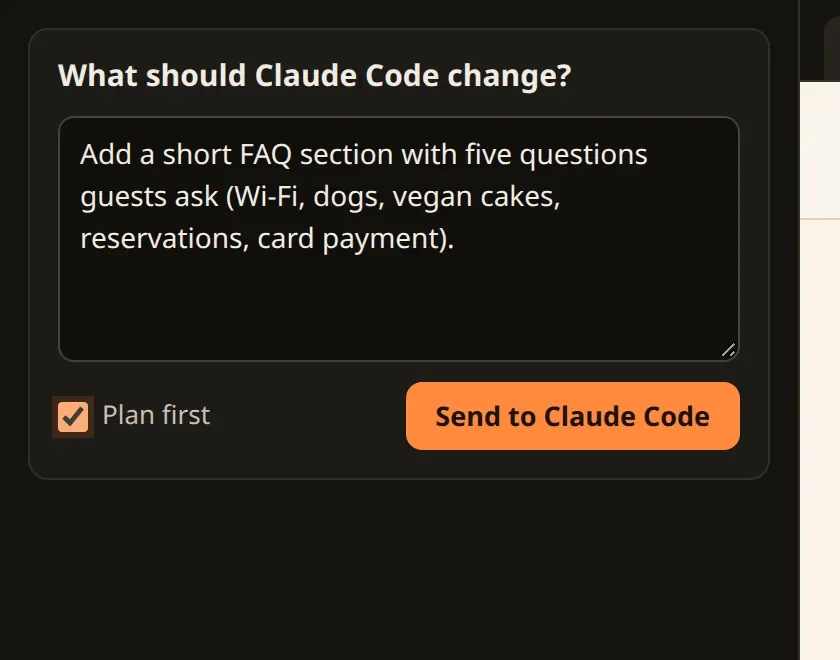
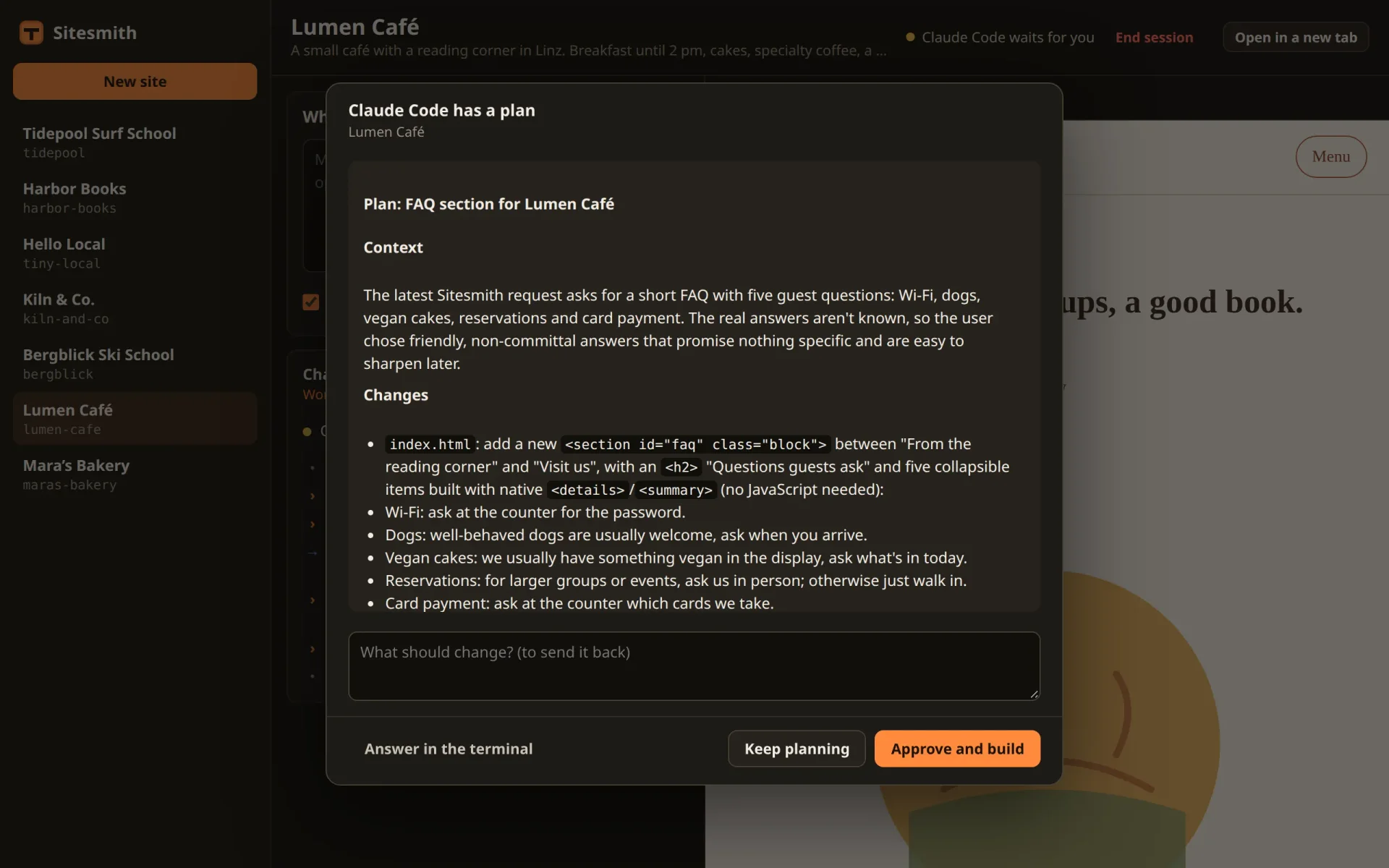
A "Plan first" box for the request: Claude Code works in plan mode, the server switches the mode with Shift+Tab and reads it off the status line, and the plan comes up in the page to approve or to send back with a note.
Claude Code in Your Own Web AppPart 11 of 16
On this page

Quest objectives
- Add a "Plan first" option to the request box and the request text
- Switch Claude Code's permission mode with Shift+Tab and read it from the status line
- Start a new session in plan mode from the first message on
- Show the plan that ExitPlanMode carries as a dialog in the page
- Approve it with the hook output Claude Code really accepts, or send it back with a note
So far, Claude Code starts building the moment a request arrives. For a small change that is right. For a bigger one, you may want to see what it is about to do first: which files, which sections, what goes where. Claude Code has a mode for that, plan mode. It reads, looks around and asks if it needs to, and then it writes up a plan instead of changing anything. You approve the plan or send it back with a note, and only then does it build.
This part adds a "Plan first" box to the request and a plan dialog to the page. Two things in it are new. The server has to switch Claude Code's mode, and no hook does that: it presses the keys you would press and reads the result off the status line. And approving a plan through the hook takes more than an "allow".
Plan first
The request box gets a checkbox. Here is src/requestBox.ts as it is now:
import { api } from './api.ts';
import { h } from './dom.ts';
import type { RequestBody, Site } from '../shared/types.ts';

/** Where you tell Claude Code what to build or change. */
export class RequestBox {
  readonly el: HTMLFormElement;
  private url: string;
  private label = h('h2', {}, 'What should Claude Code build?');
  private text = h('textarea', { rows: 5, 'aria-label': 'Your request' });
  private go = h('button', { type: 'submit', class: 'primary' }, 'Build the site');
  private plan = h('input', { type: 'checkbox' });
  private msg = h('p', { class: 'hint bad', 'aria-live': 'polite' });
  private busy = false;

  constructor(site: string) {
    this.url = `/api/sites/${site}/requests`;
    this.el = h('form', { class: 'panel request' },
      this.label, this.text,
      h('div', { class: 'actions' },
        h('label', { class: 'check', title: 'Claude Code shows you its plan before it changes anything' }, this.plan, 'Plan first'),
        this.go),
      this.msg);
    this.el.onsubmit = (e) => { e.preventDefault(); void this.send(); };
    this.text.onkeydown = (e) => { if (e.key === 'Enter' && (e.ctrlKey || e.metaKey)) { e.preventDefault(); void this.send(); } };
  }

  /** A built site gets changes; a new one its first version. Nothing goes out while a run is on. */
  update(site: Site | null, busy: boolean) {
    this.busy = busy;
    const built = Boolean(site?.built);
    this.label.textContent = built ? 'What should Claude Code change?' : 'What should Claude Code build?';
    this.text.placeholder = built
      ? 'Make the header smaller, add a page with the opening hours…'
      : 'A warm, simple one-pager: the breads of the week, opening hours, where to find us…';
    this.go.textContent = built ? 'Send to Claude Code' : 'Build the site';
    this.go.disabled = busy || !site;
  }

  private async send() {
    if (this.busy) return;
    this.msg.textContent = '';
    const body: RequestBody = { text: this.text.value, plan: this.plan.checked };
    try {
      await api('POST', this.url, body);
      this.text.value = '';
    } catch (err) { this.msg.textContent = (err as Error).message; }
  }
}
The box takes the place of the hint "Ctrl+Enter sends"; Ctrl+Enter still sends. It stays ticked or unticked for the next request, as you left it. Its value travels with the request, so RequestBody in shared/types.ts gets a field:
/** A request typed into the page. */
export interface RequestBody {
  text: string;
  /** plan first: Claude Code shows its plan for approval before it changes anything */
  plan?: boolean;
}
The route in server/main.ts hands the flag on twice, to the request text and to the run:
// requests: Claude Code works on the site
['POST', /^\/api\/sites\/([^/]+)\/requests$/, async (req, res, m) => {
  if (!terminals.available) throw new HttpError(409, 'Sessions need tmux.');
  const site = sites.get(m[1]);
  const { text, plan } = await readJson<RequestBody>(req);
  try {
    send(res, 201, agent.run(target(site.name), runTitle(site), requestText(site, String(text ?? ''), plan === true), plan === true));
  } catch (err) { throw new HttpError(409, (err as Error).message); }
}],
The request text in server/requests.ts gets one more paragraph for a plan:
import type { Site } from '../shared/types.ts';

/** The page's name for a run of this site. */
export const runTitle = (site: Site) => (site.built ? 'Changing the site' : 'Building the site');

/**
 * What Claude Code gets for a request: the user's words, framed by what Sitesmith needs. It goes
 * into .sitesmith/request.md; the folder's CLAUDE.md says what the site is and how it is built.
 */
export function requestText(site: Site, text: string, plan = false) {
  const task = site.built
    ? 'Change the site in this folder as follows:'
    : 'Build the first version of the site in this folder (CLAUDE.md says what it is about). The user adds:';
  return `# A request from Sitesmith

${task}

${text.trim() || '(nothing: use your own judgement)'}

If something important is open (the style, the sections, the tone of the texts), ask before you
build, with AskUserQuestion: two to four options per question, the one you recommend first. For a
question about the layout, give each option a small sketch of the page in plain text as its
preview. Don't ask about details you can decide well yourself.

${plan ? `You are in plan mode: first make a plan (what you will build or change, file by file, in a
few short points) and present it with ExitPlanMode. Sitesmith shows it to the user for approval.

` : ''}When you are done, say in two or three sentences what you built or changed.
`;
}
In plan mode, Claude Code knows that it is to present a plan with the tool ExitPlanMode. The paragraph says so anyway, and asks for a short plan, file by file, because it will be read in a dialog and not in a wide terminal. The paragraph about questions stays: in plan mode Claude Code can still ask first, and in the run for the screenshots it did, with one question before its plan.
In server/agent.ts, a run remembers whether it is to plan first:
/** A run, with what only the server needs. */
interface Job extends Run {
  target: Target;
  /** plan first: Claude Code works in plan mode until you approve its plan */
  plan: boolean;
  /** when its line was typed in (or its session started) */
  sentAt: number;
}
and run() takes the flag:
/** Asks Claude Code for something. One run at a time per site. */
run(t: Target, title: string, request: string, plan = false): Run {
  const on = this.active(t.name);
  if (on) throw new Error(`Claude Code is still on “${on.title}”. Wait until it is done, or stop it.`);
  fs.mkdirSync(path.join(t.dir, OWN), { recursive: true });
  fs.writeFileSync(path.join(t.dir, REQUEST), `${request.trim()}\n`);
  const job: Job = { id: crypto.randomUUID(), title, status: 'queued', queued: Date.now(), target: t, plan, sentAt: 0 };
  this.site(t.name).queue.push(job);
  this.note(t.name, { kind: 'note', text: `Asked from the page: ${title}` });
  void this.deliver(t.name);
  this.changed(t.name);
  return pub(job);
}
Claude Code's modes
Claude Code has permission modes, which decide what it may do without asking. Sitesmith has used one so far, set with --permission-mode acceptEdits when a session starts (part 3): file edits go ahead, and many commands still ask (part 9). Plan mode is another one: Claude Code may read and look around, but changes nothing until a plan is approved.
In the terminal, the status line under the input box shows the mode, and Shift+Tab moves on to the next one. One press after another, it read like this:
# the status line under the input box, Shift+Tab after Shift+Tab (on a machine where auto mode# is available; without it, the cycle skips it) ⏵⏵ accept edits on (shift+tab to cycle) ⏸ plan mode on (shift+tab to cycle) ⏵⏵ auto mode on (shift+tab to cycle) ⏸ manual mode on
"Manual mode" is Claude Code's default mode, in which file edits ask too. Auto mode is only in the cycle where it is available; without it, the cycle has three stops.
Switching by keys
No hook switches the mode. So the server does what you would do: press Shift+Tab, look at the status line, and press again until the right mode shows. tmux calls Shift+Tab BTab, for "back tab". You can try it by hand on a session that waits at its prompt:
$ tmux -L sitesmith send-keys -t =lumen-cafe: BTab$ tmux -L sitesmith capture-pane -p -t =lumen-cafe: | grep -E 'edits on|mode on'
Each BTab moves the status line one stop on, and grep picks it out of the screen that capture-pane prints. In server/terminals.ts, add a type for the modes and one for the ways a session can start, under Target:
export interface Target { name: string; dir: string }
/** How a session starts: with a first message, continuing the last conversation, in plan mode. */
export interface StartOptions { prompt?: string; resume?: boolean; plan?: boolean }
export type Mode = 'plan' | 'acceptEdits' | 'auto' | 'default';
and two methods after atEmptyPrompt():
/** The permission mode, from the status lines under Claude Code's input box. */
async mode(t: { name: string }): Promise<Mode> {
  const footer = (await this.screen(t)).trimEnd().split('\n').slice(-4).join('\n');
  if (/plan mode on/.test(footer)) return 'plan';
  if (/accept edits on/.test(footer)) return 'acceptEdits';
  if (/auto mode on/.test(footer)) return 'auto';
  return 'default';
}

/**
 * Switches the permission mode as you would: Shift+Tab cycles through the modes, the status line
 * says which one is on. Only at an empty prompt. False if the mode never came up.
 */
async setMode(t: { name: string }, want: Mode) {
  for (let i = 0; i < 5; i++) {
    if (await this.mode(t) === want) return true;
    await this.keys(t, 'BTab');
    await new Promise((r) => setTimeout(r, 400));
  }
  return await this.mode(t) === want;
}
mode() reads the screen without colors, drops the empty lines at the bottom and looks at the last four: that is where the status line is. It knows three modes by their words. Everything else is 'default': manual mode, and also a screen it doesn't recognize. Since Sitesmith only ever asks for plan mode or accept edits, a screen it doesn't recognize can never count as a success.
setMode() goes round up to five times: look, press Shift+Tab, and give Claude Code 400 milliseconds to redraw. Five presses get around a cycle of three or four stops from wherever it starts. Why read instead of counting presses? Because you don't know where the cycle starts (you may have switched modes in the terminal yourself) or how many stops it has on this machine. Reading the status line makes both questions go away.
This only works at an empty prompt. In a dialog, Shift+Tab means something else: in Claude Code's own plan dialog, for example, it approves the plan with your typed feedback, as you will see below.
A new session can't be switched this way at all. Its first message is on the command line (part 5), so Claude Code starts working before anybody could press a key. It gets its mode from the start: command(), start() and respawn() take the new options:
/**
 * What the session runs: Claude Code in a login shell, and when it exits, an interactive shell in
 * the folder, so the session stays open. The shell gets the program and its arguments as "$0"
 * and "$@", so no argument is ever parsed by the shell.
 */
private command(opts: StartOptions) {
  return [SHELL, '-lic', '"$0" "$@"; exec "$SHELL" -i', CLAUDE,
    // file edits in the site's folder go ahead, commands still ask; or plan mode for a plan first
    '--permission-mode', opts.plan ? 'plan' : 'acceptEdits',
    // the hooks, on top of your own settings
    ...(this.hooks ? ['--settings', this.hooks.settings] : []),
    ...(opts.resume ? ['--continue'] : []),
    ...(opts.prompt ? [opts.prompt] : [])];
}

/** Starts Claude Code in a site's session: fresh, or continuing the folder's last conversation. */
async start(t: Target, opts: StartOptions = {}) {
  if (this.states.has(t.name)) return;
  await this.tmux('new-session', '-d', '-s', t.name, '-x', '120', '-y', '36', '-c', t.dir, ...this.env(t), ...this.command(opts))
    .catch((err: Error) => { if (!/duplicate session/.test(err.message)) throw err; });
  await this.poll();
}

/** Claude Code again, in place of the shell it left behind. */
async respawn(t: Target, opts: StartOptions = {}) {
  await this.tmux('respawn-pane', '-k', '-t', pane(t.name), '-c', t.dir, ...this.env(t), ...this.command(opts));
  await this.poll();
}
In server/agent.ts, deliverNext() passes the flag on, and switches the mode before it types:
private async deliverNext(name: string, s: SiteAgent) {
  const job = s.queue[0];
  if (!job) return;
  await this.terminals.poll();
  const term = this.terminals.get(name);
  const resume = this.terminals.hasConversation(job.target.dir);
  try {
    if (!term) await this.terminals.start(job.target, { prompt: COMMAND, resume, plan: job.plan });
    else if (!term.claude) await this.terminals.respawn(job.target, { prompt: COMMAND, resume, plan: job.plan });
    else {
      if (this.busy(name) || !(await this.terminals.atEmptyPrompt(job.target))) return;
      // it may have been taken while we looked
      if (s.queue[0] !== job) return;
      // plan mode for a plan first, and out of it for everything else
      if (!(await this.terminals.setMode(job.target, job.plan ? 'plan' : 'acceptEdits'))) {
        throw new Error(`Claude Code did not switch to ${job.plan ? 'plan mode' : 'accepting edits'}: look in the terminal.`);
      }
      await this.terminals.type(job.target, COMMAND);
    }
  } catch (err) {
    s.queue.shift();
    s.run = job;
    this.end(name, 'failed', (err as Error).message);
    return;
  }
  s.queue.shift();
  s.run = job;
  job.status = 'starting';
  job.started = job.sentAt = Date.now();
  this.changed(name);
}
Every request typed into a running session sets the mode: plan mode for a plan first, accept edits for everything else. A plain request after a plan run never finds Claude Code still in plan mode, and if you switched modes in the terminal yourself, the next request from the page switches back. If the mode won't come up, the run fails with a message that sends you to the terminal, instead of sending your request in a mode you didn't choose.
The plan in the page
When Claude Code has its plan, it calls ExitPlanMode, with the plan as Markdown in tool_input.plan. Leaving plan mode needs your consent, so the call goes through PermissionRequest, which part 9 already holds for every tool. hook.ts and the hooks' settings stay as they are, and only hookAsk() has to recognize the plan. Its branch that builds the ask becomes:
let ask: Ask;
if (ev.hook_event_name === 'PermissionRequest' && ev.tool_name === 'ExitPlanMode') {
  // Claude Code's plan, as its own dialog would show it
  ask = { id, kind: 'plan', plan: String(ev.tool_input?.plan ?? ''), since: Date.now() };
  this.note(name, { kind: 'note', text: 'Shows you its plan' });
} else if (ev.hook_event_name === 'PermissionRequest') {
  const input = ev.tool_input ?? {};
  const detail = [input.command, input.file_path, input.url].find((v) => typeof v === 'string') as string | undefined;
  const summary = describeTool(String(ev.tool_name), input);
  ask = { id, kind: 'permission', tool: String(ev.tool_name), summary, detail, remember: Boolean(ev.permission_suggestions?.length), since: Date.now() };
  this.note(name, { kind: 'note', text: `Asks for permission: ${summary}` });
} else {
  ask = { id, kind: 'questions', questions: (ev.tool_input?.questions ?? []) as Question[], since: Date.now() };
}
The plan is a new kind of ask in shared/types.ts, and the answer gets a field for the note that goes with a plan sent back:
/** What Claude Code waits for the page to answer. */
export type Ask =
  | { id: string; kind: 'questions'; questions: Question[]; since: number }
  | {
    id: string;
    kind: 'permission';
    tool: string;
    /** one line about what it wants to do */
    summary: string;
    /** the command, the file or the address */
    detail?: string;
    /** whether Claude Code offers a rule for "from now on" */
    remember: boolean;
    since: number;
  }
  /** the trust dialog of a folder Claude Code has never worked in */
  | { id: string; kind: 'trust'; dir: string; since: number }
  /** a plan to approve (ExitPlanMode), in Markdown */
  | { id: string; kind: 'plan'; plan: string; since: number };

/** The page's answer: per question text, the chosen labels (joined with ", ") or your own words. */
export interface AnswerBody {
  id: string;
  answers?: Record<string, string>;
  /** for a permission prompt, and for a plan (allow: approve it, deny: keep planning) */
  decision?: 'allow' | 'always' | 'deny';
  /** for a plan sent back: what should change */
  note?: string;
  /** for the trust dialog */
  trust?: boolean;
  /** hand it back: Claude Code asks in the terminal instead */
  terminal?: boolean;
}
In src/askDialog.ts, import markdown, the renderer from part 7:
import { api } from './api.ts';
import { h } from './dom.ts';
import { markdown } from './markdown.ts';
import type { AnswerBody, Ask, Question } from '../shared/types.ts';
add the plan to show():
/** Shows a site's ask; nothing happens when it is already on screen, so choices made stay. */
show(site: string, title: string, ask: Ask) {
  if (this.el.open && this.ask?.id === ask.id) return;
  this.ask = ask;
  this.site = site;
  this.dismissed = null;
  this.msg.textContent = '';
  this.sub.textContent = title;
  if (ask.kind === 'questions') this.renderQuestions(ask.questions);
  else if (ask.kind === 'permission') this.renderPermission(ask);
  else if (ask.kind === 'plan') this.renderPlan(ask.plan);
  else this.renderTrust(ask.dir);
  if (!this.el.open) this.el.showModal();
}
and the dialog itself after terminalButton():
/** The plan: approve it, or send it back with what should change. */
private renderPlan(plan: string) {
  this.heading.textContent = 'Claude Code has a plan';
  const view = h('div', { class: 'plan md' });
  view.innerHTML = markdown(plan || '(The plan is empty: see the terminal.)');
  const note = h('textarea', { rows: 2, placeholder: 'What should change? (to send it back)', 'aria-label': 'What should change' });
  this.body.replaceChildren(view, note);
  const approve = h('button', { type: 'button', class: 'primary', onclick: () => void this.send({ decision: 'allow' }) }, 'Approve and build');
  this.foot.replaceChildren(this.terminalButton(),
    h('button', { type: 'button', onclick: () => void this.send({ decision: 'deny', note: note.value }) }, 'Keep planning'),
    approve);
  requestAnimationFrame(() => approve.focus());
}
The plan comes from the model, so it goes into the page through markdown(), which escapes the text before it adds any markup (part 7), never straight into innerHTML. Under it, a box for a note, and three buttons: Answer in the terminal from part 10, Keep planning with the note, and Approve and build.
Approve, or send it back
In answer(), add a branch for the plan after the one for the trust dialog:
if (ask.kind === 'plan') {
  // approved: leave plan mode for "accept edits", as the dialog's "Yes" would. The allow needs
  // the tool's input back (updatedInput), or Claude Code shows its own dialog anyway.
  if (req.decision === 'allow') {
    this.note(name, { kind: 'prompt', text: 'You approved the plan' });
    this.settle(p, { status: 'answered', output: { hookSpecificOutput: { hookEventName: 'PermissionRequest', decision: {
      behavior: 'allow',
      updatedInput: p.event?.tool_input ?? {},
      updatedPermissions: [{ type: 'setMode', mode: 'acceptEdits', destination: 'session' }],
    } } } });
  } else {
    const note = oneLine(String(req.note ?? ''));
    this.note(name, { kind: 'prompt', text: note ? `Keep planning: ${short(note)}` : 'You sent the plan back' });
    this.settle(p, { status: 'answered', output: { hookSpecificOutput: { hookEventName: 'PermissionRequest', decision: {
      behavior: 'deny',
      message: note ? `The user wants the plan changed: ${note}` : 'The user did not approve the plan. Ask what should change.',
    } } } });
  }
  return;
}
The hook prints what this branch builds, and Claude Code reads it. Approving gives Claude Code this:
{"hookSpecificOutput":{"hookEventName":"PermissionRequest","decision":{"behavior":"allow","updatedInput":{…the tool's input…},"updatedPermissions":[{"type":"setMode","mode":"acceptEdits","destination":"session"}]}}}
behavior: 'allow'letsExitPlanModego ahead: the plan is approved.updatedInputhands the tool's input back unchanged. It looks pointless, but without it Claude Code ignores the allow and asks in the terminal anyway.updatedPermissionswithsetModesays which mode to leave plan mode for: accept edits, the mode every Sitesmith session works in, for the rest of this session.
Sending the plan back gives Claude Code this:
{"hookSpecificOutput":{"hookEventName":"PermissionRequest","decision":{"behavior":"deny","message":"The user wants the plan changed: …"}}}
A deny with a message. Claude Code reads the message, stays in plan mode and works on the plan, and the next version comes back through the same hook as a new dialog. Without a note, it is told to ask what should change. The note becomes one line, like a reply in part 7.
The plan dialog in the terminal
As with permission prompts, Claude Code draws its own dialog while the hook holds the plan. In the test, the terminal showed this while the page held a plan:
# Lumen Café: the terminal while the page held the plan Claude has written up a plan and is ready to execute. Would you like to proceed? ❯ 1. Yes, and use auto mode 2. Yes, manually approve edits 3. Tell Claude what to change shift+tab to approve with this feedback ctrl+g to edit in VS Code · ~/.claude/plans/do-what-sitesmith-request-md-says-giggly-wadler.md
The last line shows that Claude Code keeps every plan as a Markdown file in ~/.claude/plans/. Its choices differ a little from the page's: they can switch to auto mode or to approving each edit by hand, while the page's approval goes to accept edits. As in part 10, whichever is answered first wins, and moveOn() closes the page's dialog once Claude Code goes on.
Try it
Restart the server, open a site that is already built, tick Plan first and send a change. In the test, Lumen Café was to get an events page:
The first plan came up in the page: "Plan: events page for Lumen Café", with Context, Changes and Verification.
It went back with the note "Also show the next event on the home page, under the hero."
The second plan came up as a new dialog, now with a "Next event strip directly under the hero".
Approved, Claude Code built it, and the panel said "Done after 0:31".
The status line in the terminal read
⏵⏵ accept edits on (shift+tab to cycle): out of plan mode, into the mode Sitesmith works in.
Send a plain request after that, without the box ticked, and look at the status line again: it stays at accept edits, because deliverNext() checks it before every request.
What you have now
A request can ask for a plan first, and the plan comes up in the page, rendered, with a way to approve it and a way to send it back. On the way, the server learned to work a part of Claude Code that no hook reaches: it presses the keys and reads the result, and when the result doesn't come, it stops and tells you rather than guess.
Every dialog Claude Code shows during a run now has its place in the page. So far you have looked at one site at a time. The next part lets several work at once, and shows you which of them waits for you.
Comments
The comments are GitHub Discussions: sign in with GitHub to write one.
The comments come from GitHub, through giscus. Loading them sends your IP address to giscus.app and GitHub.