
Claude Code in Your Own Web App · Part 4 of 16 in the series
Part 4: The Terminal in the Page
Bring each site's tmux session into the page: node-pty attaches to it on the server, a WebSocket carries the bytes, and xterm.js draws them in a Terminal tab next to the preview.
Claude Code in Your Own Web AppPart 4 of 16
On this page
Quest objectives
- Install node-pty, ws and xterm.js, and get node-pty past the compiler and npm's install-script approval
- Let the mouse scroll and copy in tmux, with the copied text reaching the clipboard through OSC 52
- Attach a page to a session with tmux attach in a pseudo-terminal, without ending the session when the page goes
- Keep other web sites away from a socket that types into a shell
- Show the session in a Terminal tab that connects only while you look at it
Since part 3, every site has its own Claude Code in a tmux session. The page can start and end it and shows whether it is working, but to see the session itself you still need a terminal of your own and tmux -L sitesmith attach.
This part brings the session into the page. Next to Preview, each site gets a Terminal tab with the live screen of its Claude Code, and what you type there goes to it, as if you sat in front of it. You will use this tab more than you might expect: for the next few parts it is the only place to answer the trust dialog of a new folder or a permission prompt, and later it is the fallback for everything the page can't answer.
How a screen gets into a page
A browser can't attach to tmux, but it can draw a terminal: xterm.js is the terminal emulator inside VS Code, and it runs in any page. It wants a stream of bytes, the same bytes a program writes to a real terminal, and it hands back the keys you press.
On the server, those bytes come from tmux attach, the command you type in your own terminal. tmux only attaches to a real terminal, though, so the server runs it in a pseudo-terminal: a terminal device without a screen, which the operating system provides and whose output a program can read. node-pty opens one from Node. Between the two, a WebSocket carries the bytes both ways.
So every page that shows a terminal is one more tmux client, just like your own terminal window. When the page closes, only that client goes. The session and the Claude Code in it run on.
Three packages and a compiler
Install the WebSocket server, xterm.js with the addon that fits a terminal to its box, the types for ws, and node-pty:
$ npm install ws @xterm/xterm @xterm/addon-fitadded 3 packages in 1s$ npm install -D @types/wsadded 1 package in 275ms$ npm install --save-optional node-ptynpm warn install-scripts node-pty@1.1.0 (install: node scripts/prebuild.js || node-gyp rebuild; postinstall: node scripts/post-install.js)npm warn install-scriptsnpm warn install-scripts Run `npm install-scripts ls` to review, or `npm install-scripts approve <pkg>` to allow.# npm 11.20 ran the script anyway and built node-pty. Approve it, so that it runs on every npm:$ npm install-scripts approve node-pty --no-allow-scripts-pinApproved node-pty: added node-pty
node-pty is a native module: part of it is C++ that has to be built for your Node. It comes with ready-made builds for macOS and Windows only, so on Linux it is compiled when you install it. That needs a C++ compiler, make and Python; on Debian and Ubuntu, sudo apt install build-essential python3 brings all three.
The build runs as an install script, and recent versions of npm are wary of those, for a good reason: a package from somewhere deep in your dependencies could run anything on your machine while it installs. npm names the script and asks you to approve it. In the npm used here (11.20), the script ran anyway, but npm's own help says that install scripts of dependencies are blocked by default, so approve it explicitly and be independent of what your npm does. The approval lands in package.json, which now looks like this:
{
  "name": "sitesmith",
  "private": true,
  "version": "1.0.0",
  "description": "Describe a website, Claude Code builds it, the page shows it and asks you what Claude Code asks",
  "type": "module",
  "engines": {
    "node": ">=24"
  },
  "scripts": {
    "server": "node server/main.ts",
    "dev": "vite",
    "build": "vite build",
    "start": "vite build && node server/main.ts",
    "typecheck": "tsc --noEmit"
  },
  "devDependencies": {
    "@types/node": "^24.10.1",
    "@types/ws": "^8.18.2",
    "typescript": "^7.0.2",
    "vite": "^8.3.5"
  },
  "dependencies": {
    "@xterm/addon-fit": "^0.11.0",
    "@xterm/xterm": "^6.0.0",
    "ws": "^8.23.0"
  },
  "optionalDependencies": {
    "node-pty": "^1.1.0"
  },
  "allowScripts": {
    "node-pty": true
  }
}
The entry under allowScripts is "node-pty": true, for node-pty as such rather than for one exact version, which is what --no-allow-scripts-pin asked for.
node-pty is an optional dependency on purpose. If it can't be built, npm install still succeeds, and Sitesmith runs without the terminal in the page: everything else works, and the Terminal tab says what is missing. A quick check that the native part loads:
$ node -e "const p=require('node-pty'); const t=p.spawn('bash',['-c','echo hi from pty'],{}); t.onData(d=>process.stdout.write(d)); t.onExit(()=>process.exit(0))"hi from pty
The mouse belongs to tmux
In a terminal window, the mouse wheel and a drag to select belong to the window itself: it has a history and a selection of its own. Here the history lives in tmux, which keeps 50,000 lines of it (part 3), so tmux should get the mouse. Add this to the end of server/tmux.conf:
# The wheel scrolls back, a drag copies (to the page's clipboard, through OSC 52), and any key goes
# back to the live screen
set -g mouse on
set -g set-clipboard on
unbind -a -T copy-mode
bind -T copy-mode Any send -X cancel
bind -T copy-mode WheelUpPane send -N 3 -X scroll-up
bind -T copy-mode WheelDownPane send -N 3 -X scroll-down
bind -T copy-mode MouseDown1Pane select-pane
bind -T copy-mode MouseDrag1Pane select-pane \; send -X begin-selection
bind -T copy-mode MouseDragEnd1Pane send -X copy-pipe-and-cancel
mouse on: tmux takes the mouse. The wheel puts the pane into copy mode, tmux's scroll mode, and moves through the history.set-clipboard on: what you copy in tmux also goes to the clipboard of the terminal tmux draws on. tmux does that with an escape sequence, OSC 52, which carries the copied text in base64. Here that terminal is xterm.js, and the page will pass the text on to the browser's clipboard.unbind -a -T copy-moderemoves every key of copy mode, and the lines after it bind only what the page needs: any key leaves copy mode and goes back to the live screen, the wheel scrolls three lines at a time, and a drag selects and copies when you let go.
The rule for any key has a catch that will matter in the next part: in copy mode, a key only brings the pane back to the live screen and goes no further. A program that types into a session somebody has scrolled back loses its first letter.
tmux reads the file given with -f only when its server starts, and Sitesmith's tmux server may have been running since part 3, with your sessions in it. So from now on the Sitesmith server tells tmux to read the file again every time it starts.
Attaching from the server
In server/terminals.ts, two imports join the top of the file. Both are types only, so the file still loads where node-pty is missing:
import { execFile } from 'node:child_process';
import fs from 'node:fs';
import os from 'node:os';
import path from 'node:path';
import type { IPty } from 'node-pty';
import type { WebSocket } from 'ws';
import type { ServerEvent, TerminalState } from '../shared/types.ts';
Replace the top of the class, down to the end of init(). The class gets two fields, for node-pty (if it loaded) and the attachments that are open, and init() loads node-pty and has tmux read the config again:
export class Terminals {
  private conf: string;
  private emit: (ev: ServerEvent) => void;
  private states = new Map<string, TerminalState>();
  private ticks = new Map<string, number[]>();
  private sent = '';
  private pty: typeof import('node-pty') | null = null;
  private attached = new Set<IPty>();
  available = false;

  constructor(app: string, emit: (ev: ServerEvent) => void) {
    this.conf = path.join(app, 'server', 'tmux.conf');
    this.emit = emit;
  }

  /**
   * Checks that tmux is there, loads node-pty (optional: it compiles at install), and follows the
   * sessions once a second. A tmux server that is already running reads the config again.
   */
  async init() {
    this.available = await this.tmux('-V').then(() => true, () => false);
    if (!this.available) return;
    this.pty = await import('node-pty').catch(() => null);
    await this.tmux('source-file', this.conf).catch(() => undefined);
    await this.poll();
    setInterval(() => void this.poll(), 1000).unref();
  }
import('node-pty') is a dynamic import with a catch: if the module is missing or its native part doesn't load, pty stays null and nothing else breaks. Below tmux(), add a getter that the server passes on to the page:
/** Whether the page can show the sessions: that needs node-pty as well. */
get canAttach() { return this.available && this.pty !== null; }
And at the end of the class, the attachment itself and a shutdown():
/**
 * One page's view of a session: `tmux attach` in a pseudo-terminal, its output to the page, the
 * page's keys and size to it. When the page goes, only this view ends: tmux detaches it, and the
 * session runs on.
 */
attach(ws: WebSocket, t: Target, cols: number, rows: number) {
  if (!this.pty || !this.states.has(t.name)) { ws.close(4404, 'no session'); return; }
  // inside tmux itself (a server started in a tmux window), tmux would refuse to attach
  const { TMUX: _nested, ...env } = process.env;
  const term = this.pty.spawn('tmux', ['-u', '-L', SOCKET, '-f', this.conf, 'attach-session', '-t', `=${t.name}`],
    { name: 'xterm-256color', cols, rows, cwd: t.dir, env, encoding: null });
  this.attached.add(term);
  // bytes, not text: a character can be split between two chunks
  term.onData((data) => { if (ws.readyState === ws.OPEN) ws.send(data); });
  term.onExit(() => { this.attached.delete(term); ws.close(); });
  ws.on('message', (raw) => {
    try {
      const m = JSON.parse(String(raw)) as { d?: string; cols?: number; rows?: number };
      if (typeof m.d === 'string') term.write(m.d);
      else if (m.cols && m.rows) term.resize(Math.min(500, m.cols), Math.min(200, m.rows));
    } catch { /* not one of the page's messages, or the pty just ended */ }
  });
  ws.on('close', () => term.kill());
}

/** The server stops: the pages' views end, the sessions go on. */
shutdown() {
  for (const term of this.attached) term.kill();
}
attach() starts tmux attach-session for the site's session in a pseudo-terminal of the size the page asked for, with the same -L and -f as every other tmux command of Sitesmith. What tmux draws goes out over the WebSocket, and what comes in goes to tmux. The details:
No
TMUX. If you start the server from a window of your own tmux,TMUXis set in its environment, and tmux refuses to attach from inside tmux. The attachment gets the server's environment without it.Bytes, not text. With
encoding: null, node-pty hands over raw bytes. Claude Code's screen is full of characters that take two or three bytes in UTF-8, like❯and─, and a chunk of output can end in the middle of one. Decoded chunk by chunk, such a character would turn into garbage. xterm.js takes the bytes and decodes them as one stream.Two kinds of message come from the page, both small JSON:
{ d }with keys to type, and{ cols, rows }when its terminal changed size. The pseudo-terminal takes the new size, tmux notices, and Claude Code redraws for the new width. Anything else is ignored.Ending. When the page's socket closes, the attach process is killed. To tmux, that is a client going away, as when you close a terminal window, and the session runs on. When the attach ends by itself, because the session was ended, the socket closes.
shutdown()ends all attachments when the server stops.
Every page is a client of its own, and your own terminal can be attached at the same time. They all see one screen and type into one Claude Code. The window takes the size of the client that was active last (window-size latest from part 3), so the others may see it cut off, or with empty space around it, until you use them.
Who may open the socket
So far the page and the server talk over plain HTTP, guarded by allowed() from part 2. A WebSocket starts with an HTTP request too, an upgrade, but browsers treat it differently in one way that matters here: the same-origin rules that keep a foreign page from reading the answers of your API don't cover WebSockets. Browsers have long let any web site you visit open a WebSocket to localhost without asking you. Newer ones begin to ask first (Chrome has started to ask before a public page reaches your local network), but the server can't count on that: an older browser, or one click on Allow, and a foreign page connected to this socket could type into a shell on your machine.
What the browser does is send the origin of the page along, and a page can't change it. So the server checks it. In server/main.ts, add this below allowed():
/**
 * A terminal socket types into a shell. Browsers have long let any web site open a WebSocket to
 * localhost without asking (newer ones begin to ask first): only our own page may, by its exact origin.
 */
function allowedSocket(req: http.IncomingMessage) {
  return HOSTS.has(req.headers.host ?? '') && ORIGINS.has(req.headers.origin ?? '');
}
Unlike allowed(), it doesn't let a request without an origin through: browsers always send one with a WebSocket, and nothing but our page needs this socket. The host check is the one from part 2: it stops a foreign name that suddenly points to 127.0.0.1 (DNS rebinding).
The rest of main.ts. The imports gain the WebSocket server and the Target type:
import fs from 'node:fs';
import http from 'node:http';
import path from 'node:path';
import { fileURLToPath } from 'node:url';
import { WebSocketServer } from 'ws';
import type { Config, NewSite, ServerEvent } from '../shared/types.ts';
import { HttpError, fileIn, readJson, send, sendFile } from './http.ts';
import { NAME, OWN, Sites } from './sites.ts';
import { Terminals, type Target } from './terminals.ts';
The config that the page loads gets a pty flag, false until the terminals are set up:
const sites = new Sites(path.resolve(option('--sites', path.join(APP, 'sites'))));
const config: Config = { previewPort: PREVIEW_PORT, terminals: false, pty: false };
Below the folder watch, where the terminals are set up, it gets its value:
const terminals = new Terminals(APP, broadcast);
await terminals.init();
config.terminals = terminals.available;
config.pty = terminals.canAttach;

/** A site's name and folder: what the terminals need, after checking the site exists. */
function target(name: string): Target {
  const site = sites.get(name);
  return { name: site.name, dir: sites.dir(site.name) };
}
The Config type in shared/types.ts learns the new field:
export interface Config {
  /** the preview server's port: the sites are shown from there, never from the page's own address */
  previewPort: number;
  /** whether tmux was found: without it there are no sessions */
  terminals: boolean;
  /** whether node-pty was found: without it the page can't show the sessions */
  pty: boolean;
}
After the API server, before the preview server, comes the handler for upgrades:
/* ------------------------------------------------------------------ */
/* the terminals in the page                                            */
/* ------------------------------------------------------------------ */

const sockets = new WebSocketServer({ noServer: true, maxPayload: 1024 ** 2 });

// /api/sites/<name>/session/socket?cols=..&rows=..: the session on a page's screen
server.on('upgrade', (req, socket, head) => {
  const url = new URL(req.url ?? '/', 'http://localhost');
  const m = url.pathname.match(/^\/api\/sites\/([^/]+)\/session\/socket$/);
  let t: Target | null = null;
  try { if (m && allowedSocket(req)) t = target(m[1]); } catch { /* no such site */ }
  if (!t) { socket.destroy(); return; }
  const size = (key: string, fallback: number) => Math.min(500, Math.max(10, Number(url.searchParams.get(key)) || fallback));
  sockets.handleUpgrade(req, socket, head, (ws) => terminals.attach(ws, t, size('cols', 120), size('rows', 36)));
});
The WebSocket server has no port of its own (noServer): it takes over the connections that the HTTP server hands it. The handler checks the path, the origin and the site, and if anything is wrong, it destroys the connection without an answer, so a foreign page learns nothing; in the tests of the finished app, such a client saw nothing but a hang-up. The size in the address is held between 10 and 500, and maxPayload caps a single message at 1 MB, plenty for a paste. Our own page asking for a site that has no session gets its socket, and attach() closes it at once with code 4404.
Vite's dev server passes WebSockets on as well (ws: true in vite.config.ts since part 2), and its origin on port 5401 is in ORIGINS, so the terminal works with npm run dev too.
Last, shutdown() ends the attachments first:
function shutdown() {
  terminals.shutdown();
  for (const c of clients) c.end();
  server.close();
  preview.close();
  setTimeout(() => process.exit(0), 300).unref();
}
process.on('SIGINT', shutdown);
process.on('SIGTERM', shutdown);
xterm.js in the page
Create src/terminalView.ts. It starts with two helpers:
import type { FitAddon } from '@xterm/addon-fit';
import type { Terminal } from '@xterm/xterm';
import { h } from './dom.ts';
import type { TerminalState } from '../shared/types.ts';

/** xterm.js is big: it loads when the first terminal comes on screen. */
async function loadXterm() {
  const [{ Terminal }, { FitAddon }] = await Promise.all([
    import('@xterm/xterm'), import('@xterm/addon-fit'), import('@xterm/xterm/css/xterm.css'),
  ]);
  return { Terminal, FitAddon };
}

/** OSC 52: tmux hands over what a drag selected, base64-encoded, for the clipboard. */
function copyToClipboard(data: string) {
  const bytes = Uint8Array.from(atob(data.slice(data.indexOf(';') + 1)), (c) => c.charCodeAt(0));
  // the clipboard needs a secure page (https, or localhost): elsewhere there is none
  void navigator.clipboard?.writeText(new TextDecoder().decode(bytes)).catch(() => undefined);
  return true;
}
xterm.js is by far the biggest thing in the page, and many visits never open a terminal. With a dynamic import(), Vite puts it into files of their own, which the browser loads the first time a terminal comes on screen. copyToClipboard is the other end of tmux's set-clipboard: the copied text arrives in base64, behind a short prefix that ends in a semicolon, and goes to the browser's clipboard. The detour through bytes and a TextDecoder is needed because atob returns one character per byte, which would mangle anything that isn't plain ASCII. A page has a clipboard only in a secure context, on https or on localhost. Opened over plain http from another device, as your phone will in part 16, it has no navigator.clipboard, and the ?. skips the copy instead of throwing.
The class follows:
/**
 * A site's session in the page: xterm.js on a WebSocket to the server, which attaches to the tmux
 * session for as long as the socket lives. It is attached only while it is on screen.
 */
export class TerminalView {
  readonly el: HTMLElement;
  private url: string;
  private state: TerminalState | undefined;
  private shown = false;
  /** whether the server can attach a page to a session (it has node-pty) */
  private available: boolean;
  private term: Terminal | null = null;
  private fit: FitAddon | null = null;
  private ws: WebSocket | null = null;
  private opening = false;
  private retry = 0;
  private screen = h('div', { class: 'term-screen' });
  private empty: HTMLElement;

  constructor(site: string, available: boolean) {
    this.url = `/api/sites/${site}/session/socket`;
    this.available = available;
    this.empty = h('div', { class: 'term-empty' },
      h('h2', {}, available ? 'No session' : 'The terminal needs node-pty'),
      h('p', {}, available
        ? 'Start Claude Code above. The session keeps running when you close this page or stop the server.'
        : 'npm install builds it (it needs a C++ compiler on Linux). Restart the server afterwards.'));
    this.el = h('div', { class: 'term' }, this.screen, this.empty);
  }

  /** The terminal tab came on screen, or left it. */
  setShown(shown: boolean) {
    this.shown = shown;
    this.sync();
    if (shown) requestAnimationFrame(() => { this.fit?.fit(); this.term?.focus(); });
  }

  update(state: TerminalState | undefined) {
    this.state = state;
    // without node-pty there is nothing to attach to: the box says what is missing
    const live = Boolean(state) && this.available;
    this.screen.hidden = !live;
    this.empty.hidden = live;
    this.sync();
  }

  /** The page shows another site: this view is gone for good. */
  dispose() {
    this.shown = false;
    this.sync();
    this.term?.dispose();
  }

  /** Attached exactly while there is a session and it is on screen. A lost connection comes back. */
  private sync() {
    const wanted = this.shown && Boolean(this.state) && this.available;
    clearTimeout(this.retry);
    if (wanted && !this.ws && !this.opening) void this.open();
    if (!wanted && this.ws) {
      const ws = this.ws;
      this.ws = null;
      ws.close();
    }
  }
The view is attached exactly while it is on screen and there is a session (and the server has node-pty), and sync() enforces that whenever one of these changes. Switch to the Preview tab, and the socket closes, which detaches this page from tmux; switch back, and it attaches again. When there is no session, the box says how to start one; on a server without node-pty it says what is missing, session or not, and the page never opens a socket it can't use.
private async open() {
  this.opening = true;
  const term = this.term ?? await this.create();
  this.opening = false;
  if (!this.shown || !this.state || this.ws) return;
  // tmux draws the whole screen when it attaches: start from an empty one
  term.reset();
  this.fit?.fit();
  const proto = location.protocol === 'https:' ? 'wss' : 'ws';
  const ws = new WebSocket(`${proto}://${location.host}${this.url}?cols=${term.cols}&rows=${term.rows}`);
  ws.binaryType = 'arraybuffer';
  // the window may have changed size while connecting
  ws.onopen = () => ws.send(JSON.stringify({ cols: term.cols, rows: term.rows }));
  ws.onmessage = (e) => term.write(new Uint8Array(e.data as ArrayBuffer));
  ws.onclose = () => {
    if (this.ws !== ws) return;
    this.ws = null;
    this.retry = window.setTimeout(() => this.sync(), 1000);
  };
  this.ws = ws;
  term.focus();
}
When tmux attaches, it draws the whole screen from scratch, so open() clears the terminal first, fits it to its box and puts that size into the address. Once the socket is open, it sends the size again, in case the window changed meanwhile. The socket delivers ArrayBuffers, which go to xterm.js as bytes, as on the server. If the connection drops while the view should be attached, because the server restarted for example, it tries again a second later.
  private async create() {
    const { Terminal, FitAddon } = await loadXterm();
    const term = new Terminal({
      fontFamily: getComputedStyle(document.documentElement).getPropertyValue('--mono'),
      fontSize: 13,
      cursorBlink: true,
      // tmux keeps the history (the wheel scrolls it), xterm.js only the screen
      scrollback: 0,
      theme: { background: '#110f0c', foreground: '#f1ece4', cursor: '#ff8a3d', selectionBackground: 'rgba(255, 138, 61, 0.35)' },
    });
    const fit = new FitAddon();
    term.loadAddon(fit);
    term.open(this.screen);
    term.parser.registerOscHandler(52, copyToClipboard);
    const send = (m: unknown) => { if (this.ws?.readyState === WebSocket.OPEN) this.ws.send(JSON.stringify(m)); };
    term.onData((d) => send({ d }));
    term.onResize(({ cols, rows }) => send({ cols, rows }));
    term.attachCustomKeyEventHandler((e) => {
      // Shift+Enter: a new line in Claude Code's input box (Ctrl+J), for keydown and the keypress after it
      if (e.shiftKey && e.key === 'Enter') {
        if (e.type === 'keydown') send({ d: '\n' });
        return false;
      }
      if (e.type !== 'keydown') return true;
      // Ctrl+C copies a selection made with Shift+drag; without one it goes to Claude Code (interrupt)
      if (e.ctrlKey && e.key === 'c' && term.hasSelection()) {
        void navigator.clipboard?.writeText(term.getSelection()).catch(() => undefined);
        term.clearSelection();
        return false;
      }
      // Ctrl+V: the browser pastes, xterm.js sends it on
      return !(e.ctrlKey && e.key === 'v');
    });
    new ResizeObserver(() => { if (this.shown && this.screen.offsetWidth) fit.fit(); }).observe(this.screen);
    this.term = term;
    this.fit = fit;
    return term;
  }
}
The terminal uses the page's monospace font and its colors. scrollback: 0, because the history belongs to tmux, and the wheel scrolls that. Then the keys, where a terminal in a browser has a few decisions to make:
Shift+Enter makes a new line in Claude Code's input box. A terminal sends the same character for Enter and Shift+Enter, so Claude Code can't tell them apart. The view sends
\ninstead (Ctrl+J), which Claude Code takes as a line break, and swallows the keypress that follows the keydown.Ctrl+C copies when xterm.js has a selection of its own, made by dragging with Shift held down (and, like the OSC 52 copy, skips quietly on a page without a clipboard). A plain drag goes to tmux, which copies by itself. Without a selection, Ctrl+C goes to Claude Code, where it interrupts.
Ctrl+V is left to the browser: it pastes, and xterm.js sends the pasted text on.
A ResizeObserver fits the terminal again when its box changes size, and onResize tells the server.
Tabs on the site page
src/sitePage.ts gets the two tabs. Replace the file:
import { h } from './dom.ts';
import { SessionControls } from './session.ts';
import { TerminalView } from './terminalView.ts';
import type { Config, Site, TerminalState } from '../shared/types.ts';

type Tab = 'preview' | 'terminal';

/** One site: what it is about, and on the right the site itself or its terminal. */
export class SitePage {
  readonly el: HTMLElement;
  readonly name: string;
  private config: Config;
  private site: Site | null = null;
  private heading = h('h1', { class: 'site-heading' });
  private about = h('p', { class: 'site-about' });
  private frame = h('iframe', { class: 'preview-frame', title: 'The site', sandbox: 'allow-scripts allow-same-origin allow-forms allow-popups' });
  private empty = h('div', { class: 'preview-empty' }, h('p', {}, 'Nothing built yet.'));
  private preview = h('div', { class: 'preview' }, this.frame, this.empty);
  private session: SessionControls;
  private terminal: TerminalView;
  private tabs: Record<Tab, HTMLButtonElement>;

  constructor(name: string, config: Config) {
    this.name = name;
    this.config = config;
    this.session = new SessionControls(name, config.terminals);
    this.terminal = new TerminalView(name, config.pty);
    this.tabs = {
      preview: h('button', { type: 'button', class: 'tab', role: 'tab', onclick: () => this.show('preview') }, 'Preview'),
      terminal: h('button', { type: 'button', class: 'tab', role: 'tab', onclick: () => this.show('terminal') }, 'Terminal'),
    };
    this.el = h('section', { class: 'site-page' },
      h('header', { class: 'site-head' },
        h('div', { class: 'site-head-text' }, this.heading, this.about),
        this.session.el,
        h('a', { class: 'button small', href: this.previewUrl, target: '_blank', rel: 'noopener' }, 'Open in a new tab')),
      h('div', { class: 'view' },
        h('div', { class: 'tabs', role: 'tablist' }, this.tabs.preview, this.tabs.terminal),
        this.preview, this.terminal.el));
    this.show('preview');
  }

  /**
   * The site on the preview server: the same host name as the page (so it also works when the
   * page is opened from another machine later), but its own port.
   */
  get previewUrl() {
    return `${location.protocol}//${location.hostname}:${this.config.previewPort}/${this.name}/`;
  }

  /** The site or its terminal on the right. */
  show(tab: Tab) {
    for (const [key, button] of Object.entries(this.tabs)) button.setAttribute('aria-selected', String(key === tab));
    this.preview.hidden = tab !== 'preview';
    this.terminal.el.hidden = tab !== 'terminal';
    this.terminal.setShown(tab === 'terminal');
  }

  /** The list of sites changed (or arrived). */
  update(sites: Site[]) {
    const site = sites.find((s) => s.name === this.name) ?? null;
    const wasBuilt = this.site?.built;
    this.site = site;
    this.heading.textContent = site?.title ?? this.name;
    this.about.textContent = site ? site.description : 'There is no site of this name.';
    this.frame.hidden = !site?.built;
    this.empty.hidden = Boolean(site?.built);
    if (site?.built && !wasBuilt) this.frame.src = this.previewUrl;
  }

  /** The sessions changed: this site's, or none. */
  terminals(list: TerminalState[]) {
    const state = list.find((t) => t.site === this.name);
    this.session.update(state);
    this.terminal.update(state);
  }

  /** Files of this site changed on disk: show the new state. */
  filesChanged() {
    // setting src again navigates the frame again, even to the same address
    if (this.site?.built) this.frame.src = this.previewUrl;
  }

  /** The page shows another site. */
  dispose() {
    this.terminal.dispose();
  }
}
The right-hand side of the page is now a view with two tabs, the preview from part 2 and the terminal. show() switches between them and tells the terminal whether it is on screen, which is all it needs to attach or let go. The session's state, which the header already shows, goes to the terminal as well, so it attaches when a session appears and shows its empty box when the session ends. dispose(), empty until now, closes the terminal when you open another site.
Try it
Build and start (npm start), open a site, start Claude Code if it isn't running, and switch to the Terminal tab:
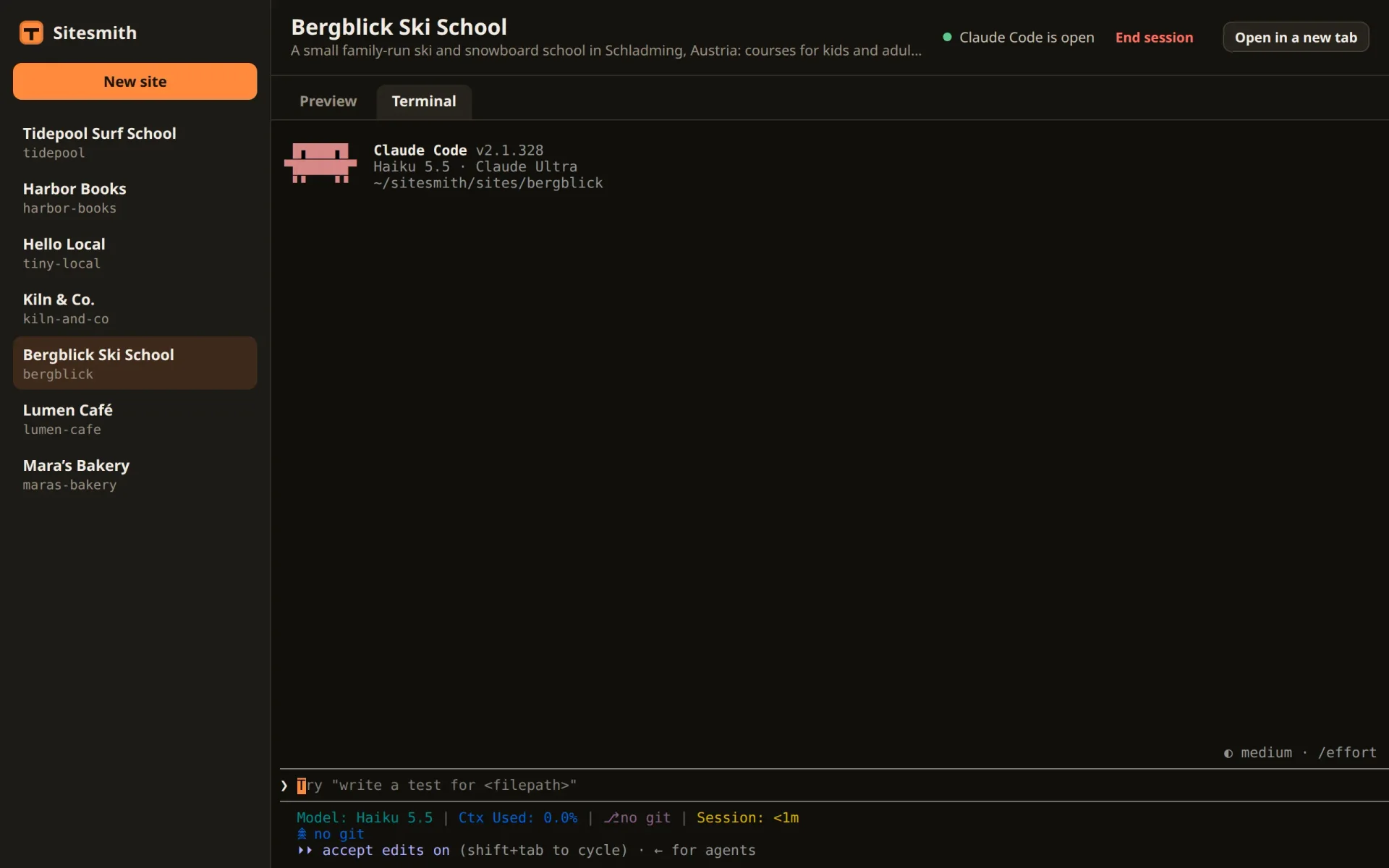
This is the screen you saw with tmux attach in part 3, and it is live. Type a question and press Enter, and Claude Code answers. Scroll up with the wheel and press any key to come back. Drag across some text, and it is on your clipboard. Open the same site in a second window, and both show the same session.
The session takes the size of the page's terminal. With the browser window at 1280 by 800 pixels:
# The page's terminal in a browser window of 1280 × 800: the size tmux gives the session$ tmux -L sitesmith display -p -t =lumen-cafe: '#{window_width}x#{window_height}'146x49
Close the browser tab or stop the server, and Claude Code doesn't notice: a tmux client went away, nothing more.
The page now shows every session and lets you type into it, and only the page itself can open that door. So far, though, you do the typing. In the next part the page takes it over: you describe what you want in a box, and Sitesmith types it into Claude Code, at a moment when that is safe.
Comments
The comments are GitHub Discussions: sign in with GitHub to write one.
The comments come from GitHub, through giscus. Loading them sends your IP address to giscus.app and GitHub.