
Claude Code in Your Own Web App · Part 6 of 16 in the series
Part 6: Hooks Report Back
Give every session a settings file with hooks: a small script posts each event to the server, which follows the tools Claude Code uses, reads what it says from its transcript, and learns the exact end of every turn.
Claude Code in Your Own Web AppPart 6 of 16
On this page
Quest objectives
- Write a settings file with hooks from the server and pass it to every session with --settings
- Tell the hook which site it reports for and where the server is, through the session environment and server.json
- Write a hook that never gets in Claude Code's way
- Turn hook events into a feed of what Claude Code does, with its own words from the transcript
- End a run on the Stop hook, and fall back to the screen for sessions without hooks
Since the last part, Sitesmith can hand Claude Code a request. What comes back is thin: the screen moves, or it doesn't. The page can't say what Claude Code is doing, it notices a few seconds late that the work has begun, and it can only guess when a turn is over.
Claude Code has a channel made for this. Hooks are commands it runs by itself at certain moments: when a session starts, when a prompt comes in, before every tool, at the end of a turn. Each one gets a description of the moment as JSON. In this part, every session Sitesmith starts gets hooks that pass these descriptions on to the server, and the panel under the request box becomes a feed of what Claude Code does.
Four hooks
The hooks reference lists many events. Sitesmith uses four of them in this part:
SessionStart: Claude Code has started.sourcesays how:startupfor a new conversation,resumefor a continued one,clearorcompactafter those commands.UserPromptSubmit: a message went in, its text inprompt. From here on, Claude Code is working.PreToolUse: Claude Code is about to use a tool.tool_nameandtool_inputsay which and with what, for exampleEditwith afile_path.Stop: the turn is over. Its input also carrieslast_assistant_message, what Claude Code said last, which part 7 puts to use.
Every event also carries session_id, cwd and transcript_path, the file in which Claude Code keeps the conversation. A hook can do more than listen: what it prints and its exit code can allow or block things, and parts 8 and 9 build on that. Here the hooks only report. A hook that exits with code 0 and prints nothing makes no decision at all.
A settings file written by the server
Hooks are configured in Claude Code's settings. You could put them into your own ~/.claude/settings.json, but then every Claude Code you start would report to Sitesmith. Instead, the server writes a settings file of its own and passes it to the sessions it starts, with --settings. Claude Code adds such a file on top of your own settings: your permissions, your status line and your own hooks all stay.
server/agent.ts grows a lot in this part. Start at the top: replace everything down to live with this, which adds two small helpers after it:
import crypto from 'node:crypto';
import fs from 'node:fs';
import path from 'node:path';
import type { Activity, AgentState, Run, ServerEvent } from '../shared/types.ts';
import { OWN } from './sites.ts';
import type { Target, Terminals } from './terminals.ts';

/** Where a request's text goes, in the site's folder. */
export const REQUEST = `${OWN}/request.md`;
/** The one short line typed into Claude Code for every request. */
const COMMAND = `Do what ${REQUEST} says.`;
/** How many lines of activity the server keeps per site. */
const ACTIVITY = 40;

/** What a hook sends: Claude Code's hook input (the fields Sitesmith reads). */
export interface HookEvent {
  hook_event_name: string;
  transcript_path?: string;
  source?: string;
  prompt?: string;
  tool_name?: string;
  tool_input?: Record<string, unknown>;
  tool_use_id?: string;
  last_assistant_message?: string;
}

/** A run, with what only the server needs. */
interface Job extends Run {
  target: Target;
  /** when its line was typed in (or its session started) */
  sentAt: number;
}

interface SiteAgent {
  /** the current run, or the last one */
  run: Job | null;
  /** runs waiting until Claude Code is free */
  queue: Job[];
  /** a run is being started or typed in right now */
  delivering: boolean;
  /** whether its session reports through the hooks */
  hooked: boolean;
  /** between a prompt and the end of its turn, as the hooks report it */
  hookBusy: boolean;
  /** the conversation's transcript, and how far it has been read */
  transcript: string | null;
  transcriptPos: number;
  activity: Activity[];
  /** the state last sent to the pages */
  sent: string;
}

const pub = (j: Job): Run => ({ id: j.id, title: j.title, status: j.status, queued: j.queued, started: j.started, ended: j.ended, error: j.error });
const live = (r: Run | null) => Boolean(r && (r.status === 'starting' || r.status === 'working'));
const short = (s: string, n = 140) => (s.length > n ? `${s.slice(0, n - 1)}…` : s);
const oneLine = (s: string) => s.replace(/\s+/g, ' ').trim();
HookEvent lists the fields of a hook's input that Sitesmith reads; the others come along and are ignored. A site now also keeps whether its session reports through hooks (hooked), whether the hooks say Claude Code is working (hookBusy), the transcript and how far it has been read, and its activity: up to 40 lines for the feed. short() and oneLine() trim text for those lines.
Next, a function that turns a tool into a line a person can read. It goes before the class:
/** One line for the page about a tool Claude Code uses. */
export function describeTool(tool: string, input: Record<string, unknown> = {}) {
  const file = path.basename(String(input.file_path ?? input.path ?? ''));
  switch (tool) {
    case 'Read': return /\.(png|jpe?g|webp|gif|svg)$/i.test(file) ? `Looking at ${file}` : `Reading ${file}`;
    case 'Write': return `Writing ${file}`;
    case 'Edit': case 'MultiEdit': return `Editing ${file}`;
    case 'Bash': return input.description ? short(String(input.description)) : `Running ${short(oneLine(String(input.command ?? 'a command')), 90)}`;
    case 'Glob': case 'Grep': return 'Searching the folder';
    case 'WebSearch': return `Searching the web: ${short(String(input.query ?? ''), 90)}`;
    case 'WebFetch': return 'Reading a web page';
    case 'TodoWrite': return 'Updating its plan';
    case 'Agent': case 'Task': return `Handing off: ${short(String(input.description ?? 'a task'), 90)}`;
    case 'AskUserQuestion': return 'Asking you something';
  }
  return tool;
}
Files show up by their name, commands by the description Claude Code gives them, which it usually does ("List project files and read CLAUDE.md", "Syntax-check the script and list files"), and the tools for questions and helpers get words of their own. An image that Claude Code reads is "Looking at", because that is what it does with it. A tool without a case of its own, an MCP tool for example, shows its name.
Now the class. Its constructor writes the settings file:
/**
 * Claude Code at work for the page. A request becomes a run: its text goes into a file in the
 * site's folder, and as soon as Claude Code is free, one short line is typed into the site's
 * session. What happens then, Claude Code's hooks report (server/hook.ts); sessions without the
 * hooks are read from the screen.
 */
export class Agent {
  /** the settings file with the hooks, passed to every session with --settings */
  readonly settingsFile: string;
  private terminals: Terminals;
  private emit: (ev: ServerEvent) => void;
  private sites = new Map<string, SiteAgent>();

  constructor(app: string, data: string, terminals: Terminals, emit: (ev: ServerEvent) => void) {
    this.terminals = terminals;
    this.emit = emit;
    // the hook script runs on the Node that runs this server; quoted for the shell Claude Code uses
    const quote = (s: string) => `'${s.replace(/'/g, `'\\''`)}'`;
    const command = `${quote(process.execPath)} --disable-warning=ExperimentalWarning ${quote(path.join(app, 'server', 'hook.ts'))}`;
    const hook = [{ type: 'command', command }];
    const settings = {
      hooks: {
        SessionStart: [{ hooks: hook }],
        UserPromptSubmit: [{ hooks: hook }],
        PreToolUse: [{ matcher: '*', hooks: hook }],
        Stop: [{ hooks: hook }],
      },
    };
    this.settingsFile = path.join(data, 'claude-hooks.json');
    fs.mkdirSync(data, { recursive: true });
    fs.writeFileSync(this.settingsFile, `${JSON.stringify(settings, null, 2)}\n`);
    terminals.setHooks(this.settingsFile, data);
    // once a second, and never twice at the same time: a check that waits for tmux takes a moment
    const loop = async () => { await this.tick().catch(() => undefined); setTimeout(loop, 1000).unref(); };
    void loop();
  }
All four events run the same command. The details:
Which Node.
process.execPathis the Node that runs the server, and the hook runs on exactly that one, whatevernodemeans in the session's login shell. A version manager or aPATHthat differs can't break it. Node runs the TypeScript file directly, as it runs the server, and--disable-warning=ExperimentalWarningkeeps it from printing warnings about features it still calls experimental, so the hook prints nothing at all.Quoted for the shell. Claude Code runs a hook's command through a shell, so both paths go into single quotes, with any single quote inside them escaped. A folder with a space in its name doesn't break the command.
Every tool. The matcher
*makesPreToolUsefire for every tool. The other three events need no matcher.The file goes into the server's data folder as
.data/claude-hooks.json, written afresh at every start, so it always points to where the app is now.
Then the constructor hands the file and the data folder to the terminals, which put them into every session they start from now on.
Every session gets them
In server/terminals.ts, the class gets a field for the hooks:
export class Terminals {
  private conf: string;
  private emit: (ev: ServerEvent) => void;
  private states = new Map<string, TerminalState>();
  private ticks = new Map<string, number[]>();
  private sent = '';
  private pty: typeof import('node-pty') | null = null;
  private attached = new Set<IPty>();
  private hooks: { settings: string; data: string } | null = null;
  available = false;
After hasConversation() come a setter and the session's environment, followed by command(), start() and respawn(), which now use them. Replace those three with this:
/** The hooks' settings file and the data folder: sessions started from now on report through them. */
setHooks(settings: string, data: string) {
  this.hooks = { settings, data };
}

/** The session's environment: which site its hooks report for, and where they find the server. */
private env(t: Target) {
  return this.hooks ? ['-e', `SITESMITH_SITE=${t.name}`, '-e', `SITESMITH_DATA=${this.hooks.data}`] : [];
}

/**
 * What the session runs: Claude Code in a login shell, and when it exits, an interactive shell in
 * the folder, so the session stays open. The shell gets the program and its arguments as "$0"
 * and "$@", so no argument is ever parsed by the shell.
 */
private command(opts: { prompt?: string; resume?: boolean }) {
  return [SHELL, '-lic', '"$0" "$@"; exec "$SHELL" -i', CLAUDE,
    // file edits in the site's folder go ahead; commands still ask
    '--permission-mode', 'acceptEdits',
    // the hooks, on top of your own settings
    ...(this.hooks ? ['--settings', this.hooks.settings] : []),
    ...(opts.resume ? ['--continue'] : []),
    ...(opts.prompt ? [opts.prompt] : [])];
}

/** Starts Claude Code in a site's session: fresh, or continuing the folder's last conversation. */
async start(t: Target, opts: { prompt?: string; resume?: boolean } = {}) {
  if (this.states.has(t.name)) return;
  await this.tmux('new-session', '-d', '-s', t.name, '-x', '120', '-y', '36', '-c', t.dir, ...this.env(t), ...this.command(opts))
    .catch((err: Error) => { if (!/duplicate session/.test(err.message)) throw err; });
  await this.poll();
}

/** Claude Code again, in place of the shell it left behind. */
async respawn(t: Target, opts: { prompt?: string; resume?: boolean } = {}) {
  await this.tmux('respawn-pane', '-k', '-t', pane(t.name), '-c', t.dir, ...this.env(t), ...this.command(opts));
  await this.poll();
}
One settings file serves all sites, so the hook has to learn from somewhere which site it reports for. The session's environment is the place: new-session -e NAME=value sets a variable for this one session (it needs tmux 3.2 or newer), and Claude Code and its hooks inherit it. SITESMITH_SITE is the site's name, SITESMITH_DATA the server's data folder. respawn-pane takes the same -e, for a Claude Code that starts again in place of its shell.
A Claude Code you start by hand in a terminal of your own has neither the variables nor the settings file, so it doesn't report, even in a site's folder.
server.json: where the hooks find the server
The hook also needs the server's address. The port could go into the environment as well, but a session outlives the server: you may stop Sitesmith and start it again with another --port, while the session from before runs on with its old environment. So the server writes where it listens into a file, and the hook reads that file every time it runs. In server/main.ts, replace the top of the file, down to the line with DIST, with this. It adds the --data option and imports the type of a hook event:
/**
 * Sitesmith's server: the API, live updates over server-sent events, the built page (dist/), and a
 * second server on a port of its own that shows the sites. It listens on this machine only.
 *
 *   node server/main.ts [--port 5400] [--sites ./sites] [--data ./.data]
 */
import fs from 'node:fs';
import http from 'node:http';
import path from 'node:path';
import { fileURLToPath } from 'node:url';
import { WebSocketServer } from 'ws';
import type { Config, NewSite, RequestBody, ServerEvent } from '../shared/types.ts';
import { Agent, type HookEvent } from './agent.ts';
import { HttpError, fileIn, readJson, send, sendFile } from './http.ts';
import { requestText, runTitle } from './requests.ts';
import { NAME, OWN, Sites } from './sites.ts';
import { Terminals, type Target } from './terminals.ts';

const APP = path.dirname(path.dirname(fileURLToPath(import.meta.url)));

function option(name: string, fallback: string) {
  const i = process.argv.indexOf(name);
  return i > 0 && process.argv[i + 1] ? process.argv[i + 1] : fallback;
}
const PORT = Number(option('--port', '5400'));
const PREVIEW_PORT = PORT + 2;
/** Vite's dev server (`npm run dev`), which forwards /api here */
const DEV_PORT = 5401;
const DIST = path.join(APP, 'dist');
/** the server's own files: the hooks' settings, and server.json, through which the hooks find it */
const DATA = path.resolve(option('--data', path.join(APP, '.data')));
The agent gets the app folder and the data folder:
const terminals = new Terminals(APP, broadcast);
await terminals.init();
config.terminals = terminals.available;
config.pty = terminals.canAttach;
const agent = new Agent(APP, DATA, terminals, broadcast);
And the lines from server.listen to the end of the file become:
const SERVER_FILE = path.join(DATA, 'server.json');
server.listen(PORT, '127.0.0.1', () => {
  // the hooks of the sessions find the server through this file
  fs.writeFileSync(SERVER_FILE, `${JSON.stringify({ port: PORT, pid: process.pid })}\n`);
  console.log(`Sitesmith: http://localhost:${PORT}/`);
});
preview.listen(PREVIEW_PORT, '127.0.0.1');

function shutdown() {
  // the hooks then know at once that nobody listens
  try { if (JSON.parse(fs.readFileSync(SERVER_FILE, 'utf8')).pid === process.pid) fs.rmSync(SERVER_FILE); } catch { /* gone */ }
  terminals.shutdown();
  for (const c of clients) c.end();
  server.close();
  preview.close();
  setTimeout(() => process.exit(0), 300).unref();
}
process.on('SIGINT', shutdown);
process.on('SIGTERM', shutdown);
When the server listens, it writes .data/server.json with its port and its process id. When it shuts down, it removes the file, so the hooks know at once that nobody is listening, instead of waiting for a connection to fail. The process id makes sure that a server removes only its own file: if another Sitesmith has started since with the same data folder, the file is that one's. The .data/ folder has been in .gitignore since part 2.
The hook
Create server/hook.ts:
/**
 * What Claude Code runs for its hooks, in the sessions Sitesmith starts: it reads the event from
 * stdin and posts it to the server. The session's environment names the site (SITESMITH_SITE) and
 * the server's data folder (SITESMITH_DATA), where server.json says on which port it listens.
 *
 * A hook must never get in Claude Code's way: whatever goes wrong (no server, a timeout, odd
 * input), it ends quietly with exit code 0 and no output, and Claude Code carries on.
 */
import fs from 'node:fs';
import path from 'node:path';

const site = process.env.SITESMITH_SITE;
const data = process.env.SITESMITH_DATA;

async function stdin() {
  let raw = '';
  for await (const chunk of process.stdin) raw += chunk;
  return raw;
}

function serverUrl() {
  try {
    const { port } = JSON.parse(fs.readFileSync(path.join(data!, 'server.json'), 'utf8')) as { port: number };
    return `http://127.0.0.1:${port}`;
  } catch { return null; }
}

async function main() {
  const raw = await stdin();
  if (!site || !data) return;
  const base = serverUrl();
  if (!base) return;
  const event = JSON.parse(raw) as { hook_event_name: string };
  await fetch(`${base}/api/hooks/event`, {
    method: 'POST',
    headers: { 'content-type': 'application/json' },
    body: JSON.stringify({ site, event }),
    signal: AbortSignal.timeout(2000),
  });
}

await main().catch(() => undefined);
process.exit(0);
The rule for this script is in its comment: it must never get in Claude Code's way. Claude Code waits for a hook before it goes on, and a hook that fails, prints something or hangs disturbs the very session it is there to watch. So:
It reads its whole input first, before it decides anything.
Without
SITESMITH_SITE, it runs in a session that Sitesmith didn't start, and does nothing. Withoutserver.json, the server isn't running, and it does nothing either.The post may take two seconds at most. A command hook may run for up to ten minutes by default, and a server that hangs shouldn't hold Claude Code up for any of them.
Every error ends in the
catch, and the script always exits with code 0 and no output: no decision, and Claude Code carries on as if there were no hook.
It posts to 127.0.0.1, the address the server listens on, so nothing depends on how localhost resolves on your machine.
The route
The hook posts to a new route. Add it to the route list in main.ts, after the Stop route:
// Claude Code's hooks (server/hook.ts) report here
['POST', /^\/api\/hooks\/event$/, async (req, res) => {
  const { site, event } = await readJson<{ site: string; event: HookEvent }>(req);
  if (site && sites.read(String(site)) && event?.hook_event_name) agent.hookEvent(String(site), event);
  send(res, 200, {});
}],
It takes an event only for a site that exists, and only with an event name, and it answers 200 in every case: the hook doesn't look at the answer anyway. Like every route, it sits behind allowed(). The hook's request comes from this machine, to the server's own address and without an origin, so it passes; a web page in your browser that sent the same POST would be turned away by its origin.
What the server makes of it
Back to agent.ts. After the constructor, site() fills the new fields, and busy() and state() come next:
private site(name: string) {
  let s = this.sites.get(name);
  if (!s) {
    s = { run: null, queue: [], delivering: false, hooked: false, hookBusy: false, transcript: null, transcriptPos: 0, activity: [], sent: '' };
    this.sites.set(name, s);
  }
  return s;
}

/** Working: the hooks say so (between a prompt and the end of its turn), or the screen moves. */
private busy(name: string) {
  const term = this.terminals.get(name);
  return Boolean(term?.claude && (term.busy || this.site(name).hookBusy));
}

state(name: string): AgentState {
  const s = this.site(name);
  // a queued run is the one that matters: there is one only when the last one is over
  const run = s.queue[0] ?? s.run;
  return { site: name, run: run ? pub(run) : null, hooked: s.hooked, busy: this.busy(name), activity: s.activity };
}
busy() combines both sources: Claude Code is working when its screen moves or when the hooks say so, which they do from the moment a prompt goes in until the Stop hook, without the screen's delay of a few seconds. state() passes hooked, busy and the activity on to the page.
After changed() comes the method that adds a line to the feed:
/** A line of activity, in its place in time; a line that was just noted is not noted again. */
private note(name: string, a: Omit<Activity, 't'>, t = Date.now()) {
  const s = this.site(name);
  if (s.activity.slice(-6).some((b) => b.kind === a.kind && b.text === a.text)) return;
  // the transcript is written a moment after the hooks fire: its lines go back to where they belong
  let i = s.activity.length;
  while (i > 0 && s.activity[i - 1].t > t) i--;
  s.activity.splice(i, 0, { t, ...a });
  if (s.activity.length > ACTIVITY) s.activity.splice(0, s.activity.length - ACTIVITY);
}
A line that is among the last six already isn't added again, so three edits of index.html in a row show as one. And a line doesn't simply go to the end: it goes to its place in time. That matters for the text from the transcript, further down.
run() notes where a run came from:
/** Asks Claude Code for something. One run at a time per site. */
run(t: Target, title: string, request: string): Run {
  const on = this.active(t.name);
  if (on) throw new Error(`Claude Code is still on “${on.title}”. Wait until it is done, or stop it.`);
  fs.mkdirSync(path.join(t.dir, OWN), { recursive: true });
  fs.writeFileSync(path.join(t.dir, REQUEST), `${request.trim()}\n`);
  const job: Job = { id: crypto.randomUUID(), title, status: 'queued', queued: Date.now(), target: t, sentAt: 0 };
  this.site(t.name).queue.push(job);
  this.note(t.name, { kind: 'note', text: `Asked from the page: ${title}` });
  void this.deliver(t.name);
  this.changed(t.name);
  return pub(job);
}
In deliverNext(), the check before typing asks busy() now, so nothing is typed into a session whose hooks say it is working, even while its screen happens to be still:
private async deliverNext(name: string, s: SiteAgent) {
  const job = s.queue[0];
  if (!job) return;
  await this.terminals.poll();
  const term = this.terminals.get(name);
  const resume = this.terminals.hasConversation(job.target.dir);
  try {
    if (!term) await this.terminals.start(job.target, { prompt: COMMAND, resume });
    else if (!term.claude) await this.terminals.respawn(job.target, { prompt: COMMAND, resume });
    else {
      if (this.busy(name) || !(await this.terminals.atEmptyPrompt(job.target))) return;
      // it may have been taken while we looked
      if (s.queue[0] !== job) return;
      await this.terminals.type(job.target, COMMAND);
    }
  } catch (err) {
    s.queue.shift();
    s.run = job;
    this.end(name, 'failed', (err as Error).message);
    return;
  }
  s.queue.shift();
  s.run = job;
  job.status = 'starting';
  job.started = job.sentAt = Date.now();
  this.changed(name);
}
end() notes a stop or a failure in the feed:
private end(name: string, status: 'done' | 'stopped' | 'failed', error?: string) {
  const run = this.site(name).run;
  if (!run || run.ended) return;
  run.status = status;
  run.ended = Date.now();
  if (error) run.error = error;
  if (status !== 'done') this.note(name, { kind: 'note', text: status === 'stopped' ? 'Stopped' : `Failed: ${error ?? ''}` });
  this.changed(name);
}
After stop() comes the new part of the file, the hooks:
/* ---------------------------------------------------------------- */
/* the hooks                                                          */
/* ---------------------------------------------------------------- */

/** A hook reported something. */
hookEvent(name: string, ev: HookEvent) {
  const s = this.site(name);
  s.hooked = true;
  if (ev.transcript_path && ev.transcript_path !== s.transcript) {
    s.transcript = ev.transcript_path;
    // a continued conversation: only what comes from now on
    try { s.transcriptPos = fs.statSync(ev.transcript_path).size; } catch { s.transcriptPos = 0; }
  }
  this.readTranscript(name);
  const run = s.run;
  switch (ev.hook_event_name) {
    case 'SessionStart':
      if (ev.source === 'startup') this.note(name, { kind: 'note', text: 'Claude Code started' });
      else if (ev.source === 'resume') this.note(name, { kind: 'note', text: 'Claude Code continued its conversation' });
      else if (ev.source === 'compact') this.note(name, { kind: 'note', text: 'Claude Code compacted its conversation' });
      break;
    case 'UserPromptSubmit': {
      s.hookBusy = true;
      if (live(run)) run!.status = 'working';
      // something typed in the terminal, not by Sitesmith
      if (!String(ev.prompt ?? '').includes(REQUEST)) this.note(name, { kind: 'prompt', text: `You: ${short(oneLine(String(ev.prompt ?? '')))}` });
      break;
    }
    case 'PreToolUse':
      s.hookBusy = true;
      if (live(run)) run!.status = 'working';
      this.note(name, { kind: 'tool', tool: ev.tool_name, text: describeTool(String(ev.tool_name), ev.tool_input) });
      break;
    case 'Stop':
      // the end of its turn: exact, where the screen could only guess
      s.hookBusy = false;
      if (live(run)) this.end(name, 'done');
      break;
  }
  this.changed(name);
}
Any event marks the site as hooked: its session reports. The path of the transcript comes with every event, and when it is a new one, reading starts at its current end, so a continued conversation doesn't replay everything that was said before. Then, by event:
SessionStartnotes how Claude Code started.UserPromptSubmitandPreToolUsemean work:hookBusyturns on, and a run that wasstartingisworkingnow, the moment it happens. A prompt that isn't Sitesmith's line was typed by somebody in the terminal, and the feed shows it as "You: …".PreToolUsealso adds a line about the tool, fromdescribeTool().Stopends the run as done. This is exact: the screen could only guess, from quiet and an empty box.
What Claude Code says between its tools, such as which part of the request it will take on next, is in none of these events. It is in the transcript, a file with one JSON object per line. The next method reads the lines that are new since last time:
/**
 * What Claude Code says between its tools: the hooks don't carry it, its transcript does (a
 * JSON line per message, assistant text in `message.content[].text`). Read from where we left.
 */
private readTranscript(name: string) {
  const s = this.site(name);
  if (!s.transcript) return;
  let size = 0;
  try { size = fs.statSync(s.transcript).size; } catch { return; }
  if (size < s.transcriptPos) s.transcriptPos = 0;
  if (size === s.transcriptPos) return;
  // a big jump (an image, a long tool result) is read only from its last 2 MB
  const from = Math.max(s.transcriptPos, size - 2 * 1024 ** 2);
  const buf = Buffer.alloc(size - from);
  const fd = fs.openSync(s.transcript, 'r');
  try { fs.readSync(fd, buf, 0, buf.length, from); } finally { fs.closeSync(fd); }
  const text = buf.toString('utf8');
  // only whole lines; the rest is read next time
  const end = text.lastIndexOf('\n');
  if (end < 0) return;
  s.transcriptPos = from + Buffer.byteLength(text.slice(0, end + 1));
  for (const line of text.slice(0, end).split('\n')) {
    if (!line.includes('"assistant"')) continue;
    try {
      const entry = JSON.parse(line) as { type?: string; timestamp?: string; message?: { content?: { type: string; text?: string }[] } };
      if (entry.type !== 'assistant') continue;
      const t = Date.parse(entry.timestamp ?? '') || Date.now();
      for (const c of entry.message?.content ?? []) {
        if (c.type === 'text' && c.text?.trim()) this.note(name, { kind: 'say', text: short(oneLine(c.text), 300) }, t);
      }
    } catch { /* a line cut at the 2 MB mark */ }
  }
}
It reads from where it stopped to the current end of the file, and only whole lines: a line that is still being written is read the next time. A very big jump, which a long tool result or an image in the conversation can cause, is read only from its last 2 MB. From each line it keeps the assistant's text, and each piece gets its own time, from the line's timestamp.
That timestamp fixed a real problem. Claude Code writes its transcript a moment after the hooks fire, so what it said before a tool arrived after that tool's line, and the feed read in the wrong order. Placed by its own time, every line lands where it belongs.
Last, the clock. check() now leaves the end of a run to the Stop hook in sessions that report, and to the screen in all others:
/** Once a second: queued runs go out, and the state of the current one is checked. */
private async tick() {
  for (const [name, s] of this.sites) {
    try { await this.check(name, s); } catch { /* a hiccup of tmux: next second */ }
    this.changed(name);
  }
}

private async check(name: string, s: SiteAgent) {
  if (s.queue.length) await this.deliver(name);
  const run = s.run;
  const term = this.terminals.get(name);
  if (!term?.claude) s.hookBusy = false;
  if (!run || !live(run)) return;
  const since = Date.now() - run.sentAt;
  if (!term) { if (since > 5000) this.end(name, 'failed', 'The session ended.'); return; }
  if (!term.claude) { if (since > 8000) this.end(name, 'failed', 'Claude Code exited.'); return; }
  // with the hooks, the Stop hook ends the run; without them, only the screen can tell
  if (s.hooked) return;
  if (term.busy) { run.status = 'working'; return; }
  // quiet again, at an empty prompt: the turn is over. A turn too short to count as busy ends
  // the same way, once it has had time to start.
  if ((run.status === 'working' || since > 15000) && await this.terminals.atEmptyPrompt(run.target)) this.end(name, 'done');
}
If Claude Code is gone from the session, hookBusy goes off, since no Stop hook will come. A session that reports never gets its end from the screen. One that doesn't, a session from before this part, still ends the way part 5 taught.
The feed in the page
The page needs the new fields. In shared/types.ts, add Activity before AgentState, and give AgentState three more fields:
/** One line of what Claude Code did: a tool, something it said, a prompt, or a note. */
export interface Activity {
  t: number;
  kind: 'tool' | 'say' | 'prompt' | 'note';
  text: string;
  tool?: string;
}

/** What Claude Code does for a site, as far as the page needs to know. */
export interface AgentState {
  site: string;
  /** the current run, or the last one */
  run: Run | null;
  /** whether its session reports through the hooks (one you started yourself does not) */
  hooked: boolean;
  /** working, by the hooks or by the screen */
  busy: boolean;
  /** the last things it did, oldest first */
  activity: Activity[];
}
In src/agentPanel.ts, the panel gets a list. Replace the class from its comment down to the end of update():
/**
 * The current (or last) run: what it is, how long Claude Code has worked on it, what it does
 * (its tools and what it says between them, from the hooks), and Stop.
 */
export class AgentPanel {
  readonly el: HTMLElement;
  private url: string;
  private title = h('h2', { class: 'agent-title' });
  private status = h('p', { class: 'agent-status' });
  private stopBtn = h('button', { type: 'button', class: 'small ghost' }, 'Stop');
  private feed = h('ol', { class: 'feed', 'aria-label': 'What Claude Code does', 'aria-live': 'polite' });
  private msg = h('p', { class: 'hint bad', 'aria-live': 'polite' });
  private timer = 0;

  constructor(site: string) {
    this.url = `/api/sites/${site}/stop`;
    this.stopBtn.onclick = () => void this.stop();
    this.el = h('section', { class: 'panel agent', 'aria-label': 'Claude Code', hidden: true },
      h('header', { class: 'agent-head' }, h('div', {}, this.title, this.status), this.stopBtn),
      this.feed, this.msg);
  }

  update(state: AgentState | undefined) {
    const run = state?.run ?? null;
    clearInterval(this.timer);
    this.el.hidden = !run;
    if (!run) return;
    this.el.dataset.status = run.status;
    this.title.textContent = run.title;
    this.status.textContent = statusText(run, Date.now());
    if (run.status === 'working') this.timer = window.setInterval(() => { this.status.textContent = statusText(run, Date.now()); }, 1000);
    this.stopBtn.hidden = !isLive(run) || run.status === 'queued';
    // what it did for this run, the last few lines
    const mine = state!.activity.filter((a) => a.t >= run.queued - 1000).slice(-9);
    this.feed.replaceChildren(...mine.map((a) => h('li', { class: a.kind }, a.text)));
    this.feed.hidden = !mine.length;
  }
The feed shows the lines of the current run: from a second before it was queued on, the last nine. Each line gets its kind as a class, and the stylesheet turns that into a mark in front: a dot for notes, an arrowhead for tools, quotation marks for what Claude Code says, an arrow for your own prompts.
Try it
Restart the server, end a site's session if it is from before, and send a change. This is what the server had sent the pages during a change request to the Lumen Café, looked at every few seconds:
# A change request to Lumen Café, in a session started with the hooks. Every few seconds, what the# server had sent the pages: the run's status, hooked, busy, and the newest lines of the feedcheck 1: working hooked=True busy=True | Asked from the page: Changing the site / Claude Code continued its conversationcheck 2: working hooked=True busy=True | Re-read the request file and list project files / Editing index.html / Editing style.csscheck 3: done hooked=True busy=False | Editing index.html / Editing style.css / The request now asks for opening hours in the visit section.# On the way, what Claude Code said between its tools first arrived after the tools it came# before: the transcript is written a moment after the hooks fire. A line of the transcript:{"type":"assistant","timestamp":"2026-11-19T12:36:22.025Z","message":{"content":[{"type":"text","text":"…"}]}}
The site had a conversation, so its session started with --continue, and SessionStart reported resume. At the first look, the run is already working: UserPromptSubmit says so the moment the line goes in, where the screen needs a few seconds of movement. The tools appear as Claude Code uses them, its words from the transcript land between them, and the moment the Stop hook arrives, the run is done, without waiting for the screen to settle. busy can lag a little behind that, because in this part it still listens to the screen as well; part 7 shows why that matters.
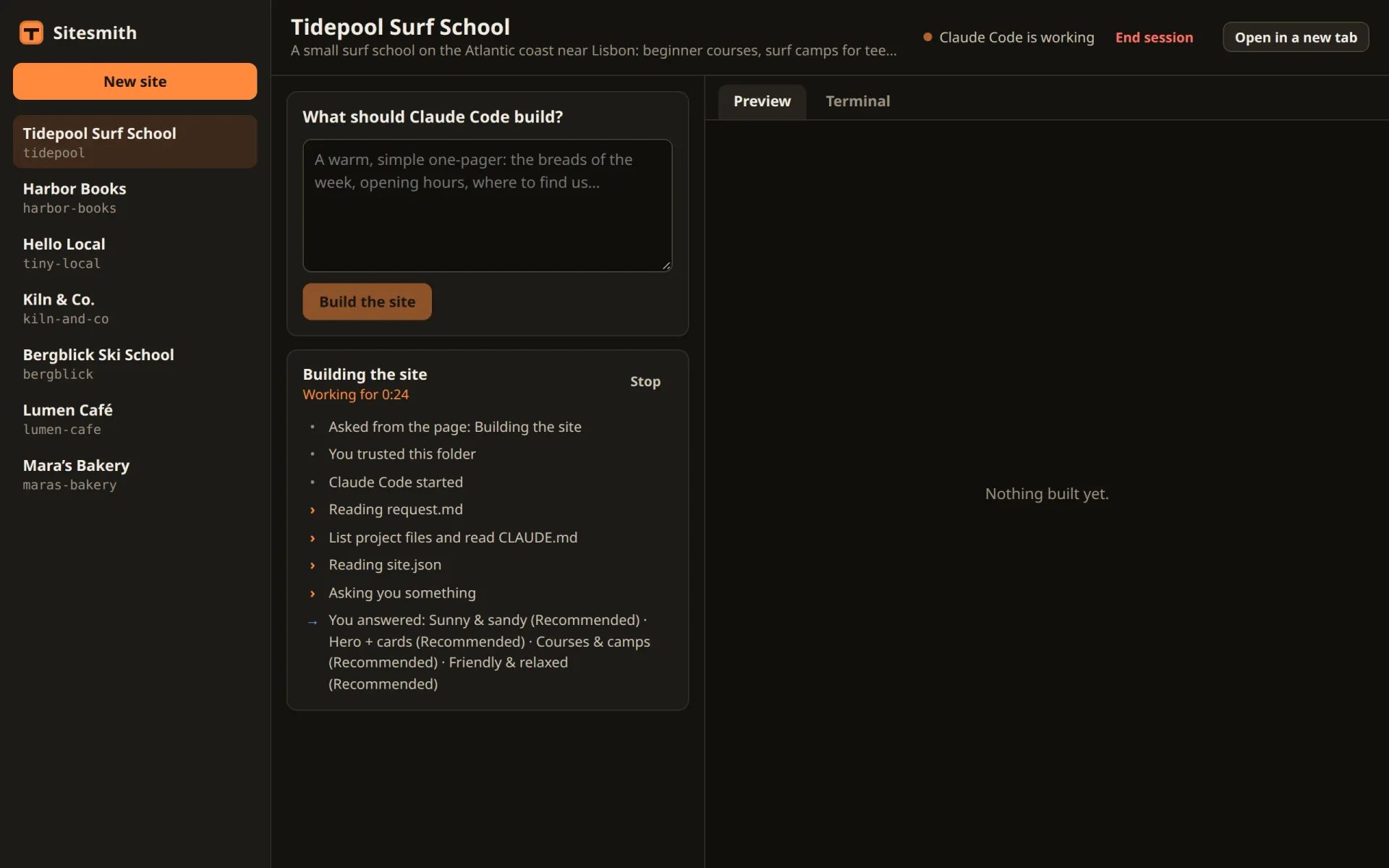
The page now knows what Claude Code does while it does it, and when a turn ends, to the second. All of it comes from Claude Code itself, so it doesn't break when Claude Code's screen looks different after an update. One thing the Stop hook carries is still unused: Claude Code's last message. In the next part, it becomes the summary of each run, and you can reply to it from the page.
Comments
The comments are GitHub Discussions: sign in with GitHub to write one.
The comments come from GitHub, through giscus. Loading them sends your IP address to giscus.app and GitHub.