
Claude Code in Your Own Web App · Part 10 of 16 in the series
Part 10: When the Page Can't Answer
No page open, the tab closed, the server restarting, a dialog the page has never seen: every way a question can miss the page, and how each ends in the page or the terminal, never in a wait for nobody. Plus the trust dialog, read from the screen and answered with keys.
Claude Code in Your Own Web AppPart 10 of 16
On this page

Quest objectives
- Go through every way a question can miss the page, and decide where each one ends
- Show the trust dialog of a new folder in the page and answer it with the arrow keys
- Hand a question or a permission prompt back to the terminal with one button
- Close the page's dialog when Claude Code has moved on without it
- Let questions survive a server restart, and send them to the terminal when no page is left
- Notice when Claude Code waits for something only the terminal shows, and bring the terminal up
Since parts 8 and 9, Claude Code's questions and permission prompts come up in the page. Behind every such dialog sits a hook that holds Claude Code until the page answers, and it is patient: Sitesmith gave it a whole day. That patience is what makes the dialogs work. It is also a promise the page has to keep, because a page that never answers leaves Claude Code waiting in a terminal that nobody looks at.
There are more ways for the page not to answer than you might think. Nobody has it open. The tab gets closed while a dialog waits. The server restarts. You would rather answer in the terminal. Or Claude Code shows something the page has never heard of. This part goes through all of them, and each one ends in one of two places: in the page, or in Claude Code's own dialog in the terminal, which the page then puts in front of you.
One more dialog moves into the page on the way: the trust dialog of a new folder. No hook reports it, so the server reads it off the screen and answers it with keys.
Every way the page can miss a question
Here are the cases, and what Sitesmith does in each once this part is done:
No page is open when Claude Code asks. Nobody could answer, so the server lets go of the hook at once (part 8 did that already), and Claude Code asks in its terminal. New: when you open the site later, the page starts on the Terminal tab, with the question in it.
The page goes away while a dialog waits. You close the tab, the laptop goes to sleep, the connection drops. After 15 seconds without any page, the server hands the question to the terminal.
The server restarts while a dialog waits. The new server has never heard of the question. The hook notices and asks again, and the dialog comes back. If no server answers for a minute, the hook gives up, and Claude Code asks in the terminal.
You hand it back. A new button, Answer in the terminal, lets go of a question, a permission prompt or the trust dialog and switches the page to the Terminal tab.
It gets answered in the terminal. A permission prompt is open in the terminal at the same time as in the page (part 9), and you may answer it there. Once Claude Code goes on, the page's dialog closes.
Claude Code shows something the page doesn't know. A dialog without a hook, a menu somebody opened in the terminal, text typed in and never sent. After a few quiet seconds, the page brings up the Terminal tab and says that Claude Code waits for you there.
The trust dialog. No hook reports it. The server finds it on the screen, the page shows it, and your answer goes to Claude Code as arrow keys and Enter.
Claude Code exits. Whatever was waiting is let go, and a run that was underway fails with "Claude Code exited."
Most of this happens in the server's clock, the method that looks at every site once a second. First, the server needs a few new things to keep track of.
What the server keeps
In shared/types.ts, replace Ask, AnswerBody and AgentState. The trust dialog joins the things Claude Code can wait for, the page's answer gets two new fields, and the state the page receives says whether Claude Code waits in the terminal:
/** What Claude Code waits for the page to answer. */
export type Ask =
  | { id: string; kind: 'questions'; questions: Question[]; since: number }
  | {
    id: string;
    kind: 'permission';
    tool: string;
    /** one line about what it wants to do */
    summary: string;
    /** the command, the file or the address */
    detail?: string;
    /** whether Claude Code offers a rule for "from now on" */
    remember: boolean;
    since: number;
  }
  /** the trust dialog of a folder Claude Code has never worked in */
  | { id: string; kind: 'trust'; dir: string; since: number };

/** The page's answer: per question text, the chosen labels (joined with ", ") or your own words. */
export interface AnswerBody {
  id: string;
  answers?: Record<string, string>;
  /** for a permission prompt */
  decision?: 'allow' | 'always' | 'deny';
  /** for the trust dialog */
  trust?: boolean;
  /** hand it back: Claude Code asks in the terminal instead */
  terminal?: boolean;
}

/** What Claude Code does for a site, as far as the page needs to know. */
export interface AgentState {
  site: string;
  /** the current run, or the last one */
  run: Run | null;
  /** whether its session reports through the hooks (one you started yourself does not) */
  hooked: boolean;
  /** working, by the hooks or by the screen */
  busy: boolean;
  /** the last things it did, oldest first */
  activity: Activity[];
  /** what it waits for you to answer */
  ask: Ask | null;
  /** it waits for something only the terminal can show: the page brings the terminal on screen */
  needsTerminal: boolean;
}
needsTerminal is the flag this part revolves around. The page can't answer what only the terminal shows, so it does the next best thing: it shows you the terminal.
In server/agent.ts, replace Pending. The hook event of a waiting ask becomes optional, since no hook reports the trust dialog:
/** Something Claude Code waits for, with the hook that holds it. */
interface Pending {
  ask: Ask;
  site: string;
  /** the hook's event (none for the trust dialog, which no hook reports) */
  event: HookEvent | null;
  result: WaitResult | null;
  /** the hook's long polls, waiting for the result */
  waiters: ((r: WaitResult) => void)[];
}
SiteAgent gets two fields under ask:
/** what Claude Code waits for the page to answer */
ask: Pending | null;
/** it waits for something in the terminal that the page can't show */
needsTerminal: boolean;
/** since when it has been neither working nor at its empty prompt (0: it is one of them) */
strandedSince: number;
Replace site(), busy() and state(). The new fields start out as false and 0; a Claude Code that waits in the terminal isn't working either, so busy() says no; and state() passes the flag on to the pages:
private site(name: string) {
  let s = this.sites.get(name);
  if (!s) {
    s = { run: null, queue: [], delivering: false, hooked: false, hookBusy: false, quietSince: 0, transcript: null, transcriptPos: 0, activity: [], ask: null, needsTerminal: false, strandedSince: 0, sent: '' };
    this.sites.set(name, s);
  }
  return s;
}

/**
 * Working: with the hooks, between a prompt and the end of its turn (exact, the moment it
 * happens); without them, while the screen moves (a few seconds late).
 */
private busy(name: string) {
  const term = this.terminals.get(name);
  const s = this.site(name);
  // waiting for your answer is not working
  if (s.ask || s.needsTerminal) return false;
  return Boolean(term?.claude && (s.hooked ? s.hookBusy : term.busy));
}

state(name: string): AgentState {
  const s = this.site(name);
  // a queued run is the one that matters: there is one only when the last one is over
  const run = s.queue[0] ?? s.run;
  return {
    site: name, run: run ? pub(run) : null, hooked: s.hooked, busy: this.busy(name),
    activity: s.activity, ask: s.ask?.ask ?? null, needsTerminal: s.needsTerminal,
  };
}
The last new field belongs to the Agent itself and goes under pages: since when no page has been open.
/** how many pages are open */
private pages: () => number;
/** since when no page has been open (0: one is) */
private noPagesSince = 0;
A closer look every second
Before the clock goes through the sites, it notes whether any page is open:
/** Once a second: queued runs go out, and the state of the current one is checked. */
private async tick() {
  if (this.pages()) this.noPagesSince = 0;
  else if (!this.noPagesSince) this.noPagesSince = Date.now();
  for (const [name, s] of this.sites) {
    try { await this.check(name, s); } catch { /* a hiccup of tmux: next second */ }
    this.changed(name);
  }
}
check() changes from top to bottom, so it comes in two halves. Here is the first:
private async check(name: string, s: SiteAgent) {
  // no page for a while: what waits for one goes to the terminal
  if (s.ask && this.noPagesSince && Date.now() - this.noPagesSince > 15000) {
    this.settle(s.ask, { status: 'release' });
    s.needsTerminal = true;
  }
  if (s.queue.length) await this.deliver(name);
  const run = s.run;
  const since = run ? Date.now() - run.sentAt : 0;
  const term = this.terminals.get(name);
  if (!term?.claude) {
    s.hookBusy = false;
    s.needsTerminal = false;
    if (s.ask) this.settle(s.ask, { status: 'release' });
    if (live(run) && !term && since > 5000) this.end(name, 'failed', 'The session ended.');
    if (live(run) && term && since > 8000) this.end(name, 'failed', 'Claude Code exited.');
    return;
  }
  // only the screens of sites with something going on are read
  if (!live(run) && !s.queue.length && !s.ask && !s.needsTerminal && !s.hookBusy) return;
  // the trust dialog of a new folder comes before any hook: only the screen shows it
  const trust = /Yes, I trust this folder/.test(await this.terminals.screen({ name }));
  // (not when it was handed to the terminal: it is answered there)
  if (trust && !s.ask && !s.needsTerminal) {
    const ask: Ask = { id: crypto.randomUUID(), kind: 'trust', dir: run?.target.dir ?? '', since: Date.now() };
    s.ask = { ask, site: name, event: null, result: null, waiters: [] };
    this.pending.set(ask.id, s.ask);
  } else if (!trust && s.ask?.ask.kind === 'trust') this.settle(s.ask, { status: 'answered', output: null });
  if (s.ask) { s.needsTerminal = false; s.strandedSince = 0; return; }
From the top:
No page for 15 seconds. Whatever waits is released: its hook ends without an answer, and Claude Code asks in the terminal.
needsTerminalgoes up as well: what went to the terminal stays there, and when you open the site again, its page starts on the Terminal tab. Why not at once? Reloading the page, or a short break in the connection, should not cost you the dialog. The page's connection to the server comes back by itself within a few seconds (part 2), and the dialog with it.Claude Code isn't running. There is no session, or it shows a shell because Claude Code has exited. Then nothing can be waiting: whatever was is let go, and a run that was underway fails after a few seconds' grace. These lines used to sit further down. They move up because everything below needs a running Claude Code.
Only sites with something going on have their screens read: a run on its way or underway, something waiting, or hooks that say busy. An idle site costs nothing.
The trust dialog. If the screen shows "Yes, I trust this folder", the server makes it an ask of its own, with the folder it is about (the run's, if there is one). It has no hook and no event. Not while
needsTerminalis up, though: then the dialog was handed to the terminal (with the button further down, or because no page was open), and it is answered there instead of coming back to the page. When the line is gone from the screen, the dialog has been answered, in the page or in the terminal, and the ask is settled.While the page holds something, the screen is not judged any further. A held permission prompt has Claude Code's own dialog on the screen as well, and a held question has nothing on it at all. Neither means that Claude Code is stuck.
Answering the trust dialog
This is what the server finds on the screen of a new site's session; part 3 caught it with capture-pane:
$ tmux -L sitesmith capture-pane -p -t =maras-bakery: Accessing workspace: ~/sitesmith/sites/maras-bakery Quick safety check: Is this a project you created or one you trust? (Like your own code, a well-known open source project, or work from your team). If not, take a moment to review what's in this folder first. Claude Code'll be able to read, edit, and execute files here. Security guide ❯ No, exit Yes, I trust this folder Enter to confirm · Esc to cancel
Part 1 answered it by hand with Down and Enter, since the cursor starts on "No, exit". The server could do the same, but only as long as the cursor is still where it started, and in a terminal that anybody can look into, it might not be. So it counts from the screen instead. Add this method to the Agent, after answer():
/**
 * The trust dialog, answered with the arrow keys and Enter: from where its cursor (❯) is now to
 * the line we want. No hook reports this dialog, so the screen is all there is.
 */
private async answerTrust(t: Target, yes: boolean) {
  const lines = (await this.terminals.screen(t)).split('\n');
  const cursor = lines.findIndex((l) => /^\s*❯/.test(l));
  const want = lines.findIndex((l) => (yes ? /Yes, I trust this folder/ : /No, exit/).test(l));
  if (cursor < 0 || want < 0) throw new Error('The trust dialog is no longer on screen.');
  for (let i = 0; i < Math.abs(want - cursor); i++) await this.terminals.keys(t, want > cursor ? 'Down' : 'Up');
  await this.terminals.keys(t, 'Enter');
  this.note(t.name, { kind: 'note', text: yes ? 'You trusted this folder' : 'You did not trust this folder: Claude Code ended' });
}
It finds the line with the dialog's cursor, ❯, and the line you chose, presses Down or Up as many times as they are apart, and then Enter. If either line is missing, the dialog has gone in the meantime, and the page hears so.
answer() calls it. Replace the method:
/**
 * The page's answer, as the hook's output for Claude Code.
 *
 * Questions: "allow" the tool, with its input extended by `answers` (per question text, the
 * chosen labels or your own words). Claude Code takes that as your answer and never shows its
 * own dialog.
 *
 * Permissions: a decision, "allow" or "deny" (with a message for Claude Code). "Allow from now on"
 * allows and adds the rules Claude Code suggested, as its own "don't ask again" would.
 */
async answer(t: Target, req: Partial<AnswerBody>) {
  const name = t.name;
  const s = this.site(name);
  const p = s.ask;
  if (!p || p.ask.id !== req.id) throw new Error('That question is no longer open.');
  const ask = p.ask;
  // handed back: the hook ends without output, and Claude Code shows its own dialog
  if (req.terminal) {
    this.settle(p, { status: 'release' });
    this.note(name, { kind: 'note', text: 'You answer in the terminal' });
    s.needsTerminal = true;
    this.changed(name);
    return;
  }
  if (ask.kind === 'trust') {
    await this.answerTrust(t, req.trust === true);
    this.settle(p, { status: 'answered', output: null });
    return;
  }
  if (ask.kind === 'permission') {
    const decision = req.decision ?? 'deny';
    this.note(name, { kind: 'prompt', text: `${decision === 'deny' ? 'You denied' : 'You allowed'}: ${ask.summary}` });
    const out = decision === 'deny'
      ? { behavior: 'deny', message: 'The user denied this in Sitesmith.' }
      : { behavior: 'allow', ...(decision === 'always' && p.event?.permission_suggestions?.length ? { updatedPermissions: p.event.permission_suggestions } : {}) };
    this.settle(p, { status: 'answered', output: { hookSpecificOutput: { hookEventName: 'PermissionRequest', decision: out } } });
    return;
  }
  const answers: Record<string, string> = {};
  for (const q of ask.questions) {
    const a = String(req.answers?.[q.question] ?? '').trim();
    if (!a) throw new Error(`Answer “${q.question}” first.`);
    answers[q.question] = a;
  }
  this.note(name, { kind: 'prompt', text: `You answered: ${short(Object.values(answers).join(' · '))}` });
  this.settle(p, {
    status: 'answered',
    output: {
      hookSpecificOutput: {
        hookEventName: 'PreToolUse',
        permissionDecision: 'allow',
        permissionDecisionReason: 'Answered in Sitesmith',
        updatedInput: { ...p.event?.tool_input, answers },
      },
    },
  });
}
Three things are new at the top. The method takes the site's Target now and is async, because the trust dialog is answered through tmux, which needs the session and takes a moment. A trust answer is settled without output, since no hook waits for it.
And an answer can now be no answer at all. terminal: true settles the ask as release: the hook's long poll hears it, the hook ends without output, and Claude Code carries on as if there had been no hook. It shows its own dialog in the terminal. For a permission prompt, that dialog has been there all along. For a question, Claude Code now draws its own question dialog, which passes the PermissionRequest hook on its way, and hookAsk() has left that one to the terminal since part 9. In every case, needsTerminal goes up right away, so the page can follow without waiting for the clock.
For the trust dialog, the flag does one more thing. That dialog has no hook to release: its ask is simply gone, and the dialog itself has been on the screen all along. With needsTerminal up, check() doesn't make it an ask again (that is the !s.needsTerminal in its condition), so it stays in the terminal until you answer it there.
Further down, p.event. became p.event?., because an ask may have no event now. The route in server/main.ts passes the target and waits:
// the page answers what Claude Code asks
['POST', /^\/api\/sites\/([^/]+)\/answer$/, async (req, res, m) => {
  const site = sites.get(m[1]);
  try { await agent.answer(target(site.name), await readJson<AnswerBody>(req)); } catch (err) { throw new HttpError(409, (err as Error).message); }
  send(res, 200, agent.state(site.name));
}],
If you choose No, exit, Claude Code does just that: it ends, the session falls back to its shell, and the run fails a few seconds later with "Claude Code exited."
In the page
The dialog in src/askDialog.ts learns to tell the page when an answer went to the terminal. Add a field under dismissed:
/** the ask put aside with Escape */
dismissed: string | null = null;
/** the answer went to the terminal: the page shows it */
onTerminal: (site: string) => void = () => {};
In show(), the trust dialog gets a renderer of its own:
/** Shows a site's ask; nothing happens when it is already on screen, so choices made stay. */
show(site: string, title: string, ask: Ask) {
  if (this.el.open && this.ask?.id === ask.id) return;
  this.ask = ask;
  this.site = site;
  this.dismissed = null;
  this.msg.textContent = '';
  this.sub.textContent = title;
  if (ask.kind === 'questions') this.renderQuestions(ask.questions);
  else if (ask.kind === 'permission') this.renderPermission(ask);
  else this.renderTrust(ask.dir);
  if (!this.el.open) this.el.showModal();
}
Replace send(), and add the button and the trust dialog below it:
private async send(body: Omit<AnswerBody, 'id'>) {
  if (!this.ask) return;
  this.msg.textContent = '';
  const buttons = [...this.foot.querySelectorAll('button')];
  buttons.forEach((b) => { b.disabled = true; });
  try {
    await api('POST', `/api/sites/${this.site}/answer`, { id: this.ask.id, ...body });
    if (body.terminal) this.onTerminal(this.site);
    this.close();
  } catch (err) {
    this.msg.textContent = (err as Error).message;
    buttons.forEach((b) => { b.disabled = false; });
  }
}

/** "Answer in the terminal": Claude Code shows its own dialog there instead. */
private terminalButton() {
  return h('button', { type: 'button', class: 'ghost left', onclick: () => void this.send({ terminal: true }) }, 'Answer in the terminal');
}

private renderTrust(dir: string) {
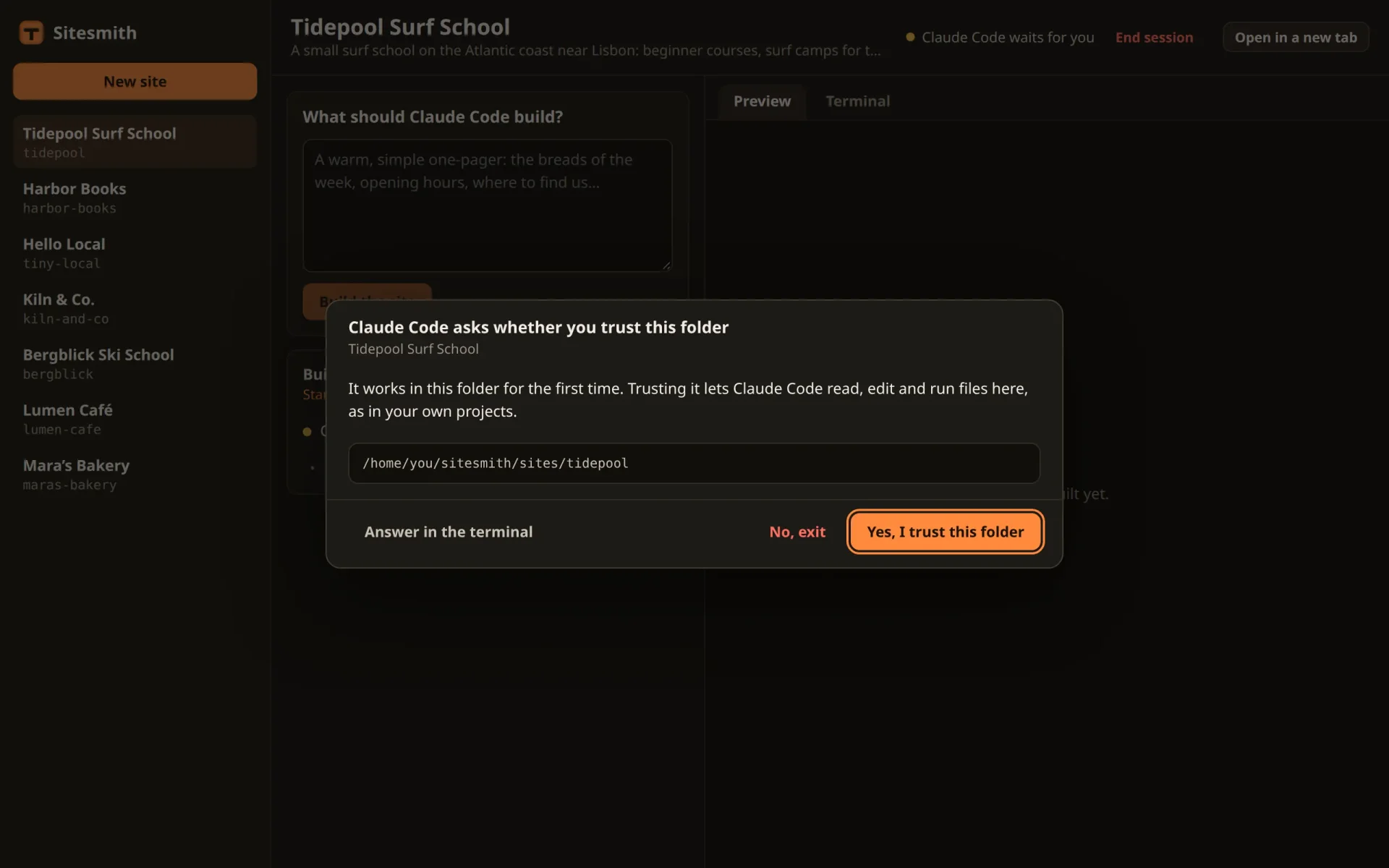
  this.heading.textContent = 'Claude Code asks whether you trust this folder';
  this.body.replaceChildren(
    h('p', {}, 'It works in this folder for the first time. Trusting it lets Claude Code read, edit and run files here, as in your own projects.'),
    h('pre', { class: 'ask-detail' }, dir || 'this site’s folder'));
  const yes = h('button', { type: 'button', class: 'primary', onclick: () => void this.send({ trust: true }) }, 'Yes, I trust this folder');
  this.foot.replaceChildren(this.terminalButton(),
    h('button', { type: 'button', class: 'ghost danger', onclick: () => void this.send({ trust: false }) }, 'No, exit'), yes);
  requestAnimationFrame(() => yes.focus());
}
terminalButton() makes a fresh Answer in the terminal button for whichever dialog is shown. It sends terminal: true, and once the server has taken it, send() calls onTerminal. The trust dialog shows the folder and the two choices of the real one, with the focus on yes.
The other two dialogs get the button first in their footer, where the left class pushes it away from the answers:
private renderPermission(ask: Extract<Ask, { kind: 'permission' }>) {
  this.heading.textContent = 'Claude Code asks for permission';
  this.body.replaceChildren(
    h('p', {}, h('strong', {}, ask.tool), ask.summary !== ask.tool ? ` · ${ask.summary}` : ''),
    ask.detail ? h('pre', { class: 'ask-detail' }, ask.detail) : '');
  const allow = h('button', { type: 'button', class: 'primary', onclick: () => void this.send({ decision: 'allow' }) }, 'Allow');
  this.foot.replaceChildren(
    this.terminalButton(),
    h('button', { type: 'button', class: 'ghost danger', onclick: () => void this.send({ decision: 'deny' }) }, 'Deny'),
    ask.remember ? h('button', { type: 'button', onclick: () => void this.send({ decision: 'always' }) }, 'Allow from now on') : '',
    allow);
  requestAnimationFrame(() => allow.focus());
}

private renderQuestions(questions: Question[]) {
  this.heading.textContent = questions.length > 1 ? 'Claude Code has questions for you' : 'Claude Code has a question for you';
  const go = h('button', { type: 'button', class: 'primary' }, questions.length > 1 ? 'Send the answers' : 'Send the answer');
  const fields: QuestionField[] = [];
  const sync = () => { go.disabled = fields.some((f) => !f.value()); };
  questions.forEach((q, i) => fields.push(new QuestionField(q, i, questions.length, sync)));
  go.onclick = () => void this.send({ answers: Object.fromEntries(fields.map((f) => [f.q.question, f.value()])) });
  this.body.replaceChildren(...fields.map((f) => f.el));
  this.foot.replaceChildren(this.terminalButton(), go);
  sync();
  requestAnimationFrame(() => fields[0]?.focus());
}
In src/main.ts, add a line under the one that creates the dialog: the page answers onTerminal by switching the open site to its Terminal tab.
const dialog = new AskDialog();
dialog.onTerminal = (site) => { if (page?.name === site) page.show('terminal'); };
That covers the button. For every other way into the terminal there is needsTerminal in the state, and agentChanged() in src/sitePage.ts watches it:
/** What Claude Code does for this site changed. */
agentChanged(state: AgentState) {
  // Claude Code waits for something only the terminal shows: bring it on screen, once
  if (state.needsTerminal && !this.agentState?.needsTerminal) this.show('terminal');
  this.agentState = state;
  this.agent.update(state);
  this.session.update(this.termState, state);
  this.request.update(this.site, isLive(state.run));
}
It switches when the flag goes up, not for as long as it stays up, so you can still go back to the preview while Claude Code waits. A site page that has just been created has no state yet: open a site whose Claude Code waits in the terminal, and it starts on the Terminal tab.
The panel in src/agentPanel.ts gets a line that says so. Add the field under waiting:
private inTerminal = h('p', { class: 'actions', hidden: true },
  h('span', { class: 'dot ask', 'aria-hidden': 'true' }), 'Claude Code waits for you in the terminal.');
put it into the panel after this.waiting in the constructor:
this.el = h('section', { class: 'panel agent', 'aria-label': 'Claude Code', hidden: true },
  h('header', { class: 'agent-head' }, h('div', {}, this.title, this.status), this.stopBtn),
  this.waiting, this.inTerminal, this.feed, this.summary, this.reply, this.msg);
and show or hide it in update(), right under the line for waiting:
this.waiting.hidden = !state?.ask;
this.inTerminal.hidden = !state?.needsTerminal;
The header in src/session.ts counts it as waiting too:
/** The session's state; with the hooks, whether Claude Code works is theirs to say (they know first). */
update(state: TerminalState | undefined, agent?: AgentState) {
  this.state = state;
  const busy = Boolean(state?.claude && (agent?.hooked ? agent.busy : state.busy));
  const waits = Boolean(state?.claude && (agent?.ask || agent?.needsTerminal));
  this.dot.className = `dot${waits ? ' ask' : busy ? ' busy' : state?.claude ? ' on' : ''}`;
  this.text.textContent = !state ? 'No session' : waits ? 'Claude Code waits for you' : busy ? 'Claude Code is working' : state.claude ? 'Claude Code is open' : 'Claude Code has exited';
  this.start.hidden = Boolean(state?.claude);
  this.end.hidden = !state;
  // "Continue" only when the folder has a conversation to continue (asked when the session changes)
  const key = `${Boolean(state)}-${Boolean(state?.claude)}`;
  if (key === this.asked) return;
  this.asked = key;
  this.resume.hidden = true;
  if (!state?.claude) void api<{ conversation: boolean }>('GET', this.url).then((r) => { this.resume.hidden = !r.conversation || Boolean(this.state?.claude); }, () => undefined);
}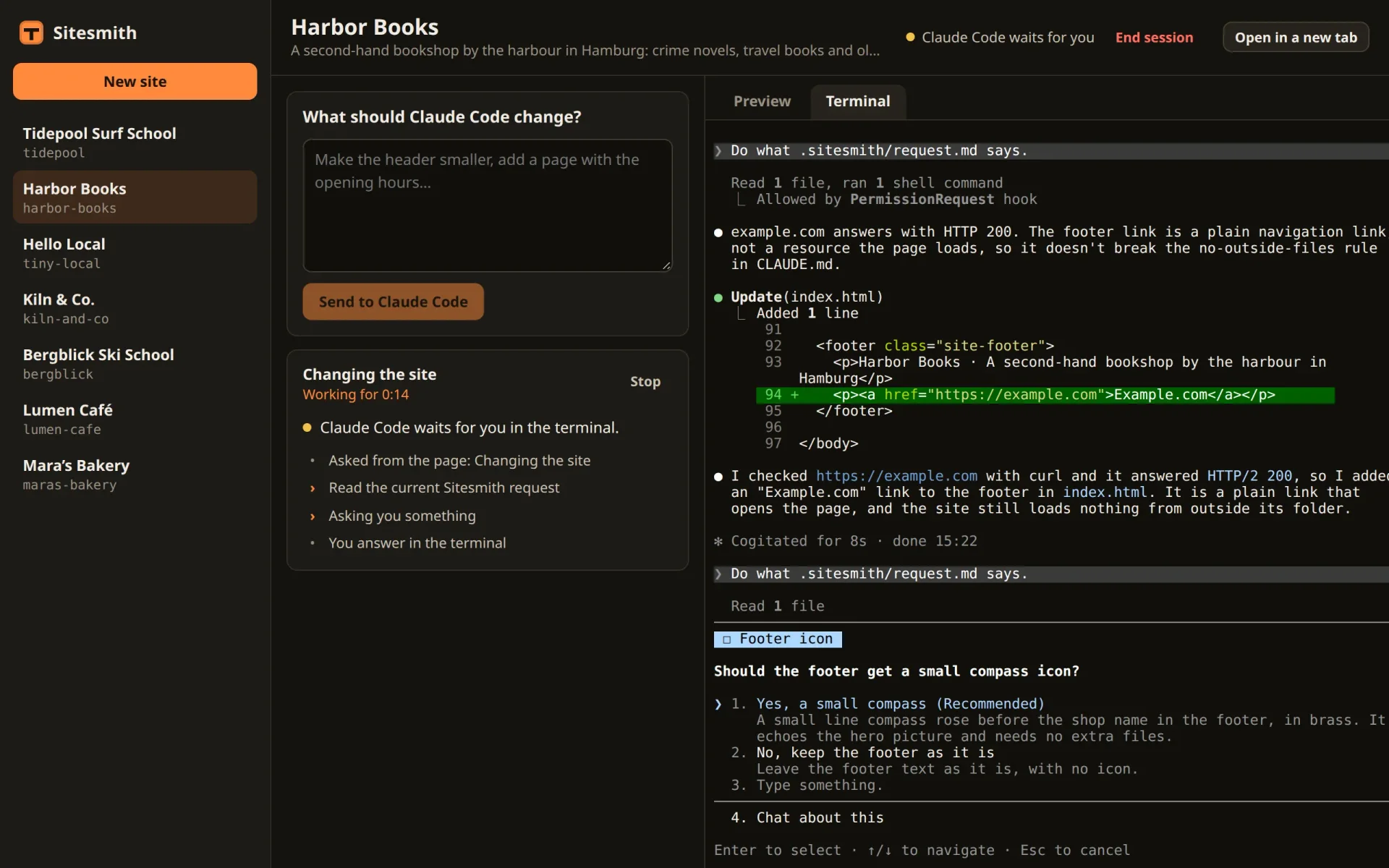
In another run, on Kiln & Co., this is what the Terminal tab showed after the button, and what Claude Code said once the question was answered there with Down and Enter:
# Kiln & Co.: the Terminal tab, 6 s after "Answer in the terminal" ☐ Button colourWhich accent colour should the buttons get?❯ 1. Terracotta (Recommended) Keeps the current clay orange, #b5582f. Matches the mugs and the warm cream background. 2. Glaze teal Deep blue-green, #2e4a4f, the same as the glaze on the mugs and bowls. Cooler and calmer.# … 5. Type something. 6. Chat about thisEnter to select · ↑/↓ to navigate · Esc to cancel# Down and Enter, typed in the Terminal tab:● Answered Claude's questions: ⎿ · Which accent colour should the buttons get? → Glaze teal
The run went on and ended as usual, after half a minute in all. Claude Code takes the answer as if the page had never been involved.
Stuck where only the terminal can see
The button and the trust dialog are cases the server knows about. The last case it has to work out for itself: Claude Code waits for something, and nobody told the server what. The second half of check() follows right after the first:
  const atPrompt = await this.terminals.atEmptyPrompt({ name });
  // a turn that ends without a Stop hook (Escape in the terminal, an error): the hooks still say
  // busy, but the screen has sat still at an empty prompt for a while
  if (s.hookBusy && !term.busy && atPrompt) {
    if (!s.quietSince) s.quietSince = Date.now();
    if (Date.now() - s.quietSince > 12000) {
      s.hookBusy = false;
      if (live(run)) this.end(name, 'stopped', 'The turn ended without a word: interrupted, or an error.');
    }
  } else s.quietSince = 0;
  // neither working nor at its prompt: a dialog the page doesn't know, or text typed in and
  // not sent. After a few quiet seconds (at once for a question handed to the terminal), the
  // page brings the terminal on screen. Back at its prompt, it no longer waits.
  if (atPrompt) {
    s.strandedSince = 0;
    s.needsTerminal = false;
  } else if (!term.busy) {
    if (!s.strandedSince) s.strandedSince = Date.now();
    if (Date.now() - s.strandedSince > 4000) s.needsTerminal = true;
  } else s.strandedSince = 0;
  // with the hooks, the Stop hook ends the run; without them, only the screen can tell
  if (s.hooked || !live(run)) return;
  if (term.busy) { run!.status = 'working'; return; }
  // quiet again, at an empty prompt: the turn is over. A turn too short to count as busy ends
  // the same way, once it has had time to start.
  if ((run!.status === 'working' || since > 15000) && atPrompt) this.end(name, 'done');
}
atEmptyPrompt() reads the screen once, and its answer, atPrompt, is used three times. The first use, the turn that ends without a Stop hook, is part 7's rule, unchanged.
The second is new. Claude Code is stranded when it is neither working (the screen has gone still) nor at its empty prompt. Something holds it, and since the page holds nothing (that case returned in the first half), it is something only the terminal shows: a dialog without a hook, or text that somebody typed into the terminal and never sent. After four seconds of that, needsTerminal goes up. Back at its prompt, it comes down again.
Why wait at all? Between two steps, Claude Code's screen can stand still for a moment without Claude Code waiting for anybody, and the page should not jump to the terminal for that. A question you handed back skips the wait, since answer() has already raised the flag.
The third use is part 5's end of a turn for sessions without hooks, which now takes the screen from above instead of reading it again.
Claude Code moved on
A permission prompt is open twice, in the page and in the terminal (part 9), and whichever is answered first wins. If that is the terminal, Claude Code goes on, and part 9 left the page's dialog standing, answerable but pointless. It has to go, and the server learns when from the next hook event. The start of hookEvent() gets two new lines, right after readTranscript:
/** A hook reported something. */
hookEvent(name: string, ev: HookEvent) {
  const s = this.site(name);
  s.hooked = true;
  if (ev.transcript_path && ev.transcript_path !== s.transcript) {
    s.transcript = ev.transcript_path;
    // a continued conversation: only what comes from now on
    try { s.transcriptPos = fs.statSync(ev.transcript_path).size; } catch { s.transcriptPos = 0; }
  }
  this.readTranscript(name);
  this.moveOn(name, ev);
  // whatever waited in the terminal was answered there: Claude Code goes on
  if (ev.hook_event_name !== 'SessionStart') s.needsTerminal = false;
  const run = s.run;
The first of them calls a new method. Add it after hookAsk():
/**
 * Claude Code went on past what the page still shows: it was answered in the terminal, or the
 * hook gave up. A new prompt, the end of its turn, or another tool: the page's dialog goes.
 */
private moveOn(name: string, ev: HookEvent) {
  const p = this.site(name).ask;
  if (!p || p.ask.kind === 'trust') return;
  const past = ev.hook_event_name === 'Stop' || ev.hook_event_name === 'UserPromptSubmit'
    || (ev.hook_event_name === 'PreToolUse' && (p.ask.kind === 'permission' || ev.tool_use_id !== p.event?.tool_use_id));
  if (past) this.settle(p, { status: 'release' });
}
Three events mean that Claude Code has gone past what the page still shows: the end of its turn, a new prompt, and a new tool. For a permission prompt, any PreToolUse after it is a new tool, since the tool's own PreToolUse came before the prompt. A question is different: its own PreToolUse is the very hook that holds it, so only a tool with another tool_use_id counts. The same covers a hook that ended without the page, for whatever reason: Claude Code goes on, and the page follows. The trust dialog is left out, since its end shows on the screen.
The line after moveOn does the same for needsTerminal: any event but SessionStart means that Claude Code no longer waits in the terminal. A start says only that Claude Code is up, not that anything was answered.
hookAsk() gets two lines as well:
/**
 * A hook holds Claude Code for the page: a question or a permission prompt. With no page open,
 * nobody could answer: Claude Code asks in the terminal instead.
 */
hookAsk(name: string, ev: HookEvent): { id: string } | { release: true } {
  if (this.pages() === 0) return { release: true };
  // a question that went to the terminal shows there as Claude Code's own dialog, which asks
  // for permission too: that one is answered in the terminal
  if (ev.hook_event_name === 'PermissionRequest' && ev.tool_name === 'AskUserQuestion') return { release: true };
  const s = this.site(name);
  s.hooked = true;
  // the same question again: the hook lost its connection and asks once more
  if (ev.tool_use_id && s.ask?.event?.tool_use_id === ev.tool_use_id) return { id: s.ask.ask.id };
  // a newer question replaces an older one that is still open
  if (s.ask) this.settle(s.ask, { status: 'release' });
  const id = crypto.randomUUID();
  let ask: Ask;
  if (ev.hook_event_name === 'PermissionRequest') {
    const input = ev.tool_input ?? {};
    const detail = [input.command, input.file_path, input.url].find((v) => typeof v === 'string') as string | undefined;
    const summary = describeTool(String(ev.tool_name), input);
    ask = { id, kind: 'permission', tool: String(ev.tool_name), summary, detail, remember: Boolean(ev.permission_suggestions?.length), since: Date.now() };
    this.note(name, { kind: 'note', text: `Asks for permission: ${summary}` });
  } else {
    ask = { id, kind: 'questions', questions: (ev.tool_input?.questions ?? []) as Question[], since: Date.now() };
  }
  const p: Pending = { ask, site: name, event: ev, result: null, waiters: [] };
  this.pending.set(ask.id, p);
  s.ask = p;
  s.needsTerminal = false;
  this.changed(name);
  return { id: ask.id };
}
A new ask clears needsTerminal: Claude Code is asking something new, so whatever held it in the terminal is over. And a question the server already holds is not taken twice. That happens when the server took the question but its reply to the hook got lost: the hook doesn't know the id and asks again, with the same event. The tool_use_id gives it away, and the hook gets the id it missed, instead of a second dialog that replaces the first. A permission prompt's event carries no tool_use_id, so this only ever matches a question.
Last on the server, settle(). Nobody polls for the trust dialog's result, so it would stay in pending forever. It goes at once:
/** The question is settled: whoever waits for it hears how. */
private settle(p: Pending, r: WaitResult) {
  p.result = r;
  const s = this.site(p.site);
  if (s.ask === p) s.ask = null;
  for (const w of p.waiters.splice(0)) w(r);
  // nobody waits for the trust dialog's answer: it is given with keys
  if (!p.event) this.pending.delete(p.ask.id);
  this.changed(p.site);
}
A server that restarts
You will restart the server, after a change to its code or because it crashed. Claude Code doesn't notice, since its sessions belong to tmux (part 3). A held hook does: its long poll breaks off, and the server that comes back has never heard of its question. In server/hook.ts, add sleep and replace wait():
const sleep = (ms: number) => new Promise((r) => setTimeout(r, ms));

/**
 * Holds Claude Code until the page answers. The server keeps each wait open for up to 25 seconds
 * and then says "pending": the hook simply asks again. A server that restarts has forgotten the
 * question (404): the hook asks it again. A server that is gone gets a minute to come back.
 * Returns what Claude Code should get, or null to let it ask in the terminal.
 */
async function wait(base: string, event: HookInput): Promise<unknown> {
  let id: string | null = null;
  let lost = 0;
  for (;;) {
    try {
      if (!id) {
        const asked = await call(`${base}/api/hooks/ask`, 'POST', { site, event }, 5000);
        if (!asked || asked.release) return null;
        id = String(asked.id);
      }
      const r = await call(`${base}/api/hooks/wait/${encodeURIComponent(id)}`, 'GET', undefined, 35000);
      lost = 0;
      if (!r) { id = null; continue; }
      if (r.status === 'release') return null;
      if (r.status === 'answered') return r.output;
    } catch {
      if (++lost > 12) return null;
      await sleep(5000);
    }
  }
}
The hook now keeps two things: the id of its question, and how many times in a row it found no server. Each round asks the question if there is no id yet, and then waits for the answer. A 404 means a server is there but doesn't know the id: it restarted. The hook forgets the id and asks again, and the new server shows the question as a new dialog. Choices you had made in the old one are gone, but the question is back.
No answer at all, because the server is down or the call timed out, counts as lost, and the hook tries again five seconds later, up to twelve times in a row: about a minute. If the last try fails as well, it gives up and returns null: no output, and Claude Code asks in the terminal. A minute is plenty for a restart, and short enough that Claude Code doesn't hang on a server that is gone for good.
Two things to know. The hook found the server through server.json when it started, and keeps that address: a server that comes back on the same port is found again, one on another port is not. And the new server shows the question only if a page is connected. The page reconnects on its own schedule, and if the hook is quicker, the server sees no page and lets the question go to the terminal, as in the first case of the list. In the test below, the page was back first.
Try it
Restart the server, reload the page, and go through the cases:
A new site. Create one and send its first request. Instead of a session that waits silently at the trust dialog, the page shows the dialog (see the screenshot above). In the test, Kiln & Co. went through three dialogs in the page, the trust dialog, Claude Code's questions and a permission prompt, and was done after 53 seconds.
Hand a question back. Send a request that leaves something open, and choose Answer in the terminal when the question comes. The Terminal tab comes up; answer there with the arrow keys and Enter.
No page. Close the page and send a request with
curl, as in part 5. The question goes straight to the terminal, and when you open the site, the page starts on the Terminal tab. In the test, the site's state saidneedsTerminal: true.A restart. With a question open in the page, stop the server with Ctrl+C and start it again. In the test, the server came back at 12:57:53 while a question about class prices waited. 5.4 seconds later the hook had asked again, the dialog was back, and Claude Code went on with the answer given there.
A closed tab. With a question open, close the page, wait twenty seconds, and look in with
tmux -L sitesmith attach -t <site>: the question waits in the terminal.
What you have now
A page that can't answer no longer leaves Claude Code waiting for it. Every question ends up somewhere it can be answered: in the page while one is there, in the terminal when none is, or when you choose so. And the page knows when Claude Code waits in the terminal, says so, and shows you the terminal.
One rule carried the whole part: when in doubt, give it back to Claude Code's own dialog. It is always there, it always works, and the hooks were only ever a faster way around it.
In the next part, Claude Code shows its plan before it changes anything, and you approve it in the page. For that, the server has to switch Claude Code's mode, something only your keyboard has done so far.
Comments
The comments are GitHub Discussions: sign in with GitHub to write one.
The comments come from GitHub, through giscus. Loading them sends your IP address to giscus.app and GitHub.