
Biome und Vegetation auf Voxel-Terrain in Babylon.js · Teil 5 von 12 der Serie
Teil 5: Gras
Lass Gras auf dem Terrain wachsen: Büschel, in den Chunk-Workern auf dem Boden verteilt, wie er wirklich ist, an Stellen, die nach jedem Edit bleiben, zu Zehntausenden als Instanzen eines kleinen Meshs gezeichnet, saftig oder trocken je nach Biom, und nur nahe der Kamera.
Biome und Vegetation auf Voxel-Terrain in Babylon.jsTeil 5 von 12
Auf dieser Seite
Quest-Ziele
- Zufallszahlen bekommen, die für denselben Ort dieselben sind, wann immer man fragt
- Stellen für Pflanzen auf dem Boden eines Chunks finden, mit Edits und Überhängen
- Pflanzen nur in den Chunks nahe der Kamera verteilen
- Ein Mesh tausendfach zeichnen, mit einem Buffer voller Instanzen
- Das Gras mit der Entfernung ausdünnen, ohne dass jemand sieht, welche Büschel gehen
- Halme von der Wurzel zur Spitze färben, saftig oder trocken je nach Biom
Bisher ist Gras eine Textur. Dieser Teil lässt das echte darauf wachsen: Büschel aus Halmen, dicht auf der Wiese, hoch und trocken in der Savanne, kurz in der Tundra, so gut wie keine in der Wüste. Das braucht drei Antworten: wo ein Büschel wächst, was ein Büschel ist und wie Zehntausende davon gezeichnet werden. Das meiste, was dieser Teil baut, hat mit Gras gar nichts zu tun, und die Blumen und Farne des nächsten Teils nutzen es wieder.
Zufallszahlen, die bleiben
Pflanzen werden Chunk für Chunk verteilt, in den Workern, und ein Chunk wird nach jedem Edit in seiner Nähe neu gebaut und wenn du den Mesher wechselst. Ein Büschel muss jedes Mal an derselben Stelle stehen, sonst würde die Wiese springen, sobald du gräbst. Ein Generator mit Seed, wie ihn das Terrain nutzt, kann das nicht versprechen: Er gibt eine Reihe von Zahlen aus, und welche Zahl ein Büschel bekommt, hängt davon ab, wie viele vor ihm gefragt wurden. Gebraucht wird eine Zahl, die vom Ort abhängt und von sonst nichts. Ergänze in src/random.ts:
/**
 * A number from 0 to 1 that looks random, and is the same for the same three whole
 * numbers: for what has to come out the same wherever and whenever it is worked out.
 */
export function hash(a: number, b: number, c = 0): number {
  let h = Math.imul(a, 374761393) ^ Math.imul(b, 668265263) ^ Math.imul(c, 1274126177);
  h = Math.imul(h ^ (h >>> 15), 2246822519);
  h = Math.imul(h ^ (h >>> 13), 3266489917);
  return ((h ^ (h >>> 16)) >>> 0) / 4294967296;
}
hash() mischt die Bits dreier ganzer Zahlen, bis von ihrer Ordnung nichts mehr übrig ist. Zwei davon werden die Nummern einer Zelle der Welt sein, die dritte sagt, welche der Zufallszahlen der Zelle gemeint ist: ihre Stelle, ihre Größe, ihre Drehung.
Was die Biome sagen
Wie viel Gras wächst, wie hoch und wie trocken, ist ein weiterer Eintrag in der Zeile jedes Bioms. Ersetze in src/climate.ts die Liste der Biome:
/**
 * The biomes, each with the climate it is at home in and a color for the map. A place
 * belongs to the biome whose climate is nearest to its own. `ground` is the texture that
 * covers its ground, and `tint` colors its soil and rock. `shape` holds the numbers that
 * shape its ground, in meters: see Shape. `grass` says how much of the ground grass covers,
 * from 0 to 1, how high it grows in meters, and how dry it is: 0 is lush, 1 is straw.
 */
export const BIOMES = [
  {
    name: 'Meadow', temperature: 0.5, moisture: 0.4, color: '#7fae3c', ground: 'grass', tint: '#ffffff',
    shape: { base: 12, hills: 40, mountains: 150, knolls: 0, dunes: 0 },
    grass: { amount: 1, height: 0.42, tone: 0.1 },
  },
  {
    name: 'Broadleaf forest', temperature: 0.52, moisture: 0.76, color: '#3c7a2a', ground: 'litter', tint: '#f2f0e6',
    shape: { base: 14, hills: 46, mountains: 150, knolls: 0, dunes: 0 },
    grass: { amount: 0.5, height: 0.36, tone: 0.2 },
  },
  {
    name: 'Conifer forest', temperature: 0.3, moisture: 0.62, color: '#28584a', ground: 'needles', tint: '#e6e8f2',
    shape: { base: 20, hills: 55, mountains: 170, knolls: 10, dunes: 0 },
    grass: { amount: 0.22, height: 0.3, tone: 0.35 },
  },
  {
    name: 'Tundra', temperature: 0.1, moisture: 0.45, color: '#c3ccd6', ground: 'moss', tint: '#dfe6f5',
    shape: { base: 24, hills: 20, mountains: 190, knolls: 5, dunes: 0 },
    grass: { amount: 0.3, height: 0.2, tone: 0.65 },
  },
  {
    name: 'Savanna', temperature: 0.76, moisture: 0.5, color: '#c9a545', ground: 'straw', tint: '#ffd9b0',
    shape: { base: 7, hills: 12, mountains: 40, knolls: 22, dunes: 0 },
    grass: { amount: 0.5, height: 0.75, tone: 1 },
  },
  {
    name: 'Desert', temperature: 0.86, moisture: 0.14, color: '#e8bd7c', ground: 'sand', tint: '#ffc08a',
    shape: { base: 9, hills: 14, mountains: 70, knolls: 30, dunes: 9 },
    grass: { amount: 0.03, height: 0.5, tone: 1 },
  },
] as const;
Stellen zum Wachsen
Eine Pflanze sind acht Zahlen: wo sie steht, von der unteren Ecke ihres Chunks aus, und ihre Größe, dann ihre Drehung, das Licht, das sie bekommt, ein Ton und eine Zufallszahl. Zwei Gruppen von je vier, denn so wird der Shader sie bekommen. Die Stellen zu finden ist die Arbeit. Erstelle src/scatter.ts:
import { BIOME_COUNT, BIOMES, biomeWeights, climateAt, cooling } from './climate.ts';
import { CHUNK_SIZE, type DensityGrid } from './grid.ts';
import { hash } from './random.ts';
import { lightAt, type LightGrid } from './skyLight.ts';
import { SEA, surfaceHeight } from './terrain.ts';

/**
 * Floats per plant: x, y and z from the chunk's low corner and the plant's size in
 * meters, then its turn in radians, the light it gets, its tone and a random number.
 */
export const PLANT_FLOATS = 8;

/** What grows in a chunk: the plants of each kind, PLANT_FLOATS numbers each. */
export interface Scattered {
  grass: Float32Array;
}

/** Meters between the places where a tuft of grass may grow. */
const GRASS_SPACING = 0.4;
/** Ground whose normal points up less than this is too steep for plants. */
const STEEPEST = 0.72;
/** Ground dug deeper than this below the generated surface is bare. */
const DEEPEST = 1;
/** Plants need this much of the sky's light. */
const DARKEST = 0.6;
/** Below this temperature the ground is under snow, and the shore stays bare this high. */
const SNOW_LINE = 0.09;
const SHORE = 2.5;

/** A place on the ground where something may grow. */
interface Spot {
  /** Where it is, from the chunk's low corner. */
  x: number;
  y: number;
  z: number;
  /** The numbers of its cell in the world: what hash() takes. */
  cellX: number;
  cellZ: number;
  /** How much the ground's normal points up, from 0 to 1. */
  up: number;
  /** Its height above the sea, and that of the ground as it was generated. */
  height: number;
  generated: number;
  /** The temperature at its height, and how much of each biome it is. */
  temperature: number;
  biomes: Float32Array;
}

/** A plant on its way into the list: `values` are its PLANT_FLOATS numbers. */
interface Plant {
  rank: number;
  values: number[];
}

const lerp = (a: number, b: number, t: number) => a + (b - a) * t;

/** The density at a point between the samples of one level of the grid. */
function densityAt(grid: DensityGrid, x: number, level: number, z: number): number {
  const x0 = Math.floor(x);
  const z0 = Math.floor(z);
  return lerp(
    lerp(grid.get(x0, level, z0), grid.get(x0 + 1, level, z0), x - x0),
    lerp(grid.get(x0, level, z0 + 1), grid.get(x0 + 1, level, z0 + 1), x - x0),
    z - z0,
  );
}

/**
 * Finds a spot in every cell of `spacing` meters of a chunk, moved about at random in its
 * cell, on each floor of the ground that the chunk's grid holds there. `salt` makes the
 * random numbers differ from those of other kinds of plants.
 */
function eachSpot(
  grid: DensityGrid,
  origin: { x: number; y: number; z: number },
  spacing: number,
  salt: number,
  visit: (spot: Spot) => void,
): void {
  const spot: Spot = { x: 0, y: 0, z: 0, cellX: 0, cellZ: 0, up: 0, height: 0, generated: 0, temperature: 0, biomes: new Float32Array(BIOME_COUNT) };
  const cells = CHUNK_SIZE / spacing;
  for (let k = 0; k < cells; k += 1) {
    for (let i = 0; i < cells; i += 1) {
      // The cell's number in the world: its random numbers are the same in every chunk
      // and after every edit.
      spot.cellX = origin.x / spacing + i;
      spot.cellZ = origin.z / spacing + k;
      spot.x = (i + hash(spot.cellX, spot.cellZ, salt)) * spacing;
      spot.z = (k + hash(spot.cellX, spot.cellZ, salt + 1)) * spacing;
      let climate = null;

      // Down the column: the ground's surface is where air lies above solid.
      for (let level = CHUNK_SIZE - 1; level >= 0; level -= 1) {
        const below = densityAt(grid, spot.x, level, spot.z);
        const above = densityAt(grid, spot.x, level + 1, spot.z);
        if (below <= 0 || above > 0) continue;
        spot.y = level + below / (below - above);
        spot.height = origin.y + spot.y;
        const [gx, gy, gz] = grid.gradient(Math.round(spot.x), Math.round(spot.y), Math.round(spot.z));
        spot.up = -gy / (Math.hypot(gx, gy, gz) || 1);
        // The climate and the generated height are the same all the way down the column.
        if (!climate) {
          climate = climateAt(origin.x + spot.x, origin.z + spot.z);
          spot.generated = surfaceHeight(origin.x + spot.x, origin.z + spot.z);
        }
        spot.temperature = climate.temperature - cooling(spot.height);
        biomeWeights(spot.temperature, climate.moisture, spot.biomes);
        visit(spot);
      }
    }
  }
}

/**
 * Whether plants grow on a spot at all: not where it is steep, where the ground was dug
 * away, on the shore, in the water or under snow.
 */
function fertile(spot: Spot): boolean {
  if (spot.up < STEEPEST || spot.generated - spot.height > DEEPEST) return false;
  if (spot.generated < SEA + SHORE || spot.height < SEA) return false;
  return spot.temperature >= SNOW_LINE;
}

/**
 * Makes the list of a chunk's plants: looks up the light where each stands, leaves out
 * those in the dark, and puts the rest in the order of their ranks. That order is random,
 * so the first half of the list is spread as evenly as all of it.
 */
function pack(plants: Plant[], light: LightGrid, origin: { x: number; y: number; z: number }): Float32Array {
  const positions = new Float32Array(plants.length * 3);
  const normals = new Float32Array(plants.length * 3);
  plants.forEach(({ values }, p) => {
    positions.set(values.slice(0, 3), p * 3);
    normals[p * 3 + 1] = 1;
  });
  // The light as the vertices of the mesh get it; it goes into the plant's sixth number.
  const lights = lightAt(light, origin, positions, normals);
  plants.forEach((plant, p) => (plant.values[5] = lights[p]));
  const lit = plants.filter(({ values }) => values[5] >= DARKEST).sort((a, b) => a.rank - b.rank);
  const packed = new Float32Array(lit.length * PLANT_FLOATS);
  lit.forEach(({ values }, p) => packed.set(values, p * PLANT_FLOATS));
  return packed;
}

/** The tufts of grass of a chunk. How many grow, how high and how dry is up to the biomes. */
function scatterGrass(grid: DensityGrid, origin: { x: number; y: number; z: number }, light: LightGrid): Float32Array {
  const tufts: Plant[] = [];
  eachSpot(grid, origin, GRASS_SPACING, 0, (spot) => {
    if (!fertile(spot)) return;
    let amount = 0;
    let height = 0;
    let tone = 0;
    for (let b = 0; b < BIOME_COUNT; b += 1) {
      amount += BIOMES[b].grass.amount * spot.biomes[b];
      height += BIOMES[b].grass.height * spot.biomes[b];
      tone += BIOMES[b].grass.tone * spot.biomes[b];
    }
    const random = (n: number) => hash(spot.cellX, spot.cellZ, n);
    if (random(2) >= amount) return;
    tufts.push({
      rank: random(3),
      values: [spot.x, spot.y, spot.z, height * (0.7 + random(4) * 0.6), random(5) * Math.PI * 2, 1, tone + (random(6) - 0.5) * 0.25, random(7)],
    });
  });
  return pack(tufts, light, origin);
}

/** Everything that grows on the ground in a chunk's grid. */
export function scatter(grid: DensityGrid, origin: { x: number; y: number; z: number }, light: LightGrid): Scattered {
  return { grass: scatterGrass(grid, origin, light) };
}eachSpot()legt ein Gitter aus Zellen über den Chunk, 40 cm breit für das Gras, und findet in jeder Zelle eine Stelle, an einem zufälligen Platz darin. Die Zellen sind in der Welt nummeriert, nicht im Chunk: Die Zufallszahlen einer Zelle sind dieselben, von welchem Chunk aus man sie auch sieht, und nach jedem Edit.Die Höhe der Stelle kommt aus dem Dichtegitter des Chunks, das den Boden enthält, wie er wirklich ist, mit allem, was du gegraben und gebaut hast.
densityAt()mischt die vier Säulen von Abtastwerten um die Stelle. Die Ebenen hinab ist die Oberfläche dort, wo eine feste Ebene unter einer aus Luft liegt, und die beiden Dichten sagen, wie weit dazwischen. Eine Säule kann die Oberfläche mehr als einmal kreuzen, unter einem Überhang oder in einer Höhle: Jeder Boden bekommt seine Stelle.Das Klima und die erzeugte Höhe werden einmal pro Säule ausgerechnet, und nur, wenn sie überhaupt Boden hat. Die Biome sind die auf der eigenen Höhe der Stelle, das Gras eines Bergs ist also das Gras der Kälte.
fertile()hält Pflanzen von dem Boden fern, den auch der Shader aus Teil 2 nicht als Bedeckung malt: steile Hänge, Boden, der mehr als einen Meter unter der erzeugten Oberfläche gegraben wurde, der Sand des Ufers, das Wasser und der Schnee. Eine Grube, die du gräbst, ist nackte Erde und Fels, und so hat sie kein Gras.scatterGrass()mischt die Zahlen der Biome nach ihren Gewichten. In einer Zelle wächst ein Büschel, wenn ihre Zufallszahl unter der Menge liegt: in jeder Zelle auf der Wiese, in der Hälfte im Laubwald, in drei von hundert in der Wüste.pack()schlägt das Licht für alle Pflanzen auf einmal nach, mitlightAt()aus der Terrain-Serie, als wären sie Vertices, die nach oben zeigen. Pflanzen, die weniger als 0,6 vom Licht des Himmels bekommen, fallen weg: kein Gras in Höhlen. Der Rest wird nach einem zufälligen Rang sortiert, was weiter unten wichtig wird.
Warum im Worker und nicht auf der Seite, aus dem fertigen Mesh? Der Worker hat das Gitter und das Licht ohnehin, die Seite müsste Dreiecke durchsuchen, und die Arbeit, 6400 Zellen pro Chunk, bleibt aus dem Frame heraus.
Nur nahe der Kamera
Ein Chunk baut seine Pflanzen, wenn er darum gebeten wird. Importiere in src/chunks.ts scatter und den Typ Scattered aus ./scatter.ts und ersetze BuiltChunk und buildChunk():
/** A built chunk: its mesh, and its grid of light and its plants if they were asked for. */
export interface BuiltChunk {
  /** null when the chunk holds no surface. */
  mesh: ChunkMesh | null;
  light: LightGrid | null;
  plants: Scattered | null;
}

/**
 * Samples the terrain in a chunk and meshes it. The light is worked out for the mesh, and
 * handed out too with `keepLight`, for the blocks. With `plants`, plants are scattered on
 * the chunk's ground.
 */
export function buildChunk(
  chunk: ChunkPosition,
  mesher: MesherName,
  edits: EditStore,
  keepLight: boolean,
  plants: boolean,
): BuiltChunk {
  const origin = { x: chunk.x * CHUNK_SIZE, y: chunk.y * CHUNK_SIZE, z: chunk.z * CHUNK_SIZE };
  const grid = new DensityGrid().fill(density, origin);
  edits.applyTo(grid, origin);
  const surface = grid.hasSurface();
  const light = surface || keepLight ? lightGrid(origin, edits) : null;
  if (!surface) return { mesh: null, light, plants: null };
  const mesh = MESHERS[mesher].mesh(grid);

  // Meters below the generated ground, for the material: soil first, then rock. And the
  // climate, for the biome.
  const { positions } = mesh;
  const depths = new Float32Array(positions.length / 3);
  const climates = new Float32Array(depths.length * 2);
  for (let i = 0; i < depths.length; i += 1) {
    const x = origin.x + positions[i * 3];
    const y = origin.y + positions[i * 3 + 1];
    const z = origin.z + positions[i * 3 + 2];
    depths[i] = surfaceHeight(x, z) - y;
    const { temperature, moisture } = climateAt(x, z);
    climates.set([temperature, moisture], i * 2);
  }
  const vertexLight = lightAt(light!, origin, mesh.positions, mesh.normals);
  return {
    mesh: { ...mesh, depths, light: vertexLight, climates },
    light: keepLight ? light : null,
    plants: plants ? scatter(grid, origin, light!) : null,
  };
}
Der Auftrag sagt, ob er Pflanzen will, und ihre Listen reisen zurück wie die Arrays des Meshs, ohne Kopie. Ersetze src/chunkWorker.ts:
import { buildChunk, type BuiltChunk, type ChunkPosition } from './chunks.ts';
import { EditStore, type Edit } from './edits.ts';
import type { MesherName } from './meshers.ts';

export interface ChunkJob {
  chunk: ChunkPosition;
  mesher: MesherName;
  /** Whether to hand out the chunk's grid of light. */
  keepLight: boolean;
  /** Whether to scatter plants on the chunk's ground. */
  plants: boolean;
}

/** What the page sends: a chunk to build, or an edit for the worker's copy of the edits. */
export type WorkerMessage = ({ type: 'build' } & ChunkJob) | { type: 'edit'; edit: Edit };

export interface ChunkResult extends BuiltChunk {
  /** Milliseconds the worker spent on the chunk. */
  time: number;
}

// Every worker keeps its own copy of the edits, made from the same edits as the page's.
const edits = new EditStore();

self.onmessage = (event: MessageEvent<WorkerMessage>) => {
  const message = event.data;
  if (message.type === 'edit') {
    edits.apply(message.edit);
    return;
  }
  const started = performance.now();
  const { mesh, light, plants } = buildChunk(message.chunk, message.mesher, edits, message.keepLight, message.plants);
  const result: ChunkResult = { mesh, light, plants, time: performance.now() - started };
  // Hand the arrays' memory over to the page instead of copying it.
  const transfer: Transferable[] = mesh
    ? [mesh.positions, mesh.normals, mesh.indices, mesh.depths, mesh.light, mesh.climates].map((array) => array.buffer)
    : [];
  if (light) transfer.push(light.nodes.buffer);
  if (plants) transfer.push(...Object.values(plants).map((list: Float32Array) => list.buffer));
  self.postMessage(result, { transfer });
};
Die Welt lädt Chunks 256 m um die Kamera, und niemand sieht einen Grashalm in dieser Entfernung. Sie überall zu verteilen würde Zeit und viel Speicher kosten. Also bekommen nur Chunks innerhalb von 96 m Pflanzen, und sie behalten sie bis 128 m: Mit derselben Entfernung für beides würde Hin- und Hergehen über die Linie Chunks wieder und wieder bauen. Importiere in src/world.ts den Typ Scattered aus ./scatter.ts und ergänze die Konstanten:
/** Chunks nearer to the camera than this, in meters, get plants. */
const PLANT_RANGE = 96;
/** And chunks that have plants keep them up to this distance. */
const PLANT_KEEP = 128;
Ein Chunk merkt sich, ob er mit Pflanzen gebaut wurde, und ein fertiger Bau ebenso. Ersetze Chunk und Finished:
interface Chunk {
  position: ChunkPosition;
  mesh: Mesh | null;
  /** Counts up whenever the chunk has to be built again. */
  version: number;
  /** The version the chunk's mesh shows; -1 before it has one. */
  shown: number;
  /** The version a worker builds, or that waits to be shown; -1 when there is none. */
  pending: number;
  /** The batch the next build belongs to, if an edit asked for it. */
  batch: Batch | null;
  /** Whether the chunk was built with plants. */
  planted: boolean;
}

interface Finished {
  chunk: Chunk;
  version: number;
  /** Whether the chunk was built with plants. */
  planted: boolean;
  data: ChunkMesh | null;
  light: LightGrid | null;
  /** The chunk's plants, or null if it was built without any, or has no ground for them. */
  plants: Scattered | null;
}
Die Welt sagt dem, der die Pflanzen zeichnet, wenn ein Chunk neue hat oder keine mehr. Ergänze die Felder von World, nach onEdit:
/** Called when a chunk has new plants, or with null when it has none any more. */
onPlants: (position: ChunkPosition, plants: Scattered | null) => void = () => {};
In addChunk() beginnt ein neuer Chunk mit planted: false. Ob ein Chunk nah ist, wird zu seiner Box gemessen, nicht zu seiner Mitte: 0 in ihm drin. Und dropFar() nimmt Chunks, die dafür zu weit weg sind, die Pflanzen, lange bevor die Chunks selbst gehen. Ersetze dropFar() durch diese zwei Methoden:
/** Whether a chunk is nearer to the camera than `range` meters. */
private near({ x, y, z }: ChunkPosition, range: number): boolean {
  // How far the camera is outside the chunk's box along each axis.
  const beyond = (corner: number, focus: number) => Math.max(corner * CHUNK_SIZE - focus, 0, focus - (corner + 1) * CHUNK_SIZE);
  return Math.hypot(beyond(x, this.focus.x), beyond(y, this.focus.y), beyond(z, this.focus.z)) < range;
}

private dropFar(): void {
  const center = this.center;
  // A little beyond the view radius, so that chunks at the edge are not dropped and
  // loaded again while the camera moves back and forth.
  const limit = (VIEW_RADIUS + 1.5) ** 2;
  for (const [key, chunk] of this.chunks) {
    // The plants go long before the chunk does.
    if (chunk.planted && !this.near(chunk.position, PLANT_KEEP)) {
      chunk.planted = false;
      this.onPlants(chunk.position, null);
    }
    if ((chunk.position.x - center.x) ** 2 + (chunk.position.z - center.z) ** 2 <= limit) continue;
    chunk.mesh?.dispose();
    if (chunk.planted) this.onPlants(chunk.position, null);
    this.chunks.delete(key);
    this.lights.delete(key);
    // A batch waiting for this chunk's build would wait forever.
    if (chunk.batch) this.settle(chunk.batch);
  }
  for (const key of this.tops.keys()) {
    const [x, z] = key.split(',').map(Number);
    if ((x - center.x) ** 2 + (z - center.z) ** 2 > limit) this.tops.delete(key);
  }
}
Ein Chunk, der gebaut wurde, als er weit weg war, hat keine Pflanzen. Wenn die Kamera nahe kommt, wird er neu gebaut, wie es die Bau-Serie für ein Lichtgitter tat, das einem Chunk fehlte. Ersetze startJobs():
/** Gives every free worker the chunk that needs building most: edited ones, then the nearest. */
private startJobs(): void {
  if (this.workers.free === 0) return;
  const wanted: { position: ChunkPosition; distance: number }[] = [];
  // Chunks that an edit changed come first, wherever they are.
  for (const chunk of this.chunks.values()) {
    if (chunk.batch && chunk.pending < 0) wanted.push({ position: chunk.position, distance: -1 });
  }
  // Then the chunks around the camera, nearest first.
  const center = this.center;
  for (let dz = -VIEW_RADIUS; dz <= VIEW_RADIUS; dz += 1) {
    for (let dx = -VIEW_RADIUS; dx <= VIEW_RADIUS; dx += 1) {
      if (dx * dx + dz * dz > VIEW_RADIUS * VIEW_RADIUS) continue;
      const x = center.x + dx;
      const z = center.z + dz;
      for (let y = LOWEST_LAYER; y <= this.top(x, z); y += 1) {
        const chunk = this.chunks.get(chunkKey({ x, y, z }));
        // A chunk that is built is built again only for a grid of light it lacks, or
        // for its plants, once the camera has come near.
        const built = chunk && chunk.shown === chunk.version &&
          (this.lights.has(chunkKey({ x, y, z })) || !this.wantsLight({ x, y, z })) &&
          (chunk.planted || !this.near({ x, y, z }, PLANT_RANGE));
        if (chunk && (chunk.batch || chunk.pending >= 0 || built)) continue;
        const distance = Math.hypot(
          (x + 0.5) * CHUNK_SIZE - this.focus.x,
          (y + 0.5) * CHUNK_SIZE - this.focus.y,
          (z + 0.5) * CHUNK_SIZE - this.focus.z,
        );
        wanted.push({ position: { x, y, z }, distance });
      }
    }
  }
  wanted.sort((a, b) => a.distance - b.distance);

  for (const { position } of wanted.slice(0, this.workers.free)) {
    const chunk = this.chunks.get(chunkKey(position)) ?? this.addChunk(position);
    const version = chunk.version;
    const batch = chunk.batch;
    chunk.batch = null;
    chunk.pending = version;
    const keepLight = this.wantsLight(position);
    const plants = this.near(position, PLANT_RANGE);
    this.workers.run({ chunk: position, mesher: this.mesher, keepLight, plants }).then((result) => {
      const finished = { chunk, version, planted: plants, data: result.mesh, light: result.light, plants: result.plants };
      if (batch) {
        batch.results.push(finished);
        this.settle(batch);
      } else {
        this.finished.push([finished]);
      }
      // The worker is free again: no need to wait for the next frame.
      this.startJobs();
    });
  }
}
Und wenn ein Bau gezeigt wird, werden seine Pflanzen weitergereicht. Ersetze showFinished():
/** Shows the meshes the workers made, as many groups as fit into the frame's budget. */
private showFinished(): void {
  const started = performance.now();
  while (this.finished.length > 0 && performance.now() - started < SHOW_BUDGET) {
    for (const { chunk, version, planted, data, light, plants } of this.finished.shift()!) {
      chunk.pending = -1;
      // Dropped while it was being built: the chunk is gone.
      if (this.chunks.get(chunkKey(chunk.position)) !== chunk) continue;
      chunk.mesh?.dispose();
      chunk.mesh = data ? this.createChunkMesh(chunk.position, data) : null;
      chunk.shown = version;
      if (light) {
        this.lights.set(chunkKey(chunk.position), light);
        this.onLight(chunk.position);
      }
      // Built without plants, a chunk that had some has them no more.
      if (plants || chunk.planted) this.onPlants(chunk.position, plants);
      chunk.planted = planted;
    }
  }
}
Ein Chunk, den ein Edit neu baut, kommt mit seinen Pflanzen zurück, neu verteilt auf dem neuen Boden, an denselben Stellen, wo der Boden noch da ist. Mehr braucht das Graben nicht: Das Gras um ein Loch bleibt, das Gras darin ist weg.
Ein Mesh, tausendfach
Ein Chunk Wiese hat Tausende Büschel. Ein Mesh mit all ihren Halmen wären Megabytes pro Chunk. Stattdessen zeichnet die Grafikkarte ein kleines Mesh, das Büschel, einmal für jede Pflanze: Instancing. Der übliche Weg in Babylon.js gibt jeder Instanz eine Matrix aus 16 Zahlen. Ein Büschel kippt nie und ist in jede Richtung gleich groß, also reichen seine acht Zahlen, und der Vertex-Shader macht mit ihnen, was die Matrix täte.
Dafür kommt die Liste der Pflanzen in einen Buffer, der als Buffer voller Instanzen markiert ist, und der Buffer wird in zwei Attribute aus je vier Zahlen geteilt. Dann wird dem Mesh gesagt, wie oft es sich zeichnen soll. Erstelle src/chunkPlants.ts:
import { BoundingInfo, Buffer, Mesh, Vector3, VertexData, type Material, type Scene } from '@babylonjs/core/pure';
import { chunkKey, type ChunkPosition } from './chunks.ts';
import { CHUNK_SIZE } from './grid.ts';
import { PLANT_FLOATS } from './scatter.ts';

/** A plant's shape: a mesh, with two more numbers per vertex under the name `extra.kind`. */
export interface PlantShape {
  positions: number[];
  indices: number[];
  extra: { kind: string; data: number[] };
}

/** How far a kind of plant is drawn, in meters from the camera. */
export interface PlantRange {
  /** Up to this distance a chunk shows all its plants. */
  allWithin: number;
  /** At `range` it shows this share of them, and beyond none. */
  fewest: number;
  range: number;
}

/**
 * Hands a list of plants to the graphics card, as the instances a mesh is drawn for: one
 * buffer, read once per instance instead of once per vertex. Its first four floats are
 * the attribute `place`, the next four `look`. Dispose of the buffer with the mesh.
 */
export function instanceBuffer(mesh: Mesh, plants: Float32Array): Buffer {
  const buffer = new Buffer(mesh.getEngine(), plants, false, PLANT_FLOATS, false, true);
  mesh.setVerticesBuffer(buffer.createVertexBuffer('place', 0, 4));
  mesh.setVerticesBuffer(buffer.createVertexBuffer('look', 4, 4));
  mesh.forcedInstanceCount = Math.max(plants.length / PLANT_FLOATS, 1);
  return buffer;
}

interface Patch {
  mesh: Mesh;
  /** The plants' numbers, on the graphics card. */
  buffer: Buffer;
  count: number;
}

/**
 * The plants of one kind in the scene: one mesh per chunk, which draws the same shape once
 * for every plant of the chunk.
 */
export class ChunkPlants {
  private readonly patches = new Map<string, Patch>();
  private readonly scene: Scene;
  private readonly material: Material;
  private readonly shape: PlantShape;
  private readonly range: PlantRange;

  constructor(scene: Scene, material: Material, shape: PlantShape, range: PlantRange) {
    this.scene = scene;
    this.material = material;
    this.shape = shape;
    this.range = range;
  }

  /** How many plants are drawn. */
  get shown(): number {
    let shown = 0;
    for (const { mesh } of this.patches.values()) if (mesh.isEnabled()) shown += mesh.forcedInstanceCount;
    return shown;
  }

  /** A chunk's plants came, or went: then `plants` is null. */
  set(position: ChunkPosition, plants: Float32Array | null): void {
    const key = chunkKey(position);
    const old = this.patches.get(key);
    if (old) {
      old.mesh.dispose();
      old.buffer.dispose();
      this.patches.delete(key);
    }
    if (!plants || plants.length === 0) return;

    const mesh = new Mesh(`plants ${key}`, this.scene);
    const data = new VertexData();
    data.positions = this.shape.positions;
    data.indices = this.shape.indices;
    data.applyToMesh(mesh);
    mesh.setVerticesData(this.shape.extra.kind, this.shape.extra.data, false, 2);
    const buffer = instanceBuffer(mesh, plants);
    const count = plants.length / PLANT_FLOATS;

    mesh.position.set(position.x * CHUNK_SIZE, position.y * CHUNK_SIZE, position.z * CHUNK_SIZE);
    // The mesh itself is one plant at the chunk's corner. Babylon.js must know that the
    // instances fill the whole chunk, or it would not draw them when the corner is out of view.
    mesh.setBoundingInfo(new BoundingInfo(new Vector3(-2, -2, -2), new Vector3(CHUNK_SIZE + 2, CHUNK_SIZE + 4, CHUNK_SIZE + 2)));
    mesh.material = this.material;
    mesh.isPickable = false;
    mesh.freezeWorldMatrix();
    this.patches.set(key, { mesh, buffer, count });
  }

  /** Once a frame: the further a chunk is from the camera, the fewer of its plants are drawn. */
  update(focus: Vector3): void {
    const { allWithin, fewest, range } = this.range;
    for (const { mesh, count } of this.patches.values()) {
      const low = mesh.position;
      const nearest = Vector3.Clamp(focus, low, low.add(new Vector3(CHUNK_SIZE, CHUNK_SIZE, CHUNK_SIZE)));
      const distance = Vector3.Distance(focus, nearest);
      mesh.setEnabled(distance < range);
      // The plants are in a random order: the first ones are spread as evenly as all.
      const share = 1 - (1 - fewest) * Math.min(Math.max((distance - allWithin) / (range - allWithin), 0), 1);
      mesh.forcedInstanceCount = Math.max(Math.ceil(count * share), 1);
    }
  }
}instanceBuffer()ist das Herzstück. Das sechste Argument vonBufferlässt die Grafikkarte einmal pro Instanz darin weitergehen, nicht einmal pro Vertex.createVertexBuffer()benennt ein Stück der Zahlen jeder Pflanze als Attribut:placeab der ersten,lookab der fünften.forcedInstanceCountsagt, wie viele Instanzen gezeichnet werden.set()macht für einen Chunk ein Mesh der Form, an der Ecke des Chunks. Die Form bringt ein eigenes Attribut mit, zwei Zahlen pro Vertex: beim Gras, wo entlang seines Halms ein Vertex liegt.Babylon.js lässt Meshes weg, die nicht im Bild sind, und beurteilt das nach der Box des Meshs, und das ist die Box eines Büschels an der Ecke des Chunks. Das Mesh bekommt stattdessen die Box des Chunks, mit etwas Platz für Pflanzen, die über den Rand reichen. Jetzt kostet ein Chunk Gras hinter der Kamera nichts.
update()dünnt das Gras aus. Bis 12 m von einem Chunk werden alle seine Büschel gezeichnet, bei 60 m ein Fünftel, darüber hinaus keines. Weniger zu zeichnen ist eine Zahl: die Anzahl der Instanzen. Das erste Fünftel der Liste ist das Fünftel, das bleibt, und weilpack()die Liste in eine zufällige Reihenfolge gebracht hat, ist dieses Fünftel so gleichmäßig über den Chunk verteilt wie alle.
Die Klasse heißt nicht Grass, weil nichts in ihr von Gras handelt: Die Form, das Material und die Reichweite kommen von außen.
Ein Büschel
Das Büschel sind sechs Halme, jeder zwei Ecken an der Wurzel, zwei auf halber Höhe und eine Spitze: fünf Vertices, drei Dreiecke. Die Halme stehen ein wenig auseinander und neigen sich weiter hinaus, je höher sie kommen. Jeder Vertex weiß, wie weit oben an seinem Halm er ist, und einen Farbton, den sein Halm hat. Erstelle src/grass.ts:
import { Color3, ShaderMaterial, Vector2, type Scene } from '@babylonjs/core/pure';
import type { PlantRange, PlantShape } from './chunkPlants.ts';
import fragmentSource from './grass.fragment.glsl?raw';
import vertexSource from './grass.vertex.glsl?raw';
import { LIGHT_UNIFORMS, setLight, type FogOptions } from './material.ts';
import { seededRandom } from './random.ts';

/** How far the grass is drawn: all of it near the camera, a fifth of it 60 m away. */
export const GRASS_RANGE: PlantRange = { allWithin: 12, fewest: 0.2, range: 60 };
/** Meters from the camera at which the grass starts to shrink into the ground. */
const FADE_FROM = 42;
/** Blades in a tuft. */
const BLADES = 6;

/** A tuft of grass, one meter high: a few blades that lean out from its middle. */
export function tuft(): PlantShape {
  const random = seededRandom(3);
  const positions: number[] = [];
  const blades: number[] = [];
  const indices: number[] = [];
  for (let b = 0; b < BLADES; b += 1) {
    const turn = ((b + random() * 0.8) / BLADES) * Math.PI * 2;
    const out = [Math.cos(turn), Math.sin(turn)];
    const height = 0.5 + random() * 0.5;
    const lean = 0.1 + random() * 0.45;
    const width = 0.04 + random() * 0.025;
    const shade = 0.85 + random() * 0.3;
    // The blades stand a little apart, so that a tuft covers some ground.
    const apart = 0.08 + random() * 0.3;
    const first = positions.length / 3;
    // Two corners at the root and two half way up, then the tip. The blade bends out
    // more the higher it gets, and starts a little below the ground.
    for (const along of [0, 0.5, 1]) {
      const reach = apart + lean * along * along * height;
      const middle = [out[0] * reach, along * height - 0.08, out[1] * reach];
      const half = width * (1 - along);
      if (along < 1) positions.push(middle[0] + out[1] * half, middle[1], middle[2] - out[0] * half);
      positions.push(middle[0] - out[1] * half, middle[1], middle[2] + out[0] * half);
      for (let corner = along < 1 ? 0 : 1; corner < 2; corner += 1) blades.push(along, shade);
    }
    indices.push(first, first + 1, first + 2, first + 1, first + 3, first + 2, first + 2, first + 3, first + 4);
  }
  return { positions, indices, extra: { kind: 'blade', data: blades } };
}

/** The grass's material: blades colored from root to tip, lit like the ground they stand on. */
export function createGrassMaterial(scene: Scene, options: FogOptions): ShaderMaterial {
  const material = new ShaderMaterial(
    'grass',
    scene,
    { vertexSource, fragmentSource },
    {
      attributes: ['position', 'blade', 'place', 'look'],
      uniforms: ['world', 'viewProjection', ...LIGHT_UNIFORMS, 'grassRange', 'lushRoot', 'lushTip', 'dryRoot', 'dryTip'],
    },
  );
  setLight(material, options);
  material.setVector2('grassRange', new Vector2(FADE_FROM, GRASS_RANGE.range));
  // The roots have the colors of the ground's textures, so that the tufts grow out of them.
  material.setColor3('lushRoot', Color3.FromHexString('#4e7f2b'));
  material.setColor3('lushTip', Color3.FromHexString('#9fca50'));
  material.setColor3('dryRoot', Color3.FromHexString('#a48a42'));
  material.setColor3('dryTip', Color3.FromHexString('#e3cd78'));
  // A blade is seen from both sides.
  material.backFaceCulling = false;
  return material;
}
Das Büschel ist einen Meter hoch: Die Größe der Pflanze skaliert es. Die Farben der Wurzeln sind die der Texturen des Bodens, die saftige die der Gras-Textur und die trockene die des Strohs, damit die Büschel aus dem Boden wachsen und nicht auf ihm stehen.
Die Shader des Grases
Der Vertex-Shader macht die Arbeit der Matrix: Er dreht das Büschel um seine Wurzel, um die Drehung der Pflanze, skaliert es und setzt es an seinen Platz. Erstelle src/grass.vertex.glsl:
precision highp float;

// A vertex of the tuft, and where along its blade it is: x from 0 at the root to 1 at
// the tip, y the blade's own shade.
attribute vec3 position;
attribute vec2 blade;
// The tuft, one for every instance: its place from the chunk's corner and its size,
// then its turn, its light, its tone and a random number.
attribute vec4 place;
attribute vec4 look;

uniform mat4 world;
uniform mat4 viewProjection;
uniform vec3 cameraPosition;
// Where the grass starts to shrink away, and where it is gone, in meters from the camera.
uniform vec2 grassRange;

varying vec3 vPosition;
varying vec2 vBlade;
varying float vLight;
varying float vTone;

void main() {
  vec3 root = (world * vec4(place.xyz, 1.0)).xyz;
  // Toward the edge of its range the grass shrinks into the ground.
  float size = place.w * (1.0 - smoothstep(grassRange.x, grassRange.y, distance(root, cameraPosition)));
  float c = cos(look.x);
  float s = sin(look.x);
  vec3 turned = vec3(position.x * c - position.z * s, position.y, position.x * s + position.z * c);
  vPosition = root + turned * size;
  vBlade = blade;
  vLight = look.y;
  vTone = look.z;
  gl_Position = viewProjection * vec4(vPosition, 1.0);
}
Zwischen 42 und 60 m von der Kamera schrumpfen die Büschel in den Boden, damit das Gras keinen Rand hat, der mit dir mitwandert. Zusammen mit dem Ausdünnen ist das ferne Ende des Grases ein paar kurze Büschel auf einem Boden derselben Farbe. Erstelle src/grass.fragment.glsl:
precision highp float;

varying vec3 vPosition;
varying vec2 vBlade;
varying float vLight;
varying float vTone;

uniform vec3 cameraPosition;
uniform vec3 sunDirection;
uniform vec3 sunColor;
uniform vec3 skyColor;
uniform vec3 caveColor;
uniform vec3 fogColor;
uniform vec2 fogRange;
// The colors of a blade at its root and at its tip, lush and dry.
uniform vec3 lushRoot;
uniform vec3 lushTip;
uniform vec3 dryRoot;
uniform vec3 dryTip;

void main() {
  // From the root's color to the tip's, lush or dry by the tuft's tone. Down between
  // the blades it is darker.
  float tone = clamp(vTone, 0.0, 1.0);
  vec3 color = mix(mix(lushRoot, dryRoot, tone), mix(lushTip, dryTip, tone), vBlade.x);
  color *= vBlade.y * mix(0.75, 1.0, vBlade.x);

  // Lit like flat ground: grass that shaded each blade by its own tilt would flicker.
  float sky = vLight;
  float sun = max(-sunDirection.y, 0.0) * smoothstep(0.6, 1.0, sky);
  vec3 lit = color * (skyColor * pow(sky, 1.5) + caveColor + sunColor * sun);

  float fog = smoothstep(fogRange.x, fogRange.y, distance(vPosition, cameraPosition));
  gl_FragColor = vec4(mix(lit, fogColor, fog), 1.0);
}
Ein Halm ist von seiner Wurzel zu seiner Spitze gefärbt, zwischen den saftigen und den trockenen Farben nach dem Ton des Büschels, und nahe am Boden dunkler. Er wird wie flacher Boden beleuchtet: danach, wie hoch die Sonne steht, nicht danach, wie der Halm geneigt ist. Halme, jeder nach seiner eigenen Neigung beleuchtet, ergeben eine Wiese, die glitzert wie zerbrochenes Glas. Das Licht des Himmels ist das der Pflanze, das pack() nachgeschlagen hat.
Die Seite
Importiere in src/main.ts ChunkPlants aus ./chunkPlants.ts sowie createGrassMaterial, GRASS_RANGE und tuft aus ./grass.ts. Nachdem die Welt erzeugt ist:
// The grass of the chunks near the camera.
const grassMaterial = createGrassMaterial(scene, fog);
const grass = new ChunkPlants(scene, grassMaterial, tuft(), GRASS_RANGE);
world.onPlants = (position, plants) => grass.set(position, plants?.grass ?? null);
Drei Zeilen noch. Im Frame, nach farView.update(): grass.update(camera.position);. In dive() kommt grassMaterial in die Liste der Materialien, deren Nebel sich ändert. Und das HUD zählt, nach seiner ersten Zeile: `${grass.shown} tufts of grass\n` +.
Ausprobieren
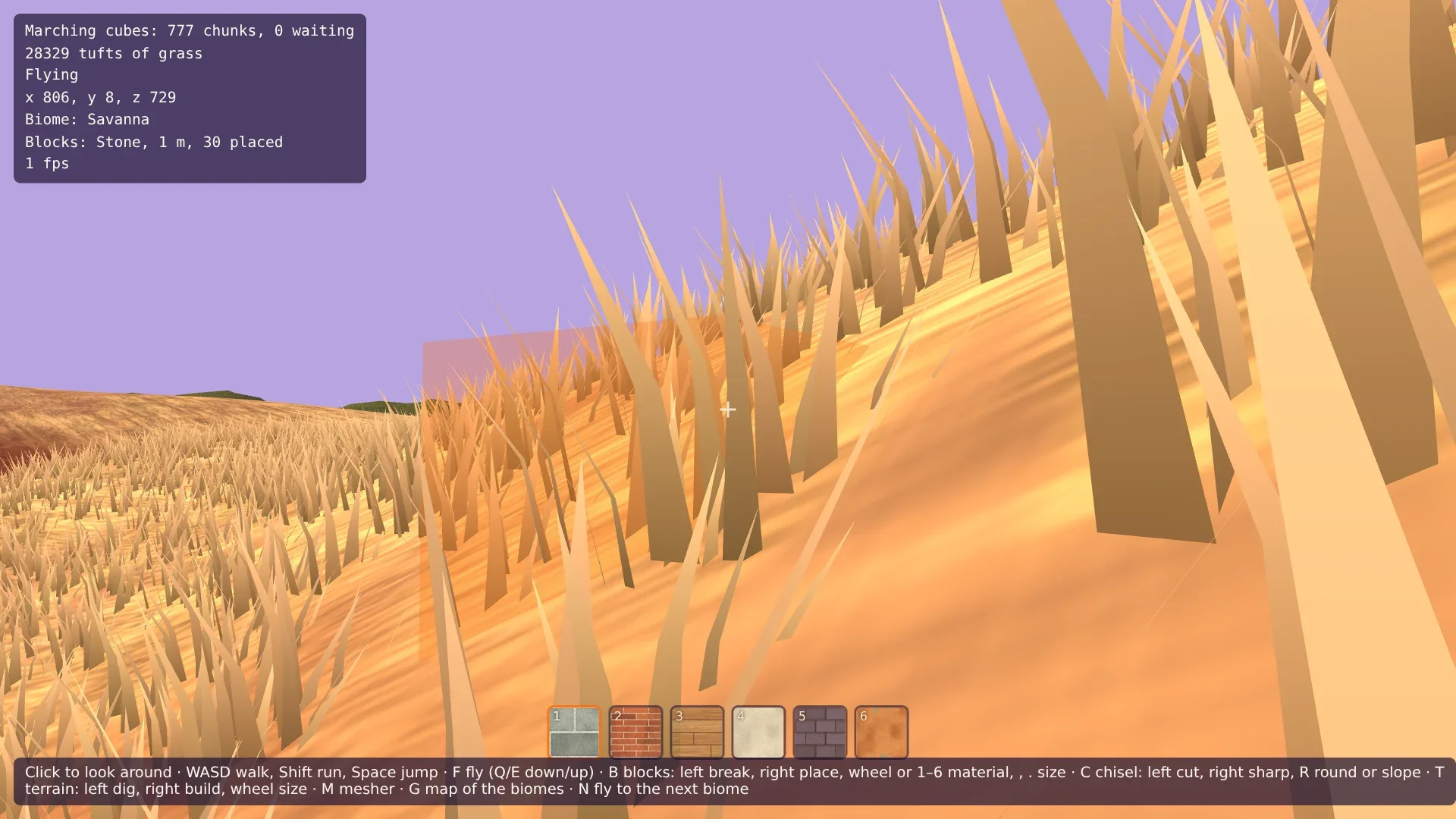
Die Wiese am Start ist voller Gras, und das HUD sagt, wie viele Büschel gezeichnet werden. Geh los und achte auf das ferne Ende des Grases: Es springt nicht ins Bild, es wächst. Grab mit T ein Loch: Sein Boden ist nackt, das Gras darum hat sich nicht bewegt. Bau mit der rechten Taste einen Hügel: Auf ihm wächst Gras. Wechsle mit M den Mesher: Jedes Büschel bleibt, wo es war. Drück dann N, bis du in der Savanne bist, und lande mit F: Das Gras ist hoch und strohfarben. In der Wüste musst du ein Büschel suchen.
Wenn dein Rechner kämpft, sind GRASS_SPACING in src/scatter.ts und GRASS_RANGE in src/grass.ts die Zahlen, an denen du drehst.
Kommentare
Die Kommentare sind GitHub Discussions: Zum Schreiben mit GitHub anmelden.
Die Kommentare kommen über giscus von GitHub. Beim Laden gehen deine IP-Adresse an giscus.app und GitHub.