
Biome und Vegetation auf Voxel-Terrain in Babylon.js · Teil 9 von 12 der Serie
Teil 9: Wälder
Pflanz die Bäume als Wälder: eine Regel, die für jede 6-m-Zelle sagt, ob dort ein Baum steht, welcher Art und wie groß, ein Worker, der Kachel für Kachel pflanzt, Instanzen nahe der Kamera, Bäume, die in einer Körnung ausblenden, feste Stämme und Schatten am Boden.
Biome und Vegetation auf Voxel-Terrain in Babylon.jsTeil 9 von 12
Auf dieser Seite
Quest-Ziele
- Allein aus den Zahlen einer Zelle entscheiden, ob in ihr ein Baum steht, und welcher
- In jedem Wald Lichtungen öffnen und das Ufer, die Hänge und die Kälte kahl lassen
- Kacheln mit Bäumen in einem Worker pflanzen, auf dem Boden, wie er wirklich ist
- Jedes Modell einmal pro Baum nahe der Kamera zeichnen und Bäume in einer Körnung ausblenden
- Die Stämme fest machen und den Boden, das Gras und die Pflanzen in den Schatten legen
Achtzehn Bäume stehen in einer Baumschule. Dieser Teil holt sie dort heraus und pflanzt sie, wo die Biome sie haben wollen: dicht an dicht in den Laub- und Nadelwäldern, hier und da einen auf der Wiese, klein und weit verstreut in der Tundra, Akazien in der Savanne und Kakteen in der Wüste. Die Wälder haben Lichtungen, ihre Stämme halten dich auf, und der Boden unter ihnen liegt in ihrem Schatten.
Was die Biome sagen
Jedes Biom bekommt einen weiteren Eintrag, trees: wie viel vom Boden seine Bäume bedecken, cover, von 0 bis 1, wie groß sie werden, und welche Arten es sind, jede mit ihrem Anteil. Ersetze in src/climate.ts BIOMES:
/**
 * The biomes, each with the climate it is at home in and a color for the map. A place
 * belongs to the biome whose climate is nearest to its own. `ground` is the texture that
 * covers its ground, and `tint` colors its soil and rock. `shape` holds the numbers that
 * shape its ground, in meters: see Shape. `grass` says how much of the ground grass covers,
 * from 0 to 1, how high it grows in meters, and how dry it is: 0 is lush, 1 is straw.
 * `plants` lists the small plants that grow in it, each with the share of the places for
 * plants that it takes. `trees` says how much of the ground trees cover, how big they
 * grow, 1 being their full size, and the share of each species among them.
 */
export const BIOMES = [
  {
    name: 'Meadow', temperature: 0.5, moisture: 0.4, color: '#7fae3c', ground: 'grass', tint: '#ffffff',
    shape: { base: 12, hills: 40, mountains: 150, knolls: 0, dunes: 0 },
    grass: { amount: 1, height: 0.42, tone: 0.1 },
    plants: { daisy: 0.1, bluebell: 0.06, bush: 0.012 },
    trees: { cover: 0.05, size: 1, kinds: { oak: 0.6, birch: 0.4 } },
  },
  {
    name: 'Broadleaf forest', temperature: 0.52, moisture: 0.76, color: '#3c7a2a', ground: 'litter', tint: '#f2f0e6',
    shape: { base: 14, hills: 46, mountains: 150, knolls: 0, dunes: 0 },
    grass: { amount: 0.5, height: 0.36, tone: 0.2 },
    plants: { fern: 0.14, bush: 0.05, bluebell: 0.04, mushroom: 0.01 },
    trees: { cover: 0.9, size: 1, kinds: { oak: 0.7, birch: 0.3 } },
  },
  {
    name: 'Conifer forest', temperature: 0.3, moisture: 0.62, color: '#28584a', ground: 'needles', tint: '#e6e8f2',
    shape: { base: 20, hills: 55, mountains: 170, knolls: 10, dunes: 0 },
    grass: { amount: 0.22, height: 0.3, tone: 0.35 },
    plants: { fern: 0.1, mushroom: 0.03, heather: 0.03, bush: 0.01 },
    trees: { cover: 0.9, size: 1, kinds: { spruce: 0.7, pine: 0.2, birch: 0.1 } },
  },
  {
    name: 'Tundra', temperature: 0.1, moisture: 0.45, color: '#c3ccd6', ground: 'moss', tint: '#dfe6f5',
    shape: { base: 24, hills: 20, mountains: 190, knolls: 5, dunes: 0 },
    grass: { amount: 0.3, height: 0.2, tone: 0.65 },
    plants: { heather: 0.1 },
    trees: { cover: 0.06, size: 0.5, kinds: { pine: 0.5, birch: 0.5 } },
  },
  {
    name: 'Savanna', temperature: 0.76, moisture: 0.5, color: '#c9a545', ground: 'straw', tint: '#ffd9b0',
    shape: { base: 7, hills: 12, mountains: 40, knolls: 22, dunes: 0 },
    grass: { amount: 0.5, height: 0.75, tone: 1 },
    plants: { shrub: 0.05 },
    trees: { cover: 0.1, size: 1, kinds: { acacia: 1 } },
  },
  {
    name: 'Desert', temperature: 0.86, moisture: 0.14, color: '#e8bd7c', ground: 'sand', tint: '#ffc08a',
    shape: { base: 9, hills: 14, mountains: 70, knolls: 30, dunes: 9 },
    grass: { amount: 0.03, height: 0.5, tone: 1 },
    plants: { shrub: 0.012 },
    trees: { cover: 0.04, size: 1, kinds: { cactus: 1 } },
  },
] as const;
Eine Regel für jede Zelle
Gras wird in den Chunk-Workern gestreut, auf dem Boden, den das Gitter eines Chunks enthält. Bei Bäumen geht das nicht: Einen Baum sieht man aus viel größerer Entfernung als den 96 m, in denen Chunks ihre Pflanzen bekommen, und Teil 10 wird Wälder in einem Kilometer Entfernung zeigen, wo gar kein Chunk geladen ist. Die Bäume kommen deshalb aus einer Regel, die nichts als einen Ort braucht. Das Land ist in Zellen von 6 m eingeteilt, und für jede Zelle sagt die Regel, ob in ihr ein Baum steht, welcher Art und wie groß. Sie fragt nur die eigenen Zahlen der Zelle, das Klima und das generierte Terrain, also gibt sie dieselbe Antwort, wann und wo auch immer sie gefragt wird.
Der Baum steht irgendwo in der Mitte seiner Zelle, nie in den äußeren 15 % an einer Seite, zwei Bäume sind also mindestens 1,8 m auseinander. Dann muss die Zelle eine Reihe von Prüfungen bestehen:
Nicht am Ufer oder im Wasser, und nicht näher als 45 m an der Stelle, an der die früheren Serien gebaut haben: Der Start bleibt eine offene Wiese.
Warm genug. Die Temperatur fällt mit der Höhe, wie in Teil 1, und unter 0,14 wächst kein Baum. Das ist etwas wärmer als dort, wo der Schnee beginnt, die Berge haben also eine Baumgrenze mit kahlem Boden zwischen den letzten Bäumen und dem Schnee.
Eine Zufallszahl unter der Bedeckung. In einem Wald steht in neun von zehn Zellen ein Baum, auf der Wiese in einer von zwanzig.
Nicht zu steil: Der generierte Boden darf auf 2 m um 1,7 m steigen oder fallen.
Die Bedeckung ist nicht allein das, was die Biome sagen. Ein Wald, der jede Zelle füllt, ist eine Wand. Ein Rauschen mit 70 m breiten Flecken öffnet deshalb Lichtungen: Wo es niedrig ist, ist die Bedeckung 0, egal in welchem Biom, und am Rand einer Lichtung steigt sie auf die volle Bedeckung. treeCover() ist eine eigene Funktion, denn auch der Boden wird danach fragen.
Die Art wird gewählt, wie Teil 6 eine Pflanzensorte wählt: eine Zufallszahl, und jede Art bekommt davon ein Stück, so lang wie ihr Anteil. Eine weitere Zufallszahl wählt eine der drei Varianten. Die Zahlen des Baums haben denselben Aufbau wie die einer Pflanze, acht Floats: sein Platz und seine Größe, dann seine Drehung, eine Zufallszahl für später, sein Modell und noch eine Zufallszahl. So kann instanceBuffer() aus Teil 5 sie der Grafikkarte geben, wie sie sind.
Auf dem Boden, wie er wirklich ist
surfaceHeight() ist die Höhe des Bodens vor den Überhängen: Das 3D-Rauschen der Dichte schiebt die wirkliche Oberfläche nach oben oder unten, um einen Meter in der Ebene und um bis zu 10 m in den Bergen. Ein Baum, der bei surfaceHeight() gepflanzt wird, würde schweben oder begraben sein. Die Regel fragt deshalb die Dichte selbst: von oberhalb all dessen, was der Boden erreichen kann, in Schritten von einem halben Meter hinunter zum ersten festen Punkt, und von dort zu der Stelle, an der die Dichte die 0 kreuzt. Füge in src/terrain.ts nach density() hinzu:
/**
 * The height of the generated ground at (x, z) as it really is, overhangs and all: the
 * highest point of the column that is solid.
 */
export function groundLevel(x: number, z: number): number {
  // Down from above everything in steps of half a meter, to the first solid point.
  let y = surfaceHeight(x, z) + MOST_BEND + 1;
  while (density(x, y, z) <= 0 && y > -200) y -= 0.5;
  // The surface lies between that point and the one above it, where the density is 0.
  const below = density(x, y, z);
  const above = density(x, y + 0.5, z);
  return y + (0.5 * below) / (below - above);
}
Das ist der generierte Boden, ohne deine Änderungen. Ein Baum, dessen Boden du weggräbst, hängt vorerst in der Luft: Teil 12 lässt ihn fallen. Der Baum wird einen Viertelmeter in den Boden gesetzt, damit man seinen Fuß an einem Hang nicht sieht. Erstelle src/treeRule.ts:
import { BIOME_COUNT, BIOMES, biomeWeights, climateAt, cooling } from './climate.ts';
import { hash, patchNoise } from './random.ts';
import { groundLevel, SEA, surfaceHeight } from './terrain.ts';
import { SPECIES, VARIANTS } from './trees.ts';

/** Meters along each side of a tile of trees, and of a cell: a cell holds one tree at most. */
export const TILE = 120;
export const TREE_CELL = 6;
/** Floats per tree: its place and its size, then its turn, a tint, its model and a random number. */
export const TREE_FLOATS = 8;
/** Trees grow this far above the sea at least, and where it is this warm at least. */
const SHORE = 2.5;
const TREE_LINE = 0.14;
/** The ground may rise or fall this much over 2 m: steeper slopes stay bare. */
const STEEPEST = 1.7;
/** No tree grows this near the start, where the earlier series built: around (96, 166). */
const HOME = { x: 96, z: 166, radius: 45 };
/** Meters across a glade or a stand of trees. */
const GLADE = 70;

/**
 * How much of the ground trees cover at a place, from 0 to 1: what its biomes say, less
 * in the glades that a noise opens in every forest.
 */
export function treeCover(x: number, z: number, biomes: Float32Array | number[]): number {
  let cover = 0;
  for (let b = 0; b < BIOME_COUNT; b += 1) cover += BIOMES[b].trees.cover * biomes[b];
  const glade = Math.min(Math.max((patchNoise(x / GLADE, z / GLADE, 99) - 0.3) / 0.2, 0), 1);
  return cover * glade;
}

const speciesOf = (name: string) => SPECIES.findIndex((species) => species.name === name);

/**
 * The trees of a tile: TREE_FLOATS numbers each. Whether a cell holds a tree, of which
 * species and how big, follows from the cell's numbers alone, so a tile comes out the
 * same whenever it is asked for.
 */
export function plantTile(tileX: number, tileZ: number): Float32Array {
  const trees: number[] = [];
  const biomes = new Float32Array(BIOME_COUNT);
  const shares = new Float32Array(SPECIES.length);
  const cells = TILE / TREE_CELL;
  for (let k = 0; k < cells; k += 1) {
    for (let i = 0; i < cells; i += 1) {
      const cellX = tileX * cells + i;
      const cellZ = tileZ * cells + k;
      const random = (n: number) => hash(cellX, cellZ, 20 + n);
      // Somewhere in the middle of its cell, so that two trees never stand trunk to trunk.
      const x = (cellX + 0.15 + random(0) * 0.7) * TREE_CELL;
      const z = (cellZ + 0.15 + random(1) * 0.7) * TREE_CELL;
      const ground = surfaceHeight(x, z);
      if (ground < SEA + SHORE || Math.hypot(x - HOME.x, z - HOME.z) < HOME.radius) continue;
      const climate = climateAt(x, z);
      const temperature = climate.temperature - cooling(ground);
      if (temperature < TREE_LINE) continue;
      biomeWeights(temperature, climate.moisture, biomes);
      if (random(2) >= treeCover(x, z, biomes)) continue;
      if (Math.abs(surfaceHeight(x + 2, z) - ground) > STEEPEST || Math.abs(surfaceHeight(x, z + 2) - ground) > STEEPEST) continue;

      // The species: one random number picks among those the biomes list, by their shares.
      shares.fill(0);
      let size = 0;
      for (let b = 0; b < BIOME_COUNT; b += 1) {
        if (biomes[b] === 0) continue;
        size += BIOMES[b].trees.size * biomes[b];
        for (const [name, share] of Object.entries(BIOMES[b].trees.kinds)) shares[speciesOf(name)] += share * biomes[b];
      }
      let pick = random(3);
      let species = shares.findIndex((share) => share > 0);
      for (let s = 0; s < shares.length; s += 1) {
        pick -= shares[s];
        if (shares[s] > 0 && pick < 0) {
          species = s;
          break;
        }
      }
      const model = species * VARIANTS + Math.floor(random(4) * VARIANTS);
      // On the ground as it really is there, overhangs and all, and a little into it.
      trees.push(x, groundLevel(x, z) - 0.25, z, size * (0.75 + random(5) * 0.5), random(6) * Math.PI * 2, random(7), model, random(8));
    }
  }
  return new Float32Array(trees);
}
Kacheln aus einem Worker
Die Regel wird Kachel für Kachel gefragt: Eine Kachel ist 120 m lang und breit und enthält 20 mal 20 Zellen. Jede Zelle kostet ein paar Abfragen des Rauschens, und jeder Baum einen Gang die Dichte hinunter, die Kacheln werden deshalb in einem eigenen Worker gepflanzt, der mit der Liste der Bäume einer Kachel antwortet. Erstelle src/treeWorker.ts:
import { plantTile } from './treeRule.ts';

export interface TileJob {
  x: number;
  z: number;
}

export interface TileResult extends TileJob {
  /** The tile's trees, TREE_FLOATS numbers each. */
  trees: Float32Array;
}

/** Plants the tiles it is asked for, one after the other. */
self.onmessage = (event: MessageEvent<TileJob>) => {
  const { x, z } = event.data;
  const result: TileResult = { x, z, trees: plantTile(x, z) };
  self.postMessage(result, { transfer: [result.trees.buffer] });
};
Der Wald
Die Klasse Forest hält die Kacheln um die Kamera und zeichnet ihre Bäume. Beim Zeichnen zahlen sich die Instanzen aus. Es gibt achtzehn Meshes, eines pro Modell, und jedes wird einmal für jeden Baum seiner Art gezeichnet, der nah genug ist: ein ganzer Wald in achtzehn Draw Calls. Ein Mesh pro Chunk, wie beim Gras, ginge hier nicht: Mit achtzehn Modellen wären das achtzehn Meshes pro Chunk.
Die Instanzen werden deshalb jedes Mal neu sortiert, wenn sich etwas ändert: Eine Kachel ist angekommen, oder die Kamera hat sich seit dem letzten Mal um 8 m bewegt. Sortieren heißt, die Bäume aller Kacheln durchzugehen, die in Reichweite in die Liste ihres Modells zu kopieren und jedem Modell seine Liste zu geben. Das sind höchstens ein paar tausend Bäume und eine Sache von einer Millisekunde.
Der Wald ist außerdem ein fester Körper, wie der Schutt der Bau-Serie: Er beantwortet die Frage nach der nächsten Oberfläche zu einem Punkt. Ein Stamm ist ein stehender Zylinder, so dick wie der Stamm des Modells am Boden und halb so hoch wie der Baum, bis dorthin, wo die Krone beginnt. Um die Stämme nahe einem Punkt zu finden, ohne jeden Baum zu fragen, sortiert jede Kachel ihre Bäume beim ersten Mal, wenn sie gefragt wird, in ein Gitter aus 8-m-Zellen, und nur die neun Zellen um den Punkt werden angesehen. Erstelle src/forest.ts:
import type { Buffer, Mesh, Scene, ShaderMaterial, Vector3 } from '@babylonjs/core/pure';
import { instanceBuffer } from './chunkPlants.ts';
import type { Solid, Surface } from './solids.ts';
import { createTreeMesh } from './treeMaterial.ts';
import { TILE, TREE_FLOATS } from './treeRule.ts';
import type { TreeModel } from './trees.ts';
import type { TileJob, TileResult } from './treeWorker.ts';

/** How far from the camera trees are drawn, in meters, and where they start to fade out. */
export const TREE_RANGE = 130;
export const TREE_FADE = 110;
/** The trees are sorted out again once the camera has moved this far. */
const STEP = 8;
/** A trunk is solid up to this share of the tree's height, where the crown begins. */
const TRUNK = 0.5;
/** Meters along each side of a cell of a tile's grid, which finds the trees near a point. */
const GRID = 8;

interface Tile {
  /** TREE_FLOATS numbers per tree, or null while the worker plants the tile. */
  trees: Float32Array | null;
  /** Which trees stand in each cell of the grid, as their numbers in the list. */
  grid: Map<number, number[]> | null;
}

const tileKey = (x: number, z: number) => `${x},${z}`;

/**
 * The trees around the camera. A worker plants them tile by tile, and every model's mesh
 * is drawn once for each tree of its kind that is near enough. Their trunks are solid.
 */
export class Forest implements Solid {
  /** How many trees are drawn. */
  shown = 0;
  private readonly tiles = new Map<string, Tile>();
  private readonly meshes: Mesh[];
  private readonly buffers: (Buffer | null)[];
  private readonly worker = new Worker(new URL('./treeWorker.ts', import.meta.url), { type: 'module' });
  /** Where the camera was when the trees were last sorted out, or null if they must be now. */
  private sorted: { x: number; z: number } | null = null;
  private readonly models: TreeModel[];

  constructor(scene: Scene, models: TreeModel[], material: ShaderMaterial) {
    this.models = models;
    this.meshes = models.map((model) => createTreeMesh(scene, model, material));
    this.buffers = models.map(() => null);
    for (const mesh of this.meshes) mesh.setEnabled(false);
    this.worker.onmessage = (event: MessageEvent<TileResult>) => {
      const tile = this.tiles.get(tileKey(event.data.x, event.data.z));
      // A tile that was dropped while it was planted is not wanted any more.
      if (!tile) return;
      tile.trees = event.data.trees;
      this.sorted = null;
    };
  }

  /** Once a frame: asks for the tiles in range, drops those far away, and sorts out the trees. */
  update(focus: Vector3): void {
    const reach = Math.ceil(TREE_RANGE / TILE);
    const [centerX, centerZ] = [Math.floor(focus.x / TILE), Math.floor(focus.z / TILE)];
    for (let z = centerZ - reach; z <= centerZ + reach; z += 1) {
      for (let x = centerX - reach; x <= centerX + reach; x += 1) {
        if (this.tiles.has(tileKey(x, z))) continue;
        this.tiles.set(tileKey(x, z), { trees: null, grid: null });
        this.worker.postMessage({ x, z } satisfies TileJob);
      }
    }
    for (const key of this.tiles.keys()) {
      const [x, z] = key.split(',').map(Number);
      if (Math.max(Math.abs(x - centerX), Math.abs(z - centerZ)) > reach + 1) this.tiles.delete(key);
    }
    if (!this.sorted || Math.hypot(focus.x - this.sorted.x, focus.z - this.sorted.z) > STEP) this.sort(focus);
  }

  /** Hands every model the trees of its kind that are in range, as its instances. */
  private sort(focus: Vector3): void {
    this.sorted = { x: focus.x, z: focus.z };
    const lists: number[][] = this.models.map(() => []);
    // A little further than they are drawn, for the way to the next sorting.
    const range = TREE_RANGE + STEP;
    for (const { trees } of this.tiles.values()) {
      if (!trees) continue;
      for (let t = 0; t < trees.length; t += TREE_FLOATS) {
        if (Math.hypot(trees[t] - focus.x, trees[t + 2] - focus.z) > range) continue;
        for (let f = 0; f < TREE_FLOATS; f += 1) lists[trees[t + 6]].push(trees[t + f]);
      }
    }
    this.shown = 0;
    lists.forEach((list, model) => {
      this.buffers[model]?.dispose();
      this.buffers[model] = list.length > 0 ? instanceBuffer(this.meshes[model], new Float32Array(list)) : null;
      this.meshes[model].setEnabled(list.length > 0);
      this.shown += list.length / TREE_FLOATS;
    });
  }

  /** The nearest trunk to a point, if one is within `reach` meters. */
  nearest(x: number, y: number, z: number, reach: number): Surface | null {
    let nearest: Surface | null = null;
    // The trees of the cells around the point, each in the tile it lies in: no trunk is
    // thicker than a cell.
    for (let k = -1; k <= 1; k += 1) {
      for (let i = -1; i <= 1; i += 1) {
        const [cellX, cellZ] = [x + i * GRID, z + k * GRID];
        const tile = this.tiles.get(tileKey(Math.floor(cellX / TILE), Math.floor(cellZ / TILE)));
        if (!tile?.trees) continue;
        const { trees } = tile;
        tile.grid ??= gridOf(trees);
        for (const t of tile.grid.get(gridKey(cellX, cellZ)) ?? []) {
          const model = this.models[trees[t + 6]];
          const size = trees[t + 3];
          if (y < trees[t + 1] || y > trees[t + 1] + model.height * size * TRUNK) continue;
          // A trunk is a standing cylinder: the way out of it is level.
          const [dx, dz] = [x - trees[t], z - trees[t + 2]];
          const apart = Math.hypot(dx, dz) || 0.001;
          const distance = apart - model.girth * size;
          if (distance < reach && (!nearest || distance < nearest.distance)) {
            nearest = { distance, normal: [dx / apart, 0, dz / apart] };
          }
        }
      }
    }
    return nearest;
  }
}

const gridKey = (x: number, z: number) => Math.floor(x / GRID) * 65536 + Math.floor(z / GRID);

/** Sorts a tile's trees into the cells of a grid. */
function gridOf(trees: Float32Array): Map<number, number[]> {
  const grid = new Map<number, number[]>();
  for (let t = 0; t < trees.length; t += TREE_FLOATS) {
    const key = gridKey(trees[t], trees[t + 2]);
    if (!grid.has(key)) grid.set(key, []);
    grid.get(key)!.push(t);
  }
  return grid;
}update()bittet den Worker um jede Kachel im Umkreis von zwei Kacheln um die der Kamera, die es nicht hat, und verwirft die, die weiter als drei entfernt sind. Eine Kachel steht in der Map, sobald um sie gebeten wurde, mittrees: null, damit nicht zweimal um sie gebeten wird.sort()nimmt Bäume einen Schritt weiter mit, als sie gezeichnet werden, damit vor dem nächsten Sortieren keiner fehlt. Ein Modell ohne Bäume wird abgeschaltet.nearest()schlägt jede der neun Zellen in der Kachel nach, in der sie liegt: Ein Stamm am Rand einer Kachel wird auch von der anderen Seite gefunden.
Ausblenden
Bäume werden bis 130 m von der Kamera gezeichnet. Ein Baum, der in dieser Entfernung ins Bild springt, fiele jedes Mal auf, und ihn einzublenden hieße, die Bäume von hinten nach vorn zu sortieren. Es gibt einen billigeren Weg, etwas auszublenden, der gar kein Blending braucht: nur einige seiner Pixel zeichnen. Eine Funktion gibt jedem Pixel des Bildschirms eine Zahl von 0 bis 1, in einem Muster, das zu fein ist, um es zu sehen. Ein Baum, der auf 0,3 ausgeblendet ist, behält die Pixel, deren Zahl unter 0,3 liegt, und wirft die anderen weg. Ab 110 m dünnt ein Baum so aus, bis er bei 130 m verschwunden ist.
Der Vertex-Shader rechnet aus, wie weit ein Baum ausgeblendet ist, aus der Entfernung seines Fußes, sodass der ganze Baum als eines ausblendet. Ersetze src/tree.vertex.glsl:
precision highp float;

attribute vec3 position;
attribute vec3 normal;
// Where on its texture the vertex is, the texture's layer, and the vertex's shade.
attribute vec4 paint;
// The tree, one for every instance: its place and its size, then its turn and three
// numbers of its own.
attribute vec4 place;
attribute vec4 look;

uniform mat4 world;
uniform mat4 viewProjection;
uniform vec3 cameraPosition;
// Where the trees start to fade out, and where they are gone, in meters from the camera.
uniform vec2 treeRange;

varying vec3 vPosition;
varying vec3 vNormal;
varying vec4 vPaint;
varying float vFade;

void main() {
  // Turned about its trunk, sized, and put in its place.
  float c = cos(look.x);
  float s = sin(look.x);
  mat3 turn = mat3(c, 0.0, s, 0.0, 1.0, 0.0, -s, 0.0, c);
  vec4 worldPosition = world * vec4(place.xyz + turn * position * place.w, 1.0);
  vPosition = worldPosition.xyz;
  vNormal = mat3(world) * (turn * normal);
  vPaint = paint;
  // The whole tree fades as one: by how far its foot is from the camera.
  vec3 foot = (world * vec4(place.xyz, 1.0)).xyz;
  vFade = 1.0 - smoothstep(treeRange.x, treeRange.y, distance(foot.xz, cameraPosition.xz));
  gl_Position = viewProjection * worldPosition;
}
Füge in src/tree.fragment.glsl nach den anderen Varyings varying float vFade; hinzu. Ersetze dann die Zeile void main() { durch die Körnung und den Test:
// A number from 0 to 1 that differs from pixel to pixel, in a pattern too fine to see.
float grain() {
  return fract(52.9829189 * fract(dot(gl_FragCoord.xy, vec2(0.06711056, 0.00583715))));
}

void main() {
  // A fading tree is drawn with only some of its pixels: fewer the more it has faded.
  if (vFade < 1.0 && vFade <= grain()) discard;
Das Material nimmt die beiden Entfernungen und gibt sie weiter. Importiere in src/treeMaterial.ts Vector2 aus Babylon.js und ersetze createTreeMaterial():
/**
 * The trees' material: bark and leaves from one texture array, lit by the sun and the sky.
 * Trees fade out between `fadeFrom` and `range` meters from the camera.
 */
export function createTreeMaterial(scene: Scene, options: FogOptions & { fadeFrom: number; range: number }): ShaderMaterial {
  const layers = new RawTexture2DArray(
    paintTreeLayers(),
    TREE_TEXTURE,
    TREE_TEXTURE,
    TREE_LAYERS.length,
    Constants.TEXTUREFORMAT_RGBA,
    scene,
    true,
    false,
    Texture.TRILINEAR_SAMPLINGMODE,
  );
  // The bark goes around and up the trunk without an end.
  layers.wrapU = Texture.WRAP_ADDRESSMODE;
  layers.wrapV = Texture.WRAP_ADDRESSMODE;
  const material = new ShaderMaterial(
    'trees',
    scene,
    { vertexSource, fragmentSource },
    {
      attributes: ['position', 'normal', 'paint', 'place', 'look'],
      uniforms: ['world', 'viewProjection', ...LIGHT_UNIFORMS, 'firstLeaves', 'treeRange'],
      samplers: ['layers'],
    },
  );
  material.setTexture('layers', layers);
  setLight(material, options);
  material.setVector2('treeRange', new Vector2(options.fadeFrom, options.range));
  material.setFloat('firstLeaves', TREE_LAYERS.findIndex((name) => name.includes('leaves') || name.includes('needles')));
  // A spray of leaves is seen from both sides.
  material.backFaceCulling = false;
  return material;
}
Schatten am Boden
Die Serie hat keine Schatten, und Bäume ganz ohne sehen aus wie auf den Boden geklebt. Echte Schatten sind ein eigenes Thema, aber ein Wald braucht sie nicht: Sein Boden liegt überall im Schatten. Der Boden wird deshalb dunkler, je mehr Bäume ihn bedecken, um bis zu 30 %, und die Lichtungen bleiben in der Sonne.
Die Bedeckung reist mit dem Klima: Aus den zwei Zahlen pro Vertex werden drei. Importiere in src/chunks.ts zusammen mit climateAt auch BIOME_COUNT, biomeWeights und cooling aus ./climate.ts, und treeCover aus ./treeRule.ts. Der Kommentar über ChunkMesh kann sagen, dass es jetzt drei Zahlen sind. Ersetze in buildChunk() die Schleife über die Vertices und die Zeilen davor:
// Meters below the generated ground, for the material: soil first, then rock. And the
// climate, for the biome.
const { positions } = mesh;
const depths = new Float32Array(positions.length / 3);
const climates = new Float32Array(depths.length * 3);
const biomes = new Float32Array(BIOME_COUNT);
for (let i = 0; i < depths.length; i += 1) {
  const x = origin.x + positions[i * 3];
  const y = origin.y + positions[i * 3 + 1];
  const z = origin.z + positions[i * 3 + 2];
  depths[i] = surfaceHeight(x, z) - y;
  const { temperature, moisture } = climateAt(x, z);
  biomeWeights(temperature - cooling(y), moisture, biomes);
  climates.set([temperature, moisture, treeCover(x, z, biomes)], i * 3);
}
In src/world.ts hat das Attribut drei Zahlen: mesh.setVerticesData('climate', data.climates, false, 3);. Dasselbe in src/farView.ts: ground.setVerticesData('climate', data.ground.climates, false, 3);. Der Worker der Fernsicht rechnet die Bedeckung für seine Vertices aus. Füge in src/farWorker.ts dieselben Importe hinzu wie in src/chunks.ts und ersetze den Anfang des Meshs für den Boden:
const climates = new Float32Array(RINGS * SEGMENTS * 3);
const biomes = new Float32Array(BIOME_COUNT);
const ground: FarMesh = {
  ...ringMesh(growing(INNER, RINGS), (px, pz, vertex) => {
    const height = surfaceHeight(x + px, z + pz);
    const { temperature, moisture } = climateAt(x + px, z + pz);
    biomeWeights(temperature - cooling(height), moisture, biomes);
    climates.set([temperature, moisture, treeCover(x + px, z + pz, biomes)], vertex * 3);
    return height - SINK;
  }),
  climates,
In src/terrain.vertex.glsl wird das Attribut zu attribute vec3 climate; und das Varying zu varying vec3 vClimate;. In src/terrain.fragment.glsl ändert sich das Varying genauso. Das Klima wird weiterhin als vClimate.x und vClimate.y gelesen. Füge nach der Zeile, die das nasse Ufer abdunkelt, hinzu:
// Under trees the ground lies in their shade.
color *= 1.0 - 0.3 * vClimate.z;
Das Gras und die kleinen Pflanzen stehen im selben Schatten. Jede Stelle erfährt, wie hell es bei ihr ist, und die Pflanzen nehmen das in ihrer sechsten Zahl mit, in der das Licht steht. Importiere in src/scatter.ts treeCover aus ./treeRule.ts. Füge Spot ein Feld hinzu und setze es in eachSpot() nach der Zeile, die die Biome ausrechnet:
/** How bright it is there: less than 1 in the shade of trees. */
shade: number;

spot.shade = 1 - 0.3 * treeCover(origin.x + spot.x, origin.z + spot.z, spot.biomes);
Die Stelle, die eachSpot() an seinem Anfang anlegt, bekommt shade: 1 als letzten Eintrag. In scatterGrass() und in add() von scatterPlants() war der sechste der Werte eine 1, ein Platz, der für das Licht freigehalten war: Setz dort spot.shade ein. Und pack() schreibt das Licht nicht mehr über diese Zahl, sondern multipliziert es hinein. Ersetze seinen Kommentar und die zwei Zeilen danach:
// The light as the vertices of the mesh get it. The plant's sixth number, which holds
// its shade so far, is multiplied by it.
const lights = lightAt(light, origin, positions, normals);
plants.forEach((plant, p) => (plant.values[5] *= lights[p]));
In die Welt
Die Baumschule hat ihre Arbeit getan: Lösche src/nursery.ts und ihren Import in src/main.ts. Importiere Forest, TREE_FADE und TREE_RANGE aus ./forest.ts und ersetze die Zeilen, die die Bäume wachsen ließen und die Baumschule pflanzten:
// The trees: every species in a few variants, grown once, and drawn wherever the forest
// has a tree of their kind.
const treeMaterial = createTreeMaterial(scene, { ...fog, fadeFrom: TREE_FADE, range: TREE_RANGE });
const forest = new Forest(scene, growModels(), treeMaterial);
Die festen Körper fragen bisher den Schutt nach weiteren festen Körpern. Jetzt fragen sie auch den Wald. Pieces hat solids.others gesetzt, als es angelegt wurde, setz es also gleich nach der Zeile, die pieces anlegt, noch einmal. Eine Generatorfunktion gibt einen festen Körper nach dem anderen heraus, ohne bei jeder Frage eine Liste zu bauen:
// The trunks are solid too, for the player and for what falls: the solids ask the rubble
// and the forest.
solids.others = function* () {
  yield* pieces.rubble;
  yield forest;
};
In jedem Frame folgt der Wald nach plants.update(camera.position); der Kamera: forest.update(camera.position);. Und das HUD zählt die Bäume: Seine zweite Zeile endet nach den Pflanzen mit , ${forest.shown} trees.
Ausprobieren
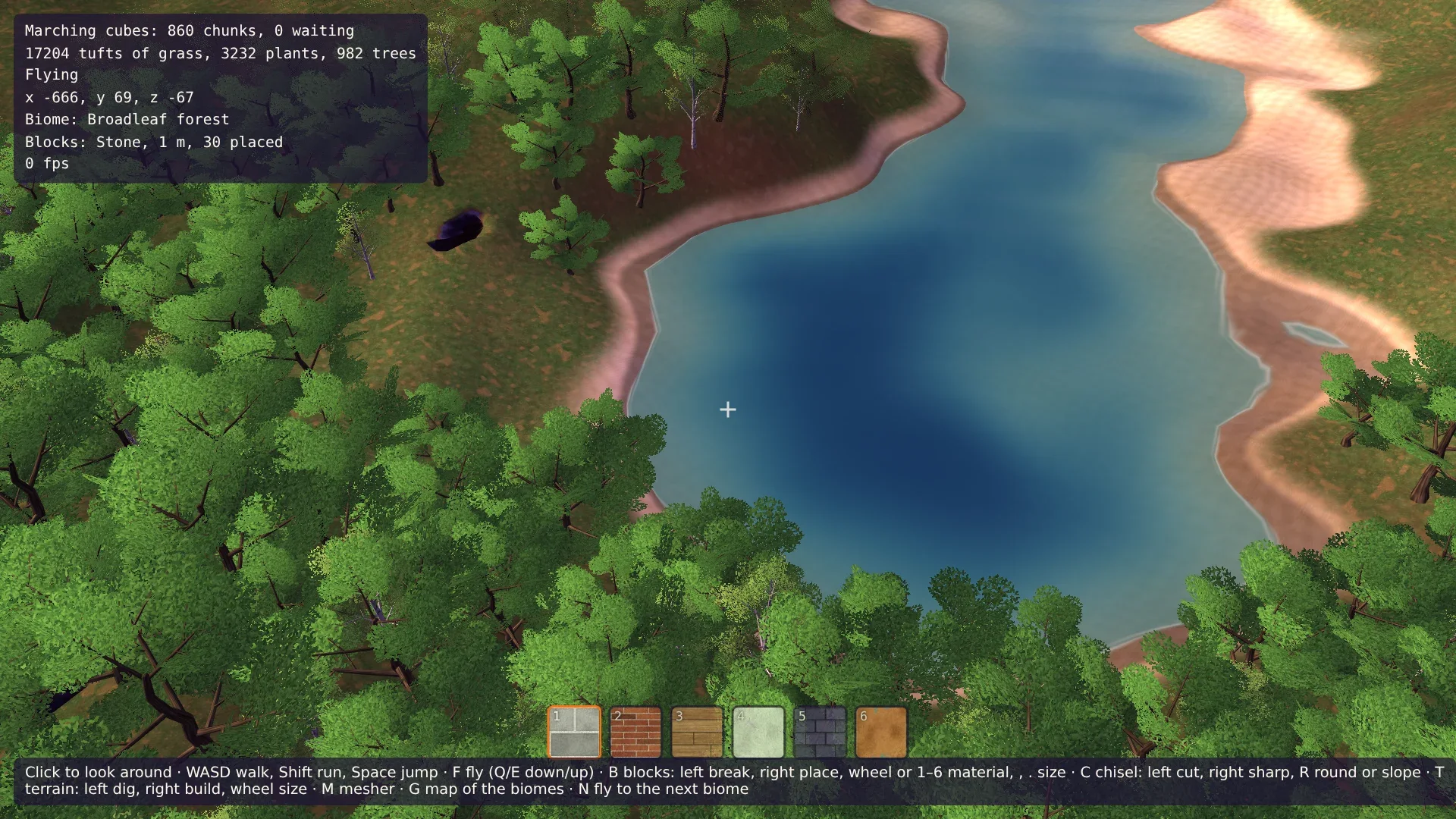
Um den Start ist die Wiese offen, mit einzelnen Eichen und Birken weiter draußen. Drück N, um zum Laubwald zu fliegen, komm mit Q herunter und drück F, um zu gehen. Die Stämme halten dich auf, der Boden zwischen ihnen ist dunkler als der der Wiese, und das Gras und die Farne sind es auch. Geh, bis sich die Bäume zu einer Lichtung öffnen: Boden in der Sonne, und der Wald steht darum herum. Flieg dann hinauf und schau dich um. Der Wald endet in einem Ring 130 m von dir, wo die Bäume in ihre Körnung ausdünnen, und dahinter ist der Boden kahl: Teil 10 führt den Wald bis zum Horizont weiter.
Drück noch einmal N für die Nadelbäume, und weiter durch die Tundra mit ihren kleinen Kiefern und Birken, die Savanne mit ihren Akazien und die Wüste mit ihren Kakteen. Schau unterwegs auf einen Berg: Die Bäume steigen seine Hänge hinauf und hören unter dem Schnee auf.
Kommentare
Die Kommentare sind GitHub Discussions: Zum Schreiben mit GitHub anmelden.
Die Kommentare kommen über giscus von GitHub. Beim Laden gehen deine IP-Adresse an giscus.app und GitHub.