
End-to-End Tests With Playwright: Frontend, Backend and Database · Part 2 of 14 in the series
Part 2: Your First Playwright Test
Install Playwright, let it start the app by itself, and write a test that opens the quest board in a real browser and adds a quest. Then find out why a green test can still be wrong.
End-to-End Tests With Playwright: Frontend, Backend and DatabasePart 2 of 14
On this page

Quest objectives
- Install Playwright and the browser it controls
- Understand the config: reporters, base URL, a project, and servers that Playwright starts itself
- Find elements with locators by role and label instead of CSS classes
- Use web-first assertions, which wait by themselves, instead of sleeps
- Read the output in the terminal and the HTML report
- See why a test that depends on leftover data proves nothing
The quest board from part 1 works when you click through it. In this part a browser does the clicking: you install Playwright, write two tests and watch them pass. At the end you find out that one of them passes for the wrong reason, and that is the best argument for the parts that follow.
One thing before you start: the tests of this part should meet an empty board. The database has to be running. Open the board, starting the two servers from part 1 again if you have stopped them, and delete the quests you added by hand, with the ✕ beside each of them. You can leave the servers running afterwards. Why the empty board matters is the subject of the last section.
Install and configure
Playwright is an npm package, and the browsers it controls come separately:
$ npm install --save-dev @playwright/test$ npx playwright install chromium
The first command installs @playwright/test: the test runner together with the library that drives browsers. The second downloads a Chromium that belongs to this version of Playwright. The tests use that one and not the Chrome on your machine, so they meet the same browser everywhere. On Linux a browser also needs some system libraries. npx playwright install --with-deps chromium installs those along with it.
Playwright reads its settings from playwright.config.ts in the project folder:
import { defineConfig, devices } from '@playwright/test';

export default defineConfig({
  testDir: './tests',
  reporter: [['list'], ['html']],
  use: {
    baseURL: 'http://localhost:5173',
    trace: 'on-first-retry',
  },
  projects: [{ name: 'chromium', use: { ...devices['Desktop Chrome'] } }],
  // Playwright starts both servers before the tests and stops them afterwards.
  webServer: [
    {
      command: 'npm run dev:api',
      url: 'http://localhost:3000/api/health',
      reuseExistingServer: !process.env.CI,
    },
    {
      command: 'npm run dev:web',
      url: 'http://localhost:5173',
      reuseExistingServer: !process.env.CI,
    },
  ],
});
testDir is the folder with the tests. Playwright takes every file in it that ends in .spec.ts as a test file.
reporter says how results are shown, and there can be several reporters at once. list prints one line per test in the terminal. html writes a report into the folder playwright-report that you can look through in the browser.
use holds settings that every test gets. baseURL is the address of the page, so a test can say goto('/') and does not have to know where the app runs. A trace is a recording of a test. With 'on-first-retry' one is made only when a failed test is run a second time, and nothing is run a second time yet. Part 9 is about traces.
projects: a project is a named group of tests with its own settings. For now there is one, chromium, and devices['Desktop Chrome'] is a ready-made set of settings that describes Chrome on a desktop computer, the size of its window for example. The next part puts projects to a different use.
webServer is the convenient part. The tests need the app to be running, and instead of counting on you to start it, Playwright does it: it runs each command, waits until the address under url answers, and only then starts the tests. Afterwards it stops the servers again. For the API that address is the health check from part 1, so "ready" includes the database.
reuseExistingServer covers the case that the app is running already. If something answers at the address, Playwright uses it and starts nothing, so you can keep your two development servers running while you test. In a pipeline, where the variable CI is set, this is switched off, and Playwright always starts the servers itself.
Three small changes belong to the setup. package.json gets a script for the tests, the last one in the list:
"scripts": {
  "dev:api": "node --env-file=.env --watch server/index.ts",
  "dev:web": "vite",
  "build": "vite build",
  "start": "node --env-file=.env server/index.ts",
  "db:generate": "drizzle-kit generate",
  "db:migrate": "node --env-file=.env server/db/migrate.ts",
  "typecheck": "vue-tsc --noEmit",
  "test": "playwright test"
},
.gitignore gets two new lines at the end. Both are folders that Playwright writes while it runs: what it keeps of failed tests, and the HTML report.
node_modules
.env
web/dist
test-results
playwright-report
And in tsconfig.json, tests joins the list in include, so your editor and npm run typecheck check the tests as well:
"include": ["server", "web/src", "tests", "*.ts"]The first test
Create the folder tests, and in it quest-board.spec.ts:
import { expect, test } from '@playwright/test';

test('shows the board', async ({ page }) => {
  await page.goto('/');

  await expect(page.getByRole('heading', { name: 'Quest Board' })).toBeVisible();
});

test('adds a quest', async ({ page }) => {
  await page.goto('/');

  await page.getByLabel('New quest').fill('Find the lost sword');
  await page.getByRole('button', { name: 'Add quest' }).click();

  await expect(page.getByRole('listitem').filter({ hasText: 'Find the lost sword' })).toBeVisible();
});
Two tests, and almost every line shows an idea you will use in every part from here on.
test and page. test declares a test: a title, and a function that does the work. The function asks for page in its argument. That is a fixture: something a test gets by naming it. Playwright prepares it before the test and clears it away afterwards. page is a fresh browser page for this one test, with its own cookies and its own storage, so the two tests share nothing in the browser.
goto. page.goto('/') opens the board. The address is put together with the baseURL from the config.
Locators. page.getByRole('heading', { name: 'Quest Board' }) does not search for anything yet. It makes a locator: a description of how to find an element, which Playwright uses at the moment something is done with it. Look at how the four locators describe their elements: the heading called "Quest Board", the field labelled "New quest", the button called "Add quest", a list item that contains the title. That is how a person finds things on a page. No CSS class and no id appears. A test written this way survives a new design, and it fails when a label disappears, which a visitor would notice too. This is why part 1 took care over labels and names.
Actions. fill puts the text into the field and click presses the button. Both wait until their element is there and can be used. The test leaves the reward field alone, so the quest gets the 10 gold the form starts with.
Web-first assertions. await expect(locator).toBeVisible() is not a single look at the page. Playwright checks again and again until the condition holds, and reports a failure only when a time limit has passed, five seconds unless you change it. Playwright calls these web-first assertions. The second test needs that: after the click, a request travels to the API and back before the quest shows up in the list. The test does not know how long that takes, and it does not have to. There is no sleep anywhere. The await in front is what makes the test wait for the outcome, so never leave it out.
Run it
Start the tests:
$ npx playwright testRunning 2 tests using 1 worker ✓ 1 [chromium] › tests/quest-board.spec.ts:3:1 › shows the board (104ms) ✓ 2 [chromium] › tests/quest-board.spec.ts:9:1 › adds a quest (147ms) 2 passed (1.9s)
If your servers were not running, Playwright started them, and stopped them again at the end. Each line is one test: the number, the project in brackets, the file with the line and column where the test begins, the title, and how long it took. A worker is a process that runs tests. For now there is one, and from the next part on there are several.
You saw no browser window, because Playwright runs browsers headless unless you say otherwise: without a window. The html reporter has written its report in the meantime. Open it:
$ npx playwright show-report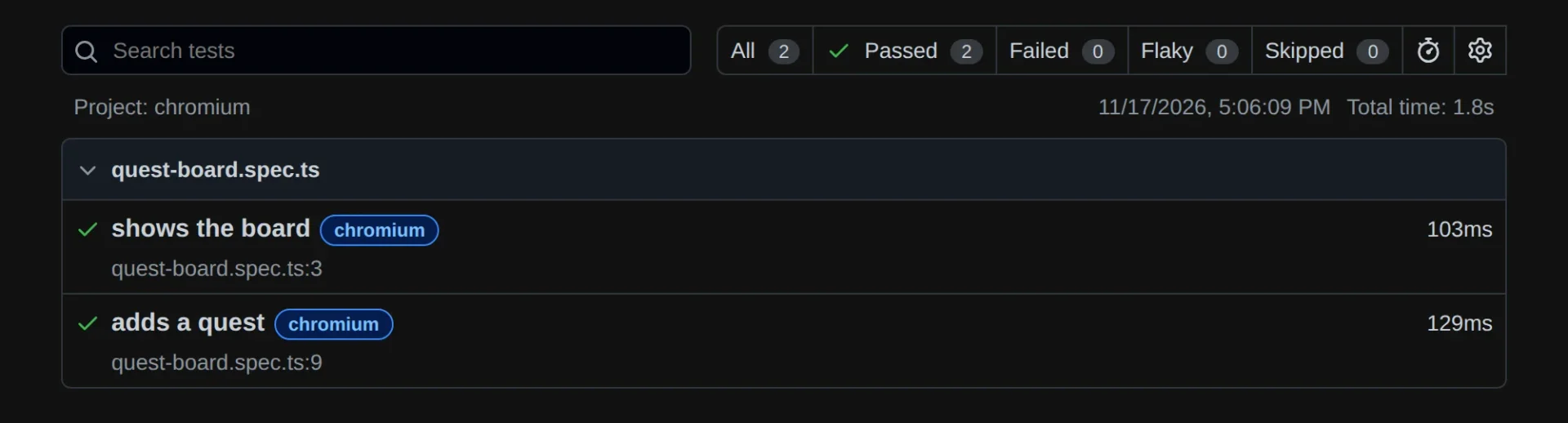
With two green tests there is not much to look at yet. Click on a test to see its steps. The report becomes important in part 9, when tests fail. Stop it in the terminal with Ctrl+C.
If you would like to watch the browser at work, let it show its window:
$ npx playwright test --headedDo not blink. Both tests together need a fraction of a second in the browser.
Green for the wrong reason
If you have not done so yet, run the tests a second time, without --headed:
$ npx playwright testRunning 2 tests using 1 worker ✓ 1 [chromium] › tests/quest-board.spec.ts:3:1 › shows the board (103ms) ✓ 2 [chromium] › tests/quest-board.spec.ts:9:1 › adds a quest (129ms) 2 passed (1.8s)
Green again. But think back to part 1: titles are unique. The first run added a quest called "Find the lost sword". The second run tried to add another one with the same title. That cannot have worked.
See for yourself. Start the two servers as in part 1, if they are not running, open http://localhost:5173 and do by hand what the test does: type "Find the lost sword" and click "Add quest".
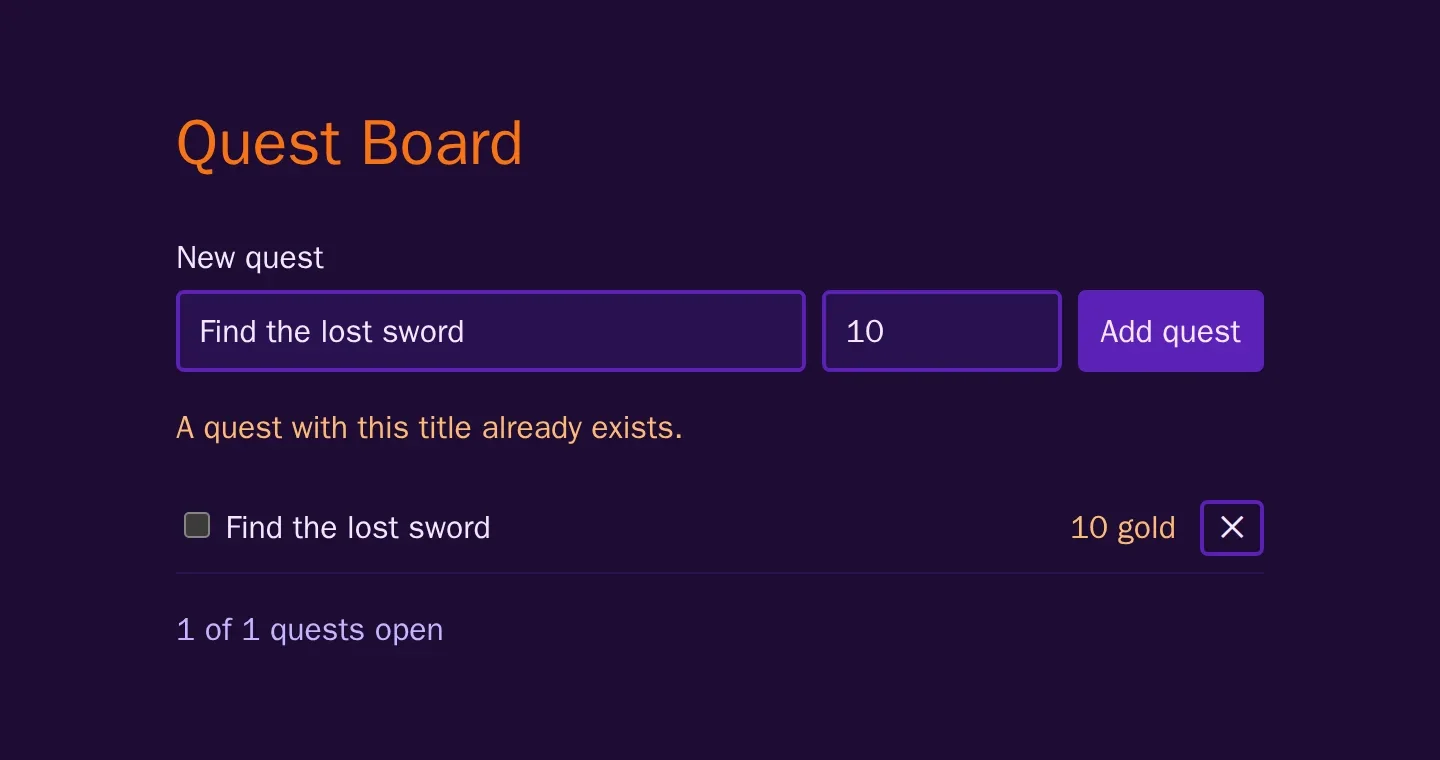
This is what the test met from its second run on. It filled in the title and clicked. The API answered with 409, and the page showed the message. No quest was added. Then the assertion asked its question: is there a list item with the text "Find the lost sword"? There was one, left over from the first run. So: green.
There are two lessons in this.
The test wrote into your development database. The quest it added is on your board now, among the data you work with. Two tests leave one quest behind. A whole suite would leave far more.
A test that depends on what an earlier run left behind proves nothing. From the second run on, this test would stay green even if adding quests were broken completely.
Deleting the quest by hand before every run is no cure. The cure is the same for both problems: a test must start on a database that holds nothing but what the test itself put there. Part 4 builds that.
What you have now
Playwright is installed and starts your app by itself. Two tests drive a real browser, find their elements the way a visitor does and wait without a single sleep. And you know the weak spot of this first suite, which is worth more than the two green lines.
Before the cure, the suite gets its shape. In the next part you split it into four projects, one for each layer of the app.
Comments
The comments are GitHub Discussions: sign in with GitHub to write one.
The comments come from GitHub, through giscus. Loading them sends your IP address to giscus.app and GitHub.