
End-to-End Tests With Playwright: Frontend, Backend and Database · Part 13 of 14 in the series
Part 13: Visual Comparisons
Take pictures of the quest board and let Playwright compare them on every run, so a CSS change that moves something shows up as a failed test. The pictures are always made in the same container, because that is the only place where they compare well.
End-to-End Tests With Playwright: Frontend, Backend and DatabasePart 13 of 14
On this page

Quest objectives
- Understand what toHaveScreenshot compares, and why the pictures must always come from the same environment
- Tag tests, and skip them visibly where they cannot give a fair answer
- Run Playwright in its official container with Docker Compose
- Create reference pictures, compare against them and update them
- Read a difference in the report and decide whether it is a mistake or intended
The tests so far know what the board says. None of them knows what it looks like. Double the padding of the list, or let the button slip under the form, and every test stays green: for them a quest that is on the page is on the page, wherever it sits.
A visual comparison closes that gap. expect(page).toHaveScreenshot() takes a picture of the page. On the first run there is nothing to compare it with, so Playwright stores it as the reference. On every later run it takes a new picture and compares the two, pixel by pixel. A difference fails the test and shows you where it is.
That catches what no other test sees: a change to the CSS with consequences somewhere you did not look. It has a price, though. A picture of a page is not the same everywhere. The board uses the font of the system it runs on, and operating systems bring different fonts and draw text and edges in slightly different ways. A reference made on one machine will not match a picture from a machine with another system, although nothing is wrong with the page.
So the rule for visual tests is: all pictures are made in the same environment, always. For Playwright that environment exists ready-made, as a container image with the browsers in it. This part runs the visual tests in that container, on whatever machine you have, and the next part uses the same image in the pipeline.
Tests that take pictures
Create tests/frontend/visual.spec.ts. The visual tests live in the frontend section for the same reason as the accessibility checks: there the test decides what the API answers, so the page shows the same quests on every run, and the picture can be the same on every run.
import { DRAGON, SWORD, expect, mockApi, test } from './fixtures.ts';

test.describe('how the board looks', { tag: '@visual' }, () => {
  // Screenshots only compare well where they were made: in the Playwright container, which
  // sets VISUAL. Everywhere else these tests are skipped.
  test.skip(!process.env.VISUAL, 'Compared in the Playwright container only: npm run visual');

  test('for a member', async ({ page, board }) => {
    await mockApi(page, 'GET', '/quests', { json: [SWORD, DRAGON] });
    await board.open();
    await expect(board.quests).toHaveCount(2);

    await expect(page).toHaveScreenshot('board-member.png');
  });

  test('for a visitor', async ({ page, board }) => {
    // Of two routes for the same request the newer one wins: this page meets a visitor.
    await mockApi(page, 'GET', '/me', { status: 401 });
    await mockApi(page, 'GET', '/quests', { json: [SWORD, DRAGON] });
    await board.open();
    await expect(board.loginButton).toBeVisible();

    await expect(page).toHaveScreenshot('board-visitor.png');
  });

  test('when a quest is turned down', async ({ page, board }) => {
    await mockApi(page, 'GET', '/quests', { json: [SWORD] });
    await mockApi(page, 'POST', '/quests', {
      status: 409,
      json: { error: 'A quest with this title already exists.' },
    });
    await board.open();
    await board.add('Find the lost sword');
    await expect(board.problem).toBeVisible();

    // One element instead of the whole page: the board, without the empty space around it.
    await expect(page.getByRole('main')).toHaveScreenshot('board-problem.png');
  });
});
The three tests sit in a test.describe with a tag, @visual. A tag is a label on tests that the command line can filter by: --grep @visual runs these three and nothing else.
test.skip with a condition, as the first line of the group, skips all of its tests when the condition holds. Here that is when the variable VISUAL is not set, and only the container will set it. On your own machine the tests are skipped, and the text beside the condition says why, and what to run instead. Skipped is not the same as gone: the tests are still listed, so nobody wonders where they went. And it is much better than the alternative, three tests that fail on every machine except the one that made the pictures.
The tests themselves are short. Each brings the page into a state, with the mocks you know from part 7, waits until that state is on the page, and takes the picture:
For a member. The board with an open and a finished quest.
expect(page).toHaveScreenshot('board-member.png')compares what the browser window of the test shows.For a visitor. The fixture of the frontend section already answers
/api/mewith robin. This test sets up a second mock for the same request, and of two routes the newer one wins: 401, and the page shows the login form.When a quest is turned down. The mocked API answers the new quest with 409, and the message appears under the form. Here the picture is taken of one element,
page.getByRole('main'), the column that holds the board, instead of the whole window. A locator hastoHaveScreenshottoo, and a smaller picture has fewer reasons to change.
Two things Playwright takes care of by itself while it takes the picture: it freezes animations, and it hides the blinking text cursor. Either would make two pictures of the same page differ.
Run the tagged tests on your machine:
$ npx playwright test --grep @visualRunning 3 tests using 3 workers - 1 [frontend] › tests/frontend/visual.spec.ts:8:3 › how the board looks › for a member @visual - 2 [frontend] › tests/frontend/visual.spec.ts:16:3 › how the board looks › for a visitor @visual - 3 [frontend] › tests/frontend/visual.spec.ts:26:3 › how the board looks › when a quest is turned down @visual 3 skipped
Three dashes, three skipped. A run of the whole suite on your machine skips them as well from now on: 78 passed, 3 skipped.
Playwright in a container
The database already runs in Docker. Add a second service to compose.yml, and a second volume at the bottom:
services:
  db:
    image: postgres:18-alpine
    ports:
      - '5432:5432'
    environment:
      POSTGRES_USER: questboard
      POSTGRES_PASSWORD: questboard
      POSTGRES_DB: questboard
    volumes:
      - db-data:/var/lib/postgresql
    healthcheck:
      test: ['CMD-SHELL', 'pg_isready -U questboard']
      interval: 5s
      timeout: 3s
      retries: 10

  # Playwright in the same container on every machine. Not started by `docker compose up`:
  # docker compose run --rm playwright <command>
  playwright:
    image: mcr.microsoft.com/playwright:v1.65.1-noble
    profiles: [tools]
    working_dir: /work
    ipc: host
    environment:
      VISUAL: '1'
      DATABASE_URL: postgres://questboard:questboard@db:5432/questboard
    volumes:
      - .:/work
      # The container's own packages, so they do not mix with the ones of your system.
      - playwright-modules:/work/node_modules
    depends_on:
      db:
        condition: service_healthy

volumes:
  db-data:
  playwright-modules:
The new service, from the top:
imageis the official Playwright image. Its tag carries the version, and it has to be the version of@playwright/testthat is installed in your project: the image holds the browsers of exactly that version. When you update Playwright, update this line with it.noblenames the Ubuntu release the image is built on.profiles: [tools]keeps the service out ofdocker compose up, which goes on starting the database and nothing else. A service with a profile is left out until you ask for it, here by name:docker compose run --rm playwright <command>starts a container, runs the command in it and removes the container afterwards.ipc: hostis what Playwright recommends for Chromium in Docker.VISUALis the switch the tests ask for.DATABASE_URLpoints atdbinstead oflocalhost: inside Compose's network a service is reached under its name. Your.envstill sayslocalhost, and that does no harm.process.loadEnvFile()in the Playwright config does not overwrite a variable that is already set, so the value from here wins.The first line under
volumesmounts your project folder at/work, where the container works. It runs your files as they are, and what it writes, such as pictures and the report, lands in your project. The second line makes one exception:node_modulesis a volume of the container's own. The reason is that some packages bring programs built for the system they are installed on. What npm installed on macOS or Windows would not run in a Linux container, and the other way round.depends_onstarts the database if it is not running, and waits until its health check is green.
The command for the visual tests is long, so it gets a script in package.json. Put a comma after the line before it:
"visual": "docker compose run --rm playwright npx playwright test --grep @visual"The container's node_modules start out empty. Fill them once, and again whenever the dependencies change. The first call also downloads the image:
$ docker compose run --rm playwright npm ciNow run the visual tests where they belong:
$ npm run visual> questboard@1.0.0 visual> docker compose run --rm playwright npx playwright test --grep @visual Container questboard-db-1 Running Container questboard-db-1 Waiting Container questboard-db-1 HealthyRunning 3 tests using 3 workers ✘ 2 [frontend] › tests/frontend/visual.spec.ts:16:3 › how the board looks › for a visitor @visual (386ms) ✘ 3 [frontend] › tests/frontend/visual.spec.ts:8:3 › how the board looks › for a member @visual (385ms) ✘ 1 [frontend] › tests/frontend/visual.spec.ts:26:3 › how the board looks › when a quest is turned down @visual (515ms)# ... and in the details of each of the three: Error: A snapshot doesn't exist at /work/tests/frontend/visual.spec.ts-snapshots/board-member-frontend-linux.png, writing actual. Error: A snapshot doesn't exist at /work/tests/frontend/visual.spec.ts-snapshots/board-visitor-frontend-linux.png, writing actual. Error: A snapshot doesn't exist at /work/tests/frontend/visual.spec.ts-snapshots/board-problem-frontend-linux.png, writing actual. 3 failed [frontend] › tests/frontend/visual.spec.ts:8:3 › how the board looks › for a member @visual [frontend] › tests/frontend/visual.spec.ts:16:3 › how the board looks › for a visitor @visual [frontend] › tests/frontend/visual.spec.ts:26:3 › how the board looks › when a quest is turned down @visual
Three failures, and they are on purpose. There were no reference pictures, so Playwright wrote them ("writing actual") and failed the run all the same. A missing picture is never accepted in silence. Otherwise a run in which the pictures were forgotten would be green while comparing nothing.
If the terminal waits at the end with the line "Serving HTML report at …", that is the report that opens after a failed run, as in part 9. This time it is served inside the container, where your browser does not reach it. Stop it with Ctrl+C.
Run the visual tests a second time:
$ npm run visual> questboard@1.0.0 visual> docker compose run --rm playwright npx playwright test --grep @visual Container questboard-db-1 Running Container questboard-db-1 Waiting Container questboard-db-1 HealthyRunning 3 tests using 3 workers ✓ 1 [frontend] › tests/frontend/visual.spec.ts:16:3 › how the board looks › for a visitor @visual (237ms) ✓ 2 [frontend] › tests/frontend/visual.spec.ts:8:3 › how the board looks › for a member @visual (245ms) ✓ 3 [frontend] › tests/frontend/visual.spec.ts:26:3 › how the board looks › when a quest is turned down @visual (302ms) 3 passed (2.6s)
Now there is something to compare with, and the pictures match. They lie beside the test file:
$ ls tests/frontend/visual.spec.ts-snapshotsboard-member-frontend-linux.png board-problem-frontend-linux.png board-visitor-frontend-linux.png
The folder is named after the test file. Each picture has the name the test gave it, followed by the project and the platform: board-member-frontend-linux.png. These files are part of the test, so commit them. The pipeline will compare against exactly these.
A change, and a decision
Time to change how the board looks. In web/src/style.css, give the items of the list more room: 0.75rem instead of 0.5rem. Then run the visual tests again.
li {
  display: flex;
  align-items: center;
  gap: 0.75rem;
  padding: 0.75rem 0;
  border-bottom: 1px solid #2a1150;
}$ npm run visual> questboard@1.0.0 visual> docker compose run --rm playwright npx playwright test --grep @visual Container questboard-db-1 Running Container questboard-db-1 Waiting Container questboard-db-1 HealthyRunning 3 tests using 3 workers ✘ 3 [frontend] › tests/frontend/visual.spec.ts:16:3 › how the board looks › for a visitor @visual (554ms) ✘ 1 [frontend] › tests/frontend/visual.spec.ts:8:3 › how the board looks › for a member @visual (575ms) ✘ 2 [frontend] › tests/frontend/visual.spec.ts:26:3 › how the board looks › when a quest is turned down @visual (564ms) 1) [frontend] › tests/frontend/visual.spec.ts:8:3 › how the board looks › for a member @visual Error: expect(page).toHaveScreenshot(expected) failed 2587 pixels (ratio 0.01 of all image pixels) are different. Snapshot: board-member.png# ... the same for the other two, and at the end: 3 failed [frontend] › tests/frontend/visual.spec.ts:8:3 › how the board looks › for a member @visual [frontend] › tests/frontend/visual.spec.ts:16:3 › how the board looks › for a visitor @visual [frontend] › tests/frontend/visual.spec.ts:26:3 › how the board looks › when a quest is turned down @visual
All three pictures contain the list, so all three tests fail. The message counts the pixels that differ: 2587 on the member's board, about one in a hundred. A number says little about a picture, so open the report. The container wrote it into the mounted project folder, which means you open it on your own machine as usual, with npx playwright show-report, once the run in the container has ended, and click on a failed test:
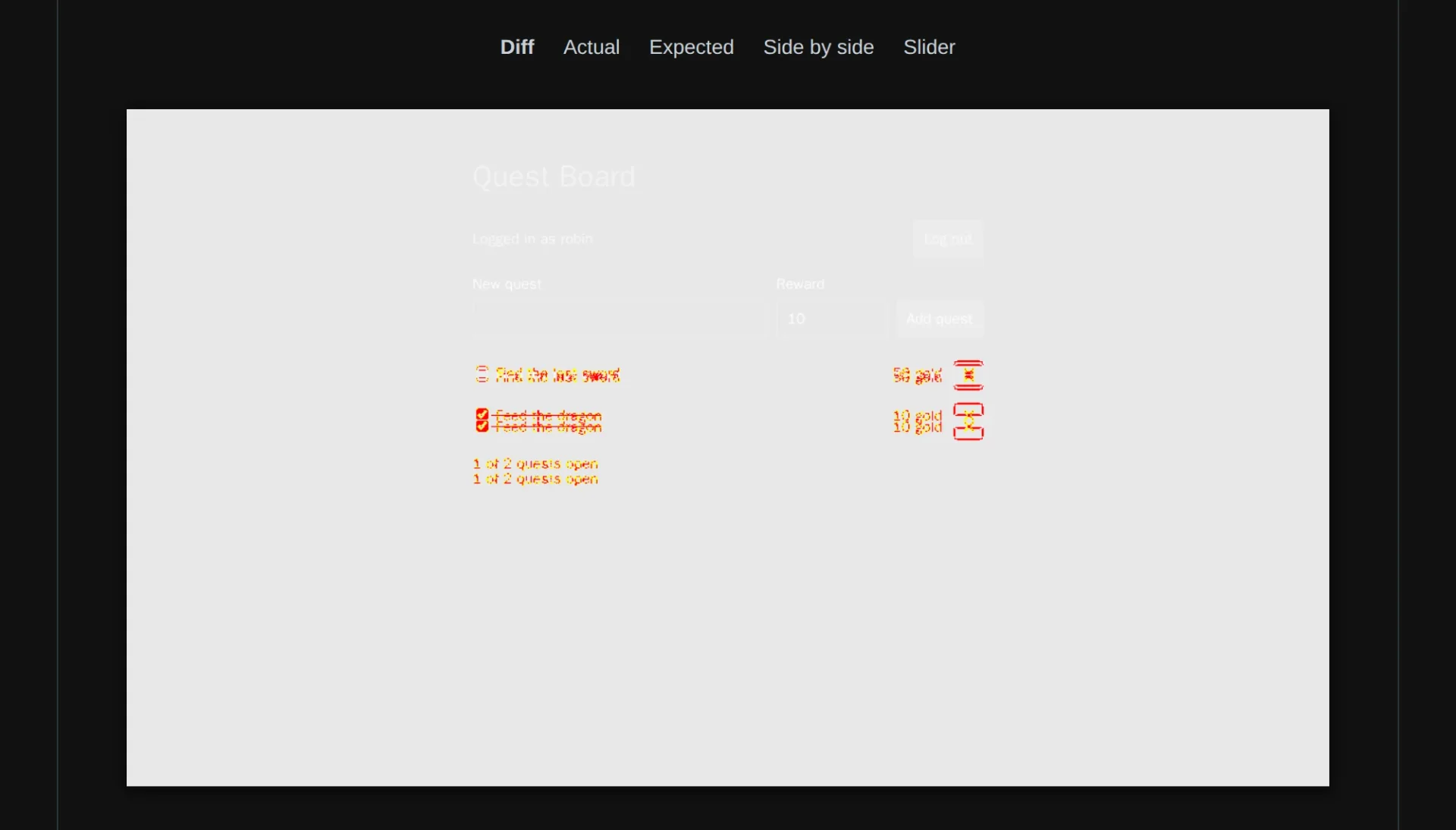
The report offers five views of the comparison. Diff marks every pixel that changed on a pale copy of the page. The heading and the form are untouched. From the first quest downwards everything is marked, some of it twice, because every row sits a little lower than before. Actual and Expected are the two pictures, Side by side puts them next to each other, and Slider lays one over the other with a handle to drag across.
What follows is the part no tool does for you, the decision:
It is a mistake. Then fix the CSS. The test turns green without anything else.
It is intended. Then the references are out of date. Have Playwright write new ones, look at them, and commit them together with the change. In a review, the changed pictures show what the change does to the page.
Writing new references is one option on the command. The two dashes make npm pass it on to Playwright:
$ npm run visual -- --update-snapshots 3 passed (2.5s)
Here the padding was an experiment, so do not update anything. Set the value back to 0.5rem, and npm run visual is green again with the pictures you have.
The whole suite in the container
The container can do more than three visual tests. Leave out the filter, and it runs everything:
$ docker compose run --rm playwright npx playwright test --reporter=dot Container questboard-db-1 Running Container questboard-db-1 Waiting Container questboard-db-1 HealthyRunning 81 tests using 8 workers··············································[✓] Pulling schema from database...··································· 81 passed (8.9s)
81 tests, all four sections, none skipped, in about nine seconds. The database, the servers of the workers and the browsers all run in containers, and the suite is as green as on your machine. That is exactly what the pipeline will do.
What you have now
Three pictures of the board are part of your repository, and a change to the CSS that moves something shows up as a failed test with a diff to look at. The pictures are always made in the same container, so they mean the same on every machine, and outside of it the tests step aside.
That container has also run the whole suite. In the next part, the last one, it does so on every push: the tests move into your pipeline.
Comments
The comments are GitHub Discussions: sign in with GitHub to write one.
The comments come from GitHub, through giscus. Loading them sends your IP address to giscus.app and GitHub.