
Zero-Downtime Deployments for Node Apps With Docker Compose · Part 6 of 11 in the series
Part 6: Caddy and the First Deploy
Put the guestbook online: behind Caddy, which fetches the HTTPS certificate by itself, with its secrets kept on the server. Then update it the usual way and count the visitors who get an error.
Zero-Downtime Deployments for Node Apps With Docker ComposePart 6 of 11
On this page
Quest objectives
- Understand what a reverse proxy does and why the app sits behind one
- Describe the server stack in one Compose file: Caddy, the app and the database
- Keep passwords in a file that exists only on the server
- Start the guestbook on the server and reach it over HTTPS
- Measure the gap that an ordinary update leaves
The server is ready and the image is within its reach. In this part the guestbook goes online, under its own name and with the padlock in the address bar. At the end you update it the way most small sites are updated, and you watch what that does to the people who are visiting at that moment.
A doorman for the app
The guestbook listens on port 3000 and speaks plain HTTP. The internet expects ports 80 and 443 and encrypted HTTPS. Between the two stands a reverse proxy: the one program that listens on the server's public ports, takes every request and passes it on to the app behind it. Visitors only ever talk to the proxy.
The series uses Caddy for that, for one reason above all: it fetches the certificate that HTTPS needs by itself, and renews it before it runs out. And because all visitors come through this one door, it is also the place where part 7 will send them from the old version to the new one.
The server's files
The server needs two small files. They belong to the project, so you write them on your computer, in a new folder deploy, and copy them over. First deploy/compose.yml, which describes everything that runs on the server:
name: guestbook

services:
  caddy:
    image: caddy:2-alpine
    restart: unless-stopped
    ports:
      - '80:80'
      - '443:443'
      - '443:443/udp'
    environment:
      DOMAIN: ${DOMAIN}
    volumes:
      - ./caddy:/etc/caddy
      - caddy-data:/data
      - caddy-config:/config

  web:
    image: ${IMAGE}:production
    restart: unless-stopped
    environment:
      DATABASE_URL: postgres://guestbook:${POSTGRES_PASSWORD}@db:5432/guestbook
    depends_on:
      db:
        condition: service_healthy

  db:
    image: postgres:18-alpine
    restart: unless-stopped
    environment:
      POSTGRES_USER: guestbook
      POSTGRES_PASSWORD: ${POSTGRES_PASSWORD}
      POSTGRES_DB: guestbook
    volumes:
      - db-data:/var/lib/postgresql
    healthcheck:
      test: ['CMD-SHELL', 'pg_isready -U guestbook']
      interval: 5s
      timeout: 3s
      retries: 10

volumes:
  caddy-data:
  caddy-config:
  db-data:
It looks like the file from part 3, with a few differences that matter:
name: guestbookfixes the name that Compose puts in front of every container, whatever the folder is called.caddyis the only service withports: 80, 443, and 443 once more for HTTP/3. Its Caddyfile comes from the foldercaddybeside the Compose file. The certificate lives in the volumecaddy-data, so it survives a new container.webhas nobuild. It runs${IMAGE}:production, the image from the registry. It publishes no port either: only Caddy can reach it, inside the network that Compose creates for the three.dbgets its password from outside, like the image's name and the domain. Wherever the file says${…}, Compose fills in a value from a file called.env, which you create on the server in a moment.restart: unless-stoppedstarts every container again after a crash or a reboot of the server.
The second file tells Caddy what to do. Create deploy/caddy/Caddyfile:
{$DOMAIN} {
	encode
	reverse_proxy web:3000
}
Four lines. The first is the address the site answers to: Caddy puts the value of DOMAIN there, which the Compose file hands it. A real domain name in this place is all Caddy needs to switch HTTPS on. encode compresses the answers, so pages travel faster. reverse_proxy web:3000 passes every request on to the service web on port 3000.
Commit the folder and push it:
$ git add deploy$ git commit --message "The server's files"$ git push
The push starts the pipeline, as every push does. The folder deploy is in .dockerignore since part 3, so the image's content is the same, but it is a new image, named after this commit. Wait until the pipeline is green. Then create the folder on the server and copy the files there:
$ ssh deploy@guestbook.example.com mkdir guestbook$ scp -r deploy/* deploy@guestbook.example.com:guestbook/
Secrets stay on the server
The database needs a password, and a password does not belong in a repository. It goes into the file .env, which exists only on the server. Log in to the server, go to the folder with cd guestbook, let it make up a password and open the new file:
$ openssl rand -hex 244411f6852782e50c793ad861a0207c304963fb527deec513$ nano .env
The file gets three lines. Use your own domain, your own name in the image's address and the password you just made, not the one shown here:
GitHub
DOMAIN=guestbook.example.com
IMAGE=ghcr.io/your-name/guestbook
POSTGRES_PASSWORD=4411f6852782e50c793ad861a0207c304963fb527deec513
GitLab
DOMAIN=guestbook.example.com
IMAGE=registry.gitlab.com/your-name/guestbook
POSTGRES_PASSWORD=4411f6852782e50c793ad861a0207c304963fb527deec513
In nano, Ctrl+O and Enter save the file, and Ctrl+X closes the editor. Compose reads a file with this name from the folder it is started in, without being told.
The first start
Still on the server, in ~/guestbook. First the database gets its table, from the image's own migrations, as you tried it in part 3. Then everything starts:
$ docker compose run --rm web node src/migrate.jsApplied 001-create-entries.sqlDatabase is up to date$ docker compose up --detach$ docker compose ps --format 'table {{.Name}}\t{{.Status}}'NAME STATUSguestbook-caddy-1 Up 5 secondsguestbook-db-1 Up 21 seconds (healthy)guestbook-web-1 Up 5 seconds (healthy)
The first command fetches the images before it does anything else, which takes a moment and is left out here. It also starts the database and waits until it is healthy, because web depends on it. After the second command three containers run, and (healthy) beside web is the image's health check at work. Ask the guestbook from your own computer how it is:
$ curl https://guestbook.example.com/health{"status":"ok","version":"4f2a9c1"}
Look at the address: https. In the few seconds since it started, Caddy has asked Let's Encrypt, a free certificate authority, for a certificate, has proven that the domain leads to this server, and has switched HTTPS on. You configured none of that. It worked because the name points at the server and ports 80 and 443 are open, both from part 5. The version in the answer is the start of the commit ID the image was built from, so yours is different. Now open the address in the browser:
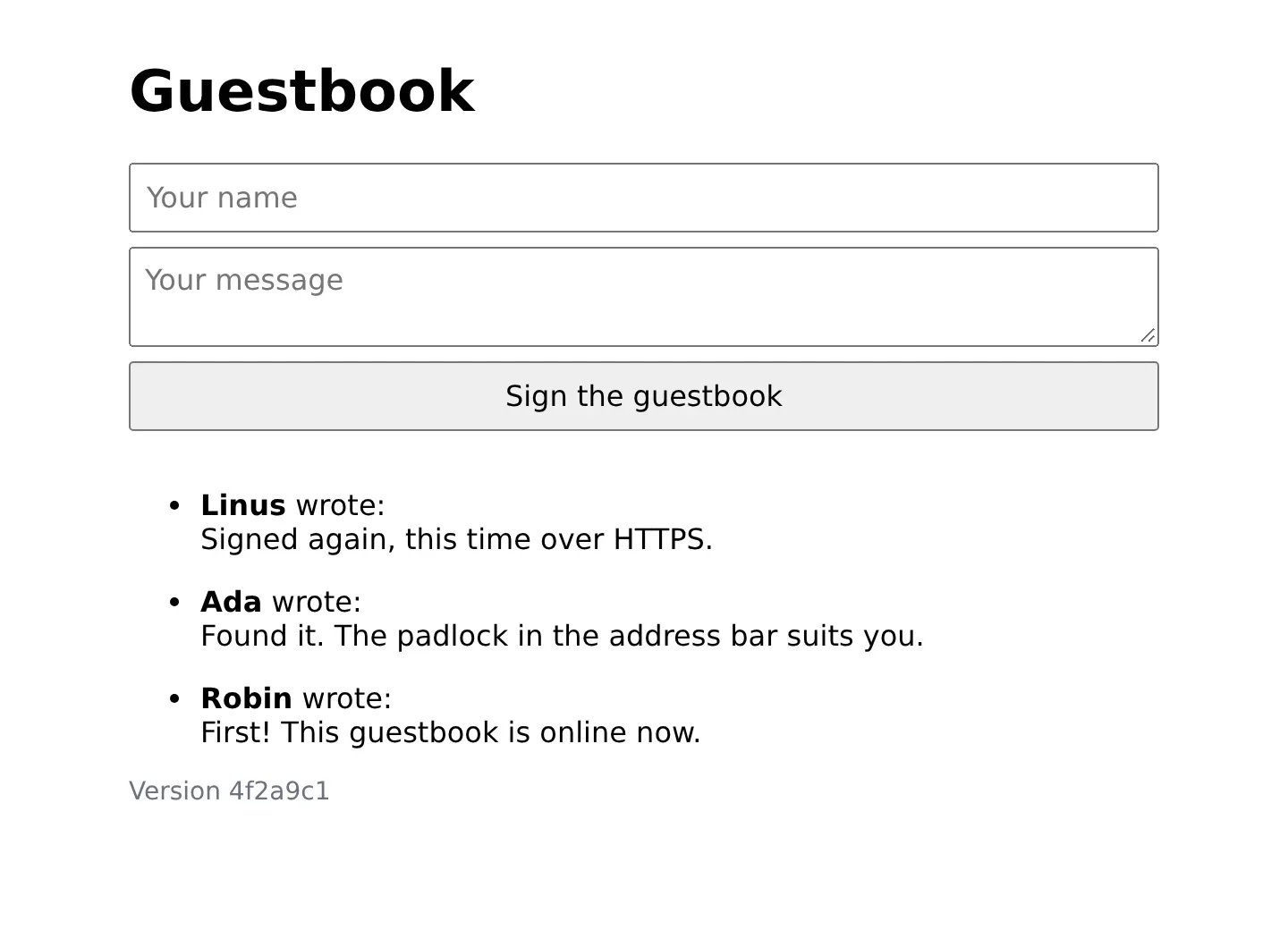
Your guestbook is online. Sign it.
An update, the plain way
Sooner or later you change something, and the new version has to get onto the server. Most small sites do that with two commands: fetch the new image, start the containers again. It works. Here is what it costs.
To see it you need someone who visits the site without a pause. On your computer, save this small script as knock.sh in the project folder:
#!/bin/sh
# Knocks on the site ten times a second: a dot for every answer, the status code for every miss.
while true; do
  code=$(curl --silent --output /dev/null --max-time 2 --write-out '%{http_code}' "$1")
  if [ "$code" = 200 ]; then printf .; else printf ' %s ' "$code"; fi
  sleep 0.1
done
It asks for the page ten times a second and prints a dot for every answer that is fine. For every other answer it prints the status code. It is a tool for you. It will end up in the repository with one of the next commits, which does no harm.
Now a change that you can see. In src/page.js, turn <h1>Guestbook</h1> into <h1>Robin's Guestbook</h1>, with your own name if you like:
$ git commit --all --message "Say whose guestbook it is"$ git push
Wait until the pipeline is green: the new image is in the registry then, and the server knows nothing of it yet. The update itself is these two commands on the server. Do not run them yet:
$ docker compose pull web$ docker compose up --detach
First start the knocking on your computer and let it run. Then run the two commands on the server, and watch the dots. This is what they looked like in the test for this series:
$ chmod +x knock.sh$ ./knock.sh https://guestbook.example.com/........................................ 502 502 502 502 502 502 502 502 ..........................................................................
Eight times in a row the answer was 502, for about a second. Ctrl+C stops the knocking. The page now says "Robin's Guestbook", and the footer shows the new commit, so the update worked. But for that second, every visitor got an error page instead of the guestbook.
What happened: Compose saw a new image for web, stopped the old container and then started the new one. In between there was no guestbook at all. Caddy had nobody to pass the requests on to and answered 502, which means "the server behind me does not answer".
One second sounds harmless. But it is one second with every update, it gets longer with every app that takes longer to start than this small one, and whoever was sending a form in that moment lost it. Under a load test of about 1,450 requests per second, the same update failed 80 of about 36,000 requests.
What you have now
The guestbook runs on your server, behind Caddy, over HTTPS, with its password kept out of the repository. And you have measured the gap that this series is about. In the next part you close it: the new container starts beside the old one, proves that it is healthy, and only then do the visitors move over.
Comments
The comments are GitHub Discussions: sign in with GitHub to write one.
The comments come from GitHub, through giscus. Loading them sends your IP address to giscus.app and GitHub.