
Your Portfolio With Manablox · Part 5 of 7 in the series
Part 5: Layout, Hero and Project Cards
Give the Astro site a layout with header and footer, a big hero, project cards with covers and a proper project page.
Quest objectives
- Build a layout with a header, a menu and a footer
- Style the site with CSS custom properties
- Load more data inside a component
- Lay out cards with CSS grid
- Add a section to a page without touching the code
In this part the plain page from part 4 becomes a portfolio. Keep pnpm dev running in my-site: every time you save a file, the browser at localhost:3005 reloads with the change. You replace files completely, so select everything in a file, delete it and paste the new version.
The layout
src/layouts/Site.astro is the HTML around every page. The new version adds a header with your name and the menu, a footer, and the styles that the whole site shares:
---
import { BLOCK_GRID_CSS } from '@manablox/public-sdk';
import { manablox } from '../lib/manablox';

interface Props {
  title: string;
  bare?: boolean;
}

const { title, bare = false } = Astro.props;
const siteName = 'Robin Pixel';
// The home page lives at /home too, and that is the address the menu links to.
const path = Astro.url.pathname === '/' ? '/home' : Astro.url.pathname;

// The menu called "main", edited in the admin under Menus.
const menu = bare ? null : await manablox().menu('main');
const year = new Date().getFullYear();
---

<html lang="en">
  <head>
    <meta charset="utf-8" />
    <meta name="viewport" content="width=device-width, initial-scale=1" />
    <title>{title === siteName ? title : `${title} · ${siteName}`}</title>
    <style set:html={BLOCK_GRID_CSS}></style>
  </head>
  <body>
    {
      !bare && (
        <header class="site-header">
          <a class="logo" href="/">{siteName}</a>
          <nav>
            {menu?.items.map((item) => (
              <a href={item.href ?? '#'} aria-current={item.href === path ? 'page' : undefined}>
                {item.label}
              </a>
            ))}
          </nav>
        </header>
      )
    }
    <main class:list={['site', { bare }]}>
      <slot />
    </main>
    {!bare && <footer class="site-footer">© {year} {siteName}</footer>}
  </body>
</html>

<style is:global>
  :root {
    --paper: #fdf8f3;
    --ink: #1f1a2e;
    --muted: #6b6480;
    --line: #ebe2d9;
    --pink: #d6246e;
    --radius: 16px;
  }
  * {
    box-sizing: border-box;
  }
  body {
    margin: 0;
    background: var(--paper);
    color: var(--ink);
    font: 17px/1.6 system-ui, sans-serif;
  }
  a {
    color: var(--pink);
  }
  h1,
  h2,
  h3 {
    line-height: 1.15;
  }
  img {
    display: block;
    max-width: 100%;
    height: auto;
    /* Robin's pictures are pixel art: keep the pixels sharp instead of blurring them. */
    image-rendering: pixelated;
  }

  .site-header,
  .site,
  .site-footer {
    max-width: 64rem;
    margin: 0 auto;
    padding: 0 1.5rem;
  }
  .site-header {
    display: flex;
    flex-wrap: wrap;
    align-items: center;
    justify-content: space-between;
    gap: 1rem;
    padding-block: 1.5rem;
  }
  .logo {
    color: var(--ink);
    font-size: 1.25rem;
    font-weight: 800;
    text-decoration: none;
  }
  .site-header nav {
    display: flex;
    flex-wrap: wrap;
    gap: 1.25rem;
  }
  .site-header nav a {
    color: var(--ink);
    font-weight: 600;
    text-decoration: none;
  }
  .site-header nav a:hover,
  .site-header nav a[aria-current='page'] {
    color: var(--pink);
  }
  .site {
    padding-bottom: 4rem;
  }
  .site.bare {
    padding-top: 1.5rem;
  }
  .site-footer {
    border-top: 1px solid var(--line);
    padding-block: 2rem;
    color: var(--muted);
    font-size: 0.875rem;
  }

  .lead {
    color: var(--muted);
    font-size: 1.25rem;
  }
  .button {
    display: inline-block;
    border-radius: 999px;
    background: var(--pink);
    color: white;
    padding: 0.75rem 1.5rem;
    font-weight: 700;
    text-decoration: none;
  }
  .button:hover {
    filter: brightness(1.1);
  }
  .block {
    margin-top: 4rem;
  }
  .block h2 {
    font-size: 2rem;
    margin: 0 0 1.5rem;
  }
  .rounded {
    border-radius: var(--radius);
  }
</style>
What is going on:
siteNameis your name. Change it to yours.The layout loads the menu called
mainitself, the one you edit under Menus in the admin.menu?.items.map(…)turns every entry into a link, andaria-currentmarks the page you are on, which the CSS colors pink.bareis for the live preview, which needs no header.:rootholds CSS custom properties such as--pink. Every component uses them withvar(--pink), so you change a color in one place.image-rendering: pixelatedkeeps Robin's pixel art sharp when it is scaled up. Remove it if your pictures are photos..button,.leadand.roundedare small classes that the components below use.
The page route
The menu used to be loaded in src/pages/[...slug].astro. Now that the layout does it, the route gets shorter:
---
import { blocksOf, gridOf, ManabloxError } from '@manablox/public-sdk';
import Blocks from '../components/Blocks.astro';
import { contentRenderers } from '../components/content/index';
import Site from '../layouts/Site.astro';
import { manablox } from '../lib/manablox';

const client = manablox();
const path = Astro.url.pathname;

let page: Record<string, unknown> | null = null;
let failure: string | null = null;

try {
  // `expand` inlines the relations the components show, which would otherwise be ids.
  page = await client.byPermalink(path, {
    expand: ['cover', 'gallery', 'image', 'images', 'projects'],
  });
} catch (error) {
  failure = error instanceof ManabloxError ? error.message : String(error);
}

if (!failure && !page) {
  return new Response(null, { status: 404, statusText: 'Not found' });
}

const fields = (page?.fields ?? {}) as Record<string, unknown>;
const blocks = blocksOf(fields.components) as Record<string, unknown>[];
const grid = gridOf(fields.components);
const Content = page ? contentRenderers[String(page.type)] : undefined;

Astro.response.status = failure ? 503 : 200;
Astro.response.headers.set(
  'cache-control',
  failure ? 'no-store' : 'public, max-age=0, s-maxage=300',
);
---

<Site title={failure ? 'Something went wrong' : String(page?.title ?? '')}>
  {
    failure ? (
      <div class="state">
        <h1>Something went wrong</h1>
        <p>{failure}</p>
      </div>
    ) : Content ? (
      <Content node={{ title: String(page?.title ?? ''), fields }} />
    ) : (
      <article>
        <h1>{String(page?.title || 'Untitled')}</h1>
        <Blocks blocks={blocks} path={['components']} grid={grid} />
      </article>
    )
  }
</Site>
A page that starts with a hero
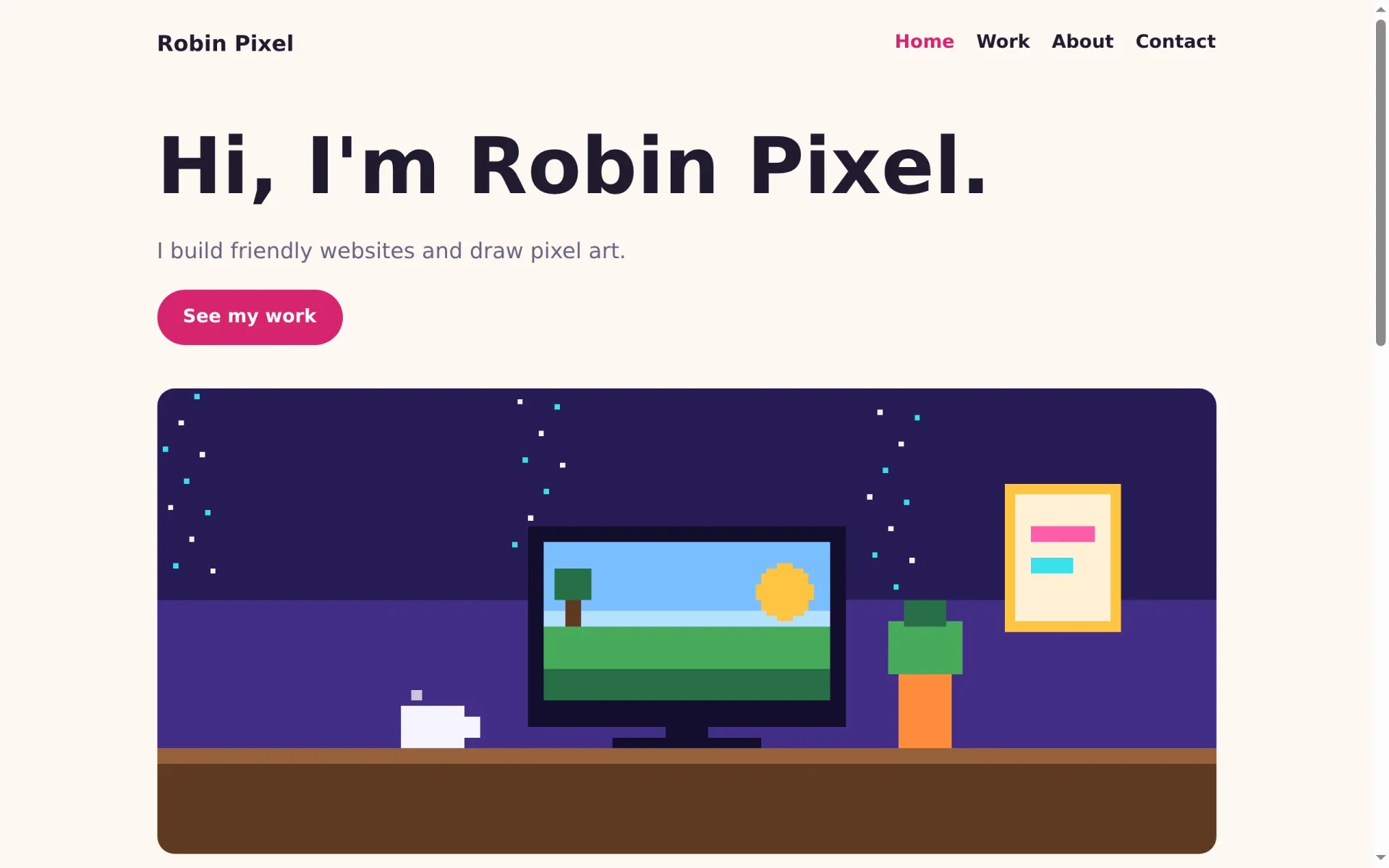
Every page shows its title as a big heading, and then its blocks. On the home page that means "Home", followed by the hero's headline. When the first block is a hero, the hero should be the heading. PageContent.astro checks that:
---
import { fieldAttribute } from '@manablox/live-preview';
import { blocksOf, gridOf } from '@manablox/public-sdk';
import { text } from '../../lib/fields';
import Blocks from '../Blocks.astro';
import type { DocumentView } from './index';

interface Props {
  node: DocumentView;
}

const { node } = Astro.props;
const fields = node.fields;
const summary = text(fields.summary);
const blocks = blocksOf(fields.components);
// A page that starts with a hero gets its big headline from there.
const startsWithHero = blocks[0]?.type === 'hero';
---

<article class="content content-page">
  {
    !startsWithHero && (
      <header class="page-header">
        <h1 {...fieldAttribute(['title'])}>{node.title || 'Untitled'}</h1>
        {summary && <p class="lead" {...fieldAttribute(['summary'])}>{summary}</p>}
      </header>
    )
  }
  <Blocks blocks={blocks} path={['components']} grid={gridOf(fields.components)} />
</article>

<style>
  .page-header h1 {
    font-size: 3rem;
    margin: 2rem 0 0.5rem;
  }
</style>
The <style> at the end only applies to this component: Astro scopes it, so h1 here does not change headings anywhere else.
The hero
The hero gets the page's only h1, a lead text, the button and a large picture:
---
import { fieldAttribute } from '@manablox/live-preview';
import { assetUrl } from '@manablox/public-sdk';
import { assets, link, text } from '../../lib/fields';

interface Props {
  block: Record<string, unknown>;
  path: (string | number)[];
}

const { block, path } = Astro.props;
const headline = text(block.headline);
const subline = text(block.subline);
const image = assets(block.image)[0];
const button = link(block.button);
---

<section class="block block-hero" {...fieldAttribute(path)}>
  {headline && <h1 {...fieldAttribute([...path, 'headline'])}>{headline}</h1>}
  {subline && <p class="lead" {...fieldAttribute([...path, 'subline'])}>{subline}</p>}
  {
    button && (
      <p {...fieldAttribute([...path, 'button'])}>
        <a class="button" href={button.href}>{button.label}</a>
      </p>
    )
  }
  {
    image && (
      <img
        class="rounded"
        src={assetUrl(image, { preset: 'hero' })}
        alt={image.alt ?? ''}
        width={image.width ?? undefined}
        height={image.height ?? undefined}
        {...fieldAttribute([...path, 'image'])}
      />
    )
  }
</section>

<style>
  .block-hero {
    margin-top: 2rem;
  }
  h1 {
    font-size: clamp(2.5rem, 7vw, 4.5rem);
    margin: 0 0 1rem;
  }
  img {
    margin-top: 2.5rem;
    width: 100%;
  }
</style>
assets(block.image)[0] takes the first picture of the field, or nothing. assetUrl(image, { preset: 'hero' }) asks Manablox for a version of the picture that is 1920 pixels wide, so nobody downloads the full original. clamp(2.5rem, 7vw, 4.5rem) lets the headline grow with the window, but never below or above those sizes.
Links that work on every page
A button that links to a page arrives from the API as contact, without the slash in front. On the home page that works, but on /work/bakery-bloom the browser would go to /work/contact. Open src/lib/fields.ts, find the function link, and add the slash:
if (!target) return null;
  // A link to a page arrives as "contact", without the leading slash.
  const href = /^([a-z]+:|\/|#)/.test(target) ? target : `/${target}`;
At the end of the same function, return the new href:
return { href, label, newTab: value.target === '_blank' };Save everything and look at the home page:
Project cards
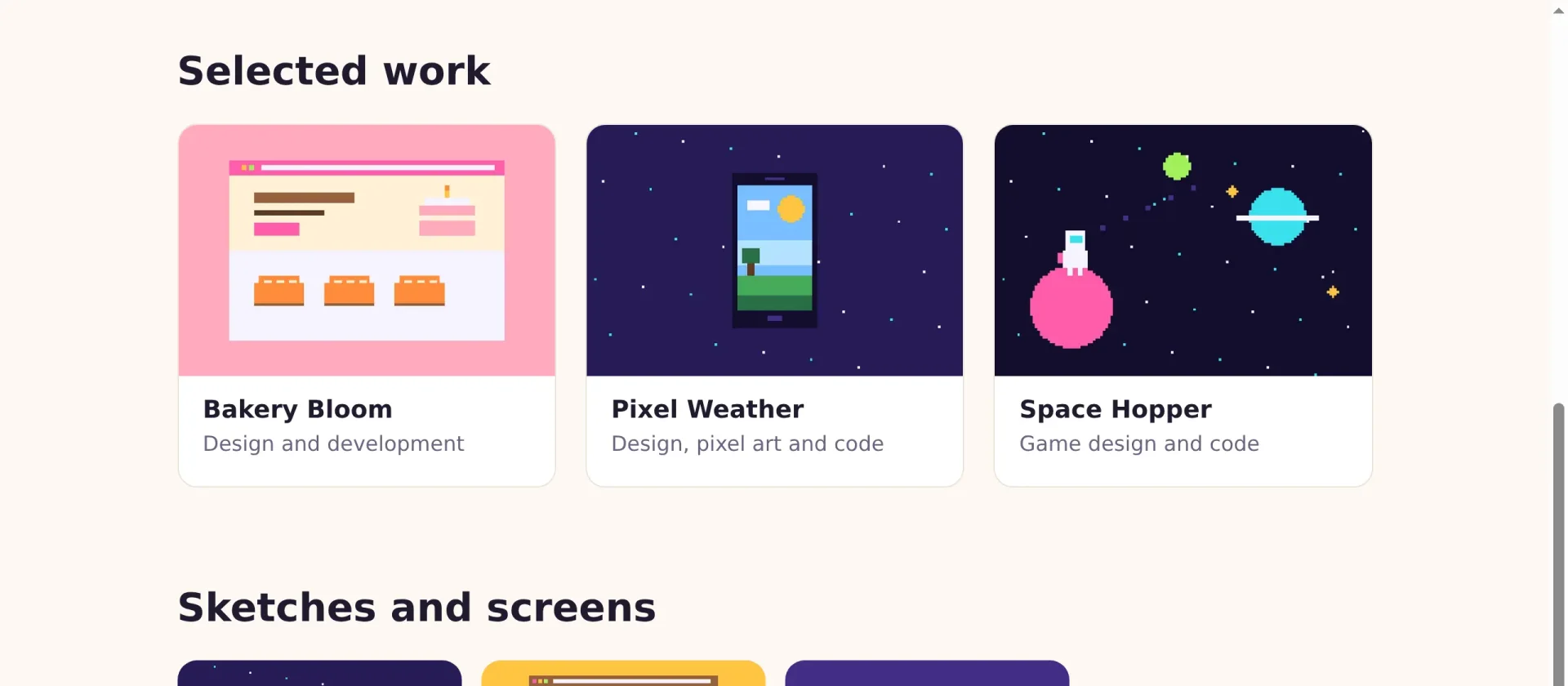
The project grid block only knows which projects to show: their ids, titles and addresses. For a card you also want the cover and the role. So the component loads each project itself, with its cover expanded:
---
import { fieldAttribute } from '@manablox/live-preview';
import { assetUrl } from '@manablox/public-sdk';
import { assets, documents, href, text } from '../../lib/fields';
import { manablox } from '../../lib/manablox';

interface Props {
  block: Record<string, unknown>;
  path: (string | number)[];
}

const { block, path } = Astro.props;
const headline = text(block.headline);

// The block only knows which projects to show. Load each one, with its cover.
const projects = await Promise.all(
  documents(block.projects).map((entry) => manablox().get(entry.id, { expand: ['cover'] })),
);
---

<section class="block block-project-grid" {...fieldAttribute(path)}>
  {headline && <h2 {...fieldAttribute([...path, 'headline'])}>{headline}</h2>}
  <div class="cards" {...fieldAttribute([...path, 'projects'])}>
    {
      projects.map((project) => {
        if (!project) return null;
        const cover = assets(project.fields.cover)[0];
        return (
          <a class="card" href={href(project)}>
            {cover && (
              <img
                src={assetUrl(cover, { preset: 'card' })}
                alt={cover.alt ?? ''}
                width={cover.width ?? undefined}
                height={cover.height ?? undefined}
                loading="lazy"
              />
            )}
            <h3>{project.title}</h3>
            <p>{text(project.fields.role)}</p>
          </a>
        );
      })
    }
  </div>
</section>

<style>
  .cards {
    display: grid;
    grid-template-columns: repeat(auto-fill, minmax(16rem, 1fr));
    gap: 1.5rem;
  }
  .card {
    overflow: hidden;
    border: 1px solid var(--line);
    border-radius: var(--radius);
    background: white;
    color: var(--ink);
    text-decoration: none;
    transition: transform 0.2s;
  }
  .card:hover {
    transform: translateY(-4px);
  }
  .card img {
    aspect-ratio: 3 / 2;
    width: 100%;
    object-fit: cover;
  }
  .card h3 {
    margin: 1rem 1.25rem 0.25rem;
    font-size: 1.25rem;
  }
  .card p {
    margin: 0 1.25rem 1.25rem;
    color: var(--muted);
  }
</style>
manablox().get(id, { expand: ['cover'] }) asks the public API for one document. Promise.all sends all requests at the same time and waits for the last one, which is faster than one after the other. Because Astro renders on the server, visitors get the finished cards and never talk to the API themselves.
The cards are laid out by CSS grid. repeat(auto-fill, minmax(16rem, 1fr)) means: as many columns as fit, each at least 16rem wide, sharing the rest of the space. That is three columns on a laptop and one on a phone, without a single media query.
The project page
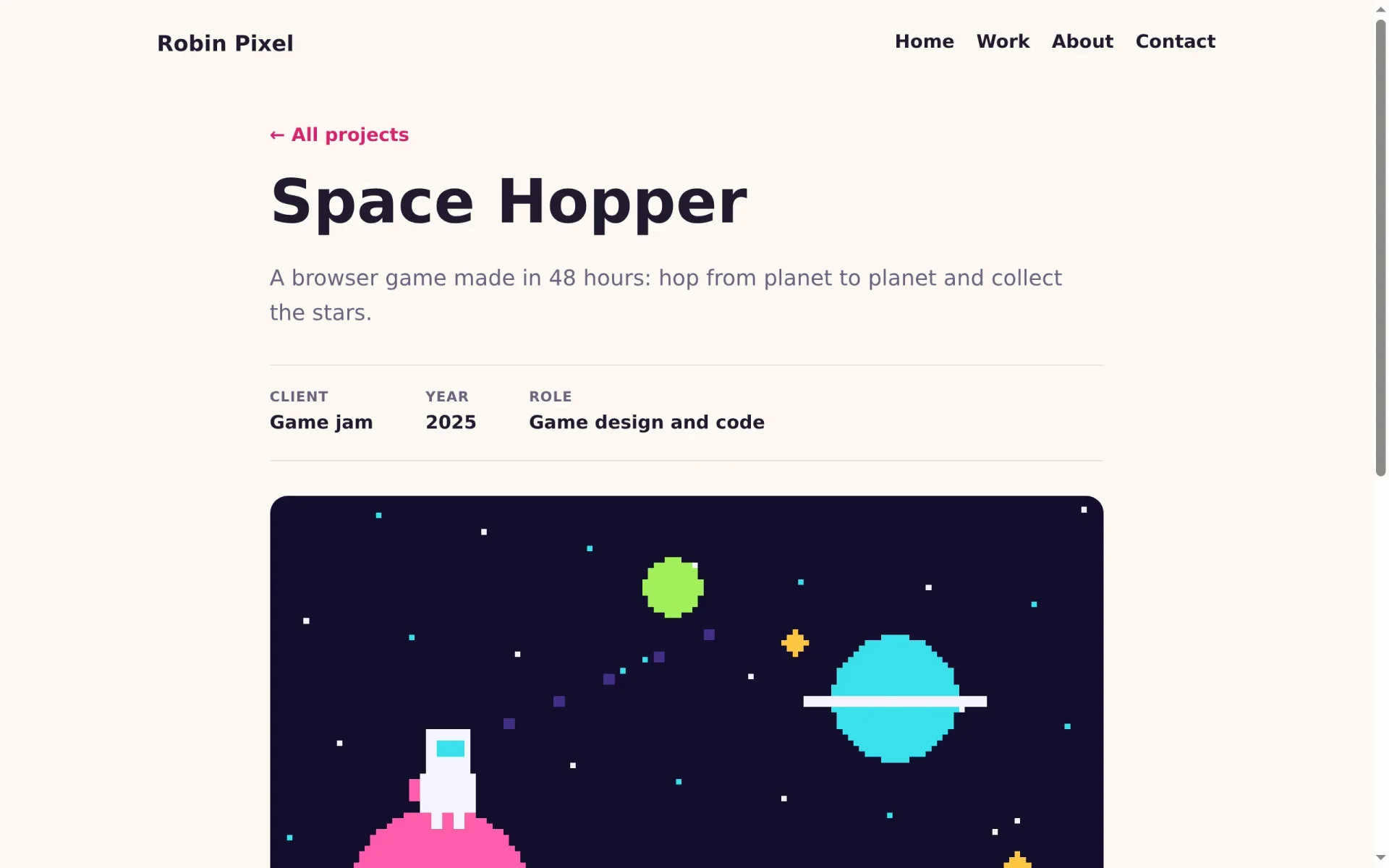
Last, the page of a single project: a link back, the title, the summary, the facts, the cover, the text and the gallery.
---
import { fieldAttribute } from '@manablox/live-preview';
import { assetUrl } from '@manablox/public-sdk';
import { assets, html, text } from '../../lib/fields';
import type { DocumentView } from './index';

interface Props {
  node: DocumentView;
}

const { node } = Astro.props;
const fields = node.fields;
const summary = text(fields.summary);
const cover = assets(fields.cover)[0];
const gallery = assets(fields.gallery);
const body = html(fields.body);

// The facts under the title, left out when empty.
const facts = [
  { label: 'Client', value: text(fields.client) },
  { label: 'Year', value: text(fields.year) },
  { label: 'Role', value: text(fields.role) },
].filter((fact) => fact.value);
---

<article class="project">
  <a class="back" href="/work">← All projects</a>
  <h1 {...fieldAttribute(['title'])}>{node.title}</h1>
  {summary && <p class="lead" {...fieldAttribute(['summary'])}>{summary}</p>}

  <dl class="facts">
    {
      facts.map((fact) => (
        <div>
          <dt>{fact.label}</dt>
          <dd>{fact.value}</dd>
        </div>
      ))
    }
  </dl>

  {
    cover && (
      <img
        class="rounded cover"
        src={assetUrl(cover, { preset: 'hero' })}
        alt={cover.alt ?? ''}
        width={cover.width ?? undefined}
        height={cover.height ?? undefined}
        {...fieldAttribute(['cover'])}
      />
    )
  }

  {body && <div class="body" {...fieldAttribute(['body'])} set:html={body} />}

  {
    gallery.length > 0 && (
      <div class="gallery" {...fieldAttribute(['gallery'])}>
        {gallery.map((image) => (
          <img
            class="rounded"
            src={assetUrl(image, { preset: 'card' })}
            alt={image.alt ?? ''}
            width={image.width ?? undefined}
            height={image.height ?? undefined}
            loading="lazy"
          />
        ))}
      </div>
    )
  }
</article>

<style>
  .project {
    max-width: 48rem;
    margin: 2rem auto 0;
  }
  .back {
    font-weight: 600;
    text-decoration: none;
  }
  h1 {
    font-size: clamp(2.5rem, 6vw, 3.5rem);
    margin: 1rem 0 0.5rem;
  }
  .facts {
    display: flex;
    flex-wrap: wrap;
    gap: 1rem 3rem;
    margin: 2rem 0;
    padding: 1.25rem 0;
    border-block: 1px solid var(--line);
  }
  dt {
    color: var(--muted);
    font-size: 0.8rem;
    font-weight: 700;
    text-transform: uppercase;
    letter-spacing: 0.05em;
  }
  dd {
    margin: 0;
    font-weight: 600;
  }
  .cover {
    width: 100%;
  }
  .body {
    margin: 2rem 0;
    font-size: 1.125rem;
  }
  .gallery {
    display: grid;
    grid-template-columns: repeat(auto-fill, minmax(14rem, 1fr));
    gap: 1rem;
  }
</style>
The facts are a list of label and value pairs. .filter((fact) => fact.value) drops the empty ones, so a project without a client simply has no client line. In the HTML, they become a <dl>, the HTML element for terms and their descriptions.
A list of all projects, without code
The Work page only has a text block so far. Instead of writing a new component, reuse the project grid: open Work in the admin, click Add block and choose Project grid.
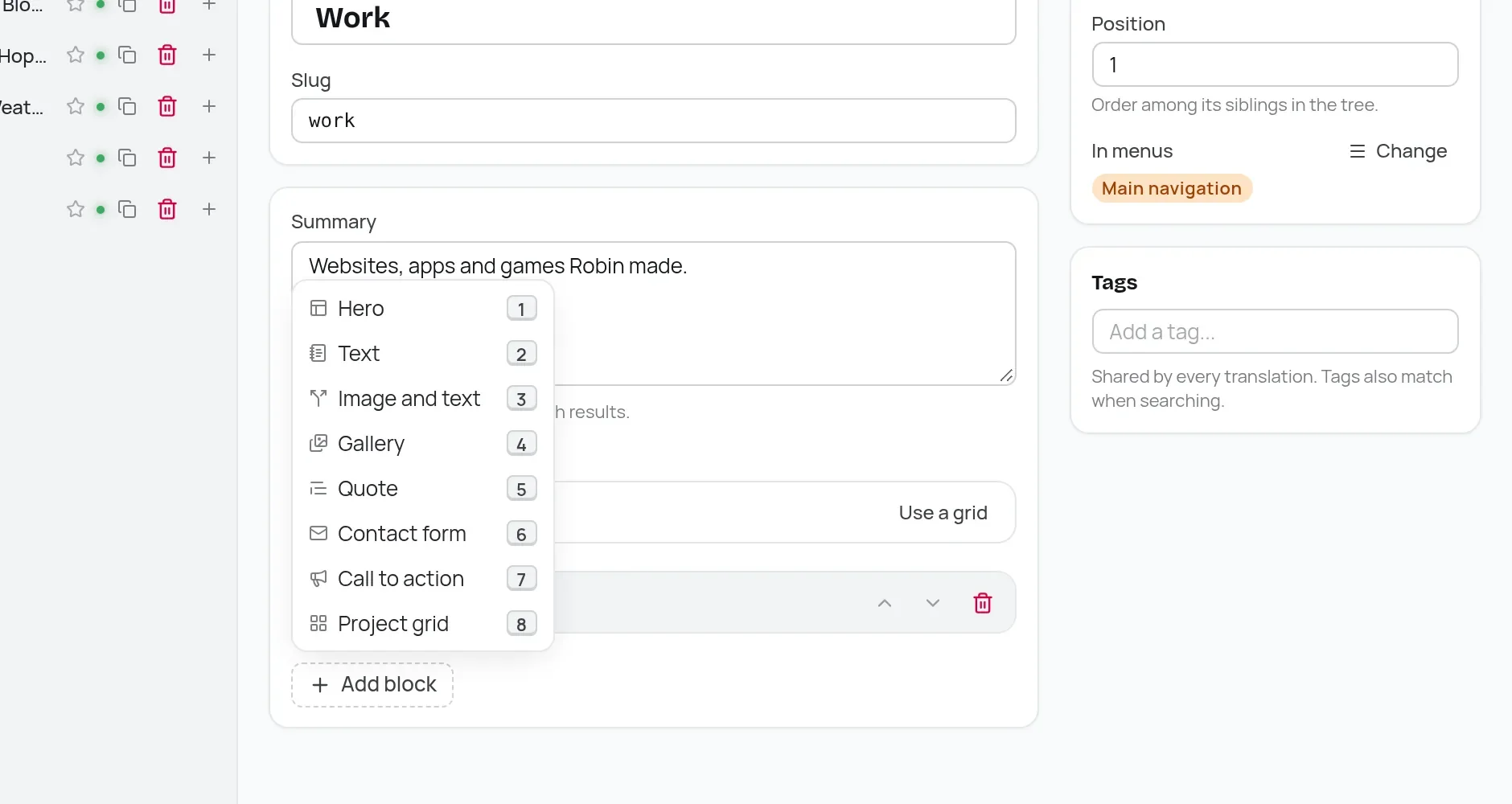
Call it All projects and link your projects with Link content, like on the home page. The old text block repeats the page title, so delete it with its trash icon. Then publish.
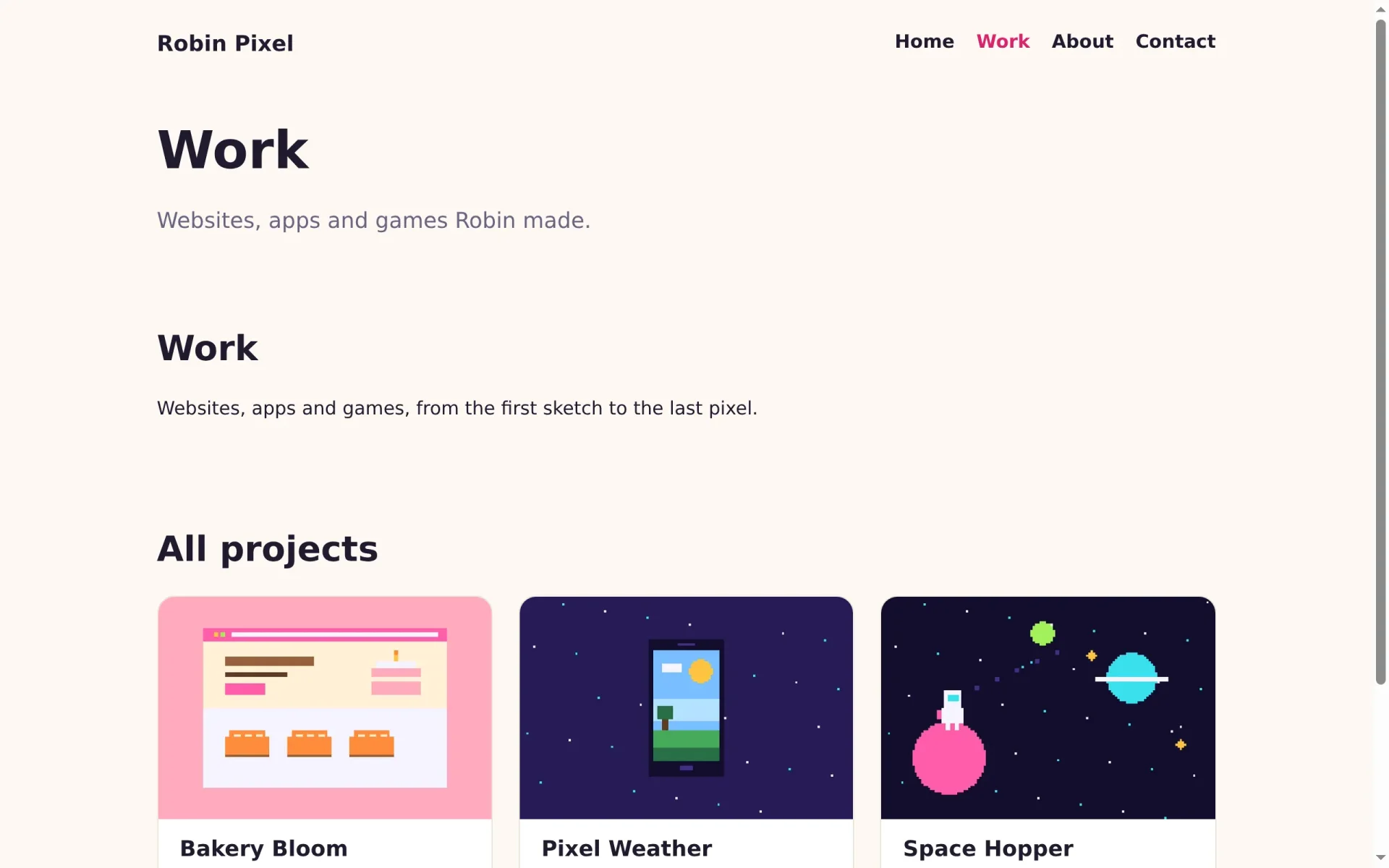
The home page and the projects look like a portfolio now. In the next part you style the remaining sections, add a contact button and get the site ready for the world.