
Smooth Voxel Terrain in Babylon.js · Part 10 of 12 in the series
Part 10: Walking on the Terrain
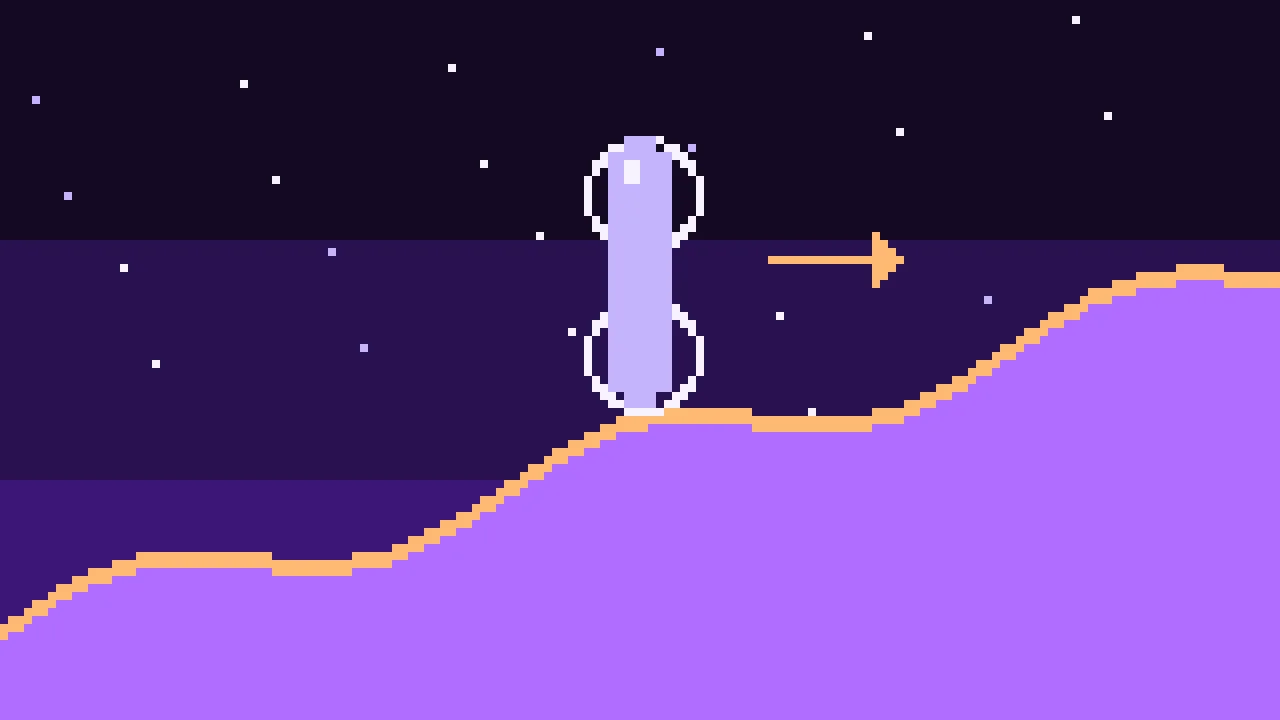
Walk on the terrain without a physics engine: the player is two balls that ask the density field itself how far the ground is, stand on slopes without sliding, slide along walls, jump and fall into the holes you dig.
Quest objectives
- Ask the density field about any point, with or without a chunk loaded there
- Estimate the distance to the surface from the density and its gradient
- Push a body out of the ground: straight up on ground, along the normal on walls
- Walk, jump and fall with a speed that changes smoothly
- Switch between walking and flying
Since part 9 you can dig, but only while flying. This part puts you on your feet. The first-person controller series used Havok's character controller, which collides with the meshes of a level. Here the ground changes with every edit, and its meshes are rebuilt in workers, a moment later. There is a more direct way: ask the density itself.
The field
The density at any point comes from the eight samples around it, blended by how close the point is to each: the trilinear blend that the surface nets used for their normals. Its gradient comes from the same samples. The samples are read with edits.sample(), edited or generated, so the player feels exactly the ground the meshes show, holes included. And nothing has to be loaded: the function answers anywhere, even where no chunk exists yet. Create src/field.ts:
import type { EditStore } from './edits.ts';

/** The density at a point and its gradient. */
export interface Probe {
  density: number;
  gradient: [number, number, number];
}

/**
 * The terrain's density anywhere, as the meshes see it: blended from the eight samples
 * around the point, edited or generated. It needs no chunk to be loaded.
 */
export class Field {
  private readonly edits: EditStore;

  constructor(edits: EditStore) {
    this.edits = edits;
  }

  probe(x: number, y: number, z: number): Probe {
    const x0 = Math.floor(x);
    const y0 = Math.floor(y);
    const z0 = Math.floor(z);
    const fx = x - x0;
    const fy = y - y0;
    const fz = z - z0;
    const d = (i: number, j: number, k: number) => this.edits.sample(x0 + i, y0 + j, z0 + k);
    const [d000, d100, d010, d110] = [d(0, 0, 0), d(1, 0, 0), d(0, 1, 0), d(1, 1, 0)];
    const [d001, d101, d011, d111] = [d(0, 0, 1), d(1, 0, 1), d(0, 1, 1), d(1, 1, 1)];
    const lerp = (a: number, b: number, t: number) => a + (b - a) * t;
    // The same trilinear blend and gradient as the surface nets' normals.
    const density = lerp(
      lerp(lerp(d000, d100, fx), lerp(d010, d110, fx), fy),
      lerp(lerp(d001, d101, fx), lerp(d011, d111, fx), fy),
      fz,
    );
    const gradient: [number, number, number] = [
      lerp(lerp(d100 - d000, d110 - d010, fy), lerp(d101 - d001, d111 - d011, fy), fz),
      lerp(lerp(d010 - d000, d110 - d100, fx), lerp(d011 - d001, d111 - d101, fx), fz),
      lerp(lerp(d001 - d000, d101 - d100, fx), lerp(d011 - d010, d111 - d110, fx), fy),
    ];
    return { density, gradient };
  }
}
A probe reads eight samples, each a quick lookup or a call of the terrain function. That costs microseconds, and the player needs a few dozen probes per frame.
How far is the ground?
The density says whether a point is in the ground. The player needs more: how far it is from the surface. Near the surface, the density changes at about the rate of its gradient's length per meter, so the density divided by the gradient's length is the distance to the surface, give or take. For a true distance field it would be exact; for this terrain it is close enough, because the player only asks within a step of the surface.
Two balls
The body is two balls of 40 cm radius on top of each other: one at the feet, one at the head, 1.8 m tall in all. Each frame, the player moves, then checks each ball: if its center is closer to the surface than its radius, it is in the ground and has to come out. Which way depends on the surface:
Ground, a surface no steeper than 50°: the player goes straight up, by the depth divided by the normal's y. Pushing along the normal would push sideways on a slope, a little every frame, and the player would slide down any hill. Straight up, the player stands still.
A wall or a ceiling: the player goes out along the normal, and loses the part of the velocity that points into the surface. That's sliding along a wall instead of sticking to it. A slope steeper than 50° is a wall too, and the player slides down it.
Three passes over both balls settle corners, where pushing out of one surface pushes into another.
The player
Create src/player.ts:
import { Vector3 } from '@babylonjs/core/pure';
import type { Field } from './field.ts';
import type { Input } from './input.ts';

/** The body: two balls of this radius, one at the feet and one at the head. */
const RADIUS = 0.4;
const HEIGHT = 1.8;
/** Where the eyes are, above the feet. */
export const EYES = 1.65;
const WALK_SPEED = 5;
const RUN_SPEED = 9;
const JUMP_SPEED = 7;
const GRAVITY = 20;
/** How fast the speed changes, in m/s², on the ground and in the air. */
const GROUND_ACCELERATION = 40;
const AIR_ACCELERATION = 8;
/** Ground whose normal points up more than this is ground to stand on: up to 50°. */
const WALKABLE = Math.cos((50 * Math.PI) / 180);
/** How far the feet follow the ground down a slope or a step. */
const STEP_DOWN = 0.4;
/** The longest move in one step, so that a fast fall can't pass through a thin floor. */
const LONGEST_STEP = RADIUS / 2;

/** A body that walks on the terrain's density, with no physics engine. */
export class Player {
  /** Where the feet are. */
  readonly position: Vector3;
  readonly velocity = new Vector3();
  grounded = false;
  private readonly field: Field;

  constructor(field: Field, feet: Vector3) {
    this.field = field;
    this.position = feet.clone();
  }

  /** Moves the player by one frame; `yaw` is where the camera looks, around the vertical. */
  update(dt: number, input: Input, yaw: number): void {
    // The speed the keys ask for, along the ground, as the camera faces.
    const forward = input.axis('KeyS', 'KeyW');
    const right = input.axis('KeyA', 'KeyD');
    const length = Math.hypot(forward, right) || 1;
    const speed = input.pressed('ShiftLeft') ? RUN_SPEED : WALK_SPEED;
    const wishX = ((Math.sin(yaw) * forward + Math.cos(yaw) * right) / length) * speed;
    const wishZ = ((Math.cos(yaw) * forward - Math.sin(yaw) * right) / length) * speed;
    const step = (this.grounded ? GROUND_ACCELERATION : AIR_ACCELERATION) * dt;
    this.velocity.x = approach(this.velocity.x, wishX, step);
    this.velocity.z = approach(this.velocity.z, wishZ, step);

    if (this.grounded && input.pressed('Space')) {
      this.velocity.y = JUMP_SPEED;
      this.grounded = false;
    }
    if (!this.grounded) this.velocity.y -= GRAVITY * dt;

    const wasGrounded = this.grounded;
    const steps = Math.ceil((this.velocity.length() * dt) / LONGEST_STEP) || 1;
    for (let i = 0; i < steps; i += 1) {
      this.position.addInPlace(this.velocity.scale(dt / steps));
      this.collide();
    }
    // Walking down a slope, the ground drops away below the feet: follow it.
    if (wasGrounded && !this.grounded && this.velocity.y <= 0) {
      this.position.y -= STEP_DOWN;
      this.collide();
      if (!this.grounded) this.position.y += STEP_DOWN;
    }
  }

  /** Pushes both balls out of the ground. */
  private collide(): void {
    this.grounded = false;
    for (let pass = 0; pass < 3; pass += 1) {
      for (const height of [RADIUS, HEIGHT - RADIUS]) {
        const { density, gradient } = this.field.probe(
          this.position.x,
          this.position.y + height,
          this.position.z,
        );
        const steepness = Math.hypot(...gradient);
        if (steepness === 0) continue;
        // How far the ball's center is from the surface: the density over how fast it
        // changes. Positive in the air.
        const distance = -density / steepness;
        if (distance >= RADIUS) continue;
        const depth = RADIUS - distance;
        // The surface's normal points out of the ground, against the gradient.
        const normal = new Vector3(-gradient[0], -gradient[1], -gradient[2]).scaleInPlace(1 / steepness);
        if (normal.y > WALKABLE) {
          // Ground: straight up, so that the player doesn't slide down a slope.
          this.position.y += depth / normal.y;
          this.velocity.y = Math.max(this.velocity.y, 0);
          this.grounded = true;
        } else {
          // A wall or a ceiling: back out along the normal, and stop moving into it.
          this.position.addInPlace(normal.scale(depth));
          const into = Vector3.Dot(this.velocity, normal);
          if (into < 0) this.velocity.subtractInPlace(normal.scale(into));
        }
      }
    }
  }
}

/** Moves `value` towards `target` by at most `step`. */
function approach(value: number, target: number, step: number): number {
  return value < target ? Math.min(value + step, target) : Math.max(value - step, target);
}update()turns the keys into the velocity they ask for, along the ground as the camera faces.approach()changes the velocity towards it by at most the acceleration per frame: quick on the ground, slow in the air, where you can only steer a little.Gravity only pulls while the player is in the air. On the ground it would push the feet into the slope every frame, only for the collision to push them back.
A move is split into steps of at most 20 cm, half a ball. A fall is fast, and one big move per frame could carry a ball through a thin floor before the collision sees it.
Walking down a slope, the ground drops away under the feet, and the player would hop down in little falls. If the player was on the ground and isn't any more, it tries 40 cm lower: if there is ground there, it stays on it.
Measured at 60 frames per second, the player walks 9.7 m in its first two seconds, nearly the full 5 m/s; jumps 1.17 m high; stands on a 36° slope for five seconds without moving a millimeter; and when a pit is dug under its feet, falls 4 m and lands on its floor.
Keys
Both the player and the flying need the keys, so they get a class of their own. Create src/input.ts:
/** Which keys are held down, by their place on the keyboard (KeyW is W on any layout). */
export class Input {
  private readonly down = new Set<string>();

  constructor() {
    window.addEventListener('keydown', (event) => this.down.add(event.code));
    window.addEventListener('keyup', (event) => this.down.delete(event.code));
    // Keys let go in another window never send their keyup.
    window.addEventListener('blur', () => this.down.clear());
  }

  pressed(code: string): boolean {
    return this.down.has(code);
  }

  /** -1, 0 or 1 from two opposite keys. */
  axis(negative: string, positive: string): number {
    return (this.pressed(positive) ? 1 : 0) - (this.pressed(negative) ? 1 : 0);
  }
}
event.code names the key by its place on the keyboard: on a French keyboard, the key where W is on others is still KeyW.
Walking and flying
Babylon.js's camera keeps only its mouse look; the code moves it. Replace src/main.ts:
import {
  Engine,
  RegisterEnginesExtensionsEngineRawTexture,
  RegisterRay,
  RegisterShaderMaterial,
  RegisterStandardEngineExtensions,
  RegisterStandardMaterial,
  Scene,
  UniversalCamera,
  Vector3,
} from '@babylonjs/core/pure';
import { Field } from './field.ts';
import { CHUNK_SIZE } from './grid.ts';
import { Input } from './input.ts';
import { createTerrainMaterial, SKY } from './material.ts';
import { MESHERS, otherMesher } from './meshers.ts';
import { EYES, Player } from './player.ts';
import { surfaceHeight } from './terrain.ts';
import { DigTool } from './tool.ts';
import { ChunkWorkers } from './workers.ts';
import { VIEW_RADIUS, World } from './world.ts';
import './style.css';

RegisterStandardEngineExtensions();
// For the texture array of the terrain.
RegisterEnginesExtensionsEngineRawTexture();
RegisterShaderMaterial();
// For the tool: the marker's material, and the ray that finds the ground.
RegisterStandardMaterial();
RegisterRay();

const canvas = document.querySelector<HTMLCanvasElement>('#game')!;
const hud = document.querySelector<HTMLElement>('#hud')!;

const engine = new Engine(canvas, true, {}, true);
const scene = new Scene(engine);
scene.clearColor = SKY.toColor4();

// Fog hides the edge of the loaded chunks: it ends a little before the view radius.
const viewDistance = VIEW_RADIUS * CHUNK_SIZE;
const material = createTerrainMaterial(scene, viewDistance * 0.5, viewDistance * 0.95);

const world = new World(scene, material, new ChunkWorkers());

// The camera only looks around: the player and the flying below move it.
const feet = new Vector3(0, surfaceHeight(0, 40) + 1, 40);
const camera = new UniversalCamera('camera', feet.add(new Vector3(0, EYES, 0)), scene);
camera.setTarget(new Vector3(0, surfaceHeight(0, -200) + 20, -200));
camera.inputs.removeByType('FreeCameraKeyboardMoveInput');
camera.minZ = 0.1;
camera.maxZ = viewDistance * 1.2;
camera.attachControl();

const input = new Input();
const player = new Player(new Field(world.edits), feet);
let mode: 'walk' | 'fly' = 'walk';

/** Flies the camera: WASD along the view, Q and E down and up, Shift faster. */
function fly(dt: number): void {
  const speed = input.pressed('ShiftLeft') ? 60 : 15;
  const forward = camera.getDirection(Vector3.Forward()).scale(input.axis('KeyS', 'KeyW'));
  const right = camera.getDirection(Vector3.Right()).scale(input.axis('KeyA', 'KeyD'));
  camera.position.addInPlace(forward.add(right).scale(speed * dt));
  camera.position.y += input.axis('KeyQ', 'KeyE') * speed * dt;
}

const tool = new DigTool(scene, camera, world);
// The mouse wheel sizes the tool instead of moving the camera.
camera.inputs.removeByType('FreeCameraMouseWheelInput');

// A click captures the mouse, so that it turns the camera without a button held down.
// While it is captured, the left button digs and the right one builds.
canvas.addEventListener('pointerdown', (event) => {
  if (document.pointerLockElement !== canvas) {
    canvas.requestPointerLock();
    return;
  }
  if (event.button === 0) tool.start('dig');
  if (event.button === 2) tool.start('build');
});
window.addEventListener('pointerup', () => tool.stop());
canvas.addEventListener('contextmenu', (event) => event.preventDefault());
canvas.addEventListener('wheel', (event) => tool.resize(-Math.sign(event.deltaY)), { passive: true });

window.addEventListener('keydown', (event) => {
  if (event.code === 'KeyL') material.wireframe = !material.wireframe;
  if (event.code === 'KeyM') world.setMesher(otherMesher(world.mesher));
  if (event.code === 'KeyF') {
    mode = mode === 'walk' ? 'fly' : 'walk';
    // Landing where the camera is: the feet go below the eyes.
    if (mode === 'walk') {
      player.position.copyFrom(camera.position).y -= EYES;
      player.velocity.setAll(0);
    }
  }
});

scene.onBeforeRenderObservable.add(() => {
  // After a stall, such as a tab in the background, one huge step would be no good.
  const dt = Math.min(engine.getDeltaTime() / 1000, 0.05);
  if (mode === 'walk') {
    player.update(dt, input, camera.rotation.y);
    camera.position.copyFrom(player.position).y += EYES;
  } else {
    fly(dt);
  }
  world.update(camera.position);
  tool.update(performance.now());
  const { loaded, waiting } = world.counts;
  const { x, y, z } = camera.position;
  hud.textContent =
    `${MESHERS[world.mesher].label}: ${loaded} chunks, ${waiting} waiting\n` +
    `${mode === 'walk' ? (player.grounded ? 'Walking' : 'In the air') : 'Flying'}\n` +
    `x ${x.toFixed(0)}, y ${y.toFixed(0)}, z ${z.toFixed(0)}\n` +
    `Tool ${tool.radius.toFixed(1)} m\n` +
    `${engine.getFps().toFixed(0)} fps`;
});

engine.runRenderLoop(() => scene.render());
window.addEventListener('resize', () => engine.resize());removeByType('FreeCameraKeyboardMoveInput')takes the camera's own keys away.fly()does what they did, with the keys fromInput: along the view with W and S, sideways with A and D, down and up with Q and E.Walking, the camera sits at the player's eyes, 1.65 m above the feet, and the player walks the way the camera looks:
camera.rotation.yis its turn around the vertical.F switches between the two. Landing puts the player's feet below the camera, wherever it is, and lets them fall.
The frame time is capped at 50 ms. After a stall, such as a tab in the background, one huge step would carry the player far through the world.
In index.html, the help names the new keys:
<div id="help">
  Click to look around · WASD walk, Shift run, Space jump · F fly (Q/E down/up) · left
  dig, right build, wheel size · M mesher
</div>Try it
You start on your feet, looking north at a slope with cave entrances in it. Click to capture the mouse and walk with W, A, S and D, run with Shift, jump with Space. Walk up the slope and stand still: you don't slide. Walk into a cave entrance. Dig a hole at your feet and fall in, or dig a staircase down. Press F to fly up for a look, and F again to land wherever you are.
The caves are as bright as the open fields. In the next part the light of the sky stays outside, and fades the further into a cave you go.
For crouching, ladders, climbing and a camera that sways with your steps, the first-person controller series goes much further.