
A First-Person Controller in Babylon.js · Part 1 of 11 in the series
Part 1: Babylon.js, Havok and Vite
Set up a Vite project with TypeScript, Babylon.js 9 and the Havok physics engine, and build the test course the player walks, jumps and climbs through in this series.
Quest objectives
- Know what you build in this series
- Create a Vite project with TypeScript
- Import Babylon.js 9 so that only what you use ends up in the bundle
- Load the Havok physics engine, which runs as WebAssembly
- Build a test course from boxes with static physics bodies
A first-person controller is the code between the player's hands and the game world: it turns keys and mouse movement into a body that walks, falls, bumps into walls and climbs, and it puts the camera in that body's head. It decides more about how a first-person game feels than anything else, so this series takes its time with it.
By the end, the controller walks and runs, takes slopes and stairs, jumps with a bit of forgiveness, crouches under low ceilings and climbs in four ways: up ladders, onto ledges, along ledges it hangs from, and all over climbable walls. The camera bobs with the steps and dips when you land.
The tools
Babylon.js is a 3D engine for the web. It draws with WebGL or WebGPU and comes with a physics integration.
Havok is a physics engine from the games industry, compiled to WebAssembly. Babylon.js ships a character controller for it, which this series builds on.
Vite serves the project while you work on it and bundles it for the web. TypeScript checks the code.
The series
Babylon.js, Havok and Vite (this part)
Mouse look with pointer lock
Walking with a character controller
Slopes, stairs and steps
Running and jumping
Crouching
Ladders and a state machine
Climbing onto ledges
Hanging from ledges
Climbing walls
Camera feel
Every part ends with a demo you can play right on the page. It is built from exactly the code the part shows, which ran with Babylon.js 9.33, Havok 1.3, Vite 8.3 and TypeScript 7 while the series was written.
What you need
Node.js 20.19 or newer, which Vite 8 requires, a terminal and a current browser. A keyboard and a mouse help: the controller is made for them.
Create the project
Vite's project generator sets up a TypeScript project without a framework. When it offers to install and start right away, answer No, because Babylon.js comes first:
$ npm create vite@latest first-person-controller -- --template vanilla-ts◇ Install with npm and start now?│ No│◇ Scaffolding project in /home/robin/first-person-controller...│└ Done. Now run: cd first-person-controller npm install npm run dev
Then install the template's packages, and Babylon.js and Havok on top:
$ cd first-person-controller$ npm installadded 17 packages, and audited 18 packages in 6sfound 0 vulnerabilities$ npm install @babylonjs/core @babylonjs/havokadded 3 packages, and audited 21 packages in 2sfound 0 vulnerabilities$ npm lsfirst-person-controller@0.0.0 /home/robin/first-person-controller├── @babylonjs/core@9.33.2├── @babylonjs/havok@1.3.14├── typescript@7.0.2└── vite@8.3.5
The template comes with a small counter demo. Remove it, and the public folder with its icons, because the page gets new files:
$ rm -r src/counter.ts src/assets publicThe page
The page is a canvas for Babylon.js to draw into. Replace index.html with this:
<!doctype html>
<html lang="en">
  <head>
    <meta charset="UTF-8" />
    <meta name="viewport" content="width=device-width, initial-scale=1.0" />
    <title>First-person controller</title>
  </head>
  <body>
    <canvas id="game"></canvas>
    <script type="module" src="/src/main.ts"></script>
  </body>
</html>
The canvas fills the window, and nothing scrolls:
html,
body {
  margin: 0;
  height: 100%;
  overflow: hidden;
  background: #130e2c;
  color: #f5f3ff;
  font-family: system-ui, sans-serif;
}

#game {
  display: block;
  width: 100%;
  height: 100%;
  outline: none;
}
Babylon.js, but only the parts you use
Babylon.js is big: @babylonjs/core has more than 2,000 source files, from particles to WebXR. A game uses a fraction of that, and the bundler should leave out the rest. That is called tree shaking, and it only works if importing a file does nothing by itself.
Babylon.js 9 has an import path for that, @babylonjs/core/pure. It exports every class and function, and importing it changes nothing. The parts of Babylon.js that add things to other classes, such as scene.enablePhysics(), are switched on with Register…() calls instead, and only the ones you call end up in the bundle. The finished game of this series comes to about 1.2 MB of JavaScript, 280 kB compressed, plus Havok's WebAssembly file.
Physics
Physics gets a file of its own, which grows over the series. For now it loads Havok and turns physics on:
import {
  HavokPlugin,
  RegisterJoinedPhysicsEngineComponent,
  Vector3,
  type Scene,
} from '@babylonjs/core/pure';
import '@babylonjs/core/Physics/joinedPhysicsEngineComponent.types';
import HavokPhysics from '@babylonjs/havok';

RegisterJoinedPhysicsEngineComponent();

/** Loads Havok's WebAssembly module and turns physics on for the scene. */
export async function enablePhysics(scene: Scene): Promise<void> {
  const havok = await HavokPhysics();
  scene.enablePhysics(new Vector3(0, -9.81, 0), new HavokPlugin(true, havok));
}
HavokPhysics() downloads and starts the WebAssembly module, about 2 MB or 670 kB compressed, so it is awaited before anything uses physics. RegisterJoinedPhysicsEngineComponent() adds enablePhysics() to the scene, and the .types import tells TypeScript about it.
The world's gravity only pulls on dynamic bodies, which fall and tumble. This series has none: the level does not move, and the player gets a gravity of its own in part 3.
The test course
Before a game gets its art, its movement is tuned on a course of plain boxes: a greybox level. This one has what the first parts need, and later parts add stations to it: a tunnel to crouch through, a ladder, ledges and a climbing wall.
import {
  Color3,
  CreateBox,
  PhysicsAggregate,
  PhysicsShapeType,
  StandardMaterial,
  Texture,
  Vector3,
  Vector4,
  type Mesh,
  type Scene,
} from '@babylonjs/core/pure';

export interface Level {
  /** Where the player's feet start. */
  spawn: Vector3;
}

const COLORS = {
  floor: '#3a2a7a',
  steps: '#3ae0f0',
  jumps: '#a0f05a',
};

type ColorName = keyof typeof COLORS;

interface BlockOptions {
  /** Width (x), height (y) and depth (z) in meters. */
  size: [number, number, number];
  /** Where the center of the block goes. */
  at: [number, number, number];
  color: ColorName;
  /** Rotation around the x axis, in degrees. */
  tilt?: number;
}

export function buildLevel(scene: Scene): Level {
  const level: Level = { spawn: new Vector3(0, 0.1, 0) };
  const build = new Builder(scene);

  build.block('floor', { size: [80, 1, 80], at: [0, -0.5, 0], color: 'floor' });

  // Ahead: two staircases up to one platform, with low steps on the left and tall ones on
  // the right.
  for (let i = 0; i < 10; i += 1) {
    const height = 0.2 * (i + 1);
    build.block(`step-${i}`, { size: [3, height, 0.3], at: [0, height / 2, 6.15 + 0.3 * i], color: 'steps' });
  }
  for (let i = 0; i < 4; i += 1) {
    const height = 0.5 * (i + 1);
    build.block(`tall-step-${i}`, { size: [2, height, 0.75], at: [2.5, height / 2, 6.375 + 0.75 * i], color: 'steps' });
  }
  build.block('stairs-top', { size: [5, 2, 3.3], at: [1, 1, 10.35], color: 'steps' });

  // Left: ramps of 20, 40 and 70 degrees. The steepest is too steep to walk up.
  [20, 40, 70].forEach((degrees, i) => {
    const angle = (degrees * Math.PI) / 180;
    build.ramp(`ramp-${degrees}`, { x: -6 - 3 * i, width: 2.4, z: 4, rise: 4.5 * Math.sin(angle), run: 4.5 * Math.cos(angle) });
  });

  // Right: a curb low enough to walk over, boxes to jump on, then gaps. The last gap needs
  // a running jump.
  build.block('curb', { size: [4, 0.15, 0.4], at: [7, 0.075, 3], color: 'jumps' });
  build.block('jump-low', { size: [2, 0.6, 2], at: [7, 0.3, 6], color: 'jumps' });
  build.block('jump-1', { size: [2, 1, 2], at: [7, 0.5, 9.5], color: 'jumps' });
  build.block('jump-2', { size: [2, 1, 2], at: [11, 0.5, 9.5], color: 'jumps' });
  build.block('jump-3', { size: [4, 1, 2], at: [19, 0.5, 9.5], color: 'jumps' });

  return level;
}

/** Makes the blocks of the level: meshes with a grid, and static physics bodies. */
class Builder {
  private readonly scene: Scene;
  private readonly grid: Texture;
  private readonly materials = new Map<ColorName, StandardMaterial>();

  constructor(scene: Scene) {
    this.scene = scene;
    this.grid = gridTexture(scene);
  }

  block(name: string, options: BlockOptions): Mesh {
    const [width, height, depth] = options.size;
    // One grid square per meter on every face, whatever the size of the block.
    const faceUV = [
      new Vector4(0, 0, width, height),
      new Vector4(0, 0, width, height),
      new Vector4(0, 0, depth, height),
      new Vector4(0, 0, depth, height),
      new Vector4(0, 0, width, depth),
      new Vector4(0, 0, width, depth),
    ];
    const mesh = CreateBox(name, { width, height, depth, faceUV }, this.scene);
    mesh.position.set(...options.at);
    mesh.rotation.x = -((options.tilt ?? 0) * Math.PI) / 180;
    mesh.material = this.material(options.color);
    // Mass 0 makes a static body: it never moves, and costs almost nothing.
    new PhysicsAggregate(mesh, PhysicsShapeType.BOX, { mass: 0 }, this.scene);
    mesh.freezeWorldMatrix();
    return mesh;
  }

  /**
   * A slab that rises along +z from the floor at `z`, by `rise` over `run` meters. Its top
   * surface starts at floor level, so there is no edge to trip over.
   */
  ramp(name: string, options: { x: number; width: number; z: number; rise: number; run: number }): void {
    const { x, width, z, rise, run } = options;
    const angle = Math.atan2(rise, run);
    const thickness = 0.2;
    // The middle of the top surface, moved down to the middle of the slab.
    const y = rise / 2 - (Math.cos(angle) * thickness) / 2;
    const middle = z + run / 2 + (Math.sin(angle) * thickness) / 2;
    this.block(name, {
      size: [width, thickness, Math.hypot(rise, run)],
      at: [x, y, middle],
      tilt: (angle * 180) / Math.PI,
      color: 'steps',
    });
  }

  private material(color: ColorName): StandardMaterial {
    let material = this.materials.get(color);
    if (!material) {
      material = new StandardMaterial(color, this.scene);
      material.diffuseTexture = this.grid;
      material.diffuseColor = Color3.FromHexString(COLORS[color]);
      material.specularColor = Color3.Black();
      this.materials.set(color, material);
    }
    return material;
  }
}

/** A white square with a dark edge, drawn once. The material's color tints it. */
function gridTexture(scene: Scene): Texture {
  const canvas = document.createElement('canvas');
  canvas.width = canvas.height = 128;
  const context = canvas.getContext('2d')!;
  context.fillStyle = '#ffffff';
  context.fillRect(0, 0, 128, 128);
  context.strokeStyle = 'rgba(0, 0, 0, 0.35)';
  context.lineWidth = 6;
  context.strokeRect(0, 0, 128, 128);
  const texture = new Texture(canvas.toDataURL(), scene);
  texture.anisotropicFilteringLevel = 8;
  return texture;
}
A few things in it are worth a closer look:
block()makes a box mesh and a static physics body of the same size: aPhysicsAggregatewith mass 0. Static bodies never move and cost almost nothing, and they are what the character controller collides with.The grid is one texture, drawn on a canvas when the page starts, so the project needs no image files.
faceUVrepeats it once per meter on every face, so a 4 m wall shows four squares and the grid works as a ruler.ramp()tilts a slab so that its top surface starts exactly on the floor. Rotating a box moves its corners, so the center is moved back by half the slab's thickness.freezeWorldMatrix()tells Babylon.js that the mesh never moves, so it stops recomputing its position every frame.
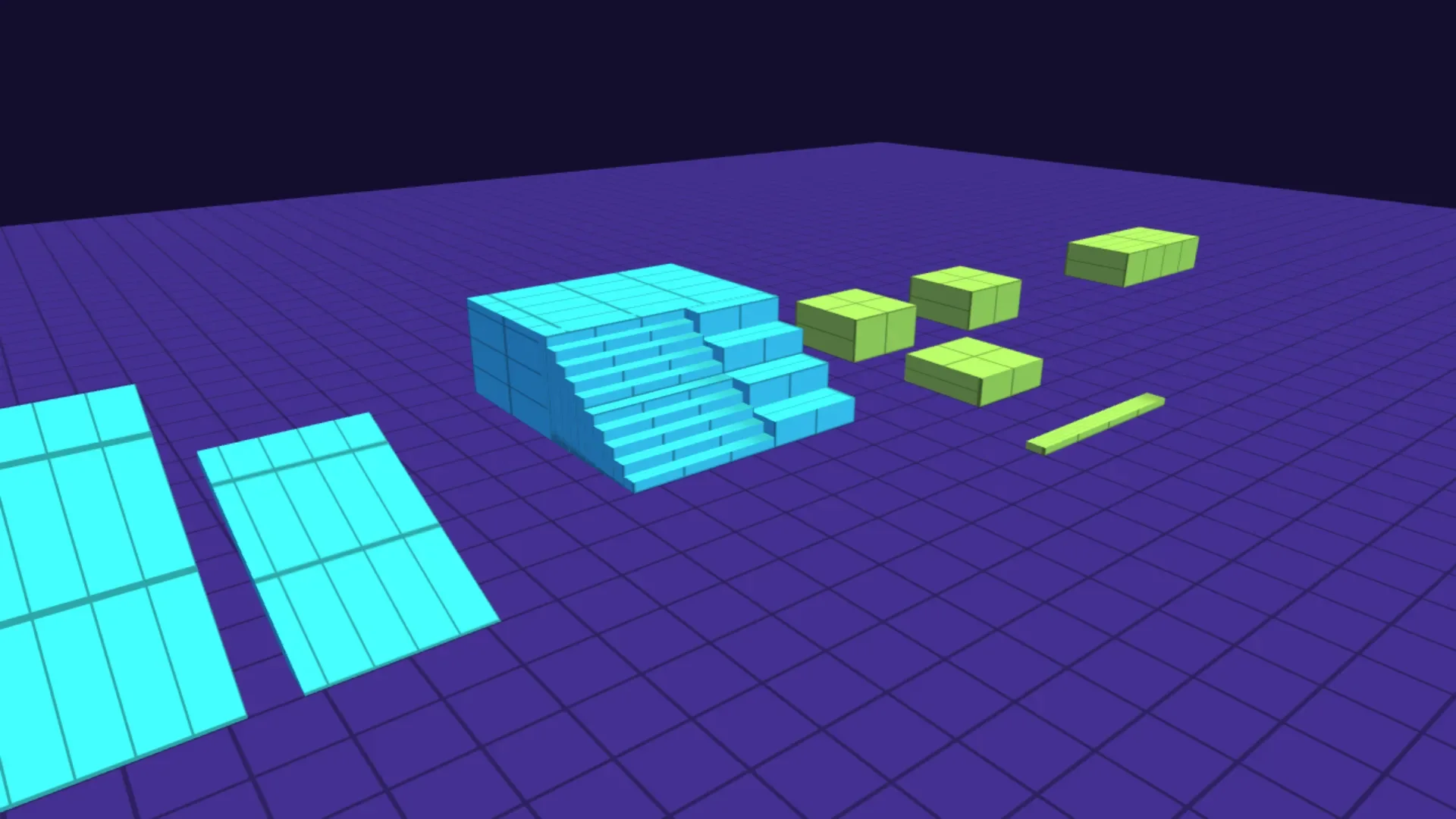
The course has stairs with 20 cm steps, taller 50 cm steps beside them, a platform 2 m high, ramps of 20, 40 and 70 degrees, a 15 cm curb, and boxes with gaps of 2 m and 5 m between them.
The scene
Replace src/main.ts. It creates the engine and the scene, two lights, the physics and the level, and for now Babylon.js's own camera, to look around:
import {
  Color3,
  Color4,
  DirectionalLight,
  Engine,
  FreeCamera,
  HemisphericLight,
  RegisterStandardEngineExtensions,
  RegisterStandardMaterial,
  Scene,
  Vector3,
} from '@babylonjs/core/pure';
import { buildLevel } from './level.ts';
import { enablePhysics } from './physics.ts';
import './style.css';

RegisterStandardEngineExtensions();
RegisterStandardMaterial();

const canvas = document.querySelector<HTMLCanvasElement>('#game')!;

const engine = new Engine(canvas, true, {}, true);
const scene = new Scene(engine);
scene.clearColor = Color4.FromHexString('#130e2cff');

// Light from the sky, tilted so that walls facing different ways get different shades,
// and a sun for contrast.
const sky = new HemisphericLight('sky', new Vector3(0.5, 1, 0), scene);
sky.intensity = 0.9;
sky.groundColor = Color3.FromHexString('#6a5cb0');
const sun = new DirectionalLight('sun', new Vector3(-0.5, -1, 0.7), scene);
sun.intensity = 0.4;

await enablePhysics(scene);
buildLevel(scene);

// For now Babylon's own camera, to look around: drag with the mouse, move with the arrow keys.
const camera = new FreeCamera('camera', new Vector3(0, 1.75, 0), scene);
camera.attachControl();
camera.minZ = 0.05;
camera.speed = 0.2;

engine.runRenderLoop(() => scene.render());
window.addEventListener('resize', () => engine.resize());
The last argument of
new Engine()renders at the screen's real resolution, which keeps the grid sharp on high-density displays.The hemispheric light comes from the sky. Its direction is tilted a little, so walls that face different ways get different shades, and a directional light adds contrast like a low sun.
awaitat the top level of a module works, because the template's TypeScript and Vite settings target current browsers.The
FreeCamerawithattachControl()is a stand-in: drag with the mouse to look and use the arrow keys to move. The next part replaces it with a camera of your own.
Run it
$ npm run dev> first-person-controller@0.0.0 dev> vite VITE v8.3.5 ready in 108 ms ➜ Local: http://localhost:5173/ ➜ Network: use --host to expose
Open localhost:5173 and fly around the course:
In the next part the mouse takes over the camera, the way it does in every first-person game.