
Smooth Voxel Terrain in Babylon.js · Part 8 of 12 in the series
Part 8: Triplanar Textures
Give the terrain grass, soil, rock and snow: textures painted in code into a texture array, projected from three sides in a GLSL shader, and chosen by slope, height and how deep below the ground a spot lies.
Quest objectives
- Know why a voxel mesh has no texture coordinates, and how triplanar mapping does without
- Paint tiling textures in code, and put them in a texture array
- Write a vertex and a fragment shader for a Babylon.js ShaderMaterial
- Choose the material by slope, height and depth below the generated ground
- Light the terrain and fog it in the shader
Since part 7, the terrain goes on forever, all in the color of clay. A texture needs texture coordinates: for every vertex, a place in the image. A modeler unwraps a model by hand for that. Voxel terrain can take any shape, overhangs and caves included, and changes when the player digs: there is nothing to unwrap.
Triplanar mapping
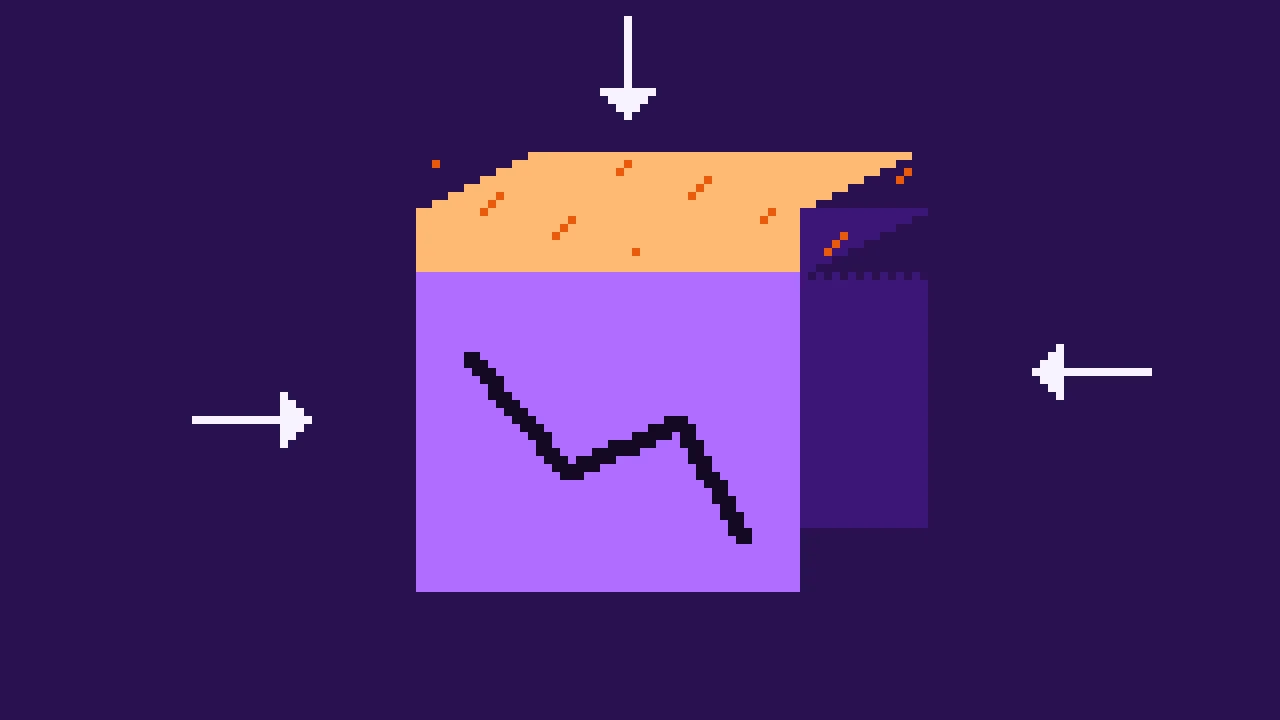
Triplanar mapping needs no coordinates. Picture three projectors, one shining down from above, one along x and one along z. Each throws the texture onto the terrain, using two of the world position's coordinates: the one from above uses x and z, the others z and y, and x and y. A flat field gets the texture from above unstretched; a cliff facing along x gets it from the x projector; a slope somewhere in between gets a blend.
The blend comes from the normal. The more the surface faces along an axis, the more of that axis's projection it takes. Raising the parts of the normal to the fourth power before blending narrows the band where two projections mix, which would otherwise look washed out.
Textures, painted in code
The terrain needs four textures: grass, soil, rock and snow. Instead of image files, the page paints them when it starts. Noise again, but of a kind that tiles: a grid of random values, blended smoothly, whose last column wraps around to the first. The right edge of the texture then continues the left one, and the texture repeats without a seam. Create src/textures.ts:
import { seededRandom } from './terrain.ts';

/** Pixels along each side of a texture. */
export const TEXTURE_SIZE = 256;
/** The textures, in the order of the layers of the texture array. */
export const LAYERS = ['grass', 'soil', 'rock', 'snow'] as const;

type Rgb = [number, number, number];
type Pattern = (u: number, v: number) => number;

const random = seededRandom(7);
const smooth = (t: number) => t * t * (3 - 2 * t);
const lerp = (a: number, b: number, t: number) => a + (b - a) * t;

/**
 * Noise that repeats `period` times across the texture: random values on a grid,
 * blended smoothly. The grid wraps around, so the texture tiles without seams.
 */
function tilingNoise(period: number): Pattern {
  const values = Float32Array.from({ length: period * period }, () => random() * 2 - 1);
  const at = (i: number, j: number) => values[(i % period) + (j % period) * period];
  return (u, v) => {
    const x = u * period;
    const y = v * period;
    const i = Math.floor(x);
    const j = Math.floor(y);
    const fx = smooth(x - i);
    const fy = smooth(y - j);
    return lerp(lerp(at(i, j), at(i + 1, j), fx), lerp(at(i, j + 1), at(i + 1, j + 1), fx), fy);
  };
}

/** Several tiling noises added up, each finer and weaker than the one before. */
function layeredNoise(...periods: number[]): Pattern {
  const layers = periods.map(tilingNoise);
  return (u, v) => layers.reduce((sum, layer, i) => sum + layer(u, v) / 2 ** i, 0) * 0.6;
}

const hex = (color: string): Rgb => [1, 3, 5].map((i) => parseInt(color.slice(i, i + 2), 16)) as Rgb;
const mix = (a: Rgb, b: Rgb, t: number): Rgb => {
  const k = Math.min(Math.max(t, 0), 1);
  return [lerp(a[0], b[0], k), lerp(a[1], b[1], k), lerp(a[2], b[2], k)];
};
const shade = (color: Rgb, amount: number): Rgb => color.map((c) => c * (1 + amount)) as Rgb;

/** How to paint each texture, from u and v between 0 and 1. */
const PAINTERS: Record<(typeof LAYERS)[number], (u: number, v: number) => Rgb> = (() => {
  const grassPatches = layeredNoise(8, 16, 32);
  const blades = layeredNoise(64, 128);
  const soilPatches = layeredNoise(8, 16, 32);
  const pebbles = tilingNoise(48);
  const rockPatches = layeredNoise(4, 8, 16, 32);
  const cracks = layeredNoise(8, 16);
  const snowPatches = layeredNoise(4, 8, 16, 64);
  return {
    grass: (u, v) => {
      const color = mix(hex('#4a7a2a'), hex('#6f9e36'), grassPatches(u, v) + 0.5);
      return shade(color, blades(u, v) * 0.5);
    },
    soil: (u, v) => {
      const color = mix(hex('#5a3b27'), hex('#795336'), soilPatches(u, v) + 0.5);
      return pebbles(u, v) > 0.55 ? mix(color, hex('#a88a6a'), 0.7) : color;
    },
    rock: (u, v) => {
      const color = mix(hex('#5f5866'), hex('#a39aa8'), rockPatches(u, v) + 0.5);
      // Cracks run where the noise crosses 0.
      return Math.abs(cracks(u, v)) < 0.025 ? shade(color, -0.45) : color;
    },
    snow: (u, v) => mix(hex('#d4dcf0'), hex('#ffffff'), snowPatches(u, v) + 0.6),
  };
})();

/** Paints every texture: RGBA bytes, one layer after the other. */
export function paintLayers(): Uint8Array {
  const pixels = TEXTURE_SIZE * TEXTURE_SIZE;
  const data = new Uint8Array(pixels * 4 * LAYERS.length);
  LAYERS.forEach((name, layer) => {
    const paint = PAINTERS[name];
    for (let y = 0; y < TEXTURE_SIZE; y += 1) {
      for (let x = 0; x < TEXTURE_SIZE; x += 1) {
        const [r, g, b] = paint(x / TEXTURE_SIZE, y / TEXTURE_SIZE);
        data.set([r, g, b, 255], (layer * pixels + y * TEXTURE_SIZE + x) * 4);
      }
    }
  });
  return data;
}tilingNoise(period)hasperiodrandom values along each side.i % periodwraps the grid, so the noise at u 1 is the noise at u 0.layeredNoise()adds several of them, like the terrain's layers. Each period must divide into the texture's 256 pixels, or the pattern wouldn't line up.Grass is green patches with fine speckles for blades. Soil is brown with lighter pebbles where a finer noise is high. Rock is grey with cracks where another noise crosses 0, which, as with the caves, happens along lines. Snow is nearly white.
The random function is
seededRandom()from the terrain, with a seed of its own. The textures are the same on every load.
Painting four textures of 256 × 256 pixels takes a moment at the start, and the project ships without a single image file.
One texture with layers
The shader needs all four textures. A texture array holds them as layers of one texture, picked by number in the shader. WebGL 2 has them, and Babylon.js makes one with RawTexture2DArray, straight from the painted bytes.
Grass, soil, rock or snow
Which texture goes where? The shader decides per pixel, from three things:
The slope: the normal's y. Grass grows on gentle slopes; steep ones are rock.
The height: snow lies above 105 m, on slopes gentle enough to hold it.
The depth below the ground: how far below the generated surface a spot lies. Grass only grows at the top; a meter or two down there is soil, and from about 4 m down it's rock. Cliffs where the overhangs pushed the ground in, cave walls and later every hole the player digs show what lies underneath.
The depth is worked out per vertex, in the worker, with surfaceHeight() from part 4: the height of the ground before overhangs and caves, minus the vertex's height. In src/chunks.ts, add a type for a chunk's mesh and replace buildChunk():
/** A chunk's mesh, with how far below the ground each vertex lies. */
export interface ChunkMesh extends MeshData {
  depths: Float32Array;
}

/** Samples the terrain in a chunk and meshes it, or null when it holds no surface. */
export function buildChunk(chunk: ChunkPosition, mesher: MesherName): ChunkMesh | null {
  const origin = { x: chunk.x * CHUNK_SIZE, y: chunk.y * CHUNK_SIZE, z: chunk.z * CHUNK_SIZE };
  const grid = new DensityGrid().fill(density, origin);
  if (!grid.hasSurface()) return null;
  const mesh = MESHERS[mesher].mesh(grid);

  // Meters below the generated ground, for the material: soil first, then rock.
  const { positions } = mesh;
  const depths = new Float32Array(positions.length / 3);
  for (let i = 0; i < depths.length; i += 1) {
    const x = origin.x + positions[i * 3];
    const y = origin.y + positions[i * 3 + 1];
    const z = origin.z + positions[i * 3 + 2];
    depths[i] = surfaceHeight(x, z) - y;
  }
  return { ...mesh, depths };
}
The worker sends the depths along, transferred like the other arrays. Replace src/chunkWorker.ts:
import { buildChunk, type ChunkMesh, type ChunkPosition } from './chunks.ts';
import type { MesherName } from './meshers.ts';

export interface ChunkJob {
  chunk: ChunkPosition;
  mesher: MesherName;
}

export interface ChunkResult {
  /** null when the chunk holds no surface. */
  mesh: ChunkMesh | null;
  /** Milliseconds the worker spent on the chunk. */
  time: number;
}

self.onmessage = (event: MessageEvent<ChunkJob>) => {
  const started = performance.now();
  const mesh = buildChunk(event.data.chunk, event.data.mesher);
  const result: ChunkResult = { mesh, time: performance.now() - started };
  // Hand the arrays' memory over to the page instead of copying it.
  const transfer = mesh
    ? [mesh.positions.buffer, mesh.normals.buffer, mesh.indices.buffer, mesh.depths.buffer]
    : [];
  self.postMessage(result, { transfer });
};
And the world hands them to the mesh as an attribute of its own, one number per vertex. In src/world.ts, import ChunkMesh instead of MeshData, use it for Finished's data, and replace createChunkMesh():
private createChunkMesh(position: ChunkPosition, data: ChunkMesh): Mesh {
  const mesh = createMesh(`chunk ${chunkKey(position)}`, data, this.scene);
  mesh.setVerticesData('depth', data.depths, false, 1);
  mesh.position.set(position.x * CHUNK_SIZE, position.y * CHUNK_SIZE, position.z * CHUNK_SIZE);
  mesh.material = this.material;
  // The chunk never moves: Babylon.js can stop working out its world matrix.
  mesh.freezeWorldMatrix();
  return mesh;
}
The shaders
Babylon.js's standard material can't do any of this, so the terrain gets its own shaders, in GLSL, the language of WebGL. The vertex shader runs once per vertex and decides where it lands on the screen. Create src/terrain.vertex.glsl:
precision highp float;

attribute vec3 position;
attribute vec3 normal;
attribute float depth;

uniform mat4 world;
uniform mat4 viewProjection;

varying vec3 vPosition;
varying vec3 vNormal;
varying float vDepth;

void main() {
  vec4 worldPosition = world * vec4(position, 1.0);
  vPosition = worldPosition.xyz;
  // Chunks are only moved, never turned or scaled, so the normal stays as it is.
  vNormal = normal;
  vDepth = depth;
  gl_Position = viewProjection * worldPosition;
}
world moves the chunk's local positions to its corner in the world, and viewProjection takes them to the screen. The world position, the normal and the depth go on to the fragment shader as varyings: values that the graphics card blends between the vertices of each triangle.
The fragment shader runs once per pixel and decides its color. Create src/terrain.fragment.glsl:
precision highp float;
precision highp sampler2DArray;

varying vec3 vPosition;
varying vec3 vNormal;
varying float vDepth;

uniform sampler2DArray layers;
uniform vec3 cameraPosition;
uniform vec3 sunDirection;
uniform vec3 sunColor;
uniform vec3 skyColor;
uniform vec3 groundColor;
uniform vec3 fogColor;
uniform vec2 fogRange;

// The layers of the texture array.
const float GRASS = 0.0;
const float SOIL = 1.0;
const float ROCK = 2.0;
const float SNOW = 3.0;
// Meters one texture covers, and a second, much larger size against visible repeats.
const float TILE = 4.0;
const float LARGE_TILE = 27.0;

// A texture at both sizes, half and half.
vec3 sampleLayer(vec2 p, float layer) {
  return (texture(layers, vec3(p / TILE, layer)).rgb + texture(layers, vec3(p / LARGE_TILE, layer)).rgb) * 0.5;
}

// A layer seen from three sides: the texture projected along x, y and z, blended by how
// much the surface faces each way.
vec3 triplanar(float layer, vec3 blend) {
  return sampleLayer(vPosition.zy, layer) * blend.x
    + sampleLayer(vPosition.xz, layer) * blend.y
    + sampleLayer(vPosition.xy, layer) * blend.z;
}

void main() {
  vec3 normal = normalize(vNormal);
  // Raised to the 4th power, so that the blend between the sides stays narrow.
  vec3 blend = pow(abs(normal), vec3(4.0));
  blend /= blend.x + blend.y + blend.z;

  // Grass on gentle slopes at the surface, rock on steep ones and deeper down, soil
  // between them, and snow high up.
  float flat_ = normal.y;
  float grass = smoothstep(0.7, 0.85, flat_) * (1.0 - smoothstep(0.5, 2.0, vDepth));
  float rock = max(1.0 - smoothstep(0.45, 0.7, flat_), smoothstep(3.0, 6.0, vDepth));
  float snow = smoothstep(105.0, 120.0, vPosition.y) * smoothstep(0.55, 0.75, flat_);

  vec3 color = triplanar(SOIL, blend);
  if (grass > 0.0) color = mix(color, triplanar(GRASS, blend), grass);
  if (rock > 0.0) color = mix(color, triplanar(ROCK, blend), rock);
  if (snow > 0.0) color = mix(color, triplanar(SNOW, blend), snow);

  // Light from the sun, and from the sky: more from above than from below.
  float sun = max(dot(normal, -sunDirection), 0.0);
  vec3 ambient = mix(groundColor, skyColor, normal.y * 0.5 + 0.5);
  vec3 lit = color * (ambient + sunColor * sun);

  float fog = smoothstep(fogRange.x, fogRange.y, distance(vPosition, cameraPosition));
  gl_FragColor = vec4(mix(lit, fogColor, fog), 1.0);
}triplanar()samples one layer three times, once per projection, and blends the three byblend.sampleLayer()takes each texture at two sizes, 4 m and 27 m, and averages them. A texture repeated every 4 m makes a regular pattern that the eye catches from a distance; the large copy, at a size that doesn't divide evenly into 4, breaks it up.The amounts of grass, rock and snow are each a
smoothstepbetween two values, so the materials fade into each other instead of switching at a line. Theifs skip the samples of a layer that isn't there.The light is the same as the standard material had: the sun, by how much the surface faces it, and the sky, more from above than from below. The fog fades to the sky's color by the distance to the camera, because a
ShaderMaterialdoesn't get the scene's fog.
The material
Create src/material.ts:
import {
  Color3,
  Constants,
  RawTexture2DArray,
  ShaderMaterial,
  Texture,
  Vector2,
  Vector3,
  type Scene,
} from '@babylonjs/core/pure';
import fragmentSource from './terrain.fragment.glsl?raw';
import vertexSource from './terrain.vertex.glsl?raw';
import { LAYERS, paintLayers, TEXTURE_SIZE } from './textures.ts';

/** The sky's color, a hazy lilac, which the fog fades to. */
export const SKY = Color3.FromHexString('#b8a4e0');

/** The terrain's material: painted textures, projected from three sides, and lit. */
export function createTerrainMaterial(scene: Scene, fogStart: number, fogEnd: number): ShaderMaterial {
  const material = new ShaderMaterial(
    'terrain',
    scene,
    { vertexSource, fragmentSource },
    {
      attributes: ['position', 'normal', 'depth'],
      uniforms: [
        'world', 'viewProjection', 'cameraPosition', 'sunDirection',
        'sunColor', 'skyColor', 'groundColor', 'fogColor', 'fogRange',
      ],
      samplers: ['layers'],
    },
  );

  const textures = new RawTexture2DArray(
    paintLayers(),
    TEXTURE_SIZE,
    TEXTURE_SIZE,
    LAYERS.length,
    Constants.TEXTUREFORMAT_RGBA,
    scene,
    true,
    false,
    Texture.TRILINEAR_SAMPLINGMODE,
  );
  textures.wrapU = Texture.WRAP_ADDRESSMODE;
  textures.wrapV = Texture.WRAP_ADDRESSMODE;
  // Sharper textures on ground seen at a flat angle.
  textures.anisotropicFilteringLevel = 8;
  material.setTexture('layers', textures);

  // A warm, low sun, a cool sky and a dark violet below.
  material.setVector3('sunDirection', new Vector3(0.5, -0.65, -0.55).normalize());
  material.setColor3('sunColor', Color3.FromHexString('#ffd8a8').scale(1.1));
  material.setColor3('skyColor', Color3.FromHexString('#c4b5fd').scale(0.6));
  material.setColor3('groundColor', Color3.FromHexString('#3b1676').scale(0.6));
  material.setColor3('fogColor', SKY);
  material.setVector2('fogRange', new Vector2(fogStart, fogEnd));
  return material;
}
The
?rawat the end of an import is Vite's way to load a file as a string. The shaders stay in.glslfiles, where an editor can highlight them.attributes,uniformsandsamplerstell Babylon.js what the shaders use.world,viewProjectionandcameraPositionare filled in by Babylon.js itself; the rest is set here.The sky is a hazy lilac now: the old dark violet suited the clay, but not a sunlit world.
Replace src/main.ts. The lights and the standard material go, the terrain material comes in:
import {
  Engine,
  RegisterEnginesExtensionsEngineRawTexture,
  RegisterShaderMaterial,
  RegisterStandardEngineExtensions,
  Scene,
  UniversalCamera,
  Vector3,
} from '@babylonjs/core/pure';
import { CHUNK_SIZE } from './grid.ts';
import { createTerrainMaterial, SKY } from './material.ts';
import { MESHERS, otherMesher } from './meshers.ts';
import { surfaceHeight } from './terrain.ts';
import { ChunkWorkers } from './workers.ts';
import { VIEW_RADIUS, World } from './world.ts';
import './style.css';

RegisterStandardEngineExtensions();
// For the texture array of the terrain.
RegisterEnginesExtensionsEngineRawTexture();
RegisterShaderMaterial();

const canvas = document.querySelector<HTMLCanvasElement>('#game')!;
const hud = document.querySelector<HTMLElement>('#hud')!;

const engine = new Engine(canvas, true, {}, true);
const scene = new Scene(engine);
scene.clearColor = SKY.toColor4();

// Fog hides the edge of the loaded chunks: it ends a little before the view radius.
const viewDistance = VIEW_RADIUS * CHUNK_SIZE;
const material = createTerrainMaterial(scene, viewDistance * 0.5, viewDistance * 0.95);

const world = new World(scene, material, new ChunkWorkers());

// A flying camera: WASD to move, Q and E for down and up, drag the mouse to look.
const start = new Vector3(0, surfaceHeight(0, 40) + 25, 40);
const camera = new UniversalCamera('camera', start, scene);
camera.setTarget(new Vector3(0, surfaceHeight(0, -200) + 20, -200));
camera.keysUp = [87];
camera.keysDown = [83];
camera.keysLeft = [65];
camera.keysRight = [68];
camera.keysDownward = [81];
camera.keysUpward = [69];
camera.speed = 1;
camera.minZ = 0.1;
camera.maxZ = viewDistance * 1.2;
camera.attachControl();

window.addEventListener('keydown', (event) => {
  if (event.code === 'KeyL') material.wireframe = !material.wireframe;
  if (event.code === 'KeyM') world.setMesher(otherMesher(world.mesher));
  // Shift flies faster.
  if (event.key === 'Shift') camera.speed = 4;
});
window.addEventListener('keyup', (event) => {
  if (event.key === 'Shift') camera.speed = 1;
});

scene.onBeforeRenderObservable.add(() => {
  world.update(camera.position);
  const { loaded, waiting } = world.counts;
  const { x, y, z } = camera.position;
  hud.textContent =
    `${MESHERS[world.mesher].label}: ${loaded} chunks, ${waiting} waiting\n` +
    `x ${x.toFixed(0)}, y ${y.toFixed(0)}, z ${z.toFixed(0)}\n` +
    `${engine.getFps().toFixed(0)} fps`;
});

engine.runRenderLoop(() => scene.render());
window.addEventListener('resize', () => engine.resize());Try it
Grass on the plains, soil on the slopes, rock on the cliffs and the mountainsides, a dusting of snow on the highest crests. Fly close to a cliff and then far away: up close the rock's cracks show, and from afar the large copy of the textures keeps the ground from looking like a tiled floor. The cave entrances are rock inside, because they lie deep below the ground.
In the next part you get a tool: aim, dig a hole, and build the ground back up.