
Smooth Voxel Terrain in Babylon.js · Part 2 of 12 in the series
Part 2: Marching Cubes With a Generated Table
Turn the density grid into a smooth mesh with marching cubes, from a case table the code works out from the cube itself, so that neighboring cubes always close.
Quest objectives
- Know how marching cubes walks a grid cell by cell
- Work out the 256 cases of the case table instead of typing them in
- Decide the ambiguous faces of a cube the same way every time, so the mesh has no holes
- Place each vertex where the density crosses 0, and share it between cubes
- Get smooth normals from the density's gradient
The blocks of part 1 only know whether a sample is solid. This part uses the numbers. Marching cubes, published by William Lorensen and Harvey Cline in 1987, builds a surface out of triangles, one cell of the grid at a time.
One cube at a time
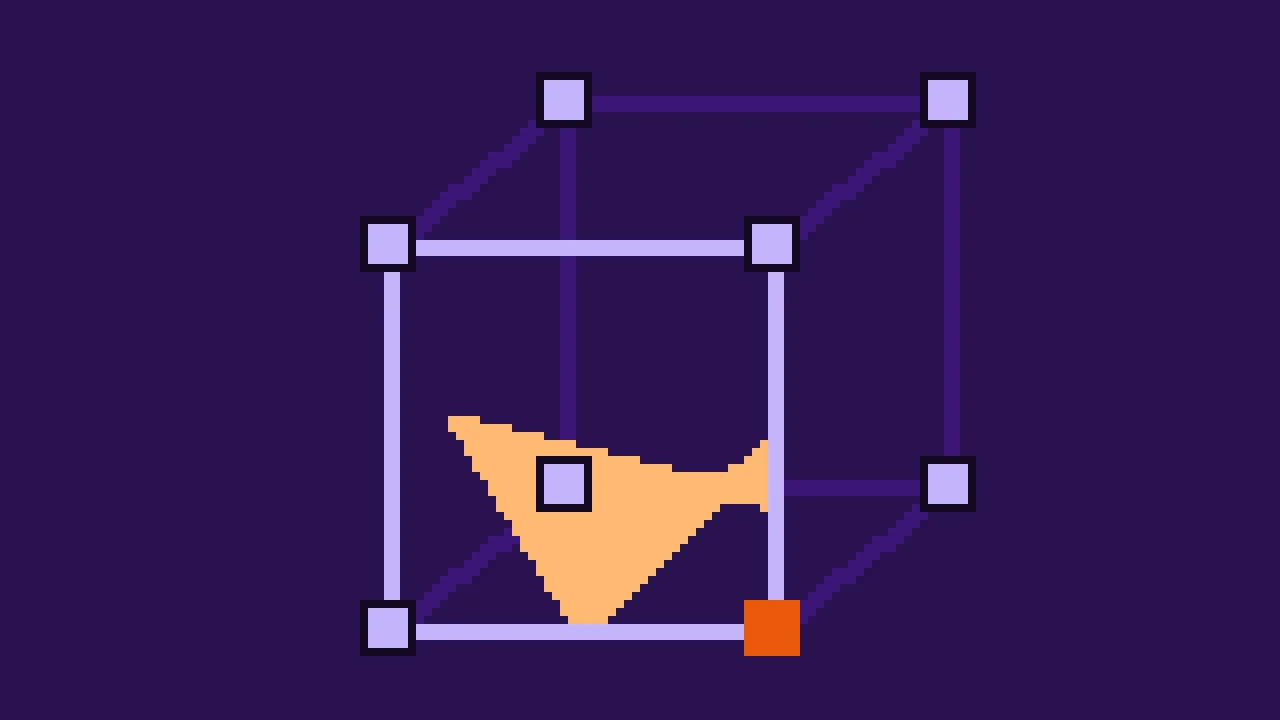
Each cell is a cube with a sample at each of its eight corners. If all eight are solid or all are air, the surface doesn't pass through it. Otherwise it crosses every edge that has a solid corner at one end and air at the other, and the triangles of the cube connect points on those edges.
Which edges are crossed depends only on which corners are solid. Eight corners, each solid or not, make 28 = 256 cases, and a table holds the triangles for each. The algorithm is then short: for every cube, number the case, look up its triangles, and put each corner of a triangle on its edge, where the density crosses 0. Between a sample of 0.25 and one of -0.75 that is a quarter of the way, t = a / (a - b).
Numbers for corners and edges
A cube's corner is numbered by where it is: bit 0 is a step along x, bit 1 along y, bit 2 along z. Corner 0 is the low corner, corner 7 the one opposite, and corner 5, binary 101, is one step along x and one along z. A case number then has one bit per corner: case 1 is corner 0 alone being solid.
The 12 edges are numbered by their axis: edges 0 to 3 run along x, 4 to 7 along y and 8 to 11 along z. Within an axis, the number holds the edge's place on the two other axes, as two more bits.
A table worked out, not typed in
Most marching cubes code includes a table of 256 rows of numbers, copied from the same few sources. It works, but it is a block of magic numbers that says nothing about why, and there is a subtle question behind it. A face of a cube with two solid corners on one diagonal and two air corners on the other can be cut in two ways: the two solid corners can be joined across the face, or kept apart. If one cube joins them and its neighbor, which shares that face, keeps them apart, the surface has a hole. The original paper built its cases from 15 basic ones, and it was soon shown that this can happen with them. Tables since then answer the question in different ways.
This series works the table out from the cube itself, and decides every such face the same way: the solid corners are always kept apart. Two cubes that share a face look at the same four corners, decide the same, and their surfaces meet.
The idea: where the surface passes through a cube, it crosses the cube's faces in lines, and those lines form closed loops around each patch of surface.
Walk around each face, corner by corner. Where a run of solid corners ends, a line starts on that edge, and it runs across the face to the edge where the run began. It cuts the solid corners off from the rest of the face. On a diagonal face, each solid corner is a run of its own and gets its own line: kept apart.
All faces are walked the same way round, seen from outside the cube. Two faces that meet then walk their shared edge in opposite directions, so every crossed edge is where one face's line ends and another's begins. Following the lines from edge to edge always closes a loop.
Each loop is a flat-ish polygon. Split it into a fan of triangles from one of its corners. One detail: a fan's inner side between two edges of the same face would lie flat in that face, where the neighbor's surface can lie too. The fan starts at a corner that has no such side.
Create src/caseTable.ts:
/**
 * The marching cubes case table, worked out from the cube rather than typed in.
 *
 * Corners are numbered by where they are: bit 0 is x, bit 1 is y and bit 2 is z, so
 * corner 5 (binary 101) sits at x = 1, y = 0, z = 1. Edges are numbered axis × 4 + i:
 * edges 0 to 3 run along x, 4 to 7 along y and 8 to 11 along z, and i holds the
 * edge's place on the two other axes.
 */

/** The axis each edge runs along. */
export const EDGE_AXIS: number[] = [];
/** The corner each edge starts at; it ends one step further along its axis. */
export const EDGE_START: number[] = [];

for (let axis = 0; axis < 3; axis += 1) {
  const [a, b] = otherAxes(axis);
  for (let i = 0; i < 4; i += 1) {
    EDGE_AXIS.push(axis);
    EDGE_START.push(((i & 1) << a) | ((i >> 1) << b));
  }
}

function otherAxes(axis: number): [number, number] {
  return axis === 0 ? [1, 2] : axis === 1 ? [0, 2] : [0, 1];
}

/** The edge between two corners next to each other. */
function edgeBetween(c1: number, c2: number): number {
  const axis = Math.log2(c1 ^ c2);
  const start = c1 & c2;
  const [a, b] = otherAxes(axis);
  return axis * 4 + ((start >> a) & 1) + ((start >> b) & 1) * 2;
}

/**
 * The six faces of the cube, each as its four corners in order around it. Seen from
 * outside the cube, all of them go around the same way, so two faces that meet walk
 * their shared edge in opposite directions.
 */
const FACES: number[][] = [];
for (let axis = 0; axis < 3; axis += 1) {
  const u = 1 << ((axis + 1) % 3);
  const v = 1 << ((axis + 2) % 3);
  const high = 1 << axis;
  FACES.push([0, v, u | v, u]);
  FACES.push([high, high | u, high | u | v, high | v]);
}

/**
 * Where the surface meets the cube's faces: closed loops of edges, around each patch of
 * surface in the cube. `corners` has a bit set for every solid corner.
 */
function outlinesOf(corners: number): number[][] {
  const solid = (corner: number) => ((corners >> corner) & 1) === 1;
  // On every face, a line runs from the edge where a row of solid corners ends to the edge
  // where it starts, cutting those corners off. `next` links each line to the next one.
  const next = new Map<number, number>();
  for (const face of FACES) {
    for (let i = 0; i < 4; i += 1) {
      const corner = face[i];
      const after = face[(i + 1) % 4];
      if (!solid(corner) || solid(after)) continue;
      let first = i;
      while (solid(face[(first + 3) % 4])) first = (first + 3) % 4;
      next.set(edgeBetween(corner, after), edgeBetween(face[(first + 3) % 4], face[first]));
    }
  }
  // Every edge ends one line and starts another, so following the links closes loops.
  const loops: number[][] = [];
  const done = new Set<number>();
  for (const start of next.keys()) {
    if (done.has(start)) continue;
    const loop: number[] = [];
    for (let edge = start; !done.has(edge); edge = next.get(edge)!) {
      done.add(edge);
      loop.push(edge);
    }
    loops.push(loop);
  }
  return loops;
}

/** Whether two edges lie on the same face of the cube. */
function shareFace(e1: number, e2: number): boolean {
  for (let axis = 0; axis < 3; axis += 1) {
    if (axis === EDGE_AXIS[e1] || axis === EDGE_AXIS[e2]) continue;
    if (((EDGE_START[e1] >> axis) & 1) === ((EDGE_START[e2] >> axis) & 1)) return true;
  }
  return false;
}

/**
 * Splits a loop into a fan of triangles around one of its edges. The loop runs so that
 * Babylon.js shows the triangles' front to the air. A side between two edges of the same
 * face would lie flat in that face, where the next cube's surface may lie too, so the fan
 * starts at an edge that has no such side.
 */
function triangulate(loop: number[]): number[] {
  const n = loop.length;
  for (let apex = 0; apex < n; apex += 1) {
    const at = (i: number) => loop[(apex + i) % n];
    let fits = true;
    for (let i = 2; i < n - 1; i += 1) if (shareFace(at(0), at(i))) fits = false;
    if (!fits) continue;
    const triangles: number[] = [];
    for (let i = 1; i < n - 1; i += 1) triangles.push(at(0), at(i), at(i + 1));
    return triangles;
  }
  throw new Error(`No fan fits the loop ${loop.join(', ')}`);
}

/** For every case, the edges its triangles' corners lie on, three per triangle. */
export const CASES: number[][] = [];
for (let corners = 0; corners < 256; corners += 1) {
  CASES.push(outlinesOf(corners).flatMap(triangulate));
}EDGE_STARTandEDGE_AXISdescribe the 12 edges: where each starts, and which way it runs. The marching cubes code turns an edge number into a sample of the grid with them.FACESlists the corners of each face in walking order. A face on the high side of an axis goes one way, the face on the low side the other way, which is the same way when seen from outside.outlinesOf()draws the lines on each face intonext, from the edge a line starts on to the edge it ends on, and then follows them into loops.triangulate()tries each corner as the fan's center until one fits. For all 256 cases one does.
The loops run in the order that makes Babylon.js show the front of each triangle to the air. The cases add up to 820 triangles, at most five in one cube. Built from many random grids, the mesh is closed: every edge of every triangle borders exactly one other triangle.
Normals from the density
Lighting needs a normal at each vertex: the direction the surface faces. The density knows it. Its gradient, the direction in which it rises fastest, points straight into the solid, so the normal is the gradient turned around. On the grid, the gradient at a sample is the difference of its two neighbors on each axis, halved: a central difference.
A sample on the grid's outer edge has a neighbor on one side only. So the grid gets a margin: samples one step beyond the cells on every side. Replace src/grid.ts:
/** Cells along each side of a chunk. A side has one sample more than it has cells. */
export const CHUNK_SIZE = 32;
/** Extra samples around the cells on every side, for the normals at the border. */
export const MARGIN = 1;

/** The density of the world at a point: above 0 is solid, below 0 is air. */
export type Density = (x: number, y: number, z: number) => number;

/**
 * The density sampled at the corners of a cube of CHUNK_SIZE³ cells, one meter apart.
 * Samples go from -MARGIN to CHUNK_SIZE + MARGIN on each axis.
 */
export class DensityGrid {
  /** Samples along each side. */
  readonly side = CHUNK_SIZE + 1 + 2 * MARGIN;
  readonly values = new Float32Array(this.side ** 3);

  index(x: number, y: number, z: number): number {
    return x + MARGIN + this.side * (y + MARGIN + this.side * (z + MARGIN));
  }

  get(x: number, y: number, z: number): number {
    return this.values[this.index(x, y, z)];
  }

  /** Samples `density` at every corner. The corner (0, 0, 0) is at `origin` in the world. */
  fill(density: Density, origin = { x: 0, y: 0, z: 0 }): this {
    const last = CHUNK_SIZE + MARGIN;
    for (let z = -MARGIN; z <= last; z += 1) {
      for (let x = -MARGIN; x <= last; x += 1) {
        for (let y = -MARGIN; y <= last; y += 1) {
          this.values[this.index(x, y, z)] = density(origin.x + x, origin.y + y, origin.z + z);
        }
      }
    }
    return this;
  }

  /**
   * The gradient at a sample: the direction in which the density rises fastest, which
   * points into the solid. Central differences need the samples on both sides.
   */
  gradient(x: number, y: number, z: number): [number, number, number] {
    return [
      (this.get(x + 1, y, z) - this.get(x - 1, y, z)) / 2,
      (this.get(x, y + 1, z) - this.get(x, y - 1, z)) / 2,
      (this.get(x, y, z + 1) - this.get(x, y, z - 1)) / 2,
    ];
  }
}
The samples now go from -1 to 33 on each axis, 35 of them, and index() moves the coordinates by the margin. The rest of the code keeps counting from 0.
The mesh
Both meshers in this series produce the same thing: positions, normals and indices, three numbers per vertex for the first two and three vertex numbers per triangle. Create src/meshData.ts:
import { Mesh, VertexData, type Scene } from '@babylonjs/core/pure';

/** A mesh as typed arrays: what a mesher makes and Babylon.js draws. */
export interface MeshData {
  positions: Float32Array;
  normals: Float32Array;
  indices: Uint32Array;
}

/** Collects vertices and triangles in growing arrays and hands them out as typed ones. */
export class MeshBuilder {
  private readonly positions: number[] = [];
  private readonly normals: number[] = [];
  private readonly indices: number[] = [];

  /** Adds a vertex and returns its number. The normal is made one meter long. */
  vertex(x: number, y: number, z: number, nx: number, ny: number, nz: number): number {
    const length = Math.hypot(nx, ny, nz) || 1;
    this.positions.push(x, y, z);
    this.normals.push(nx / length, ny / length, nz / length);
    return this.positions.length / 3 - 1;
  }

  triangle(a: number, b: number, c: number): void {
    this.indices.push(a, b, c);
  }

  build(): MeshData {
    return {
      positions: new Float32Array(this.positions),
      normals: new Float32Array(this.normals),
      indices: new Uint32Array(this.indices),
    };
  }
}

export function createMesh(name: string, data: MeshData, scene: Scene): Mesh {
  const mesh = new Mesh(name, scene);
  const vertexData = new VertexData();
  vertexData.positions = data.positions;
  vertexData.normals = data.normals;
  vertexData.indices = data.indices;
  vertexData.applyToMesh(mesh);
  return mesh;
}
MeshBuilder collects them in plain arrays, which can grow, and hands them out as typed arrays, which Babylon.js takes as they are. It makes every normal one meter long. createMesh() turns them into a Babylon.js mesh.
Marching cubes
Create src/marchingCubes.ts:
import { CASES, EDGE_AXIS, EDGE_START } from './caseTable.ts';
import { CHUNK_SIZE, type DensityGrid } from './grid.ts';
import { MeshBuilder, type MeshData } from './meshData.ts';

/** One step along each axis. */
const STEP = [
  [1, 0, 0],
  [0, 1, 0],
  [0, 0, 1],
];

/** A surface for the density in the grid's cells, with its vertices on the cells' edges. */
export function marchingCubes(grid: DensityGrid): MeshData {
  const mesh = new MeshBuilder();
  // The vertex on each edge of the grid once it is made, by the edge's start sample and
  // axis. Cubes next to each other share it.
  const vertices = new Map<number, number>();

  const vertexOn = (x: number, y: number, z: number, axis: number): number => {
    const key = grid.index(x, y, z) * 3 + axis;
    const known = vertices.get(key);
    if (known !== undefined) return known;
    const [dx, dy, dz] = STEP[axis];
    const a = grid.get(x, y, z);
    const b = grid.get(x + dx, y + dy, z + dz);
    // How far along the edge the density crosses 0.
    const t = a / (a - b);
    // The normal points out of the solid, against the gradient.
    const ga = grid.gradient(x, y, z);
    const gb = grid.gradient(x + dx, y + dy, z + dz);
    const vertex = mesh.vertex(
      x + dx * t,
      y + dy * t,
      z + dz * t,
      -(ga[0] + (gb[0] - ga[0]) * t),
      -(ga[1] + (gb[1] - ga[1]) * t),
      -(ga[2] + (gb[2] - ga[2]) * t),
    );
    vertices.set(key, vertex);
    return vertex;
  };

  for (let z = 0; z < CHUNK_SIZE; z += 1) {
    for (let y = 0; y < CHUNK_SIZE; y += 1) {
      for (let x = 0; x < CHUNK_SIZE; x += 1) {
        // One bit per solid corner: the case number.
        let corners = 0;
        for (let corner = 0; corner < 8; corner += 1) {
          if (grid.get(x + (corner & 1), y + ((corner >> 1) & 1), z + (corner >> 2)) > 0) {
            corners |= 1 << corner;
          }
        }
        const edges = CASES[corners];
        for (let i = 0; i < edges.length; i += 3) {
          const [a, b, c] = [edges[i], edges[i + 1], edges[i + 2]].map((edge) => {
            const start = EDGE_START[edge];
            return vertexOn(x + (start & 1), y + ((start >> 1) & 1), z + (start >> 2), EDGE_AXIS[edge]);
          });
          mesh.triangle(a, b, c);
        }
      }
    }
  }
  return mesh.build();
}
The loops go over the cells, 0 to 31 on each axis. A cell's corners are the samples at its coordinates plus 0 or 1.
An edge of the grid belongs to up to four cubes.
vertexOn()keys its vertex by the edge's start sample and axis, so all four cubes use the same vertex instead of each making their own. That makes the mesh smaller, and a shared vertex with one normal is what makes the shading smooth across the triangles.The normal is the gradient at both ends of the edge, blended by
t.
The page
The blocks stay, switched off, for comparison. The page gets a HUD in the top corner, and the help names two keys:
<!doctype html>
<html lang="en">
  <head>
    <meta charset="UTF-8" />
    <meta name="viewport" content="width=device-width, initial-scale=1.0" />
    <title>Voxel terrain</title>
  </head>
  <body>
    <canvas id="game"></canvas>
    <div id="hud"></div>
    <div id="help">Drag to turn, scroll to zoom · B blocks · L wireframe</div>
    <script type="module" src="/src/main.ts"></script>
  </body>
</html>
Add the HUD's style to src/style.css:
#hud {
  position: fixed;
  left: 12px;
  top: 12px;
  padding: 6px 10px;
  border-radius: 6px;
  background: rgb(29 18 51 / 0.7);
  font: 13px/1.5 ui-monospace, monospace;
  white-space: pre;
  pointer-events: none;
}
And replace src/main.ts. It meshes the grid, shows the mesh with a material in the color of the blocks, and lets B show the blocks and L the triangles:
import {
  ArcRotateCamera,
  Color3,
  Color4,
  DirectionalLight,
  Engine,
  HemisphericLight,
  RegisterStandardEngineExtensions,
  RegisterStandardMaterial,
  RegisterThinInstanceMesh,
  Scene,
  StandardMaterial,
  Vector3,
} from '@babylonjs/core/pure';
import { showBlocks } from './blocks.ts';
import { CHUNK_SIZE, DensityGrid } from './grid.ts';
import { marchingCubes } from './marchingCubes.ts';
import { createMesh } from './meshData.ts';
import { testShape } from './shapes.ts';
import './style.css';

RegisterStandardEngineExtensions();
RegisterStandardMaterial();
RegisterThinInstanceMesh();

const canvas = document.querySelector<HTMLCanvasElement>('#game')!;
const hud = document.querySelector<HTMLElement>('#hud')!;

const engine = new Engine(canvas, true, {}, true);
const scene = new Scene(engine);
scene.clearColor = Color4.FromHexString('#2a1150ff');

// A cool light from the sky and a warm, low sun.
const sky = new HemisphericLight('sky', new Vector3(0, 1, 0), scene);
sky.intensity = 0.6;
sky.diffuse = Color3.FromHexString('#c4b5fd');
sky.groundColor = Color3.FromHexString('#3b1676');
const sun = new DirectionalLight('sun', new Vector3(0.5, -0.65, -0.55), scene);
sun.intensity = 1.1;
sun.diffuse = Color3.FromHexString('#ffd8a8');

const grid = new DensityGrid().fill(testShape);
const data = marchingCubes(grid);
const material = new StandardMaterial('ground', scene);
material.diffuseColor = Color3.FromHexString('#d9a066');
material.specularColor = Color3.Black();
const mesh = createMesh('shape', data, scene);
mesh.material = material;

const blocks = showBlocks(scene, grid);
blocks.setEnabled(false);

hud.textContent =
  `Marching cubes\n${data.indices.length / 3} triangles, ${data.positions.length / 3} vertices`;

window.addEventListener('keydown', (event) => {
  if (event.code === 'KeyB') blocks.setEnabled(!blocks.isEnabled());
  if (event.code === 'KeyL') material.wireframe = !material.wireframe;
});

// Orbit around the middle of the grid.
const middle = new Vector3(CHUNK_SIZE / 2, CHUNK_SIZE / 3, CHUNK_SIZE / 2);
const camera = new ArcRotateCamera('camera', 2.2, 1.1, 60, middle, scene);
camera.attachControl();
camera.lowerRadiusLimit = 10;
camera.upperRadiusLimit = 120;
camera.wheelPrecision = 5;

engine.runRenderLoop(() => scene.render());
window.addEventListener('resize', () => engine.resize());
Try it
The ball is round now, and the slab has smooth, rounded edges. Press L to see the triangles: they lie in a regular pattern, set by the grid, and get small and thin where the surface passes close to a sample.
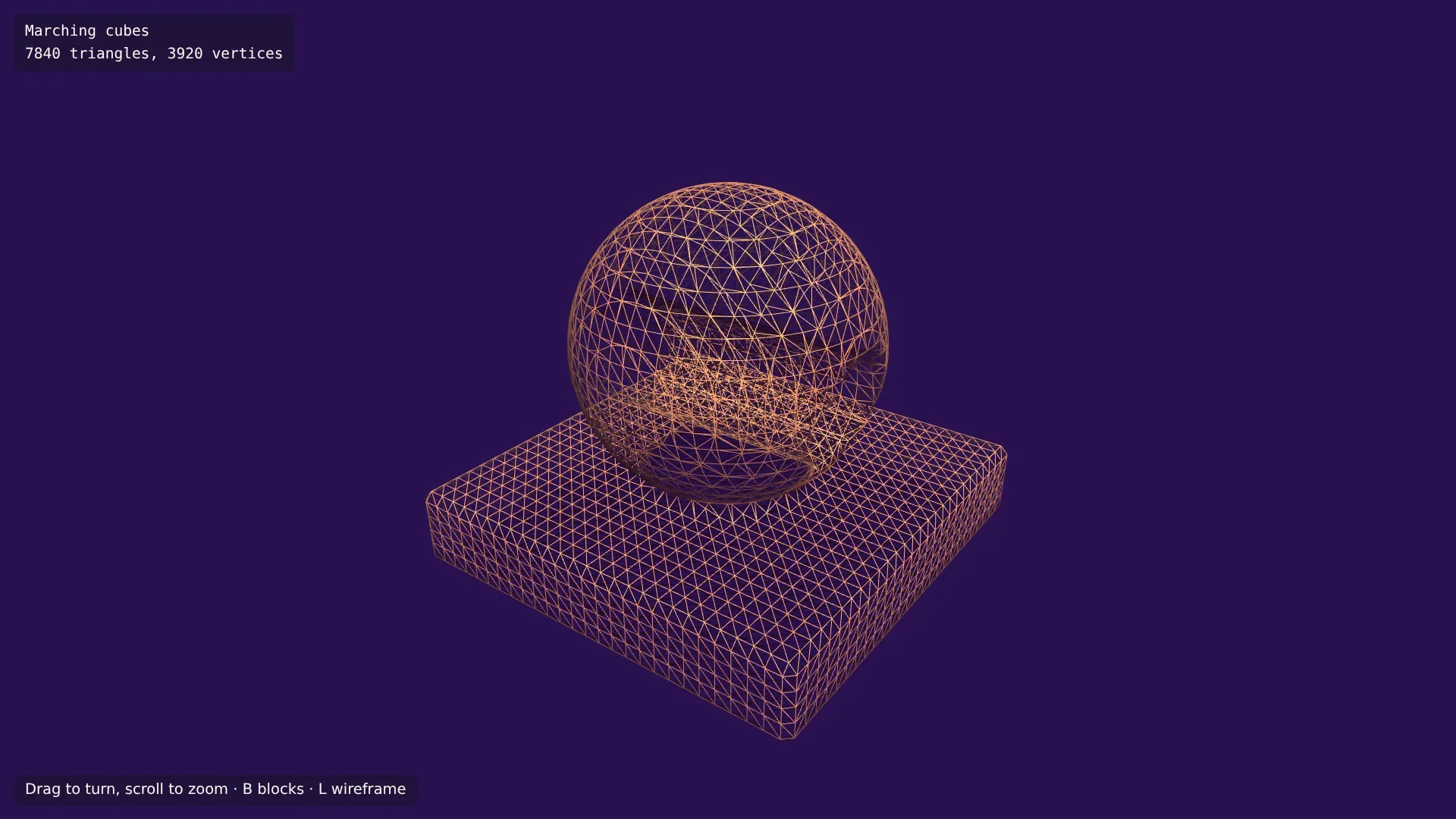
Press B to lay the blocks over it: the smooth surface runs through the blocks, sometimes inside them and sometimes outside. Look at the tunnel's opening. Where the cylinder meets the ball, the shape has a sharp edge, and the mesh chews it off. Marching cubes can only put vertices on the grid's edges, so a corner that falls between them is cut. Other methods, such as dual contouring, keep sharp edges, but terrain has few of them, and the next part's surface nets don't keep them either.
In the next part a second mesher joins: surface nets, which put one vertex inside each cell instead of on its edges.