
Smooth Voxel Terrain in Babylon.js · Part 12 of 12 in the series
Part 12: A Far View to the Horizon
Show the ground beyond the chunks, out to 4.5 km, as a cheap heightfield of rings around the camera that get wider with distance, built in a worker of its own, and joined to the voxel terrain with an overlap the shader hides.
Quest objectives
- Know why far terrain doesn't need voxels
- Build a heightfield of rings whose detail falls off with distance
- Split quads along the shorter diagonal so ridges stay ridges
- Leave out the far ground where the chunks are, and hide the seam
- Use one shader for both, with a define
Everything since part 7 ends in fog 250 m away. Seen from a hill, the world is a lilac wall.
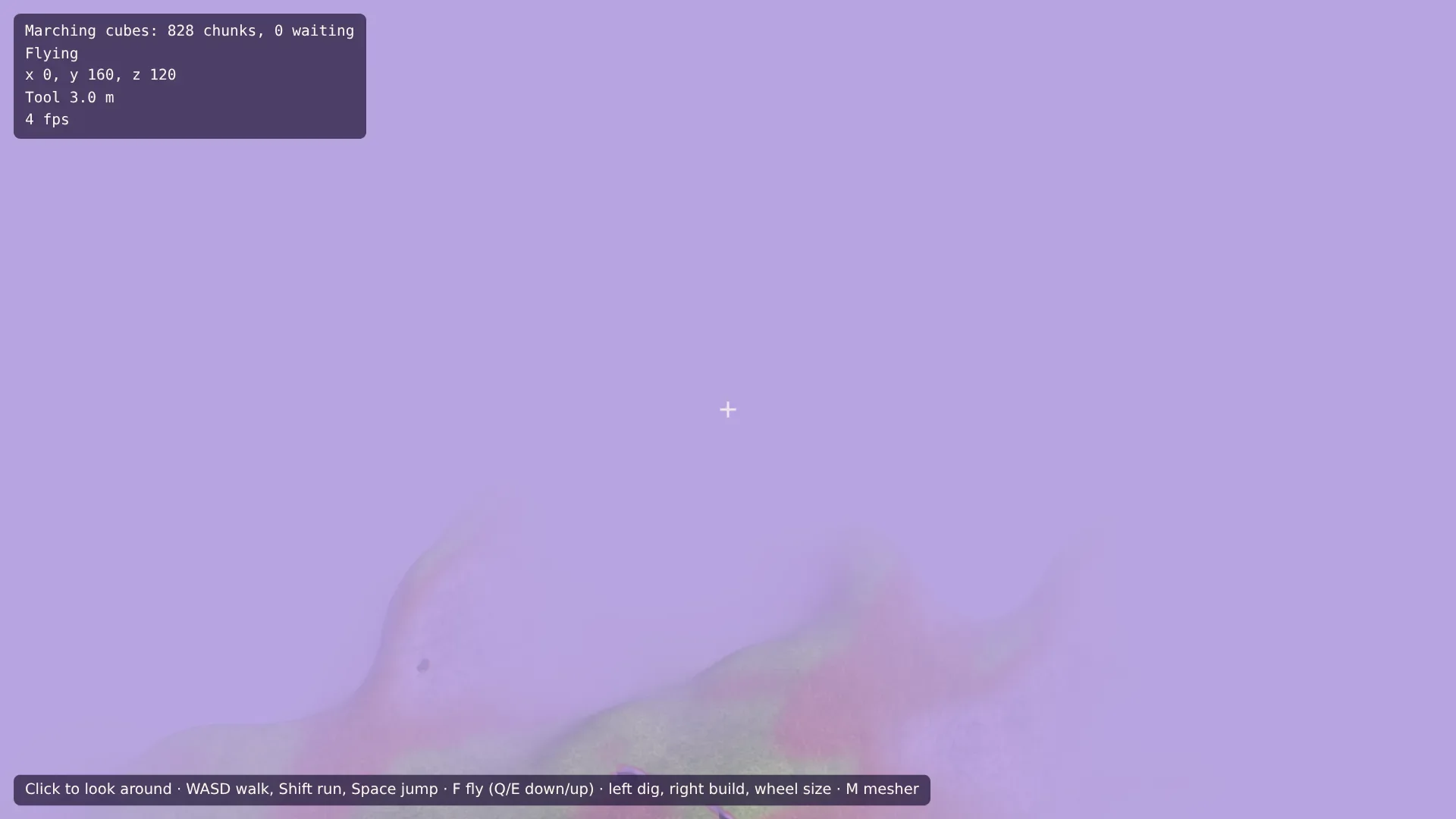
Loading chunks out to the horizon is no answer: their number grows with the square of the distance, and 4 km would be tens of thousands. But far away, voxels have nothing to show. A cave or an overhang 2 km off is a few pixels, if that. What shapes the horizon is the height of the ground, and that is surfaceHeight(), the cheap 2D function from part 4. A heightfield of it, a grid of triangles with one height per point, can reach the horizon for the cost of a few chunks.
Rings
The detail the eye can see falls with distance: a 10 m bump 3 km away is less than a pixel. So the far view is not a square grid but a disc of rings around the camera: 128 rings from 150 m out to 4.5 km, each a little wider than the one before, with 256 points around each. Near the camera the points are a few meters apart, at the horizon about a hundred.
Because every ring has the same number of points, the rings join without gaps, and the whole far view is one mesh, with no seams between levels of detail. Each ring's width is the last one's times the same factor, so the triangles keep their shape from near to far.
The worker
128 × 256 heights take a moment, so the far view is built in a worker of its own, next to the chunk workers. Create src/farWorker.ts:
import type { MeshData } from './meshData.ts';
import { surfaceHeight } from './terrain.ts';

/** Rings from INNER to OUTER meters around the center, each further one wider. */
export const INNER = 150;
export const OUTER = 4500;
const RINGS = 128;
const SEGMENTS = 256;
/** The far ground lies this much lower, so that the chunks win where both are drawn. */
const SINK = 1;

export interface FarJob {
  x: number;
  z: number;
}

/** A heightfield of rings around (x, z), positions from that point. */
self.onmessage = (event: MessageEvent<FarJob>) => {
  const { x, z } = event.data;
  const growth = (OUTER / INNER) ** (1 / (RINGS - 1));
  const positions = new Float32Array(RINGS * SEGMENTS * 3);
  for (let ring = 0; ring < RINGS; ring += 1) {
    const radius = INNER * growth ** ring;
    for (let segment = 0; segment < SEGMENTS; segment += 1) {
      const angle = (segment / SEGMENTS) * Math.PI * 2;
      const px = Math.cos(angle) * radius;
      const pz = Math.sin(angle) * radius;
      positions.set([px, surfaceHeight(x + px, z + pz) - SINK, pz], (ring * SEGMENTS + segment) * 3);
    }
  }

  // Normals from the neighbors: across the ring outwards, and along it.
  const at = (ring: number, segment: number, axis: number) =>
    positions[(Math.min(Math.max(ring, 0), RINGS - 1) * SEGMENTS + ((segment + SEGMENTS) % SEGMENTS)) * 3 + axis];
  const normals = new Float32Array(positions.length);
  for (let ring = 0; ring < RINGS; ring += 1) {
    for (let segment = 0; segment < SEGMENTS; segment += 1) {
      const out = [0, 1, 2].map((axis) => at(ring + 1, segment, axis) - at(ring - 1, segment, axis));
      const along = [0, 1, 2].map((axis) => at(ring, segment + 1, axis) - at(ring, segment - 1, axis));
      // The cross product of the two, turned to point up.
      let nx = out[1] * along[2] - out[2] * along[1];
      let ny = out[2] * along[0] - out[0] * along[2];
      let nz = out[0] * along[1] - out[1] * along[0];
      if (ny < 0) [nx, ny, nz] = [-nx, -ny, -nz];
      const length = Math.hypot(nx, ny, nz);
      normals.set([nx / length, ny / length, nz / length], (ring * SEGMENTS + segment) * 3);
    }
  }

  // Two triangles between each ring and the next, segment by segment, split along the
  // shorter diagonal as in the surface nets: the triangles then follow the ridges.
  const distance = (a: number, b: number) =>
    Math.hypot(
      positions[a * 3] - positions[b * 3],
      positions[a * 3 + 1] - positions[b * 3 + 1],
      positions[a * 3 + 2] - positions[b * 3 + 2],
    );
  const indices = new Uint32Array((RINGS - 1) * SEGMENTS * 6);
  let i = 0;
  for (let ring = 0; ring < RINGS - 1; ring += 1) {
    for (let segment = 0; segment < SEGMENTS; segment += 1) {
      const a = ring * SEGMENTS + segment;
      const b = ring * SEGMENTS + ((segment + 1) % SEGMENTS);
      const c = a + SEGMENTS;
      const d = b + SEGMENTS;
      if (distance(a, d) <= distance(b, c)) indices.set([a, d, b, a, c, d], i);
      else indices.set([a, c, b, b, c, d], i);
      i += 6;
    }
  }

  const mesh: MeshData = { positions, normals, indices };
  self.postMessage(mesh, { transfer: [positions.buffer, normals.buffer, indices.buffer] });
};growthis the factor from one ring to the next: 128 rings from 150 m to 4.5 km grow by 30 times, so each ring is about 2.7 % wider than the last.The normals come from the neighbors: the cross product of the way to the next ring and the way along the ring, turned to point up. No further heights are needed.
The quads between the rings are split along the shorter diagonal, as in the surface nets of part 3. On a ridge that runs at a slant across the rings, a fixed diagonal would cut the crest into a saw blade; the shorter one follows it.
The far ground lies a meter lower than the height says. Where it and the chunks overlap, the chunks then win: the far view would otherwise poke through the ground in dips.
Moving along
The rings are centered near the camera, but not on it: their center snaps to a grid of 64 m, and the far view is built again when the camera reaches a new step. Moving it with the camera every frame would make the far ground swim, its points sliding over the hills. Create src/farView.ts:
import type { Material, Mesh, Scene, Vector3 } from '@babylonjs/core/pure';
import type { FarJob } from './farWorker.ts';
import { createMesh, type MeshData } from './meshData.ts';

/** The far view moves along in steps of this many meters, and is built again each time. */
const STEP = 64;

/** The ground beyond the chunks, to the horizon: a heightfield of the generated heights. */
export class FarView {
  private mesh: Mesh | null = null;
  private center: FarJob | null = null;
  private building: FarJob | null = null;
  private readonly worker = new Worker(new URL('./farWorker.ts', import.meta.url), { type: 'module' });
  private readonly scene: Scene;
  private readonly material: Material;

  constructor(scene: Scene, material: Material) {
    this.scene = scene;
    this.material = material;
    this.worker.onmessage = (event: MessageEvent<MeshData>) => this.show(event.data);
  }

  get vertices(): number {
    return this.mesh?.getTotalVertices() ?? 0;
  }

  /** Once a frame: builds the far view again when the camera has moved a step. */
  update(focus: Vector3): void {
    const x = Math.round(focus.x / STEP) * STEP;
    const z = Math.round(focus.z / STEP) * STEP;
    if (this.building || (this.center?.x === x && this.center.z === z)) return;
    this.building = { x, z };
    this.worker.postMessage(this.building);
  }

  private show(data: MeshData): void {
    this.mesh?.dispose();
    const mesh = createMesh('far view', data, this.scene);
    // The far ground is all surface, under the open sky.
    const count = data.positions.length / 3;
    mesh.setVerticesData('depth', new Float32Array(count), false, 1);
    mesh.setVerticesData('light', new Float32Array(count).fill(1), false, 1);
    mesh.position.set(this.building!.x, 0, this.building!.z);
    mesh.material = this.material;
    mesh.isPickable = false;
    mesh.freezeWorldMatrix();
    this.mesh = mesh;
    this.center = this.building;
    this.building = null;
  }
}
One build at a time: while the worker builds, a new step waits, and the next update() after the result starts the build for wherever the camera is then. The far view uses the terrain material, so it needs a depth, 0 everywhere, and a light, 1 everywhere: it is all surface, all under the open sky.
The seam
Near the camera, the chunks show the ground, with their caves and edits. The far view must not cover them, so the shader leaves it out within 200 m of the camera. The chunks are sure to reach a bit further than that in every direction, so the two overlap in a band, and there is no gap at any angle. In the overlap, the chunks win thanks to the meter of sinking, and beyond it, the far view takes over at a distance where the difference doesn't show.
The far view uses the same shader as the chunks, with a define: FAR switches on a few lines at the start of the fragment shader. In src/terrain.fragment.glsl, add a uniform after the others, and the test at the start of main():
#ifdef FAR
uniform float nearRadius;
#endif

void main() {
#ifdef FAR
  // Near the camera, the chunks show the ground.
  if (distance(vPosition.xz, cameraPosition.xz) < nearRadius) discard;
#endif
  vec3 normal = normalize(vNormal);
  // …
discard drops the pixel. A define makes a separate program of the shader, so the chunks' material doesn't even contain the test.
Two materials, one set of textures
The far view needs its own material, for the define and the radius, but the same textures: painting them twice would waste the time and the memory. Replace src/material.ts:
import {
  Color3,
  Constants,
  RawTexture2DArray,
  ShaderMaterial,
  Texture,
  Vector2,
  Vector3,
  type Scene,
} from '@babylonjs/core/pure';
import fragmentSource from './terrain.fragment.glsl?raw';
import vertexSource from './terrain.vertex.glsl?raw';
import { LAYERS, paintLayers, TEXTURE_SIZE } from './textures.ts';

/** The sky's color, a hazy lilac, which the fog fades to. */
export const SKY = Color3.FromHexString('#b8a4e0');

/** The painted textures, as the layers of one texture array. */
export function createTextures(scene: Scene): RawTexture2DArray {
  const textures = new RawTexture2DArray(
    paintLayers(),
    TEXTURE_SIZE,
    TEXTURE_SIZE,
    LAYERS.length,
    Constants.TEXTUREFORMAT_RGBA,
    scene,
    true,
    false,
    Texture.TRILINEAR_SAMPLINGMODE,
  );
  textures.wrapU = Texture.WRAP_ADDRESSMODE;
  textures.wrapV = Texture.WRAP_ADDRESSMODE;
  // Sharper textures on ground seen at a flat angle.
  textures.anisotropicFilteringLevel = 8;
  return textures;
}

interface TerrainOptions {
  fogStart: number;
  fogEnd: number;
  /** For the far view: the distance from the camera within which it isn't drawn. */
  nearRadius?: number;
}

/** The terrain's material: painted textures, projected from three sides, and lit. */
export function createTerrainMaterial(
  scene: Scene,
  textures: RawTexture2DArray,
  options: TerrainOptions,
): ShaderMaterial {
  const far = options.nearRadius !== undefined;
  const material = new ShaderMaterial(
    far ? 'far terrain' : 'terrain',
    scene,
    { vertexSource, fragmentSource },
    {
      attributes: ['position', 'normal', 'depth', 'light'],
      uniforms: [
        'world', 'viewProjection', 'cameraPosition', 'sunDirection', 'sunColor', 'skyColor',
        'groundColor', 'caveColor', 'lampColor', 'fogColor', 'fogRange', 'nearRadius',
      ],
      samplers: ['layers'],
      defines: far ? ['#define FAR'] : [],
    },
  );
  material.setTexture('layers', textures);

  // A warm, low sun, a cool sky and a dark violet below.
  material.setVector3('sunDirection', new Vector3(0.5, -0.65, -0.55).normalize());
  material.setColor3('sunColor', Color3.FromHexString('#ffd8a8').scale(1.1));
  material.setColor3('skyColor', Color3.FromHexString('#c4b5fd').scale(0.6));
  material.setColor3('groundColor', Color3.FromHexString('#3b1676').scale(0.6));
  // In caves: a faint violet glow, and a warm lamp.
  material.setColor3('caveColor', Color3.FromHexString('#5b21b6').scale(0.3));
  material.setColor3('lampColor', Color3.FromHexString('#fdba74').scale(1.2));
  material.setColor3('fogColor', SKY);
  material.setVector2('fogRange', new Vector2(options.fogStart, options.fogEnd));
  if (far) material.setFloat('nearRadius', options.nearRadius!);
  return material;
}
createTextures() paints the textures once, and createTerrainMaterial() takes them. A nearRadius makes the far material: it adds the define and sets the radius.
Fog to the horizon
Both materials get the same fog, and it moves out: from 1.1 km to the far view's edge. The chunks' edge needs no fog any more, because the far view goes on behind it. Replace src/main.ts. The demo starts high in the air, so that you can see it:
import {
  Engine,
  RegisterEnginesExtensionsEngineRawTexture,
  RegisterRay,
  RegisterShaderMaterial,
  RegisterStandardEngineExtensions,
  RegisterStandardMaterial,
  Scene,
  UniversalCamera,
  Vector3,
} from '@babylonjs/core/pure';
import { FarView } from './farView.ts';
import { OUTER } from './farWorker.ts';
import { Field } from './field.ts';
import { CHUNK_SIZE } from './grid.ts';
import { Input } from './input.ts';
import { createTerrainMaterial, createTextures, SKY } from './material.ts';
import { MESHERS, otherMesher } from './meshers.ts';
import { EYES, Player } from './player.ts';
import { surfaceHeight } from './terrain.ts';
import { DigTool } from './tool.ts';
import { ChunkWorkers } from './workers.ts';
import { VIEW_RADIUS, World } from './world.ts';
import './style.css';

RegisterStandardEngineExtensions();
// For the texture array of the terrain.
RegisterEnginesExtensionsEngineRawTexture();
RegisterShaderMaterial();
// For the tool: the marker's material, and the ray that finds the ground.
RegisterStandardMaterial();
RegisterRay();

const canvas = document.querySelector<HTMLCanvasElement>('#game')!;
const hud = document.querySelector<HTMLElement>('#hud')!;

const engine = new Engine(canvas, true, {}, true);
const scene = new Scene(engine);
scene.clearColor = SKY.toColor4();

// The chunks reach VIEW_RADIUS chunks around the camera, the far view to the horizon.
// The fog is the same for both, and only hides the far view's edge.
const textures = createTextures(scene);
const fog = { fogStart: OUTER * 0.25, fogEnd: OUTER * 0.95 };
const material = createTerrainMaterial(scene, textures, fog);
// The far view leaves out the ground near the camera, which the chunks show. They are
// sure to cover a little less than VIEW_RADIUS chunks.
const nearRadius = (VIEW_RADIUS - 1.75) * CHUNK_SIZE;
const farView = new FarView(scene, createTerrainMaterial(scene, textures, { ...fog, nearRadius }));

const world = new World(scene, material, new ChunkWorkers());

// The camera only looks around: the player and the flying below move it.
const feet = new Vector3(0, surfaceHeight(0, 40) + 1, 40);
const camera = new UniversalCamera('camera', feet.add(new Vector3(0, EYES, 0)), scene);
camera.setTarget(new Vector3(0, surfaceHeight(0, -200) + 20, -200));
camera.inputs.removeByType('FreeCameraKeyboardMoveInput');
camera.minZ = 0.1;
camera.maxZ = OUTER * 1.1;
camera.attachControl();

const input = new Input();
const player = new Player(new Field(world.edits), feet);
// This part starts high in the air, with the far view in sight; F lands.
let mode: 'walk' | 'fly' = 'fly';
camera.position.set(0, 160, 120);
camera.setTarget(new Vector3(0, 110, -100));

/** Flies the camera: WASD along the view, Q and E down and up, Shift faster. */
function fly(dt: number): void {
  const speed = input.pressed('ShiftLeft') ? 60 : 15;
  const forward = camera.getDirection(Vector3.Forward()).scale(input.axis('KeyS', 'KeyW'));
  const right = camera.getDirection(Vector3.Right()).scale(input.axis('KeyA', 'KeyD'));
  camera.position.addInPlace(forward.add(right).scale(speed * dt));
  camera.position.y += input.axis('KeyQ', 'KeyE') * speed * dt;
}

const tool = new DigTool(scene, camera, world);
// The mouse wheel sizes the tool instead of moving the camera.
camera.inputs.removeByType('FreeCameraMouseWheelInput');

// A click captures the mouse, so that it turns the camera without a button held down.
// While it is captured, the left button digs and the right one builds.
canvas.addEventListener('pointerdown', (event) => {
  if (document.pointerLockElement !== canvas) {
    canvas.requestPointerLock();
    return;
  }
  if (event.button === 0) tool.start('dig');
  if (event.button === 2) tool.start('build');
});
window.addEventListener('pointerup', () => tool.stop());
canvas.addEventListener('contextmenu', (event) => event.preventDefault());
canvas.addEventListener('wheel', (event) => tool.resize(-Math.sign(event.deltaY)), { passive: true });

window.addEventListener('keydown', (event) => {
  if (event.code === 'KeyL') material.wireframe = !material.wireframe;
  if (event.code === 'KeyM') world.setMesher(otherMesher(world.mesher));
  if (event.code === 'KeyF') {
    mode = mode === 'walk' ? 'fly' : 'walk';
    // Landing where the camera is: the feet go below the eyes.
    if (mode === 'walk') {
      player.position.copyFrom(camera.position).y -= EYES;
      player.velocity.setAll(0);
    }
  }
});

scene.onBeforeRenderObservable.add(() => {
  // After a stall, such as a tab in the background, one huge step would be no good.
  const dt = Math.min(engine.getDeltaTime() / 1000, 0.05);
  if (mode === 'walk') {
    player.update(dt, input, camera.rotation.y);
    camera.position.copyFrom(player.position).y += EYES;
  } else {
    fly(dt);
  }
  world.update(camera.position);
  farView.update(camera.position);
  tool.update(performance.now());
  const { loaded, waiting } = world.counts;
  const { x, y, z } = camera.position;
  hud.textContent =
    `${MESHERS[world.mesher].label}: ${loaded} chunks, ${waiting} waiting\n` +
    `${mode === 'walk' ? (player.grounded ? 'Walking' : 'In the air') : 'Flying'}\n` +
    `x ${x.toFixed(0)}, y ${y.toFixed(0)}, z ${z.toFixed(0)}\n` +
    `Tool ${tool.radius.toFixed(1)} m, far view ${farView.vertices} vertices\n` +
    `${engine.getFps().toFixed(0)} fps`;
});

engine.runRenderLoop(() => scene.render());
window.addEventListener('resize', () => engine.resize());
Try it
Hills and mountain ranges run out to the horizon and fade into the haze, with snow on the highest crests. Fly towards the mountains: as you get close, the chunks take over from the far view, and the ground gets its overhangs and caves. Press F to land and walk: the horizon stays. The far view is about 33,000 vertices, about as many as eight chunks of rugged ground.
Where to go from here
That's the series: a density field and two ways to mesh it, endless terrain with overhangs and caves, chunks built in workers and streamed around you, textures without texture coordinates, digging and building, walking, cave light and a far view. A few ideas for what's next:
Saving: keep the edits in IndexedDB, as part 9 described, so the holes are still there tomorrow.
Coarser chunks in the distance: chunks of 2 m voxels between the near chunks and the far view would keep caves and overhangs visible further out. The catch is the seam between chunks of different sizes, which is what the Transvoxel algorithm solves.
Speed: sampling and meshing are plain arithmetic on arrays. Written in Rust or C and compiled to WebAssembly, the same code can run on the page and in the workers, often faster.
A world to live in: water in the low places, plants that grow on the grass layer, and objects that fall when you dig the ground away under them.
The code of every part is in the demos, which play right here in the series. Have fun digging.