Bauen auf Voxel-Terrain in Babylon.js · Teil 4 von 10 der Serie
Teil 4: Ein Meißel für runde Kanten
Runde Blockkanten mit einem Meißel: zwölf Bits pro Block, eine Form aus acht Oktanten, je eine Box, ein Viertelzylinder, zwei gekreuzte Zylinder oder ein Kugelachtel, ihr vorzeichenbehafteter Abstand fürs Gehen, und ein Werkzeug, das die anvisierte Kante, Ecke oder Seite aufleuchten lässt.
Quest-Ziele
- Die zwölf Kanten eines Würfels nummerieren und die gerundeten eines Blocks in seinen Bits halten
- Jede Rundung aus acht Oktanten von vier Arten bauen und ihre Kurven zusammenpassen lassen
- Getrennt halten, was flach auf einer Seite liegt, damit Nachbarn es weiter verdecken können
- Den vorzeichenbehafteten Abstand zu einem gerundeten Block ausrechnen, damit die Spielfigur auf seinen Kurven geht
- Auf eine Kante, eine Ecke oder eine Seite zielen und sie mit einem Klick runden oder schärfen
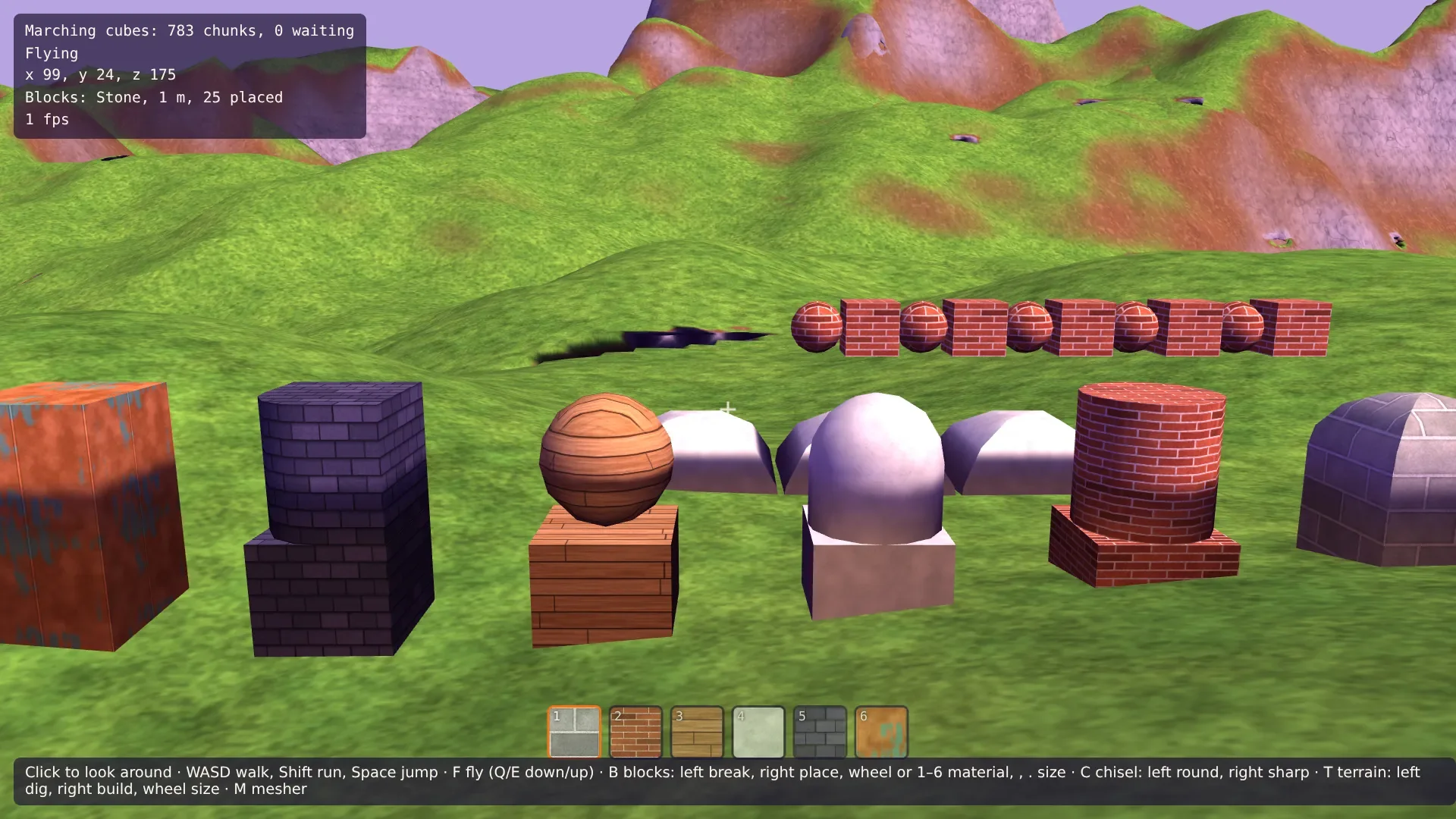
Ein Block ist ein Würfel, mit zwölf scharfen Kanten. Runde einige davon, und er wird etwas anderes: Runde die vier aufrechten Kanten, und du hast eine Säule, runde alle zwölf, und du hast eine Kugel, runde die vier oberen und die vier aufrechten, und du hast eine Kuppel. Wer Kanten runden kann, eine nach der anderen, bekommt Bögen, Säulen, gerundete Mauerkronen und gewölbte Türme aus denselben Blöcken.
Dieser Teil bringt einen Meißel. Ziel mit ihm auf eine Kante eines Blocks, und ein Klick rundet sie; ziel nahe einer Ecke, und er rundet die drei Kanten der Ecke; ziel auf die Mitte einer Seite, und er rundet ihre vier. Ein Rechtsklick macht sie wieder scharf.
Zwölf Bits
Welche Kanten eines Blocks gerundet sind, passt in eine Zahl: ein Bit pro Kante, 4.096 mögliche Formen. Die Kanten brauchen Nummern. Eine Kante läuft entlang einer Achse und liegt am einen oder anderen Ende der beiden anderen Achsen: vier Kanten pro Achse, zwölf insgesamt. Die Kanten 0 bis 3 laufen entlang x, 4 bis 7 entlang y, 8 bis 11 entlang z, und innerhalb einer Achse machen die beiden Enden den Rest der Nummer aus.
Ein Block bekommt ein Feld dafür. Ergänze in src/blocks.ts in Block:
/** A bit for each rounded edge, by the edge's number (see shapes.ts). */
cuts: number;
Und eine Methode in BlockStore, die die Form ändert und es den Meshes sagt:
/** Rounds a block's edges, or makes them sharp again. */
reshape(block: Block, cuts: number): void {
  if (block.cuts === cuts) return;
  block.cuts = cuts;
  this.onChange(block);
}
Acht Oktanten
4.096 Formen sind zu viele, um sie von Hand zu modellieren, und die meisten bestehen aus denselben wenigen Stücken. Schneide den Würfel in acht Oktanten, einen pro Ecke, jeder einen halben Block auf jeder Seite. An einer Ecke treffen sich drei Kanten, und sie laufen am Oktanten entlang. Gib einer gerundeten Kante nun einen Radius von einem halben Block. Dann liegt ihre Kurve ganz in den beiden Oktanten entlang der Kante, und das Stück der Form in einem Oktanten hängt nur davon ab, wie viele seiner eigenen drei Kanten gerundet sind:
Keine: eine Box. Ihre drei äußeren Seiten liegen auf den Seiten des Blocks.
Eine: ein Viertelzylinder entlang dieser Kante, der in einer Viertelscheibe auf der Seite endet, in die er läuft. Die anderen beiden Seiten sind weg: Die Kurve beginnt, wo sie wären.
Zwei: zwei sich kreuzende Zylinder, jeder entlang seiner Kante nur so weit, wie er im anderen liegt. Sie treffen sich entlang einer Kurve, wie das Gewölbe, wo sich zwei Tonnendächer kreuzen.
Alle drei: ein Achtel einer Kugel.
Eine Säule sind also acht Oktanten mit je einer aufrechten Kante, und eine Kugel sind acht Achtel einer Kugel. Jedes Stück ist leicht zu bauen, und die acht schließen sich zu einer Form, wenn ihre Kurven zusammenpassen: Der Zylinder in einem Oktanten muss enden, wo die Kugel im nächsten beginnt. Also wird jede Kurve gleich geschnitten, in dieselben vier Stücke pro Viertelkreis, und benachbarte Stücke teilen ihre Punkte genau.
Beginne src/shapes.ts mit den Teilen der Form und den Nummern der Kanten. Eine Form hält getrennt, was flach auf jeder der sechs Seiten liegt, vom Rest: Ein Nachbar kann eine flache Seite verdecken, aber nichts kann eine Kurve verdecken.
/**
 * The shapes of blocks, in a cube from 0 to 1 on every axis: a plain cube, or one with
 * some of its twelve edges rounded. A block's `cuts` has a bit for each edge.
 */

/** Segments of a quarter circle. */
const SEGMENTS = 4;
/** The radius of a rounded edge: half the block. */
const R = 0.5;

type Vec = [number, number, number];

/** Triangles as plain lists: positions, normals and indices. */
export interface ShapeMesh {
  positions: number[];
  normals: number[];
  indices: number[];
}

export interface Shape {
  /** What lies flat on each side of the cube, by side: -x, +x, -y, +y, -z, +z. */
  sides: ShapeMesh[];
  /** The rest, which no neighbor can cover. */
  inner: ShapeMesh;
  /** A bit for each side the shape covers whole. */
  fullSides: number;
}

/** A side's number: -x, +x, -y, +y, -z, +z. */
export const sideOf = (axis: number, dir: number) => axis * 2 + (dir > 0 ? 1 : 0);

/**
 * An edge's number. The edge runs along `axis`; `ends` says at which end of the other two
 * axes it lies, 0 or 1 (the entry for `axis` itself doesn't count). Edges 0 to 3 run
 * along x, 4 to 7 along y, 8 to 11 along z.
 */
export function edgeOf(axis: number, ends: number[]): number {
  return axis * 4 + ends[(axis + 1) % 3] + 2 * ends[(axis + 2) % 3];
}

/** The edges of a block that meet at a corner, given by its ends on the three axes. */
export function cornerEdges(ends: number[]): number[] {
  return [0, 1, 2].map((axis) => edgeOf(axis, ends));
}

/** The four edges around a side. */
export function sideEdges(axis: number, dir: number): number[] {
  const edges: number[] = [];
  for (const other of [(axis + 1) % 3, (axis + 2) % 3]) {
    const along = 3 - axis - other;
    for (const end of [0, 1]) {
      const ends = [0, 0, 0];
      ends[axis] = dir > 0 ? 1 : 0;
      ends[other] = end;
      edges.push(edgeOf(along, ends));
    }
  }
  return edges;
}
cornerEdges() und sideEdges() sind für den Meißel: die drei Kanten einer Ecke, die vier um eine Seite. Als Nächstes kleine Vektor-Helfer und die Art, eine Kurve zu schneiden. Punkte entlang eines Viertelkreises werden auf der geraden Linie zwischen seinen beiden Enden genommen und auf den Kreis hinausgeschoben. Das verteilt sie ein wenig ungleich, was niemand sieht, und es funktioniert genauso für die Bögen einer Kugel, wo die Linie zwischen drei Ecken läuft. Ergänze in src/shapes.ts:
const unit = (axis: number): Vec => [axis === 0 ? 1 : 0, axis === 1 ? 1 : 0, axis === 2 ? 1 : 0];
const add = (a: Vec, b: Vec): Vec => [a[0] + b[0], a[1] + b[1], a[2] + b[2]];
const scale = (a: Vec, s: number): Vec => [a[0] * s, a[1] * s, a[2] * s];
const normalize = (a: Vec): Vec => scale(a, 1 / Math.hypot(...a));

/**
 * The point k / SEGMENTS of the way round a quarter circle, from `from` to `to`, both
 * one unit long: on the straight line between them, pushed out onto the circle. Every
 * curve is cut the same way, so the curves of neighboring pieces meet point for point.
 */
function arc(from: Vec, to: Vec, k: number): Vec {
  return normalize(add(scale(from, SEGMENTS - k), scale(to, k)));
}

function emptyMesh(): ShapeMesh {
  return { positions: [], normals: [], indices: [] };
}

/**
 * Adds a triangle that faces the way its normals lean. Babylon.js draws the front of a
 * triangle (a, b, c) where cross(a - b, c - b) points; the other order turns it around.
 */
function triangle(mesh: ShapeMesh, points: Vec[], normals: Vec[]): void {
  const [a, b, c] = points;
  const ab = [a[0] - b[0], a[1] - b[1], a[2] - b[2]];
  const cb = [c[0] - b[0], c[1] - b[1], c[2] - b[2]];
  const facing = [ab[1] * cb[2] - ab[2] * cb[1], ab[2] * cb[0] - ab[0] * cb[2], ab[0] * cb[1] - ab[1] * cb[0]];
  const lean = add(add(normals[0], normals[1]), normals[2]);
  const dot = facing[0] * lean[0] + facing[1] * lean[1] + facing[2] * lean[2];
  // Two points in the same place: no triangle at all.
  if (Math.abs(dot) < 1e-12) return;
  const order = dot > 0 ? [0, 1, 2] : [0, 2, 1];
  const first = mesh.positions.length / 3;
  for (const i of order) {
    mesh.positions.push(...points[i]);
    mesh.normals.push(...normals[i]);
  }
  mesh.indices.push(first, first + 1, first + 2);
}

/** Two triangles for four points in order around them. */
function quad(mesh: ShapeMesh, points: Vec[], normals: Vec[]): void {
  triangle(mesh, [points[0], points[1], points[2]], [normals[0], normals[1], normals[2]]);
  triangle(mesh, [points[0], points[2], points[3]], [normals[0], normals[2], normals[3]]);
}
triangle() dreht jedes Dreieck so, dass es dorthin schaut, wohin sich seine Normalen neigen, also müssen sich die Stücke nicht um die Reihenfolge ihrer Punkte kümmern. Ein Dreieck, dessen Punkte zusammenfallen, wird weggelassen: Ein Zylinder, der an seinem Ende auf nichts zugeschnitten ist, hinterlässt eines.
Nun die Form selbst. Jeder Oktant arbeitet in seinem eigenen Rahmen: von der Mitte des Würfels aus, hinaus zu seiner Ecke auf allen drei Achsen, damit derselbe Code alle acht baut. at() und out() machen aus seinen Punkten und Normalen die des Würfels. Ergänze in src/shapes.ts:
/**
 * The shape with the edges in `cuts` rounded. The cube is cut into eight octants, one
 * per corner, each half a block on every side. In an octant three edges meet, and its
 * piece of the shape depends only on how many of them are rounded: none, a box; one, a
 * quarter cylinder along it; two, two crossing cylinders; all three, an eighth of a ball.
 */
function roundShape(cuts: number): Shape {
  const shape: Shape = { sides: [0, 1, 2, 3, 4, 5].map(emptyMesh), inner: emptyMesh(), fullSides: 0 };
  // A side is whole while none of its octants has a rounded edge.
  let notWhole = 0;
  for (let corner = 0; corner < 8; corner += 1) {
    const ends = [corner & 1, (corner >> 1) & 1, (corner >> 2) & 1];
    const sign = ends.map((end) => (end ? 1 : -1));
    // Points and normals in the octant go out from the middle of the cube, toward the
    // corner on every axis: `at` and `out` turn them into the cube's own.
    const at = (o: Vec): Vec => [0.5 + sign[0] * o[0], 0.5 + sign[1] * o[1], 0.5 + sign[2] * o[2]];
    const out = (n: Vec): Vec => [sign[0] * n[0], sign[1] * n[1], sign[2] * n[2]];
    const rounded = [0, 1, 2].filter((axis) => cuts & (1 << edgeOf(axis, ends)));
    if (rounded.length > 0) for (let axis = 0; axis < 3; axis += 1) notWhole |= 1 << sideOf(axis, sign[axis]);
    // Two points along a curve and the same two moved along the axis by their lengths.
    const strip = (mesh: ShapeMesh, k: number, curve: (k: number) => Vec, axis: number, length: (p: Vec) => number) => {
      const [p, q] = [curve(k), curve(k + 1)];
      const [np, nq] = [normalize(p), normalize(q)];
      const points = [p, q, add(q, scale(unit(axis), length(q))), add(p, scale(unit(axis), length(p)))];
      quad(mesh, points.map(at), [np, nq, nq, np].map(out));
    };

    if (rounded.length === 0) {
      // A box: a square on each of the octant's three outer sides.
      for (let axis = 0; axis < 3; axis += 1) {
        const [b, c] = [unit((axis + 1) % 3), unit((axis + 2) % 3)];
        const base = scale(unit(axis), R);
        const points = [base, add(base, scale(b, R)), add(add(base, scale(b, R)), scale(c, R)), add(base, scale(c, R))];
        quad(shape.sides[sideOf(axis, sign[axis])], points.map(at), Array(4).fill(out(unit(axis))));
      }
    } else if (rounded.length === 1) {
      // A quarter cylinder along the rounded edge, and its end, a quarter disc on the side.
      const [axis] = rounded;
      const [b, c] = [unit((axis + 1) % 3), unit((axis + 2) % 3)];
      const curve = (k: number) => scale(arc(b, c, k), R);
      const cap = scale(unit(axis), R);
      for (let k = 0; k < SEGMENTS; k += 1) {
        strip(shape.inner, k, curve, axis, () => R);
        triangle(
          shape.sides[sideOf(axis, sign[axis])],
          [cap, add(cap, curve(k)), add(cap, curve(k + 1))].map(at),
          Array(3).fill(out(unit(axis))),
        );
      }
    } else if (rounded.length === 2) {
      // Two cylinders, each along its edge only as far as it lies inside the other. The
      // cylinder along a reaches as far along a as its curve is out along b.
      const [a, b] = rounded;
      const c = 3 - a - b;
      const curveA = (k: number) => scale(arc(unit(b), unit(c), k), R);
      const curveB = (k: number) => scale(arc(unit(a), unit(c), k), R);
      for (let k = 0; k < SEGMENTS; k += 1) {
        strip(shape.inner, k, curveA, a, (p) => p[b]);
        strip(shape.inner, k, curveB, b, (p) => p[a]);
      }
    } else {
      // An eighth of a ball: a triangle of points, each pushed out onto the ball.
      const point = (i: number, j: number) =>
        scale(normalize(add(add(scale(unit(0), i), scale(unit(1), j)), scale(unit(2), SEGMENTS - i - j))), R);
      const ball = (points: Vec[]) =>
        triangle(shape.inner, points.map(at), points.map((p) => out(normalize(p))));
      for (let i = 0; i < SEGMENTS; i += 1) {
        for (let j = 0; j < SEGMENTS - i; j += 1) {
          ball([point(i, j), point(i + 1, j), point(i, j + 1)]);
          if (i + j + 1 < SEGMENTS) ball([point(i + 1, j), point(i + 1, j + 1), point(i, j + 1)]);
        }
      }
    }
  }
  shape.fullSides = 0b111111 & ~notWhole;
  return shape;
}strip()macht ein Stück eines Zylinders: zwei benachbarte Punkte seiner Kurve und dieselben zwei entlang der Achse des Zylinders verschoben. Die Länge kann sich pro Punkt unterscheiden, und genau das schneidet einen Zylinder am anderen zu.Bei zwei gerundeten Kanten a und b reicht der Zylinder entlang a nur so weit entlang a, wie seine Kurve entlang b hinausreicht. Wo beide gleich weit draußen sind, treffen sich die zwei Zylinder.
Das Achtel der Kugel ist ein Dreieck aus Punkten zwischen ihren drei Achsen, jeder auf die Kugel hinausgeschoben, und an seinem Rand dieselben Punkte wie die Kurven der Zylinder.
Eine Seite ist nur ganz, wenn keiner ihrer vier Oktanten eine gerundete Kante hat. Eine ganze Seite kann die Seite eines Nachbarn verdecken.
Eine Form wird einmal gemacht und behalten, nach ihren Schnitten. Ergänze in src/shapes.ts:
const shapes = new Map<number, Shape>();

/** The shape of a block with the edges in `cuts` rounded, made once and kept. */
export function shapeOf(cuts: number): Shape {
  let shape = shapes.get(cuts);
  if (!shape) {
    shape = roundShape(cuts);
    shapes.set(cuts, shape);
  }
  return shape;
}
Formen vernetzen
Der Mesher setzt jetzt die Form jedes Blocks, auf den Block skaliert, statt sechs Quadraten. Der innere Teil, die Kurven, wird immer gezeichnet. Eine Seite wird gezeichnet, außer die Zellen dahinter halten Blöcke, deren eigene Seiten dort ganz sind: Ein gerundeter Nachbar verdeckt dich nicht mehr. Ersetze src/blockMesher.ts:
import { CELL, type Block, type BlockStore } from './blocks.ts';
import { MeshBuilder, type MeshData } from './meshData.ts';
import { shapeOf, sideOf, type ShapeMesh } from './shapes.ts';

/** A mesh of blocks, with the material of every vertex. Positions are in meters. */
export interface BlockMesh extends MeshData {
  materials: Float32Array;
}

/** A side of a box: the axis it faces along, and which way, -1 or 1. */
export interface Side {
  axis: number;
  dir: number;
}

/** The six sides of a box: -x, +x, -y, +y, -z, +z. */
export const SIDES: Side[] = [0, 1, 2].flatMap((axis) => [-1, 1].map((dir) => ({ axis, dir })));

/**
 * Whether blocks fill every cell right beyond a side of a block, each with its own side
 * there whole. Then that side can't be seen, and is left out.
 */
export function covered(store: BlockStore, block: Block, { axis, dir }: Side): boolean {
  const cell = [block.x, block.y, block.z];
  cell[axis] = dir > 0 ? cell[axis] + block.size : cell[axis] - 1;
  const u = (axis + 1) % 3;
  const v = (axis + 2) % 3;
  const from = [...cell];
  const facing = 1 << sideOf(axis, -dir);
  for (let a = 0; a < block.size; a += 1) {
    for (let b = 0; b < block.size; b += 1) {
      cell[u] = from[u] + a;
      cell[v] = from[v] + b;
      const other = store.at(cell[0], cell[1], cell[2]);
      if (!other || !(shapeOf(other.cuts).fullSides & facing)) return false;
    }
  }
  return true;
}

/** Meshes blocks: each block's shape, without the sides its neighbors cover. */
export function meshBlocks(blocks: Iterable<Block>, store: BlockStore): BlockMesh | null {
  const builder = new MeshBuilder();
  const materials: number[] = [];
  for (const block of blocks) {
    const shape = shapeOf(block.cuts);
    const meters = block.size * CELL;
    const parts: ShapeMesh[] = [shape.inner];
    SIDES.forEach((side, s) => {
      if (!covered(store, block, side)) parts.push(shape.sides[s]);
    });
    // The shape is a unit cube: scaled to the block and moved to its place.
    for (const { positions, normals, indices } of parts) {
      const vertices: number[] = [];
      for (let i = 0; i < positions.length; i += 3) {
        materials.push(block.material);
        vertices.push(builder.vertex(
          block.x * CELL + positions[i] * meters,
          block.y * CELL + positions[i + 1] * meters,
          block.z * CELL + positions[i + 2] * meters,
          normals[i],
          normals[i + 1],
          normals[i + 2],
        ));
      }
      for (let i = 0; i < indices.length; i += 3) {
        builder.triangle(vertices[indices[i]], vertices[indices[i + 1]], vertices[indices[i + 2]]);
      }
    }
  }
  if (materials.length === 0) return null;
  return { ...builder.build(), materials: new Float32Array(materials) };
}
Auf Kurven gehen
Die Spielfigur soll über einen gerundeten Block gehen, nicht über die Box um ihn herum. Eine gerundete Form ist die Box, von der Teile weggenommen sind, also ist ihr vorzeichenbehafteter Abstand der der Box oder der einer Kurve, je nachdem, welcher größer ist: Ein Punkt liegt nur in der Form, wenn er in allen liegt. Für einen Punkt in einem Oktanten sind das die Zylinder der gerundeten Kanten des Oktanten, oder die Kugel, wenn alle drei es sind. Der Abstand eines Zylinders ist der Abstand des Punkts von seiner Achse weniger dem Radius, und die Achse läuft durch die Mitte des Würfels. Ergänze den Rest in src/shapes.ts:
/** How far a point is from a shape, and which way is out. */
export interface ShapeDistance {
  /** Below 0 inside. */
  distance: number;
  normal: Vec;
}

/**
 * The signed distance from a point of the cube to a shape. The box gives one distance,
 * each rounded edge of the point's octant another: the cylinder's or the ball's. The
 * shape is inside all of them, so the largest one counts. Inside the box, the way out
 * is through the nearest side for which `isOpen(side)` says yes, or up.
 */
export function shapeDistance(
  cuts: number,
  x: number,
  y: number,
  z: number,
  isOpen: (side: number) => boolean,
): ShapeDistance {
  // From the middle of the cube.
  const p: Vec = [x - 0.5, y - 0.5, z - 0.5];
  const q = p.map((c) => Math.abs(c) - R);
  const outside = q.map((c) => Math.max(c, 0));
  const length = Math.hypot(...outside);
  let nearest: ShapeDistance;
  if (length > 0) {
    // Out of the box from its nearest point.
    nearest = { distance: length, normal: outside.map((c, axis) => (c / length) * Math.sign(p[axis])) as Vec };
  } else {
    // Inside the box: each side's plane is dir × p[axis] - R away, below 0.
    let side = 3;
    let distance = -Infinity;
    for (let s = 0; s < 6; s += 1) {
      const d = (s % 2 ? 1 : -1) * p[Math.floor(s / 2)] - R;
      if (d > distance && isOpen(s)) {
        side = s;
        distance = d;
      }
    }
    if (distance === -Infinity) distance = p[1] - R;
    const normal: Vec = [0, 0, 0];
    normal[Math.floor(side / 2)] = side % 2 ? 1 : -1;
    nearest = { distance, normal };
  }
  if (cuts === 0) return nearest;

  const ends = p.map((c) => (c > 0 ? 1 : 0));
  const sign = ends.map((end) => (end ? 1 : -1));
  const a = p.map(Math.abs);
  const rounded = [0, 1, 2].filter((axis) => cuts & (1 << edgeOf(axis, ends)));
  // Each rounded edge's surface: the ball's when all three are, else a cylinder's.
  const curves = rounded.length === 3 ? [-1] : rounded;
  for (const axis of curves) {
    const along = [0, 1, 2].map((other) => (other === axis ? 0 : a[other]));
    const l = Math.hypot(...along);
    if (l === 0 || l - R <= nearest.distance) continue;
    nearest = { distance: l - R, normal: along.map((c, other) => (c / l) * sign[other]) as Vec };
  }
  return nearest;
}
Der Box-Teil ist der aus Teil 3, im Einheitswürfel gemessen. Der größte von mehreren vorzeichenbehafteten Abständen ist nicht überall der genaue Abstand zu ihrer Schnittmenge, nur nahe ihren Oberflächen. Mehr braucht die Spielfigur nicht. Ersetze in src/solids.ts blockDistance(), das jetzt den Abstand der Form auf den Block skaliert, und importiere shapeDistance aus ./shapes.ts:
/**
 * The distance from a point to a block, below 0 inside it: the distance to its shape,
 * scaled from the unit cube to the block. Inside, the way out is through the nearest side
 * for which `isOpen(side)` says yes, by the side's number in SIDES.
 */
export function blockDistance(
  block: Block,
  x: number,
  y: number,
  z: number,
  isOpen: (side: number) => boolean = () => true,
): Surface {
  const meters = block.size * CELL;
  const { distance, normal } = shapeDistance(
    block.cuts,
    (x - block.x * CELL) / meters,
    (y - block.y * CELL) / meters,
    (z - block.z * CELL) / meters,
    isOpen,
  );
  return { distance: distance * meters, normal };
}
Auf einen Block zielen
Zwei Werkzeuge zielen jetzt auf Blöcke, also zieht das Zielen in eine eigene Datei. Auf einem gerundeten Block sagt die Normale wenig über die Seite: Auf der Kurve neigt sie sich zwischen zwei. Also ist die Seite die Achse, entlang der der getroffene Punkt am weitesten von der Mitte des Blocks liegt. Auf einer ebenen Seite ist das dasselbe wie bisher. Lege src/aim.ts an:
import { Vector3, type Camera, type Scene } from '@babylonjs/core/pure';
import { CELL, type Block, type BlockStore } from './blocks.ts';

/** Where the camera looks: at a side of a block's box, or at the ground. */
export type Aim =
  | { kind: 'block'; block: Block; axis: number; dir: number; point: Vector3 }
  | { kind: 'ground'; point: Vector3; normal: Vector3 };

/** What the camera's ray hits first within `reach` meters. */
export function aimAt(scene: Scene, camera: Camera, store: BlockStore, reach: number): Aim | null {
  const hit = scene.pickWithRay(camera.getForwardRay(reach));
  if (!hit?.pickedPoint || !hit.pickedMesh) return null;
  const point = hit.pickedPoint;
  const normal = hit.getNormal(true) ?? Vector3.Up();
  if (hit.pickedMesh.metadata === 'blocks') {
    // A point just inside the surface that was hit is in the block's cells.
    const inside = point.subtract(normal.scale(0.01));
    const block = store.at(Math.floor(inside.x / CELL), Math.floor(inside.y / CELL), Math.floor(inside.z / CELL));
    if (block) {
      // The side of the box the point is nearest to, also on a rounded surface: the
      // axis along which it lies furthest from the block's middle.
      const meters = block.size * CELL;
      const local = [point.x - block.x * CELL, point.y - block.y * CELL, point.z - block.z * CELL].map(
        (c) => c / meters - 0.5,
      );
      const axis = [0, 1, 2].reduce((best, a) => (Math.abs(local[a]) > Math.abs(local[best]) ? a : best));
      return { kind: 'block', block, axis, dir: Math.sign(local[axis]) || 1, point };
    }
  }
  return { kind: 'ground', point, normal };
}
Das Block-Werkzeug nutzt es und exportiert seine Markierung und seine Reichweite für den Meißel. Neue Blöcke beginnen scharf. Ersetze src/buildTool.ts:
import { Color3, CreateBox, StandardMaterial, type Camera, type Mesh, type Scene } from '@babylonjs/core/pure';
import { aimAt, type Aim } from './aim.ts';
import { CELL, type Block, type BlockStore } from './blocks.ts';

/** How far the player reaches with blocks, in meters. */
export const REACH = 12;
/** The sizes of blocks, in cells: 0.5, 1 and 2 m. */
export const SIZES = [1, 2, 4];
/** Milliseconds between blocks while a mouse button is held down. */
const REPEAT = 200;

/** A see-through box that marks a place, never in the way of the camera's ray. */
export function createMarker(name: string, scene: Scene): Mesh {
  const marker = CreateBox(name, { size: 1 }, scene);
  const material = new StandardMaterial(name, scene);
  material.disableLighting = true;
  material.alpha = 0.3;
  marker.material = material;
  marker.isPickable = false;
  marker.isVisible = false;
  return marker;
}

/** Places a marker over a box of cells. `grow` makes it a little bigger than the box. */
function placeMarker(marker: Mesh, x: number, y: number, z: number, size: number, grow = 0): void {
  const meters = size * CELL;
  marker.position.set((x + size / 2) * CELL, (y + size / 2) * CELL, (z + size / 2) * CELL);
  marker.scaling.setAll(meters + grow);
  marker.isVisible = true;
}

/** Places blocks where the camera looks and breaks them. */
export class BlockTool {
  /** The material of the next block, by its number. */
  material = 0;
  /** The size of the next block, in cells. */
  size = 2;
  /** Whether a block may go somewhere, besides fitting between the other blocks. */
  canPlace: (block: Block) => boolean = () => true;
  /** What the button held down does, again and again. */
  private held: 'break' | 'place' | null = null;
  /** A click not acted on yet: even a short one between two frames counts. */
  private clicked: 'break' | 'place' | null = null;
  private lastEdit = 0;
  /** Where a right click puts a block: orange, or red where it doesn't fit. */
  private readonly ghost: Mesh;
  /** The block a left click breaks. */
  private readonly target: Mesh;
  private readonly scene: Scene;
  private readonly camera: Camera;
  private readonly store: BlockStore;

  constructor(scene: Scene, camera: Camera, store: BlockStore) {
    this.scene = scene;
    this.camera = camera;
    this.store = store;
    this.ghost = createMarker('ghost', scene);
    this.target = createMarker('target', scene);
    (this.target.material as StandardMaterial).emissiveColor = Color3.FromHexString('#fff7ed');
    (this.target.material as StandardMaterial).alpha = 0.15;
  }

  start(action: 'break' | 'place'): void {
    this.held = action;
    this.clicked = action;
  }

  stop(): void {
    this.held = null;
  }

  /** Makes the next block bigger or smaller by `steps` sizes. */
  resize(steps: number): void {
    const index = Math.min(Math.max(SIZES.indexOf(this.size) + steps, 0), SIZES.length - 1);
    this.size = SIZES[index];
  }

  hide(): void {
    this.ghost.isVisible = false;
    this.target.isVisible = false;
  }

  update(now: number): void {
    this.hide();
    const aim = aimAt(this.scene, this.camera, this.store, REACH);
    if (!aim) {
      this.clicked = null;
      return;
    }
    const block = this.placement(aim);
    const fits = this.store.fits(block.x, block.y, block.z, block.size) && this.canPlace(block);
    placeMarker(this.ghost, block.x, block.y, block.z, block.size);
    (this.ghost.material as StandardMaterial).emissiveColor = Color3.FromHexString(fits ? '#f97316' : '#ef4444');
    if (aim.kind === 'block') {
      const { x, y, z, size } = aim.block;
      placeMarker(this.target, x, y, z, size, 0.02);
    }

    const action = this.clicked ?? (now - this.lastEdit >= REPEAT ? this.held : null);
    this.clicked = null;
    if (!action) return;
    this.lastEdit = now;
    if (action === 'break' && aim.kind === 'block') this.store.remove(aim.block);
    if (action === 'place' && fits) this.store.add(block);
  }

  /** The block a right click would put down. */
  private placement(aim: Aim): Block {
    const size = this.size;
    // A block lines up with the blocks of its own size: a 1 m block starts at whole meters.
    const snap = (meters: number) => Math.floor(meters / CELL / size) * size;
    const material = this.material;
    if (aim.kind === 'ground') {
      // The block around a point just above the ground.
      const p = aim.point.add(aim.normal.scale(0.05));
      return { x: snap(p.x), y: snap(p.y), z: snap(p.z), size, material, cuts: 0 };
    }
    // Against the side that was hit, and across it where the ray hit it.
    const { block, axis, dir, point } = aim;
    const low = [snap(point.x), snap(point.y), snap(point.z)];
    const from = [block.x, block.y, block.z];
    low[axis] = dir > 0 ? from[axis] + block.size : from[axis] - size;
    return { x: low[0], y: low[1], z: low[2], size, material, cuts: 0 };
  }
}
Der Meißel
Wohin auf einem Block zielt der Meißel? Schau auf der getroffenen Seite, wo der Punkt quer darauf liegt, von 0 bis 1 auf ihren beiden Achsen. Innerhalb eines Viertels von einem Rand auf beiden Achsen liegt er nahe einer Ecke; auf einer, nahe einer Kante; auf keiner, in der Mitte. Die Markierung folgt: ein kleiner Würfel an einer Ecke, ein dünner Balken entlang einer Kante, eine dünne Platte auf einer Seite. Lege src/chiselTool.ts an:
import { Color3, type Camera, type Mesh, type Scene, type StandardMaterial } from '@babylonjs/core/pure';
import { aimAt } from './aim.ts';
import { CELL, type Block, type BlockStore } from './blocks.ts';
import { createMarker, REACH } from './buildTool.ts';
import { cornerEdges, edgeOf, sideEdges } from './shapes.ts';

/** How near to a side's border, as a share of the side, the aim picks an edge. */
const BORDER = 0.25;
/** Meters across the marks of an edge and a corner. */
const THIN = 0.06;
const CORNER = 0.16;

/** What a click of the chisel changes: some edges of a block, and where to mark them. */
interface Target {
  block: Block;
  edges: number[];
  /** The mark: its middle and its size along each axis, in meters. */
  middle: number[];
  extent: number[];
}

/**
 * Where on a block the chisel aims. On the side that was hit, near a corner it takes the
 * corner's three edges, near a border the edge there, and in the middle the side's four.
 */
function targetOf(block: Block, axis: number, dir: number, point: number[]): Target {
  const meters = block.size * CELL;
  const low = [block.x, block.y, block.z].map((c) => c * CELL);
  // Where on the block the point lies, from 0 to 1 on each axis.
  const local = point.map((c, a) => (c - low[a]) / meters);
  const u = (axis + 1) % 3;
  const v = (axis + 2) % 3;
  const near = (t: number) => (t < BORDER ? 0 : t > 1 - BORDER ? 1 : -1);
  const ends = [0, 0, 0];
  ends[axis] = dir > 0 ? 1 : 0;
  ends[u] = near(local[u]);
  ends[v] = near(local[v]);

  // A corner, an edge or the side: the mark sits there, thin where it isn't long.
  const middle = ends.map((end, a) => low[a] + (end < 0 ? 0.5 : end) * meters);
  const extent = ends.map((end) => (end < 0 ? meters : THIN));
  let edges: number[];
  if (ends[u] >= 0 && ends[v] >= 0) {
    edges = cornerEdges(ends);
    extent.fill(CORNER);
  } else if (ends[u] >= 0) {
    edges = [edgeOf(v, ends)];
  } else if (ends[v] >= 0) {
    edges = [edgeOf(u, ends)];
  } else {
    edges = sideEdges(axis, dir);
    extent[axis] = THIN;
    extent[u] = extent[v] = meters * 0.9;
  }
  return { block, edges, middle, extent };
}

/** Rounds the edges of blocks, or makes them sharp again. */
export class ChiselTool {
  /** A click not acted on yet. */
  private clicked: 'cut' | 'sharpen' | null = null;
  private readonly mark: Mesh;
  private readonly scene: Scene;
  private readonly camera: Camera;
  private readonly store: BlockStore;

  constructor(scene: Scene, camera: Camera, store: BlockStore) {
    this.scene = scene;
    this.camera = camera;
    this.store = store;
    this.mark = createMarker('chisel', scene);
    const material = this.mark.material as StandardMaterial;
    material.emissiveColor = Color3.FromHexString('#f97316');
    material.alpha = 0.7;
  }

  start(action: 'cut' | 'sharpen'): void {
    this.clicked = action;
  }

  hide(): void {
    this.mark.isVisible = false;
  }

  update(): void {
    this.hide();
    const aim = aimAt(this.scene, this.camera, this.store, REACH);
    if (aim?.kind !== 'block') {
      this.clicked = null;
      return;
    }
    const { point } = aim;
    const target = targetOf(aim.block, aim.axis, aim.dir, [point.x, point.y, point.z]);
    this.mark.position.set(target.middle[0], target.middle[1], target.middle[2]);
    this.mark.scaling.set(target.extent[0], target.extent[1], target.extent[2]);
    this.mark.isVisible = true;

    if (!this.clicked) return;
    const mask = target.edges.reduce((bits, edge) => bits | (1 << edge), 0);
    const { block } = target;
    this.store.reshape(block, this.clicked === 'cut' ? block.cuts | mask : block.cuts & ~mask);
    this.clicked = null;
  }
}
Ein Linksklick setzt die Bits der Kanten, auf die er zielt, ein Rechtsklick löscht sie. Eine Kante zu runden, die schon rund ist, ändert nichts, und der Speicher baut nicht einmal das Mesh neu.
Drei Werkzeuge
Ergänze in src/main.ts den Meißel bei den Werkzeugen:
// Three tools: one digs and builds the terrain, one places and breaks blocks, and one
// rounds their edges.
const digTool = new DigTool(scene, camera, world);
const blockTool = new BlockTool(scene, camera, blocks.store);
const chiselTool = new ChiselTool(scene, camera, blocks.store);
let tool: 'terrain' | 'blocks' | 'chisel' = 'blocks';
Gib ihm die Maustasten:
canvas.addEventListener('pointerdown', (event) => {
  if (document.pointerLockElement !== canvas) {
    canvas.requestPointerLock();
    return;
  }
  if (tool === 'terrain') {
    if (event.button === 0) digTool.start('dig');
    if (event.button === 2) digTool.start('build');
  } else if (tool === 'blocks') {
    if (event.button === 0) blockTool.start('break');
    if (event.button === 2) blockTool.start('place');
  } else {
    if (event.button === 0) chiselTool.start('cut');
    if (event.button === 2) chiselTool.start('sharpen');
  }
});
Das Rad wechselt das Material nur, wenn das Block-Werkzeug in der Hand ist: if (tool === 'blocks') pickMaterial(-steps);. Ergänze if (event.code === 'KeyC') tool = 'chisel'; bei den Tasten. Im Frame aktualisiert sich jedes Werkzeug oder versteckt sich:
if (tool === 'terrain') digTool.update(now);
else digTool.hide();
if (tool === 'blocks') blockTool.update(now);
else blockTool.hide();
if (tool === 'chisel') chiselTool.update();
else chiselTool.hide();
Und das HUD sagt, welches Werkzeug in der Hand ist:
const toolLine = {
  terrain: `Terrain tool, ${digTool.radius.toFixed(1)} m`,
  blocks: `Blocks: ${MATERIALS[blockTool.material].name}, ${blockTool.size * CELL} m, ${blocks.store.count} placed`,
  chisel: 'Chisel: rounds edges',
}[tool];
Ergänze den Meißel in der Hilfe in index.html:
<!doctype html>
<html lang="en">
  <head>
    <meta charset="UTF-8" />
    <meta name="viewport" content="width=device-width, initial-scale=1.0" />
    <title>Voxel building</title>
  </head>
  <body>
    <canvas id="game"></canvas>
    <div id="crosshair"></div>
    <div id="hud"></div>
    <div id="bar"></div>
    <div id="help">
      Click to look around · WASD walk, Shift run, Space jump · F fly (Q/E down/up) · B blocks:
      left break, right place, wheel or 1–6 material, , . size · C chisel: left round, right sharp ·
      T terrain: left dig, right build, wheel size · M mesher
    </div>
    <script type="module" src="/src/main.ts"></script>
  </body>
</html>
Ausprobieren
Setz einen Block, drück C und ziel nacheinander auf seine vier aufrechten Kanten: vier Klicks, und er ist eine runde Säule. Ziel auf die Mitte einer Seite, und alle vier ihrer Kanten runden sich auf einmal. Nahe einer Ecke eines anderen Blocks rundet ein Klick die Ecke; runde alle vier oberen Ecken, und er wird eine Kuppel, alle acht, und er ist eine Kugel. Geh über die Kugel und spür, wie die Spielfigur von ihr hinunterrollt.