
Create an AI Assistant With Local Models · Part 9 of 13 in the series
Part 9: A Chat Page in the Browser
Move the assistant out of the terminal: a small web server with Node.js alone, a page with the conversation and the lamps of the home, and a channel through which the server tells the page what has changed.
Create an AI Assistant With Local ModelsPart 9 of 13
On this page
Quest objectives
- Write a web server with nothing but Node.js
- Send a sentence from a page to the assistant
- Push changes from the server to the page with server-sent events
- Draw the lamps so that they glow in their color
- Keep the page reachable from your own computer only
The terminal was a good place to build Pixel, but it is not where an assistant lives. A page in the browser can show the home, it works on every operating system in the same way, and in the next parts it will be Pixel's microphone and loudspeaker. The assistant itself does not change at all: the page talks to the same handle function the terminal chat uses.
The server
Give the page a port in src/config.ts:
export const PORT = Number(process.env.PORT ?? 3210);The server has three jobs: hand out the files of the page, take a sentence and answer it, and tell the page when something changes. Node.js can do all of that without any extra package. Create src/server.ts:
import { readFile } from 'node:fs/promises';
import { createServer, type IncomingMessage, type ServerResponse } from 'node:http';
import { extname, join } from 'node:path';
import { onAnnounce } from './announce.ts';
import { handle } from './assistant.ts';
import { NAME, PORT } from './config.ts';
import { getLamps, onHomeChange } from './home.ts';
import { COLORS } from './language.ts';

const PUBLIC = join(import.meta.dirname, '..', 'public');
const TYPES: Record<string, string> = {
  '.html': 'text/html; charset=utf-8',
  '.css': 'text/css',
  '.js': 'text/javascript',
};

/** The browsers that have the page open. Each one is a response that never ends. */
const watchers = new Set<ServerResponse>();

function push(event: string, data: unknown): void {
  for (const watcher of watchers) watcher.write(`event: ${event}\ndata: ${JSON.stringify(data)}\n\n`);
}

/** The lamps, each with the color the page paints it in. */
const home = () =>
  getLamps().map((lamp) => ({ ...lamp, css: COLORS.find((color) => color.name === lamp.color)?.css }));

onHomeChange(() => push('home', home()));
onAnnounce((speech) => push('say', { speech }));

async function body(request: IncomingMessage): Promise<Buffer> {
  const chunks: Buffer[] = [];
  for await (const chunk of request) chunks.push(chunk);
  return Buffer.concat(chunks);
}

function json(response: ServerResponse, data: unknown): void {
  response.writeHead(200, { 'content-type': 'application/json' });
  response.end(JSON.stringify(data));
}

const server = createServer(async (request, response) => {
  const { pathname } = new URL(request.url ?? '/', 'http://localhost');
  try {
    if (request.method === 'POST' && pathname === '/api/say') {
      const { text } = JSON.parse((await body(request)).toString()) as { text: string };
      return json(response, await handle(String(text)));
    }
    if (pathname === '/api/events') {
      response.writeHead(200, { 'content-type': 'text/event-stream', 'cache-control': 'no-cache' });
      response.write(`event: home\ndata: ${JSON.stringify(home())}\n\n`);
      watchers.add(response);
      request.on('close', () => watchers.delete(response));
      return;
    }
    // everything else is a file from public/
    const file = join(PUBLIC, pathname === '/' ? 'index.html' : pathname);
    if (!file.startsWith(PUBLIC)) throw new Error('outside public/');
    const content = await readFile(file);
    response.writeHead(200, { 'content-type': TYPES[extname(file)] ?? 'application/octet-stream' });
    response.end(content);
  } catch (error) {
    const missing = (error as NodeJS.ErrnoException).code === 'ENOENT';
    if (!missing) console.error(error);
    if (!response.headersSent) response.writeHead(missing ? 404 : 500);
    response.end();
  }
});

// 127.0.0.1: only this computer can reach the page
server.listen(PORT, '127.0.0.1', () => console.log(`${NAME} is at http://localhost:${PORT}`));
Every request to the server lands in the function given to createServer, which looks at the address and decides what to do:
POST /api/sayreads the sentence from the request, gives it tohandleand sends back the answer as JSON. This is the whole connection between the page and the assistant.GET /api/eventsis the channel in the other direction. More about it in a moment.Anything else is a file from the
publicfolder. The check withstartsWithmakes sure that an address like/../src/config.tscannot reach files outside of it.
The server speaks first
A web page normally asks and the server answers. But a timer that rings, or a lamp that a rule has just switched, are things the server knows first. For this there are server-sent events: the page opens a request to /api/events, and the server never finishes answering it. It keeps the response open and writes a few lines into it whenever there is news:
event: home
data: [{"room":"kitchen","on":true,"brightness":100,"color":"white","css":"#fff4e0"}, ...]
watchers holds these open responses, one per browser tab, and push writes to all of them. The two lines below home connect it to what you built earlier: onHomeChange from part 4, which has waited for a listener ever since, and onAnnounce from part 5. So a lamp that changes appears on every open page at once, however it was switched.
The page
Create a folder public next to src, and in it index.html:
<!doctype html>
<html lang="en">
  <head>
    <meta charset="utf-8" />
    <meta name="viewport" content="width=device-width, initial-scale=1" />
    <title>Pixel</title>
    <link rel="icon" href="data:," />
    <link rel="stylesheet" href="style.css" />
  </head>
  <body>
    <main>
      <h1>Pixel</h1>
      <section id="home" aria-label="The home"></section>
      <section id="log" aria-live="polite"></section>
      <form id="form">
        <input id="text" placeholder="Say something to Pixel" autocomplete="off" autofocus />
        <button>Send</button>
      </form>
    </main>
    <script type="module" src="app.js"></script>
  </body>
</html>
Some styling, in public/style.css:
:root {
  color-scheme: dark;
  font-family: system-ui, sans-serif;
  background: #17111f;
  color: #f3ecff;
}
main {
  max-width: 40rem;
  margin: 0 auto;
  padding: 1rem;
}
#home {
  display: grid;
  grid-template-columns: repeat(auto-fit, minmax(7rem, 1fr));
  gap: 0.5rem;
}
.room {
  padding: 0.75rem 0.25rem;
  font-size: 0.9rem;
  border: 2px solid #4a3a66;
  border-radius: 0.5rem;
  text-align: center;
}
.bulb {
  width: 2.5rem;
  height: 2.5rem;
  margin: 0 auto 0.5rem;
  border-radius: 50%;
  border: 2px solid #4a3a66;
  /* --glow is the color of the lamp, --level its brightness from 0 to 1 */
  background: color-mix(in srgb, var(--glow) calc(var(--level) * 100%), #241a33);
  box-shadow: 0 0 calc(var(--level) * 1.5rem) var(--glow);
  transition: all 0.3s;
}
.room small {
  display: block;
  min-height: 1.2em;
  color: #a898c4;
}
#log {
  height: 40vh;
  margin: 1rem 0;
  overflow-y: auto;
}
#log p {
  margin: 0.4rem 0;
  padding: 0.5rem 0.75rem;
  border-radius: 0.5rem;
  background: #241a33;
}
#log p.you {
  margin-left: 20%;
  background: #4a2f7a;
}
#log small {
  margin-left: 0.5rem;
  color: #a898c4;
}
form {
  display: flex;
  gap: 0.5rem;
}
input#text {
  flex: 1;
}
input#text,
button {
  padding: 0.6rem 0.8rem;
  border: 2px solid #4a3a66;
  border-radius: 0.5rem;
  background: #241a33;
  color: inherit;
  font: inherit;
}
button.active {
  background: #ea580c;
}
.switches {
  display: flex;
  gap: 1.5rem;
  color: #a898c4;
}
The interesting part is .bulb. Every lamp gets two values from the script, --glow for its color and --level for its brightness from 0 to 1. The style mixes the color into the dark background according to the level and puts a shadow of the same color around it, which looks like a glow.
And the script, public/app.js. It runs in the browser, so it is plain JavaScript:
const home = document.querySelector('#home');
const log = document.querySelector('#log');
const form = document.querySelector('#form');
const input = document.querySelector('#text');

/** Adds a line to the conversation. `who` is "you" or "pixel". */
function show(who, text, note = '') {
  const line = document.createElement('p');
  line.className = who;
  line.textContent = text;
  if (note) {
    const small = document.createElement('small');
    small.textContent = note;
    line.append(small);
  }
  log.append(line);
  line.scrollIntoView();
}

/** Shows Pixel's answer. */
async function answered(answer) {
  show('pixel', answer.speech, answer.tier ? `${answer.tier}, ${answer.ms} ms` : '');
}

/** Sends a sentence to Pixel. */
async function send(text) {
  show('you', text);
  const response = await fetch('/api/say', {
    method: 'POST',
    headers: { 'content-type': 'application/json' },
    body: JSON.stringify({ text }),
  });
  await answered(await response.json());
}

form.addEventListener('submit', (event) => {
  event.preventDefault();
  const text = input.value.trim();
  input.value = '';
  if (text) send(text);
});

/** Draws the rooms with their lamps. */
function drawHome(lamps) {
  home.replaceChildren(
    ...lamps.map((lamp) => {
      const room = document.createElement('div');
      room.className = 'room';
      const bulb = document.createElement('div');
      bulb.className = 'bulb';
      bulb.style.setProperty('--glow', lamp.css);
      bulb.style.setProperty('--level', lamp.on ? lamp.brightness / 100 : 0);
      const state = document.createElement('small');
      state.textContent = lamp.on ? `${lamp.brightness}% ${lamp.color}` : '';
      room.append(bulb, lamp.room, state);
      return room;
    }),
  );
}

// what the server sends without being asked: the lamps, and what Pixel says by itself
const events = new EventSource('/api/events');
events.addEventListener('home', (event) => drawHome(JSON.parse(event.data)));
events.addEventListener('say', (event) => answered(JSON.parse(event.data)));showadds a line to the conversation. It sets the text withtextContent, never withinnerHTML, so nothing a model writes can ever be run as code by the page.sendposts a sentence to/api/sayand shows the answer, with the tier and the time in small print.EventSourceis the browser's side of the server-sent events. It opens the channel, reconnects by itself when the server restarts, and calls a function for every event: the home is drawn again, and an announcement is shown like an answer.
Start it
Add a script to package.json:
"scripts": {
    "chat": "node src/chat.ts",
    "serve": "node src/server.ts",
    "typecheck": "tsc"
}$ npm run servePixel is at http://localhost:3210
Open localhost:3210 and talk to Pixel:
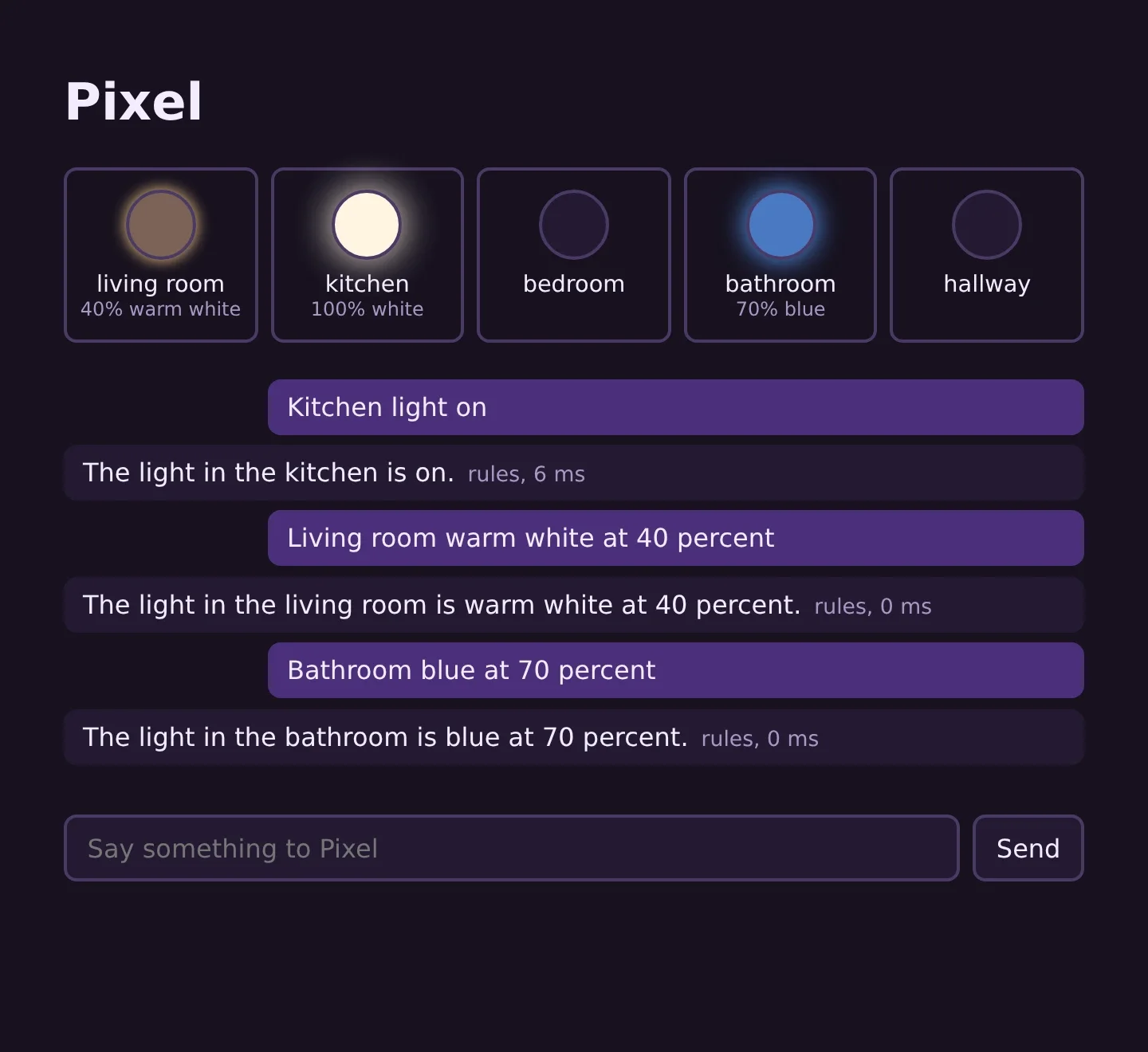
Open the page in a second tab and switch a lamp in the first: both tabs show it. Set a timer, and the announcement appears in both. The terminal chat still works as well, but it is a program of its own with a home of its own.
Pixel has a face now. In the next part it gets ears: you hold a button, say what you want, and a speech recognizer on your machine turns it into text.
Comments
The comments are GitHub Discussions: sign in with GitHub to write one.
The comments come from GitHub, through giscus. Loading them sends your IP address to giscus.app and GitHub.