
A Fast GraphQL API With Fastify and Yoga · Part 1 of 8 in the series
Part 1: Fastify Meets GraphQL Yoga
Set up a TypeScript project that runs without a build step, put GraphQL Yoga on a Fastify server and send it your first queries.

Quest objectives
- Know what you build in this series
- Run TypeScript files directly with Node.js 24
- Serve GraphQL Yoga from a Fastify route
- Send queries with curl and with GraphiQL
- Get one readable log line per request
In this series you build the API behind a guild board. Guilds post quests, adventurers accept and complete them, and every board that is open in a browser updates the moment something changes. By the last part the API batches its database queries, runs as several instances, caches whole responses and turns away queries that would cost too much.
GraphQL lets a client ask for exactly the fields it needs, nested as deep as it likes, in one request to one address. The schema describes everything the API can do, with types. The price is on the server: it has to answer any combination of those fields, and answer it quickly. That is what this series is about.
The tools
Fastify is a fast HTTP server for Node.js with a structured logger built in.
GraphQL Yoga is a GraphQL server built on the Fetch API. It speaks subscriptions over Server-Sent Events out of the box, and its plugins cover caching, limits and more.
TypeScript checks the code. Node.js runs it directly, so there is no build step.
The series
Fastify meets GraphQL Yoga (this part)
A database with PostgreSQL and Drizzle
The schema, typed by GraphQL Codegen, and the N+1 problem
Batching with DataLoader
Mutations and live updates with subscriptions
Subscriptions across instances with Valkey
Caching whole responses
Query limits and persisted operations
Every command in this series was run while it was written, and the output you see is the output it printed.
What you need
Node.js 24, pnpm, and a terminal with curl. From the second part on you also need Docker, for PostgreSQL and later Valkey. Check your versions:
$ node --versionv24.22.2$ pnpm --version12.16.1
If pnpm is missing, install it with npm, which comes with Node.js:
$ npm install --global --allow-scripts=pnpm pnpmadded 2 packages in 1s
Create the project
Make a folder for the API and let pnpm write a package.json:
$ mkdir guild-api$ cd guild-api$ pnpm initWrote to /home/robin/projects/guild-api/package.json{ "name": "guild-api", "version": "1.0.0", "description": "", "main": "index.js", "scripts": { "test": "echo \"Error: no test specified\" && exit 1" }, "keywords": [], "author": "", "license": "ISC", "devEngines": { "packageManager": { "name": "pnpm", "version": "12.16.1", "onFail": "download" } }, "packageManager": "pnpm@12.16.1", "type": "module"}
"type": "module" is already set, so Node.js treats every file as an ES module with import and export. Now add the packages:
$ pnpm add fastify graphql-yoga graphql @graphql-hive/loggerPackages: +72Progress: resolved 72, reused 0, downloaded 72, added 72, donedependencies:+ @graphql-hive/logger 1.1.1+ fastify 5.12.8+ graphql 17.0.2+ graphql-yoga 6.0.1Done in 414ms using pnpm v12.16.1$ pnpm add -D typescript @types/node@24 pino-prettyPackages: +18Progress: resolved 18, reused 26, downloaded 18, added 18, donedevDependencies:+ @types/node 24.19.2+ pino-pretty 13.2.0+ typescript 7.0.2Done in 401ms using pnpm v12.16.1
graphql is the reference implementation of GraphQL that Yoga builds on. Yoga 6 logs through @graphql-hive/logger, and you will connect that to Fastify's logger in a moment. TypeScript only checks the code, @types/node describes Node 24's APIs to it, and pino-pretty makes the logs readable while you develop.
TypeScript without a build step
Node.js 24 runs .ts files itself: it removes the types and runs what is left. It does not check them, though, so tsc does that and writes nothing. Create tsconfig.json:
{
  "compilerOptions": {
    "module": "nodenext",
    "target": "esnext",
    "types": ["node"],
    "strict": true,
    "noEmit": true,
    "allowImportingTsExtensions": true,
    "erasableSyntaxOnly": true,
    "verbatimModuleSyntax": true,
    "skipLibCheck": true
  },
  "include": ["src", "scripts", "*.ts"]
}
Three options make the code fit Node's type stripping. erasableSyntaxOnly forbids TypeScript features that would need real code instead of being removed, such as enum and namespaces. verbatimModuleSyntax makes you write import type for imports that are only types, because Node cannot tell them apart on its own. And allowImportingTsExtensions lets you import ./db.ts with its real file name, which is what Node needs to find it.
The settings go in a .env file, which Node also reads itself, and that file stays out of git:
PORT=4000node_modules
.envReplace the scripts in package.json with these:
"scripts": {
    "dev": "node --env-file=.env --watch src/server.ts | pino-pretty",
    "start": "node --env-file=.env src/server.ts",
    "typecheck": "tsc"
  },
pnpm dev restarts the server whenever a file changes and turns the JSON logs into readable lines. pnpm start is for production, with plain JSON logs that a log collector can read. pnpm typecheck runs tsc.
The server
Create src/server.ts:
import Fastify, { LogController, type FastifyReply, type FastifyRequest } from 'fastify';
import { createSchema, createYoga } from 'graphql-yoga';
import { Logger } from '@graphql-hive/logger';
import { PinoLogWriter } from '@graphql-hive/logger/writers/pino';

const app = Fastify({
  logger: true,
  logController: new LogController({ disableRequestLogging: true }),
});

const yoga = createYoga<{ req: FastifyRequest; reply: FastifyReply }>({
  schema: createSchema({
    typeDefs: /* GraphQL */ `
      type Query {
        hello: String!
      }
    `,
    resolvers: {
      Query: {
        hello: () => 'Welcome to the guild board!',
      },
    },
  }),
  logging: new Logger({ writers: [new PinoLogWriter(app.log)] }),
});

app.route({
  url: yoga.graphqlEndpoint,
  method: ['GET', 'POST', 'OPTIONS'],
  handler: (req, reply) => yoga.handleNodeRequestAndResponse(req, reply, { req, reply }),
});

await app.listen({ port: Number(process.env.PORT) });
From the top:
logger: truegives Fastify its logger, pino, which writes one JSON object per line. By default Fastify logs two lines for every request. TheLogControllerturns those off, because Yoga writes a better one for every GraphQL request.createYogagets a schema with one field,hello, and the resolver that answers it. The type argument says what every resolver will find in its context: Fastify's request and reply.loggingsends Yoga's log lines into Fastify's logger, so they look the same and carry Fastify's request id.The route answers
/graphql, Yoga's endpoint. It hands Node's request and Fastify's reply to Yoga, which writes the response itself. The last argument is the server context from the type argument.
Start it:
$ pnpm dev[15:17:24.082] INFO (139): Server listening at http://[::1]:4000[15:17:24.083] INFO (139): Server listening at http://127.0.0.1:4000
The first queries
In a second terminal, send a query. GraphQL travels as JSON in a POST request, and a query can also go in the address of a GET request:
$ curl -s localhost:4000/graphql -H 'content-type: application/json' -d '{"query":"{ hello }"}'{"data":{"hello":"Welcome to the guild board!"}}$ curl -s 'localhost:4000/graphql?query=%7Bhello%7D'{"data":{"hello":"Welcome to the guild board!"}}$ curl -s localhost:4000/graphql -H 'content-type: application/json' -d '{"query":"{ goodbye }"}'{"errors":[{"message":"Cannot query field \"goodbye\" on type \"Query\".","locations":[{"line":1,"column":3}],"extensions":{"code":"GRAPHQL_VALIDATION_FAILED"}}]}
The third query asks for a field that does not exist. Yoga checks every operation against the schema before it runs anything and answers with an error that says where the problem is. Back in the first terminal, there is one line for every request:
[15:17:26.330] INFO (139): Request processed requestId: "req-1" method: "POST" path: "/graphql" operationType: "query" status: 200 errorCount: 0 durationMs: 5[15:17:26.341] INFO (139): Request processed requestId: "req-2" method: "GET" path: "/graphql" operationType: "query" status: 200 errorCount: 0 durationMs: 1[15:17:26.349] INFO (139): Request processed requestId: "req-3" method: "POST" path: "/graphql" operationType: "query" status: 200 errorCount: 1 durationMs: 1
The request id, whether it was a query, a mutation or a subscription, how many errors it had and how long it took. You will lean on durationMs a lot in this series.
GraphiQL
Open localhost:4000/graphql in your browser. A browser asks for HTML, so Yoga answers with GraphiQL, a playground for your API. Type { hello } on the left and click the run button:
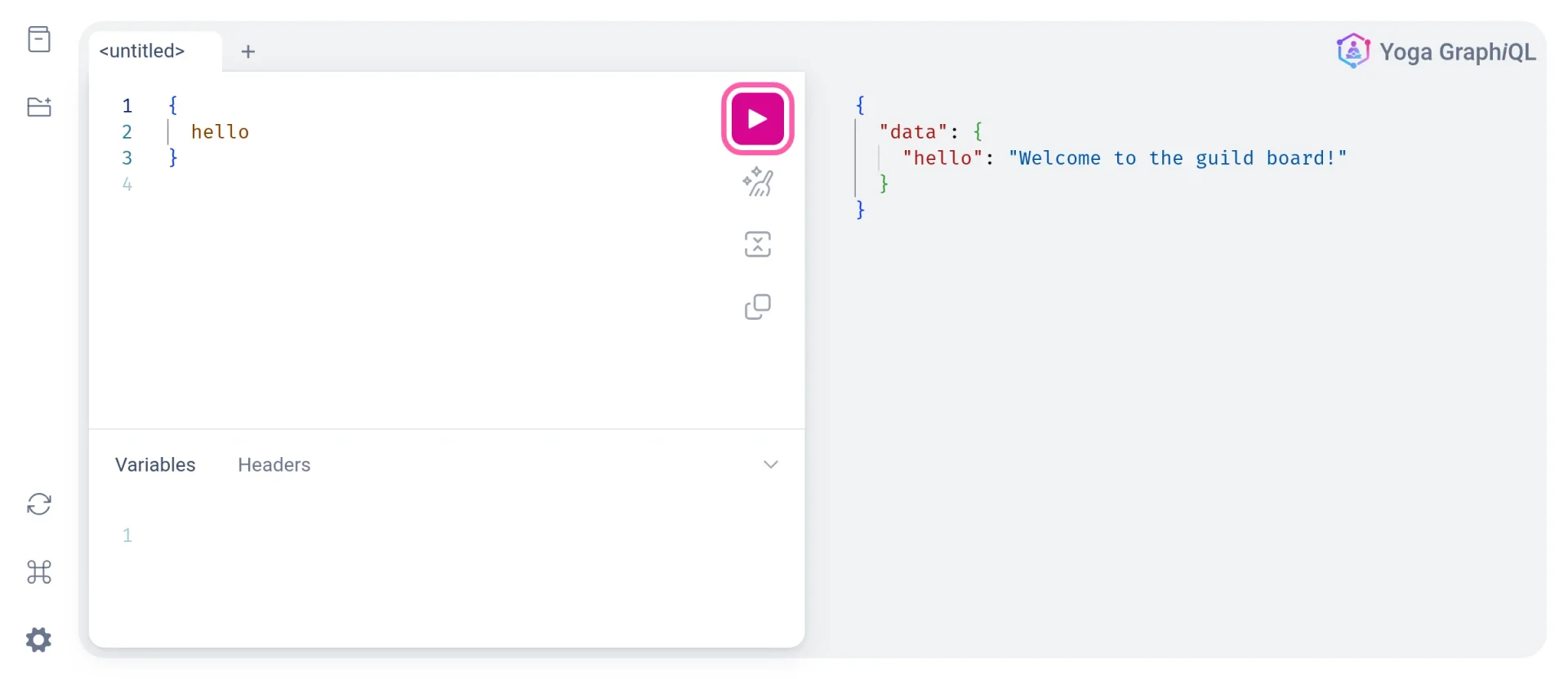
GraphiQL knows the schema, so it completes field names while you type and shows their documentation. It is the quickest way to try out a query.
The API answers, but only with a greeting. In the next part you give it something to talk about: a PostgreSQL database with guilds, adventurers and quests.