
Glattes Voxel-Terrain in Babylon.js · Teil 9 von 12 der Serie
Teil 9: Graben und Bauen
Grab Kugeln aus dem Boden und bau sie auf: Edits ändern die Dichtewerte, werden nur dort gehalten, wo sie passiert sind, erreichen die Worker als Operationen und bauen die Chunks, die sie berühren, alle im selben Frame neu.
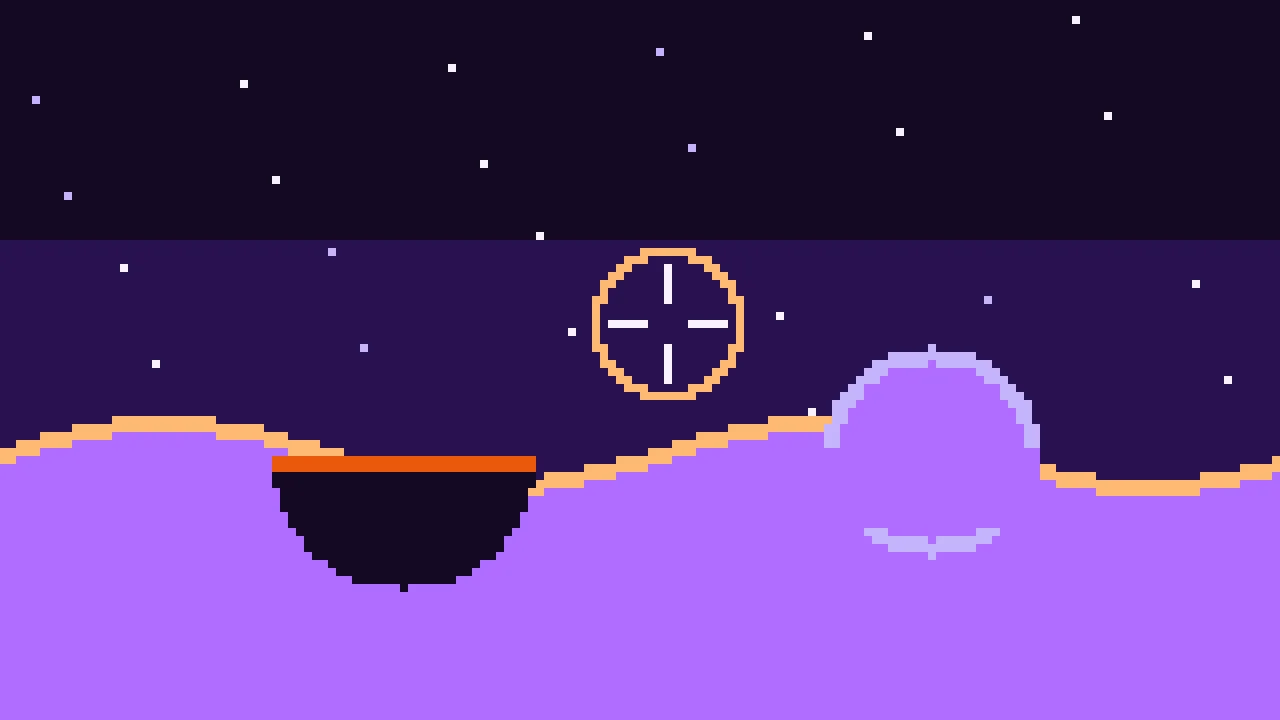
Quest-Ziele
- Das Terrain mit demselben min und max wie in Teil 1 ändern
- Nur die Werte halten, die ein Edit geändert hat, in Bricks von der Größe eines Chunks
- Die Kopien der Edits in den Workern gleich halten, indem man ihnen die Edits schickt
- Die Chunks finden, die ein Edit berührt, und ihre neuen Meshes zusammen zeigen
- Mit einem Strahl aus der Kamera zielen und die Maus einfangen
Das Terrain aus Teil 8 macht eine Funktion, und es lässt sich nicht ändern. Dieser Teil ergänzt das, wofür sich glattes Voxel-Terrain lohnt: ein Werkzeug, das Löcher hineingräbt und es aufbaut, überall und in jede Richtung.
Graben ist eine Differenz
Teil 1 hat Formen mit min und max verbunden. Eine Kugel mit Radius r hat die Dichte r - Abstand. Sie aus dem Boden zu graben, ist die Differenz, der Boden und nicht die Kugel: min(boden, -kugel). Sie aufzubauen, ist die Vereinigung: max(boden, kugel). Das ist der ganze Edit.
Die Frage ist, wo das Ergebnis lebt. Das Terrain ist eine Funktion: Es kann sich nicht merken, dass eine Kugel aus ihm gegraben wurde. Die Edits müssen als Daten gehalten werden, als die geänderten Dichtewerte, und alles, was das Terrain liest, muss auch sie lesen.
Bricks
Eine Kopie jedes Werts zu halten, bräuchte schon für die geladenen Chunks über hundert Megabyte, und die Welt hat kein Ende. Edits berühren nur wenige Stellen, also werden nur die gehalten, in Bricks: Blöcken aus 32 × 32 × 32 Werten, angeordnet wie die Chunks, jeder mit den Werten, mit denen ein Chunk beginnt. Ein Brick entsteht, wenn ein Edit ihn zum ersten Mal berührt, gefüllt aus dem erzeugten Terrain, und der Edit ändert ihn von dort aus. Wo kein Brick ist, ist das Terrain weiter die Funktion.
Ein Edit ändert nicht jeden Wert in seiner Reichweite. Weiter als 2 m außerhalb der Kugel behalten die Werte ihren Wert: Nur das Vorzeichen und die Werte nahe 0 formen die Oberfläche, mit einem Schritt Rand für die Normalen. Das hält Edits klein und schnell.
Lege src/edits.ts an:
import { CHUNK_SIZE, MARGIN, type DensityGrid } from './grid.ts';
import { density } from './terrain.ts';

/** A change to the terrain: a ball of ground dug away or added. */
export interface Edit {
  kind: 'dig' | 'build';
  x: number;
  y: number;
  z: number;
  radius: number;
}

/** The samples an edit changed, from the lowest corner to the highest, both included. */
export interface SampleBox {
  low: [number, number, number];
  high: [number, number, number];
}

const key = (x: number, y: number, z: number) => `${x},${y},${z}`;

/**
 * The edited terrain: the density of every sample that edits changed. The samples are
 * kept in bricks of CHUNK_SIZE³, each one holding the samples a chunk starts with, and a
 * brick exists only once an edit has touched it. Everything else is still generated.
 */
export class EditStore {
  private readonly bricks = new Map<string, Float32Array>();
  /** The highest brick in each column of bricks. */
  private readonly tops = new Map<string, number>();

  /** The density at a sample: edited if an edit changed it, generated if not. */
  sample(x: number, y: number, z: number): number {
    const bx = Math.floor(x / CHUNK_SIZE);
    const by = Math.floor(y / CHUNK_SIZE);
    const bz = Math.floor(z / CHUNK_SIZE);
    const brick = this.bricks.get(key(bx, by, bz));
    if (!brick) return density(x, y, z);
    return brick[brickIndex(x - bx * CHUNK_SIZE, y - by * CHUNK_SIZE, z - bz * CHUNK_SIZE)];
  }

  /** Applies an edit and returns the samples it changed, or null if it changed none. */
  apply(edit: Edit): SampleBox | null {
    // Samples further than 2 m outside the ball keep their value: so far from the
    // surface, the values don't shape it.
    const reach = edit.radius + 2;
    let box: SampleBox | null = null;
    for (let z = Math.ceil(edit.z - reach); z <= edit.z + reach; z += 1) {
      for (let x = Math.ceil(edit.x - reach); x <= edit.x + reach; x += 1) {
        for (let y = Math.ceil(edit.y - reach); y <= edit.y + reach; y += 1) {
          const distance = Math.hypot(x - edit.x, y - edit.y, z - edit.z);
          if (distance > reach) continue;
          // The ball's own density: above 0 inside it.
          const ball = edit.radius - distance;
          const before = this.sample(x, y, z);
          const after = edit.kind === 'dig' ? Math.min(before, -ball) : Math.max(before, ball);
          if (after === before) continue;
          this.set(x, y, z, after);
          if (!box) box = { low: [x, y, z], high: [x, y, z] };
          box.low = [Math.min(box.low[0], x), Math.min(box.low[1], y), Math.min(box.low[2], z)];
          box.high = [Math.max(box.high[0], x), Math.max(box.high[1], y), Math.max(box.high[2], z)];
        }
      }
    }
    return box;
  }

  /** Writes the edited samples into a grid whose sample (0, 0, 0) is at `origin`. */
  applyTo(grid: DensityGrid, origin: { x: number; y: number; z: number }): void {
    // The grid reaches MARGIN samples into the bricks around the chunk's own.
    const first = (o: number) => Math.floor((o - MARGIN) / CHUNK_SIZE);
    const last = (o: number) => Math.floor((o + CHUNK_SIZE + MARGIN) / CHUNK_SIZE);
    for (let bz = first(origin.z); bz <= last(origin.z); bz += 1) {
      for (let by = first(origin.y); by <= last(origin.y); by += 1) {
        for (let bx = first(origin.x); bx <= last(origin.x); bx += 1) {
          const brick = this.bricks.get(key(bx, by, bz));
          if (!brick) continue;
          // The samples the brick and the grid share, in the grid's numbers.
          const from = (b: number, o: number) => Math.max(b * CHUNK_SIZE - o, -MARGIN);
          const to = (b: number, o: number) => Math.min((b + 1) * CHUNK_SIZE - 1 - o, CHUNK_SIZE + MARGIN);
          for (let z = from(bz, origin.z); z <= to(bz, origin.z); z += 1) {
            for (let y = from(by, origin.y); y <= to(by, origin.y); y += 1) {
              for (let x = from(bx, origin.x); x <= to(bx, origin.x); x += 1) {
                grid.values[grid.index(x, y, z)] = brick[brickIndex(
                  origin.x + x - bx * CHUNK_SIZE,
                  origin.y + y - by * CHUNK_SIZE,
                  origin.z + z - bz * CHUNK_SIZE,
                )];
              }
            }
          }
        }
      }
    }
  }

  /** The highest layer of chunks with an edited brick in the column, or -Infinity. */
  highestLayer(x: number, z: number): number {
    return this.tops.get(`${x},${z}`) ?? -Infinity;
  }

  private set(x: number, y: number, z: number, value: number): void {
    const bx = Math.floor(x / CHUNK_SIZE);
    const by = Math.floor(y / CHUNK_SIZE);
    const bz = Math.floor(z / CHUNK_SIZE);
    let brick = this.bricks.get(key(bx, by, bz));
    if (!brick) {
      // A brick starts out as the generated terrain.
      brick = new Float32Array(CHUNK_SIZE ** 3);
      for (let k = 0; k < CHUNK_SIZE; k += 1) {
        for (let i = 0; i < CHUNK_SIZE; i += 1) {
          // Up the column last, as the terrain likes it.
          for (let j = 0; j < CHUNK_SIZE; j += 1) {
            brick[brickIndex(i, j, k)] = density(bx * CHUNK_SIZE + i, by * CHUNK_SIZE + j, bz * CHUNK_SIZE + k);
          }
        }
      }
      this.bricks.set(key(bx, by, bz), brick);
      this.tops.set(`${bx},${bz}`, Math.max(by, this.highestLayer(bx, bz)));
    }
    brick[brickIndex(x - bx * CHUNK_SIZE, y - by * CHUNK_SIZE, z - bz * CHUNK_SIZE)] = value;
  }
}

function brickIndex(x: number, y: number, z: number): number {
  return x + CHUNK_SIZE * (y + CHUNK_SIZE * z);
}sample()liest einen Wert des Terrains, wie es jetzt ist: aus seinem Brick, falls er einen hat, sonst aus der Funktion.apply()geht über die Werte in Reichweite der Kugel, rechnet den neuen Wert mitminodermaxaus und schreibt ihn, falls er sich geändert hat. Es liefert den Kasten der geänderten Werte, damit die Welt weiß, welche Chunks neu zu bauen sind.applyTo()schreibt die geänderten Werte in das Gitter eines Chunks, nachdem das Gitter abgetastet ist. Ein Gitter reicht zwei Werte in die Bricks seiner Nachbarn, also können bis zu 27 Bricks Werte darin haben; die meisten gibt es nicht.highestLayer()sagt der Welt, wie hoch die Edits in einer Säule reichen. Ein in den Himmel gebauter Turm liegt über dem höchsten Boden, den Teil 7 kennt.
Ein Chunk entsteht aus der Funktion, dann aus den Edits. Ersetze in src/chunks.ts buildChunk():
/** Samples the terrain in a chunk and meshes it, or null when it holds no surface. */
export function buildChunk(chunk: ChunkPosition, mesher: MesherName, edits: EditStore): ChunkMesh | null {
  const origin = { x: chunk.x * CHUNK_SIZE, y: chunk.y * CHUNK_SIZE, z: chunk.z * CHUNK_SIZE };
  const grid = new DensityGrid().fill(density, origin);
  edits.applyTo(grid, origin);
  if (!grid.hasSurface()) return null;
  const mesh = MESHERS[mesher].mesh(grid);

  // Meters below the generated ground, for the material: soil first, then rock.
  const { positions } = mesh;
  const depths = new Float32Array(positions.length / 3);
  for (let i = 0; i < depths.length; i += 1) {
    const x = origin.x + positions[i * 3];
    const y = origin.y + positions[i * 3 + 1];
    const z = origin.z + positions[i * 3 + 2];
    depths[i] = surfaceHeight(x, z) - y;
  }
  return { ...mesh, depths };
}
Edits in den Workern
Die Chunks werden in den Workern gebaut, also brauchen die Worker die Edits. Ihnen mit jeder Aufgabe die Bricks zu schicken, kopierte viele Daten wieder und wieder. Stattdessen hält jeder Worker seinen eigenen EditStore, und die Seite schickt ihm die Edits: eine Art, einen Punkt und einen Radius, ein paar Bytes. Jeder Worker wendet dieselben Edits mit demselben Code an, und Nachrichten an einen Worker kommen in der Reihenfolge an, in der sie geschickt wurden, also sind am Ende alle Kopien gleich der der Seite.
Ein Worker, der beschäftigt ist, wenn ein Edit ankommt, wendet ihn nach seinem aktuellen Chunk an. Dieser Chunk entstand aus dem alten Terrain, aber sein Ergebnis ist ohnehin veraltet: Der Edit hat die Version des Chunks hochgezählt, also wird er neu gebaut.
Ersetze src/chunkWorker.ts. Eine Nachricht ist jetzt ein Chunk zum Bauen oder ein Edit:
import { buildChunk, type ChunkMesh, type ChunkPosition } from './chunks.ts';
import { EditStore, type Edit } from './edits.ts';
import type { MesherName } from './meshers.ts';

export interface ChunkJob {
  chunk: ChunkPosition;
  mesher: MesherName;
}

/** What the page sends: a chunk to build, or an edit for the worker's copy of the edits. */
export type WorkerMessage = ({ type: 'build' } & ChunkJob) | { type: 'edit'; edit: Edit };

export interface ChunkResult {
  /** null when the chunk holds no surface. */
  mesh: ChunkMesh | null;
  /** Milliseconds the worker spent on the chunk. */
  time: number;
}

// Every worker keeps its own copy of the edits, made from the same edits as the page's.
const edits = new EditStore();

self.onmessage = (event: MessageEvent<WorkerMessage>) => {
  const message = event.data;
  if (message.type === 'edit') {
    edits.apply(message.edit);
    return;
  }
  const started = performance.now();
  const mesh = buildChunk(message.chunk, message.mesher, edits);
  const result: ChunkResult = { mesh, time: performance.now() - started };
  // Hand the arrays' memory over to the page instead of copying it.
  const transfer = mesh
    ? [mesh.positions.buffer, mesh.normals.buffer, mesh.indices.buffer, mesh.depths.buffer]
    : [];
  self.postMessage(result, { transfer });
};
Der Pool lernt, einen Edit an jeden Worker zu schicken, beschäftigt oder nicht. Ersetze src/workers.ts:
import type { ChunkJob, ChunkResult, WorkerMessage } from './chunkWorker.ts';
import type { Edit } from './edits.ts';

/** A few workers that build chunks, each one chunk at a time. */
export class ChunkWorkers {
  private readonly all: Worker[] = [];
  private readonly idle: Worker[] = [];
  readonly count: number;

  constructor() {
    // One core for the page, the others for the workers, but not too many.
    this.count = Math.min(Math.max((navigator.hardwareConcurrency || 2) - 1, 1), 6);
    for (let i = 0; i < this.count; i += 1) {
      this.all.push(new Worker(new URL('./chunkWorker.ts', import.meta.url), { type: 'module' }));
    }
    this.idle.push(...this.all);
  }

  /** Sends an edit to every worker, busy or not. A worker takes it after its current job. */
  broadcast(edit: Edit): void {
    const message: WorkerMessage = { type: 'edit', edit };
    for (const worker of this.all) worker.postMessage(message);
  }

  /** How many workers wait for a job. */
  get free(): number {
    return this.idle.length;
  }

  /** Builds a chunk on a free worker; check `free` first. */
  run(job: ChunkJob): Promise<ChunkResult> {
    const worker = this.idle.pop();
    if (!worker) throw new Error('No free worker');
    return new Promise((resolve) => {
      worker.onmessage = (event: MessageEvent<ChunkResult>) => {
        this.idle.push(worker);
        resolve(event.data);
      };
      worker.postMessage({ type: 'build', ...job } satisfies WorkerMessage);
    });
  }
}
Gemeinsam neu bauen
Ein Edit nahe am Rand eines Chunks ändert mehrere Chunks: jeden Chunk, dessen Werte, Rand eingeschlossen, einen geänderten Wert enthalten. Ihre neuen Meshes kommen eins nach dem anderen an. Für einen Frame oder zwei zeigt ein neuer Chunk neben einem alten einen Riss, wo sich die Oberfläche nicht mehr trifft. Deshalb bilden die Chunks eines Edits einen Batch: Ihre Meshes werden zurückgehalten, bis der letzte gebaut ist, und dann im selben Frame angezeigt. Ersetze src/world.ts:
import type { Material, Mesh, Scene, Vector3 } from '@babylonjs/core/pure';
import { chunkKey, type ChunkMesh, type ChunkPosition } from './chunks.ts';
import { EditStore, type Edit } from './edits.ts';
import { CHUNK_SIZE, MARGIN } from './grid.ts';
import { createMesh } from './meshData.ts';
import type { MesherName } from './meshers.ts';
import { highestGround } from './terrain.ts';
import type { ChunkWorkers } from './workers.ts';

/** How far around the camera chunks are loaded, in chunks. */
export const VIEW_RADIUS = 8;
/** The lowest layer of chunks: below it the world is solid. */
const LOWEST_LAYER = -2;
/** Milliseconds per frame for handing new meshes to the graphics card. */
const SHOW_BUDGET = 4;

/** Chunks that an edit changed: their new meshes are shown together, once all are built. */
interface Batch {
  left: number;
  results: Finished[];
}

interface Chunk {
  position: ChunkPosition;
  mesh: Mesh | null;
  /** Counts up whenever the chunk has to be built again. */
  version: number;
  /** The version the chunk's mesh shows; -1 before it has one. */
  shown: number;
  /** The version a worker builds, or that waits to be shown; -1 when there is none. */
  pending: number;
  /** The batch the next build belongs to, if an edit asked for it. */
  batch: Batch | null;
}

interface Finished {
  chunk: Chunk;
  version: number;
  data: ChunkMesh | null;
}

/** The chunks around the camera: which to load, build, show and drop. */
export class World {
  mesher: MesherName = 'marching-cubes';
  /** The page's copy of the edits. */
  readonly edits = new EditStore();
  private readonly chunks = new Map<string, Chunk>();
  /** The highest layer of chunks that can hold ground, per column. */
  private readonly tops = new Map<string, number>();
  /** Meshes ready to be shown, in groups that are shown in the same frame. */
  private readonly finished: Finished[][] = [];
  private focus = { x: 0, y: 0, z: 0 };
  private readonly scene: Scene;
  private readonly material: Material;
  private readonly workers: ChunkWorkers;

  constructor(scene: Scene, material: Material, workers: ChunkWorkers) {
    this.scene = scene;
    this.material = material;
    this.workers = workers;
  }

  /** Switches the mesher. Every chunk is built again and keeps its mesh until then. */
  setMesher(mesher: MesherName): void {
    this.mesher = mesher;
    for (const chunk of this.chunks.values()) chunk.version += 1;
  }

  /** Digs or builds: changes the terrain here and in the workers, and rebuilds its chunks. */
  edit(edit: Edit): void {
    const box = this.edits.apply(edit);
    if (!box) return;
    this.workers.broadcast(edit);

    // Every chunk whose samples, margin included, hold a changed sample.
    const first = (axis: number) => Math.ceil((box.low[axis] - CHUNK_SIZE - MARGIN) / CHUNK_SIZE);
    const last = (axis: number) => Math.floor((box.high[axis] + MARGIN) / CHUNK_SIZE);
    const batch: Batch = { left: 0, results: [] };
    for (let z = first(2); z <= last(2); z += 1) {
      for (let x = first(0); x <= last(0); x += 1) {
        this.tops.delete(`${x},${z}`);
        for (let y = first(1); y <= last(1); y += 1) {
          const chunk = this.chunks.get(chunkKey({ x, y, z })) ?? this.addChunk({ x, y, z });
          chunk.version += 1;
          // An older edit's batch stops waiting for this chunk: it comes with this one.
          if (chunk.batch) this.settle(chunk.batch);
          chunk.batch = batch;
          batch.left += 1;
        }
      }
    }
  }

  /** Once a frame: follows the camera at `focus`. */
  update(focus: Vector3): void {
    this.focus = { x: focus.x, y: focus.y, z: focus.z };
    this.dropFar();
    this.startJobs();
    this.showFinished();
  }

  /** How many chunks are loaded, and how many of them wait for a mesh. */
  get counts(): { loaded: number; waiting: number } {
    let waiting = 0;
    for (const chunk of this.chunks.values()) if (chunk.shown !== chunk.version) waiting += 1;
    return { loaded: this.chunks.size, waiting };
  }

  /** The column of chunks the camera is in. */
  private get center(): { x: number; z: number } {
    return { x: Math.floor(this.focus.x / CHUNK_SIZE), z: Math.floor(this.focus.z / CHUNK_SIZE) };
  }

  private addChunk(position: ChunkPosition): Chunk {
    const chunk = { position, mesh: null, version: 0, shown: -1, pending: -1, batch: null };
    this.chunks.set(chunkKey(position), chunk);
    return chunk;
  }

  private dropFar(): void {
    const center = this.center;
    // A little beyond the view radius, so that chunks at the edge are not dropped and
    // loaded again while the camera moves back and forth.
    const limit = (VIEW_RADIUS + 1.5) ** 2;
    for (const [key, chunk] of this.chunks) {
      if ((chunk.position.x - center.x) ** 2 + (chunk.position.z - center.z) ** 2 <= limit) continue;
      chunk.mesh?.dispose();
      this.chunks.delete(key);
      // A batch waiting for this chunk's build would wait forever.
      if (chunk.batch) this.settle(chunk.batch);
    }
    for (const key of this.tops.keys()) {
      const [x, z] = key.split(',').map(Number);
      if ((x - center.x) ** 2 + (z - center.z) ** 2 > limit) this.tops.delete(key);
    }
  }

  /** Gives every free worker the chunk that needs building most: edited ones, then the nearest. */
  private startJobs(): void {
    if (this.workers.free === 0) return;
    const wanted: { position: ChunkPosition; distance: number }[] = [];
    // Chunks that an edit changed come first, wherever they are.
    for (const chunk of this.chunks.values()) {
      if (chunk.batch && chunk.pending < 0) wanted.push({ position: chunk.position, distance: -1 });
    }
    // Then the chunks around the camera, nearest first.
    const center = this.center;
    for (let dz = -VIEW_RADIUS; dz <= VIEW_RADIUS; dz += 1) {
      for (let dx = -VIEW_RADIUS; dx <= VIEW_RADIUS; dx += 1) {
        if (dx * dx + dz * dz > VIEW_RADIUS * VIEW_RADIUS) continue;
        const x = center.x + dx;
        const z = center.z + dz;
        for (let y = LOWEST_LAYER; y <= this.top(x, z); y += 1) {
          const chunk = this.chunks.get(chunkKey({ x, y, z }));
          if (chunk && (chunk.batch || chunk.pending >= 0 || chunk.shown === chunk.version)) continue;
          const distance = Math.hypot(
            (x + 0.5) * CHUNK_SIZE - this.focus.x,
            (y + 0.5) * CHUNK_SIZE - this.focus.y,
            (z + 0.5) * CHUNK_SIZE - this.focus.z,
          );
          wanted.push({ position: { x, y, z }, distance });
        }
      }
    }
    wanted.sort((a, b) => a.distance - b.distance);

    for (const { position } of wanted.slice(0, this.workers.free)) {
      const chunk = this.chunks.get(chunkKey(position)) ?? this.addChunk(position);
      const version = chunk.version;
      const batch = chunk.batch;
      chunk.batch = null;
      chunk.pending = version;
      this.workers.run({ chunk: position, mesher: this.mesher }).then((result) => {
        const finished = { chunk, version, data: result.mesh };
        if (batch) {
          batch.results.push(finished);
          this.settle(batch);
        } else {
          this.finished.push([finished]);
        }
        // The worker is free again: no need to wait for the next frame.
        this.startJobs();
      });
    }
  }

  /** Counts a chunk of a batch as done; the last one hands the batch over to be shown. */
  private settle(batch: Batch): void {
    batch.left -= 1;
    // An edit's chunks go first, before the meshes of the chunks that just came into view.
    if (batch.left === 0) this.finished.unshift(batch.results);
  }

  /** The highest layer of chunks in a column that can hold ground, edited or generated. */
  private top(x: number, z: number): number {
    const key = `${x},${z}`;
    let top = this.tops.get(key);
    if (top === undefined) {
      const generated = Math.floor(highestGround(x * CHUNK_SIZE, z * CHUNK_SIZE, CHUNK_SIZE) / CHUNK_SIZE);
      top = Math.max(generated, this.edits.highestLayer(x, z));
      this.tops.set(key, top);
    }
    return top;
  }

  /** Shows the meshes the workers made, as many groups as fit into the frame's budget. */
  private showFinished(): void {
    const started = performance.now();
    while (this.finished.length > 0 && performance.now() - started < SHOW_BUDGET) {
      for (const { chunk, version, data } of this.finished.shift()!) {
        chunk.pending = -1;
        // Dropped while it was being built: the chunk is gone.
        if (this.chunks.get(chunkKey(chunk.position)) !== chunk) continue;
        chunk.mesh?.dispose();
        chunk.mesh = data ? this.createChunkMesh(chunk.position, data) : null;
        chunk.shown = version;
      }
    }
  }

  private createChunkMesh(position: ChunkPosition, data: ChunkMesh): Mesh {
    const mesh = createMesh(`chunk ${chunkKey(position)}`, data, this.scene);
    mesh.setVerticesData('depth', data.depths, false, 1);
    mesh.position.set(position.x * CHUNK_SIZE, position.y * CHUNK_SIZE, position.z * CHUNK_SIZE);
    mesh.material = this.material;
    // The chunk never moves: Babylon.js can stop working out its world matrix.
    mesh.freezeWorldMatrix();
    return mesh;
  }
}edit()wendet den Edit hier an, schickt ihn an die Worker und zählt die Version jedes Chunks hoch, den er berührt. Chunks, die noch nicht geladen waren, kommen dazu, etwa die Luft über einer Säule, in die jetzt ein Turm reicht.Ein
Batchzählt die Chunks, auf die er noch wartet. Gehört der Bau eines Chunks zu einem Batch, kommt sein Ergebnis in den Batch, und der letzte gibt alle auf einmal weiter.finishedist jetzt eine Liste von Gruppen, undshowFinished()zeigt ganze Gruppen.startJobs()nimmt zuerst die geänderten Chunks, wo sie auch sind, und dann wie zuvor die nächsten. Graben soll sich sofort anfühlen.settle()zählt einen Chunk für einen Batch als fertig, ohne sein Mesh: wenn der Chunk wegfällt oder wenn ein neuerer Edit ihn in seinen eigenen Batch nimmt. Ohne das könnte ein Batch ewig warten, und der Edit erschiene nie.top()berücksichtigt die Edits, undedit()löscht die gemerkte Obergrenze einer Säule, damit sie neu ausgerechnet wird.
Das Werkzeug
Das Werkzeug gräbt dort, wohin die Kamera schaut. Ein Strahl von der Kamera durch die Mitte des Bildschirms findet das erste Dreieck, das er trifft: pickWithRay() von Babylon.js prüft die Hüllkästen der Meshes und dann ihre Dreiecke. Eine durchsichtige Kugel zeigt, wohin der Edit geht und wie groß er ist. Lege src/tool.ts an:
import {
  Color3,
  CreateSphere,
  StandardMaterial,
  type Camera,
  type Mesh,
  type Scene,
} from '@babylonjs/core/pure';
import type { World } from './world.ts';

/** How far the tool reaches, in meters. */
const REACH = 80;
/** Milliseconds between edits while a mouse button is held down. */
const REPEAT = 120;
/** The smallest and largest ball the tool makes, in meters of radius. */
const SMALLEST = 1.5;
const LARGEST = 8;

/** Digs and builds where the camera looks, and shows the ball it would dig or build. */
export class DigTool {
  radius = 3;
  private action: 'dig' | 'build' | null = null;
  private lastEdit = 0;
  private readonly marker: Mesh;
  private readonly scene: Scene;
  private readonly camera: Camera;
  private readonly world: World;

  constructor(scene: Scene, camera: Camera, world: World) {
    this.scene = scene;
    this.camera = camera;
    this.world = world;
    this.marker = CreateSphere('marker', { diameter: 1, segments: 16 }, scene);
    const material = new StandardMaterial('marker', scene);
    material.emissiveColor = Color3.FromHexString('#f97316');
    material.disableLighting = true;
    material.alpha = 0.3;
    this.marker.material = material;
    // The camera's ray must find the ground, not the marker.
    this.marker.isPickable = false;
  }

  start(action: 'dig' | 'build'): void {
    this.action = action;
    this.lastEdit = 0;
  }

  stop(): void {
    this.action = null;
  }

  /** Makes the ball bigger or smaller by `steps` half meters. */
  resize(steps: number): void {
    this.radius = Math.min(Math.max(this.radius + steps * 0.5, SMALLEST), LARGEST);
  }

  update(now: number): void {
    const hit = this.scene.pickWithRay(this.camera.getForwardRay(REACH));
    if (!hit?.pickedPoint) {
      this.marker.isVisible = false;
      return;
    }
    this.marker.isVisible = true;
    this.marker.position.copyFrom(hit.pickedPoint);
    this.marker.scaling.setAll(this.radius * 2);
    if (this.action && now - this.lastEdit >= REPEAT) {
      this.lastEdit = now;
      const { x, y, z } = hit.pickedPoint;
      this.world.edit({ kind: this.action, x, y, z, radius: this.radius });
    }
  }
}
Eine gehaltene Taste wiederholt den Edit alle 120 ms. Jede neue Kugel sitzt dort, wo der Strahl jetzt trifft, am Boden des gerade gegrabenen Lochs, also gräbt die gehaltene linke Taste tiefer und tiefer, und die rechte baut eine Säule auf dich zu.
Die Maus einfangen
Mit gezogener Maus schauen und mit Klicks graben, das passt nicht zusammen. Die Seite fängt die Maus stattdessen mit der Pointer-Lock-API ein: Nach einem Klick ist der Zeiger versteckt, jede Mausbewegung dreht die Kamera, und die Tasten sind frei. Die Kamera von Babylon.js dreht sich bei gesperrtem Zeiger schon von sich aus bei Mausbewegung. Esc gibt die Maus zurück.
Das Werkzeug braucht ein Material für die Markierung und Strahlen. Importiere in src/main.ts RegisterRay und RegisterStandardMaterial und ruf sie mit den anderen auf:
RegisterStandardEngineExtensions();
// For the texture array of the terrain.
RegisterEnginesExtensionsEngineRawTexture();
RegisterShaderMaterial();
// For the tool: the marker's material, and the ray that finds the ground.
RegisterStandardMaterial();
RegisterRay();
Importiere DigTool und leg nach der Kamera das Werkzeug an und hör auf die Maus:
const tool = new DigTool(scene, camera, world);
// The mouse wheel sizes the tool instead of moving the camera.
camera.inputs.removeByType('FreeCameraMouseWheelInput');

// A click captures the mouse, so that it turns the camera without a button held down.
// While it is captured, the left button digs and the right one builds.
canvas.addEventListener('pointerdown', (event) => {
  if (document.pointerLockElement !== canvas) {
    canvas.requestPointerLock();
    return;
  }
  if (event.button === 0) tool.start('dig');
  if (event.button === 2) tool.start('build');
});
window.addEventListener('pointerup', () => tool.stop());
canvas.addEventListener('contextmenu', (event) => event.preventDefault());
canvas.addEventListener('wheel', (event) => tool.resize(-Math.sign(event.deltaY)), { passive: true });
Das Werkzeug zielt einmal pro Frame, und das HUD zeigt seine Größe:
scene.onBeforeRenderObservable.add(() => {
  world.update(camera.position);
  tool.update(performance.now());
  const { loaded, waiting } = world.counts;
  const { x, y, z } = camera.position;
  hud.textContent =
    `${MESHERS[world.mesher].label}: ${loaded} chunks, ${waiting} waiting\n` +
    `x ${x.toFixed(0)}, y ${y.toFixed(0)}, z ${z.toFixed(0)}\n` +
    `Tool ${tool.radius.toFixed(1)} m\n` +
    `${engine.getFps().toFixed(0)} fps`;
});
Ein Fadenkreuz markiert die Mitte des Bildschirms. Ersetze index.html:
<!doctype html>
<html lang="en">
  <head>
    <meta charset="UTF-8" />
    <meta name="viewport" content="width=device-width, initial-scale=1.0" />
    <title>Voxel terrain</title>
  </head>
  <body>
    <canvas id="game"></canvas>
    <div id="crosshair"></div>
    <div id="hud"></div>
    <div id="help">
      Click to look around · WASD fly, Q/E down/up, Shift faster · left dig, right build,
      wheel size · M mesher
    </div>
    <script type="module" src="/src/main.ts"></script>
  </body>
</html>
Und ergänze seinen Stil in src/style.css, zwei mit Verläufen gezeichnete Linien:
#crosshair {
  position: fixed;
  left: 50%;
  top: 50%;
  width: 14px;
  height: 14px;
  margin: -7px 0 0 -7px;
  background:
    linear-gradient(#fff7ed, #fff7ed) center / 2px 100% no-repeat,
    linear-gradient(#fff7ed, #fff7ed) center / 100% 2px no-repeat;
  opacity: 0.8;
  pointer-events: none;
}Ausprobieren
Klick in die Demo, um die Maus einzufangen. Ziel auf den Boden und halt die linke Taste: Ein Schacht öffnet sich und geht tiefer, Erde am Rand und Fels darunter. Halt die rechte Taste, und ein Felshügel wächst aus dem Gras. Scroll, um die Kugel größer oder kleiner zu machen. Grab über eine Chunkgrenze hinweg, und das Loch hat keinen Riss, weil beide Chunks ihr neues Mesh im selben Frame zeigen. Und schalte den Mesher mit M um: Die Edits bleiben, weil beide Mesher dieselben Werte lesen.
Bisher fliegst du. Im nächsten Teil gehst du auf dem Boden, und in die Löcher, die du gräbst.