Bauen auf Voxel-Terrain in Babylon.js · Teil 7 von 10 der Serie
Teil 7: Fallende Stücke
Lass lose Gruppen als starre Körper fallen, ohne Physik-Engine: Masse, Mitte und Trägheit aus den Blöcken, ein Quaternion, das sich dreht, Kontakte an den Ecken der Zellen gegen Terrain und Blöcke, Stöße, die sie draußen halten, Reibung, die sie anhalten lässt, und Ruhe, wenn sie still liegen.
Quest-Ziele
- Masse, Mitte und Trägheit eines Stücks aus seinen Blöcken ausrechnen
- Einen Körper in festen Schritten bewegen und drehen, mit einem Quaternion für seine Lage
- Kontakte an Punkten der Oberfläche des Stücks finden, gegen Terrain und Blöcke
- Kontakte mit Impulsen lösen: aus der Oberfläche heraus, ein wenig Abprallen, und Reibung
- Ein fallendes Stück als Mesh unter einem Knoten zeigen, der seinem Körper folgt
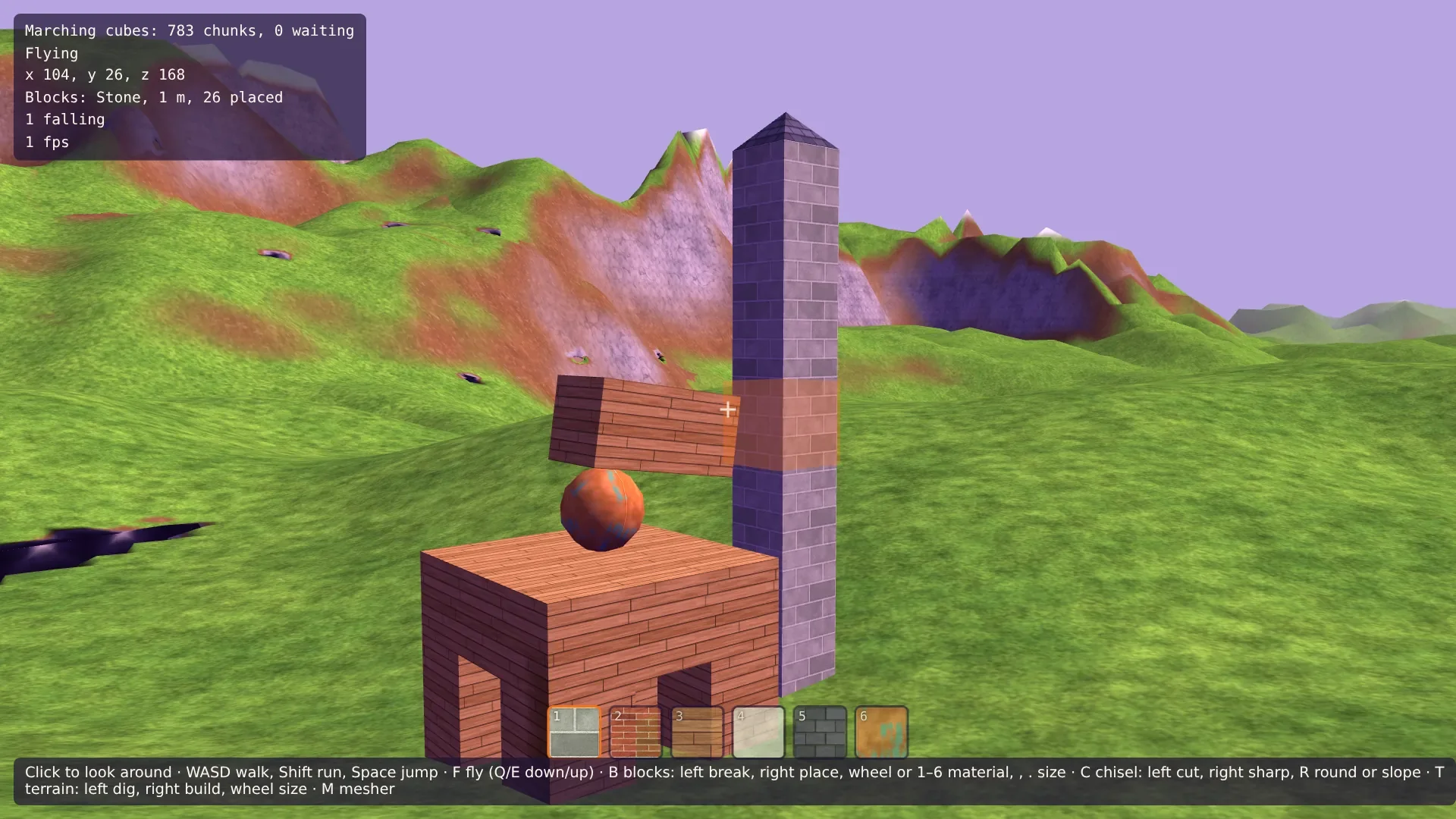
In Teil 6 verschwindet eine Gruppe, die ihren Halt verliert. Jetzt fällt sie: als ein Stück, ein starrer Körper, der seine Form behält, fällt, sich dabei dreht, mit einer Ecke auf Boden oder Wand trifft, umkippt, einen Hang hinunterrutscht und zur Ruhe kommt.
Babylon.js bringt Havok mit, eine volle Physik-Engine, und die Serie über den First-Person-Controller nutzt sie. Hier passt ein eigener Körper besser. Seine Kollisionsformen müssten die Chunks des Terrains sein, nach jedem Graben zu Mesh-Formen neu gebaut, und alle Blöcke; und hundert eigene Zeilen können für jeden Punkt unsere eigene Frage stellen, die, die die Spielfigur seit Teil 3 stellt: Wie weit ist die nächste Oberfläche, und wo geht es hinaus?
Ein Körper
Ein starrer Körper hat vier Dinge, die sich ändern: wo seine Mitte ist, wie er gedreht ist, wie schnell er sich bewegt und wie schnell er sich dreht. Die Lage ist ein Quaternion, vier Zahlen, die eine Drehung beschreiben, und die Drehgeschwindigkeit ein Vektor: Seine Richtung ist die Achse, seine Länge die Geschwindigkeit in Radiant pro Sekunde.
Drei Dinge ändern sich nicht. Die Masse, in Kilogramm: das Volumen jedes Blocks mal die Dichte seines Materials. Die Mitte der Masse, der Durchschnitt der Mitten der Blöcke, nach ihren Massen gewichtet: Um sie dreht sich ein Körper. Und die Trägheit, wie schwer der Körper um jede Achse in Drehung zu versetzen ist: Ein langer Balken dreht sich leicht um seine Länge und kaum überschlagend. Für einen Würfel ist sie m s² / 6 um jede Achse. Ein Block abseits der Mitte fügt seine Masse mal seinem Abstand zum Quadrat hinzu, der Satz von Steiner. Die Trägheit eines ganzen Stücks ist eine 3 × 3-Matrix; einen Stoß in Drehung zu verwandeln, braucht ihr Inverses.
Die Materialien bekommen ihre Gewichte. Kupfer ist schwer, Bretter sind leicht. Ersetze src/materials.ts:
/**
 * What blocks can be made of, in the order of the number keys and the texture layers,
 * with how heavy each is, in kilograms per cubic meter.
 */
export const MATERIALS = [
  { name: 'Stone', color: '#9a9c8e', density: 2600 },
  { name: 'Bricks', color: '#b5523b', density: 1900 },
  { name: 'Planks', color: '#b98a52', density: 600 },
  { name: 'Plaster', color: '#d6dcc6', density: 1500 },
  { name: 'Slate', color: '#4f4a63', density: 2800 },
  { name: 'Copper', color: '#cf7a3f', density: 8900 },
] as const;
Ein gerundeter oder geschrägter Block ist leichter als sein Würfel, und sein Gewicht zieht von woanders als der Mitte des Würfels. Die Formen können sagen, wo: Das Volumen aus Teil 5 und seine Mitte kommen aus denselben Pyramiden. Ergänze in src/shapes.ts in Shape:
/** How much of the cube the shape fills, from 0 to 1. */
volume: number;
/** The middle of its volume: where its weight pulls. */
middle: Vec;
Beide Formen beginnen mit middle: [0.5, 0.5, 0.5] neben volume: 0 und rufen measure(shape) dort auf, wo sie volumeOf() aufgerufen haben, das es ersetzt:
/**
 * Works out a shape's volume and its middle from its closed mesh: each triangle and the
 * origin make a pyramid, with a third of the triangle's area times its height as volume
 * and its middle at a quarter of the way from the origin to the triangle's corners.
 */
function measure(shape: Shape): void {
  let volume = 0;
  let middle: Vec = [0, 0, 0];
  for (const { positions: p, indices } of [shape.inner, ...shape.sides]) {
    for (let i = 0; i < indices.length; i += 3) {
      const [a, b, c] = [0, 1, 2].map((k) => p.slice(indices[i + k] * 3, indices[i + k] * 3 + 3)) as Vec[];
      // a · (b × c) / 6, turned the way Babylon.js sees a triangle's front.
      const v = -dot(a, [b[1] * c[2] - b[2] * c[1], b[2] * c[0] - b[0] * c[2], b[0] * c[1] - b[1] * c[0]]) / 6;
      volume += v;
      middle = add(middle, scale(add(add(a, b), c), v / 4));
    }
  }
  shape.volume = volume;
  if (volume > 1e-9) shape.middle = scale(middle, 1 / volume);
}
Schritte
Der Körper bewegt sich in festen Schritten von 1/120 s, so vielen pro Frame, wie die Zeit des Frames fasst. Gleich lange Schritte machen die Bewegung gleich, egal wie schnell die Seite läuft, und kurze hindern einen schnellen Körper daran, zwischen zwei Blicken durch eine dünne Wand zu wandern. Ein Schritt tut vier Dinge:
Schwerkraft fügt ihren Teil zur Geschwindigkeit hinzu.
Kontakte: Jeder Punkt der Oberfläche des Stücks, der einen festen Körper berührt oder in ihn gesunken ist, ergibt einen Kontakt, mit der Normalen der Oberfläche.
Lösen: Stöße an den Kontakten ändern Geschwindigkeit und Drehung, bis sich kein Kontaktpunkt mehr in seine Oberfläche bewegt, und Reibung bremst sie entlang ihrer.
Bewegen: Die Geschwindigkeit bewegt die Mitte, die Drehung dreht die Lage.
Stöße
Ein Kontakt wird mit einem Impuls gelöst, einem Stoß, der die Geschwindigkeit auf einmal ändert. Ein Stoß J entlang der Normalen an einem Punkt ändert die Geschwindigkeit um J / m und die Drehung um die inverse Trägheit mal den Hebel des Punkts gekreuzt mit dem Stoß: Ein Stoß abseits der Mitte dreht den Körper. Wie schnell sich der Punkt dann entlang der Normalen bewegt, folgt aus beidem. Der Stoß, der diese Geschwindigkeit genau zu der macht, die wir wollen, ist die gewünschte Änderung geteilt durch die effektive Masse, wie schwer sich der Körper an diesem Punkt in dieser Richtung anfühlt: die ganze Masse in seiner Mitte, weniger am Ende eines langen Hebels.
Jeder Kontakt ergibt drei Zeilen: eine entlang der Normalen, zwei entlang der Oberfläche. Die Normalen-Zeile stößt nur, sie zieht nie. Ihre Zielgeschwindigkeit ist 0 für einen Punkt, der ruht, ein wenig nach außen für einen Punkt, der eingesunken ist, und ein Teil der Geschwindigkeit, mit der er aufschlug, für ein Abprallen. Die beiden Reibungs-Zeilen zielen auf 0, damit der Punkt aufhört zu rutschen, dürfen aber höchstens 0,6-mal so stark stoßen wie die Normalen-Zeile: Ein Körper auf einem ausreichend steilen Hang rutscht.
Ein Stoß an einem Kontakt ändert die Geschwindigkeit an den anderen. Also werden die Zeilen achtmal pro Schritt abgearbeitet, jede korrigiert, was übrig ist. Das heißt sequenzielle Impulse, und es hält einen Körper ruhig, der auf vielen Punkten liegt. Jede Zeile merkt sich den Stoß, den sie in diesem Schritt gegeben hat, und die Grenzen gelten für diese Summe, nicht für jede Korrektur: Eine Korrektur darf etwas vom Stoß zurücknehmen, solange die Summe nicht zieht.
Ruhe
Ein Körper, der etwas berührt und 0,4 s lang langsam war, kommt zur Ruhe: Er hält an und bleibt in Ruhe, bis ihn etwas weckt. Ein Körper, der nach 20 s noch fällt, ruht, wo immer er ist. Nur eine Kugel, die einen langen Hang hinunterrollt, braucht so lange.
Der Körper
Lege src/body.ts an. Zuerst die Zahlen, die ihn abstimmen:
import { Quaternion, Vector3 } from '@babylonjs/core/pure';
import type { Solids } from './solids.ts';

/** Meters per second², down. */
const GRAVITY = 9.81;
/** Seconds per step: bodies move in small steps of the same length, whatever the frame. */
const STEP = 1 / 120;
/** How often the contacts of a step are worked through. */
const ITERATIONS = 8;
/** How near a surface a point counts as touching it, in meters. */
const MARGIN = 0.02;
/** How deep a point may sink in unnoticed, and how much of the rest a step pushes out. */
const SLOP = 0.01;
const PUSH = 0.2;
/** The fastest a body is pushed out of a surface, in meters per second. */
const MOST_PUSH = 2;
/** A hit faster than BOUNCE_SPEED bounces back with this share of its speed. */
const BOUNCE = 0.15;
const BOUNCE_SPEED = 1.5;
/** How hard rubbing along a surface may be, as a share of the push into it. */
const FRICTION = 0.6;
/** How much of its spin a touching body loses per second. */
const SPIN_LOSS = 2;
/** A touching body this slow, for this long, comes to rest. */
const STILL_SPEED = 0.15;
const STILL_SPIN = 0.3;
const STILL_TIME = 0.4;
/** Seconds after which a body rests, wherever it is. */
const LONGEST_FALL = 20;
Ein wenig Rechnerei mit 3 × 3-Matrizen, als neun Zahlen in einer Liste gehalten: eine Matrix mal ein Vektor, zwei Matrizen multipliziert, die Transponierte, die Inverse und die Matrix, die einen Vektor dreht wie ein Quaternion. Und zwei Richtungen entlang einer Oberfläche, für die Reibung:
/** A 3 × 3 matrix, row after row. */
type Matrix3 = number[];

function times(m: Matrix3, v: Vector3): Vector3 {
  return new Vector3(
    m[0] * v.x + m[1] * v.y + m[2] * v.z,
    m[3] * v.x + m[4] * v.y + m[5] * v.z,
    m[6] * v.x + m[7] * v.y + m[8] * v.z,
  );
}

function product(a: Matrix3, b: Matrix3): Matrix3 {
  const m: Matrix3 = [];
  for (let i = 0; i < 3; i += 1) {
    for (let j = 0; j < 3; j += 1) m.push(a[i * 3] * b[j] + a[i * 3 + 1] * b[3 + j] + a[i * 3 + 2] * b[6 + j]);
  }
  return m;
}

const transpose = (m: Matrix3): Matrix3 => [m[0], m[3], m[6], m[1], m[4], m[7], m[2], m[5], m[8]];

/** The inverse, from the cofactors over the determinant. */
function inverse(m: Matrix3): Matrix3 {
  const [a, b, c, d, e, f, g, h, i] = m;
  const cofactors = [e * i - f * h, c * h - b * i, b * f - c * e, f * g - d * i, a * i - c * g, c * d - a * f, d * h - e * g, b * g - a * h, a * e - b * d];
  const determinant = a * cofactors[0] + b * cofactors[3] + c * cofactors[6];
  return cofactors.map((value) => value / determinant);
}

/** The matrix that turns a vector as the quaternion does. */
function rotation({ x, y, z, w }: Quaternion): Matrix3 {
  return [
    1 - 2 * (y * y + z * z), 2 * (x * y - z * w), 2 * (x * z + y * w),
    2 * (x * y + z * w), 1 - 2 * (x * x + z * z), 2 * (y * z - x * w),
    2 * (x * z - y * w), 2 * (y * z + x * w), 1 - 2 * (x * x + y * y),
  ];
}

/** Two directions along a surface, square to its normal and to each other. */
function tangents(normal: Vector3): [Vector3, Vector3] {
  const helper = Math.abs(normal.y) < 0.9 ? Vector3.Up() : Vector3.Right();
  const first = Vector3.Cross(normal, helper).normalize();
  return [first, Vector3.Cross(normal, first)];
}
Ein Teil eines Körpers, und eine Zeile:
/** A part of a body: its mass and middle, and its inertia about that middle. */
export interface BodyPart {
  mass: number;
  center: Vector3;
  /** kg m², about the part's own middle. */
  inertia: Matrix3;
}

/**
 * A row of a contact: a push along `linear` at a point, and how the body answers it. Each
 * contact gives three: one out of the surface, two along it for friction.
 */
interface Row {
  linear: Vector3;
  /** The point's lever times the push: how a push along the row turns the body. */
  angular: Vector3;
  /** How the spin changes per unit of push. */
  turn: Vector3;
  /** How much push changes the speed along the row by one meter per second. */
  mass: number;
  /** The speed along the row the step should end with. */
  target: number;
  /** The push given so far in this step. */
  impulse: number;
  /** For friction: the row out of the surface, whose push limits the rubbing. */
  normal: Row | null;
}
Der eigene Rahmen des Körpers ist der seiner Teile: für ein Stück das Gitter, in dem seine Blöcke waren. toWorld() nimmt einen Punkt dieses Rahmens, misst ihn von der Mitte aus, dreht ihn und addiert den Ort der Mitte in der Welt. wake() ist für Teil 8, der ruhende Körper wieder in Bewegung setzt:
/**
 * A rigid body: it falls, spins, hits the solids, slides and bounces off them, and comes
 * to rest. Its points are tested for contacts.
 */
export class Body {
  /** Kilograms. */
  readonly mass: number;
  /** The middle of its mass, in the body's own frame. */
  readonly center: Vector3;
  /** Where that middle is in the world. */
  readonly position: Vector3;
  readonly orientation = Quaternion.Identity();
  readonly velocity = new Vector3();
  /** Turning speed: around this axis of the world, its length in radians per second. */
  readonly spin = new Vector3();
  /** The points tested for contacts, in the body's own frame. */
  readonly points: Vector3[];
  resting = false;
  /** How many points touched something in the last step. */
  touching = 0;
  /** The inverse of the inertia about the middle, in the body's own frame. */
  private readonly inverseInertia: Matrix3;
  private still = 0;
  private age = 0;
  /** Seconds left over from the last frame, less than a step. */
  private time = 0;

  constructor(parts: BodyPart[], points: Vector3[]) {
    this.mass = parts.reduce((sum, part) => sum + part.mass, 0);
    this.center = parts.reduce((sum, part) => sum.addInPlace(part.center.scale(part.mass / this.mass)), new Vector3());
    // Each part's inertia about the body's middle: its own, and its mass at its distance
    // (the parallel axis theorem).
    const inertia: Matrix3 = [0, 0, 0, 0, 0, 0, 0, 0, 0];
    for (const part of parts) {
      const d = part.center.subtract(this.center).asArray();
      const lengthSquared = d[0] ** 2 + d[1] ** 2 + d[2] ** 2;
      for (let i = 0; i < 3; i += 1) {
        for (let j = 0; j < 3; j += 1) {
          inertia[i * 3 + j] += part.inertia[i * 3 + j] + part.mass * ((i === j ? lengthSquared : 0) - d[i] * d[j]);
        }
      }
    }
    this.inverseInertia = inverse(inertia);
    this.position = this.center.clone();
    this.points = points;
  }

  /** Where a point of the body's own frame is in the world. */
  toWorld(local: Vector3): Vector3 {
    return local.subtract(this.center).applyRotationQuaternion(this.orientation).addInPlace(this.position);
  }

  /** Moves the body on by `dt` seconds, in steps, against the solids. */
  update(dt: number, solids: Solids): void {
    this.time += dt;
    while (this.time >= STEP && !this.resting) {
      this.time -= STEP;
      this.step(solids);
    }
  }

  /** Sets the body moving again from where it rests. */
  wake(): void {
    this.resting = false;
    this.still = 0;
    this.age = 0;
  }
Ein Schritt. Die Trägheit ist im eigenen Rahmen des Körpers bekannt; in dem der Welt ist sie R I⁻¹ Rᵀ, mit R der Drehung des Körpers. Die Lage ändert sich um die halbe Drehgeschwindigkeit, als Quaternion geschrieben, mal sich selbst, was die Ableitung eines Quaternions ist. Danach wird das Quaternion wieder auf eine Einheit Länge gebracht, sonst wüchse es langsam und streckte den Körper:
private step(solids: Solids): void {
  this.velocity.y -= GRAVITY * STEP;
  // The inertia turns with the body: R I⁻¹ Rᵀ is the inverse in the world's frame.
  const turned = rotation(this.orientation);
  const inverseInertia = product(product(turned, this.inverseInertia), transpose(turned));
  const rows = this.contacts(solids, inverseInertia);
  for (let i = 0; i < ITERATIONS; i += 1) for (const row of rows) this.solve(row);

  this.position.addInPlace(this.velocity.scale(STEP));
  // Turning: the orientation changes by half the spin, as a quaternion, times itself.
  const change = new Quaternion(this.spin.x, this.spin.y, this.spin.z, 0).multiply(this.orientation);
  this.orientation.x += change.x * STEP * 0.5;
  this.orientation.y += change.y * STEP * 0.5;
  this.orientation.z += change.z * STEP * 0.5;
  this.orientation.w += change.w * STEP * 0.5;
  this.orientation.normalize();

  // A body on the ground slows its spin, and rests once it has been still for a while.
  this.touching = rows.length / 3;
  if (this.touching > 0) this.spin.scaleInPlace(Math.max(1 - SPIN_LOSS * STEP, 0));
  const still = this.touching > 0 && this.velocity.length() < STILL_SPEED && this.spin.length() < STILL_SPIN;
  this.still = still ? this.still + STEP : 0;
  this.age += STEP;
  if (this.still >= STILL_TIME || this.age >= LONGEST_FALL) {
    this.resting = true;
    this.velocity.setAll(0);
    this.spin.setAll(0);
  }
}
Die Kontakte, die Zeilen und das Lösen. Ein Punkt gilt innerhalb von 2 cm einer Oberfläche als berührend, damit ein ruhender Körper seine Kontakte behält und nicht jeden Schritt ein Haar breit in den Boden sinkt und herausspringt:
/** The rows of every point that touches a solid. */
private contacts(solids: Solids, inverseInertia: Matrix3): Row[] {
  const rows: Row[] = [];
  for (const local of this.points) {
    const point = this.toWorld(local);
    const surface = solids.nearest(point.x, point.y, point.z, MARGIN);
    if (!surface) continue;
    const normal = Vector3.FromArray(surface.normal);
    const lever = point.subtract(this.position);
    // A fast hit bounces back a little. A point that sank in is pushed out, a share
    // of its depth per step.
    const velocity = this.velocity.add(Vector3.Cross(this.spin, lever));
    const closing = -Vector3.Dot(velocity, normal);
    const bounce = closing > BOUNCE_SPEED ? closing * BOUNCE : 0;
    const push = Math.min((Math.max(-surface.distance - SLOP, 0) * PUSH) / STEP, MOST_PUSH);
    const out = this.row(normal, lever, inverseInertia, Math.max(bounce, push), null);
    const [first, second] = tangents(normal);
    rows.push(out, this.row(first, lever, inverseInertia, 0, out), this.row(second, lever, inverseInertia, 0, out));
  }
  return rows;
}

private row(linear: Vector3, lever: Vector3, inverseInertia: Matrix3, target: number, normal: Row | null): Row {
  const angular = Vector3.Cross(lever, linear);
  const turn = times(inverseInertia, angular);
  const mass = 1 / (1 / this.mass + Vector3.Dot(angular, turn));
  return { linear, angular, turn, mass, target, impulse: 0, normal };
}

/**
 * Pushes along a row so that the speed along it reaches its target: out of a surface
 * only pushes, never pulls, and friction rubs at most FRICTION times the push. The
 * push changes the velocity and the spin.
 */
private solve(row: Row): void {
  const speed = Vector3.Dot(row.linear, this.velocity) + Vector3.Dot(row.angular, this.spin);
  let impulse = row.impulse + (row.target - speed) * row.mass;
  if (row.normal) {
    const most = FRICTION * row.normal.impulse;
    impulse = Math.min(Math.max(impulse, -most), most);
  } else {
    impulse = Math.max(impulse, 0);
  }
  const change = impulse - row.impulse;
  row.impulse = impulse;
  row.linear.scaleAndAddToRef(change / this.mass, this.velocity);
  row.turn.scaleAndAddToRef(change, this.spin);
}
Das Ziel zum Hinausschieben ist ein Fünftel der Tiefe pro Schritt und höchstens 2 m/s, damit ein eingesunkener Punkt sanft herauskommt statt zu springen.
Ein Abprallen gibt es erst über 1,5 m/s. Darunter würde ein ruhender Körper von seinen eigenen kleinen Korrekturen weiterhüpfen.
scaleAndAddToRef()addiert einen skalierten Vektor zu einem anderen, ohne einen neuen zu machen: Die Zeilen werden hunderte Male pro Frame gelöst.
Wo ein Stück berührt
Welche Punkte eines Stücks werden getestet? Eine Box braucht auf ebenem Boden nur ihre Ecken, aber ein Stück landet auf Blöcken, Graten und den Kanten anderer Dinge, die zwischen weit auseinanderliegende Ecken stoßen können. Also sind die Punkte die Ecken der Zellen des Stücks, einen halben Meter auseinander, auf seiner Außenseite: Eine Ecke, deren acht Zellen ringsum alle zum Stück gehören, liegt innen und wird weggelassen. Auf einem gerundeten oder geschrägten Block kann eine Ecke seiner Box in der Luft liegen, neben der Form. Sie wird zur Mitte der Form hin hineingezogen, bis sie auf der Form liegt: den Weg hin und zurück halbiert, sechzehnmal. Die Formen sind um ihre Mitte konvex, also kreuzt die Linie von der Mitte die Oberfläche einmal.
Lege src/pieces.ts an, mit dem Teil eines Blocks an einem Körper:
import { TransformNode, Vector3, type Material, type Mesh, type Scene } from '@babylonjs/core/pure';
import { BlockStore, CELL, cellKey, type Block } from './blocks.ts';
import { meshBlocks } from './blockMesher.ts';
import { Body, type BodyPart } from './body.ts';
import { CHUNK_SIZE } from './grid.ts';
import { MATERIALS } from './materials.ts';
import { createMesh } from './meshData.ts';
import { shapeDistance, shapeOf } from './shapes.ts';
import { lightAt } from './skyLight.ts';
import type { Solids } from './solids.ts';
import type { World } from './world.ts';

/** Below this height, a falling piece is gone for good. */
const BOTTOM = -500;

/** A block's weight, its middle and its inertia, as a part of a body. */
export function partOf(block: Block): BodyPart {
  const meters = block.size * CELL;
  const shape = shapeOf(block.cuts, block.slope);
  const mass = MATERIALS[block.material].density * shape.volume * meters ** 3;
  const low = new Vector3(block.x, block.y, block.z).scaleInPlace(CELL);
  const center = low.add(Vector3.FromArray(shape.middle).scaleInPlace(meters));
  // A cube's inertia about its middle, the same about every axis: m s² / 6.
  const inertia = (mass * meters * meters) / 6;
  return { mass, center, inertia: [inertia, 0, 0, 0, inertia, 0, 0, 0, inertia] };
}
Und die Punkte:
/**
 * Pulls a corner of a cut block in toward the middle of its shape until it lies on the
 * shape. The shapes are convex around their middles, so halving the way there and back
 * finds the surface.
 */
function pullOnto(block: Block, corner: number[]): number[] {
  const { middle } = shapeOf(block.cuts, block.slope);
  const at = (t: number) => middle.map((m, axis) => m + (corner[axis] - m) * t);
  const outside = (t: number) => {
    const [x, y, z] = at(t);
    return shapeDistance(block.cuts, block.slope, x, y, z, () => true).distance > 0;
  };
  let inside = 0;
  let out = 1;
  if (!outside(1)) return corner;
  for (let i = 0; i < 16; i += 1) {
    const t = (inside + out) / 2;
    if (outside(t)) out = t;
    else inside = t;
  }
  return at(inside);
}

/**
 * The points a piece touches things with: the corners of its cells on its outside, a
 * point every half meter. A corner with all eight cells around it in the piece is inside
 * it. On a cut block, a corner is pulled in onto the shape.
 */
export function contactPoints(blocks: Block[], own: BlockStore): Vector3[] {
  const points = new Map<number, Vector3>();
  for (const block of blocks) {
    const { x, y, z, size } = block;
    for (let k = 0; k <= size; k += 1) {
      for (let j = 0; j <= size; j += 1) {
        for (let i = 0; i <= size; i += 1) {
          const [cx, cy, cz] = [x + i, y + j, z + k];
          let cells = 0;
          for (let c = 0; c < 8; c += 1) {
            if (own.at(cx - 1 + (c & 1), cy - 1 + ((c >> 1) & 1), cz - 1 + (c >> 2))) cells += 1;
          }
          if (cells === 8) continue;
          // A plain block's corner is a real corner; a cut one only if no plain block has it.
          const key = cellKey(cx, cy, cz);
          if (block.cuts !== 0 && points.has(key)) continue;
          const [u, v, w] = block.cuts === 0 ? [i / size, j / size, k / size] : pullOnto(block, [i / size, j / size, k / size]);
          const meters = size * CELL;
          points.set(key, new Vector3(x * CELL + u * meters, y * CELL + v * meters, z * CELL + w * meters));
        }
      }
    }
  }
  return [...points.values()];
}
Ein einzelner 1-m-Block hat 26 Punkte: seine 27 Zellecken, weniger die in seiner Mitte. Ein Stück aus 64 Blöcken, 4 m auf jeder Seite, hat 386.
Ein Stück
Ein Stück ist eine Gruppe von Blöcken, ihr Körper und ihr Mesh. Die Blöcke behalten ihre Plätze im Gitter: Das ist der eigene Rahmen des Stücks, und das Mesh wird dort gebaut, vom selben Mesher, mit einem Speicher aus den eigenen Blöcken des Stücks, damit die Seiten zwischen ihnen wegfallen. Das Mesh hängt unter einem TransformNode, um die Mitte der Masse zurückverschoben, und der Knoten folgt dem Körper. So dreht sich das Mesh um die Mitte, und seine Vertices behalten ihre Positionen im Gitter: Das Muster aus Teil 2 bleibt, wo es auf den Blöcken ist, wie auch immer sie sich drehen. Das Licht ist das, wo das Stück abgebrochen ist, aus dem Gitter des Chunks, in dem seine Mitte liegt. Ergänze in src/pieces.ts:
/**
 * A group of blocks that broke off. Its blocks keep the places they had in the grid: that
 * is the piece's own frame. A body moves and turns it, and the mesh hangs under a node
 * that follows the body.
 */
export class Piece {
  readonly blocks: Block[];
  readonly body: Body;
  readonly node: TransformNode;
  readonly mesh: Mesh;

  constructor(blocks: Block[], scene: Scene, material: Material, world: World) {
    this.blocks = blocks;
    // The piece's own store, so that the sides between its blocks are left out.
    const own = new BlockStore();
    for (const block of blocks) own.add(block);
    this.body = new Body(blocks.map(partOf), contactPoints(blocks, own));

    const data = meshBlocks(blocks, own)!;
    this.mesh = createMesh('piece', data, scene);
    this.mesh.setVerticesData('material', data.materials, false, 1);
    this.mesh.setVerticesData('projection', data.projections, false, 1);
    // The light where the piece broke off, from the grid of the chunk its middle is in.
    // It keeps that light while it falls.
    const [x, y, z] = this.body.center.asArray().map((c) => Math.floor(c / CHUNK_SIZE));
    const grid = world.lightGrid({ x, y, z });
    const light = grid
      ? lightAt(grid, { x: 0, y: 0, z: 0 }, data.positions, data.normals)
      : new Float32Array(data.positions.length / 3).fill(1);
    this.mesh.setVerticesData('light', light, false, 1);
    this.mesh.material = material;

    // The mesh is in the grid's meters: moved back by the middle, the node turns it
    // about the middle.
    this.node = new TransformNode('piece', scene);
    this.mesh.parent = this.node;
    this.mesh.position = this.body.center.negate();
    this.node.rotationQuaternion = this.body.orientation.clone();
    this.node.position.copyFrom(this.body.position);
  }

  /** Puts the node where the body is. */
  follow(): void {
    this.node.position.copyFrom(this.body.position);
    this.node.rotationQuaternion!.copyFrom(this.body.orientation);
  }

  dispose(): void {
    this.node.dispose();
  }
}
Und die Stücke: Eine lose Gruppe verlässt den Speicher und wird eines, und in jedem Frame bewegen sich die fallenden weiter. Ein Stück, das in ein tiefes Loch und aus der Welt fällt, wird verworfen. Ergänze:
/** The pieces that broke off, falling or at rest. */
export class Pieces {
  readonly all: Piece[] = [];
  private readonly scene: Scene;
  private readonly material: Material;
  private readonly world: World;
  private readonly solids: Solids;

  constructor(scene: Scene, material: Material, world: World, solids: Solids) {
    this.scene = scene;
    this.material = material;
    this.world = world;
    this.solids = solids;
  }

  /** How many pieces are falling. */
  get falling(): number {
    return this.all.filter((piece) => !piece.body.resting).length;
  }

  /** A loose group leaves the grid and falls as one piece. */
  breakOff(group: Block[], store: BlockStore): void {
    for (const block of group) store.remove(block);
    this.all.push(new Piece(group, this.scene, this.material, this.world));
  }

  /** Once a frame: moves the falling pieces. */
  update(dt: number): void {
    for (const piece of [...this.all]) {
      if (piece.body.resting) continue;
      piece.body.update(dt, this.solids);
      piece.follow();
      if (piece.body.position.y < BOTTOM) {
        piece.dispose();
        this.all.splice(this.all.indexOf(piece), 1);
      }
    }
  }
}
Samples, einmal
Ein fallendes Stück fragt an jedem seiner Punkte nach der nächsten Oberfläche, jeden Schritt. Der Teil des Terrains daran ist die trilineare Mischung aus acht Samples, und ein Sample unbearbeiteten Bodens sind drei 3D-Rauschen. Ein paar hundert Punkte, zwei oder mehr Schritte pro Frame, acht Samples jeder: Das ist viel Rauschen. Aber benachbarte Punkte teilen Samples, und ein Stück bewegt sich pro Schritt nur Zentimeter. Also behält das Feld jedes Sample, das es ausgerechnet hat, bis sich der Boden ändert. Ersetze src/field.ts:
import { cellKey } from './blocks.ts';
import type { EditStore } from './edits.ts';

/** The density at a point and its gradient. */
export interface Probe {
  density: number;
  gradient: [number, number, number];
}

/**
 * The terrain's density anywhere, as the meshes see it: blended from the eight samples
 * around the point, edited or generated. It needs no chunk to be loaded.
 */
export class Field {
  private readonly edits: EditStore;
  /** Samples worked out before, kept until the ground changes. */
  private readonly samples = new Map<number, number>();

  constructor(edits: EditStore) {
    this.edits = edits;
  }

  /** Forgets the kept samples: the ground changed. */
  forget(): void {
    this.samples.clear();
  }

  probe(x: number, y: number, z: number): Probe {
    const x0 = Math.floor(x);
    const y0 = Math.floor(y);
    const z0 = Math.floor(z);
    const fx = x - x0;
    const fy = y - y0;
    const fz = z - z0;
    const d = (i: number, j: number, k: number) => this.sample(x0 + i, y0 + j, z0 + k);
    const [d000, d100, d010, d110] = [d(0, 0, 0), d(1, 0, 0), d(0, 1, 0), d(1, 1, 0)];
    const [d001, d101, d011, d111] = [d(0, 0, 1), d(1, 0, 1), d(0, 1, 1), d(1, 1, 1)];
    const lerp = (a: number, b: number, t: number) => a + (b - a) * t;
    // The same trilinear blend and gradient as the surface nets' normals.
    const density = lerp(
      lerp(lerp(d000, d100, fx), lerp(d010, d110, fx), fy),
      lerp(lerp(d001, d101, fx), lerp(d011, d111, fx), fy),
      fz,
    );
    const gradient: [number, number, number] = [
      lerp(lerp(d100 - d000, d110 - d010, fy), lerp(d101 - d001, d111 - d011, fy), fz),
      lerp(lerp(d010 - d000, d110 - d100, fx), lerp(d011 - d001, d111 - d101, fx), fz),
      lerp(lerp(d001 - d000, d101 - d100, fx), lerp(d011 - d010, d111 - d110, fx), fy),
    ];
    return { density, gradient };
  }

  /** A sample of the terrain, worked out once: falling blocks ask for the same ones often. */
  private sample(x: number, y: number, z: number): number {
    const key = cellKey(x, y, z);
    let value = this.samples.get(key);
    if (value === undefined) {
      value = this.edits.sample(x, y, z);
      // Not without end: a long walk would fill the memory.
      if (this.samples.size > 200_000) this.samples.clear();
      this.samples.set(key, value);
    }
    return value;
  }
}In src/main.ts bekommen die festen Körper einen Namen, die Stücke werden erzeugt, und ein Edit lässt das Feld vergessen. Ersetze den Teil vom Feld bis zum Handler des Edits:
const field = new Field(world.edits);
const solids = new Solids(field, blocks.store);
const player = new Player(solids, feet);

// What holds the blocks: after a block is broken or the ground dug, the blocks around
// are checked, and the groups nothing holds any more break off and fall.
const support = new Support(blocks.store, field);
// Something to try the rules on, in front of the player.
buildSample(blocks.store, field, 96, 158);
const pieces = new Pieces(scene, blockMaterial, world, solids);
blocks.store.onRemove = (block) => support.removed(block);
world.onEdit = (box) => {
  field.forget();
  support.groundChanged(box);
};
Im Frame brechen die losen Gruppen ab, und die Stücke fallen:
for (const group of support.update()) pieces.breakOff(group, blocks.store);
pieces.update(dt);
Das HUD zählt sie, nach der Zeile des Werkzeugs:
(pieces.falling > 0 ? `${pieces.falling} falling\n` : '') +Importiere Pieces aus ./pieces.ts.
Ausprobieren
Bau den Balken neben der Säule ab. Der Rest des Balkens und die Kupferkugel kippen ab und fallen auf den Tisch, als ein Stück: Die schwere Kugel zieht ihr Ende zuerst hinunter. Schlag den untersten Block der Säule über dem Boden heraus, und die ganze Säule sackt ab, neigt sich und fällt um. Bau einen hohen, dünnen Turm an einem Hang und grab mit dem Terrain-Werkzeug seinen Fuß aus. Vorerst bleibt ein Stück, das zur Ruhe gekommen ist, wo es ist, aber sonst weiß niemand, dass es da ist: Die Spielfigur geht hindurch, und das nächste Stück fällt hindurch. Teil 8 macht es zu Schutt.